Why is Yahoo/AOL throttling my email and returning a 552 error?

Updated on 19 Aug 2026: We clarified how Yahoo/AOL 552 rejections differ from temporary throttling and added current sender requirements.
A Yahoo/AOL 552 error is a permanent rejection of a specific SMTP action, not a throttling signal by itself. Yahoo normally communicates temporary throttling with a 421 or 451 response. When both symptoms occur in the same incident, classify each complete SMTP reply separately before changing traffic or content.
The important clue is the full reply and its timing. If connections stay open, mail slows for a few minutes, and delivery later resumes after 4xx replies, Yahoo is temporarily deferring traffic. If a 552 appears after the end-of-message marker, treat it as a permanent message or transaction rejection. Yahoo's SMTP error codes separate temporary errors from permanent failures, so the response class, diagnostic text, and SMTP stage matter more than the word throttling.
- Direct answer: 421 or 451 indicates temporary throttling, while 552 indicates a permanent failure for that transaction.
- Most useful clue: A 552 after DATA means Yahoo evaluated the complete message before rejecting it.
- First move: Capture the exact SMTP reply, including the command Yahoo answered and all diagnostic text.
- Wrong move: Do not retry a 552 automatically or keep sending 4xx-deferred traffic at full speed.
What the 552 reply usually means
A 552 response is a 5xx SMTP response, so the receiving system is reporting a permanent failure for the requested action. The base SMTP code is historically associated with exceeded storage allocation, but Yahoo's diagnostic text gives the practical meaning. Do not classify a 552 by the three digits alone.
A 552 1 Requested mail action aborted, mailbox not found reply means the recipient does not exist and should be suppressed. A 552 40 Requested mail action aborted reply is less specific, so use the SMTP stage and compare the rejected message with an accepted sample. If the enhanced status code is 5.3.4 or the reply mentions size, test a smaller plain-text message through the same route.
Read the timing
When the response arrives after the final dot, Yahoo has already seen the headers and body. Check MIME structure, header validity, DKIM signing, From domains, envelope sender domains, message size, and content policy indicators. If the reply says mailbox not found, message changes will not restore that recipient.
Example SMTP transactiontext
C: EHLO mail.example.com
S: 250-mta.mail.yahoo.com
C: MAIL FROM:<bounce@example.com>
S: 250 sender ok
C: RCPT TO:<user@yahoo.com>
S: 250 recipient ok
C: DATA
S: 354 go ahead
C: [message content]
C: .
S: 552 40 Requested mail action aborted
That example is a permanent transaction rejection, not a connection limit or classic temporary throttle. Your MTA can show steady connections while delivered volume dips because queue scheduling, route-level backoff, and remote acceptance speed interact. Correlate the 552 with any separate 421 or 451 replies instead of assuming the 552 caused every slowdown.
First check the SMTP transaction
The fastest way to stop guessing is to capture real mail logs, not only bounce logs. Bounce logs tell you the final result. Transaction logs tell you which command Yahoo answered, what the envelope looked like, and whether the failure happened before or after DATA.
If a manual trace looks normal while live volume still dips, do not treat the trace as proof that the problem is gone. A trace tests one clean transaction. The failing sample usually comes from the production queue with its actual recipient mix, headers, personalization, connection reuse, and concurrency. Use the live route log for the same minute as the drop.
- Log level: Increase SMTP transaction logging for Yahoo and AOL routes during a controlled sample window.
- Command stage: Record whether the reply follows EHLO, MAIL FROM, RCPT TO, DATA, or the final dot.
- Full diagnostic: Preserve the SMTP class, enhanced status code, Yahoo diagnostic text, and any bracketed identifier.
- Message sample: Compare a rejected message with a delivered message from the same stream and route.
- Route scope: Check whether all sending IPs slow together or only one IP, pool, domain, or campaign.
- Retry behavior: Use backoff for 421 and 451 replies. Stop automatic retries for 552 until the permanent cause changes.
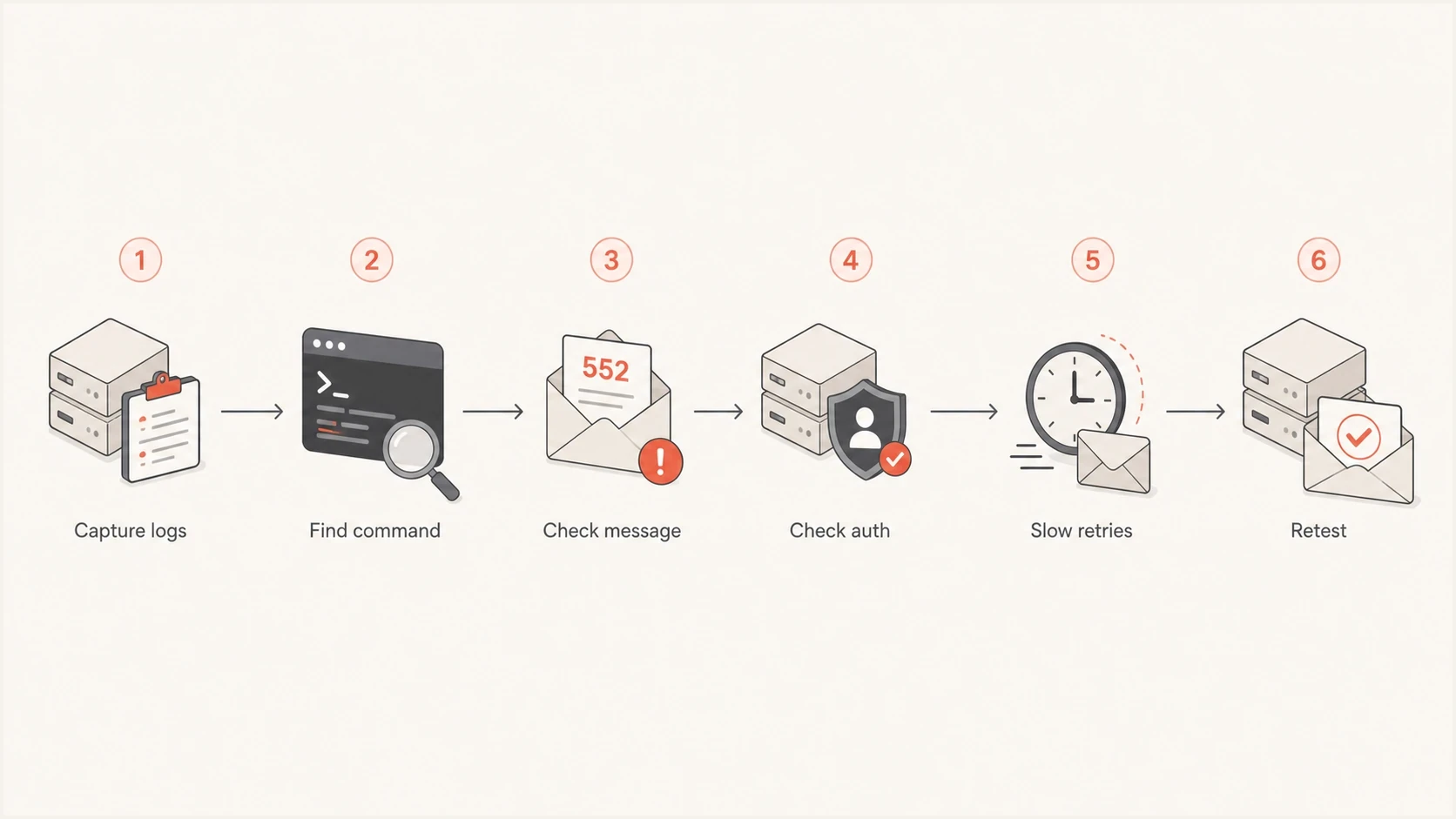
Yahoo and AOL SMTP 552 troubleshooting flowchart
Send a real message through the same production path and inspect the headers. A quick pass through the email tester helps separate obvious SPF, DKIM, DMARC, DNS, and content issues from remote-side rate behavior.
Email tester
Send a real email to this address. Suped shows a results button when the test is ready.
?/43tests passed
Separate throttling, deferral, and rejection
The word throttling gets used for several Yahoo/AOL symptoms. Separate temporary deferrals from permanent rejections, and treat slow acceptance without a bounce as an observation that still needs log evidence. This keeps the fix matched to the SMTP result.
|
|
|
|---|---|---|
421 or 451 | Temporary deferral or throttle | Back off and retry later |
552 1, mailbox not found | Invalid recipient | Suppress the address |
552 40 after DATA | Permanent message rejection | Inspect the full reply and message |
552 5.3.4 or size text | Size or storage limit | Test smaller mail |
553 or 554 | Permanent rejection | Stop automatic retries |
No bounce | Slow acceptance or queue delay | Correlate route logs |
Common Yahoo/AOL delivery patterns and first actions
Looks like reputation
- Scope: One IP or one pool performs worse than the rest.
- Signals: Complaints, unknown users, or unwanted-mail indicators rise before 4xx deferrals.
- Fix: Reduce deferred volume, clean the affected segment, and restore stable acceptance before ramping.
Looks like message rejection
- Scope: The same message pattern fails across one or more routes while other messages deliver.
- Signals: The 552 appears after DATA, or its text identifies an invalid recipient or size problem.
- Fix: Follow the diagnostic text and correct the recipient, message format, or authentication/DNS defect.
For a broader breakdown of how the code behaves, use this SMTP 552 page as a companion reference. A 552 is not proof of a blacklist or blocklist problem, and it is not interchangeable with a 4xx deferral.
Fix the cause shown by the reply
Once the log shows where the failure happens, work through the information Yahoo/AOL can evaluate at that point in the SMTP session. After DATA, Yahoo can inspect the complete message, authentication results, header structure, body format, sender domains, and reputation context.
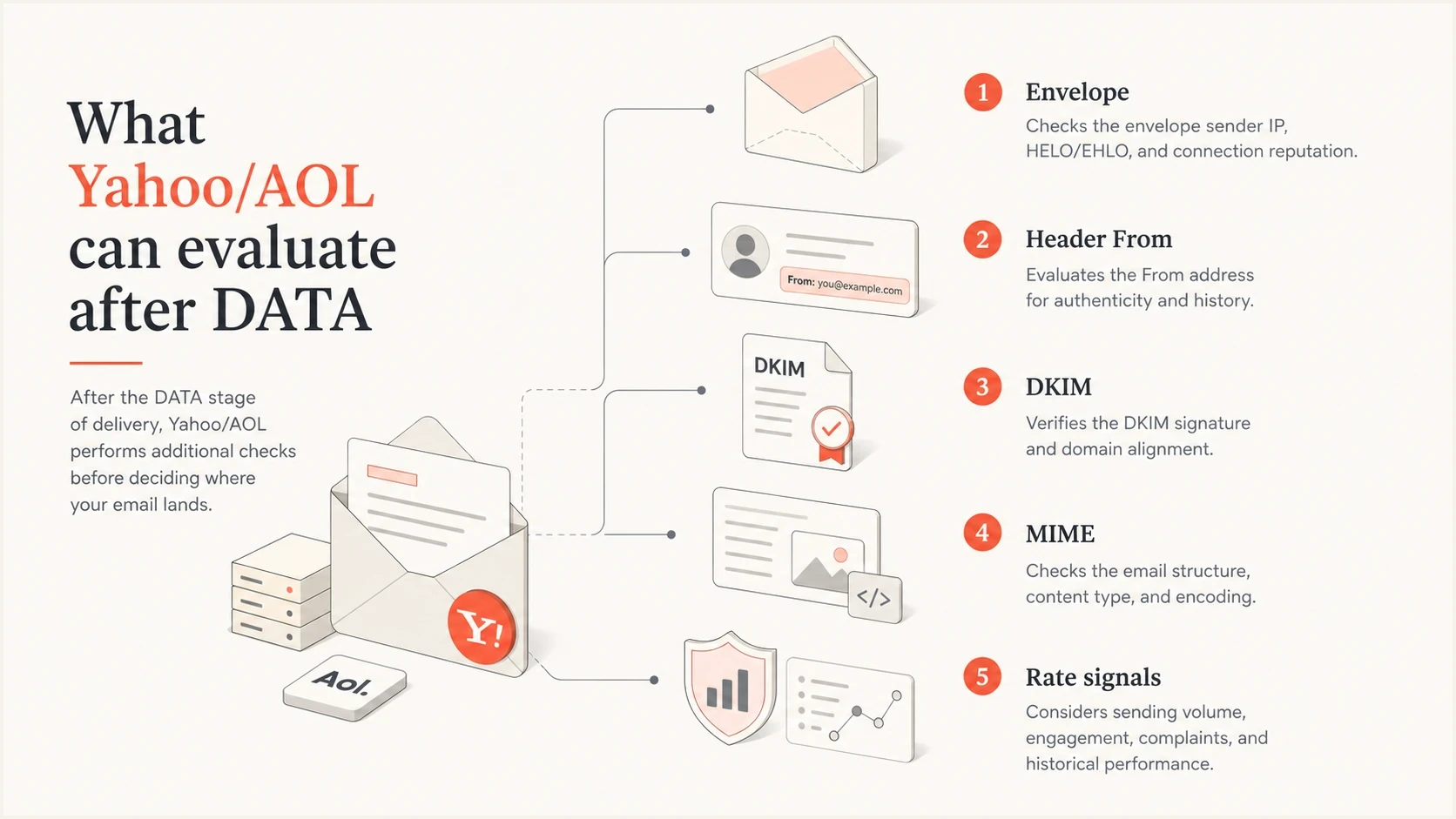
Signals Yahoo and AOL evaluate after DATA, including envelope, Header From, DKIM, MIME, and rate signals
- Recipient: Suppress an address when the full reply says the mailbox does not exist. Authentication changes will not restore it.
- Protocol: Check EHLO names, TLS behavior, pipelining, line endings, and final-dot handling.
- Envelope: Make sure the MAIL FROM domain exists, resolves, and has valid SPF coverage.
- Headers: Remove duplicate, malformed, oversized, or non-decodable headers before retesting.
- Authentication: Verify SPF, DKIM, and DMARC with a domain health checker before changing routing.
- Reputation: Check complaints against Yahoo/AOL inbox-delivered mail, unknown users, engagement, and blocklist monitoring data, including blacklist matches.
- Traffic: Lower concurrency and delivery rate when separate 4xx replies show throttling. A lower rate alone does not fix a 552.
DNS records worth checkingdns
example.com. TXT "v=spf1 include:send.example.net -all"
_dmarc.example.com. TXT "v=DMARC1; p=none; rua=mailto:dmarc-rua@example.com"
selector1._domainkey.example.com. TXT "v=DKIM1; k=rsa; p=BASE64KEY"
Do not clear the queue blindly
A queue flush can turn a small deferral into a larger reputation problem. Preserve samples, use backoff for 4xx replies, and remove permanent 5xx failures from automatic retry. Return to normal speed only after the temporary acceptance rate stabilizes.
Meet Yahoo's current sender requirements
Yahoo applies its sender requirements across consumer email brands hosted by Yahoo Mail, including AOL. These requirements can affect placement or rejection even when a specific 552 has a message-level or recipient-level cause. Yahoo Japan is separate.
All senders
- Authentication: Authenticate mail with SPF or DKIM at minimum.
- Complaint rate: Keep the Yahoo spam complaint rate below 0.3%.
- DNS: Use valid forward and reverse DNS for each sending IP.
- SMTP format: Comply with RFC 5321 and RFC 5322.
Bulk senders
- Authentication: Use both SPF and DKIM, publish DMARC with at least p=none, and make DMARC pass by matching the Header From domain to the authenticated SPF or DKIM domain.
- One-click unsubscribe: Add a functioning List-Unsubscribe header for marketing and subscribed messages, with RFC 8058 POST preferred.
- Visible opt-out: Include a clear unsubscribe link in the message body and honor requests within two days.
- Complaint rate: Remain below 0.3%; Yahoo calculates its rate against messages delivered to the inbox.
A body unsubscribe link does not satisfy the one-click header requirement on its own. One-click unsubscribe applies to promotional and marketing messages, not transactional mail such as order confirmations or password resets. Keep those streams separated so each has suitable headers and sending behavior.
DMARC must pass for bulk mail
Publishing a DMARC record is only part of the requirement. The Header From domain must match the authenticated SPF domain or DKIM signing domain. Relaxed DMARC domain matching is acceptable, and a reporting address in rua helps identify sources before stricter policy changes.
How to respond without making it worse
Classify the response before acting. Slow the route for temporary 421 and 451 deferrals, preserve evidence for every pattern, and stop automatic retry of permanent 552 failures. Fix the smallest proven defect, then restore deferred traffic in controlled steps.
Yahoo requires bulk senders to keep the spam complaint rate below 0.3%. Yahoo calculates that rate against messages delivered to the inbox, so total campaign volume is the wrong denominator. Yahoo does not publish lower healthy or intervention bands. Investigate any sustained rise in complaints, especially when it coincides with 4xx deferrals.
- Cap deferred volume: Reduce Yahoo/AOL concurrency and messages per connection when 421 or 451 replies appear.
- Protect samples: Keep the rejected message, headers, envelope, route, IP, timestamp, and complete SMTP reply together.
- Stop permanent retries: Suppress invalid recipients and hold other 552 failures until their stated cause changes.
- Test one fix: Change one variable at a time, such as message size, header cleanup, or DMARC identity matching.
- Ramp temporary traffic: Restore traffic in stages and watch 4xx replies, accepted volume, complaint rate, and queue age.
If the symptom is mostly 421 or 451 deferrals, follow the rate and reputation path. If the reply is 552 after DATA, do not skip message validation or convert the permanent failure into a retry loop.
Where Suped fits
Suped is our DMARC and email authentication platform. Its role in this incident is to connect authentication evidence with sending sources while the MTA logs identify the SMTP failure. Use Suped to check whether the affected Yahoo/AOL stream passes SPF, DKIM, and DMARC, and whether a change is isolated to one authorized source.

Issue steps to fix dialog showing the issue overview, tailored fix steps, and verification action
With Suped, DMARC monitoring shows which sources pass, fail, or drift. Issue-level fix steps help trace an authentication change to the responsible source. Hosted SPF and hosted DMARC can keep managed records stable once the correct authorization and policy are known.
Practical workflow
- Detect: Use Suped alerts when DMARC failures or authentication changes spike.
- Explain: Use issue-level fix steps to identify what changed and how to correct it.
- Operate: Keep DMARC, SPF, DKIM, blocklist and blacklist checks, and delivery signals together.
- Verify: Compare the authentication evidence with the same timestamp, source, and route in the SMTP logs.
Suped does not replace SMTP transaction logs from your MTA. It provides the authentication and sender-source context needed to determine whether the Yahoo/AOL symptom is isolated, tied to one stream, or part of a broader domain health issue.
Views from the trenches
Best practices
Capture full SMTP transaction logs before changing rates, routes, content, or DNS.
Compare rejected and accepted samples on the same sender and production route during one campaign.
Treat low-rate 552 bursts as evidence to classify, not as proof of a blocklist signal.
Common pitfalls
Reading bounce logs alone misses the SMTP command that triggered Yahoo's response.
Flushing queued mail at full speed can raise complaints and prolong the slowdown.
Assuming every 552 is reputation-based wastes time when the message format failed.
Expert tips
If every IP dips together, look beyond one IP and inspect shared message behavior.
A 552 after the final dot gives the receiver the full message context to reject.
Keep 4xx retry windows calm while checking RFC, DNS, DKIM, SPF, and DMARC evidence.
Marketer from Email Geeks says delivery can dip sharply for a few minutes while connections remain steady, so volume graphs alone do not prove a block.
2024-01-30 - Email Geeks
Marketer from Email Geeks says the command before the 552 response is the key evidence, especially when the error is not visible as a normal bounce.
2024-01-30 - Email Geeks
What to do next
The clean answer is this: Yahoo/AOL temporary throttling normally appears as a 421 or 451 reply, while a 552 is a permanent refusal of one SMTP action. For a 552 after DATA, focus on the complete diagnostic text, recipient status, message format, authentication, and sender domains.
- Today: Turn up transaction logging for Yahoo/AOL and capture the exact SMTP stage and full reply.
- For 4xx replies: Throttle the affected route, use backoff, and investigate complaint or traffic changes.
- For 552 replies: Stop automatic retries, follow the diagnostic text, and fix the permanent cause before resending.
- Before ramping: Validate MIME, MAIL FROM, Header From, SPF, DKIM, DMARC, and Yahoo bulk-sender requirements.
If the same symptom repeats, keep a small evidence pack for each burst: timestamps, sending IPs, envelope sender, Header From, authentication result, complaint rate, queue age, and the exact SMTP transcript. That pack turns a vague Yahoo/AOL slowdown into a specific delivery incident.




