What is the Comcast BL00000 error and how to resolve it?

Published 5 Jul 2025
Updated 8 Aug 2026
10 min read
Summarize with
Updated on 8 Aug 2026: We updated this guide with Comcast's current BL000000 meaning and blocked-IP removal process.
The Comcast BL000000 error, often shortened to BL00000 in searches and support tickets, means Comcast filters detected spam-like sending patterns and blocked the sending email server from the Xfinity network. The fastest fix is to identify the exact sending IP in the SMTP bounce, confirm whether it belongs to your infrastructure or a shared ESP pool, correct the behavior behind the block, then submit the IP through Comcast's postmaster route or have the ESP handle it.
Treat BL000000 as an IP reputation incident first, not a DMARC failure. Authentication still matters because it helps establish legitimate domain use, but passing SPF, DKIM, or DMARC does not remove an IP from Comcast's blocklist (blacklist).
- Meaning: Comcast blocked the sending email server after detecting patterns associated with spam.
- Scope: The block is IP-based, so a shared IP can affect unrelated senders at the same ESP.
- Fix: Work through the party that controls the IP, remediate the sending pattern, request removal, and monitor for repeat blacklist errors.
What BL000000 means
BL000000 is Comcast's code for a sending email server blocked after its filters detected patterns associated with spam. The useful signals are the complete BL code and the blocked sending IP in the SMTP response. The code does not mean every Comcast mailbox is unavailable, and it does not prove that Comcast has a broad delivery incident.
That difference matters. If the same campaign delivered normally elsewhere but bounced at Comcast or Xfinity addresses, the incident is probably Comcast-specific. If the same IP also fails at other mailbox providers, investigate a wider reputation problem through a blocklist monitoring workflow.
Do not start with DNS changes
A BL000000 bounce points to the connecting IP. Check authentication as part of the investigation, but do not rewrite SPF, rotate DKIM selectors, or change DMARC policy until the IP owner and bounce pattern are known.
- IP first: Find the sending IP that Comcast rejected before editing any DNS record.
- Owner next: Decide whether the IP is dedicated to you or shared by your ESP.
- Cause after that: Fix complaint, bounce, volume, or abuse signals before asking for removal.
Representative BL000000 bounce layouttext
550 [203.0.113.24] blocked after Comcast detected spam-like sending patterns.
Error BL000000. Follow the URL in the bounce for removal instructions.
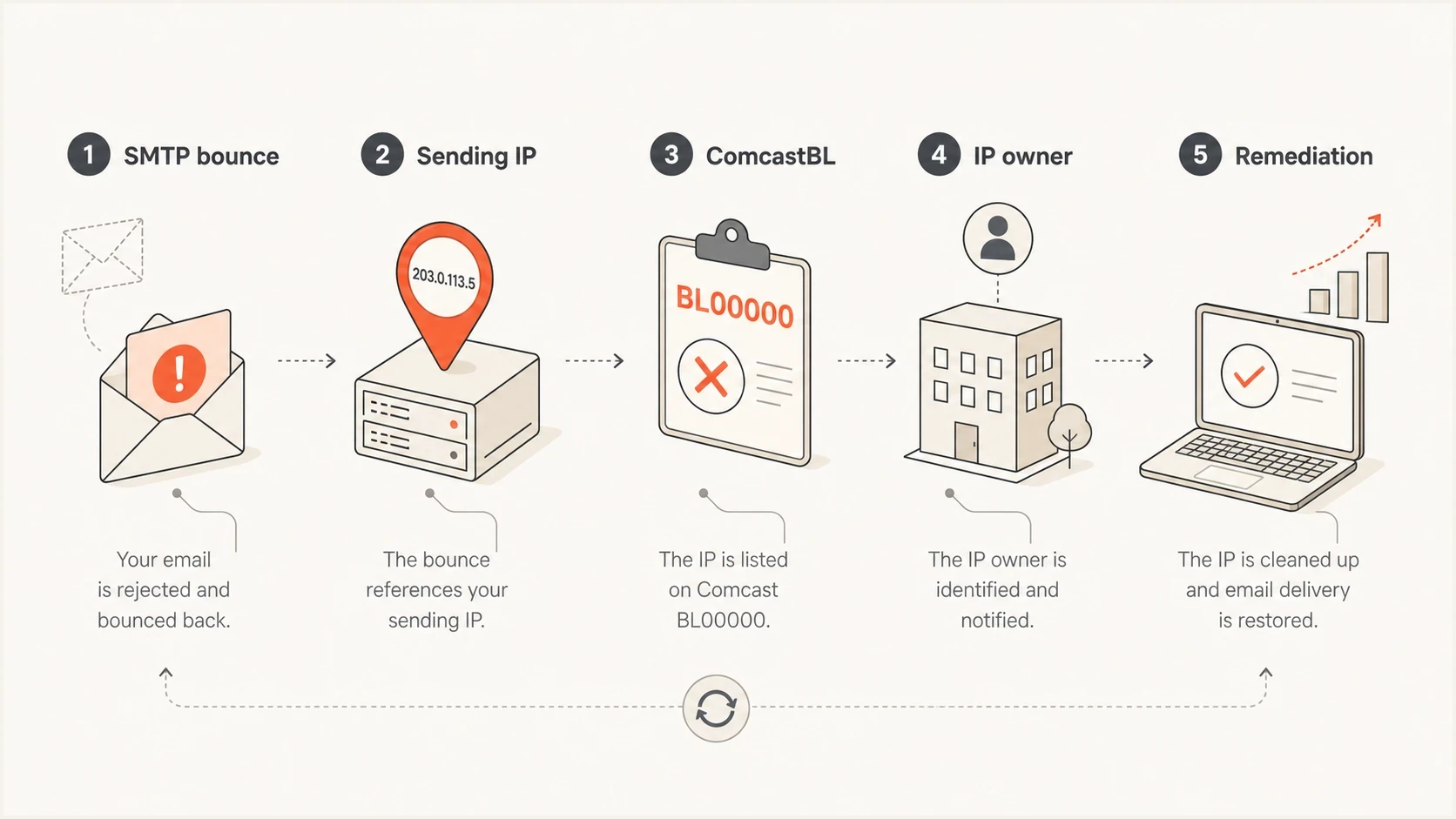
Comcast BL000000 diagnosis linking the SMTP bounce to the blocked sending IP.
BL000000 versus other Comcast BL codes
The zero count matters. BL000000 is Comcast's spam-pattern block for the sending email server. Codes between BL000001 and BL001111 indicate that one or more public blocklists (blacklists) contributed to the rejection. Do not shorten a bounce code when diagnosing it because one digit changes the removal path.
|
|
|
|---|---|---|
BL000000 | Comcast detected spam-like sending patterns from the email server | Fix the sending cause and use Comcast's IP removal route |
BL000001 to BL001111 | One or more public blacklist listings affected the decision | Follow the exact code guidance in the Xfinity error directory |
Use the complete Comcast code before choosing a removal path.
A clean public blacklist check does not rule out BL000000. Comcast can block an IP based on its own filtering even when public blocklists show no listing. Use the Xfinity error codes page to match the complete bounce code to the correct action.
How to confirm the blocked IP
The bounce text is the source of truth. Pull the full SMTP response, not a shortened campaign report. Record the receiving domain, timestamp, sending host, sending IP, message ID, complete BL code, and enhanced status code. Xfinity's blocked-IP guidance says the IP appears in the 550 error text before the word blocked.
If the bounce does not show the IP, ask your ESP for the raw MTA log line. Comcast also publishes steps for finding a blocked IP address. Do not file a vague case stating that the domain is blocked. File with the IP, full error code, timestamps, and a short remediation note.
- Collect: Export several raw bounces from Comcast or Xfinity recipients.
- Compare: Check whether the same IP and complete BL code appear in every bounce.
- Separate: Split transactional and marketing mail into separate incident notes.
- Verify: Check public blocklists alongside recent complaint, bounce, and volume data.
Blocklist checker
Check your domain or IP against 144 blocklists.







|
|
|
|---|---|---|
Shared ESP IP | ESP | Escalate to compliance |
Dedicated IP | Your team | Fix and request removal |
Many providers | Sender | Pause risky sends |
Comcast | Use the postmaster route |
Compact comparison of likely BL000000 ownership paths.
How to resolve BL000000
The resolution path depends on who controls the IP. If the IP is shared, the ESP owns the removal path and root-cause investigation. If the IP is dedicated, your team owns the fix, supporting evidence, and Comcast request. Removal is only one step. The sending pattern that caused the blacklist issue also needs to change.
Shared ESP IP
For shared pools, ask the ESP to handle Comcast remediation through compliance or deliverability operations. A front-line ticket that only reports poor delivery lacks the IP-level evidence needed for investigation.
- Owner: The ESP controls the MTA, reverse DNS, pool policy, and Comcast relationship.
- Ask: Request a compliance review of the shared pool and the specific blocked IP.
- Avoid: Do not keep requesting removal if another sender in the pool is causing the issue.
Dedicated IP
For a dedicated IP, pause the risky stream, fix the data or cadence problem, then prepare a concise request. Comcast's block removal request requires the blocked email server's IP address. Xfinity says submissions are monitored around the clock, although removal still depends on its review.
- Owner: Your sending team controls volume, list quality, authentication, and remediation evidence.
- Submit: Provide the IP, complete code, timestamps, and the change made before requesting removal.
- Avoid: Do not switch IPs to bypass the block because that can spread the reputation problem.
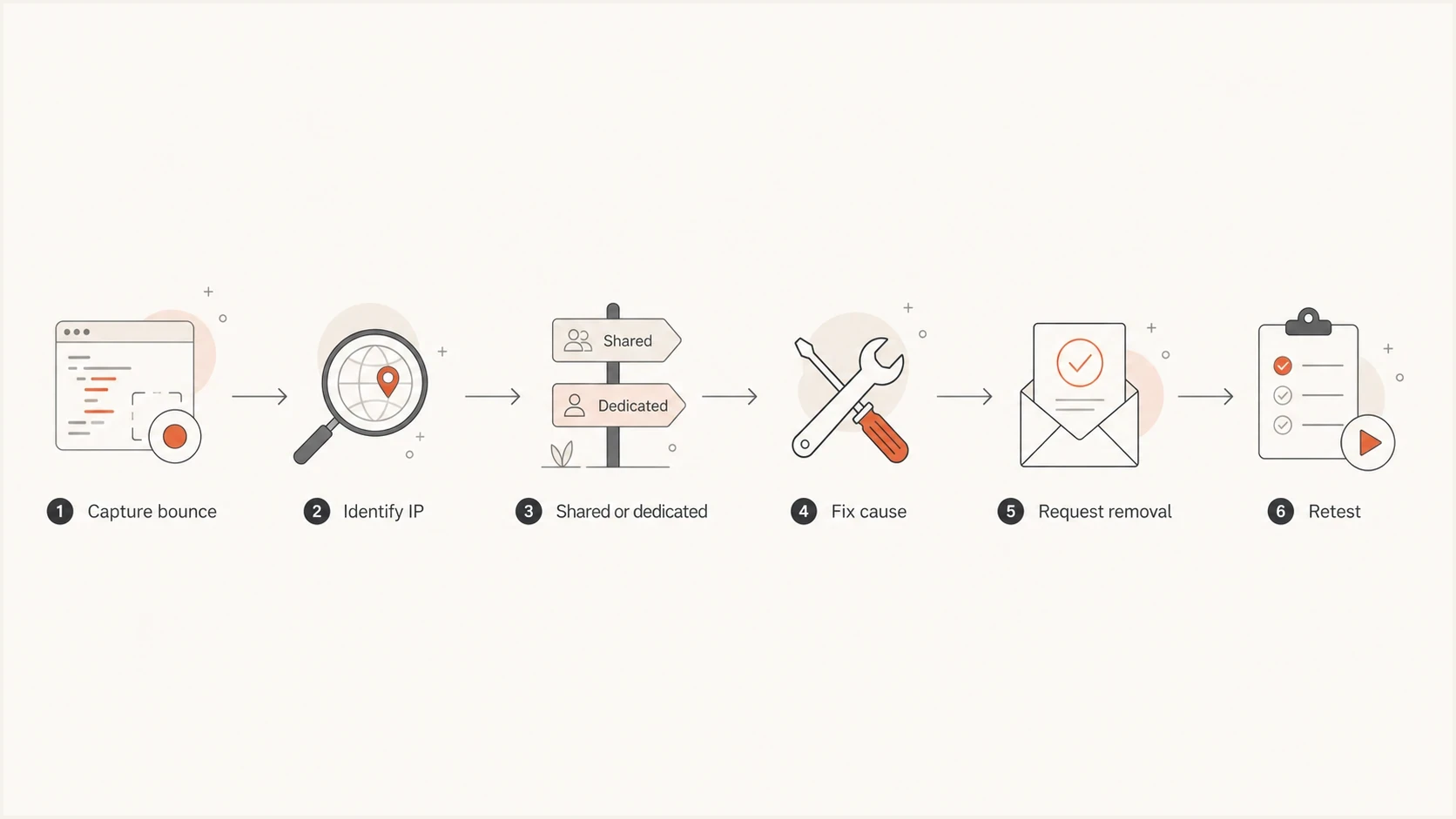
Comcast BL000000 resolution flow for identifying, fixing, and retesting a blocked IP.
Short escalation note for an ESPtext
We are seeing Comcast BL000000 bounces for IP 203.0.113.24.
The failures began at [UTC timestamp].
Please route this to compliance or deliverability operations.
We need confirmation of Comcast block status, pool impact, and remediation.
If Comcast throttling appears alongside BL000000, separate the symptoms. A 4xx temporary rate limit tells the sending server to retry, while BL000000 is a block that requires IP investigation and remediation. The guide on Comcast rejections covers that difference in more detail.
Fix the cause before requesting removal
A removal request without remediation is fragile. Comcast can remove the IP and block it again if the same signals continue. Check what changed before the first bounce, such as an old segment, sudden volume growth, a purchased or poorly sourced list, compromised forms, or transactional mail routed through a marketing pool.
For shared IPs, the cause can sit elsewhere in the pool. The ESP's compliance team can review other senders, complaint sources, and queue patterns that customers cannot access.
Root-cause checklist
- Complaints: Review Comcast recipient complaints and recent opt-out spikes before resending.
- Recipients: Suppress invalid and inactive Comcast addresses, and verify how each address entered the list.
- Volume: Check for abrupt growth or a new IP that was not warmed with consistent wanted mail.
- Abuse: Inspect signup forms and credential-reset traffic for automated submissions or compromised accounts.
- Authentication: Run a domain health check and correct SPF, DKIM, DMARC, or reverse-DNS faults.
- Retest: Send a small test through the affected stream with the email tester before restoring normal volume.
Response urgency by BL000000 scope
Use the scope of affected mail to decide how quickly to pause, escalate, and request removal.
Single test
Watch
One isolated bounce with no campaign impact.
One stream
Pause
A campaign or transactional stream is affected.
Shared pool
Escalate
Multiple customers or streams share the blocked IP.
Fixed
Resume
The cause is remediated and Comcast accepts controlled retests.
Suped's product supports this workflow by keeping DMARC reports, SPF and DKIM results, blocklist status, domain and IP reputation signals, alerts, and issue history together. That context helps a team connect a Comcast blacklist incident to the affected source and document what changed before mail resumes.

Blocklist monitoring page showing domain and IP checks across blocklists with importance and status
Where DMARC fits
DMARC does not directly remove an IP from Comcast's blocklist, but it should be healthy before mail resumes. Failing authentication, weak policy, or unverified sources make incident analysis harder. Comcast is making an IP-based decision for BL000000, while authentication data can expose an unauthorized source or routing mistake behind the traffic.
Resolve the blocked IP first, then confirm that legitimate sources pass SPF or DKIM with DMARC domain matching. Suped's DMARC monitoring shows which sources pass, which fail domain matching, and which unverified sources need investigation. Suped's hosted SPF and SPF flattening can also help a team manage the SPF DNS lookup limit.
What DMARC helps with
- Visibility: Shows which services send mail using your domain.
- Control: Supports movement toward quarantine or reject after legitimate sources are verified.
- Evidence: Gives support and compliance teams source-level data during a reputation incident.
What DMARC does not fix
- IP block: A valid DMARC record does not remove an IP from Comcast's blacklist.
- List quality: Authentication cannot repair stale recipients or high complaint rates.
- Pool behavior: Your records cannot fix another sender in a shared ESP pool.
For recurring Comcast blocks, keep an incident log by IP and mail stream, with timestamps for the first bounce, remediation, removal request, and successful retest. The guide on Comcast blocking covers additional prevention patterns.
Views from the trenches
Best practices
Capture the full SMTP bounce, blocked IP, exact BL code, and provider before filing a case.
Route shared-IP BL000000 cases through ESP compliance rather than a generic support queue.
Keep authentication, complaint, bounce, and reputation data together for fast incident review.
Common pitfalls
Requesting removal without fixing sender behavior often causes another Comcast blacklist event.
Treating BL000000 as a domain-only fault wastes time because the block applies to an IP.
Rotating to another shared IP hides the symptom while the original sending problem stays active.
Expert tips
Compare Comcast-only failures with other providers before changing authentication records.
Ask which customers or streams share the blocked IP before accepting a quick removal.
Alert on provider-specific bounce spikes so BL000000 is caught before a campaign finishes.
A marketer in Email Geeks says BL000000 points to a Comcast block, and the SMTP response should contain the postmaster path for removal.
2024-05-07 - Email Geeks
A marketer in Email Geeks says the code is IP-based, so shared ESP pools need provider-level investigation before domain DNS changes.
2024-05-07 - Email Geeks
How to prevent repeat BL000000 blocks
Prevention starts with stable, wanted traffic. Keep marketing and transactional mail on separate streams, suppress invalid or inactive recipients, protect signup forms from automated abuse, and warm new dedicated IPs with consistent volume. For shared pools, ask the ESP how it isolates abusive senders and responds to provider-specific blocks.
After Comcast accepts mail again, monitor the domain and IP together. Suped's product can support that operating process with DMARC monitoring, hosted DMARC, hosted SPF, SPF flattening, hosted MTA-STS, blocklist monitoring, real-time alerts, and multi-domain reporting for MSPs.




