Why is Comcast blocking my emails and what steps can I take to prevent it?

Published 2 May 2025
Updated 4 Aug 2026
13 min read
Summarize with
Updated on 4 Aug 2026: We updated this guide to distinguish hard blocks from temporary deferrals and show the correct recovery path.
Comcast can block your emails by rejecting a sending IP, defer the traffic with a temporary rate limit, reject a message that fails your domain's DMARC policy, or accept a message that an Xfinity spam filter later moves. Common triggers include spam-like sending patterns, public blocklist or blacklist listings, complaints, sudden volume changes, weak list consent, authentication failures, invalid reverse DNS, and excessive connections. The exact SMTP response determines the fix. Save the full error, identify the sending IP and owner, correct the cited problem, and use Comcast's review process only when the code calls for it.
Treat a Comcast block as both an immediate incident and a warning about the mail program behind it. A successful removal request can restore delivery, but it does not repair recipient trust. If the same list, content, cadence, and complaint pattern continue, the same IP or domain can encounter another block or rate limit.
- Immediate action: Pause hard-rejected Comcast sends, preserve 4xx deferrals in the queue, and collect the full SMTP response.
- Root cause: Check the cited error, complaint spikes, stale recipients, reverse DNS, and authentication results.
- Prevention: Make opt-out easy, segment by engagement, authenticate every stream, and monitor reputation by sending IP.
What Comcast is actually blocking
Comcast can reject mail at the SMTP layer, defer it with a 4xx response, place accepted mail in the Spam folder, or reject traffic because of a recipient's Xfinity Email settings. A 5xx response is a permanent failure for that delivery attempt. A 4xx response tells the sending server to queue the message and try again later. Spam placement is harder to spot because the message is accepted, but it lands where the subscriber may not read it.
A representative Comcast BL000000 error looks like this:
Representative Comcast SMTP rejectiontext
554 5.1.0 ... BL000000 ...
Mail to Comcast is rejected because the sending server has been blocked.
BL000000 points to an IP-based block caused by traffic patterns Comcast associates with spam. The IP in the full bounce is the sending server Comcast rejected. If you send through an email service provider, that IP often belongs to the provider or a shared pool. Ask the IP owner to investigate other traffic on the server, but also audit your own list and campaigns because Comcast judges the traffic it receives.
If Comcast accepted the message and no bounce exists, ask the recipient to check the Xfinity Spam folder within seven days, mark legitimate mail as Not Spam, and review custom filters. The recipient should also check whether Email Safe List is enabled. When it is enabled, messages from addresses outside that list are rejected. These account-level checks do not remove a sending-IP block.
Handle permanent and temporary errors differently
Stop automatic retries after a 5xx hard rejection and investigate the affected stream. For a 4xx deferral, keep the message in the normal delivery queue, reduce sending pressure where needed, and follow the retry guidance in the error. Replaying a hard-failed campaign or forcing more traffic through a rate limit can worsen the signal.
Match the Comcast error code to the fix
Do not submit every Comcast failure as a delisting request. Comcast publishes code-specific remedies, and its block-removal form applies to BL000000. Other BL codes point to a public blocklist or blacklist finding, DM000001 points to your own DMARC policy, and RL codes are temporary rate limits.
|
|
|
|---|---|---|
BL000000 | Comcast blocked the sending server for spam-like patterns | Fix the source, then submit the blocked IP for Comcast review |
Other BL code | The IP appears on a public blocklist or blacklist cited by Comcast | Follow the removal instructions tied to that exact code |
DM000001 | The message failed DMARC under the sender domain's reject policy | Make the authenticated SPF or DKIM domain match the From domain |
RL code or 4xx | Comcast temporarily deferred traffic based on rate, reputation, or authentication | Keep mail queued, control throughput, and audit list quality |
421 reverse DNS | The sending IP lacks working reverse DNS or DNS temporarily failed | Fix the PTR and matching forward DNS, then retry temporary failures |
550 not our customer | The Comcast recipient does not exist | Suppress the address instead of retrying it |
Common Comcast responses and the correct first remedy.
Also check basic connection limits with the mail administrator. Comcast currently documents limits of 25 simultaneous connections per sending IP and 100 recipients per message. A limit response calls for MTA configuration changes, not a blocklist removal request.
Why it can feel sudden
A Comcast block often feels sudden because the visible failure appears on one send. The cause usually builds over weeks. Some recipients stop opening. Some messages go to spam. Some users hit the spam button instead of finding the unsubscribe link. Eventually, the reputation score crosses a threshold and the next campaign receives hard rejections.
A sender can truthfully report that nothing changed on the day of the block. List quality, recipient expectations, or complaint behavior changed earlier. The block is the point where Comcast made that history visible.
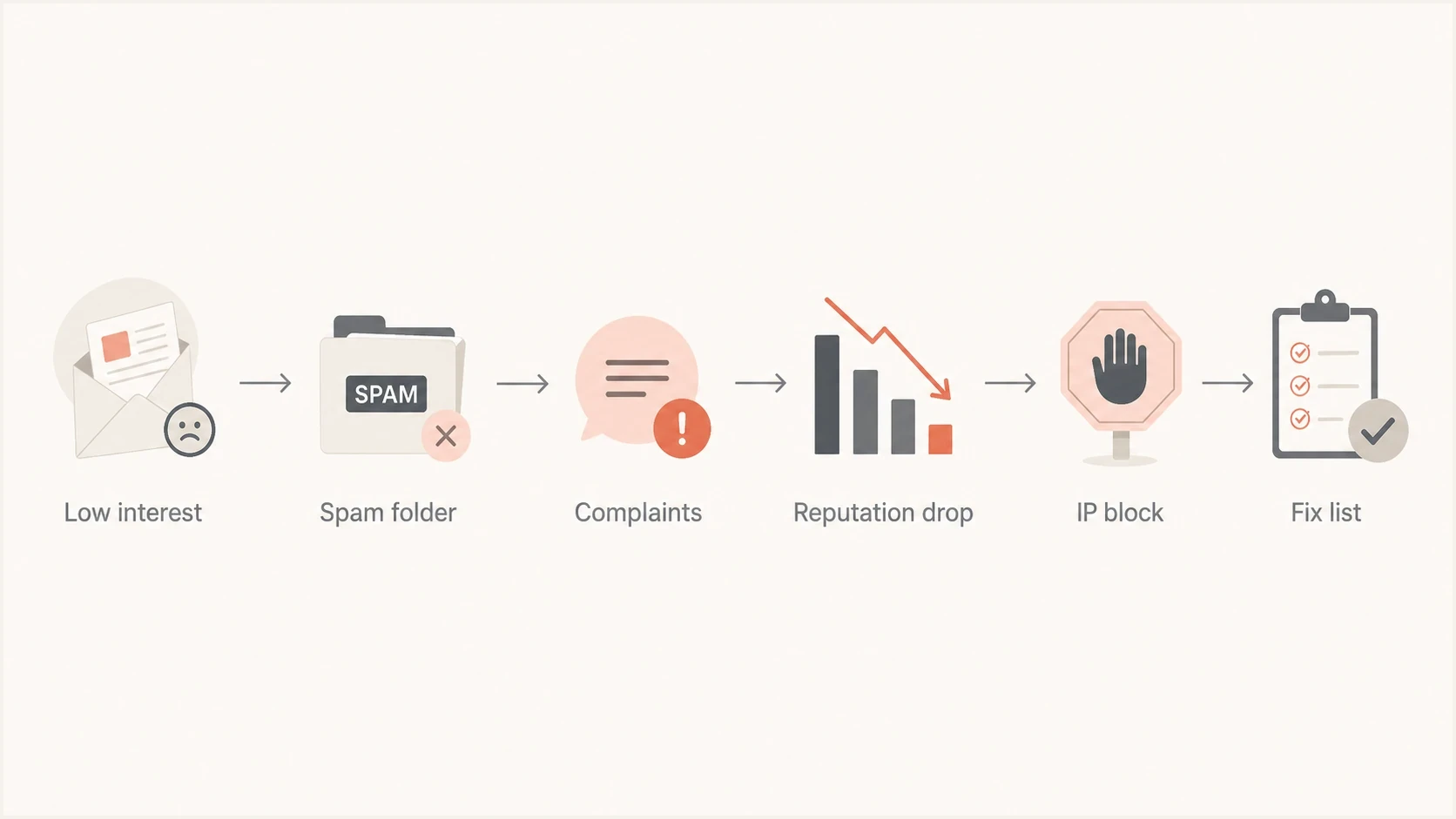
Flowchart showing how low engagement and complaints can lead to an IP block.
What the sender sees
- One campaign: A normal send suddenly returns Comcast bounces.
- No obvious change: The same template, sender, and list were used.
- Urgent pressure: Stakeholders want delivery restored immediately.
What Comcast sees
- Recipient history: Prior low engagement and spam placement matter.
- Complaint signals: Spam reports accumulate until the IP looks risky.
- Current risk: The next send triggers rejection or throttling.
What to do in the first hour
The first hour is about containment. Collect facts, stop making a hard-block signal worse, and give Comcast or the sending provider the information needed to review the failure.
- Classify the response: Pause the affected comcast.net stream for a 5xx or BL hard block. Keep a 4xx response in the normal retry queue.
- Save evidence: Export the full SMTP response, timestamp, campaign ID, sending IP, envelope sender, visible From domain, and message ID samples.
- Identify ownership: Confirm whether the IP belongs to your email service provider, your own mail server, or a shared sending pool.
- Check identity: Verify reverse DNS, inspect SPF and DKIM results, and confirm that at least one authenticated domain matches the visible From domain under DMARC.
- Request the right review: Use Comcast's postmaster help path and the Blocked Provider Request Form for BL000000. Follow the error-specific instructions for other codes.
Comcast says Blocked Provider Request Form submissions are reviewed 24 hours a day, seven days a week, but review does not guarantee removal. The request needs the blocked IP and contact details. If the block clears, resume with recent engagers and widen the segment only after bounces, deferrals, and placement stabilize.
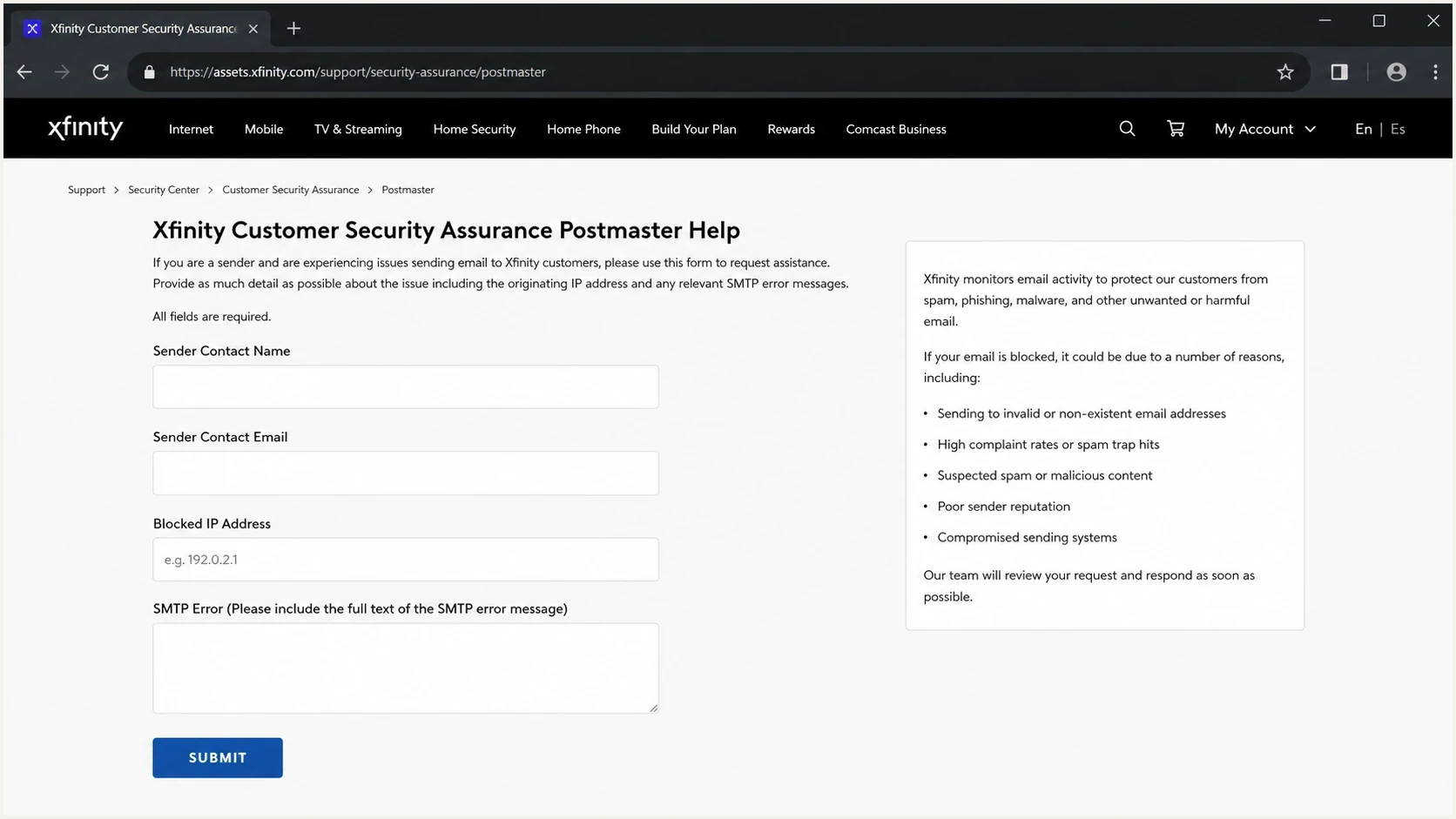
Screenshot-style view of an Xfinity postmaster help page for blocked sender review.
?
What's your domain score?
Deep-scan SPF, DKIM & DMARC records for email deliverability and security issues.
Run a domain-level check before contacting the sending provider. Suped's domain health checker checks DMARC, SPF, DKIM, and related DNS issues in one pass, which gives the incident owner a technical baseline to compare with the bounce.
Fix the causes that create repeat blocks
The durable fix is to reduce the number of people receiving mail they do not want. A footer unsubscribe link and automatic complaint suppression are necessary, but they are not enough if recipients never clearly asked for the stream or if the preference center takes too much effort.
Review the Comcast audience separately from the rest of the list. Domain-specific review matters because Comcast can have a problem while other mailbox providers look normal. Track delivered volume, bounce rate, complaint rate, clicks, unsubscribes, spam-folder placement, and last meaningful activity by mailbox provider. Treat opens as a directional signal because privacy controls and image caching reduce their accuracy.
Comcast recovery risk bands
Use these practical bands to decide how aggressively to resume sending after a block.
Low risk
Send first
Recent engagers only, clean authentication, low complaint history.
Medium risk
Limit volume
Mixed engagement, older opt-ins, or uncertain complaint handling.
High risk
Suppress
Unengaged recipients, automatic opt-in, or prior Comcast bounces.
- Consent source: Separate explicit email opt-ins from people added through terms and conditions.
- Engagement age: Stop mailing Comcast recipients who have not clicked, logged in, purchased, replied, or otherwise acted recently.
- Complaint handling: Confirm the sending provider receives Comcast feedback-loop reports and suppresses the related recipients immediately.
- Unsubscribe design: Put an unsubscribe or preference link near the top for sensitive, billing-adjacent, rate-change, or service-related marketing.
- Content mix: Separate required notices from optional marketing, and let recipients choose categories at signup.
Messages about bills, rates, account programs, outages, service updates, and payment help can create complaints even when the sender considers the content useful. A recipient who is worried about money can still mark a helpful email as spam if it feels unexpected, repetitive, or hard to opt out of.
Check authentication and reputation
Comcast blocks are often reputation-driven, but DNS and authentication problems have their own error paths and can reduce throughput or placement. Comcast urges senders to use TLS 1.2 or 1.3 and DKIM or SPF. For each production stream, verify SPF and DKIM independently, then confirm that at least one authenticated domain matches the visible From domain under DMARC. The sending IP also needs valid reverse DNS.
DMARC record for monitoring before enforcementdns
v=DMARC1; p=none; rua=mailto:dmarc-reports@example.com;
A monitoring policy shows which sources send as your domain and whether they authenticate. After every legitimate source passes DMARC through a matching SPF or DKIM domain, move toward quarantine and reject in controlled stages. Suped's DMARC monitoring groups sending sources, shows failures, detects configuration issues, and provides fix steps instead of leaving the team with raw XML reports.
Issues page showing top issues, verified sources, unverified sources, and authentication pass rates
The same operational view should include blocklist and blacklist checks. A Comcast block is not always caused by a public blocklist, but if the sending IP or domain appears on one, add the finding to the incident record. Suped's blocklist monitoring connects those checks to DMARC, SPF, DKIM, and delivery signals so the team can review one incident timeline.
What to send your email provider
- Bounce text: Include the full SMTP response and the blocked IP.
- Campaign data: Share send time, volume, segment, and message ID samples.
- Complaint handling: Ask whether Comcast feedback-loop reports were received and acted on.
- Authentication: Provide SPF, DKIM, and DMARC results for the affected stream.
If the error mentions BL000000, use a Comcast-specific playbook. The detailed page on Comcast BL000000 explains that code and the removal request in more depth.
When to segment and when to delist
For BL000000, correct the cause and submit the Comcast review request for the blocked IP. Then segment future Comcast sends so the restored connection does not immediately recreate the same signal. Delisting without segmentation is short-term relief. Segmentation without resolving a hard block leaves legitimate recent engagers unable to receive mail.
Delisting request
Use Comcast's blocked-IP review when the response contains BL000000.
- Best for: Requesting removal after identifying and correcting the blocked source.
- Limit: It does not prove that the list or other traffic on a shared IP is healthy.
Comcast segmentation
Use segmentation before the next send so the most wanted mail goes first.
- Best for: Protecting reputation while rebuilding stable delivery.
- Limit: It will not remove an existing IP block.
For the first recovery send, use a narrow Comcast segment with recent engagement or account activity, no prior complaints, no hard bounces, and no long-dormant addresses. Increase volume gradually and watch deferrals, bounces, complaint indicators, and engagement by domain.
If Comcast returns an RL code or another 4xx response, treat it as a temporary deferral and let the mail server retry. Control concurrency and volume rather than resending the full campaign manually. The guide on Comcast throttling covers that recovery pattern.
Use testing before the next campaign
Before the next campaign, send real test messages through the same platform, domain, DKIM selector, envelope sender, and tracking domain. A seed test cannot prove Comcast will accept a full campaign, but it can catch broken authentication, risky headers, missing unsubscribe headers, and domain-match mistakes.
Email tester
Send a real email to this address. Suped shows a results button when the test is ready.
?/43tests passed
Suped's email tester is a practical preflight step because it inspects the actual message and shows whether its authenticated domains match the production stream.
For blocklist and blacklist status, do not rely on a single check at the moment of failure. Reputation can change after retry storms, new complaints, or sending-pool changes. A monitoring view over time provides more context than one lookup during an incident. Suped includes blocklist checks in its broader domain-health workflow so a team can compare listings with authentication and bounce changes.
Blocklist checker
Check your domain or IP against 144 blocklists.







Keep the next send simple: use a clean segment, a clear sender name, a familiar subject, one obvious purpose, and visible unsubscribe language. Recovery is not the time for reactivation, broad newsletters, or complex personalization experiments.
Views from the trenches
Best practices
Pause Comcast sends, collect full bounces, then submit the exact blocked IP for review.
Track engagement by mailbox provider so falling Comcast response rates are visible earlier.
Place opt-out links high in sensitive messages so complaints are not the easiest exit.
Resume with recent engagers first, then widen Comcast volume only after signals stabilize.
Common pitfalls
Treating a delisting as the fix leaves the same complaint pattern untouched after recovery.
Assuming terms-based consent means recipients actually expect optional marketing email.
Reviewing only global campaign metrics hides Comcast-specific foldering and complaints.
Retrying blocked mail at full speed can reinforce the risky traffic pattern Comcast sees.
Expert tips
Ask the ESP whether feedback loop complaints are received and suppressed without delay.
Separate required service notices from optional programs, offers, and rate-change content.
Audit dormant Comcast recipients before sending any post-block recovery campaign volume.
Use DMARC reports to confirm the blocked stream is authenticated with matching domains.
Marketer from Email Geeks says cable providers can block a campaign one day and accept a similar send later, which is why the exact error and IP matter.
2025-01-07 - Email Geeks
Expert from Email Geeks says Comcast blocks can be removed through the postmaster process, but repeat listing is likely when placement problems continue.
2025-01-07 - Email Geeks
The practical path forward
If Comcast is blocking your emails, start with the SMTP class, error code, blocked IP, and full bounce. Then fix the mail program behind the response with clearer consent, accessible unsubscribe paths, engagement-based segmentation, working feedback-loop suppression, and authenticated domains that match the From domain.
Suped's DMARC platform combines DMARC source analysis, SPF and DKIM checks, blocklist and blacklist monitoring, hosted policy controls, MTA-STS, alerts, and issue-level fix steps. Teams can use Suped to correlate a Comcast bounce with authentication or reputation changes, assign the corrective work, and watch the affected stream before restoring broader volume.




