What causes Comcast email throttling and how can I improve my open rates?

Published 29 May 2025
Updated 26 Jul 2026
12 min read
Summarize with

Updated on 26 Jul 2026: We updated this guide for Comcast.net's Yahoo Mail migration, current 4xx throttling patterns, and more reliable engagement measurement.
Comcast email throttling is usually caused by rate limiting against a sending IP or domain that does not have enough accepted history, has uneven volume, or is generating poor quality signals. The direct fix is to slow down, retry temporary 4xx responses correctly, warm the sending identity with consistent recipient-specific volume, reduce spam placement, and verify that SPF, DKIM, DMARC, rDNS, and bounce handling are clean.
If your open rates are poor at Comcast while other mailbox providers look healthy, do not assume every provider has the same view of your traffic. Comcast.net recipients can have a different reputation picture for your IP, domain, subdomain, and exact recipient group. During the move of Comcast.net mailboxes to Yahoo Mail, the system returning the SMTP response also matters. A low complaint rate elsewhere does not prove that Comcast.net recipients are engaging, clicking, or keeping your mail out of spam.
Start with the evidence: SMTP deferrals, accepted volume, spam placement, complaint signals, and authentication. For a practical inbox-level check, send a real message through an email tester before changing sending volume. That gives you a baseline for headers, authentication, content, and obvious routing issues.
- Throttle: Reduce Comcast.net concurrency and hourly send speed before making content changes.
- Separate: Keep transactional and marketing traffic on clean, predictable streams.
- Measure: Track Comcast.net clicks, complaints, bounces, deferrals, and opens separately.
- Repair: Fix authentication and reputation issues before asking for more volume.
What Comcast throttling means
A Comcast throttling response is a temporary SMTP deferral. It tells your sending system to try again later rather than permanently reject the message. Comcast responses have included 421 4.1.0 and 451 4.2.0 replies with wording such as "Throttled - try again later" and an RL reference. Your mail queue should keep the message and retry using controlled backoff.
Example Comcast throttling responsestext
421 4.1.0 156.70.24.118 Throttled - try again later
Please see postmaster guidance for RL000003.

451 4.2.0 Throttled - try again later
Please see postmaster guidance for RL000010.
Preserve the complete RL code, responding hostname, timestamp, and sending IP. The code separates a reputation or rate-limit event from session limits, invalid-recipient problems, and policy blocks. The exact response also tells you which receiving system handled the attempt during the Comcast.net migration.
Do not treat every deferral as a block
A 4xx throttling response is not the same as a permanent rejection. The wrong response is to keep hammering the same destination with immediate retries. Slow the queue, preserve the mail, and let reputation recover through accepted, wanted messages.
|
|
|
|---|---|---|
421 or 451 | Temporary throttle | Slow retry |
RL code | Rate-limit category | Read full reply |
Low opens | Possible spam placement | Check placement |
New IP | Thin history | Warm slowly |
Common Comcast signals and what they usually mean.
How the Yahoo Mail migration changes diagnosis
Starting in June 2025, Xfinity began inviting Comcast.net users to move their mailboxes to Yahoo Mail, with invitations rolling out through 2026. The email address remains @comcast.net, but migrated mailboxes use Yahoo Mail. Mailboxes move at different times, so a sender cannot assume that every Comcast.net recipient is handled by the same filtering system during the transition.
Treat legacy Comcast postmaster guidance as one part of the diagnosis and meet Yahoo's sender requirements for migrated mailboxes. Use the responding mail host and exact SMTP code in your logs to decide which path applies. Do not classify a Yahoo temporary deferral as a Comcast RL event simply because the recipient address ends in @comcast.net.
- Identify the receiver: Save the responding hostname, full SMTP reply, timestamp, and outbound IP.
- Authenticate every stream: Yahoo requires SPF or DKIM for all senders, while bulk senders need both plus a valid DMARC policy that passes.
- Support easy unsubscribe: Bulk marketing mail needs a working list-unsubscribe mechanism and a visible body link, with requests honored within two days.
- Control complaints: Keep Yahoo spam complaints below 0.3% and process complaint feedback for the DKIM domain used on migrated mail.
The recipient domain no longer identifies the filter
A Comcast.net address can now lead to either a legacy Comcast response or a Yahoo response. Build provider reporting from SMTP evidence rather than grouping every @comcast.net event under one error-code system.
Why a new IP or subdomain gets throttled
A new subdomain and a dedicated IP do not inherit unlimited trust. The receiving system has to learn whether recipients want the mail. If the first 30 days include uneven volume, one busy burst, residual mail across several IPs, or low engagement, the reputation system has weak history and negative quality signals at the same time.
The trap is thinking that "small volume" is always safe. Small volume can still perform badly. If an IP sends only a few messages in a recent window, the receiver has little proof that the IP needs more capacity. If those few messages get ignored or marked as spam, the reputation picture gets worse even though total send volume is low.
Example Comcast warm-up shape
A stable ramp gives the receiving system a repeated pattern of wanted mail.
Daily Comcast volume
Those numbers are not a universal limit. They show the intended shape: predictable growth, no sudden jump, and no attempt to force more mail through while the receiver is already deferring.
Healthy warm-up
- Pace: Volume increases only after accepted mail stays stable.
- Audience: The first recipients have recent clicks or account activity.
- Streams: Transactional traffic does not mask marketing issues.
Risky warm-up
- Burst: A new IP suddenly sends a large Comcast batch.
- Mixing: Different mail types share one reputation problem.
- Noise: Ignored mail or spam reports dominate early history.
How to diagnose the Comcast cause
Split the diagnosis into four buckets: rate, reputation, authentication, and recipient behavior. Rate shows whether the sending system is pushing faster than the receiver currently accepts. Reputation shows whether the IP and domain have enough positive history. Authentication shows whether the receiver can trust the domain identity. Recipient behavior shows whether the mail earns inbox placement after acceptance.
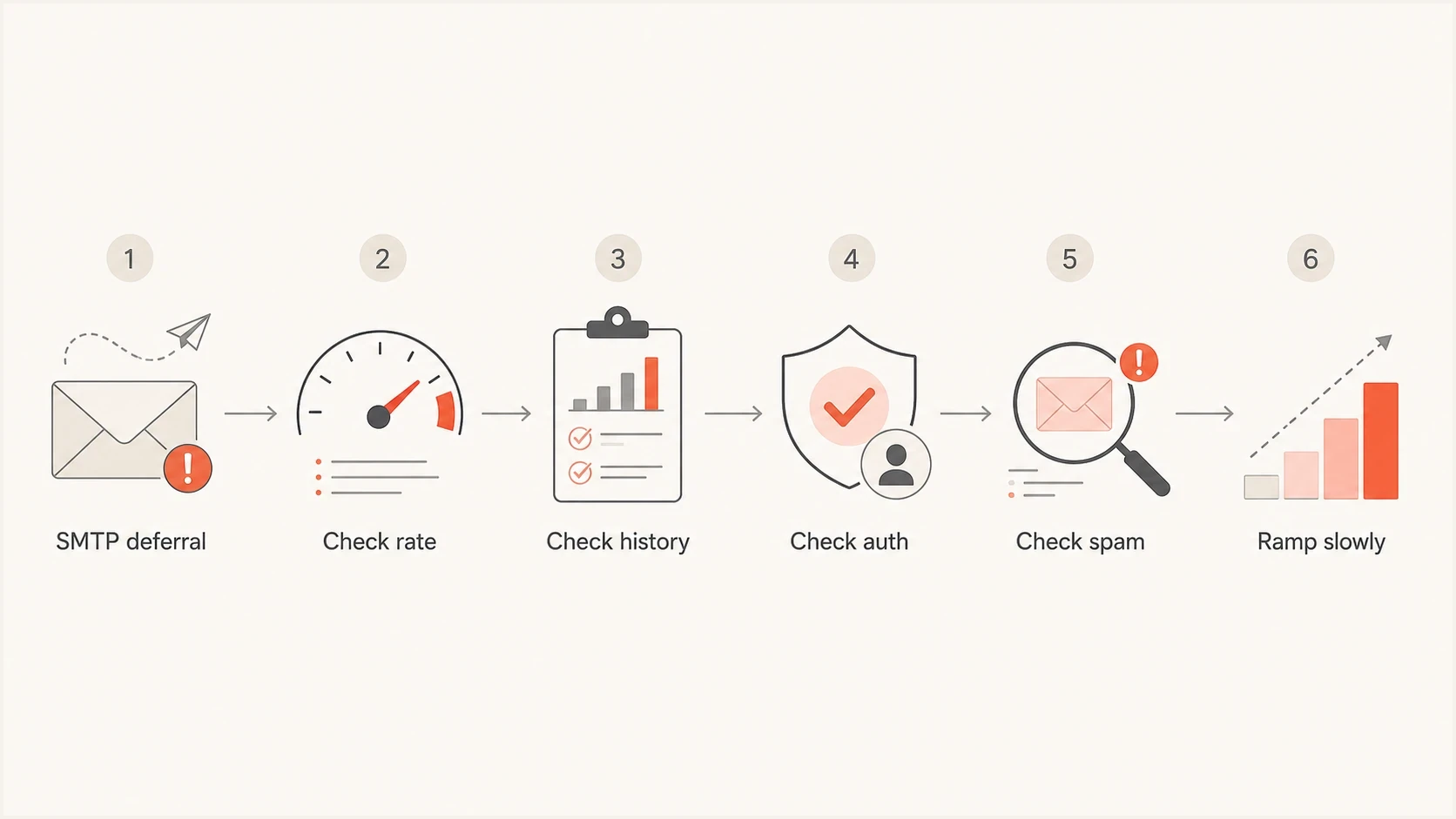
Comcast email throttling diagnosis flowchart covering rate, sender history, authentication, and spam placement.
Start with logs for the exact IP and receiving host that returned the deferral. In one real-world pattern, a sender looked at one IP because the bounces mentioned that IP, but most recent Comcast.net traffic had actually shifted through another IP. That mismatch wastes time. The receiver judges the IP that connects, not the IP you expected to use.
Suped's DMARC monitoring pulls sending sources, authentication results, and issue detection into one place. Use Suped to identify unapproved senders, broken DKIM signatures, and domains that need policy staging, while SMTP logs explain the receiver-specific throttle.

Issue steps to fix dialog showing the issue overview, tailored fix steps, and verification action
For a broader authentication and DNS check, use a domain health check alongside your queue logs. The DNS result will not explain every receiver decision, but it removes obvious technical defects before you work on reputation.
Email tester
Send a real email to this address. Suped shows a results button when the test is ready.
?/43tests passed
What to change first
The first change is usually speed. Reduce Comcast.net concurrency, lower the hourly cap, and retry with backoff. If deferrals stop, hold the new limit for several days rather than immediately increasing again. Wait until the data shows that the receiver is accepting the stream cleanly before asking for more capacity.
- Cut speed: Drop Comcast.net hourly volume until temporary deferrals fall sharply.
- Hold steady: Keep the same cap for several days after the queue clears.
- Ramp small: Increase only one Comcast.net segment at a time.
- Watch quality: Pause increases when spam placement or complaints rise.
The second change is audience quality. For Comcast.net recipients, send first to people who recently clicked, logged in, purchased, replied, or completed the core action your product asks for. Opt-in status matters, but opt-in alone does not prove current interest. People forget, change expectations, or dislike the frequency.
|
|
|
|---|---|---|
Speed | 4xx rate | Lower cap |
Audience | Clicks | Prioritize active |
Spam | Complaints | Suppress faster |
Auth | DMARC | Fix sources |
A compact recovery checklist for Comcast open rate issues.
For a deeper recovery path, compare this against the Comcast-specific steps for Comcast rejections and the broader diagnosis for low open rates. The core rule is the same: accepted mail still needs inbox placement, and inbox placement depends on wanted mail.
Authentication checks that matter
Authentication will not override bad recipient behavior, but broken authentication makes recovery much harder. Verify SPF, DKIM, DMARC, forward DNS, reverse DNS, and a consistent HELO identity. For migrated Comcast.net mailboxes, Yahoo requires SPF or DKIM for every sender and requires SPF, DKIM, and passing DMARC for bulk senders.
Simple DMARC monitoring recorddns
_dmarc.example.com. 3600 IN TXT (
  "v=DMARC1; p=none; rua=mailto:dmarc@example.com; fo=1"
)
A monitoring policy is a starting point, not the finish line. Move toward quarantine or reject only after legitimate senders pass consistently. Suped's hosted DMARC can stage those policy changes, while Suped's hosted SPF and SPF flattening can keep sender authorization manageable when teams add platforms or inherit old DNS records.
Use DMARC data to find the source
If throttling appears after a new subdomain launch, review every source sending as that domain. Suped's DMARC monitoring shows which senders pass, which fail, and which need DNS or platform changes.
- SPF: Confirm the sending IP is authorized for the envelope domain.
- DKIM: Confirm signatures pass and use the expected domain.
- DMARC: Confirm at least one authenticated domain matches the visible From domain.
- rDNS: Confirm the connecting IP has a sensible reverse DNS name.
Blocklist and blacklist checks
A blocklist or blacklist listing is not always the root cause of Comcast throttling, but it belongs in the diagnosis. If the sending IP or domain appears on a major reputation list, the receiver can treat the stream more cautiously. The same applies when the domain has old abuse history, forwarded spam, compromised forms, or affiliate traffic mixed into the same identity.
Suped's blocklist monitoring checks domain and IP reputation alongside DMARC, SPF, and DKIM results. Use that shared source view to connect a blocklist or blacklist event with the sending identity affected by the throttle.
Do not chase one metric
A clean blocklist check does not prove the mail is wanted. A passing DMARC result does not prove the mail belongs in the inbox. A low complaint rate at another provider does not prove Comcast.net recipients like the same campaign. Use all signals together.
How to improve Comcast open rates
Open rate recovery starts with inbox placement. If most accepted mail lands in spam, subject line testing will not fix the problem. First reduce the audience to the recipients most likely to engage, then rebuild reputation through consistent, wanted messages.
Treat tracked opens as a directional metric rather than a precise count. Image blocking can undercount opens, while privacy prefetching can record an open without a person reading the message. Compare unique clicks, conversions, replies, complaint rates, and inbox placement alongside opens. Build active-recipient segments around clicks and account activity instead of a tracked open alone.
Send less at first
A smaller, active Comcast.net segment gives the sending identity a better chance to show positive behavior.
- Recent: Send to recent site or product activity first.
- Quiet: Suppress long-inactive Comcast.net recipients.
- Clear: Use recognizable sender names and direct subjects.
Earn more engagement
The receiving system needs evidence that recipients want the mail, so content and timing still matter.
- Promise: Match the email to the original signup expectation.
- Cadence: Reduce frequency for low-intent recipients.
- Exit: Make unsubscribe easy and honor it quickly.
Separate transactional mail from campaigns wherever the business can support it. Transactional mail often has strong engagement and user expectation. Marketing mail has a wider range of intent. Mixing them can hide the source of a reputation dip and make recovery harder to manage.
Comcast recovery signals
Use these thresholds as operational triggers, not universal Comcast limits.
Healthy
Stable
Deferrals rare, opens recovering, complaints low.
Watch
Pause
Deferrals returning after a volume increase.
Bad
Reduce
Spam placement dominates accepted mail.
Views from the trenches
Best practices
Check the exact IP in the SMTP reply before changing volume across the whole pool.
Warm Comcast traffic with steady daily sends to active recipients, not sudden bursts.
Use provider-specific metrics because Gmail spam rates do not explain Comcast behavior.
Common pitfalls
Assuming opt-in alone is enough when current recipient interest has clearly dropped.
Looking at all-provider delivery reports instead of isolating Comcast accepted mail.
Pushing retries too quickly after 421 deferrals, which adds noise to the mail queue.
Expert tips
Compare the last ten days of accepted mail with the IP named in the deferral text.
Keep marketing traffic slower than transactional traffic during early reputation build.
Treat low Comcast opens as a spam placement clue, not only a subject line problem.
Expert from Email Geeks says throttling generally means the sender is moving faster than Comcast is ready to accept, especially on a new subdomain.
2024-06-18 - Email Geeks
Expert from Email Geeks says the RL code matters because Comcast rate limits depend on internal history, quantity, and quality signals.
2024-06-18 - Email Geeks
The practical fix order
Fix Comcast.net throttling in this order: confirm the responding host, exact outbound IP, and full temporary SMTP response; slow the affected queue; isolate the mail stream; send only to recently active recipients; repair authentication; then rebuild volume gradually. If open rates remain poor after deferrals calm down, test inbox placement and tighten the audience further.
Suped supports the authentication and reputation parts of this workflow through DMARC reporting, source identification, SPF and DKIM checks, blocklist and blacklist monitoring, alerts, and guided issue steps. Use SMTP logs and receiver complaint data for the rate-limit and recipient-response parts that DMARC reports do not contain.
Do not chase a postmaster exception before the fundamentals are clean, and do not assume Comcast support owns a response returned by Yahoo. The receiving system needs to see wanted mail over time. Give it a slower stream, better recipients, a clean identity, and consistent evidence that people want the mail.




