
Why are my email open rates low and how can I improve deliverability?

Updated on 28 Sep 2026: We added a practical open-rate optimization workflow and refreshed Gmail, Yahoo, and Outlook sender requirements.
Low email open rates usually come down to one of five causes: inbox placement, weak recipient engagement, list quality, sending reputation, or tracking noise. Start by checking whether the drop is isolated to Gmail, Outlook, Yahoo, corporate domains, or one campaign type. If one mailbox provider has fallen harder than the others, investigate both provider-specific inbox placement and provider-specific measurement changes. If every provider has dropped at about the same rate, look at list engagement, message relevance, timing, and tracking changes before assuming every message is landing in spam.
The practical fix is not one change. Prove where the loss is happening, then fix the cause. For most teams, that means testing a real sent message, checking DMARC, SPF, and DKIM, reviewing SMTP responses and complaint patterns, comparing performance by mailbox provider, cleaning inactive recipients, and separating urgent transactional mail from broad nurture campaigns.
- Fast answer: Break reports down by mailbox provider, then test a real message with full headers.
- Highest-risk signal: A sudden provider-specific drop with stable sending volume warrants inbox-placement and measurement checks.
- Most common fix: Reduce low-engagement volume, repair authentication, and send first to recent clickers, buyers, and active subscribers.
Why open rates drop
Do not treat open rate as a final truth. Open tracking depends on remote content loading, and mailbox privacy systems can hide or inflate opens. Still, a sudden drop is useful because it shows that something changed. The change often sits in one of two places: the message is not reaching the inbox, or the recipient is not interested enough to open it. A broken tracking pixel can create the same pattern, so rule that out too.
Make the first split by recipient domain. A drop across one provider points to provider-specific filtering, reputation, policy treatment, or measurement behavior. A drop across every provider points to audience fatigue, weak subject lines, stale leads, seasonal timing, broken tracking, or a technical issue that affects all mail, such as authentication failure or a blocklist (blacklist) listing tied to the sending IP.
|
|
|
|---|---|---|
Filtering or tracking | Provider split | |
Microsoft reputation | SMTP responses | |
Filtering change | Complaint data | |
All providers drop | Engagement or setup | Full audit |
Clicks stay stable | Tracking noise | Click and conversion trend |
Use this table to choose the first investigation path.
A forwarded test email is a weak diagnostic. Forwarding changes headers, sender paths, and authentication results. Send a fresh test directly through the same system, sender, template, and audience path used by the original campaign.
Separate tracking noise from inbox trouble
Open rate is usually calculated as unique tracked opens divided by delivered messages, multiplied by 100. Confirm that each report uses the same denominator and unique-open method before comparing campaigns. Apple Mail Privacy Protection can download remote content when a message is received instead of when a person views it. Image blocking, caching, and automated checks can also change open data without a matching change in human attention.
Treat opens as a directional signal, not a complete measure of deliverability. Gmail does not track or verify the open-rate data in your campaign platform. Compare opens with clicks, replies, conversions, unsubscribes, complaints, bounces, successful deliveries, and SMTP responses. A fall in opens with stable clicks and conversions points to measurement noise more often than a delivery collapse.
Run a structured email tester check before rewriting a campaign. A test send should show the sending IP, authentication results, message headers, content issues, and obvious spam-folder risk. It will not replace live performance data, but it gives you a clean starting point.
Email tester
Send a real email to this address. Suped shows a results button when the test is ready.
?/43tests passed
After the test, compare performance by message type. Appointment reminders, account notices, invoices, and lead nurture emails should not be judged as one pool. A person who booked a consultation has a stronger intent signal than a person who filled in a form three months ago and never replied. If those two streams share the same sender identity and the nurture stream performs badly, the weaker stream can drag reputation signals into the urgent stream.
Example provider split
A provider-level report helps show whether the problem is broad or concentrated.
Gmail
28%Yahoo
24%Corporate
21%Outlook
8%Check authentication and reputation
If deliverability is the suspected cause, check the domain before changing creative. Use a domain health checker to confirm that the domain has valid SPF, DKIM, and DMARC, then inspect the real message headers for pass results and DMARC domain matching. DNS can look correct while a specific sending platform still fails because the envelope sender, DKIM selector, return-path, or visible From domain was not configured for that stream.
DMARC aggregate reports show which services are sending for your domain and whether their SPF or DKIM domain matches the visible From domain. Suped's product groups those reports by sending source, flags authentication failures and new sources, and provides guided fixes instead of leaving teams to interpret raw XML.
Suped DMARC dashboard showing email volume, authentication health, and source breakdown
For ongoing protection, DMARC monitoring helps show whether a new sender, broken DNS change, or spoofed source started at the same time open rates dropped. Also check blocklist monitoring when a sending IP or domain appears to have a reputation problem. A blocklist or blacklist hit does not prove inbox-placement failure by itself, but it is a useful clue when matched with bounces, deferrals, and provider-level declines.
Starter DMARC record for monitoringdns
Host: _dmarc
Type: TXT
Value: v=DMARC1; p=none; rua=mailto:dmarc-reports@example.com
Example SPF recorddns
Host: @
Type: TXT
Value: v=spf1 include:send.example.net include:_spf.example.com -all
Example DKIM record shapedns
Host: selector1._domainkey
Type: TXT
Value: v=DKIM1; k=rsa; p=MIIBIjANBgkqh...
Meet current bulk sender requirements
Mailbox-provider requirements are enforced deliverability controls, not optional setup advice. Gmail bulk senders must authenticate with SPF and DKIM, publish a DMARC policy, and pass DMARC through an SPF or DKIM domain that matches the visible From domain. Promotional and subscribed mail must support one-click unsubscribe. Valid forward and reverse DNS, TLS, accurate headers, consistent sending, and low user-reported spam rates also affect acceptance and inbox placement.
|
|
|
|---|---|---|
All senders, with added rules at 5,000 or more messages per day | SPF or DKIM for all; SPF, DKIM, DMARC domain matching, one-click unsubscribe for marketing and subscribed mail, PTR, and TLS for bulk senders | |
Bulk senders; Yahoo does not publish a fixed volume threshold | SPF, DKIM, DMARC domain matching, one-click unsubscribe for marketing and subscribed mail, and complaints below 0.3% | |
Domains sending more than 5,000 messages per day to Outlook.com consumer addresses | SPF and DKIM must pass, DMARC must be published with at least p=none, and DMARC must pass through SPF or DKIM domain matching |
Current requirements for mail sent to consumer inboxes.
Keep complaints below the danger line
For Gmail, keep the user-reported spam rate below 0.1% and avoid ever reaching 0.3%. Yahoo requires bulk senders to remain below 0.3%. One-click unsubscribe for marketing mail, a visible unsubscribe link, and suppression within two days reduce the chance that recipients use the spam button instead.
Apply these checks to each sending stream, not only the root domain. Confirm that the exact From domain passes DMARC through SPF or DKIM using the same organizational domain, that every active service is authorized, and that promotional mail includes standards-based one-click unsubscribe headers. Transactional messages such as password resets and reservation confirmations are excluded from the Gmail and Yahoo one-click requirement, but they still need authentication and low complaint rates. Outlook.com rejects non-compliant high-volume mail with a 550 5.7.515 response, so review that code separately from temporary deferrals.
Fix list quality and engagement
When open rates drop across every provider, treat engagement as a central cause until the data proves otherwise. Mailbox providers watch how recipients react. If a large share of people ignore, delete, mark as spam, or never click, the sender starts to look less wanted. That is especially common when nurture campaigns keep sending to old leads who showed interest once but have gone quiet.
Tighten the audience before changing the design. Send the next few campaigns to recent clickers, recent openers where that data remains useful, recent form submitters, recent buyers, and people with a clear active relationship. Suppress invalid addresses and honor unsubscribes promptly. Pause people who have not opened or clicked in a long time. If the smaller engaged segment performs better, gradually add back less recent segments while watching complaint rate, bounce rate, and provider-level performance.
Trace complaints and bounces back to the signup source. Keep consent records, remove purchased, rented, and scraped contacts, and close re-engagement sequences with a clear suppression rule. An inactive recipient should not stay in an endless win-back loop because each ignored message adds volume without evidence that the mail is wanted.
Transactional reminders
- Intent: The recipient recently booked, bought, signed up, or requested the message.
- Risk: Low visibility hurts operations because the message contains needed details.
- Action: Use a stable sender, simple copy, clean authentication, and minimal marketing content.
Lead nurture campaigns
- Intent: The recipient showed earlier interest, but the current level of interest is unclear.
- Risk: Older leads ignore more mail and can create weaker reputation signals.
- Action: Segment by recency, reduce cadence, and suppress people who never interact.
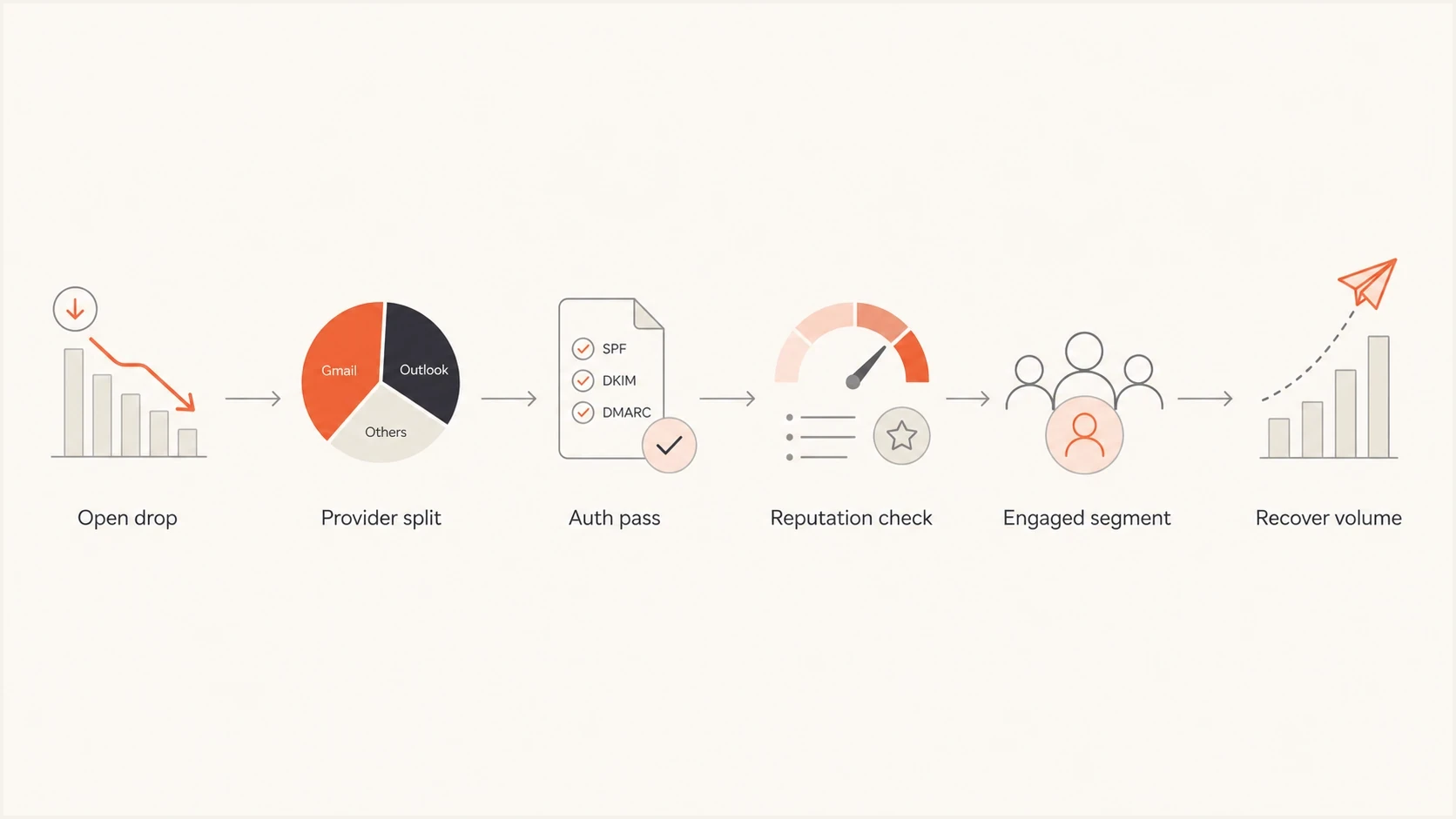
Email deliverability recovery flowchart for diagnosing low open rates.
Improve opens after inbox placement is healthy
Once delivery, authentication, and tracking are stable, improve the decision a recipient makes in the inbox. There is no universal good open rate because audience intent, message type, sending frequency, and tracking method change the result. Compare each stream with its own historical baseline and judge gains alongside clicks, replies, conversions, unsubscribes, and complaints.
- Make the sender recognizable: Use a stable From name and address that recipients connect with the signup, purchase, or service relationship.
- Set an accurate expectation: Write a specific subject line and preview text that describe the value inside without false urgency or a misleading reply prefix.
- Use audience timing: Test send times against recipient time zones and past behavior instead of relying on a universal best day or hour.
- Check the mobile inbox view: Keep the sender, subject, and preview text understandable when the inbox truncates them on a small screen.
- Test one variable at a time: Use a sufficiently large random sample, record the hypothesis, and wait for enough responses before selecting a winner.
Do not optimize for opens alone. A subject line that raises opens but increases complaints or produces no lift in clicks, replies, or conversions is not a useful improvement.
Clean up the sending program
The fastest deliverability recovery usually comes from removing bad signals. Look for recent list imports, new lead sources, automation changes, subject line changes, sender name changes, domain changes, tracking-domain changes, template changes, and sudden volume spikes. Any one of those can coincide with a drop. Find the smallest change that explains the timing.
- Segment first: Compare the last strong campaign with the first weak campaign by provider, audience, subject, sender, and automation path.
- Pause weak sources: Stop sending to old leads, unverified addresses, purchased or rented lists, scraped contacts, and people with no recent activity.
- Protect urgent mail: Separate appointment reminders and operational messages from promotional nurture streams.
- Reduce friction: Make the email useful above the fold, avoid overloaded image-only layouts, and keep links relevant.
- Rebuild slowly: Increase volume in controlled batches only after complaints, bounces, SMTP responses, and provider splits stay stable.
A useful recovery rule is simple: send wanted mail to the people most likely to want it, then earn your way back to broader volume. Authentication fixes open the door, but engagement keeps the door open.
If open rate is near zero, first check whether the tracking pixel still loads and whether clicks, replies, or conversions continue. If downstream engagement also collapsed, treat the drop as a delivery incident. Check whether messages are bouncing, blocked, deferred, or routed to spam. Then follow a full deliverability diagnosis process before sending again to the whole list.
Recovery priority bands
Use these bands to decide how aggressively to reduce volume during recovery.
Healthy
Normal send
Stable engagement, low bounces, and no provider-specific collapse.
Warning
Reduce volume
One provider drops or bounces rise after a recent change.
Critical
Pause and audit
Near-zero engagement, authentication failures, or repeated blocks.
Use Suped for ongoing control
A one-time audit helps, but low open-rate problems can return when a new sender is added, a DNS record changes, or an agency starts sending for a domain without clear ownership. Suped's product fits this workflow by grouping DMARC data by source, monitoring authentication results, and alerting teams to failures or new senders. Hosted SPF, hosted DMARC, hosted MTA-STS, SPF flattening, and blocklist or blacklist monitoring support related DNS and reputation checks in the same platform.
Monitor every sending domain, identify legitimate sources, remove unknown senders, stage the DMARC policy carefully, and set alerts for authentication failures or sudden source changes. The multi-tenant dashboard keeps the same investigation workflow available across client domains for agencies and MSPs.
Manual approach
- Reports: You collect XML reports and interpret source behavior yourself.
- DNS: SPF changes need careful editing each time a sender is added.
- Alerts: Problems are often noticed after performance has already dropped.
Suped workflow
- Reports: DMARC data is grouped by source with clear pass and fail patterns.
- DNS: Hosted SPF and SPF flattening reduce lookup-limit and change-control problems.
- Alerts: Automated alerts flag authentication failures and new sending sources.
Views from the trenches
Best practices
Break opens by mailbox provider before changing content, cadence, or authentication settings.
Send direct test messages rather than forwards, so headers and authentication stay intact.
Separate booking reminders from nurture campaigns so urgent mail keeps clean recipient signals.
Common pitfalls
Treating a global open-rate drop as one issue hides provider-specific placement problems.
Forwarded test emails hide the real sending path and make authentication results misleading.
Sending nurture mail to old leads after silence can teach inboxes that people ignore it.
Expert tips
Use recent engagement as the first filter before increasing volume after a clear drop occurs.
Watch bounces during testing because bad addresses point to list hygiene and routing problems.
Check appointment emails separately because they carry different risk than broad nurture mail.
Expert view
Expert from Email Geeks says provider-level open-rate splits are the fastest way to separate inbox placement trouble from broad audience fatigue.
2022-07-22 - Email Geeks
Expert view
Expert from Email Geeks says a uniform decline across mailbox providers points to engagement, list quality, subject matter, or brand interest before one single provider block.
2022-07-22 - Email Geeks
What to fix first
Do not start by rewriting every subject line. Pull open, click, bounce, complaint, conversion, and SMTP-response data by provider and campaign type. Then send a direct test, inspect authentication and DMARC domain matching, check reputation, and pause the least engaged audience until the stronger segment shows stable delivery and engagement.
For the long term, keep transactional reminders and nurture programs separate enough that one does not weaken the other. Suped's product provides the DMARC and email authentication layer for that work by keeping sending-source data, hosted records, authentication alerts, and blocklist or blacklist visibility in one workflow.




