How to resolve Comcast email rejections and throttling issues?

Published 25 Jun 2025
Updated 27 Jul 2026
11 min read
Summarize with

Updated on 27 Jul 2026: We added Comcast's current rate-limit codes and sending limits, and clarified how to retry temporary deferrals without increasing sending pressure.
The direct answer is this: resolve Comcast email rejections and throttling by slowing Comcast-bound mail first, decoding the exact SMTP reply, fixing the sending source that Comcast is rating poorly, and then escalating with evidence only after the source is clean. Do not start with DNS changes unless the bounce proves authentication or host identity is failing.
The common error pattern is 421 4.1.0 or 451 4.2.0 with wording such as "Throttled - try again later." That is a temporary deferral. If your sending system later emits 554 5.4.7 after the message sits in queue, that final bounce is usually your own MTA or sending platform giving up after its retry window expires.
- Get the exact code: Do not treat a queue timeout, a policy block, and a rate-limit deferral as the same issue.
- Throttle yourself: Cut Comcast volume and concurrency while you investigate. Keep retries controlled and spaced out.
- Check the source: Confirm the sending IP, reverse DNS, HELO name, SPF, DKIM, and alignment with the visible From domain.
- Clean the mailstream: Pause risky campaigns, suppress unengaged Comcast recipients, and review message samples.
- Escalate with proof: Send Comcast the IP, domain, timestamps, full SMTP error, and sample messages after the fix is in place.
Read the bounce before changing DNS
A Comcast delivery problem often looks worse than it is because one log line contains both the provider response and the sender-side queue failure. Separate those two pieces before changing anything. The Comcast part tells you what the mailbox provider did. The sender-side part tells you how the local queue reacted.
Typical Comcast throttle bouncetext
554 5.4.7 [internal] message timeout
(exceeded max time, last transfail:
421 4.1.0 a.b.c.d Throttled - try again later
Please see Comcast postmaster reference RL000003)
|
|
|
|---|---|---|
421 or 451 | Temporary deferral | Retry with controlled pressure |
554 5.4.7 | Queue timeout | Review retry and queue rules |
RL000003 | IP history and volume throttle | Reduce IP pressure and rebuild history |
RL000010 | Domain history and volume throttle | Inspect the authenticated domain stream |
RL000020 | Unauthenticated-mail throttle | Repair SPF or DKIM authentication |
DM000001 | DMARC policy rejection | Fix SPF or DKIM alignment |
BL000000 | Spam-pattern block | Clean the source, then request review |
How to translate Comcast throttle and rejection codes.
Comcast publishes descriptions for these mailbox errors in the Xfinity error guide. Use the exact code in the SMTP response because RL000003, RL000010, and RL000020 point to different sources of throttling.
Do not chase the wrong error
When the Comcast line is a 421 or 451, the mailbox provider has deferred the message. The later 554 is often your queue converting an undelivered message into a final bounce after 24, 48, or 72 hours. Fixing the queue text will not fix the Comcast reputation signal.
Match the error to Comcast's published limits
Not every Comcast rejection is reputation-based. Before changing campaign volume or requesting a review, compare the reply with Comcast's published inbound limits and DNS requirements. A limit error has a direct configuration fix, while an RL code requires reputation or authentication work.
|
|
|
|---|---|---|
421 Too many sessions | More than 25 simultaneous connections per sending IP | Cap Comcast concurrency below 25 |
452 Too many emails | More than 1,000 emails in one SMTP session | Rotate the connection before the limit |
452 Too many recipients | More than 100 recipients on one message | Split the recipient list |
552 Message size exceeded | Message larger than 15 MB | Reduce the full encoded message size |
550 Invalid sender domain | Sending domain lacks a valid A or MX record | Publish and verify the required DNS record |
421 or 554 PTR failure | Sending IP lacks working reverse DNS | Fix PTR and matching forward DNS |
Published Comcast inbound limits and requirements.
Do not confuse inbound and account limits
These limits apply to mail entering Comcast's network from sending servers. Residential Xfinity account sending limits are a different policy and do not explain a bulk sender's inbound RL code.
Stabilise sending first
The first mitigation step is to stop making the reputation signal worse. RL000003 is tied to historical IP volume and quality, while RL000010 is tied to historical domain volume and quality. Continuing to push the same traffic at the same rate adds failed attempts and queue pressure.
- Pause weak segments: Stop sending to inactive Comcast recipients, old imports, complaint-prone audiences, and scraped addresses.
- Lower concurrency: Reduce simultaneous SMTP connections and messages per connection for Comcast domains.
- Separate traffic: Keep transactional mail away from promotional mail so one stream does not damage the other.
- Review samples: Look at the exact messages Comcast is deferring, including headers, links, templates, and unsubscribe handling.
- Warm back slowly: Restart with your most engaged Comcast recipients and increase only after deferrals drop.
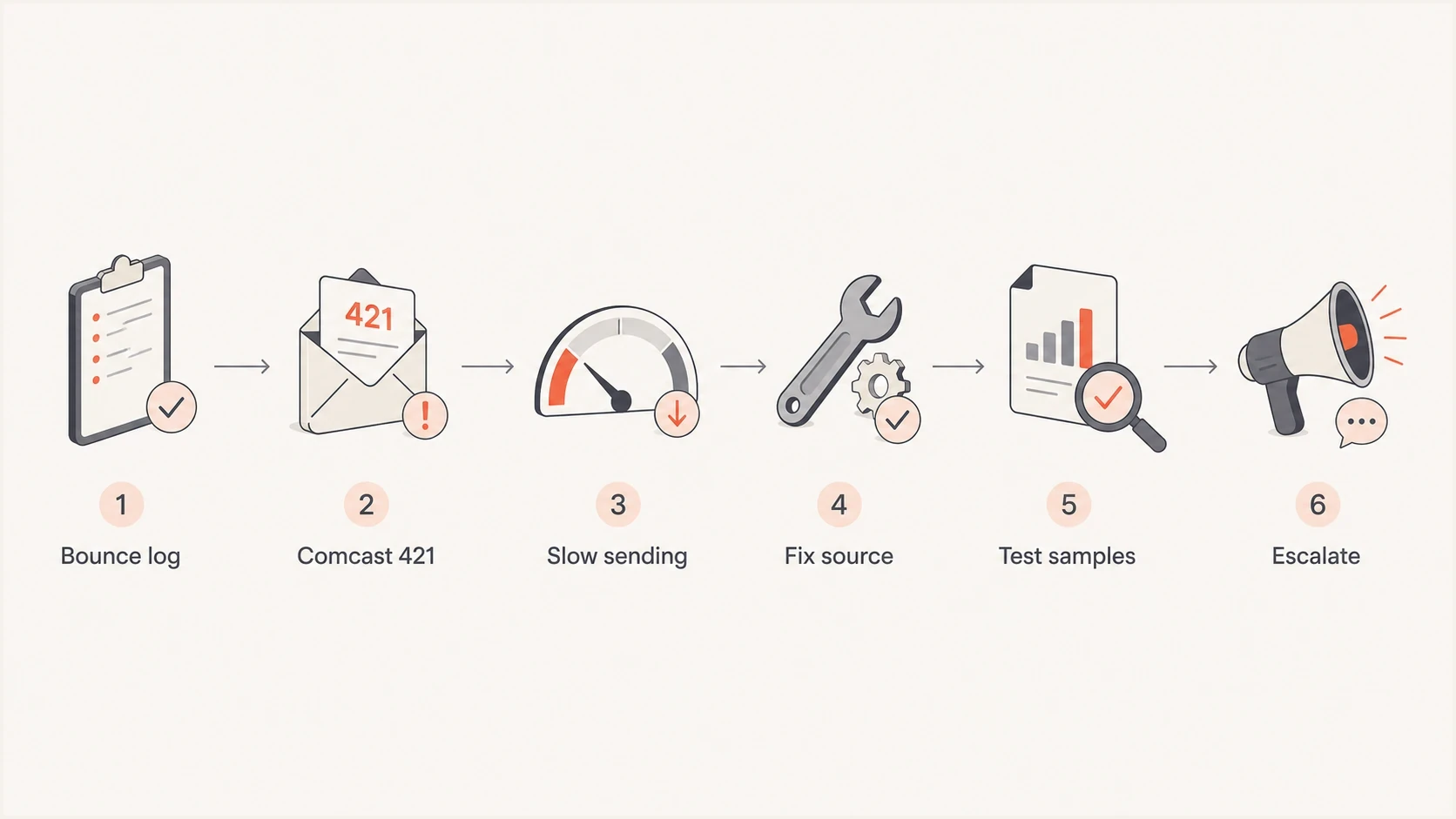
Flowchart showing the Comcast throttling recovery sequence.
Wrong first move
- More pressure: Higher concurrency and rapid repeated attempts turn a temporary throttle into a larger backlog.
- Broad escalation: Asking for relief before cleanup leaves the same spam classification problem in place.
- Blind DNS edits: Changing SPF or DMARC without evidence can break good traffic.
Better first move
- Controlled flow: Lower Comcast-specific volume while you isolate the failing source.
- Clean evidence: Gather IPs, domains, headers, timestamps, sample messages, and queue logs.
- Measured return: Restore traffic in small steps after authentication and content pass review.
Fix authentication and domain health
Authentication is not always the cause of Comcast throttling, but RL000020 specifically points to unauthenticated mail and DM000001 points to failed DMARC evaluation. Verify the visible From domain, SPF or DKIM alignment, DMARC policy, reverse DNS, and HELO identity before asking Comcast to review a throttle. A quick domain health checker pass catches common DNS faults before log review.
Send a fresh sample through an email tester to inspect headers, authentication results, and content signals in one message. This does not replace Comcast logs, but it catches broken signing, unexpected senders, and template issues before the next retry wave.
Email tester
Send a real email to this address. Suped shows a results button when the test is ready.
?/43tests passed
For recurring Comcast issues, DMARC monitoring shows which services send for the domain and whether SPF or DKIM aligns with the visible From domain. Suped's product connects those reports to source discovery, authentication diagnostics, and alerts, which helps isolate the domain behind an RL000010 or RL000020 response.
The record set should be simple. Use one SPF record, valid DKIM keys for active selectors, one DMARC record, and working reverse DNS. The outbound hostname should resolve forward to the sending IP, and its PTR should return that hostname.
DNS checks to verify before escalationtext
example.com. TXT "v=spf1 include:send.example.net -all"

selector1._domainkey.example.com. TXT (
  "v=DKIM1; k=rsa; p=MIIBIjANBgkqh..."
)

_dmarc.example.com. TXT (
  "v=DMARC1; p=none; rua=mailto:dmarc@example.com;"
  " pct=100"
)

mail.example.com. A 192.0.2.10
10.2.0.192.in-addr.arpa. PTR mail.example.com.
DMARC record detail view showing SPF, DKIM, DMARC, rDNS diagnostics, and DNS records
Check reputation, content, and list quality
When Comcast throttles only one sender while other mailbox providers accept the same campaign, that does not prove Comcast is wrong. It shows Comcast has a different reputation view of that IP, domain, content, recipient set, or shared sending pool.
Check blocklist and blacklist signals as supporting evidence. A public blocklist listing is not the same as Comcast's internal scoring, but blocklist monitoring can explain why a sender's reputation shifted. Suped's product keeps blocklist and blacklist results beside the domain and IP inventory used for DMARC analysis, so the affected source can be reviewed in one workflow.
Deferral trend before volume changes
Use Comcast 4xx results across comparable sends to decide whether to increase volume.
Resume carefully
Falling
Increase only for engaged recipients after a sustained decline in Comcast deferrals.
Hold volume
Flat
Keep volume and concurrency stable while the deferral rate remains unchanged.
Stop increases
Rising
Reduce pressure and continue remediation when Comcast deferrals rise.
The highest-impact cleanup usually sits in the audience and message, not the DNS. If a message stream is being classified poorly, asking for a throttle increase gives you more attempts but does not fix why the mail is disliked.
- Suppress stale recipients: Remove Comcast addresses that have not opened, clicked, logged in, or purchased in a long period.
- Review complaint paths: Confirm unsubscribe links work, complaint feedback is processed, and preference changes apply quickly.
- Audit shared IPs: If the sending IP is shared, identify exactly which streams are yours and what else uses that pool.
- Compare templates: Check link domains, image hosting, subject lines, footer text, and personalization for patterns in deferred mail.
Other ISPs accepting mail is not a pass
Comcast has its own scoring and rate limits. A sender can pass elsewhere and still hit Comcast throttling because the Comcast recipient set, complaint rate, local history, or IP pool has a specific problem.
Tune retry and queue behaviour
A 421 or 451 response asks the sender to try again later. Xfinity says shortening the delivery retry interval can help, but its postmaster guidance also warns that sending faster or sending more can hurt a source with poor reputation. Treat those as separate controls: schedule a reasonable first retry, then use backoff while keeping Comcast-specific concurrency and volume low.
Example Comcast-specific retry policyyaml
comcast.net:
  max_connections: 2
  max_messages_per_connection: 20
  retry_initial: 15m
  retry_backoff: exponential
  queue_lifetime: 72h
  pause_on_421_rate: high
Temporary deferral
The provider is saying "try later." The correct response is a scheduled retry, limited connection pressure, and source cleanup.
- Main code: Look for 4xx replies such as 421 or 451.
- Queue action: Retry with a bounded first interval and backoff.
Permanent rejection
The provider or your own system has stopped delivery for that message. The correct response is diagnosis before resending.
- Main code: Look for 5xx replies or queue-expiry bounces.
- Queue action: Do not resend until the cause is clear.
For a narrower walkthrough of 421 handling, the Comcast deferral guide covers retry behaviour in more detail. A queue timeout proves your retries never recovered, not that every original message was a hard Comcast rejection.
Prepare a Comcast escalation packet
Escalation works best after you have reduced pressure and fixed obvious sender issues. The request should be specific. Comcast needs the sending IP, sending domain, envelope sender, visible From domain, timestamps with timezone, complete SMTP transcript, sample message source, and a short explanation of what changed.
Avoid asking for a blanket unblock when the error is a throttle. Ask Comcast's Customer Security Assurance Postmaster team to review the affected IP or domain after remediation. If the error is a spam-pattern block such as BL000000, use the BL00000 error notes instead of treating it as a rate-limit case.
- Identify the IP: Use the actual outbound IP in the SMTP session, not a marketing platform account name.
- Attach samples: Provide full headers and message source for examples that Comcast deferred.
- State fixes: List suppression, volume cuts, authentication repairs, and queue changes already completed.
- Keep records: Track each Comcast-bound send, throttle rate, final bounce rate, and recovery volume.
What good evidence looks like
A useful escalation packet says exactly which IP and domain are affected, when the 421 or 451 replies started, what percentage of Comcast traffic is deferred, which messages are involved, and what remediation has already been completed.
Views from the trenches
Best practices
Capture the raw SMTP transcript before treating a delayed queue message as a rejection.
Cut Comcast traffic until deferrals slow down, then restart with cleaner segments.
Keep authentication, reverse DNS, EHLO, and visible From domains consistent across streams.
Common pitfalls
Assuming other mailbox providers accepting mail proves Comcast has made a mistake with scoring.
Retrying aggressively after a 421 reply, which adds queue pressure and harms recovery.
Escalating before removing risky campaigns, stale recipients, bad templates, and noisy forms.
Expert tips
Group Comcast traffic by sending IP so shared-pool issues do not hide the real source.
Send sample messages with full headers when asking why a stream is classified poorly.
Use DMARC reports to prove which authenticated sources are sending Comcast volume today.
Expert from Email Geeks says the Comcast 421 line is the mailbox-provider response. A later 554 timeout usually comes from the sender's own queue policy after retries expire.
2023-03-02 - Email Geeks
Expert from Email Geeks says Comcast reputation scoring is based on sending history, volume, message quality, and complaints, so the sending IP and sample messages matter.
2023-03-02 - Email Geeks
The practical recovery path
Treat Comcast throttling as a sender-health incident. First confirm whether Comcast returned a 421 or 451 deferral, a published limit error, or a true 5xx rejection. Then reduce Comcast-bound pressure, clean the affected stream, verify authentication and DNS, check blocklist and blacklist signals, and tune retries so the queue stops amplifying the problem.
Suped's product supports the sender-side checks in that process by combining DMARC source data, SPF and DKIM diagnostics, issue alerts, and blocklist or blacklist monitoring. Use that evidence to identify the affected IP or domain before contacting Comcast and to confirm authentication remains stable as sending resumes.




