What should I do about Comcast throttling and deferral errors?

Updated on 26 Jul 2026: We updated this guide with Comcast's current rate-limit codes and the comcast.net move to Yahoo Mail.
If Comcast returns 421 4.1.0 throttling or Too many sessions opened deferrals, slow down new Comcast volume, reduce concurrent SMTP connections, and keep the affected mail queued for retry. A shorter initial retry can help clear a temporary rate limit, but repeated responses from the same IP call for wider backoff and a reputation review. If the mail ultimately delivers and recipients engage, it is not an emergency. It is still a clear operational signal that Comcast wants less pressure from your sending infrastructure.
Treat these events as a queue management and reputation health issue, not as a content-only problem. One burst can be normal. Repeated bursts across campaigns mean the Comcast lane needs its own sending profile and a review of IP quality, authentication, complaint rate, and engagement.
- Immediate action: Lower Comcast concurrency and new hourly volume before changing creative or subject lines.
- Retry approach: Keep 4xx responses queued, retry on a controlled schedule, and widen the interval if the same IP repeats.
- Risk level: Delivered mail lowers the urgency, but repeated deferrals still damage speed and predictability.
- Deeper check: Review authentication, rDNS, blocklist (blacklist) status, complaints, and recent volume changes.
What Comcast is telling you
Comcast throttling means the receiving system is accepting some mail from your IP or domain, but not at the rate or connection level you are attempting. A 4xx response is temporary, so your mail transfer agent should keep the message in queue and try again rather than converting it into a hard bounce.
Common Comcast deferral examplestext
421 4.1.0 {IP address} Throttled - try again later (RL000003)
451 4.2.0 Throttled (RL000010)
421 Too many sessions opened
421 Reverse DNS failure: Try again later
The response text and RL code matter. RL000001 uses IP reputation and successful authentication. RL000002 uses IP reputation and volume metrics. RL000003 points to the sending IP's historical volume and quality. RL000010 applies a similar history-based policy to the sending domain, while RL000020 points to unauthenticated mail. Too many sessions opened is more direct: Comcast publishes a ceiling of 25 simultaneous connections per sending IP.
|
|
|
|---|---|---|
RL000001 | IP reputation and authentication rate limit | Verify authentication and pace retries |
RL000002 | IP reputation and volume rate limit | Smooth volume and protect IP quality |
RL000003 | IP volume and quality history | Stabilize IP volume |
RL000010 | Domain volume and quality history | Warm the domain with wanted mail |
RL000020 | Unauthenticated email | Fix SPF or DKIM |
Too many sessions | More than 25 connections per IP | Lower connection concurrency |
Reverse DNS failure | PTR lookup returned a temporary DNS failure | Check PTR and authoritative DNS |
Comcast deferral meanings
Do not force the queue
Xfinity says shortening the retry interval can help when a rate limit delays delivery. That does not mean opening more connections or adding fresh campaign volume. Keep retries inside the connection cap, reduce new volume, and widen the interval when the same route continues to return 4xx responses.
First response plan
Start with delivery mechanics. Comcast is already telling you the mail path exists because some messages are being accepted and delivered. The first fix is to shape traffic specifically for comcast.net recipients instead of slowing every provider equally.
- Split Comcast traffic: Put comcast.net traffic into its own delivery pool or rule set.
- Lower concurrency: Stay below Comcast's 25-connection ceiling per IP. During recovery, start with one or two active connections and increase only after clean delivery.
- Slow the ramp: Spread campaign launches, avoid abrupt spikes, and warm new IPs with steady Comcast-specific volume.
- Retry calmly: Use a short controlled first retry, then widen the interval if throttles continue on the same IP or domain.
- Measure outcome: Track final delivery, time to deliver, complaints, engagement, and unsubscribes by domain.
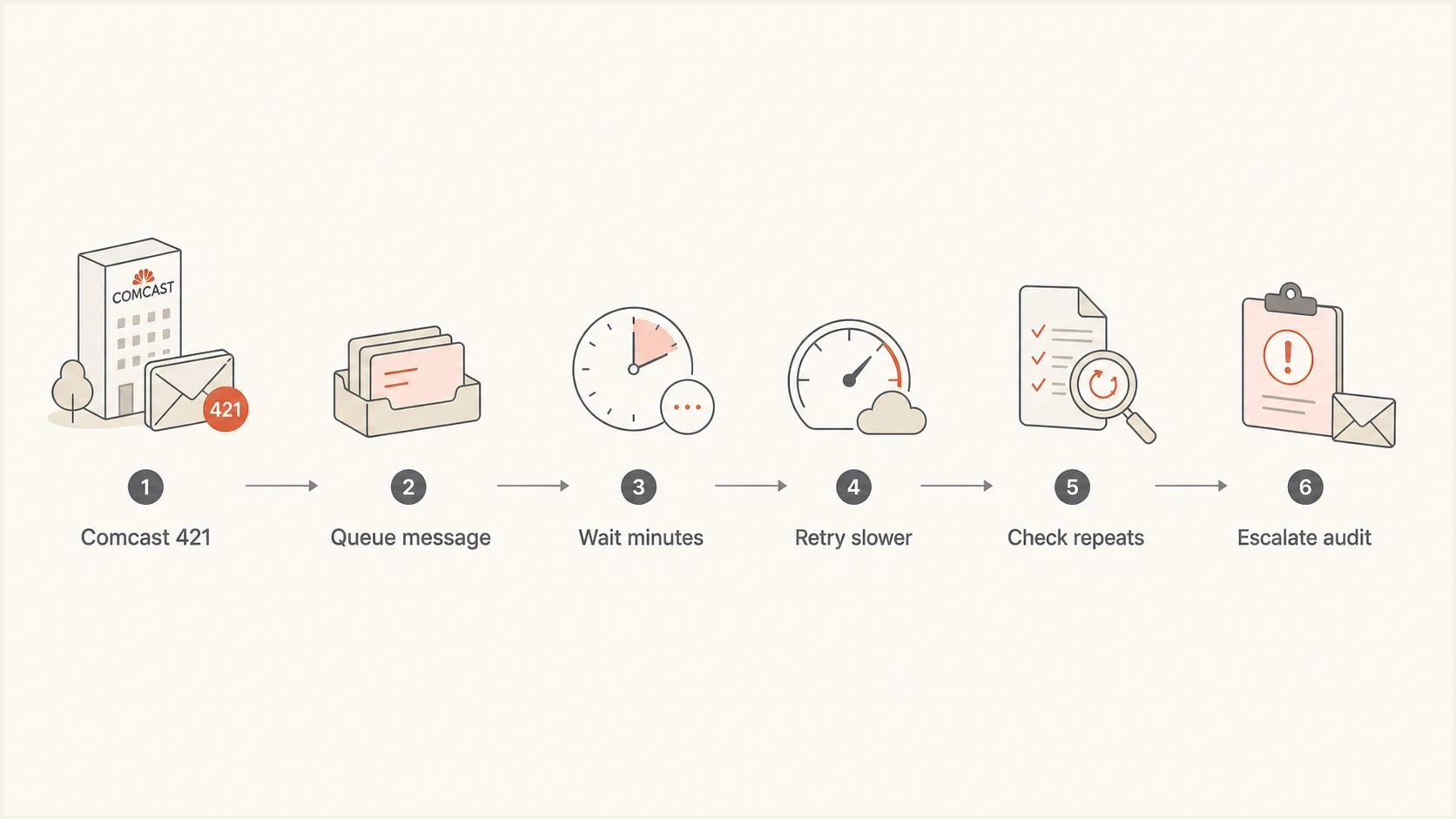
A six-step Comcast deferral handling flow from 421 response to retry and audit.
Example Comcast delivery profileyaml
provider: comcast
max_connections_per_ip: 2
initial_retry: 5m
second_retry: 15m
later_retry: 30m
campaign_spacing: staggered
stop_condition: repeated_4xx_rate_limit
When delivered messages still matter
A final delivery event means the immediate message survived the deferral. That does not make the deferral meaningless. Mail that arrives late can miss time-sensitive context, suppress revenue in a campaign window, and hide a developing reputation issue because the top-line delivered rate still looks fine.
Example Comcast deferral bands
These are example internal operating bands for triage, not thresholds published by Xfinity. Set baselines against your normal Comcast traffic.
Low
<2%
Occasional 4xx responses that clear on the first retry
Watch
2-10%
Repeated throttles during campaign peaks
Act
>10%
The same IP or campaign hits limits across multiple sends
The most useful metric is not only whether delivery eventually happened. Track how long Comcast held the mail, how many retry attempts were needed, whether the same sending IP was involved, and whether engagement fell once delivery delay increased.
Safe deferral pattern
- Short delay: Messages clear after one or two controlled retries.
- Limited scope: Only one campaign peak or one small segment is affected.
- Clean signals: Complaints, bounces, and authentication failures stay low.
Risky deferral pattern
- Repeat delay: The same IP hits 4xx errors across several sends.
- Session pressure: Connection errors appear before or during every launch.
- Quality decline: Complaints rise or engaged users shrink at Comcast.
Separate rate limits from reputation problems
The trap is assuming every Comcast 4xx response is only about volume. A throttle often starts as a rate limit, but the threshold Comcast gives an IP or domain is influenced by historical quantity and quality. High complaint rates, stale addresses, weak engagement, authentication failures, missing reverse DNS, and blacklist or blocklist listings can all reduce how much mail Comcast accepts comfortably.
Send a real message through an email tester when you need header-level evidence. That confirms SPF, DKIM, DMARC domain matching, headers, and common content or infrastructure issues without guessing from queue logs alone.
Email tester
Send a real email to this address. Suped shows a results button when the test is ready.
?/43tests passed
Then compare those test results with a broader domain health check. This catches cross-domain setup problems that do not always appear in one SMTP error, especially when a brand uses several ESPs, CRMs, ticketing systems, and internal mail servers.
What to check before blaming Comcast
- Authentication: SPF or DKIM passes with DMARC domain matching to the visible From domain.
- Infrastructure: Reverse DNS, HELO, TLS, and bounce handling are correct for the sending IP.
- Reputation: Complaints, unknown users, spamtrap risk, and Comcast engagement trends are under control.
- Listing status: Major IP and domain blocklist or blacklist hits are reviewed and remediated.
Suped's product fits this workflow when you need monitoring instead of one-off checks. Suped brings DMARC monitoring, SPF, DKIM, hosted SPF, hosted DMARC, MTA-STS, issue detection, real-time alerts, and blocklist monitoring into one place. For Comcast deferrals, the useful workflow is checking whether the throttled IP also has authentication drift, unknown senders, failed domain matching, or reputation flags.
Issues page showing top issues, verified sources, unverified sources, and authentication pass rates
Account for the comcast.net move to Yahoo Mail
Xfinity began inviting comcast.net users to move their mailboxes to Yahoo Mail in June 2025, and invitations are rolling out gradually through 2026. The email address stays the same, but a user who accepts the move has Yahoo Mail as the mailbox provider. Other active comcast.net accounts can remain on Xfinity's email platform during the rollout.
Classify the response, not only the address
Xfinity's mailbox migration notice does not say that every sender-facing MX route or rate-limit policy changes at the same time. Keep the destination response text, MX route, enhanced status code, and timestamp in your logs. Apply the Comcast controls on this page when the response is a Comcast or Xfinity RL code, throttle, or session error.
- Preserve raw responses: Do not collapse every comcast.net 4xx result into one generic throttle category.
- Watch routing changes: Compare the MX route and response family when a previously stable segment changes behavior.
- Keep separate baselines: Measure queue delay and final delivery by response family if sender-facing routing changes.
- Avoid stale automation: Update rules that assume every comcast.net deferral uses a legacy Comcast error string.
Tune the Comcast lane
A good Comcast profile limits simultaneous sessions, spaces delivery over time, and lets the queue drain. Comcast publishes hard ceilings, but reputation-based rate limits can be lower. Recovery settings should therefore start conservatively and rise only after clean acceptance.
|
|
|
|---|---|---|
Connections | 25 per IP maximum; recover at 1-2 | Increase only after session errors clear |
Messages per session | 1,000 maximum | Start a new session below the ceiling |
Recipients per message | 100 maximum | Split larger recipient batches |
Initial retry | Short, controlled queue interval | Back off when the same 4xx repeats |
Campaign spacing | Staggered | Flatten abrupt volume peaks |
Practical Comcast sending controls
If you send marketing campaigns, avoid launching every large segment at the same minute. Send the most engaged Comcast recipients first, then expand to less recent segments after the initial batch clears. This gives Comcast cleaner early signals and reduces the chance that one campaign peak consumes your allowance.
What to stop doing
- Shared peaks: Launching every provider and Comcast segment at the same second.
- Fast repeats: Retrying throttled mail immediately across many parallel workers.
- Global fixes: Changing all providers because one Comcast lane is constrained.
What to do instead
- Provider rules: Set Comcast-specific connection, retry, and hourly caps.
- Measured retries: Retry on a short controlled schedule, then widen intervals for repeated 4xx responses.
- Segment order: Send recent openers and clickers before older or colder recipients.
A sensible retry pattern
For Comcast 4xx deferrals, a short first retry is reasonable and matches Xfinity's advice to retry temporary failures. If the same message, IP, or domain keeps hitting throttles, stretch the interval, reduce active connections, and stop adding fresh campaign volume until the queue drains.
Check the records and logs
Authentication failures do not always cause Comcast throttling directly, but they reduce trust and RL000020 specifically applies to unauthenticated mail. When a sender has multiple mail sources, DMARC reports should show every source that sends as the domain, not only the ESP used for the affected campaign.
Example DMARC record for monitoringdns
_dmarc.example.com. 3600 IN TXT (
  "v=DMARC1; p=none; rua=mailto:dmarc@example.com; "
  "adkim=s; aspf=s"
)
Use p=none when you need visibility before enforcement. Move toward quarantine or reject only after legitimate senders pass SPF or DKIM with domain matching. Suped's hosted DMARC and issue detection can show which source is failing and what needs to change.
DMARC record detail view showing SPF, DKIM, DMARC, rDNS diagnostics, and DNS records
Group queue logs by receiving route, response family, sending IP, campaign, and error text. If throttling clusters around one IP, fix that IP's reputation and volume profile. If it clusters around one domain or RL000010 response, inspect domain authentication, list age, segmentation, complaint rate, and recent engagement. If it appears across every Comcast send, treat it as a provider-specific routing problem and lower the whole Comcast lane.
When to escalate
Escalate only after the basics are clean. Xfinity's Customer Security Assurance postmaster path is more useful when you can provide IPs, timestamps, sample SMTP responses, domain names, volume by hour, queue retry behavior, and evidence that authentication and DNS are correct.
- Escalate now: Mail remains queued through normal retry windows and Comcast recipients stop receiving.
- Keep tuning: Messages deliver after short retries and errors cluster around campaign peaks.
- Pause volume: The same IP accumulates throttles, complaints, and blocklist or blacklist hits.
- Document evidence: Save exact SMTP responses, RL codes, IPs, dates, queue timings, and authentication results.
For Comcast-specific rejection patterns, compare your symptoms with this Comcast rejection guide. For recovery on a new sending IP, use this IP warm-up guide.
If you need Xfinity to review a persistent Comcast response, use the Xfinity support path to reach Customer Security Assurance and select the Postmaster option. Provide a dated list of affected IPs, exact deferral strings, the changes already made, and what still fails.
Views from the trenches
Best practices
Throttle by mailbox provider so Comcast changes do not slow delivery to every destination.
Retry 4xx deferrals on schedule, then widen gaps if the same IP keeps hitting limits.
Track delivery after retry, not only first attempt, so temporary limits stay visible.
Common pitfalls
Treat Too many sessions as a connection problem before changing content or creative.
Assume delivered means solved, then miss repeated rate-limit pressure across campaigns.
Push retries too hard and convert a normal queue delay into a stronger reputation signal.
Expert tips
Keep Comcast on its own concurrency rules so bursts from large segments do not collide.
Compare Comcast errors with SPF, DKIM, DMARC, rDNS, and blocklist history by IP.
Use engagement and complaint trends to decide whether the throttle is volume or quality.
Marketer from Email Geeks says Comcast is telling the sender to slow down and limit concurrent connections before sending more volume.
2022-07-21 - Email Geeks
Marketer from Email Geeks says RL000003 can clear with retries after a few minutes, but it is not a reason to push harder.
2022-07-21 - Email Geeks
The practical answer
Do not ignore Comcast throttling just because the messages eventually delivered. Also do not overreact by rebuilding your whole program. Slow new Comcast volume, stay below the session cap, retry temporary failures on a controlled schedule, and verify whether the deferrals are isolated to volume or tied to reputation and authentication.
The operating model is provider-specific control plus continuous monitoring. Suped's product keeps DMARC, SPF, DKIM, hosted SPF, hosted DMARC, MTA-STS, blocklist monitoring, alerts, and multi-domain reporting in one place. In this workflow, that evidence helps separate a normal Comcast rate limit from an authentication or sender reputation problem before queued mail expires.




