How to resolve Optonline IP blacklisting issues?

Published 13 Jul 2025
Updated 7 Aug 2026
13 min read
Summarize with

Updated on 7 Aug 2026: We clarified Optimum's current acceptance requirements, including outbound server security and bounce handling.
To resolve Optonline IP blacklisting issues, start with the exact bounce response, confirm the outbound sending IP, check whether Optimum's published third-party blocklists are involved, fix authentication and traffic quality signals, then contact the right postmaster or abuse channel with a short evidence-based request. If the bounce says something like 5.3.2 Connection refused and names your IP as blacklisted, investigate an IP or connection-level block. If it says 554 5.7.1 Spam detected by content scanner, investigate a message or policy rejection instead. A clean public blacklist check does not rule out an Optonline reputation or filtering decision.
Treat the problem according to the SMTP stage and diagnostic text. Fix anything that makes the traffic look risky, prove that SPF, DKIM, DMARC, reverse DNS, HELO, server security, and complaint handling are clean, then decide whether the affected volume justifies escalation. For a tiny recipient segment, suppression or targeted remediation can be more rational than weeks of postmaster chasing.
- Direct fix: Collect the bounce, verify the outbound IP, check authentication and server security, review complaints, then use the removal path that matches the rejection.
- Possible cause: A published third-party blocklist, a local reputation rule, an unsecured mail server, or a message-specific policy rejection.
- Best workflow: Use DMARC and blocklist monitoring together so you can separate authentication failures from IP reputation problems.
What the Optonline bounce means
The SMTP status and rejection stage tell you what Optonline refused. A 5.3.2 connection refusal that names an IP points to the sending IP, connection policy, or server reputation. A 554 5.7.1 response that says a content scanner rejected the message usually occurs later and points to message content, a message fingerprint, or another policy rule. Content changes will not repair a connection-level IP block, and delisting work will not fix a message-specific rejection when the IP is clean.
Common Optonline bounce patterns
5.3.2 (system not accepting network messages)
Connection refused. 13.111.75.173 is blacklisted

554 5.7.1 Spam detected by content scanner. Message rejected.
The first wording is specific enough to start IP and server checks, but not specific enough to identify the exact blacklist (or blocklist). A public listing often names the list or gives a lookup path. A generic is blacklisted response can also come from a local block, a reputation score, a temporary network rule, or a stale signal. The second wording requires content and message-stream testing before an IP delisting request.
Do not stop after one clean public blacklist check. A clean result only proves the IP is not listed on the blocklists you checked. It does not prove Optonline accepts the IP, and it does not rule out a content or policy rejection.
Optonline.net addresses use Optimum consumer mail infrastructure. Delivery can differ across mailbox filtering, forwarding, and account-level settings. Collect the remote SMTP host, enhanced status code, diagnostic text, and rejection stage before choosing an escalation path.
Run the triage in this order
Run a receiver-specific triage and build a small evidence pack instead of guessing which blacklist is involved. If the issue clears, the checks still show whether the sending system is healthy. If it remains, the evidence supports a postmaster request or a third-party delisting request.
- Capture the bounce: Save the full SMTP response, timestamp, remote host, outbound IP, sending domain, envelope sender, recipient domain, and message stream.
- Confirm the IP path: Make sure the rejected IP is the outbound IP used by the affected stream, not a web server address or a shared relay you do not control.
- Check published listings: Run a current blacklist check for the outbound IP and domain, including the third-party lists named in Optimum's published policy, then record the results.
- Validate authentication: Confirm DMARC passes because either the DKIM signing domain or the SPF-authenticated envelope sender domain matches the visible From domain for the exact stream that bounced.
- Review recent signals: Look for complaint spikes, hard bounces, spam traps, volume changes, inactive Optonline recipients, and compromised sending accounts.
- Use the matching route: Follow the listing operator's removal process for a confirmed public listing, or escalate receiver-specific and content-policy rejections with evidence.
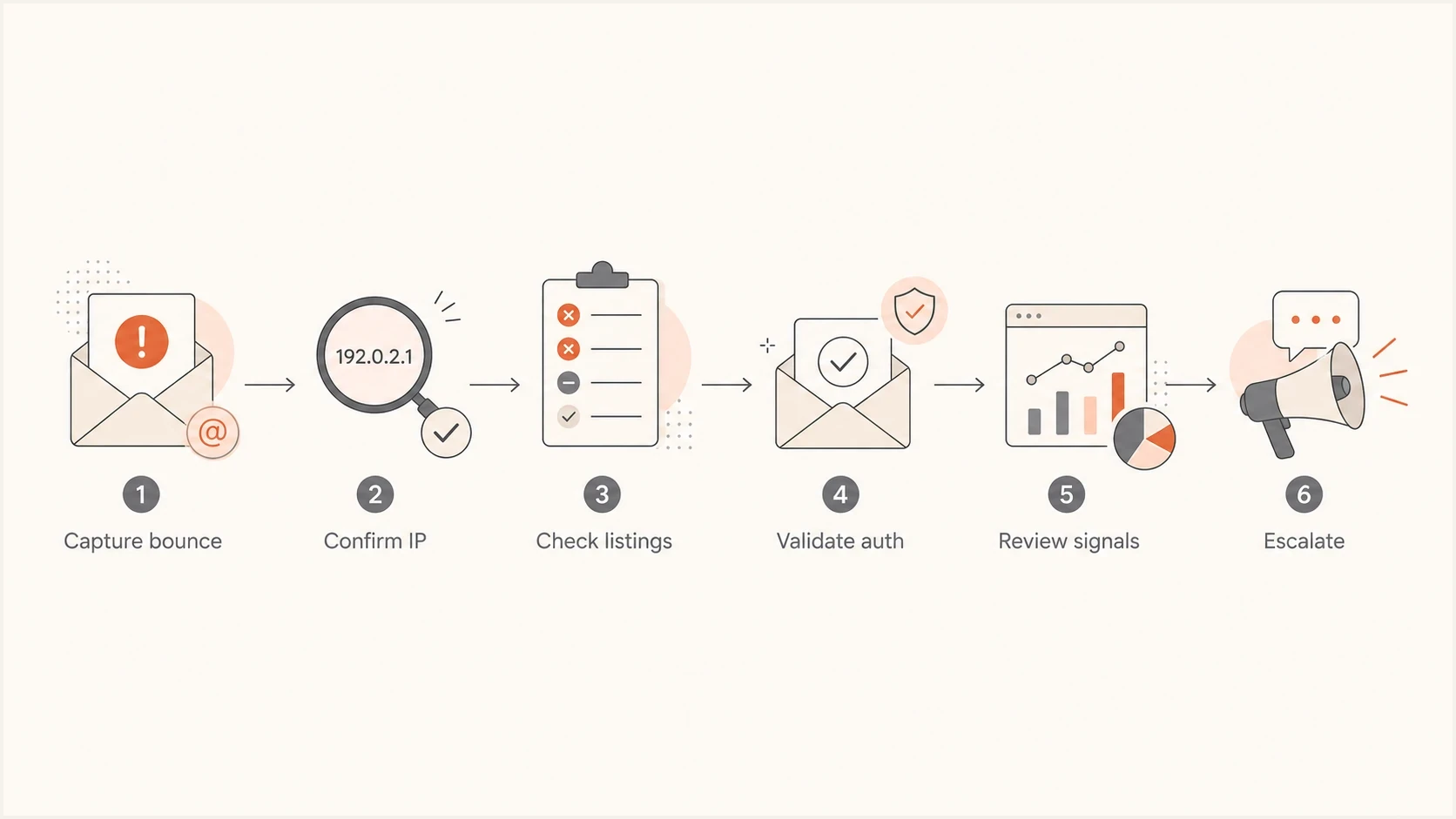
Flowchart showing the Optonline blacklist troubleshooting process.
This order matters because escalation without evidence often gets routed to generic support. Evidence also prevents an outsized response to a small recipient segment. If Optonline rejects 250 messages out of 450,000 sends, the operational choice depends on recipient value, mail type, and whether similar signals appear at other mailbox providers.
Check whether the block is public or internal
Optimum's published mail blocking policy directs senders to the third-party blocklists listed on its policy page and says Optimum cannot remove a restriction imposed by those lists. The same policy also permits Optimum to block other mail and reject unsecured mail servers. Check the published lists first, but do not label a clean result as an internal block until the SMTP evidence supports that conclusion.
Blocklist checker
Check your domain or IP against 144 blocklists.
 Spamhaus
 0Spam
0Spam

 Cisco
Cisco
 NoSolicitado

 URIBL
URIBL
 abuse.ro
 ALPHANET
 Anonmails
 Ascams
 BLOCKEDSERVERS
 Calivent Networks


 EFnet
EFnet




 JustSpam
 Kempt.net
 NordSpam

 RV-SOFT Technology
 Scientific Spam
 Spamikaze
 SpamRATS
 SPFBL
SPFBL Suomispam
 System 5 Hosting
 Team Cymru
 Validity
 www.blocklist.de Fail2Ban-Reporting Service
 ZapBL
ZapBL 2stepback.dk
 Fayntic Services
 ORB UK
 technoirc.org
 TechTheftSpamhaus0SpamCiscoNoSolicitadoURIBLabuse.roALPHANETAnonmailsAscamsBLOCKEDSERVERSCalivent NetworksEFnetJustSpamKempt.netNordSpamRV-SOFT TechnologyScientific SpamSpamikazeSpamRATSSPFBLSuomispamSystem 5 HostingTeam CymruValiditywww.blocklist.de Fail2Ban-Reporting ServiceZapBL2stepback.dkFayntic ServicesORB UKtechnoirc.orgTechTheftSpamhaus0SpamCiscoNoSolicitadoURIBLabuse.roALPHANETAnonmailsAscamsBLOCKEDSERVERSCalivent NetworksEFnetJustSpamKempt.netNordSpamRV-SOFT TechnologyScientific SpamSpamikazeSpamRATSSPFBLSuomispamSystem 5 HostingTeam CymruValiditywww.blocklist.de Fail2Ban-Reporting ServiceZapBL2stepback.dkFayntic ServicesORB UKtechnoirc.orgTechTheftSpamhaus0SpamCiscoNoSolicitadoURIBLabuse.roALPHANETAnonmailsAscamsBLOCKEDSERVERSCalivent NetworksEFnetJustSpamKempt.netNordSpamRV-SOFT TechnologyScientific SpamSpamikazeSpamRATSSPFBLSuomispamSystem 5 HostingTeam CymruValiditywww.blocklist.de Fail2Ban-Reporting ServiceZapBL2stepback.dkFayntic ServicesORB UKtechnoirc.orgTechTheftSpamhaus0SpamCiscoNoSolicitadoURIBLabuse.roALPHANETAnonmailsAscamsBLOCKEDSERVERSCalivent NetworksEFnetJustSpamKempt.netNordSpamRV-SOFT TechnologyScientific SpamSpamikazeSpamRATSSPFBLSuomispamSystem 5 HostingTeam CymruValiditywww.blocklist.de Fail2Ban-Reporting ServiceZapBL2stepback.dkFayntic ServicesORB UKtechnoirc.orgTechTheft
Look up the exact outbound IP named in the bounce and the sending domain. A receiver-specific issue can begin as an IP reputation problem, but domain reputation and authentication still matter. A clean IP with a weak domain, unauthenticated mail, or poor list hygiene can still be rejected.
|
|
|
|---|---|---|
Listed IP | Confirmed public IP reputation issue | Stop the cause, then follow the listing operator's removal process |
Clean IP | No listing confirmed on the lists checked | Match the bounce wording and inspect the live message |
Listed domain | Domain reputation or authentication issue | Review DMARC identifier matching and sending sources |
No listings | Public blocklist cause remains unconfirmed | Check server security, content, and receiver policy |
Use this table to interpret what you find after checking the outbound IP and domain.
If no public listing appears, do not repeat the same lookup every hour or assume the block is internal. Switch to mail-stream analysis and ask what Optonline saw at the rejection stage: a risky connection, an unsecured server, weak authentication, or a message fingerprint.
Fix the signals Optonline can see
Optonline does not need a public listing to reject mail. Its systems can judge traffic using connection behavior, authentication, recipient quality, complaints, and historical engagement. Remove every obvious reason for a conservative ISP filter to distrust the sending stream.
Signals that help
- Authentication: DKIM or SPF passes through an authenticated domain that matches the visible From domain.
- Identity: The outbound IP has valid PTR and forward DNS, and HELO identifies the sending host.
- Recipients: Recent opt-ins, low hard bounces, and fast removal of inactive addresses.
- Traffic: Predictable volume, standards-based retries, and separate transactional and marketing streams.
Signals that hurt
- Authentication: Broken DKIM or SPF with no passing identifier that matches the visible From domain.
- Identity: Missing PTR, generic hostnames, or HELO and forward DNS that do not match the sending host.
- Recipients: Old addresses, repeated bounces, spam complaints, or role accounts.
- Traffic: Bursting, retries after permanent 5xx failures, and mixed mail streams on one IP.
Authentication deserves special attention because it is easy to prove and easy for a receiver to use in filtering. SPF authenticates the envelope sender domain, while DKIM authenticates its signing domain. DMARC passes when at least one passing identifier matches the visible From domain under DMARC rules. A pass on an unrelated vendor domain does not satisfy DMARC.
Baseline DMARC record for monitoringdns
v=DMARC1; p=none; rua=mailto:dmarc-reports@example.com
Do not jump straight to a stricter DMARC policy to solve an Optonline block. First, make sure all legitimate senders authenticate correctly. Suped is our DMARC and email authentication platform. Its aggregate reporting can map failing sources to specific SPF, DKIM, or domain-matching fixes, while alerts show whether a receiver-specific block coincides with a wider authentication change.

Issue steps to fix dialog showing the issue overview, tailored fix steps, and verification action
Check the outbound mail server
Optimum's published acceptance policy rejects connections from unsecured mail servers and says a host acting as a mail transfer agent must accept bounce messages. Missing PTR records, open relay exposure, compromised accounts, and unsecured proxy paths can also damage reputation or trigger a block. Check the server itself before asking for delisting.
- Verify DNS identity: Query the authoritative reverse zone for the outbound IP, then confirm the PTR hostname resolves forward to that IP and matches the HELO identity.
- Close unauthorized relay paths: Confirm the MTA is not an open relay and that exposed proxies, web forms, or connection-sharing systems cannot send without authorization.
- Audit for compromise: Review account logins, API keys, queue growth, unusual recipients, and volume by authenticated user; disable the source and rotate credentials when abuse appears.
- Accept legitimate bounces: Test delivery status notifications to the return path and null reverse-path handling without creating backscatter to forged senders.
PTR and forward DNS checksbash
dig -x 203.0.113.25 +short
dig mail.example.com A +short
dig mail.example.com AAAA +short
Run these checks against the outbound IP shown in the bounce, not the website IP or an inbound MX. If a sending provider owns the shared IP, send the bounce and timestamp to that provider because only the IP owner can correct its PTR, investigate neighboring traffic, or complete an IP-level removal request.
Validate with a real test message
DNS checks are necessary, but they do not always show what a receiver sees in a live message. Send a new test message through the same infrastructure, envelope domain, visible From domain, and header pattern as the affected traffic. Then inspect SPF, DKIM, DMARC, rDNS, message headers, and any content-level flags.
Email tester
Send a real email to this address. Suped shows a results button when the test is ready.
?/43tests passed
If the test message passes cleanly but Optonline still refuses the connection, return to IP or server reputation. If the test exposes a DMARC domain mismatch, fix that first. If Optonline returns a content-scanner rejection, compare a minimal plain-text message with the production version to isolate a message fingerprint, URL, attachment, or template element. A postmaster request has a better chance after the observed bad signal is removed.
When the affected mail is transactional, test the exact transaction type. Password resets, account alerts, receipts, and marketing campaigns often use different subdomains, DKIM selectors, envelope senders, and IP pools.
When to contact Optonline or Altice
For a confirmed listing on a third-party blocklist named in Optimum's policy, fix the cause and use that listing operator's removal process. Optimum says it cannot remove those restrictions. Contact Optonline, Optimum, or Altice when the published checks are clean but the receiver still returns a local or content-policy rejection, or when the evidence points to an incorrect receiver-side block.
Optimum publishes mail blocking policies covering its blocklist policy and technical acceptance requirements. If the issue requires postmaster outreach after those checks, the dedicated guide on contacting Optonline covers the evidence and outreach process in more detail.
Postmaster request template
Subject: Optonline delivery block for sending IP 203.0.113.25

Hello,

We are seeing SMTP rejections from Optonline for legitimate mail
from 203.0.113.25.

Example response:
5.3.2 (system not accepting network messages)
Connection refused. 203.0.113.25 is blacklisted

Details:
Sending domain: example.com
Envelope sender: bounces.example.com
Reverse DNS: mail.example.com
SPF: pass, envelope domain matches visible From domain
DKIM: pass, signing domain matches visible From domain
DMARC: pass
Traffic type: account notifications
Complaint review: no recent spike found
Time observed: YYYY-MM-DD HH:MM UTC

The published third-party blocklist checks are clean, and we have
verified the server is secure and accepts bounce messages. Please
review whether this IP is blocked by a local filtering policy. We
can provide additional logs if needed.

Regards,
Email operations team
Keep the message short. Include the facts needed to find the rejection, but omit unrelated DNS records and large attachments unless requested. If the first response is generic, reply once with the same evidence and ask whether the outbound IP is subject to a local connection rule or whether the message hit a content policy.
- Include: Full bounce, outbound IP, timestamp, remote host, sending domain, traffic type, and authentication results.
- Exclude: Speculation, blame, unrelated provider history, and large attachments.
- Follow up: Wait 48 to 72 hours unless the mail is urgent, then send one concise update without requeuing the rejected 5xx delivery.
When to wait, suppress, or keep pushing
Not every Optonline blacklist issue deserves the same amount of work. A block affecting password resets for paying customers is urgent. A block affecting a small number of inactive newsletter recipients is a list hygiene task. The right move depends on business impact, mail type, recurrence, and whether the issue is isolated.
Escalation priority
Use affected recipient value and recurrence to decide how aggressively to work the block.
Low
Monitor
Small, non-critical segment with no repeat pattern
Medium
Escalate
Recurring bounces or valuable opted-in recipients
High
Urgent
Transactional mail or customer access affected
If only Optonline is blocking and the volume is tiny, fix the sender-side basics, then place affected recipients into a temporary suppression or reduced-frequency segment. Keep them out of high-volume campaigns until the cause is fixed and a new controlled test succeeds. That protects sender reputation while you decide whether outreach is worth the time.
If other providers begin showing similar rejections, treat it as a broader reputation incident. Pause risky streams, isolate transactional mail, remove old or unengaged recipients, check acquisition sources, and watch complaint data more closely. A guide on dedicated IP blocks is useful if the issue extends beyond one ISP.
Treat a 5xx response as permanent for that delivery and do not requeue the same message. Use controlled backoff only for temporary 4xx responses. After remediation, send a new controlled test instead of hammering Optonline with repeated attempts.
How Suped fits into this workflow
Suped is useful when the bounce is one symptom among several. Diagnosis requires separating an authentication failure, an unknown sender, an SPF lookup problem, a DKIM gap, a blocklist event, and a narrow receiver-side rule. Suped keeps the authentication and reputation evidence attached to the same domain and sending source.
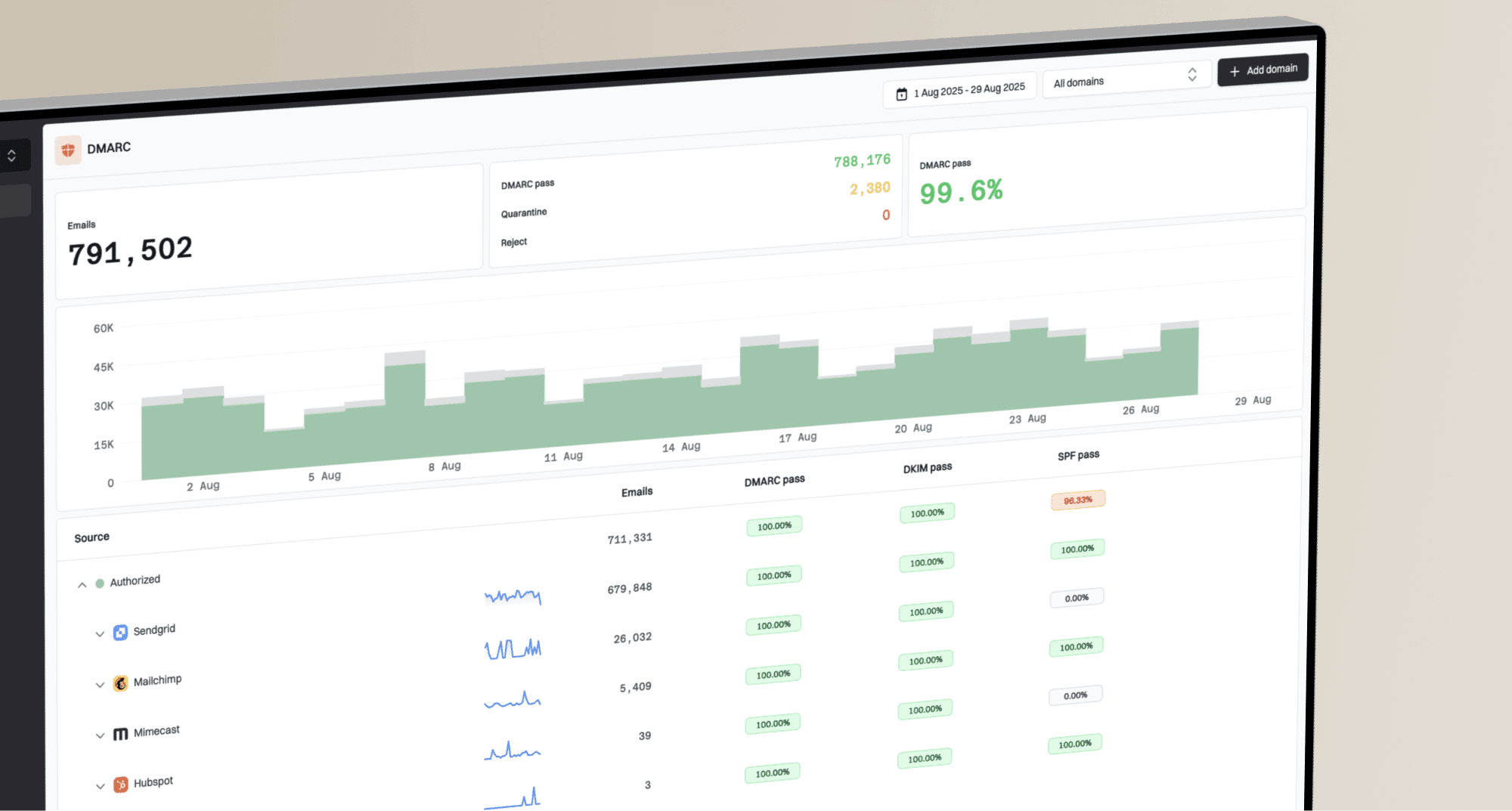
Suped DMARC dashboard showing email volume, authentication health, and source breakdown
Suped is our DMARC and email authentication platform. In this workflow, use it to monitor DMARC across the domain, surface unverified sources, alert when authentication failures rise, correlate blocklist and blacklist signals, and keep SPF under lookup limits with hosted SPF. Hosted DMARC supports controlled policy staging when a sending source changes, without turning an isolated Optonline bounce into an immediate enforcement change.
- Issue detection: Find failing sources and get specific steps to fix them.
- Reputation visibility: Monitor blocklist and blacklist signals beside DMARC results.
- Policy control: Use hosted SPF and hosted DMARC to stage verified DNS changes.
- MSP workflow: Manage client domains, reports, and alerts from one dashboard.
Views from the trenches
Best practices
Capture the full SMTP response before changing DNS, routing, or sending cadence.
Check the exact sending IP and domain, then compare against recent complaint signals.
Treat isolated Optonline rejections as receiver-specific until wider evidence appears.
Common pitfalls
Assuming a clean public blacklist lookup proves the receiver has no internal block.
Sending repeated retries to the same Optonline users while reputation is unsettled.
Escalating without the bounce text, timestamp, IP, authentication result, and stream type.
Expert tips
Ask whether the rejection is an internal rule or filtering partner result before retrying.
Separate transactional mail from marketing streams before requesting receiver review.
Use DMARC reports to prove legitimate sources authenticate before tightening policy.
Marketer from Email Geeks says Optonline-only blocks can have low business impact when the affected segment is small, so the first decision is whether escalation is worth the operational time.
2022-02-02 - Email Geeks
Marketer from Email Geeks says a clean public lookup does not rule out an internal receiver blacklist, especially when the bounce does not name a specific RBL.
2022-02-02 - Email Geeks
The practical resolution path
Resolving Optonline IP blacklisting starts with the bounce, not a generic blacklist search. Check the exact outbound IP against the third-party lists in Optimum's published policy, then use the SMTP wording to distinguish a connection block from a content or receiver-policy rejection. Validate server identity, security, live authentication, recent complaint signals, and recipient quality before requesting removal or escalation.
For small affected volumes, suppress the segment while fixing the cause. For critical mail or repeat Optonline failures, escalate with logs and keep the request narrow. Suped can keep DMARC, SPF, DKIM, policy controls, alerts, and blocklist or blacklist monitoring together, so the evidence is ready when a new delivery incident appears.