How to successfully contact Optonline postmaster about email deliverability issues?


Updated on 13 Aug 2026: We updated this guide with Optimum's current recipient checks, corrected contact routing, and clearer evidence requirements for Optonline delivery cases.
The most reliable way to contact Optonline postmaster about email deliverability issues is to treat direct postmaster outreach as one path, not the whole plan. Send a concise, evidence-heavy request to the standard postmaster contact for the Optonline mail domain, but expect slow or no response. At the same time, collect full message samples, prove your SPF, DKIM, DMARC, rDNS, TLS, and blocklist posture, then use an affected recipient's Optimum support path when the direct alias bounces or goes unanswered.
For Optonline, the practical answer is evidence first, contact second. Do not send a vague request that says mail is bouncing. Send a ticket-style note with the sender domain, sending IPs, envelope sender, visible From domain, affected recipient domain, exact SMTP response, timestamps with timezone, full message headers, and one attached .eml sample. If the mail is transactional, say that plainly, for example password resets, purchase receipts, security codes, account notices, or billing confirmations.
Do not wait days for a postmaster reply before fixing your own evidence trail. Optonline delivery problems often need proof that the sender is authenticated, wanted, low complaint, and not listed on a major blocklist or blacklist before anyone can act on the receiving side.
The short answer
Start with the direct postmaster route, but do not depend on it. Try postmaster@optonline.net for mail sent to Optonline recipients. If that alias hard bounces, preserve the bounce as evidence and ask an affected Optonline user to open a technical-support case with Optimum. Optimum publishes abuse@optimum.net for reports about abuse originating from its network, so it is not the general escalation address for legitimate inbound mail that Optonline rejects.
- Email the Optonline postmaster alias with a complete technical packet, not a narrative complaint.
- Ask the recipient to raise an Optimum technical-support case and attach your bounce, headers, and message sample if direct outreach fails.
- If the rejection pattern points to content fingerprinting, prepare an .eml sample and sender evidence for a filtering review.
- Audit authentication, reputation, complaint sources, and list hygiene while escalation is running.
|
|
|
|---|---|---|
1 | Postmaster | Bounce, headers, IP, domain, .eml |
2 | Recipient support | Customer impact and expected-message details |
3 | Filtering review | Fingerprint evidence and full source |
4 | Follow-up | Fresh tests and case reference |
Use this contact order when Optonline delivery is blocking transactional or account-critical mail.
Why Optonline postmaster outreach is hard
The hard part is getting the request to someone who can inspect filtering decisions. Consumer mailbox providers often separate customer support, abuse intake, network operations, and filtering operations. A postmaster alias can exist but route into a queue with limited external sender handling. In some cases, aliases that worked under older mail operations practices bounce, which leaves senders unsure whether the path is stale, protected, outsourced, or unmanaged.
That is why the message needs to look like an escalation packet. The person reading it should be able to reproduce the problem or search logs without asking basic follow-up questions. If the first contact lacks timestamps, recipient samples, SMTP responses, and authentication results, the case is easy to close without investigation.

Flowchart showing the Optonline deliverability escalation path from sender audit to monitoring.
Weak request
- The request says mail is blocked, but does not show the bounce or SMTP response.
- The request omits sending IPs, domains, message IDs, and timestamps.
- The reader has no full source message to inspect for content or header issues.
Stronger request
- The request names the affected traffic type and recipient domain.
- It includes exact timestamps, IPs, envelope sender, and message identifiers.
- It attaches one failed message sample and one recent accepted sample if available.
Build the evidence packet first
Before contacting anyone, run a sender-side review. This order separates problems you can fix immediately from problems that need receiver action. A mailbox provider has more reason to investigate when the sender can show that authentication passes and the issue is limited to one receiver family.
Start with live delivery testing. Send a real message that closely matches the failing traffic, then inspect the final headers, authentication results, and placement signals. Suped's email tester provides a report you can compare with the bounce evidence before escalating.
Email tester
Send a real email to this address. Suped shows a results button when the test is ready.
?/43tests passed
Then validate the domain's authentication and DNS posture. Use a broad domain health check for DMARC, SPF, and DKIM first. If authentication is inconsistent across streams, fix that before assuming Optonline caused the failure.
- Save the complete SMTP diagnostic. A 4xx response is a temporary deferral that calls for controlled retries, while a 5xx response is a permanent rejection for that attempt. Preserve enhanced codes such as 5.7.1 exactly as returned.
- Export the failed message as an .eml file so headers and body structure remain intact.
- Record the envelope sender, visible From domain, return path, DKIM selector, sending IP, and message ID.
- Include SPF, DKIM, and DMARC pass or fail results from the same stream.
- Check whether the sending IP or domain appears on a blocklist or blacklist before escalation.
- Redact unrelated recipient data and include one affected address only when support needs it for a log search.

Email tester sample report showing total score, email preview, issue summary, and per-section results
Check authentication and reputation
Optonline deliverability cases become harder when the sender has mixed authentication. A single domain can pass DMARC for marketing mail but fail for transactional mail if the transactional platform uses a different return path, DKIM selector, or bounce domain. Do not rely on a dashboard average. Check the exact stream that is failing.
Suped's DMARC monitoring shows which sources pass or fail, which senders use your domain, and which messages fail DMARC domain matching. That matters when Optonline rejects password resets or receipts, because those messages often come through a different system than newsletters.
Sender readiness before Optonline escalation
Use evidence from the affected stream before asking the receiver to change a filtering decision.
Ready
Verified
SPF or DKIM passes with DMARC domain matching, rDNS is correct, and no active blocklist or blacklist issue is present.
Needs review
Mixed
Authentication passes for some sources, but the affected stream or sender identity remains unclear.
Fix first
Failed
The affected stream fails DMARC, has broken DNS, or uses an unresolved listed IP.
Check blocklists and blacklists at the same time. A receiver-specific failure does not prove a public listing caused the rejection. Optonline can use internal reputation or policy data that public checks do not expose. If a sending IP is listed, document the listing, remediate the cause, and keep that work separate from the Optonline contact path.
Blocklist checker
Check your domain or IP against 144 blocklists.
 Spamhaus
 0Spam
0Spam

 Cisco
Cisco
 NoSolicitado

 URIBL
URIBL
 abuse.ro
 ALPHANET
 Anonmails
 Ascams
 BLOCKEDSERVERS
 Calivent Networks


 EFnet
EFnet




 JustSpam
 Kempt.net
 NordSpam

 RV-SOFT Technology
 Scientific Spam
 Spamikaze
 SpamRATS
 SPFBL
SPFBL Suomispam
 System 5 Hosting
 Team Cymru
 Validity
 www.blocklist.de Fail2Ban-Reporting Service
 ZapBL
ZapBL 2stepback.dk
 Fayntic Services
 ORB UK
 technoirc.org
 TechTheftSpamhaus0SpamCiscoNoSolicitadoURIBLabuse.roALPHANETAnonmailsAscamsBLOCKEDSERVERSCalivent NetworksEFnetJustSpamKempt.netNordSpamRV-SOFT TechnologyScientific SpamSpamikazeSpamRATSSPFBLSuomispamSystem 5 HostingTeam CymruValiditywww.blocklist.de Fail2Ban-Reporting ServiceZapBL2stepback.dkFayntic ServicesORB UKtechnoirc.orgTechTheftSpamhaus0SpamCiscoNoSolicitadoURIBLabuse.roALPHANETAnonmailsAscamsBLOCKEDSERVERSCalivent NetworksEFnetJustSpamKempt.netNordSpamRV-SOFT TechnologyScientific SpamSpamikazeSpamRATSSPFBLSuomispamSystem 5 HostingTeam CymruValiditywww.blocklist.de Fail2Ban-Reporting ServiceZapBL2stepback.dkFayntic ServicesORB UKtechnoirc.orgTechTheftSpamhaus0SpamCiscoNoSolicitadoURIBLabuse.roALPHANETAnonmailsAscamsBLOCKEDSERVERSCalivent NetworksEFnetJustSpamKempt.netNordSpamRV-SOFT TechnologyScientific SpamSpamikazeSpamRATSSPFBLSuomispamSystem 5 HostingTeam CymruValiditywww.blocklist.de Fail2Ban-Reporting ServiceZapBL2stepback.dkFayntic ServicesORB UKtechnoirc.orgTechTheftSpamhaus0SpamCiscoNoSolicitadoURIBLabuse.roALPHANETAnonmailsAscamsBLOCKEDSERVERSCalivent NetworksEFnetJustSpamKempt.netNordSpamRV-SOFT TechnologyScientific SpamSpamikazeSpamRATSSPFBLSuomispamSystem 5 HostingTeam CymruValiditywww.blocklist.de Fail2Ban-Reporting ServiceZapBL2stepback.dkFayntic ServicesORB UKtechnoirc.orgTechTheft
Suped combines DMARC, SPF, DKIM, blocklist monitoring, hosted SPF, hosted DMARC, hosted MTA-STS, and real-time alerts in one operational view. For this workflow, use those records to identify the failing source and keep the evidence current while Optonline escalation is pending.
What to send to Optonline
The request should be short enough to read in one screen and detailed enough to search logs. Keep the first email factual. Avoid accusations, speculation about filtering vendors, and long business impact stories. Put the impact in one sentence, then move straight into the data.
Optonline postmaster escalation templatetext
Subject: Delivery issue to Optonline recipients for transactional mail

Hello,

We are seeing delivery failures for transactional mail sent to Optonline
recipients. The affected messages are account-related messages such as
password resets and purchase receipts.

Sender domain: example.com
Envelope sender: bounce.example.com
Visible From domain: example.com
Sending IP: 203.0.113.24
Affected recipient domain: optonline.net
Time range: YYYY-MM-DD HH:MM-HH:MM UTC
Sample message ID: <sample-id@example.com>

SMTP response:
550 5.7.1 Message rejected or blocked by policy

Authentication on the affected stream:
SPF: pass with DMARC domain match
DKIM: pass with DMARC domain match
DMARC: pass
PTR/rDNS: configured
TLS: offered

Attached:
1. Full bounce transcript
2. Full .eml source for one failed message
3. Headers for one accepted message, if available

Please review whether this sender, IP, domain, or message fingerprint is
being filtered for Optonline recipients. If another team handles this,
please route this case to the correct mail filtering or postmaster queue.
Recipient data unrelated to the log search has been redacted.

Thank you.
If you have multiple examples, do not attach a pile of unrelated messages. Include one clean failed sample and one similar successful sample. If the issue affects one template, say that. If it affects all traffic from one IP or one sending subaccount, say that instead. Narrow scope makes the investigation easier.
|
|
|---|---|
Sending IP | Lets the receiver search logs |
Timestamp | Defines the log window |
SMTP code | Shows rejection or deferral class |
DMARC | Confirms domain matching |
Message file | Allows content review |
Keep the first request tight. Add detail in attachments, not in long prose.
When postmaster aliases bounce
If the postmaster alias hard bounces, do not keep sending the same request every few hours. Save the bounce, note the date and address used, and shift to recipient-assisted escalation. The bounce itself is useful evidence, especially if a customer support representative asks why the sender did not contact the postmaster.
A recipient-assisted case works best when the Optonline customer reports that wanted mail is missing and includes the same technical packet. The customer should say the message is expected, transactional, and not bulk promotional mail. They should include the sender address, approximate time, and any bounce or rejection detail you can provide.
Do not ask users to mark random test messages as wanted if they did not request them. Use real opted-in mail only. Wanted transactional mail gives support a cleaner case than synthetic traffic.
Sender-led
Sender-led outreach is faster to prepare and gives the sender control over the evidence. It fails when the mailbox provider has no effective external queue or the alias bounces.
Recipient-led
Recipient-led escalation has customer context and can reach consumer support paths. It depends on the recipient opening a case and attaching technical detail.
There are public reports of senders struggling with Optonline filtering and support paths, including a discussion about Optonline spam filtering. Treat those reports as context, not proof for your case. Your packet still needs current evidence for your sending IPs, domains, and message samples.
Rule out recipient mailbox issues
First determine whether Optonline rejected the message during SMTP or accepted it and the recipient cannot find it. A 5xx bounce is a sender-side rejection case. An accepted message with no visible inbox copy calls for recipient-side checks before another postmaster escalation.
Optimum's published email troubleshooting steps say an Optimum mailbox has a 5GB storage limit. The guidance also identifies Junk placement, forwarding, mailbox filters, and POP3 downloads as reasons expected mail can appear missing.
- Ask the recipient to check the storage meter in Optimum webmail. At 100%, they need to remove mail, including items in Deleted and Junk.
- Check Junk in webmail. If the wanted message is there, mark it as not junk and add the sender to the safe sender list.
- Review mail forwarding and mailbox filters that can redirect or remove messages.
- Check whether a device or mail client uses POP3 and deletes server copies after download.
- Do not treat safe sender settings as a fix for an SMTP rejection. The message must first be accepted into the recipient's mailbox.
Use Optimum webmail for this check. If the message exists in webmail but not in a desktop or mobile client, troubleshoot the client's synchronization or POP3 settings instead of opening a sender block case.
How to handle filtering vendor escalation
Some Optimum and Optonline filtering decisions have historically involved third-party filtering. If the pattern looks like content fingerprinting, prepare the case as a message review instead of a generic block removal request. Fingerprinting problems can affect one template, link, image, footer, or sending pattern even when SPF, DKIM, and DMARC pass.
The strongest evidence is the original source of the exact message that failed. Forwarded copies are weak because forwarding changes headers and can alter the body. Export the original .eml from the sending system or receiving mailbox, then pair it with the rejection text and authentication results.
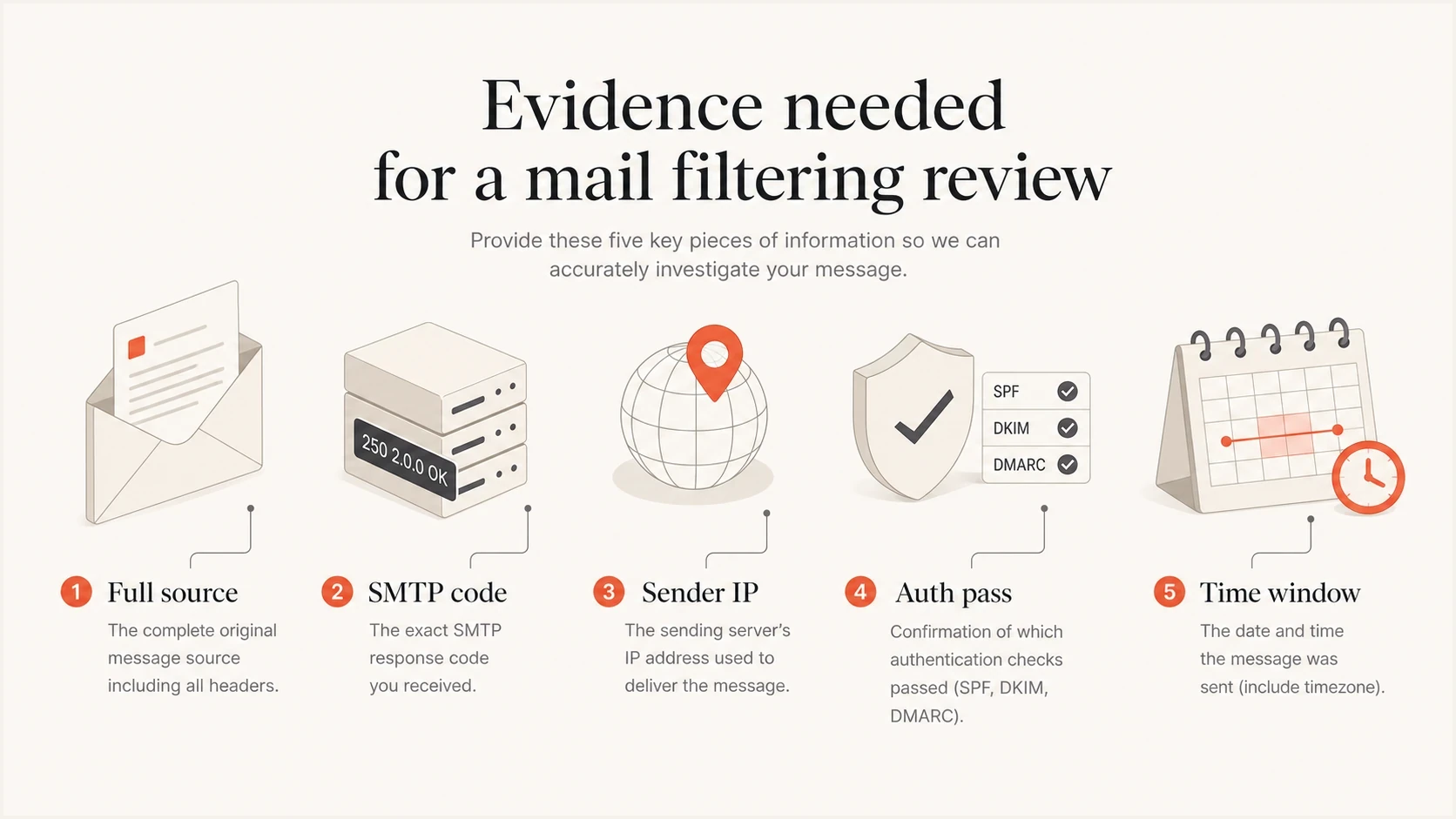
Infographic showing the evidence needed for a mail filtering review.
- Test whether only one transactional template fails, such as password resets or receipts.
- Check whether a specific tracking domain, redirect domain, or URL appears only in failed messages.
- Compare failures by sending IP, return path, DKIM selector, and visible From address.
- Look for sudden rate changes, retry storms, or repeated sends to inactive Optonline addresses.
Fix the sender-side issues they will check
Even when Optonline is the receiver causing the problem, sender-side cleanup still matters. Receivers rarely change delivery for senders that have visible authentication gaps, bad reverse DNS, broken bounce handling, or poor list hygiene. Remove every clear reason to reject the mail before escalating.
- For SPF-based DMARC, make sure the authenticated envelope sender domain matches the visible From domain under the configured DMARC matching mode.
- Sign the failing stream with DKIM and use a signing domain that matches the visible From domain under DMARC.
- Confirm the sending IP has a PTR record that maps to a hostname with matching forward DNS.
- Suppress invalid Optonline addresses after a hard bounce so retries do not create another negative signal.
- Separate transactional mail from marketing mail and keep promotional content out of critical templates.
Minimal DMARC record for monitoringdns
_dmarc.example.com. 3600 IN TXT
"v=DMARC1; p=none; rua=mailto:dmarc@example.com"
A monitoring-only DMARC policy is not the final state, but it gives you visibility before enforcement. Suped's hosted DMARC and policy staging help a team move through p=none, p=quarantine, and p=reject after authorized sources are identified and fixed.

Issue steps to fix dialog showing the issue overview, tailored fix steps, and verification action
What success looks like
Success does not require a direct reply from Optonline postmaster. Confirm recovery through delivery behavior, a customer support case that reaches the correct queue, or a filtering review that clears a template. Track exact SMTP acceptance and real production mail instead of assuming a reply means the problem is fixed.
Measure acceptance by message stream and record the denominator. A password reset flow and a marketing newsletter should not share one success metric. If password resets recover but promotional mail still lands in spam, treat them as separate issues and keep the escalation focused on mail users need to receive.
Use Suped to keep DMARC, SPF, DKIM, blocklist and blacklist status, hosted records, and source-level alerts current. Pair those results with the documented escalation packet so Optonline support has evidence for the affected stream.
Views from the trenches
Best practices
Prepare full message source, bounce text, sender IPs, and timestamps before escalation.
Ask affected recipients to raise support cases when external postmaster routes fail.
Separate transactional traffic from marketing traffic before Optonline recovery tests.
Common pitfalls
Sending vague postmaster requests without logs usually creates long delays or no reply.
Treating one accepted test as recovery can hide template-specific filtering issues.
Ignoring blocklist or blacklist status weakens the sender-side evidence packet during review.
Expert tips
Use one failed sample and one accepted sample to narrow the receiver investigation.
Preserve hard bounces from postmaster aliases as evidence for later support cases.
Track acceptance by message stream so transactional recovery is measured cleanly.
Marketer from Email Geeks says recent Optonline postmaster outreach has produced little success, so senders should prepare fallback escalation paths before waiting on a reply.
2023-11-01 - Email Geeks
Marketer from Email Geeks says multiple routes failed even for password resets and purchase receipts, which makes sender evidence and recipient-assisted support cases more important.
2023-11-01 - Email Geeks
Practical next step
Contacting Optonline postmaster successfully means controlling what you can prove. Send a compact escalation request, attach the right evidence, keep a record of bounced contact aliases, and run a recipient-assisted support case when the direct route fails. Continue sender-side remediation while waiting.
Monitor authentication and reputation continuously, then use that data when a specific provider blocks important mail. Suped's product connects DMARC monitoring, SPF and DKIM visibility, blocklist and blacklist monitoring, hosted records, and real-time alerts with source-level fix steps. Use that evidence to reduce unknowns and prepare a cleaner Optonline escalation packet.




