Why are my dedicated IPs blocked and how can I fix it?

Published 27 Jun 2025
Updated 22 Sep 2026
13 min read
Summarize with
Updated on 22 Sep 2026: We added unauthorized-sending checks and tightened the recovery steps for SMTP responses, complaint rates, throttling, authentication, and delisting.
Dedicated IPs get blocked when mailbox providers or blocklists see sending behavior that looks risky. The usual causes are sudden volume changes, weak consent, high complaint or bounce rates, authentication gaps, a reused IP with poor history, wider network reputation, unauthorized traffic, or content that matches abuse patterns. The fix is to stop treating the block as a form issue and start proving that the traffic is wanted, authenticated, stable, and separated cleanly by IP.
Start by answering one question: is the receiver blocking the IP because of the IP itself, or because the domain, list source, traffic pattern, and recipient response make every IP look bad? When three out of four dedicated IPs are blocked for one domain, the answer is often the second one. Moving the same traffic around more IPs usually makes the pattern look worse.
- Volume: Reduce traffic immediately, then rebuild on a predictable schedule.
- Consent: Send first to people with clear signup proof and recent engagement.
- Authentication: Confirm SPF, DKIM, DMARC, rDNS, HELO or EHLO, and bounce domain identity.
- Reputation: Check each dedicated IP separately, not only the domain or range.
Do this before removal requests
Do not ask every provider for removal before you know why the block happened. A removal request without a changed sending plan often leads to a short lift, then another block after the next campaign.
Why dedicated IPs get blocked
A dedicated IP gives you control, but it also removes the cover of shared traffic. If complaints, unknown users, spam trap hits, or erratic volume appear, the reputation signal points straight at your sender. That is why a dedicated IP can be blocked even when the domain has worked before on another provider or shared pool.
The most common mistake is assuming that a warm IP is permanently safe. Warming is a starting period, not a guarantee. If the list changes, the campaign type changes, traffic doubles, or a risky source enters the stream, receivers score the new behavior. A long pause can also cool an IP reputation, so rebuild volume instead of resuming at the previous peak. Gmail, Microsoft, Yahoo, and regional mailbox providers react to the traffic they see now.
|
|
|
|---|---|---|
Volume spike | Sudden daily jump | Throttle |
Weak consent | Complaints | Tighten list |
Stale data | Hard bounces | Suppress |
Authentication gap | No aligned pass | Repair identity |
Network range reputation | Nearby IPs listed | Ask provider to investigate |
Unauthorized traffic | Log and queue mismatch | Contain access |
Common causes and first fixes for dedicated IP blocks.
Dedicated IPs also get blocked when one domain spreads similar traffic across several IPs. Receivers can read that as an attempt to hide volume or complaints under multiple reputations. If the content category has higher complaint risk, single opt-in acquisition, or unclear signup paths, the block is rarely solved by adding more IPs.
Run the first diagnosis
The first diagnosis needs to separate four things: blocklist status, mailbox-provider blocking, authentication, and list quality. A public blocklist and blacklist check tells you whether the IP appears on a public list. A real inbox and SMTP test tells you whether the provider is rejecting, throttling, or sending you to spam.
Blocklist checker
Check your domain or IP against 144 blocklists.







Then send a controlled message through the same IP and domain. Suped's email tester helps inspect the real headers, authentication result, message body, and deliverability warnings. Use this before touching DNS because it shows what the receiver actually sees.
For a broader pass, run a domain health check and compare it with your own mail logs. If Microsoft reports 20,000 messages in a day but your campaign log says 8,000 Microsoft-family recipients, something else is sending, retries are multiplying, or your segmentation count is wrong.
Bounce patterns worth separatingtext
550 5.7.1 Client host [203.0.113.24] blocked
421 4.7.0 Try again later, rate limited for this IP
550 5.7.1 Message rejected due to IP reputation
451 4.7.500 Server busy, retry after throttling
- Permanent block: A 5xx response refuses the message. Do not retry it unchanged.
- Temporary deferral: A 4xx response delays delivery. Retry with controlled backoff and lower rates.
- Spam placement: The message is accepted but filtered because reputation is weak.
- Authentication failure: The message fails SPF or DKIM, leaving DMARC without an aligned pass.
Rule out unauthorized sending
A dedicated IP can be blocked because someone else is using your infrastructure, even when the IP is assigned only to your account. Leaked SMTP credentials, exposed API keys, an open relay, a compromised web application, or a breached user account can create complaint and volume spikes that do not appear in campaign reports.
- Compare totals: Match outbound queue and receiver counts against campaign and transactional logs.
- Inspect identities: Look for unknown From addresses, return-paths, DKIM domains, recipients, or sending applications.
- Contain access: Revoke exposed keys, rotate SMTP credentials, close open relays, and patch the affected system.
- Preserve evidence: Keep timestamps, source addresses, queue IDs, and authentication logs for the review request.
Stop the unauthorized stream first
Do not warm the IP or request delisting while unauthorized messages are still leaving the server. Confirm that queue volume, application logs, and receiver counts match before restarting wanted mail.
Confirm whether a listing causes the block
An IP appearing on a blocklist or blacklist does not prove that the listing caused a delivery failure. Record the exact SMTP response, recipient domain, affected IP, first failure time, and whether the message was rejected or accepted. Then compare that evidence with the listing time and reason.
|
|
|
|---|---|---|
SMTP rejection names a list | Strong causal evidence | Fix the cause, then follow its removal process |
Listing and failures start together | The listing is likely related | Compare timestamps and affected IPs |
Provider block with no public listing | A private reputation decision | Use the provider's review path |
Message accepted but sent to spam | A placement issue, not an SMTP block | Repair consent, engagement, identity, and volume |
Evidence that separates a public listing from other reputation failures.
A DNSBL or RBL entry matters when a receiving system uses it, names it in a rejection, or the timing and affected traffic connect it to the failures. Some public lists have little delivery impact. Do not rotate traffic or replace an otherwise clean IP solely because it appears on a low-impact list.
Check volume and throttling
If the IPs were sending for only a week, or if the daily volume moved quickly to 20,000 messages, the IPs are not fully proven yet. A receiver can block a dedicated IP after a warmup if the next campaign goes to less engaged subscribers, a new country mix, a new content type, or a new signup source.
For personal Gmail traffic, keep the user-reported spam rate below 0.1% and prevent it from reaching 0.3% or higher. Bulk senders at 0.3% or higher are ineligible for mitigation until the rate stays below 0.3% for seven consecutive days. Treat 0.3% as a ceiling, not a target. Other receivers calculate and act on complaints differently, so read each receiver's feedback separately.
Dedicated IP recovery signals
Use these as practical investigation bands, then compare them with each receiver's feedback.
Stable
Low risk
Low complaints, low unknown users, steady day-over-day volume.
Needs throttling
Medium risk
Volume moved faster than engagement or deferrals are rising.
Stop and repair
High risk
Blocks, high bounces, complaints, or suspicious traffic changes.
Throttling means lower total volume, slower hourly rates, fewer simultaneous connections, receiver-specific queues, and controlled retry behavior. Back off after 4xx deferrals and cap retries so delayed mail cannot create a new volume spike. Do not retry 5xx failures unchanged. If Microsoft is blocking you but a local ISP still accepts traffic, reduce Microsoft-family volume first.
If you need a dedicated plan for ramping traffic, the same principles apply as when you warm up a new IP: start with the safest traffic, hold each step long enough to read feedback, and avoid jumping from early success to full-list campaigns.
Illustrative restart scheduletext
Day 1: 500 to recently engaged subscribers on one IP
Day 2: 750 if blocks and complaints stay low
Day 3: 1,000 with the same recipient quality
Day 4: Hold volume if deferrals rise
Day 5: Add only one clear segment at a time
Those counts illustrate pacing, not a universal schedule. Base each step on normal volume, sending frequency, recipient quality, and receiver feedback. If your normal traffic cannot stay consistent enough to build an IP reputation, a dedicated IP can be the wrong setup.
Separate IP, domain, and data problems
The fastest way to waste time is to assume the IP is the whole problem. An IP block is the visible symptom. The reason can sit in the sending domain, bounce domain, DKIM selector, rDNS, signup source, message body, or subscriber age.
IP problem
- One IP: Only one dedicated IP gets rejected while others send similar traffic.
- Range risk: Nearby IPs have poor history, so review requests should name each IP.
- Rate issue: Deferrals rise at a specific hourly rate or connection count.
- Fix path: Throttle, isolate, ask for review, then rebuild slowly.
Domain or data problem
- Many IPs: Several dedicated IPs fail for the same domain and audience.
- Signup risk: Single opt-in traffic has weak proof when complaints appear.
- Identity drift: SPF, DKIM, DMARC, rDNS, HELO or EHLO, or bounce identity breaks trust.
- Fix path: Clean the list, repair identity, then restart on fewer IPs.
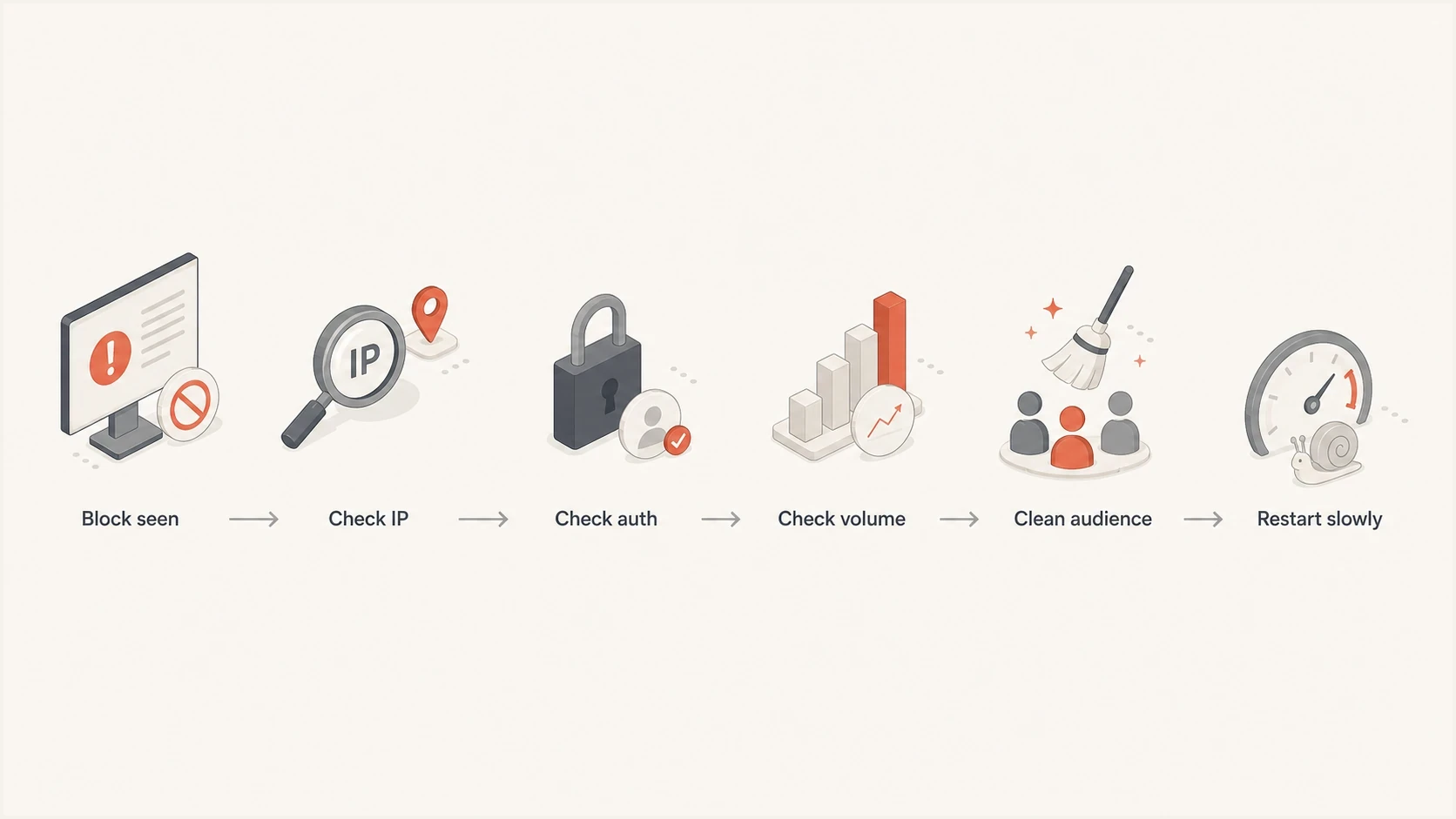
Dedicated IP blocklist and blacklist diagnosis flow before traffic restarts.
For Microsoft-family addresses, compare sender data with your list count for Outlook, Hotmail, and Live recipients. If the receiver sees far more messages than expected, inspect retries, forwarded traffic, automated notifications, and any sender that shares the same IP. For a provider-specific block, the deeper recovery path is different from a general blacklist cleanup. A Microsoft issue such as blocked by Hotmail needs throttling and provider feedback, not only blocklist removal.
Fix the sending plan
Once you know the likely cause, fix the plan before asking for delisting. Reduce the setup to one clean IP, one authenticated domain path, and the safest audience. That removes noise. If one IP cannot send to a recently engaged segment without blocks, four IPs will not solve the root issue.
Recovery sequence
- Pause risky sends: Stop full-list campaigns, old segments, and unproven acquisition streams.
- Pick one IP: Restart on the cleanest IP instead of rotating across several reputations.
- Use best data: Send to recent clickers, purchasers, active account users, or confirmed subscribers first.
- Make leaving easy: Add one-click unsubscribe headers and a visible unsubscribe link to marketing mail, then honor suppressions promptly.
- Watch feedback: Hold volume when deferrals, bounces, or complaints rise.
- Request review: Ask for removal only after the traffic change is visible in logs.
List quality matters more than IP ownership. Single opt-in can work when the signup path is clear and the first message is immediate, but it creates risk when the category draws casual signups, incentives, unclear sources, or vague expectations. If complaints are the signal, suppress anyone without recent engagement and move high-risk acquisition sources out of the recovery stream.
Separate promotional mail from transactional messages by IP or DKIM identity when the traffic has different consent, cadence, and complaint patterns. A campaign recovery should not put password resets, receipts, or account alerts behind the same damaged reputation.
Check authentication and connection identity after every routing change. A clean dedicated IP still fails if neither SPF nor DKIM passes with a domain aligned to the visible From domain, the return-path is unrelated to the brand, the PTR hostname does not resolve forward to the same IP, or the message format breaks SMTP and header standards.
Minimum identity checklisttext
SPF: sending IP is authorized for the return-path domain
DKIM: valid signature uses a domain aligned with the visible From domain
DMARC: SPF or DKIM passes with exact or relaxed organizational-domain alignment
PTR/rDNS: IP resolves to a hostname that maps back to the same IP
HELO/EHLO: valid hostname is consistent with the sending identity
TLS: outbound connections use transport encryption
Format: envelope and headers comply with RFC 5321 and RFC 5322
Bounce: return-path domain is controlled and identifiable
Where Suped fits
Suped is our DMARC and email authentication platform. For this workflow, it connects DMARC monitoring, SPF and DKIM checks, blocklist and blacklist monitoring, deliverability insights, and real-time alerts. The practical value is seeing the issue, affected source, and repair steps in one place.

Blocklist monitoring page showing domain and IP checks across blocklists with importance and status
For dedicated IP recovery, Suped's blocklist monitoring helps you watch domains and dedicated IPs while DMARC reports show which sources send for the domain. Compare listing timestamps and affected IPs with authentication changes and reported traffic. That helps determine whether the listing, an unauthorized source, or the sending plan is the cause.
For MSPs and agencies, Suped's multi-tenant dashboard lets teams compare domains, sources, policies, alert history, and reputation status without logging into a separate account for each client.
When to ask for review
Ask for provider review when you can state what changed. A useful request names the exact IP, sending domain, bounce response, date the block started, volume reduction, list segment now used, and authentication checks that pass.
- Name each IP: Do not ask for a whole range unless the whole range is truly affected.
- State the change: Explain the throttling, suppression, list cleaning, security containment, or authentication repair already done.
- Attach evidence: Use bounce samples, timestamps, affected domains, and current send volumes.
- Keep sending low: A review is not a license to return to full volume immediately.
If a blocklist or blacklist listing is active and connected to the failures, follow that operator's removal process after fixing the cause. If the issue is provider-specific, use the provider's sender support path and keep the restart slow. A successful review gets the IP unblocked without triggering the same signal again.
Views from the trenches
Best practices
Verify each IP's receiver volume against your send logs before asking for removal.
Restart recovery with the most active subscribers and one IP before adding traffic.
Keep each dedicated IP tied to clear consent and a stable cadence under one identity.
Common pitfalls
Spreading weak subscriber data across four IPs makes provider filters more suspicious.
Assuming a warm IP is healthy without checking daily receiver data misses blocks.
Requesting review for a whole range hides which specific IP needs a separate decision.
Expert tips
Throttle Microsoft traffic first, then increase only after provider data stays clean for days.
Use double opt-in or recent engagement filters for higher complaint-risk categories.
Separate transactional mail so campaign recovery does not harm account messages.
Expert from Email Geeks says receiver volume should match the expected Outlook, Hotmail, and Live audience, and the RCPT and DATA columns can reveal traffic that the sender did not expect.
2020-02-27 - Email Geeks
Marketer from Email Geeks says throttling is the first practical move when Microsoft blocks dedicated IP traffic, especially when several IPs carry one domain.
2020-02-27 - Email Geeks
The practical fix
Your dedicated IPs are blocked because the current traffic has created a reputation, trust, security, or authentication signal that receivers do not like. Fix that signal before chasing removal. Start with blocklist and blacklist checks, bounce evidence, receiver feedback, send logs, queue totals, and authentication results. Then contain unauthorized traffic, reduce volume, send only to the safest audience, and rebuild on one IP until the data stays clean.
If multiple dedicated IPs are blocked for the same domain, treat it as a domain and data problem until proven otherwise. More IPs add complexity. Cleaner consent, steadier volume, consistent identity, and reliable authentication are what get the recovery to hold.




