Why is my IP address blocked by Hotmail and how do I resolve it?

Updated on 22 Sep 2026: We updated this guide with Microsoft's current sender rules, delisting routes, and recovery steps for Hotmail IP blocks.
Your IP address is blocked by Hotmail because Microsoft has classified mail from that IP as unwanted or risky. The cause is usually IP reputation, not one bad DNS record. The fix is to stop or heavily reduce Hotmail traffic, correct the behavior behind complaints, invalid recipients, or sudden volume changes, confirm SPF, DKIM, DMARC, reverse DNS, and sending identity, then follow the route in the rejection message and restart with a much smaller engaged audience.
The hard part is that Hotmail and Outlook.com rarely give a detailed human explanation. A green content score, a valid SPF record, or a clean-looking blacklist check does not prove the IP is trusted. Microsoft can still block mail when its internal reputation data shows complaints, invalid recipients, suspicious traffic, or other abusive patterns.
If 100% of Hotmail mail is rejected, continuing to send transactional, triggered, or marketing traffic through the same IP usually keeps the block alive. Pause Hotmail-bound traffic first, then work backward through permission, engagement, complaints, authentication, and infrastructure before submitting another delist request.
Why Hotmail blocks an IP address
Hotmail, Outlook.com, Live, and MSN addresses sit behind Microsoft consumer mail filtering. The filter evaluates the sending IP, domain, authentication, recipient complaints, unknown users, traffic consistency, and signs of compromised infrastructure. A valid message can still be rejected when the source IP or surrounding network has poor reputation.
A block is often the late stage of a reputation problem. Before the block, mail has usually spent time going to junk or bulk. If the sender changes nothing, the receiving system can move from filtering the message to rejecting the connection or returning a bounce. That is why a delisting request without behavior changes fails so often.
Content signals
- Microsoft evaluates message wording, URLs, attachments, and formatting.
- A green content screen can pass even when the IP is still blocked.
- Remove suspicious URLs, broken templates, and heavy image-only layouts.
IP reputation signals
- Complaints, invalid recipients, and traffic spikes affect the IP.
- A banned IP can reject good-looking mail before content matters.
- Stop bad traffic patterns and rebuild with engaged recipients.
The strongest practical clue is the pattern behind the traffic: complaint rate, bounce rate, list age, unknown users, old imports, shared IP neighbors, sudden volume jumps, and whether recipients have ignored the sender for months. Also investigate compromised mailboxes, web applications, leaked API credentials, open relays, unexpected queue spikes, and address-validation activity that resembles namespace mining.
Complaint pressure
Use complaint rate as a risk signal. Microsoft does not publish one universal cutoff for every sender.
Low
Under 0.1%
Keep watching trends and list sources.
Concerning
0.1-0.3%
Suppress weak segments before the next campaign.
High risk
Above 0.3%
Treat this as a permission or targeting problem.
How to confirm the Hotmail block
Start with the full bounce message, not a generic blacklist checker. Hotmail blocks usually appear as SMTP rejects with Microsoft wording, a sending IP reference, a 5.7.x enhanced status code, or an S-code such as S3140. Read the whole rejection because Microsoft uses separate handling for Outlook.com consumer mail and Microsoft 365 recipients, and the Office 365 portal is not a universal Hotmail delisting route.
Common Microsoft rejection patternstext
550 5.7.606-649 Access denied, banned sending IP [x.x.x.x]
550 5.7.511 Access denied, banned sender [x.x.x.x]
550 5.7.515 Access denied, sending domain does not meet the required authentication level
S3140 or S3150 network block for Outlook.com consumer mail
421 4.7.x temporarily deferred due to IP reputation
Also check whether the IP is listed on a public blocklist database or blacklist, but do not stop there. Microsoft can block mail even when public blocklists are clean, because its internal reputation system has its own recipient and abuse signals.
Blocklist checker
Check your domain or IP against 144 blocklists.







After that, run a broader authentication and DNS review. A domain health check helps catch missing DMARC, SPF lookup problems, broken DKIM selectors, reverse DNS gaps, and sender identity mismatches that weaken a delist request.
|
|
|
|---|---|---|
5.7.606-649 | Microsoft 365 blocked IP | Follow the NDR portal |
5.7.511 | Manual source review | Forward the full NDR |
5.7.515 | High-volume authentication failure | Fix SPF, DKIM, and DMARC |
S3140/S3150 | Consumer network block | Use consumer sender support |
421 4.7.x | Temporary deferral | Reduce rate and retry |
Use the full bounce code to decide the next action.
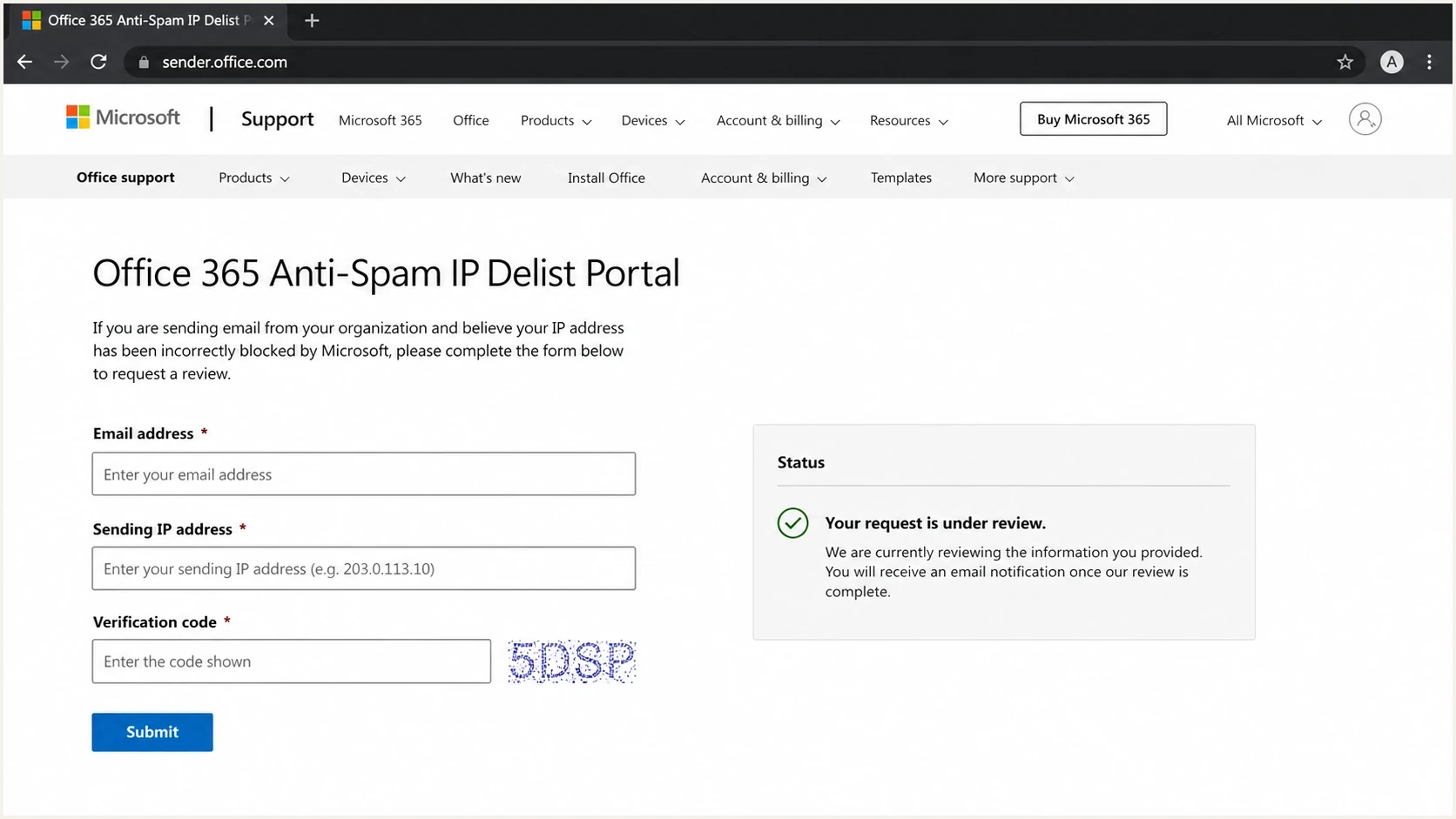
Microsoft 365 Anti-Spam IP Delist Portal form for a blocked source IP.
Microsoft's high-volume sender requirements
Microsoft enforces additional authentication requirements for primary domains sending more than 5,000 messages per day to Outlook.com consumer addresses. Volume from the primary domain and its subdomains rolls up to the same threshold. A 550 5.7.515 rejection points to this authentication rule, not an IP delisting problem.
- SPF must pass for the envelope sender domain.
- DKIM must pass with a valid signature.
- A valid DMARC record must be published, and DMARC must pass through aligned SPF or DKIM.
- The aligned domain must match the visible From domain under the domain's DMARC alignment mode.
Microsoft accepts a valid DMARC policy starting at p=none for this requirement, although the message still has to pass DMARC. Passing these checks resolves 5.7.515, but it does not override a separate IP reputation block, public blocklist or blacklist listing, or poor recipient response.
Check the authentication results in a rejected message before requesting delisting. If the code is 5.7.515, repair the From-domain alignment and verify every sending source that uses the primary domain or its subdomains.
Choose the correct Microsoft delisting route
Follow the destination and instructions in the full NDR. A 5.7.606-649 NDR is the clearest sign that the source IP is on Microsoft's blocked senders list. Microsoft 365 commercial mail and Outlook.com consumer mail use separate support paths, even when the rejection text looks similar.
|
|
|
|---|---|---|
5.7.606-649 | Office 365 Anti-Spam IP Delist Portal | One mailbox that received the NDR and one blocked source IP per visit |
5.7.511 | Email review at delist@microsoft.com | The complete NDR and blocked IP, because the portal cannot resolve this code |
S3140 or S3150 | Outlook.com consumer sender support | The full bounce, source IP, affected consumer domain, and corrective actions |
Match the rejection to the supported Microsoft route.
For the Microsoft 365 portal, submit the details, open the confirmation message, return through its confirmation link, and select Delist IP. Microsoft says restrictions can take 24 hours or longer to clear. For 5.7.511, Microsoft says it will contact the sender within 48 hours after the full NDR is forwarded.
A successful delist removes the listed block. It does not guarantee inbox placement or acceptance of mail that still fails Microsoft's security checks.
How to resolve a Hotmail IP block
Submitting the form is only one part of recovery. If Microsoft keeps seeing the same traffic after a block, delisting either fails or the IP gets blocked again quickly. Use this sequence so Microsoft sees a different traffic pattern after the request.
- Pause sending to Hotmail, Outlook.com, Live, and MSN recipients when the block is hard.
- Keep full NDRs, sending IPs, timestamps, envelope senders, and sample message IDs.
- Remove old imports, unengaged Microsoft recipients, role accounts, and weak consent sources.
- Confirm SPF, DKIM, DMARC, reverse DNS, HELO, and visible From-domain alignment.
- Follow the Microsoft delist steps only when the NDR points to that portal.
- For 5.7.511, forward the full NDR to the address named in the rejection and include the blocked IP.
- Resume with recent reliable activity, then expand only while rejects and complaints stay low.
If Microsoft refuses to delist after traffic is paused, more waiting alone is not a fix. A quiet IP with the same bad list loaded for the next send has not recovered. It is only paused.
If the portal says the IP is not currently blocked but your logs still show Hotmail rejects, treat it as a routing and evidence problem. Confirm the exact source IP, check whether a gateway or relay changes the source, and verify that the rejected IP is the one you submitted. An S3140 or S3150 response can also cover a wider network range, so ask the hosting provider to investigate neighboring senders.
A valid DMARC record will not force Hotmail to accept the IP, but weak authentication hurts trust and makes troubleshooting slower. Start with monitoring while you inventory legitimate senders and verify alignment:
Example DMARC TXT recorddns
_dmarc.example.com TXT "v=DMARC1; p=none; rua=mailto:d@example.com"
For deeper Microsoft-specific cases, the same recovery logic applies to sudden Hotmail SMTP blocks and cases where Microsoft delisting fails. The difference is usually evidence quality, source IP clarity, and whether the sender changed the traffic mix after the first rejection.
What to fix before asking again
Before another delist request, identify which recipients and sources created risk. The most useful segments are Microsoft recipients with no reliable activity in the last 90 to 180 days, recipients who recently unsubscribed, addresses added by import, and addresses mailed after long silence. Use clicks, replies, purchases, or other first-party events where available, because privacy protections can inflate open data. These groups show whether the block came from permission decay, bad acquisition, or volume pressure.
Check whether triggered mail is truly wanted. Password resets and purchase receipts should stay separate from marketing, but triggered mail can still be a problem when it includes promotional modules, sends too often, or goes to accounts that never asked for it.
|
|
|
|---|---|---|
Permission | Consent age | Suppress stale |
Complaints | Rate spike | Cut source |
Identity | SPF/DKIM | Repair DNS |
Routing | Source IP | Match logs |
Volume | Daily jump | Ramp slowly |
Compact recovery checklist before the next request.
Send a real test message after the fixes, then inspect authentication, headers, spam signals, and rendering with an email tester. A test does not replace Microsoft recipient data, but it catches basic defects before you send into a fragile reputation state.
A shared IP adds another variable. If other senders damaged the IP, your list hygiene still shares the same reputation pool. Ask the provider for Microsoft-specific bounce and complaint data, plus a clear plan for isolating risky senders.
Where Suped fits
Suped is our DMARC and email authentication platform. It does not force Microsoft to delist an IP. Suped helps teams collect evidence and fix issues that affect recovery by showing DMARC results, SPF and DKIM status, sending sources, policy gaps, and blocklist or blacklist signals in one workflow.
For this workflow, Suped turns authentication and reputation evidence into concrete issues with repair steps. That helps when a Hotmail block involves more than one sending source or domain.

Issue steps to fix dialog showing the issue overview, tailored fix steps, and verification action
- Suped flags broken authentication, misconfigured records, and risky source patterns.
- Alerts help teams react before a Microsoft delivery issue becomes a hard block.
- Hosted SPF, DMARC, and MTA-STS controls reduce DNS maintenance.
- Suped's blocklist monitoring keeps IP and domain checks beside DMARC data.
- MSPs and agencies can review many client domains in the same account.
When a sending IP is blocked by Hotmail, the team needs to see which sources pass authentication, which domains have policy gaps, which IPs have blocklist or blacklist signals, and which repairs remain open. Suped keeps that evidence together during diagnosis, repair, the delist request, and the cautious restart.
Views from the trenches
Best practices
Pause Hotmail traffic during hard blocks, then restart with recent engaged recipients only.
Keep full NDRs, source IPs, timestamps, and sender domains before each delist request.
Separate transactional and marketing streams so one weak list cannot damage every send.
Common pitfalls
Treating a green content result as proof that Microsoft trusts the sending IP again.
Submitting repeated delist requests without changing list quality or send volume first.
Leaving triggered mail active during a 100% block and extending the same bad pattern.
Expert tips
Use Microsoft complaint and rejection data to find the list source causing pressure.
Review quiet recipients with no reliable clicks, replies, or purchases before sending.
When delisting fails, wait longer only after the traffic pattern has clearly changed.
Expert from Email Geeks says Hotmail content colors and IP blocking measure separate things, so a green content result does not clear a blocked IP.
2024-04-18 - Email Geeks
Expert from Email Geeks says the usual reason is unwanted mail at the recipient level, so permission and engagement have to be fixed before recovery.
2024-04-19 - Email Geeks
How to prevent another Hotmail IP block
A Hotmail IP block is a reputation decision. The cleanest recovery path is to stop feeding the block, prove that the sending identity is technically sound, remove the segments that Microsoft users do not want, then request delisting with accurate evidence.
After the block lifts, treat the restart as a controlled reputation rebuild. Begin with recently engaged Microsoft recipients, cap volume, and watch rejects and complaints each day. Expand only while the data stays stable. Keep new or inactive recipients out of the first sends, and investigate sudden queue growth before it reaches Microsoft.




