Why is my SMTP server suddenly blocked by Hotmail?

Published 8 Aug 2025
Updated 31 Jul 2026
11 min read
Summarize with
Updated on 31 Jul 2026: We clarified Microsoft SMTP error codes, added the current high-volume authentication requirements, and expanded the recovery checks for Hotmail blocks.
If the bounce contains S3150, Hotmail has blocked the public outbound IP or part of its network at the SMTP stage. Other 550 or 553 responses can instead point to policy, authentication, or relay problems, so the complete response text matters more than the three-digit status alone.
Treat an S3150 response as a reputation incident first. Confirm the exact bounce, pause or throttle Microsoft-bound mail, check SPF, DKIM, and DMARC, inspect recent complaint and bounce changes, then send only clean test traffic. If you already run blocklist monitoring, check both the SMTP IP and the domain because a blocklist or blacklist signal is often only one part of the problem.
- Most likely cause: For S3150, Microsoft has blocked the public sending IP or surrounding network after reputation or policy signals.
- Most urgent action: Stop pushing rejected Hotmail traffic at the same rate, especially if you were sending thousands per hour.
- Most common mistake: Assuming nothing changed because DNS and infrastructure look the same as last month.
What the Hotmail block usually means
Hotmail is part of Microsoft's Outlook.com consumer mail system. In practice, Hotmail, Outlook.com, Live.com, and MSN.com recipients often behave like one receiver family for sender reputation. A block against one can show up across the group, even if only Hotmail users report the issue first.
S3150 means the public outbound IP, or part of its network, is on Microsoft's own blocklist. It does not prove the IP appears on a public blocklist or blacklist, and it is not proof that Microsoft announced a new policy. The underlying trigger can involve IP reputation, complaints, invalid recipients, suspicious traffic, poor list quality, or activity elsewhere in a shared network range.
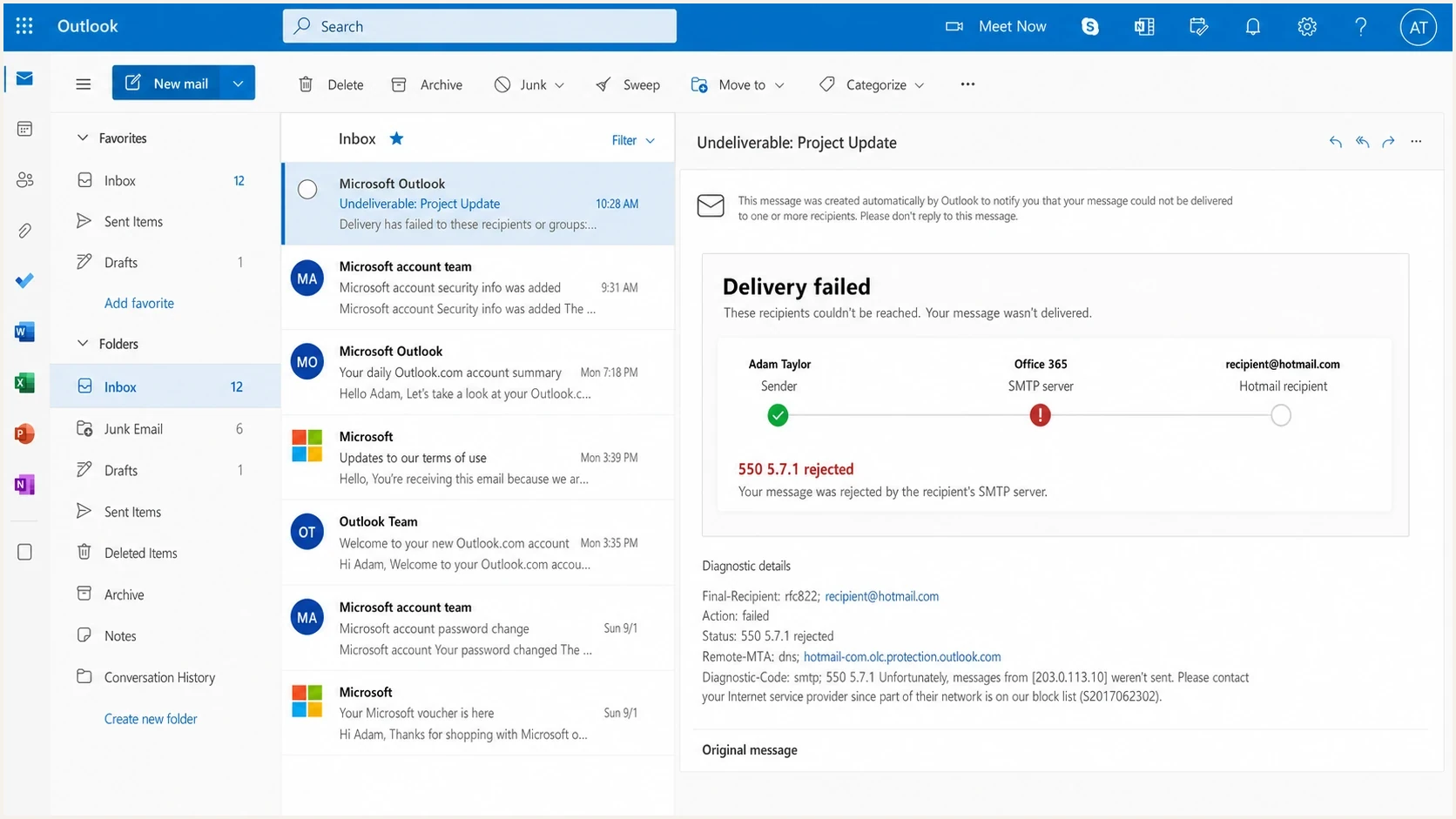
Outlook.com inbox showing a 550 5.7.1 Hotmail SMTP delivery failure.
The word sudden can mislead the investigation. A block often appears suddenly to the sender, but the receiver has usually been collecting weak signals for days or weeks. Rising complaints, more invalid recipients, unusual connection behavior, and reduced recipient interaction can appear before SMTP-level rejection.
|
|
|
|---|---|---|
S3150 | IP or network block | Pause Hotmail |
5.7.515 | Authentication rejection | Fix SPF, DKIM, DMARC |
Junking | Trust decline | Segment domains |
421 RP | Rate or connection limit | Slow sending |
Common Microsoft-side symptoms and first actions.
If your related issue is specifically an IP-level block, the recovery path overlaps with Hotmail IP block remediation: reduce bad traffic, prove the source is authenticated, and rebuild trust with engaged recipients.
Do not keep hammering the same route
If Hotmail starts rejecting a server that was sending about 5,000 messages per hour, continuing at that pace usually makes recovery harder. A receiver sees repeated unwanted attempts, not a sender trying to debug.
First identify which SMTP server rejected the message
A Hotmail recipient address does not prove Hotmail rejected the message. Read the Remote-MTA or reporting host in the non-delivery report. A response from an Outlook.com protection host points to recipient-side filtering, while a response from your own configured outgoing server points to submission, authentication, or relay settings.
- S3150 in a 550 5.7.1 response: Microsoft has blocked the public sending IP or surrounding network. Investigate traffic quality and follow the support route named in the current bounce.
- 550 5.7.515: A high-volume sending domain does not meet Microsoft's SPF, DKIM, and DMARC requirements. Correct authentication before retrying.
- 421 RP response: Microsoft is limiting mail because of rate, connections, or reputation. Keep the mail queued, use backoff, and reduce concurrency.
- 550, 553, or relay prohibited from your outgoing server: The SMTP server did not authorize the submission. Verify the configured host, port, TLS setting, credentials, SMTP authentication, and permitted From domain.
This distinction prevents two expensive mistakes: filing an IP review for a local relay problem, or repeatedly changing client settings when Microsoft is rejecting the public sending IP. Preserve the complete bounce before testing either path.
Signals that lead to sudden blocking
The most useful question is not, "What changed in Hotmail today?" The better question is, "What changed in how Microsoft now scores my traffic?" That score can shift even when your server, DNS, and application code did not change.
Sender-side signals
- Volume: A jump in Hotmail-bound mail can trip rate and reputation controls.
- List quality: Old or weakly opted-in addresses create complaints and bounces.
- Recipient response: Lower interaction and more junk reports show that recipients do not want the mail.
- Infrastructure: New IPs, rDNS gaps, HELO mismatches, or shared ranges change trust.
Microsoft-side signals
- Thresholds: A small reputation drop can cross an internal rejection line.
- Delay: Bad signals can accumulate before enforcement becomes visible.
- Domain family: Hotmail, Outlook.com, Live, and MSN can expose one shared issue.
- Rate limits: High hourly volume can turn weak trust into hard rejection.
This is why a server can work for a month and then fail. The behavior of recipients, the mix of addresses, and the amount of traffic all feed the reputation calculation. Your unchanged server can still send a changed risk profile.
The first hour triage
Start with evidence. Record the exact SMTP response, the sending IP, the envelope sender, the From domain, the HELO or EHLO name, the timestamp, the recipient domain, and the campaign or application that produced the message. Without that, every fix becomes guesswork.
- Capture the bounce: Save the full SMTP transcript, including the Microsoft hostname and response string.
- Stop the failing segment: Pause or throttle Hotmail, Outlook.com, Live.com, and MSN.com traffic.
- Split by domain: Compare Microsoft recipients against other large mailbox providers instead of using one blended rate.
- Send a controlled test: Use an email tester through the same SMTP path and inspect the headers.
- Run domain checks: Use a domain health check to catch SPF, DKIM, DMARC, rDNS, and DNS issues.
- Check listings: Compare the IP and domain against public blocklists because a blacklist hit can explain only part of the rejection.
- Check for compromise: Inspect authenticated SMTP logs, queue growth, new accounts, unexpected scripts, and open relay tests before assuming the traffic is legitimate.
If only Microsoft domains are failing, do not rebuild the entire mail system. Keep the investigation narrow: Microsoft-bound traffic, the IPs used for that traffic, and the recent behavior of Microsoft recipients.
?
What's your domain score?
Deep-scan SPF, DKIM & DMARC records for email deliverability and security issues.
A clean domain result does not prove reputation is healthy, but it removes common blockers before you ask for review. A broken result gives you a fix to make before attempting recovery.
Authentication checks before asking for review
SPF, DKIM, and DMARC do not guarantee Hotmail inbox placement, but broken authentication makes recovery slower. For domains sending more than 5,000 messages per day to Outlook.com consumer accounts, Microsoft requires SPF and DKIM to pass, plus DMARC at p=none or p=reject with either the SPF or DKIM identity matching the visible From domain. Non-compliant mail can be rejected with 550 5.7.515, which is separate from S3150.
Illustrative DNS patterndns
example.com TXT
"v=spf1 include:_spf.sender.example -all"

selector1._domainkey.example.com TXT
"v=DKIM1; k=rsa; p=BASE64_PUBLIC_KEY"

_dmarc.example.com TXT
"v=DMARC1; p=none; rua=mailto:dmarc@example.com"
The DMARC policy does not need to be at reject on day one. For a live incident, visibility matters first. Aggregate reports show which services are sending, which sources pass, and which sources fail. Once the legitimate sources are clean, policy enforcement becomes a controlled change instead of a risky guess.

Issue steps to fix dialog showing the issue overview, tailored fix steps, and verification action
Suped's product can support this stage by combining DMARC reports with SPF and DKIM diagnostics, verified source detection, blocklist and blacklist monitoring, and alerts. Use its issue-level steps to trace the failing source, then apply hosted SPF, hosted DMARC, or hosted MTA-STS only when those managed DNS workflows fit the environment.
Why unchanged systems still get blocked
An unchanged SMTP server can still become a riskier sender. Recipient behavior changes, list age changes, inbox placement changes, and campaign mix changes. If messages land in junk for two weeks, genuine interaction falls and complaints can rise. A lower unsubscribe rate can look good in a dashboard while recipients simply are not seeing the mail.
Example Microsoft engagement decline before a block
Illustrative relative score showing why a block can feel sudden after several weaker weeks.
Relative engagement
At 5,000 Hotmail messages per hour, small quality issues become large receiver signals quickly. That example rate is not Microsoft's policy threshold. A small complaint rate, spam traps, or a bad batch of old addresses can still create enough negative evidence for Microsoft to reject the next wave.
Watch top recipient domains separately. A blended campaign report can hide a Microsoft-specific delivery drop until the SMTP block appears. By then, the warning signs are already old.
A practical recovery path
Recovery is a sequence. If you ask for review before changing the traffic that caused the block, the same signals reappear. If you change traffic first, you have a better case and a cleaner restart.
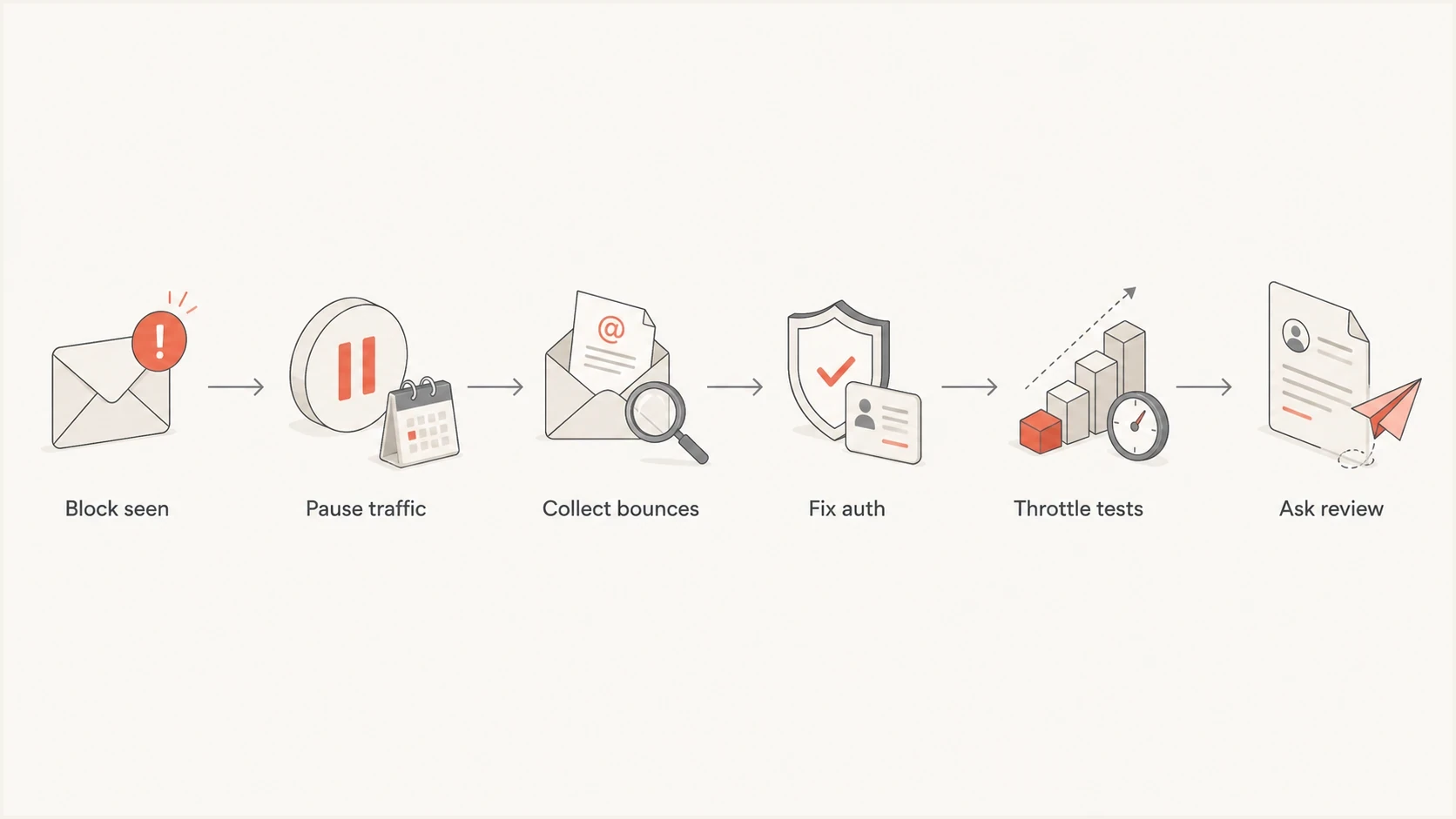
Flowchart showing the recovery path after a Hotmail SMTP block.
This order separates damage control from proof. The first goal is to stop repeating the rejected behavior. The second goal is to prove the mail that remains is authenticated, expected, and wanted.
- Throttle first: Reduce Microsoft-bound volume and stop automatic retries that create repeated failures.
- Use engaged recipients: Restart only with recent openers, clickers, purchasers, or active account users.
- Remove risky mail: Suppress old addresses, role accounts, bounced contacts, scraped addresses, and unconfirmed signups.
- Fix identity: Use stable From domains, correct rDNS, consistent HELO names, and signed DKIM.
- Ask for review: Contact Microsoft after you can show authentication is clean and volume is under control.
- Warm back slowly: Increase only when bounces, complaints, and junk placement stay stable.
Do now
- Evidence: Save bounces and headers before changing routes.
- Segmentation: Separate Microsoft domains in every report.
- Clean traffic: Send only to recipients with recent activity.
Avoid
- Route hopping: Moving bad traffic to a new IP repeats the issue.
- Bulk retries: Repeated failures add more negative evidence.
- DNS-only fixes: Authentication repairs do not erase weak engagement.
How to prevent the next Hotmail block
The long-term fix is recipient-domain monitoring rather than total campaign performance alone. Track Microsoft domains together and compare them with other large recipient groups. If Hotmail starts drifting while the other groups stay stable, use a Microsoft-specific intervention.
- Domain reporting: Review opens, clicks, bounces, complaints, and unsubscribes by recipient domain every week.
- Source inventory: Know every platform, app, and SMTP server that sends using your From domain.
- Authentication drift: Watch for new senders that fail SPF, DKIM, or DMARC before receivers punish the domain.
- Reputation watch: Monitor blocklist and blacklist status for both IPs and domains, not only the SMTP host.
- Policy staging: Move DMARC policy in stages after legitimate mail sources are visible and clean.
In Suped's product, group domains by sending service, review DMARC authentication changes, watch IP and domain blocklist or blacklist status, and route alerts to the team that owns each source. Multi-tenancy gives MSPs and agencies the same workflow across client domains without mixing their evidence.
The practical prevention rule
If Microsoft performance changes while global performance looks stable, treat it as an early warning. Waiting for an SMTP rejection means waiting until the receiver has already escalated the issue.
Views from the trenches
Best practices
Track Hotmail, Outlook.com, Live, and MSN as one Microsoft consumer mailbox family.
Watch engagement by recipient domain weekly so a slow Microsoft decline is visible early.
Keep DNS authentication clean before reputation repair, not after the block appears.
Common pitfalls
Assuming no internal change means Microsoft made a public policy change that caused it.
Continuing rejected volume at the same rate and teaching filters the traffic is unwanted.
Checking only global open rate while Microsoft domains are already moving mail to junk.
Expert tips
Compare bounces, complaints, and engagement for Microsoft domains before filing review.
Throttle first, then send only recent clickers while reputation recovery starts safely.
Treat falling opt-outs plus falling opens as a warning that mail is missing the inbox.
Expert from Email Geeks says Microsoft filtering changes continuously because reputation models learn from current traffic, not only announced policy changes.
2024-03-08 - Email Geeks
Marketer from Email Geeks says blocks that feel sudden often follow weeks of weaker Microsoft engagement and rising junk placement.
2024-03-10 - Email Geeks
The answer in practice
If the response contains S3150, your SMTP server is blocked by Hotmail because Microsoft has blocked the public sending IP or surrounding network. It looks sudden because the enforcement point is visible, while the reputation or policy signals that led to it often build quietly.
The fix is to stop the failing traffic, collect the evidence, repair authentication and sender identity, check for compromised sending, clean the Microsoft segment, then restart slowly with engaged recipients. After that, make monitoring permanent so the next decline is visible before it becomes a Hotmail block.




