Why Hotmail email deliverability suddenly dropped


Updated on 14 Aug 2026: We updated this guide with Microsoft's enforced high-volume authentication rules and a clearer sending-velocity diagnosis.
A sudden Hotmail email deliverability drop usually means Microsoft has started treating your mail differently at the mailbox provider level. The cause is usually a temporary Microsoft-side deferral, an IP or domain block, a reputation drop, a sending-velocity or list-quality change, or a DNS authentication problem.
The first mistake is treating every sudden Hotmail issue as a spam-folder problem. If your delivery rate fell from 99.9% to 62.3%, that is not the same incident as opens falling by 50%. A delivery-rate collapse means messages are bouncing, deferring, pending, or being rejected before the inbox decision is complete. Start there because it changes the response.
If Hotmail and Outlook.com drop while Gmail, Yahoo, corporate domains, and smaller mailbox providers stay stable, isolate Microsoft traffic before changing every sending practice. A provider-specific collapse points to provider filtering, provider capacity, Microsoft-specific reputation signals, or Microsoft-specific blocking.
Why the drop happens
Hotmail deliverability suddenly drops when Microsoft starts throttling, deferring, junking, or rejecting a sender that it previously accepted. Sometimes that decision follows a sender-side change. Sometimes it follows Microsoft-side changes to filtering, routing, or server capacity. Prove which side the evidence supports before requesting removal, pausing traffic, or changing authentication.
- Temporary deferrals: Microsoft accepts the connection path only slowly, so messages sit pending or retry for hours.
- Hard blocking: Microsoft rejects the IP, domain, or message pattern with a clear SMTP rejection.
- Filtering change: Mail still delivers, but more messages land in junk because Microsoft changed risk scoring.
- Sender reputation: Complaint rate, unknown-user rate, low engagement, or spam-trap exposure changed the way Microsoft scores you.
- Sending velocity: A quiet Microsoft-bound stream followed by a large batch can trigger rate limits even when total sending volume looks stable.
- Authentication drift: SPF, DKIM, DMARC, rDNS, or domain matching changed after a DNS edit, vendor change, or mail stream move.
Example pattern: Microsoft-only delivery drop
A provider-specific fall is more meaningful than a global average.
Delivery rate
A sharp one-provider drop is a signal, not a diagnosis. If the same IPs, domains, templates, and audiences work everywhere except Hotmail, the evidence leans toward Microsoft-specific treatment. If every major provider drops, your own sending system, content, list quality, or authentication has probably changed.
First separate delivery from placement
Separate the incident into delivery rate and inbox placement, then review engagement. Delivery rate tells you whether Microsoft accepted the message. Inbox placement tells you whether accepted mail reached inbox or junk. Engagement tells you whether recipients are still opening and clicking after delivery. Blending those metrics hides the cause.
Delivery rate drop
This is a transport problem first. Focus on bounces, deferrals, retry queues, SMTP text, IP blocks, and message acceptance.
- Primary metric: Accepted messages versus sent messages.
- First logs: SMTP responses, retry status, bounce categories, and queue age.
Inbox placement drop
This is a filtering problem first. Focus on recipient engagement, complaints, content changes, sender reputation, and authentication results.
- Primary metric: Inbox placement among messages Microsoft accepted.
- First logs: Seed tests, headers, authentication pass rates, and campaign-level engagement.
When the symptom is unclear, send a controlled message through an email tester and compare headers, authentication, and placement across providers. Use the test as a snapshot, then confirm it against real bounce and delivery data.
Email tester
Send a real email to this address. Suped shows a results button when the test is ready.
?/43tests passed
If Microsoft returns SMTP errors, sort them by response text and enhanced status code. This usually tells you whether the issue is temporary capacity, reputation throttling, or a hard block.
Common Microsoft-style bounce cluestext
451 4.7.0 Temporary server error. Please try again later.
451 4.3.0 Insufficient system resources.
421 4.7.0 Server busy. Please try again later.
451 4.7.650 The mail server has been temporarily rate limited due to IP reputation.
550 5.7.515 Access denied, sending domain does not meet the required authentication level.
550 5.7.1 Messages from this IP were not accepted.
Check Microsoft-specific evidence
The best evidence is not one seed result or one angry recipient. Pull a Microsoft-only view of sends, accepts, bounces, deferrals, opens, clicks, complaints, and unsubscribes. Then compare it with the same metrics for non-Microsoft domains over the same hours.
|
|
|
|---|---|---|
Microsoft only | Provider treatment | Inspect bounces |
All providers | Sender change | Audit changes |
High deferrals | Throttling | Slow traffic |
Hard rejects | Block | Request review |
Low opens | Junk placement | Check placement |
Use this table to separate provider issues from sender issues.
If the failure is a hard block, the next step is different from a soft deferral. A hard block needs evidence, remediation notes, and a focused request for review. A soft deferral usually needs reduced volume, retry monitoring, and patience while you confirm that messages eventually deliver. For a deeper Microsoft blocking workflow, use the guide on Microsoft domains being blocked.
What to check in the first 30 minutes
- Scope: Is the drop limited to Hotmail, Outlook.com, Live.com, and MSN domains?
- Timing: Did it begin after a DNS edit, IP move, template launch, audience change, or burst in Microsoft-bound volume?
- SMTP text: Do the responses mention server busy, resources, policy, rate limiting, or a blocked sender?
- Queue state: Are messages pending and retrying, or are they failing outright?
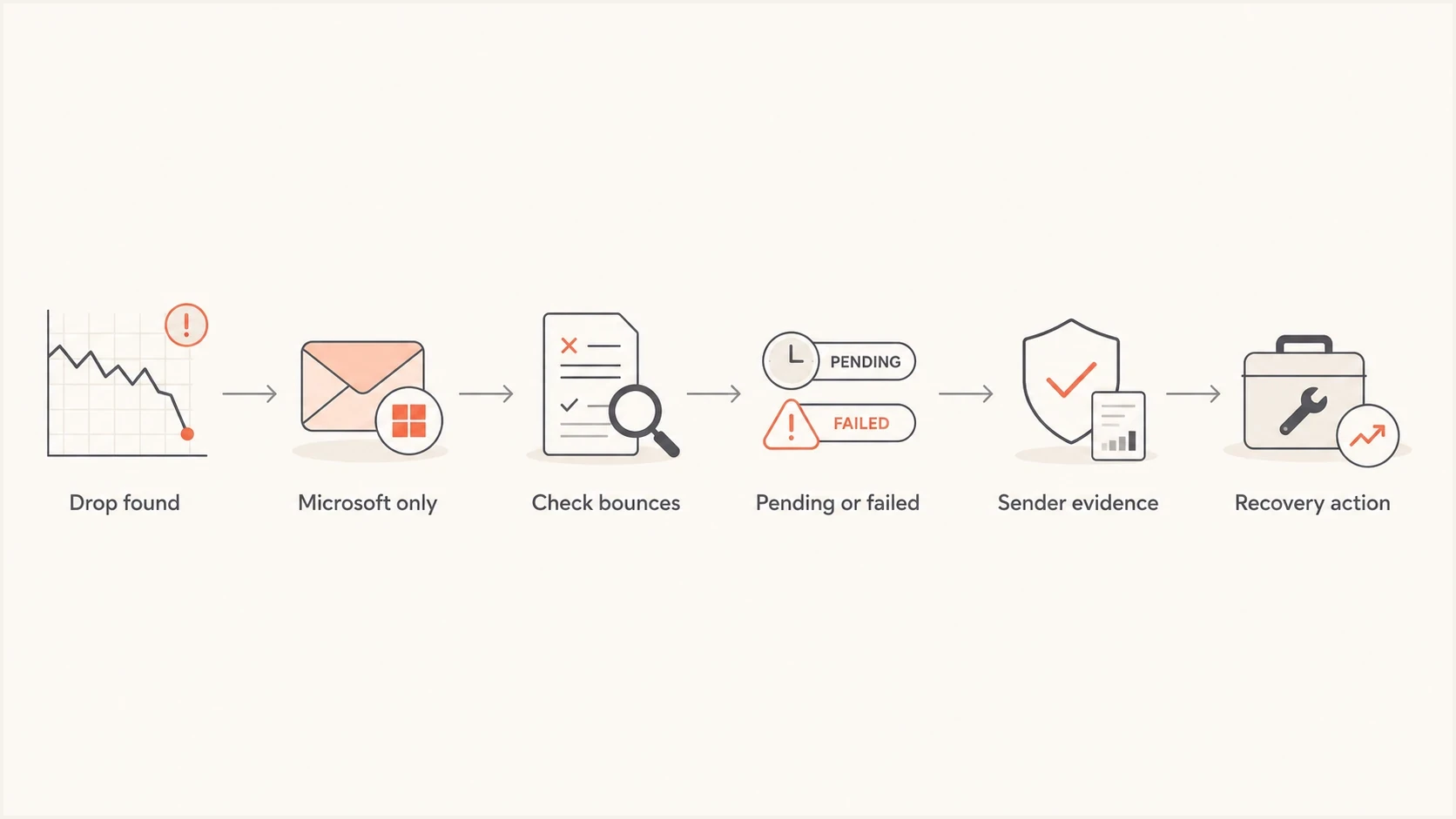
Hotmail email deliverability diagnosis flowchart covering bounces and recovery.
Authentication and DNS checks
A Hotmail-only drop can still come from your own DNS. Microsoft can be less forgiving than another provider for a specific message stream, especially when authentication breaks after a vendor switch or a new sending domain. Run a domain health check before you assume Microsoft has a platform issue.
Minimal DMARC record for monitoringdns
v=DMARC1; p=none; rua=mailto:dmarc@yourdomain.com
RFC 9989 classifies the former pct tag as historic. Omit it from new DMARC records instead of using percentage-based policy rollout.
- SPF: Confirm the sending IP is authorized and the SPF record stays under lookup limits.
- DKIM: Confirm the selector exists, the key matches the signer, and signatures pass.
- DMARC: Confirm the RFC 5322 From domain matches either the SPF-authenticated Mail From domain or the DKIM signing domain under DMARC rules.
- rDNS: Confirm reverse DNS exists and does not look generic or unrelated to the sender.
- Subdomains: Confirm transactional, marketing, and lifecycle streams do not share a broken setup.
This is where DMARC monitoring earns its keep. Aggregate reports show which sources pass, fail, or send without authorization. That turns a vague Hotmail complaint into a source-level problem you can assign and fix.
?
What's your domain score?
Deep-scan SPF, DKIM & DMARC records for email deliverability and security issues.
Suped's product groups DMARC source data, authentication checks, Hosted SPF, Hosted MTA-STS, and blocklist monitoring in one workflow. Teams can identify the source that started failing, follow issue-specific remediation steps, and receive alerts when authentication or blacklist status changes.

Issue steps to fix dialog showing the issue overview, tailored fix steps, and verification action
Microsoft high-volume sender requirements
Microsoft enforces additional authentication requirements for domains sending more than 5,000 messages per day to Outlook.com consumer addresses, including Hotmail.com and Live.com. Non-compliant mail can be rejected with 550 5.7.515, so a sudden drop after crossing that volume level needs an authentication review before a reputation appeal.
- SPF must pass: The sending source must be authorized for the envelope sender domain.
- DKIM must pass: The message must carry a valid signature from the configured signing domain.
- DMARC must pass: Publish at least p=none and make the visible From domain match SPF or DKIM under DMARC rules.
- Sender hygiene still matters: Use valid sender addresses, process unsubscribes, suppress invalid recipients, and keep complaint rates low.
Authentication is a baseline, not inbox access
Passing SPF and DKIM, plus DMARC, prevents an authentication-level rejection. Microsoft can still throttle or junk authenticated mail because of complaints, weak engagement, poor list quality, or unstable sending velocity.
Reputation and complaints
If bounces stay low but Hotmail opens and clicks fall, focus on reputation and placement. Microsoft uses signals such as complaints, recipient engagement, sender history, message patterns, and authentication. Microsoft's own engagement troubleshooting guidance also treats falling engagement as a deliverability symptom, not only a content-performance issue.
- Complaints: A small increase can matter when Hotmail volume is high or complaint history is weak.
- Engagement: Long-term non-openers create risk, especially after a sudden campaign volume increase.
- Bounces: A rising unknown-user rate tells Microsoft your list quality has slipped.
- Cadence: A sudden jump in frequency can make a previously stable stream look risky.
- Segmentation: Sending to dormant Hotmail users first is a common way to trigger filtering.
How to judge Hotmail risk
Use relative movement against your own baseline, not a single universal number.
Normal
Stable
Delivery, complaints, bounces, and engagement stay close to recent Microsoft baselines.
Watch
Changed
One metric moves sharply, but SMTP logs still show mostly accepted mail.
Act
Severe
Delivery collapses, deferrals climb, or hard rejects appear across Microsoft domains.
Review
Recovering
Microsoft improves after throttling, but engagement remains below baseline.
Do not overreact to one low-open campaign. Do react when Hotmail-only opens fall at the same time as deferrals, complaint indicators, or junk-folder placement. That pattern means Microsoft is actively changing how it treats your mail.
When it is Microsoft-side trouble
Sometimes the evidence points outside the sender. Microsoft-side capacity problems, filtering changes, cluster issues, or migrations can create sudden deferrals and inconsistent Hotmail behavior. That conclusion is defensible only after your logs show Microsoft-specific errors and your authentication, complaint, and blocklist (blacklist) checks look clean.
Signs it is outside sender control
- Provider scope: Only Microsoft-hosted domains show the sudden delivery collapse.
- Capacity text: Bounces mention server busy, temporary server error, or insufficient resources.
- Clean setup: SPF, DKIM, DMARC, rDNS, and blocklist (blacklist) checks show no new issue.
- Mixed impact: Some Microsoft recipients accept mail normally while others defer or fail.
During a Microsoft-side incident, the sender action is practical: reduce pressure, keep retries reasonable, avoid huge resends, preserve proof, and watch for recovery by recipient domain. If you flood retries or blast the same audience again, you can turn a provider issue into your own reputation issue.
|
|
|
|---|---|---|
Throttle | Reduces pressure | High deferrals |
Pause resends | Avoids complaints | Low placement |
Save logs | Supports review | Hard rejects |
Segment | Protects good users | Mixed response |
A calm response protects reputation while you gather proof.
Microsoft-specific temporary failures deserve their own handling path. The guide on temporary delivery failures goes deeper on retries and deferrals. A recent Microsoft Q&A report also shows how sudden Outlook and Hotmail bounces can appear provider-specific.
Recovery plan
The fastest recovery plan protects sender reputation while isolating the cause. Do not change everything at once. One change per stream, measured with Microsoft-only metrics, gives you a clean read on whether the action helped.
- Freeze changes: Stop template, DNS, IP, and audience changes until you have a baseline.
- Classify failures: Separate pending, deferred, bounced, blocked, and junked messages.
- Reduce risky volume: Pause dormant Hotmail users and spread Microsoft-bound batches into a steadier sending rate.
- Fix authentication: Resolve failed sources before asking Microsoft to review your sending.
- Document evidence: Keep timestamps, SMTP text, affected IPs, domains, and remediation notes.
Do now
- Throttle: Slow Microsoft traffic when deferrals climb.
- Segment: Keep mail to recent Hotmail engagers separate.
- Monitor: Track accepts, deferrals, bounces, and complaint signals by hour.
Do after 24-48 hours
- Escalate: Request review if hard rejects continue after fixes.
- Rebuild: Restart with engaged users before dormant segments.
- Compare: Check whether non-Microsoft domains followed the same pattern.
Suped's product supports this incident workflow with source-level DMARC data, authentication issue detection, alerts, hosted authentication controls, and blocklist (blacklist) monitoring. That gives the team one place to identify which source broke, assign the fix, and confirm whether authentication recovered.
Views from the trenches
Best practices
Separate Microsoft traffic first, then compare accepts, bounces, and opens by hour.
Save exact SMTP responses before changing DNS, IP routing, templates, or audience rules.
Throttle retry-heavy Microsoft streams so temporary deferrals do not damage reputation.
Common pitfalls
Treating a delivery-rate collapse like a normal spam-folder placement issue wastes time.
Blasting delayed Hotmail mail again can turn a provider problem into sender reputation loss.
Assuming a clean global average means Microsoft-specific bounces do not need review.
Expert tips
Keep a Microsoft-only dashboard for accepts, deferrals, complaint signals, and blocks.
Keep Microsoft-bound volume steady when a dedicated IP is otherwise quiet for days.
Use DMARC source data to prove whether a new vendor started failing authentication.
Marketer from Email Geeks says a delivery-rate drop needs bounce and pending-message analysis before anyone assumes the issue is only inbox placement.
2018-01-25 - Email Geeks
Marketer from Email Geeks says Microsoft-side server and filtering changes can create pockets of unusual Hotmail behavior without a sender-side change.
2018-01-25 - Email Geeks
What to do next
A sudden Hotmail deliverability drop is a reason to stop guessing. First prove whether Microsoft is rejecting, deferring, or accepting the mail. Then check authentication, reputation, complaints, recent sending changes, Microsoft-bound velocity, and blocklist (blacklist) status. If the evidence points at Microsoft-side trouble, slow down, preserve logs, and avoid large resends while the issue clears or while you request review.
If accepted mail keeps landing in junk instead of the inbox, shift the workflow toward placement and reputation. The guide on Hotmail junk placement is the better next step for that symptom.




