Why are my emails going to the junk folder in Outlook despite passing authentication checks?

Published 4 Jun 2025
Updated 6 Sep 2026
13 min read
Summarize with
Updated on 6 Sep 2026: We updated this guide to explain Microsoft's current SCL guidance and separate sender reputation issues from mailbox-side filtering.
Your emails are going to the junk folder in Outlook despite passing authentication checks because SPF, DKIM, and DMARC prove that the message is allowed to use your domain. They do not prove that Outlook trusts the domain, sender history, links, volume pattern, tenant policy, or recipient response. Outlook can see a technically valid message and still score it as unwanted.
The useful way to troubleshoot this pattern is to separate two questions. First, did the message authenticate correctly? Second, did Microsoft have enough positive evidence to put it in the inbox? A perfect authentication result answers the first question only. The second question depends on the filtering category, BCL, sender reputation, mailbox behavior, complaint history, send consistency, tenant rules, and the way recipients interact with your mail.
- Direct answer: Outlook is making a reputation and engagement decision after authentication passes.
- Common trigger: A newer or recently repurposed domain sends a weekly spike with limited Microsoft engagement.
- Header clue: CAT, SFV, BCL, compauth, dest:J, and RF:JunkEmail show more than an authentication pass alone.
- Best next step: Prove whether this is one test mailbox, one Microsoft 365 tenant, or a real subscriber placement problem.
Authentication proves identity, not inbox placement
SPF checks whether the sending server is allowed by the return-path domain. DKIM checks whether the message was signed by a domain that has the matching public key in DNS. DMARC checks whether the visible From domain matches the authenticated SPF or DKIM domain under DMARC rules, then applies the domain policy.
That matters a lot, but it has a narrow job. Authentication tells Outlook, "this message is really from the claimed sender path." It does not tell Outlook that the recipient asked for the message, that past recipients wanted similar mail, or that your domain has a strong Microsoft-specific reputation.
Passing authentication is the floor
A pass result keeps you in the evaluation process. It does not guarantee inbox placement. Outlook still uses mailbox-level, tenant-level, and network-level filtering after SPF, DKIM, and DMARC pass.
- SPF: The sending IP is authorized for the return-path domain.
- DKIM: The message has a valid cryptographic signature.
- DMARC: The visible sender domain matches an authenticated domain path.
- Filtering: Microsoft decides whether the message looks wanted by this user base.
Header result that still can land in junktext
Authentication-Results: spf=pass smtp.mailfrom=bounces.example.com; dkim=pass header.d=example.com; dmarc=pass header.from=example.com; compauth=pass
X-Forefront-Antispam-Report: CAT:SPM; SFV:SPM; SCL:5
X-Microsoft-Antispam: BCL:0
X-Microsoft-Antispam-Mailbox-Delivery: dest:J; RF:JunkEmail
In this header, authentication and composite authentication passed, but CAT and SFV show a spam classification. The mailbox-delivery fields confirm delivery to junk. SCL adds context, but it no longer determines the verdict or action by itself in Microsoft's cloud filtering.
Why Outlook treats similar sends differently
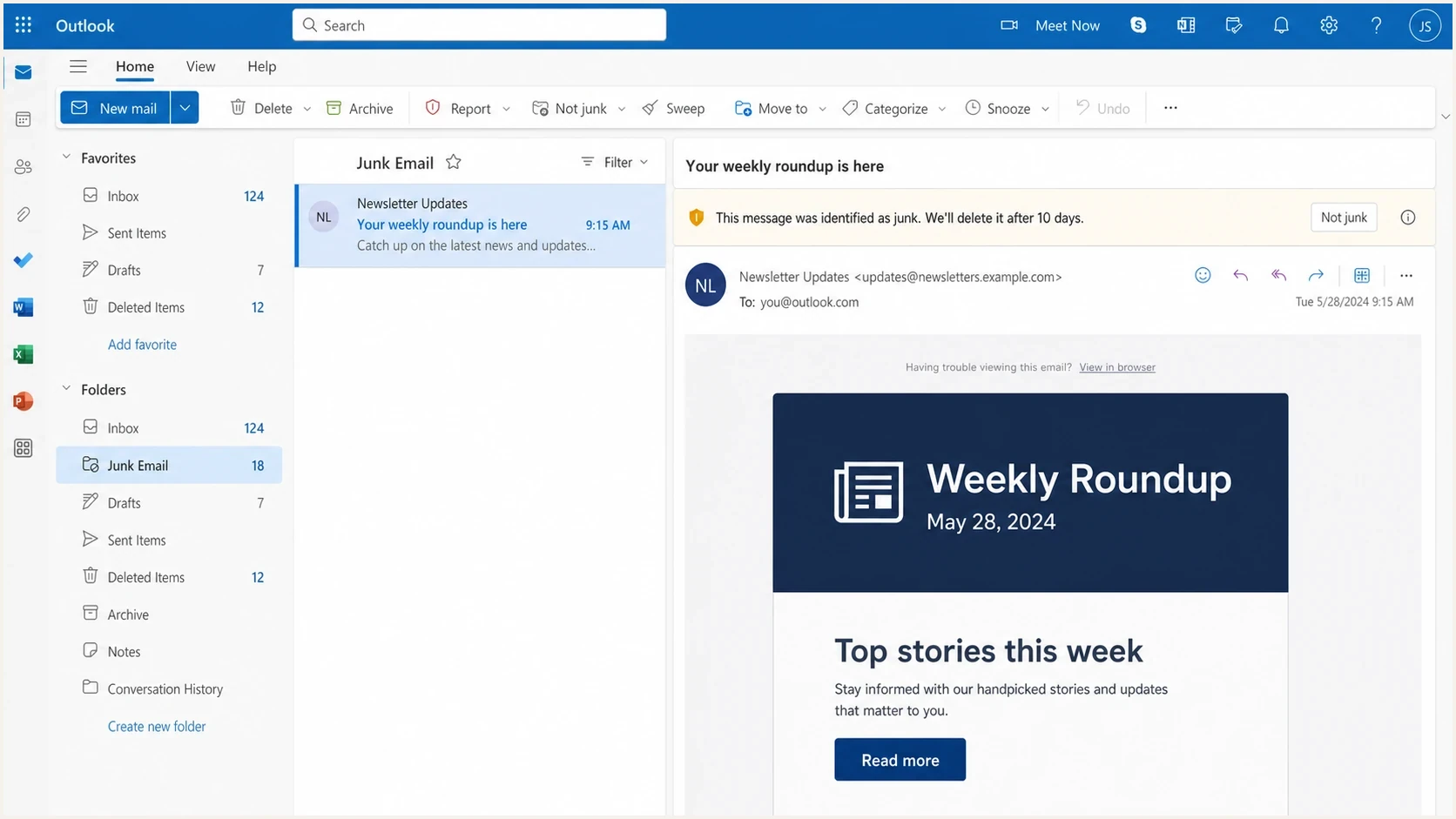
Microsoft Outlook on the web Junk Email folder with a selected newsletter message.
The frustrating case is when two domains use the same sending infrastructure and the same content, but Outlook inboxes one and junks the other. That usually means the content is not the only deciding factor. The domain identity, sender history, recipient behavior, link reputation, and Microsoft-specific reputation differ even when the delivery system looks identical.
What looks the same
- Infrastructure: The same sending provider and same shared pool can deliver both messages.
- Content: The visible copy, template, and subject line can be identical.
- Authentication: Both messages can pass SPF, DKIM, and DMARC.
What Outlook scores separately
- Domain history: A domain recently moved into newsletter sending can look unproven.
- Recipient response: Replies, deletes, reports as junk, and Not junk rescues give Microsoft direct user feedback.
- Sending rhythm: A large weekly spike gives Microsoft less steady positive evidence.
A blank test mailbox also creates noise. A mailbox with no history has no positive relationship with your sender. If it receives one newsletter and has never replied, moved a message, marked it as Not junk, or saved previous messages from you, Outlook has less reason to override a cautious placement.
The same split can happen inside one domain. A newsletter, event confirmation, receipt, and support reply can share the same visible From domain while using different routing, templates, tracking links, DKIM selectors, or return-path domains.
|
|
|
|---|---|---|
SCL | Supporting score, not the cloud verdict | Read it with CAT, SFV, and final action |
BCL | Bulk complaint level for bulk mail | Value and tenant bulk threshold |
Mailbox delivery | Microsoft's final folder destination | dest:J and RF:JunkEmail |
Domain | Microsoft trust for the visible sender | Age, history, and mail mix |
Recipient | How users handle your messages | Complaints and Not junk rescues |
Signals that explain Outlook junk placement after authentication passes.
Check each sending stream separately
Automated and templated emails often behave differently from the campaign that caused the signup or action. A confirmation email can be generated immediately, contain several operational links, and travel through a different mail path than the original invite, even when SPF, DKIM, and DMARC pass.
Treat each stream as its own placement problem. Microsoft can trust the newsletter but junk the event responder if the responder has weaker engagement, a different IP pool, a different Return-Path, a different DKIM selector, a new tracking domain, or thin template copy with too many redirected links.
- Compare headers: Check Return-Path, DKIM d= and s=, connecting IP, Message-ID domain, tracking domains, CAT, SFV, SCL, BCL, and mailbox-delivery fields.
- Review template shape: Short automated emails with repeated buttons, generic click here labels, and several redirected links need clearer context and fewer URLs.
- Separate reputation: Test confirmations, invoices, support replies, and marketing sends as separate streams.
- Check local Outlook behavior: If server headers look clean but one user's Outlook desktop moves mail, inspect Safe Senders, Blocked Senders, mailbox rules, and add-ins.
How to diagnose the real cause
Start with proof, not guesses. Find out whether the issue is isolated to one mailbox, limited to Outlook.com addresses, limited to Microsoft 365 tenants, limited to one automated stream, or visible across many mailbox providers. Each answer points to a different fix.
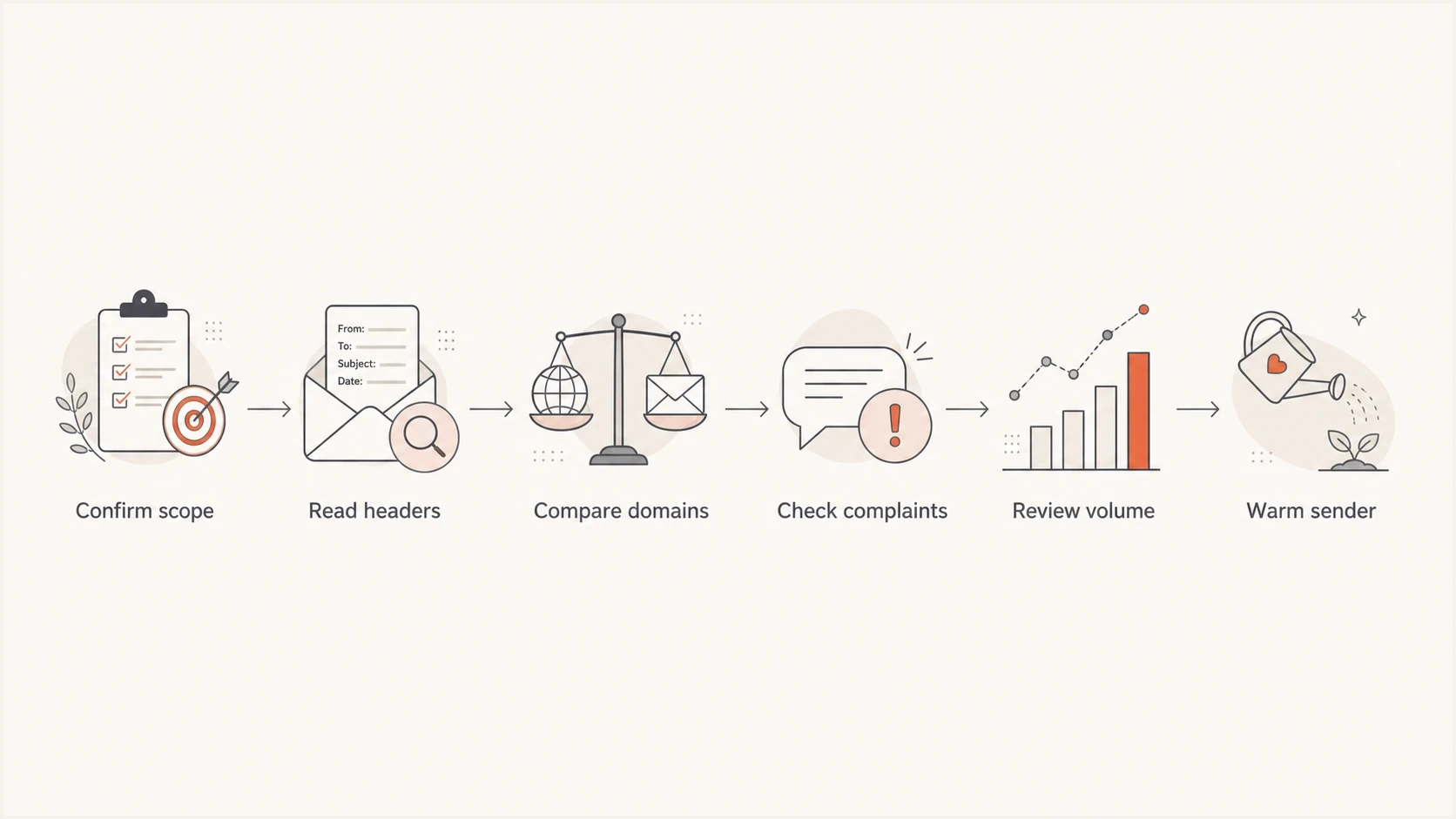
Flowchart for diagnosing Outlook junk placement after SPF DKIM and DMARC pass.
- Confirm scope: Test several real Microsoft recipients, not only one seed account.
- Read headers: Look for authentication results, compauth, CAT, SFV, SCL, BCL, return-path, DKIM domain, From domain, and mailbox-delivery fields.
- Compare domains and streams: Send the same message through the same path with another established domain, then compare automated and campaign streams.
- Check metrics: Separate Microsoft complaints, hard bounces, unsubscribes, positive replies, and Not junk rescues.
- Review volume: Compare daily Microsoft volume against normal weekly volume and recent changes.
- Retest carefully: Change one variable at a time so the result tells you what worked.
A practical test is to send a real message and inspect the resulting authentication and placement signals. Suped's email tester helps with that first technical pass, then you still need recipient-side evidence for Outlook placement.
Email tester
Send a real email to this address. Suped shows a results button when the test is ready.
?/43tests passed
The key is not to treat a clean test as the end of the investigation. Treat it as proof that authentication is not the blocker, then move into reputation and Microsoft behavior.
What to fix first
If authentication passes, the highest-value fixes usually happen outside DNS. Start with audience quality, Microsoft-specific engagement, sending pattern, and the exact stream that is landing in junk. Changing SPF or DKIM again does not help when the headers already show clean pass results.
If your domain sends more than 5,000 messages per day to Outlook.com consumer addresses, Microsoft also expects valid From or Reply-To addresses, functional unsubscribe, consent-based lists, prompt complaint handling, and clean list practices. Passing SPF, DKIM, and DMARC covers the authentication requirement, not the rest of that standard.
Microsoft-focused triage levels
Use these bands to decide how aggressively to slow or segment Microsoft-bound mail.
Stable
Continue
Low complaints and normal engagement
Watch
Segment
Small engagement drop or mixed placement
Critical
Pause
Broad junking or complaint rise
- Warm the domain: Send first to Microsoft recipients who recently replied, clicked, purchased, or moved earlier mail out of junk.
- Reduce spikes: Avoid sending nearly all weekly volume on one day while the domain is earning trust.
- Suppress risk: Hold back stale Microsoft addresses until placement and engagement improve.
- Clean automated templates: Use descriptive link text, reduce redirect chains, and add context before operational links.
- Ask for rescue: Tell known subscribers to move wanted messages from junk to inbox when needed.
- Protect reputation: Remove complainers, hard bounces, and long-inactive recipients quickly.
Shared IPs are not always the answer
Shared sending infrastructure can be a factor, but it is not automatically the cause. If another domain using the same pool reaches the inbox, Outlook is giving weight to domain-level and recipient-level history. Check the sending IP, but do not stop there.
Also check blocklist and blacklist status, but keep the result in context. A blocklist (blacklist) listing can explain some filtering, yet Outlook also makes private reputation decisions that public lists do not show.
Where Suped fits
Suped is our DMARC and email authentication platform. In this workflow, it turns reporting data into source visibility, specific fixes, alerts, and reputation monitoring without requiring manual review of raw XML files.
Suped DMARC dashboard showing email volume, authentication health, and source breakdown
The workflow should be simple: confirm every legitimate sender, detect authentication drift, watch volume changes, and connect delivery symptoms with the domain and sender source behind them. Suped's DMARC monitoring helps you see which services are sending for your domain and whether they pass under DMARC rules.
Before changing DNS, use the domain health checker to confirm DMARC, SPF, and DKIM basics. If you are investigating reputation, Suped's blocklist monitoring helps track domain and IP listings that can add pressure to Outlook filtering.
?
What's your domain score?
Deep-scan SPF, DKIM & DMARC records for email deliverability and security issues.
Suped also has hosted SPF, hosted DMARC, SPF flattening, hosted MTA-STS, real-time alerts, and MSP multi-tenancy. Those capabilities matter when the issue is not one bad record, but an ongoing need to keep authentication clean while you repair sender reputation.
When Microsoft-specific data helps
Microsoft-specific sender and complaint data can help, but the usefulness depends on your access to the sending IPs and whether your mail uses dedicated or shared infrastructure. With shared infrastructure, the data often tells you less than you want because many senders use the same IP pool.
For Microsoft 365 recipients, tenant policy can also override sender reputation. A corporate tenant can move mail to junk because of security policy, transport rules, user safe and blocked sender lists, quarantine settings, tenant-level allow or block entries, or past user action. That is why a consumer Outlook.com seed account and a business Outlook inbox can behave differently.
The header trail is the best starting evidence. Authentication-Results shows SPF, DKIM, DMARC, and compauth. In X-Forefront-Antispam-Report, CAT identifies the category and SFV describes the spam filtering path. X-Microsoft-Antispam includes BCL. X-Microsoft-Antispam-Mailbox-Delivery values such as dest:J and RF:JunkEmail confirm that Microsoft delivered the message to junk.
Values to pull from Microsoft headerstext
Authentication-Results: spf=pass dkim=pass dmarc=pass compauth=pass
X-Forefront-Antispam-Report: CAT:SPM; SFV:SPM; SCL:5
X-Microsoft-Antispam: BCL:3
X-Microsoft-Antispam-Mailbox-Delivery: dest:J; RF:JunkEmail
Do not diagnose a cloud message from SCL alone. An SCL of 5 or higher generally remains a negative signal, but Microsoft says categorization and other signals now determine the verdict and action. Use CAT and SFV to identify the filtering decision, BCL to assess bulk treatment, and mailbox-delivery fields to confirm the destination. If the header points to a sender or policy override, ask the recipient's Microsoft 365 admin to review tenant policy and submit the message as a false positive before assuming DNS is the cause.
For a deeper path through high SCL scores, use the score with CAT, SFV, BCL, and the final delivery fields to separate reputation, bulk treatment, policy, and recipient behavior.
The fix is usually behavioral
Once authentication is clean, improvement often comes from sending wanted mail to the most engaged Microsoft recipients, reducing risky volume, and giving Outlook clear positive recipient actions.
When only one mailbox is affected
If coworkers and other Outlook recipients receive the same message in the inbox, but one mailbox consistently sends it to junk, treat that mailbox as a separate branch of the investigation. A sender-wide reputation change should affect more than one recipient.
- Review junk settings: Check Safe Senders, Blocked Senders, blocked domains, and any setting that trusts only approved senders.
- Check message handling: Review inbox rules, forwarding, mobile mail settings, and add-ins that can move a message after delivery.
- Use a controlled test: Mark a wanted message as Not junk and add the exact sender address to Safe Senders, then retest with a new message.
- Escalate tenant policy: If the user setting looks correct, ask the Microsoft 365 admin to check anti-spam policy, mail flow rules, tenant allow or block entries, and message trace.
Secure the account if all mail suddenly moves
If every incoming message suddenly goes to junk, messages disappear, or contacts report mail you did not send, sign out active sessions, change the password, enable multifactor authentication, and remove unknown rules or forwarding. That pattern points to mailbox compromise or configuration, not the sender's DMARC result.
Safe Senders is useful for diagnosing and correcting one mailbox. It is not a scalable deliverability fix, and Microsoft 365 organization policy can still control how business mailboxes handle messages.
Views from the trenches
Best practices
Verify the problem across real Outlook recipients before changing DNS or sender identity.
Track Microsoft complaints, bounces, Not junk rescues, and volume by mailbox provider.
Warm the domain with engaged Microsoft recipients before increasing newsletter volume again.
Use DMARC reports to confirm every sending source passes with the visible From domain.
Common pitfalls
Treating a perfect authentication result as proof that Outlook will place mail in inbox.
Testing with one empty mailbox and assuming it reflects subscriber inbox placement at scale.
Blaming shared IPs before checking domain reputation, complaint rates, and engagement.
Sending one weekly spike without steady mail flow to Microsoft-hosted recipients first.
Expert tips
Compare the same message across domains to separate content issues from domain reputation.
Ask engaged subscribers to rescue wanted mail from junk when a domain warms at Outlook.
Keep complaint rates low by suppressing inactive Microsoft recipients during warmup.
Use blocklist and blacklist checks as a clue, not the only reputation signal for Outlook.
Marketer from Email Geeks says Microsoft sender data can help, but green status does not guarantee current inbox placement.
2022-03-11 - Email Geeks
Marketer from Email Geeks says generic testing scores do not show how major mailbox filters treat a message.
2022-03-11 - Email Geeks
The practical answer
If your Outlook mail goes to junk while SPF, DKIM, and DMARC pass, the problem is usually not authentication. Microsoft either lacks enough trusted behavior for that sender identity, has negative or uncertain signals, or is applying a recipient or tenant rule that routes the message to junk.
Fix it in this order: prove the issue across real Microsoft recipients, inspect CAT, SFV, BCL, compauth, and mailbox-delivery fields, compare sending streams, check single-mailbox settings when appropriate, confirm every sender in DMARC data, check blocklist and blacklist signals, clean risky automated templates, reduce risky Microsoft volume, then warm the domain with recipients most likely to engage. Use SCL as supporting context, not a final cloud verdict.




