How can I improve my Spam Complaint Level (SCL) on Outlook?

Updated on 27 Jul 2026: We corrected Microsoft's SCL guidance and added current Outlook.com authentication requirements.
To improve SCL on Outlook, start with the audience and complaint signals, not the template. Microsoft uses SCL to mean Spam Confidence Level, not Spam Complaint Level, and its own Microsoft SCL documentation explains how the score is used in filtering. Complaints still matter because complaint behavior, low engagement, stale consent, link reputation, and bulk sending patterns can push marketing mail toward junk.
If your confirmed opt-in message lands in the inbox at SCL 1 while later marketing sends land in junk at SCL 5, the useful clue is the difference between those two mail streams. The confirmation email is expected, immediate, and tied to a user action. The marketing email asks Microsoft to trust the same relationship over time. Treat that SCL 5 as a signal to inspect the recipient set, send pattern, link history, and campaign relevance.
Fast answer
- Consent: send marketing only to people who clearly asked for it, not people who missed a pre-checked box.
- Complaints: suppress every known complainer, including feedback loop and junk mail reporting data.
- Engagement: send first to recent buyers, clickers, and subscribers who still show intent.
- Infrastructure: check SPF, DKIM, DMARC, link domains, redirects, and blocklist (blacklist) status.
What SCL means in Outlook
SCL is a message-level spam score added by Microsoft filtering. A higher value means Microsoft classified the message as more likely to be spam. It is not a public reputation score that you can directly edit, and it is not a single complaint metric. You improve it by changing the signals Microsoft receives when it evaluates your mail. Those signals include authentication, sender and domain history, recipient behavior, bulk patterns, content, URLs, and receiving-side rules.
The documented actions below apply to Microsoft 365 cloud mailboxes. Outlook.com consumer addresses use Microsoft filtering, but senders cannot inspect or change a recipient tenant's anti-spam policy. Do not treat one SCL result as a universal domain score. Read SCL beside BCL, the spam filtering verdict (SFV), message trace, Authentication-Results, and the sender identities in the headers. For a header-by-header workflow, compare this with SCL headers.
|
|
|
|
|---|---|---|---|
-1 | Spam filtering bypassed | Inbox | Check why filtering was skipped |
0, 1 | Not spam | Inbox | Keep signals stable |
5, 6 | Spam | Junk, or Strict quarantine | Find the verdict source |
7, 8, 9 | High-confidence spam | Junk, or preset-policy quarantine | Pause risky sending |
Current Microsoft 365 SCL values and policy-dependent actions.
Spam filtering does not stamp SCL 2, 3, or 4, and it does not normally stamp SCL 7. Analyst grading, a DMARC failure, or a mail flow rule can produce higher values. When a result looks unexpected, inspect SFV in X-Forefront-Antispam-Report and any rule identifiers before changing content.
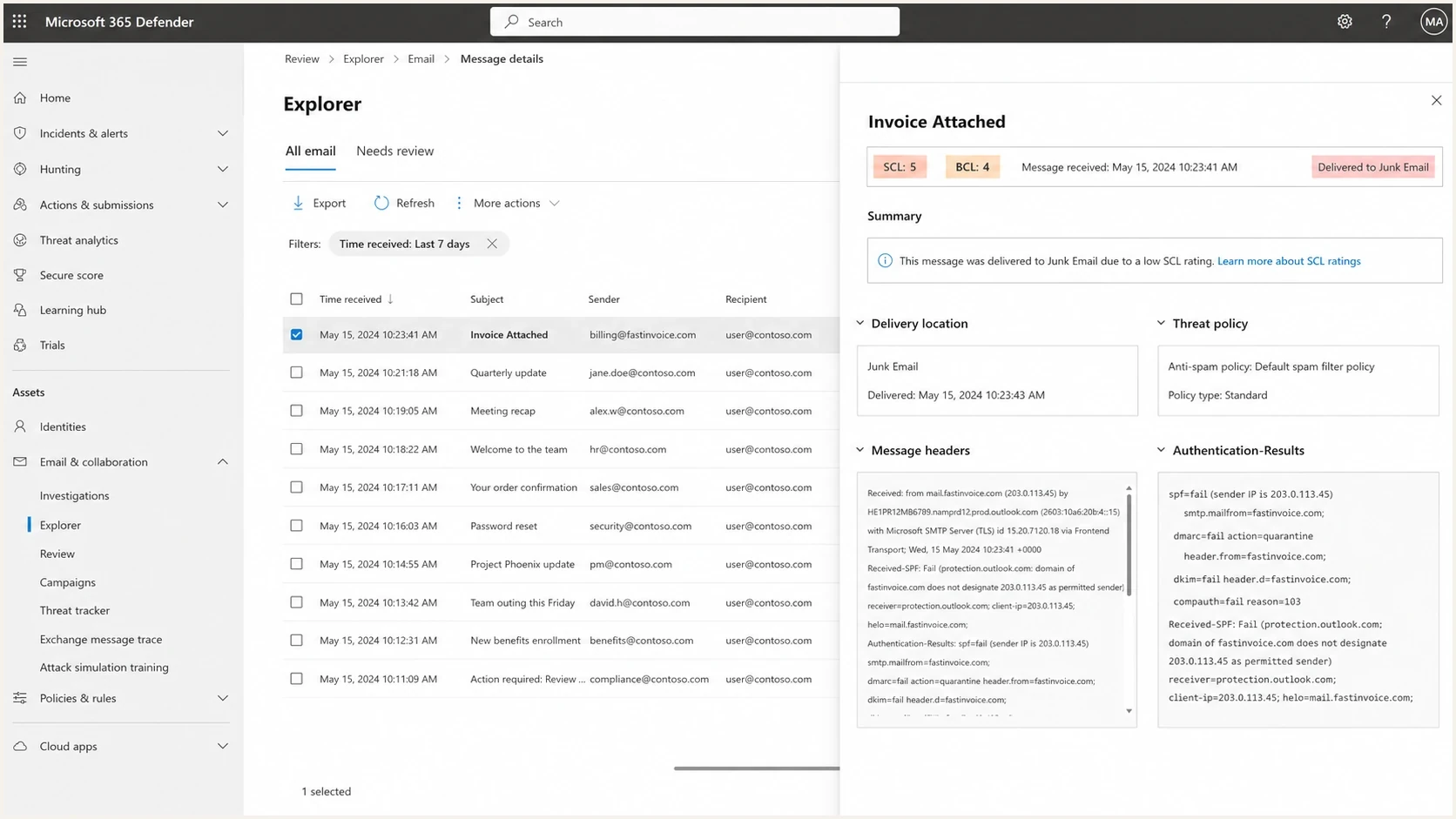
Microsoft Defender for Office 365 message details with SCL 5, BCL 4, and authentication results.
How SCL and BCL differ
SCL and BCL answer different questions. SCL records Microsoft's spam classification for the message. BCL, or Bulk Complaint Level, records how likely mail from an identified bulk sender is to generate complaints. A marketing message can pass SPF, DKIM, and DMARC and still receive a high BCL because authentication proves identity, not recipient demand.
|
|
|
|
|---|---|---|---|
SCL | Spam classification | -1; 0, 1; 5 to 9 | Trace the filter or override |
BCL | Bulk complaint likelihood | 0 to 9 | Improve consent and engagement |
SFV | Filtering verdict or override | Header code | Identify what set SCL |
How to interpret SCL and BCL together.
Microsoft currently categorizes BCL 1 to 3 as bulk mail with few complaints, 4 to 7 as a mixed complaint level, and 8 to 9 as a high complaint level. BCL 0 means the message was not identified as bulk. The default Microsoft 365 bulk threshold is 7, while Standard uses 6 and Strict uses 5. If the message meets the applicable threshold and bulk mail is marked as spam, Microsoft converts the result to SCL 6 and applies the configured bulk action. For senders, the fix remains better consent, faster complaint suppression, steadier volume, and more relevant targeting. A recipient administrator can tune a false positive, but that does not repair the sender's underlying reputation.
Why confirmed opt-in lands in inbox
A confirmed opt-in email usually has the best possible timing. The recipient just asked for it, the subject is expected, the message has a narrow purpose, and the send feels one-to-one even when it comes from a bulk platform. That is why a confirmation email can get SCL 1 while a plain-text marketing message still gets SCL 5.
Changing HTML to plain text does not fix a trust problem. If Microsoft already distrusts the campaign stream, a simpler template will not remove stale subscribers, complaints, bad acquisition sources, reused tracking links, or an aggressive send cadence. The fix is to make the marketing stream behave more like wanted mail.
Confirmation email
- Timing: sent seconds after the subscriber action.
- Intent: recipient expects a specific confirmation step.
- Scope: narrow content with few links and little promotion.
Marketing email
- Timing: sent later, often at a brand-defined cadence.
- Intent: recipient interest has to be proven again.
- Scope: wider audience, tracking links, offers, and repetition.
Fix list quality before content
The fastest route to a lower Outlook SCL is usually a cleaner Microsoft audience. Split Outlook and Microsoft 365 recipients into their own recovery segment, then send only to people with recent, measurable intent. Use recent clicks, purchases, account activity, or a fresh confirmation, not just old opens.
Feedback loops matter here. FBL means feedback loop. JMR means junk mail reporting. When a recipient reports mail as junk and that data reaches you, suppress that person from marketing immediately. Do not wait for a weekly list-cleaning job, and do not move the address into a different promotional stream.
- Active opt-in: keep confirmed opt-in for new subscribers and reconfirm weak acquisition sources.
- Complaint removal: remove every address tied to FBL, JMR, abuse desk, or direct complaint signals.
- Recency filter: restart Outlook sends with subscribers active in the last 30 to 90 days.
- Frequency cap: reduce repeat sends to people who ignore multiple campaigns.
- Offer match: stop promoting products a customer already bought unless the message has clear next-step value.
Practical suppression logic
if complaint_received = true then suppress_marketing
if last_click > 180 days and no purchase then pause_marketing
if source = unknown then request_reconfirmation
if outlook_engagement = none for 90 days then throttle
Check authentication and sending identity
Authentication does not override recipient dislike, but broken authentication can make an SCL problem worse. Check that SPF passes, DKIM passes, and DMARC passes for the visible From domain. Also compare whether confirmation mail and marketing mail use the same return-path domain, DKIM signing domain, tracking domain, sending IP pool, and visible From address.
Current Outlook.com high-volume requirement
A domain that sends at least 5,000 messages to Microsoft consumer email services using the same 5322.From domain must have SPF and DKIM pass, publish DMARC, and pass DMARC through aligned SPF or DKIM. Microsoft can reject noncompliant mail with 550 5.7.515. That rejection is an authentication failure, not an SCL verdict, so fix it before running placement tests.
A quick way to separate infrastructure issues from audience issues is to run a domain health checker pass, then compare the authentication results between the confirmation stream and the marketing stream. If both pass cleanly but only marketing gets SCL 5 or 6, keep most of your effort on consent, complaints, and engagement.
?
What's your domain score?
Deep-scan SPF, DKIM & DMARC records for email deliverability and security issues.
Suped helps with this workflow by turning DMARC aggregate data into source-level findings, authentication trends, and concrete fix steps. Its DMARC monitoring shows which services are sending for your domain, which ones pass, and which ones need SPF, DKIM, or DMARC fixes before you keep testing Outlook placement.
Example DMARC record for monitoringDNS
v=DMARC1; p=none; rua=mailto:dmarc@yourdomain.com;
adkim=s; aspf=s; pct=100
Audit links, domains, and reputation
Outlook filtering does not only evaluate the sender. It also evaluates what the message points to. A plain-text email can still carry a tracking domain, redirect chain, coupon URL, image host, or landing page path with poor history. If those same URLs were pushed through campaigns that recipients did not want, Microsoft can treat the new mail with more suspicion.
Review every domain in the message, including the visible brand domain, click-tracking domain, image host, unsubscribe domain, and any short links. Then check IP and domain reputation through blocklist monitoring. A blocklist or blacklist listing does not explain every Microsoft SCL 5 or 6, but it is a concrete issue to remove before deeper campaign testing.
Link checks that matter
- Tracking domain: keep it branded and avoid sharing it across unrelated senders.
- Redirect path: remove unnecessary hops before the final landing page.
- Unsubscribe link: make it visible, direct, and working without a login.
- Blacklist status: investigate blocklist or blacklist listings before increasing Outlook volume.
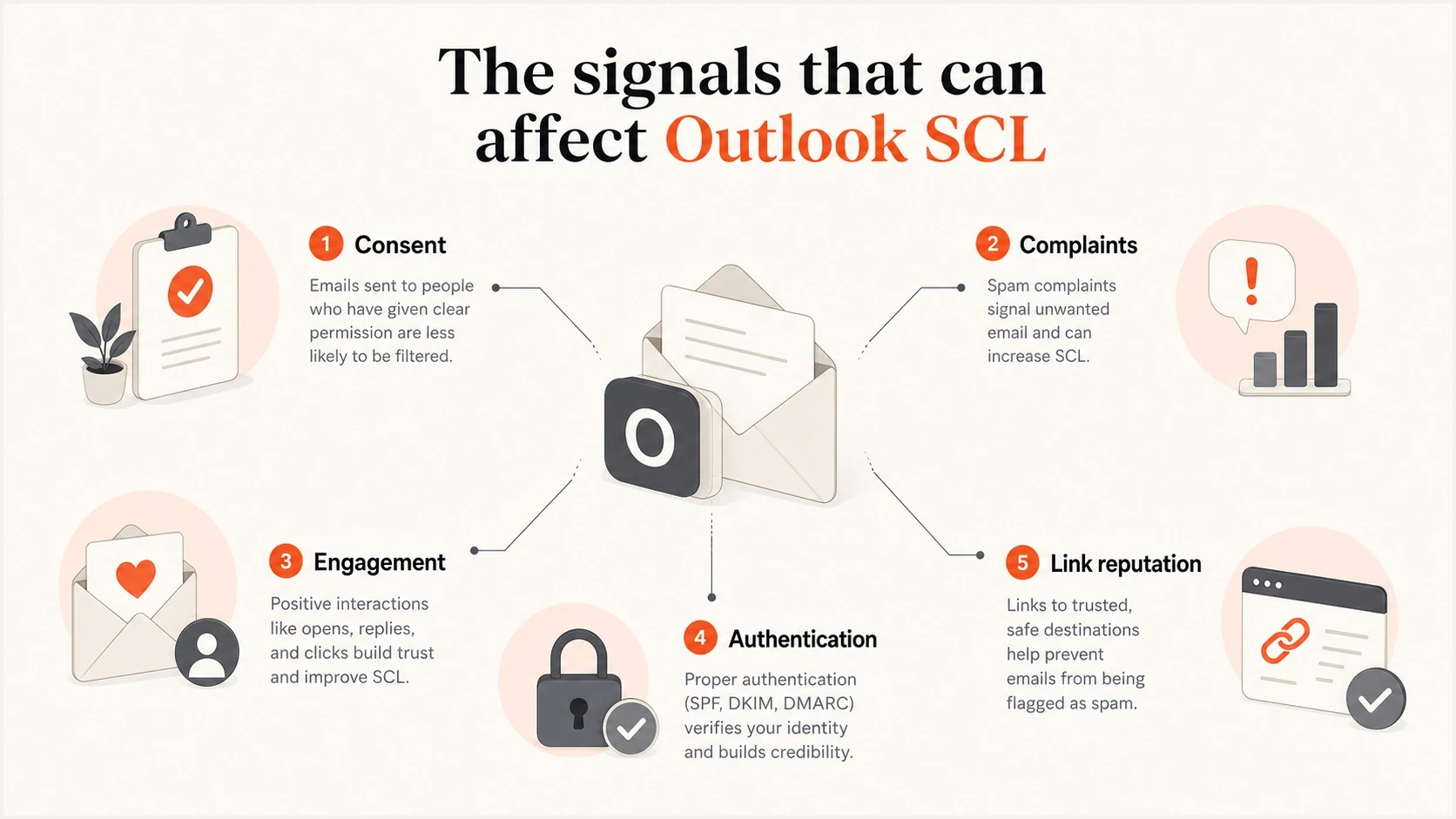
Consent, complaints, engagement, authentication, and link reputation signals that affect Outlook SCL.
Test the message the way Outlook sees it
Do not judge the fix from a single internal mailbox. Send controlled tests to real Outlook.com and Microsoft 365 recipients, then compare the full headers from the confirmation email, a recent marketing email, and a trimmed recovery send. Use an email tester to inspect authentication, content, visible URLs, and technical issues before you send more volume.
The most useful test is a small Microsoft-only send to a recently engaged segment. If that group gets better placement, the sender can recover. If recent clickers still get SCL 5 or 6, inspect the sending identity, link chain, SFV value, and any receiving tenant policy affecting the test inboxes. For more placement work, see Outlook placement.
Email tester
Send a real email to this address. Suped shows a results button when the test is ready.
?/43tests passed
When reviewing headers, compare specific fields rather than relying on inbox or junk alone. A recovery test should show passing authentication, fewer redirect surprises, consistent sender identity, a clear filtering verdict, and a lower SCL than the failing campaign.
Header fields to compare
X-Forefront-Antispam-Report: SCL:5; SFV:SPM
X-Microsoft-Antispam: BCL:4
Authentication-Results: spf=pass dkim=pass dmarc=pass
Return-Path: bounce.yourdomain.com
From: news@yourdomain.com
List-Unsubscribe: <mailto:unsubscribe@yourdomain.com>
List-Unsubscribe-Post: List-Unsubscribe=One-Click
Microsoft 365 SCL action bands
Use the score as a triage signal, then inspect the verdict and receiving policy.
Not spam
0, 1
Delivered to the inbox unless another policy or user setting applies.
Spam
5, 6
Sent to Junk under most policies, while Strict normally quarantines it.
High-confidence spam
7, 8, 9
Sent to Junk under default policy or quarantined under Standard and Strict.
A practical recovery sequence
Once you have confirmed that SCL 5 or 6 is repeatable, stop changing multiple variables at once. A clean recovery sequence makes the problem measurable. Run it over several sends, not one day, because Microsoft needs consistent positive signals before it relaxes filtering.
- Pause risk: stop broad Outlook sends to inactive recipients while you diagnose the source.
- Export complaints: remove every address tied to junk reports, abuse replies, and direct spam complaints.
- Segment intent: create a Microsoft-only segment of recent buyers, clickers, and confirmed subscribers.
- Reduce volume: send smaller batches and avoid sudden spikes after a junk placement event.
- Simplify URLs: use the fewest necessary links and remove redirect chains you do not control.
- Compare headers: track SCL, BCL, SFV, authentication results, and delivery location after each test.
- Scale slowly: add back less recent segments only after the engaged Microsoft segment improves.
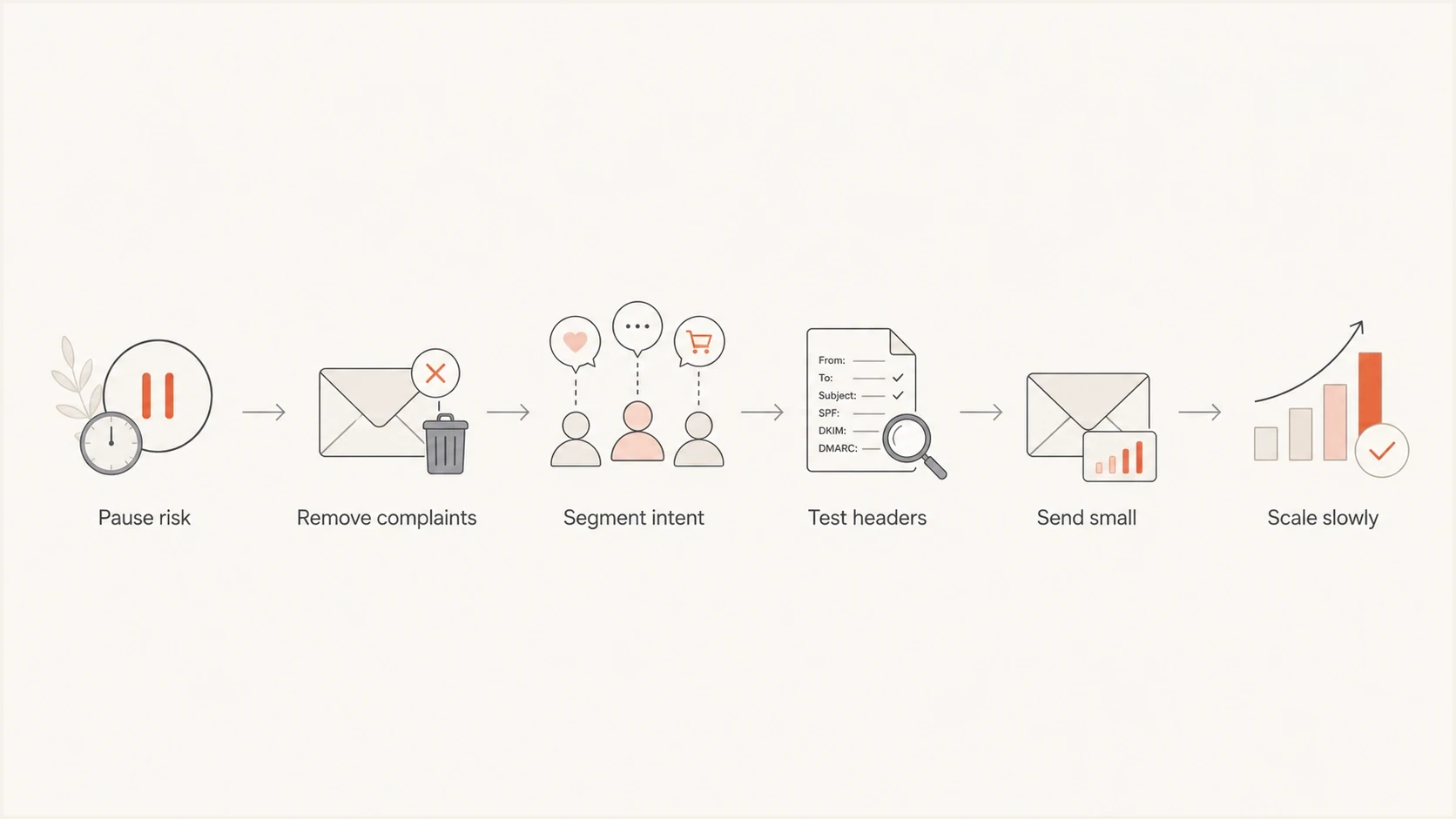
Six-step Outlook SCL recovery flow for complaints, segmentation, testing, and controlled scaling.
Where Suped fits
Suped is our DMARC reporting and email authentication platform. It helps teams separate authentication faults from reputation or audience problems by showing each sending source, SPF, DKIM, and DMARC outcomes, and guided fix steps. Suped does not lower SCL directly or make unwanted marketing wanted. It gives the technical evidence needed to find a failing source before more Outlook tests are sent.
Use Suped to monitor DMARC, alert on new failures, identify sources that are approaching SPF DNS lookup limits, and review blocklist (blacklist) signals beside authentication trends. Agencies and MSPs can keep the same checks organized across client domains.

Issue steps to fix dialog showing the issue overview, tailored fix steps, and verification action
Use Suped for the technical layer
- Issue detection: find failed SPF, DKIM, DMARC, rDNS, and source-level problems faster.
- Action steps: turn authentication failures into plain fix instructions for the right owner.
- Policy staging: use hosted DMARC to move toward stronger protection without blind changes.
- Reputation checks: review blacklist and blocklist signals beside authentication and source data.
Views from the trenches
Best practices
Treat confirmed opt-in as the consent floor, then segment marketing by recent intent signals.
Remove Microsoft complainers and hard bounces quickly, before the next campaign wave sends.
Compare inboxing confirmation mail with marketing mail before changing authentication settings.
Common pitfalls
Assuming plain text fixes SCL when the recipient set and link history stay unchanged.
Keeping passive consent records after complaint data proves the audience did not want mail.
Using the same tracked links in wanted and unwanted channels, then blaming template HTML.
Expert tips
Throttle Outlook sends first, then rebuild volume with recipients who clicked within 60 days.
Create a separate test seed path, but judge recovery by real recipient engagement over time.
Review JMR and FBL feeds daily so complaint signals turn into immediate suppression.
Marketer from Email Geeks says active opt-in matters because passive consent creates complaint risk when recipients did not expect marketing mail.
2022-11-18 - Email Geeks
Marketer from Email Geeks says if confirmation mail and marketing mail share the same setup, the marketing audience and offer deserve the first review.
2022-11-18 - Email Geeks
The shortest path to a lower SCL
The direct fix for Outlook SCL is to make the marketing stream more wanted and easier to trust. Start by suppressing complaints, rebuilding around active consent, reducing Microsoft volume to engaged recipients, and proving that SPF, DKIM, DMARC, link domains, and blacklist or blocklist status are clean.
When a confirmation email gets SCL 1 and marketing gets SCL 5 or 6, do not spend weeks polishing template details before checking list quality. The confirmation email shows Microsoft can accept your mail. The marketing result shows Microsoft is not yet convinced that the broader campaign stream is wanted.




