Why are Hotmail (Outlook.com) experiencing temporary delivery failures?


Updated on 7 Aug 2026: We corrected the Microsoft SMTP code guidance and added a clearer process for diagnosing temporary Outlook.com delivery failures.
Hotmail and Outlook.com temporary delivery failures usually happen because Microsoft's receiving system is deferring mail, not permanently rejecting it. Common causes include receiver resource pressure, sender throttling, IP reputation limits, DNS lookup problems, authentication failures, content filtering, and short-lived Outlook.com incidents.
Responses such as 451 4.7.500-699 Access denied, please try again later, or 452 4.3.1 Insufficient system resources are soft bounces. Keep the mail queued, slow delivery to Microsoft consumer domains, and preserve the complete response so you can tell whether the issue is on Microsoft's side or tied to your sending.
Direct answer
A temporary Hotmail or Outlook.com failure means Microsoft's mail system has asked your sending server to try again later. Leave the message in the queue and let the sending server retry. Microsoft lists connection timeouts, no adequate servers, out-of-memory responses, and temporarily unavailable resources among failures that often clear after a wait. See delivery failed for Microsoft-facing examples.
What the common Outlook.com errors mean
The SMTP code tells you whether the remote server expects another attempt. A 4xx code is temporary, so your mail transfer agent should retry according to its queue policy. A 5xx code is permanent for that delivery attempt and needs a different investigation. Read the enhanced code and the response text together. A bare 451 or 421 does not identify the cause.
|
|
|
|---|---|---|
451 4.7.500-699 | Temporary policy restriction after a sending-pattern change or suspicious activity | Reduce rate, compare recent volume, and let the queue retry. |
451 4.7.650 | Temporary IP-reputation rate limit | Check the named IP, complaints, list quality, and traffic shape. |
452 4.3.1 | Insufficient mail-system resources | Keep the queue intact and track how long the response persists. |
421 | Service unavailable or connection closed, with the exact cause in the remaining text | Capture the full response, then check routing and retry behavior. |
Common Microsoft temporary failures and first actions.
Outlook.com, Hotmail, Live, and MSN are Microsoft consumer domains. A company that uses Microsoft-hosted business email can have different tenant controls and failure paths, so do not assume every recipient behind a Microsoft MX has the same cause. A short spike across several sending IPs points toward receiver congestion or an incident. A spike limited to one IP, one domain, one template, or one mail stream points toward sender reputation, traffic shape, authentication, or content.
Example temporary failure lines
451 4.7.500-699 Access denied, please try again later.
452 4.3.1 Insufficient system resources.
451 4.7.650 The mail server [192.0.2.10] has been temporarily rate limited due to IP reputation.
How to read the complete SMTP response
Do not diagnose a deferral from the first three digits alone. Save the complete remote response and the delivery-attempt record. Microsoft's diagnostic string often identifies the affected sending IP, receiving host, UTC timestamp, enhanced status code, and internal marker. Those fields let you group matching events and show whether one restriction is repeating.
- SMTP stage: Record whether Microsoft deferred the connection, MAIL FROM, RCPT TO, or message data. The stage narrows the trigger.
- Remote host and time: Keep the Microsoft host name and UTC timestamp so separate senders can compare the same window accurately.
- Sending identity: Capture the connecting IP, envelope sender, From domain, DKIM signing domain, and campaign or mail stream.
- Queue result: Track whether a later retry was accepted or the message expired. An expired queue generates a final NDR even though the earlier responses were temporary.
Do not confuse 550 5.7.515 with a deferral
Microsoft now rejects noncompliant high-volume senders to its consumer email services with 550 5.7.515. Domains sending 5,000 or more messages must publish SPF, DKIM, and DMARC, both SPF and DKIM must pass, and DMARC must pass through a matching authenticated domain. This is a permanent authentication failure, not a 4xx response that normal retries will fix.
Why Microsoft defers mail that worked yesterday
Outlook.com delivery can change without a DNS edit or campaign change on your side. Microsoft evaluates the connection, IP, sending domain, recipient response history, and message. A queue that looked clean yesterday can hit a different threshold today after a volume jump, lower engagement, more complaints, or receiver resource pressure.
- Receiver pressure: Responses that say no adequate servers, out of memory, or resources temporarily unavailable usually mean Microsoft is asking for a retry because the receiving side is constrained.
- Rate limiting: Microsoft slows traffic when an IP or domain pattern looks risky. Sudden bursts, weak engagement, complaint spikes, and new sending infrastructure can contribute. IP reputation rate limiting needs slower recovery than a short receiver outage.
- Authentication gaps: SPF, DKIM, and DMARC problems weaken the evidence that a message belongs to the visible From domain. Use DMARC monitoring to identify which sources pass for Microsoft recipients.
- DNS failures: Intermittent SPF, DKIM, MX, or reverse DNS lookups can create uneven Outlook.com delivery. A domain health check helps catch obvious DNS issues, and Outlook.com DNS failures need separate analysis.
- Shared IP reputation: Traffic from other senders on a shared IP can affect Microsoft throttling. Check whether the named IP is dedicated to your mail before treating every reputation change as your own.
- Blocklist status: A blocklist or blacklist listing is not the only cause, but it is worth checking while the queue is slowed. Suped's blocklist monitoring connects those signals with DMARC and delivery data.
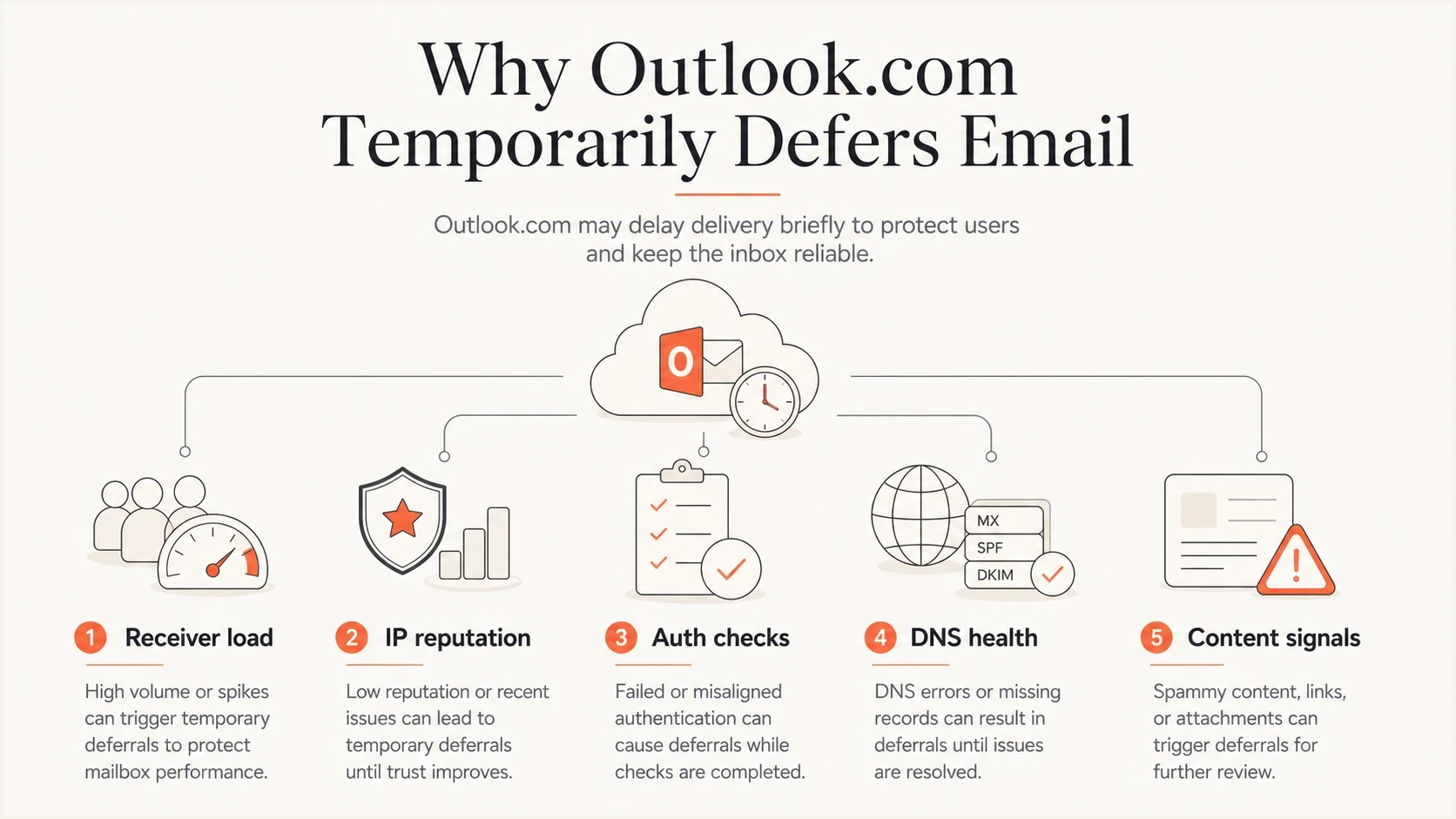
Five factors behind Outlook.com temporary delivery failures.
How to tell whether it is Microsoft or your sender issue
Start with scope. If several Microsoft consumer domains begin deferring at the same time across otherwise healthy traffic, the evidence leans toward receiver capacity or a Microsoft incident. If failures cluster around one sender, IP, template, list, or mail stream, the evidence leans toward sender-side reputation or configuration. On a shared IP, check whether unrelated senders use the same address before assigning the cause.
Looks like Microsoft
- Broad scope: Hotmail, Outlook.com, Live, and MSN defer across multiple sending IPs.
- Clean history: No recent volume, DNS, authentication, or content change exists.
- Short duration: Normal retries clear the same SMTP response across affected streams.
Looks like your sender
- Narrow scope: Failures hit one IP, domain, brand, or mail stream.
- Pattern change: Volume, cadence, recipients, HTML, or links changed.
- Long duration: The queue stays delayed after normal retry windows.
Check Microsoft's public status and user-facing issue notes as supporting evidence, not as the only evidence. Microsoft keeps a recent issues page for Outlook.com, but SMTP receiver behavior can change before public notes appear.
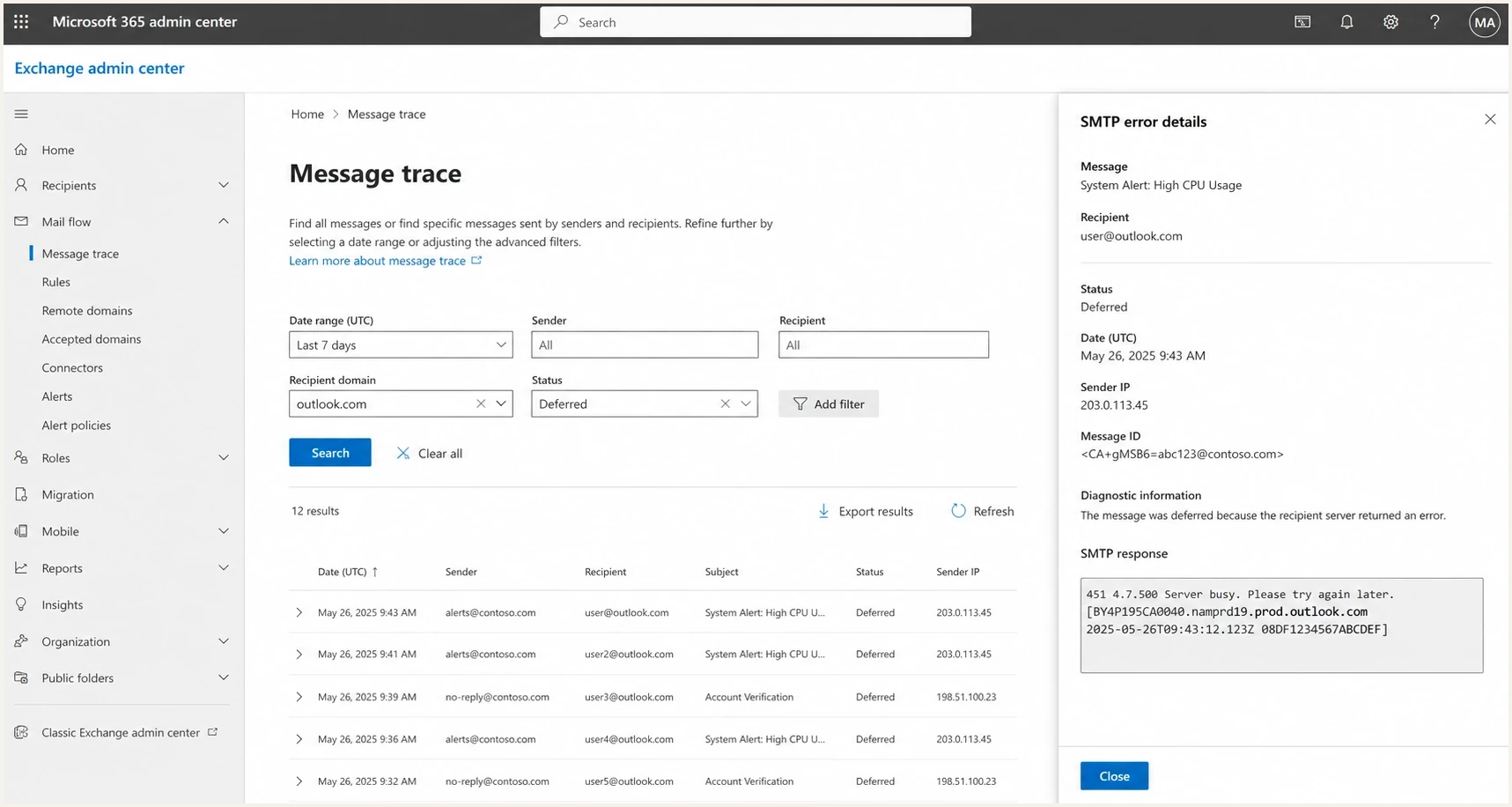
Microsoft 365 Exchange admin center message trace with Outlook.com deferred messages.
What to do in the first hour
The first hour matters because aggressive retries can turn a temporary deferral into heavier throttling. Keep the queue intact, reduce the speed of Microsoft-bound mail, and preserve the exact response text with timestamps and sending IPs. Check the queue lifetime too, because a message that keeps receiving 4xx responses eventually expires and generates a final NDR.
- Pause bursts: Stop large Microsoft-domain sends while keeping normal retry logic active.
- Segment queues: Separate Microsoft consumer domains from Microsoft-hosted business domains, then compare each SMTP response.
- Inspect authentication: Confirm SPF pass, DKIM pass, and a matching DMARC result on real delivered messages.
- Check content: Compare the failing template with a known-good template, including links and HTML.
- Resume gradually: Increase Microsoft volume in small steps after deferrals fall and queued mail drains.
Do not retry aggressively
A retry storm creates more connections and failed attempts. Use backoff and keep one queued copy of each message. Do not manually resend a message that remains queued, because the original can succeed later and create a duplicate.
Send a real diagnostic message through an email tester to confirm headers, authentication, content signals, and scoring outside your production queue.
Email tester
Send a real email to this address. Suped shows a results button when the test is ready.
?/43tests passed
Where Suped fits this workflow
Suped's product fits this workflow when you need to connect DMARC authentication, SPF and DKIM health, blocklist (blacklist) changes, and delivery symptoms. During a Microsoft deferral, use Suped to compare authentication by source and sending IP, then check whether a DNS or reputation signal changed before the queue began growing.
Issues page showing top issues, verified sources, unverified sources, and authentication pass rates
A DMARC pass alone does not explain every deferral. Check which source, IP, selector, policy, or DNS record changed before the Microsoft errors started. Suped's Real-Time Alerts can surface those shifts while mail remains queued, and its hosted authentication controls reduce manual DNS work when the cause is configuration related.
Example Microsoft temp fail recovery
A normal pattern after slowing retries and fixing sender-side signals.
Temp fail rate
When to escalate to Microsoft
Escalate after collecting evidence. Include the complete SMTP response, the command stage, sending IP, recipient domain, UTC timestamps, receiving host, message IDs, retry outcomes, and a short account of what changed before the spike. Redact recipient addresses and message content unless Microsoft requests them through a secure support channel.
- Escalate now: The same 4xx response persists for many hours, retries do not clear, and Microsoft-only queues keep growing.
- Wait briefly: The issue is broad and short-lived, and retry queues are draining without new errors.
- Fix first: SPF, DKIM, DMARC, reverse DNS, list quality, or sending-pattern problems appear in your evidence.
If the data points to sender reputation, a support request alone will not restore delivery. Reduce risky volume, suppress inactive addresses, remove invalid recipients, repair authentication, and rebuild Microsoft engagement steadily.
Views from the trenches
Best practices
Separate Microsoft traffic into its own queue so one spike does not hold back healthy domains.
Track soft bounces by SMTP code, recipient domain, sender IP, campaign, and hour.
Keep retry intervals calm and preserve queue evidence before changing infrastructure again.
Compare authentication pass rates before and during the spike, not after retries finish.
Common pitfalls
Treating every 451 as an outage hides reputation, DNS, and content signals in the data.
Retrying too fast turns a short deferral into a stronger throttling pattern at Microsoft.
Pausing all mail without warming back up can make Monday volume look abnormal to filters.
Assuming clean blocklists mean clean reputation misses recipient engagement at Microsoft.
Expert tips
Create a Microsoft-only view of temp fails, opens, complaints, and accepted volume daily.
Keep a known-good seed message so content changes do not blur infrastructure tests.
Use DMARC reports to find unauthorized sources before blaming receiver capacity first.
Escalate to sender support with exact codes, timestamps, IPs, and sample headers.
Marketer from Email Geeks says a surge of 452 and 451 responses can indicate Microsoft receiver pressure when many senders see the same pattern.
2018-01-19 - Email Geeks
Marketer from Email Geeks says comparing graphs across senders helps separate a broad Microsoft spike from one client's reputation issue.
2018-01-19 - Email Geeks
What matters most
Hotmail and Outlook.com temporary failures are usually recoverable if you avoid panic retries and read the complete response. A short, broad spike with 4xx responses often clears through normal queue retries. A narrow or persistent spike needs sender-side work on reputation, DNS, authentication, content, and traffic shape.
Slow Microsoft-bound traffic, preserve the error evidence, verify SPF, DKIM, DMARC, DNS, and blocklist or blacklist status, then resume volume gradually. Suped's product supports that workflow by connecting DMARC source data, authentication changes, blocklist monitoring, and issue-level fix steps.




