Why is Microsoft IP delisting not working?

Published 29 May 2025
Updated 30 Jul 2026
14 min read
Summarize with

Updated on 30 Jul 2026: We updated this guide with Microsoft's current NDR-specific delisting routes, verification steps, and response times.
Microsoft IP delisting usually fails for one of five reasons: the delist portal has a temporary fault, the verification email is delayed or missing, the IP is not eligible for portal removal, Microsoft still sees harmful sending patterns, or the block comes from a different Microsoft filtering layer. If the Microsoft delist portal returns a temporary error before it accepts the IP, or the confirmation link never arrives, the portal workflow has not been completed.
Treat this as two separate problems. First, prove whether the Microsoft form and its verification step are failing. Second, prove whether the sending IP and domain deserve removal. Those are different investigations, and mixing them wastes time.
The practical answer is simple: do not keep hammering the delist form. Collect the SMTP rejection, match its code to the correct Microsoft route, test a fresh message, verify the sender identity, check the IP across public blocklist (blacklist) signals, fix anything still failing, then submit a clean request with the exact IP and evidence.
The direct answer
If Microsoft IP delisting is not working, the most common immediate cause is a portal-side error, especially when the page says "temporary error" before it accepts the submission. That means Microsoft has not evaluated the IP yet. It does not mean the IP is clean, and it does not mean the IP is permanently blocked.
If the portal accepts the request and Microsoft still blocks mail, the delist action has not fixed the underlying reputation signal. Microsoft can continue to reject, throttle, quarantine, or junk mail when recipient engagement, complaint rate, authentication, or traffic quality still looks risky. The official Microsoft delisting guidance is useful, but it is only one part of the repair path.
- Portal fault: The form fails before submission, often with a temporary error that affects more than one sender.
- Wrong route: The NDR requires manual review, an Outlook.com consumer form, tenant action, or another path instead of the Microsoft 365 IP delist portal.
- Reputation remains: The IP has fresh complaints, spamtrap hits, weak engagement, high unknown-user rates, or uneven traffic.
- Identity mismatch: SPF, DKIM, DMARC, rDNS, HELO, and the visible From domain do not form a coherent sender identity.
- Shared damage: Another sender on the same IP or nearby pool keeps creating negative signals after each request.
A delist confirmation is not the same as deliverability repair. It only says Microsoft accepted or acted on a listing request. Inbox placement still depends on sender reputation, authentication, content, recipient behavior, and policy checks at the receiving tenant.
- Receipt: The portal took the request and produced an email or page response.
- Removal: The IP was removed from a specific Microsoft blocklist path.
- Delivery: A new message reaches a Microsoft mailbox without rejection, throttling, or heavy junk placement.
- Recovery: Positive sending behavior remains stable over several mail cycles.
How to separate portal failure from reputation failure
Start by looking at where the failure happens. If the page rejects the request before Microsoft sends a confirmation, treat it as a portal problem. If the request is accepted but mail keeps bouncing, treat it as a sender reputation problem. The difference changes what you do next.
Portal faults often appear in waves. A colleague or another sender can submit the same IP to confirm whether the issue is global, account-specific, browser-specific, or network-specific. If several unrelated users see the same temporary error, waiting is usually better than repeated submissions.
Portal problem
- Timing: The error appears before the request is accepted or before the confirmation link arrives.
- Scope: Other senders see the same failure during the same window.
- Action: Save screenshots, check spam or junk for the verification email, retry later, and avoid making DNS changes just because the page failed.
Sender problem
- Timing: The request is accepted, but Microsoft keeps rejecting or throttling mail.
- Scope: Specific streams, domains, or recipients fail more often than the rest.
- Action: Pause risky traffic, repair authentication, reduce bad addresses, and resubmit with evidence.
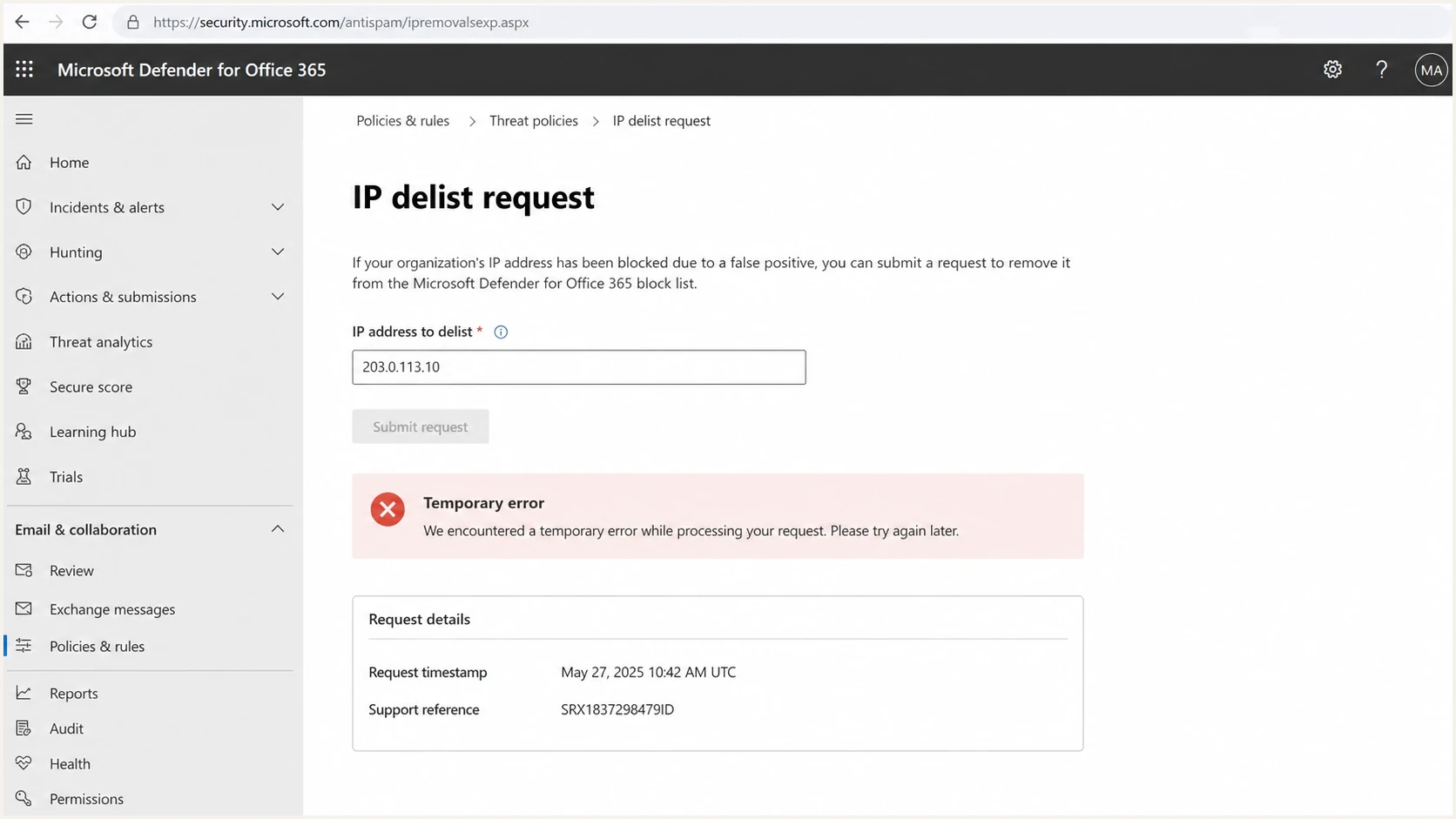
Microsoft Defender for Office 365 delist screen with a temporary error.
|
|
|
|---|---|---|
Temporary error | Portal fault | Capture and retry |
No verification email | Delayed portal mail | Check junk and wait |
5.7.606-649 | Microsoft 365 IP block | Use delist portal |
5.7.511 | Manual investigation | Email full NDR |
Quick triage map for Microsoft delisting failures.
A public thread about a portal outage discussion shows why every delist failure should not be blamed on the sender. The form can fail independently of mail quality. The investigation still needs to prove the sender side is clean before relying on the next submission.
Match the NDR to the correct Microsoft route
Read the complete non-delivery report (NDR) before using any form. Microsoft 365 business delivery and Outlook.com consumer delivery have separate block handling, and error 5.7.511 explicitly bypasses the standard portal. The route named in the NDR takes priority over a generic delisting checklist.
|
|
|
|---|---|---|
550 5.7.606-649 | Microsoft 365 delist portal | Verify email, select Delist IP, then allow up to 24 hours or longer |
550 5.7.511 | Forward the full NDR and IP to delist@microsoft.com | Microsoft says it will contact the sender within 48 hours |
Outlook.com consumer block | Use the separate Outlook.com sender form | Follow the consumer form and the exact NDR instructions |
No IP-block code | Do not assume a Microsoft blocklist | Check tenant policy, content, authentication, and recipient-specific controls |
Current Microsoft routes by rejection code or destination.
For 5.7.606-649, use the email address that received the NDR and the IP address printed in that NDR. The portal accepts one email address and one IP address per visit. Submission is only the first step: open the verification message, follow its link, and select "Delist IP" to complete the request.
If the verification email does not arrive, check the submitted mailbox's spam or junk folder and allow several hours for delayed delivery. Confirm that the mailbox can receive external mail before starting again. Repeated submissions do not replace the confirmation step.
After removal, Microsoft says restrictions can take up to 24 hours or longer to clear. Continue testing with fresh messages, but do not treat propagation time as proof that another delist request is needed.
The current Microsoft blocked sender instructions document both the portal process and the separate 5.7.511 route.
Technical causes Microsoft still rejects the IP
When the portal works but delivery does not recover, look for signals that Microsoft is still receiving bad mail or cannot trust the identity behind the mail. Microsoft filtering is not a single yes-or-no list. IP reputation, domain reputation, message content, recipient interaction, and tenant-level controls all affect the final result.
Example Microsoft block responsetext
550 5.7.1 Service unavailable, client host [203.0.113.10] blocked
using Microsoft sender reputation data.
Review the sending IP and contact sender support.
The exact bounce code matters. A general IP reputation reject requires different work than S3150 bounces, tenant policy filtering, or content-level blocking. Save the complete SMTP response before changing anything.
- Complaints: Recipients report the mail or delete it without opening, which weakens trust quickly.
- Bad addresses: Unknown-user rates and stale lists tell Microsoft the stream lacks list hygiene.
- Authentication: SPF, DKIM, and DMARC fail or pass for a domain that does not match the visible sender.
- Traffic shape: Large bursts, sudden product mail, and uneven retry patterns look risky during recovery.
- Shared IPs: Another sender on the same IP or provider pool keeps damaging the listing status.
- DNS identity: Reverse DNS, HELO, SPF includes, and DKIM selectors do not match a stable mail source.
Authentication baselinetext
SPF: the sending IP is authorized for the sender domain
DKIM: the message has a valid signature for that domain
DMARC: SPF or DKIM passes and matches the visible From domain
Readiness before resubmission
Use these operating bands before asking Microsoft to review the same IP again.
Ready
Submit
Authentication passes, bad traffic is paused, and recent bounces are understood.
Unstable
Wait
Some mail is clean, but list quality or traffic spikes still create risk.
Blocked
Stop
Fresh rejects, high failures, or unknown senders still appear in logs.
Unknown
Investigate
The team lacks bounces, headers, authentication results, or source ownership.
Before resubmitting, gather enough proof that the same problem will not reappear right after removal. Microsoft has little reason to keep an IP removed when the next campaign repeats the same failure pattern.
- Sources: Every application, vendor, server, and automated job using the IP is known.
- Headers: A fresh message shows passing authentication and clear sending identity.
- Volume: Retry queues are drained and new mail is sent at a controlled rate.
- Recipients: Suppression lists remove complainers, invalid addresses, and dormant contacts.
A practical recovery workflow
The recovery path should be boring and evidence-based. Do not start with a new IP unless the current IP is clearly contaminated and the root cause is contained. Moving to a new IP without fixing the sender stream often transfers the same problem to a fresh address.
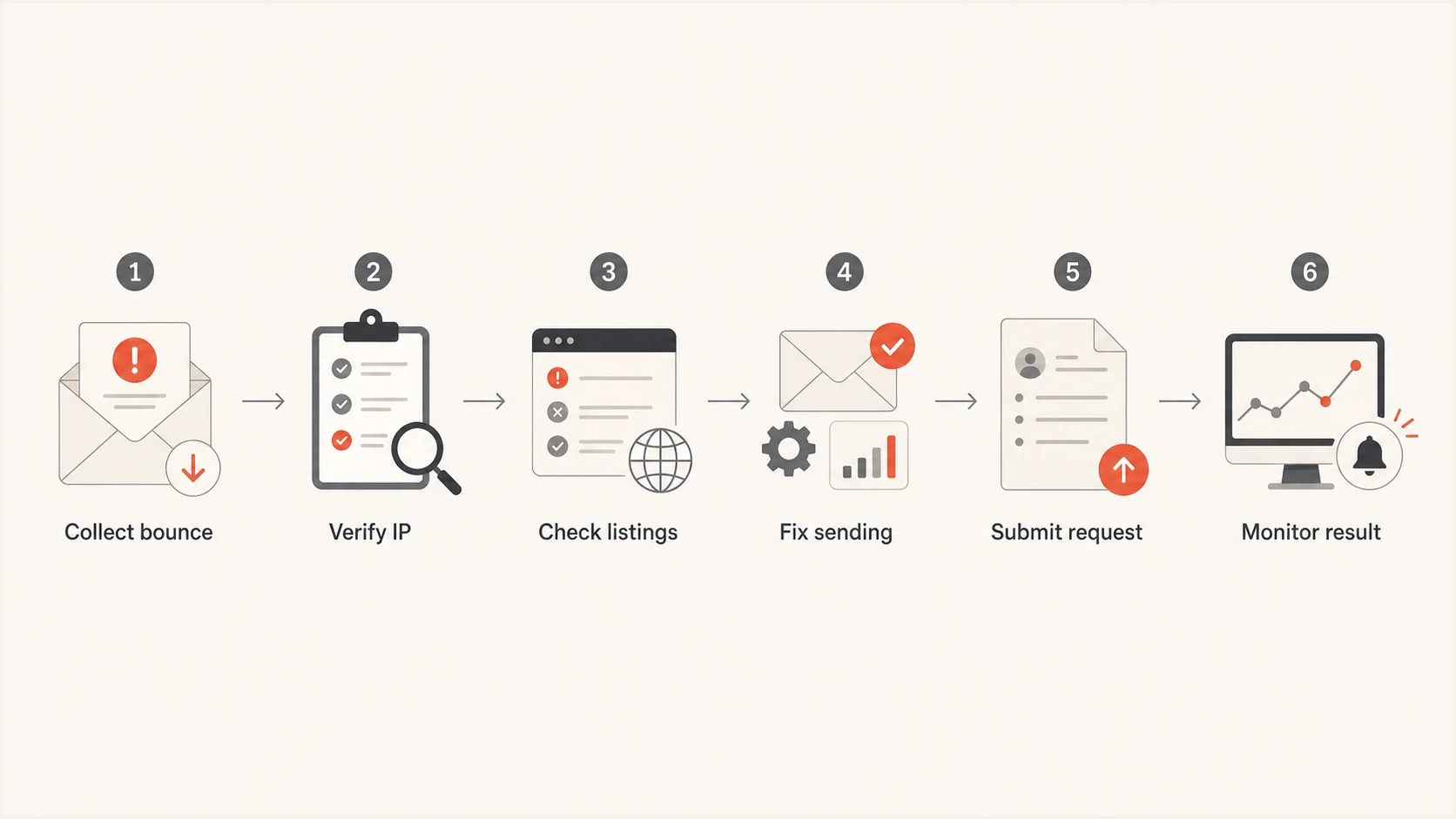
Flowchart for recovering a Microsoft IP delisting failure.
- Collect evidence: Save the full SMTP response, timestamps, recipient domain, sending IP, envelope sender, and message headers.
- Confirm scope: Test Microsoft consumer domains and Microsoft 365 business recipients separately because policy paths differ.
- Audit sources: Identify every source on the IP, including transactional systems, marketing mail, alerts, and legacy scripts.
- Fix failures: Resolve authentication gaps, remove stale recipients, slow the queue, and stop unexpected mail.
- Check reputation: Look beyond Microsoft and inspect major blocklists before another request.
- Submit cleanly: Use the route named in the NDR, send one complete request, then monitor fresh mail instead of opening duplicates.
Before opening another Microsoft request, check whether the IP or domain appears on broader blocklists. A Microsoft-only reject is handled one way. A wider blacklist pattern points to list hygiene, compromised sending, or provider pool damage.
Blocklist checker
Check your domain or IP against 144 blocklists.







After the blocklist check, send a fresh controlled message and inspect the headers. The email tester is useful here because a real message exposes authentication and content issues that a DNS-only check misses.
A good resubmission has a tight story: the IP was blocked, the sender identified the cause, the risky mail was stopped, authentication now passes, and Microsoft should see stable traffic when it reviews the IP again.
What to send Microsoft when the portal works
The request should be short and specific. Microsoft does not need a long narrative. It needs the IP, the exact rejection, the sender domain, the changes made, and a reason to trust that the same traffic will not trigger another listing.
|
|
|
|---|---|---|
IP address | Targets review | 203.0.113.10 |
Bounce code | Shows filter path | 5.7.606 |
Sender domain | Proves identity | example.com |
Fix made | Shows control | Paused source |
Fresh test | Confirms state | Header pass |
Evidence to gather before a Microsoft IP delist request.
Minimal request notestext
IP: 203.0.113.10
Sender domain: example.com
Issue: Microsoft 5.7.606 IP reputation rejection
Fix: paused stale campaign and removed invalid recipients
Authentication: SPF, DKIM, and DMARC pass on fresh test mail
Request: please review the current IP listing status
If consumer Hotmail and Outlook.com addresses are the main failure point, the Hotmail block guide is the closer match. If Microsoft 365 business domains reject broadly, the Microsoft delivery blocks workflow is more useful.
Stop resubmitting when the sender state is still changing. Duplicate requests with fresh bad traffic make the case weaker. Fix the stream first, then submit once with a clean explanation.
- Do not: Submit the same IP every few minutes during a temporary portal error.
- Do not: Rotate to a new IP before identifying the source that caused the listing.
- Do not: Assume passing SPF alone is enough when DKIM or DMARC identity still fails.
- Do not: Ignore Microsoft tenant policy when only one company rejects the mail.
Where Suped fits
Suped's product helps keep a Microsoft delisting investigation tied to the real sender identity: domains, IPs, SPF, DKIM, DMARC, and reputation signals. Teams can use Suped to connect DMARC monitoring, hosted SPF, hosted DMARC, hosted MTA-STS, SPF flattening, alerts, issue detection, and blocklist monitoring in one operational workflow.

Blocklist monitoring page showing domain and IP checks across blocklists with importance and status
The practical value is that the team can answer more than "did Microsoft delist us?" Suped shows whether the sender is ready to stay clean. The issues view gives fix steps, alerts identify new failures, and the multi-tenant dashboard helps agencies and MSPs manage the same workflow across many domains.
One-off delisting
- Scope: Focuses on one IP and one rejection path.
- Evidence: Depends on manually collected bounces, headers, and screenshots.
- Risk: Misses the domain or authentication issue that caused the listing.
Suped workflow
- Scope: Connects IP reputation with DMARC, SPF, DKIM, and sending sources.
- Evidence: Shows verified sources, failures, policy state, and clear fix steps.
- Risk: Alerts identify new failures before the next Microsoft review cycle.
For a first pass, use the domain health check to validate DMARC, SPF, and DKIM before another Microsoft submission.
?
What's your domain score?
Deep-scan SPF, DKIM & DMARC records for email deliverability and security issues.
If the health check finds authentication failures, fix those before asking for delisting again. Microsoft can remove an IP from one blocklist path and still distrust the next message if the domain identity is unclear.
Common mistakes that keep delisting stuck
The mistakes are usually operational. Teams focus on the Microsoft form because it is visible, then miss quieter issues in their sending program. Delay the request until the sender state is stable instead of submitting a weak request that the next batch of mail can undo.
- Over-retrying: Repeated form submissions do not repair a portal outage or improve sender reputation.
- Wrong evidence: Screenshots without SMTP responses make it harder to identify the actual filter path.
- Partial fixes: Removing one campaign does not help when automated alerts or legacy systems keep sending bad mail.
- DNS drift: Old SPF includes, unused DKIM selectors, and mismatched HELO names weaken trust.
- Tenant confusion: One Microsoft 365 customer can block a sender locally even when Microsoft-wide reputation improves.
- Bad timing: Submitting before queues settle lets Microsoft review the IP during the worst traffic window.
A fresh end-to-end test helps separate DNS assumptions from real message behavior. Send a message after the fixes, inspect authentication results, and confirm the message path before reopening the delist request.
Views from the trenches
Best practices
Confirm whether the Microsoft form fails globally before changing working DNS records.
Keep full SMTP responses and timestamps so each delist request has precise evidence.
Pause risky streams until fresh authentication and recipient-quality checks pass.
Ask a second verified submitter to test the same IP when portal errors repeat again.
Common pitfalls
Treating a temporary portal error as proof that the IP is permanently rejected today.
Submitting the same IP repeatedly while poor traffic continues in the background.
Assuming a delist receipt means Microsoft inbox placement will recover immediately.
Checking only the IP and ignoring domain authentication, HELO, and reverse DNS data.
Expert tips
Separate consumer and business Microsoft failures because the policy paths differ.
Record the exact error text because similar Microsoft bounces need different fixes.
Use controlled test sends after every fix instead of judging only by old bounces.
Build a repeatable evidence packet for each IP before requesting manual review again.
Marketer from Email Geeks says Microsoft delist portal errors can affect more than one sender at once, so the first check is whether the failure is broader than one account.
2024-01-10 - Email Geeks
Marketer from Email Geeks says the same temporary error has appeared in past periods, then cleared, which makes patient retesting better than repeated submissions.
2024-01-10 - Email Geeks
The practical answer
Microsoft IP delisting is not working because the failure is with the portal, the verification step, the sender reputation, or the assumption that the portal controls every Microsoft filtering decision. Treat those as separate paths.
If the form fails with a temporary error or the verification email does not arrive, save the evidence, check the submitted mailbox, and retry later. If the form works but mail still fails, stop focusing on the button and fix the sender: authentication, traffic quality, recipient hygiene, shared IP exposure, and evidence quality.
The fastest durable fix is the correct route for the NDR and the cleanest sender state at the moment Microsoft reviews the IP.




