What causes Microsoft S3150 blocklist bounces and how can I resolve them?


Updated on 9 Aug 2026: We clarified the correct Microsoft delisting routes, IP ownership requirements, and safe handling of permanent S3150 rejections.
Microsoft S3150 bounces happen when Microsoft rejects mail because the outbound IP or part of its sending network is on an internal blocklist. Resolve them by saving the full bounce, confirming the affected IPs and recipient domains, checking reputation and authentication, then using the Microsoft support route named in the NDR. If the first answer says no issue was found, reply with newer S3150 samples instead of starting over.
Treat S3150 as an IP reputation and Microsoft filtering problem first, not as a pure DMARC problem. Authentication still matters because broken SPF, DKIM, reverse DNS, or domain matching can make reputation recovery slower, but a correct DNS setup does not automatically remove a Microsoft block.
- First move: Collect complete bounce text, sending IP, timestamp, sender domain, and recipient domain before changing anything.
- Main test: Check whether the failures are limited to Outlook, Hotmail, Live, MSN, and Microsoft 365 recipients.
- Fastest path: Fix obvious sending issues, then submit multiple fresh bounce examples through the route named in the NDR.
What S3150 means
The S3150 wording usually appears inside a 550 5.7.1 non-delivery report. The key phrase is that part of the sender's network is on Microsoft's block list. That points to an IP or network reputation decision inside Microsoft, not a mailbox typo, bad MX record, or generic SMTP outage. The wording does not reveal the size of the affected network, so do not assume that a full /24 or every IP at the provider is blocked.
Common S3150 bounce wording
550 5.7.1 Unfortunately, messages from [203.0.113.10] were not sent.
Please contact your Internet service provider since part of their network
is on our block list (S3150).
A Microsoft thread documents the same rejection and shows why public blacklist results cannot confirm the scope of Microsoft's internal block.
|
|
|
|---|---|---|
S3150 | Network block | Open ticket |
S3140 | Related block | Check IPs |
5.7.1 | Policy reject | Review cause |
4xx | Temporary defer | Slow retries |
Compact reading of common Microsoft rejection clues
Why Microsoft issues S3150 bounces
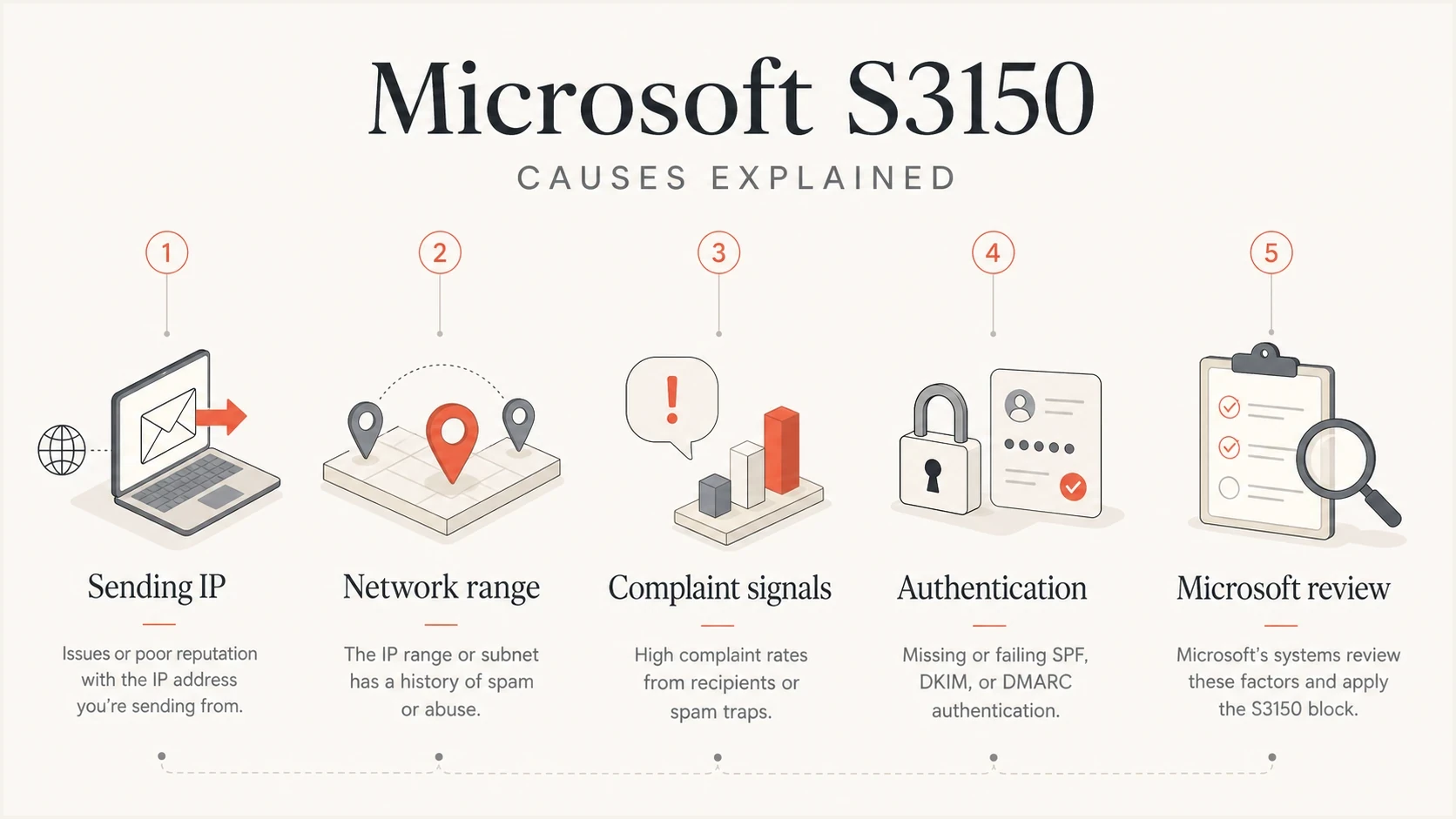
Infographic showing common Microsoft S3150 causes
The most common cause is poor or suspicious reputation on the IP that connected to Microsoft. That reputation can be tied to recent complaint spikes, spam trap hits, compromised traffic, bad shared-pool neighbors, sudden volume changes, or old mail streams that were reactivated too quickly.
S3150 can also begin across several Microsoft recipient domains while sender-side checks remain stable. Treat that pattern as a reason to collect affected IPs, recipient domains, timestamps, and fresh failures for escalation. It is not proof of a Microsoft outage.
- IP listing: Microsoft has classified the connecting IP as risky, blocked, or part of a risky network.
- Network range: The rejection can involve more than one outbound IP, so test each IP instead of inferring the range size from the wording.
- Volume jump: Microsoft saw a sudden increase in mail before it had enough positive engagement history.
- Auth gaps: SPF, DKIM, DMARC, rDNS, or HELO problems reduced trust in otherwise legitimate mail.
- Review needed: Microsoft support must review the evidence when automated delisting reports no block but S3150 continues.
How to confirm the cause
Start by separating Microsoft-only failures from global delivery failures. If non-Microsoft providers accept the same mail while Outlook and Hotmail bounce S3150, the problem is centered on Microsoft reputation or routing. If many providers reject mail, the issue is broader than S3150.
Then check whether the affected IP appears on public blocklists or blacklist databases. Microsoft can block an IP even when public checks look clean, but a public listing gives you a concrete fix before you ask Microsoft to review anything.
Blocklist checker
Check your domain or IP against 144 blocklists.







Also send a controlled test message and inspect headers, authentication, and delivery signals. A focused email tester helps separate DNS mistakes from reputation problems. For a wider DNS and authentication review, use a domain health check before submitting the ticket.
Evidence to collect before escalation
Affected IP: 203.0.113.10
Sender domain: example.com
Recipient domain: outlook.com
UTC time: 2026-08-10 03:14
SMTP response: 550 5.7.1 S3150
Message type: transactional password reset
Recent volume change: none
Authentication result: SPF pass, DKIM pass, DMARC pass
Choose the correct Microsoft delisting route
Use the recipient type, complete SMTP response, and instructions in the NDR to choose the route. S3150 commonly appears when sending to Microsoft's consumer domains, while Microsoft 365 has a separate banned-sending-IP flow with different enhanced status codes.
- For S3150 affecting Outlook.com, Hotmail, Live, or MSN recipients, start with Outlook.com sender support.
- If the NDR directs you to sender.office.com, including Microsoft 365 banned-IP responses such as 5.7.606-649, use the Microsoft IP delist portal.
- Complete the confirmation link sent by the portal. The request is not finished until that verification step succeeds.
- If a portal reports no active block while new S3150 bounces continue, keep the response and reply to the existing support case with newer samples.
Submit through the IP owner
The organization that controls the public outbound IP should submit the request. If the IP belongs to a shared relay, ISP, or sending provider, send that provider the full NDR and timestamps so its abuse or deliverability team can investigate the range and contact Microsoft.
How to resolve S3150 bounces
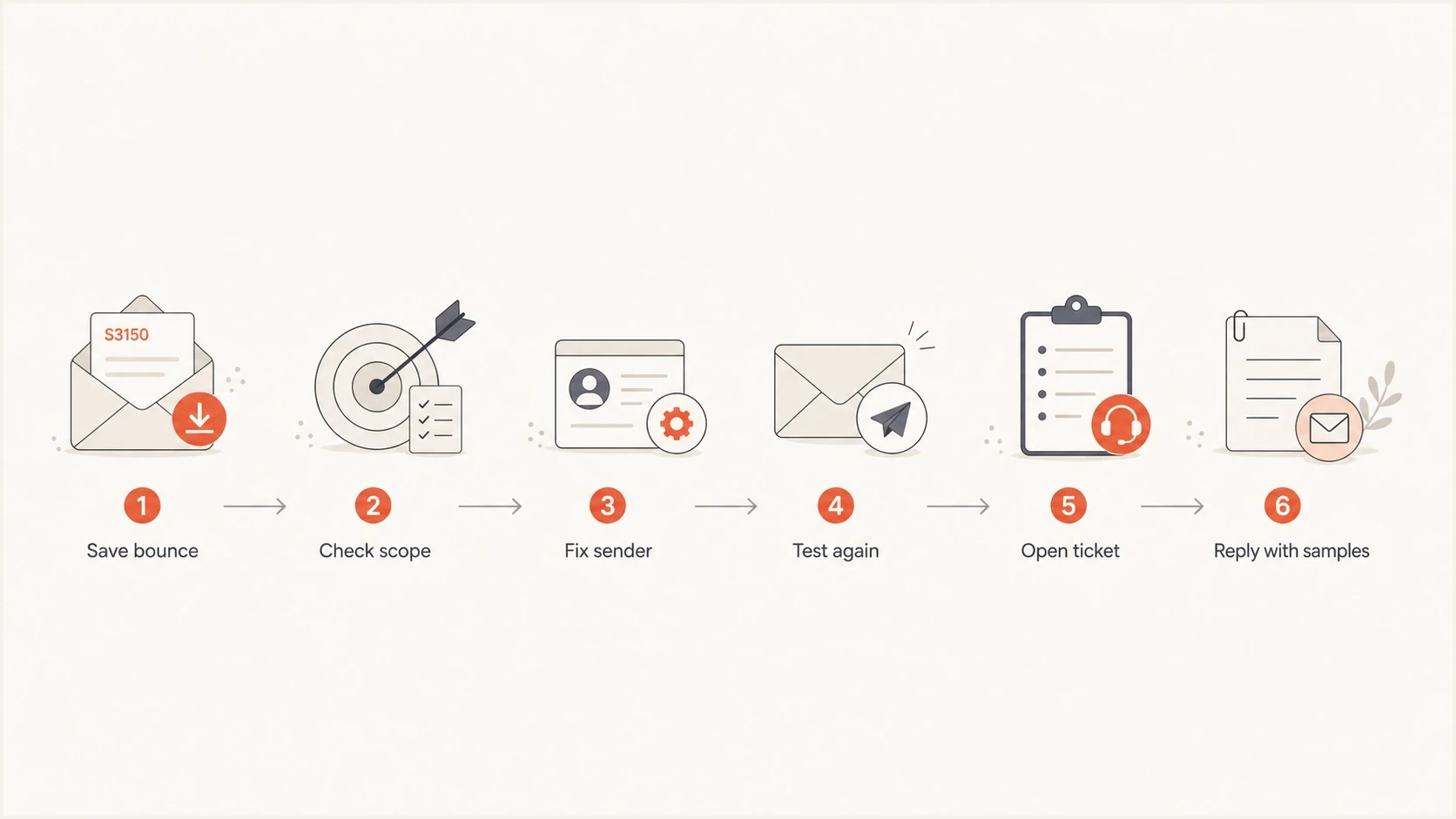
Flowchart for resolving Microsoft S3150 bounces
The workflow is short, but the order matters. A ticket with vague wording often gets a generic response. Fixing DNS without asking Microsoft to review the rejected outbound IP can leave the block in place.
- Save evidence: Keep the raw bounce, not a screenshot or summary. Microsoft needs the exact SMTP response.
- Map scope: Group failures by sending IP, recipient domain, message stream, and first-seen time.
- Fix basics: Correct SPF, DKIM, DMARC, PTR, HELO, list hygiene, compromised accounts, and unsafe queue behavior.
- Retest once: Send a new controlled message to a Microsoft recipient and record the result. Do not retransmit the rejected message after a 5xx response.
- Open the case: Use the route named in the NDR and submit the IP, UTC timestamps, bounce text, corrective action, and operational purpose of the mail.
- Reply again: If Microsoft says no issue exists, reply to the same case with newer bounce samples from the affected IP.
Stop retries after a permanent rejection
A 550 response is a permanent failure for that delivery attempt. Do not retransmit the same message to the same recipient. Pause or suppress the affected Microsoft queue, investigate the cause, and use a new controlled message only when you need current evidence.
Ticket evidence template
Hello Microsoft support,

We are seeing S3150 rejections for legitimate mail from 203.0.113.10.
The mail is transactional, requested by recipients, and authenticated.

Sample 1: 2026-08-10 03:14 UTC, user@outlook.com, 550 5.7.1 S3150
Sample 2: 2026-08-10 03:22 UTC, user@hotmail.com, 550 5.7.1 S3150
Sample 3: 2026-08-10 03:31 UTC, user@live.com, 550 5.7.1 S3150

SPF, DKIM, DMARC, PTR, and HELO have been checked.
Please review the continuing S3150 rejection for the affected IP.
What to fix before requesting delisting
Before asking for removal, make the sending identity consistent. Microsoft should see a stable IP, clear reverse DNS, authenticated mail, expected volume, and recipients who asked for the message. That does not guarantee delisting, but it removes obvious reasons for denial.
Fix first
- Authentication: SPF and DKIM pass, and DMARC evaluates against the visible sender domain.
- Identity: PTR, HELO, and sending hostname match the provider and sending stream.
- Audience: Suppress hard bounces, inactive addresses, role accounts, and old imported lists.
- Cadence: Keep volume stable and avoid resending large backlogs into Microsoft inboxes.
Do not over-focus
- DMARC alone: Passing DMARC helps, but S3150 is usually an IP or network block decision.
- Content swaps: Changing templates rarely clears S3150 unless the content caused complaints.
- New tickets: Replying to the existing case with fresh evidence is often cleaner than reopening.
- Warmup myths: Warmup helps reputation, but it does not force Microsoft to remove a block.
Minimum authentication baselineDNS
example.com TXT "v=spf1 include:send.example.net -all"
selector._domainkey.example.com TXT "v=DKIM1; k=rsa; p=..."
_dmarc.example.com TXT "v=DMARC1; p=none; rua=mailto:d@example.com"
If Microsoft support points back to sender reputation after the basics are corrected, keep the ticket factual. A Microsoft Q&A thread shows how senders frame S3150 removal requests around affected IPs and repeated bounces.
Using Microsoft admin data
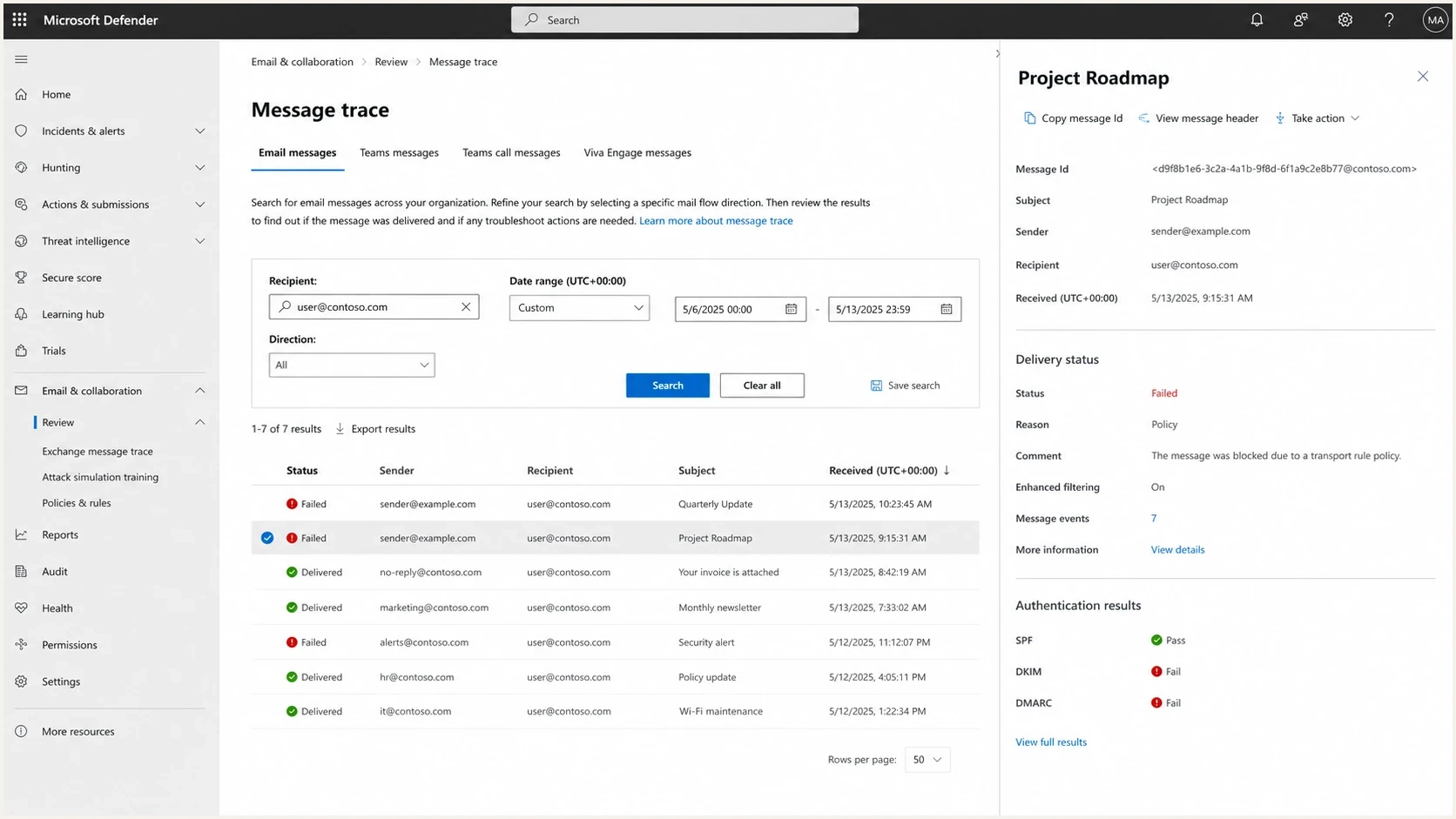
Microsoft Defender portal message trace screen for checking delivery failures
If you control the recipient tenant, Microsoft admin data can confirm whether the failure is a sender-side rejection, a tenant policy decision, or a message that never reached the tenant. That distinction matters because S3150 happens before normal mailbox delivery. A recipient admin often has no quarantine item to release.
For sender-side troubleshooting, focus on the SMTP transcript and the connecting IP. For tenant-side troubleshooting, compare message trace results with the bounce time. If the message is absent from trace, Microsoft rejected it before tenant-level processing.
Where Suped fits
Suped is our DMARC and email authentication platform. In an S3150 incident, it helps teams map domains to sending sources, verify authentication, monitor public blocklist or blacklist changes, and keep the evidence for each affected IP together. DMARC does not remove an S3150 block, but the reporting data helps rule out an authentication regression while the Microsoft case is open.

Blocklist monitoring page showing domain and IP checks across blocklists with importance and status
In Suped, the domain and IP views help confirm affected senders, watch for blocklist or blacklist changes, and track whether SPF, DKIM, and DMARC are passing for each mail source. Suped's blocklist monitoring helps identify when S3150 coincides with a wider reputation issue.
For MSPs and teams with many domains, monitor each domain and sending source, alert on authentication or reputation changes, and attach the affected IP details to the Microsoft case. Suped's hosted DNS controls and multi-tenant reporting reduce the manual checks needed during incident response.
When it is probably Microsoft-side
Sometimes S3150 appears across unrelated senders within a short period, then clears after Microsoft reviews the affected IPs. That pattern points to a Microsoft-side filtering or support-system problem, especially when sending practices have not changed and other mailbox providers continue accepting the same mail.
Signs to escalate
- Sudden start: S3150 begins across Microsoft domains without a matching change in volume or content.
- Clean checks: Public blacklist checks are clean and authentication passes on the affected stream.
- Moving target: One IP clears, then a different IP in the same operation starts seeing S3150.
- Support clue: A support reply references technical difficulties or asks for more current examples.
When blocks keep returning after delisting, compare the pattern against deeper Microsoft reputation issues. The related pages on a Microsoft bounce message and Microsoft IP delisting cover those cases in more detail.
Views from the trenches
Best practices
Keep raw bounces with IPs and UTC times so Microsoft can review exact S3150 events.
Reply to the same support case with fresh samples when the first response misses the block.
Check public blacklist status, but treat clean results as only one signal in the review.
Pause aggressive retries to Microsoft while you work the block and collect evidence.
Common pitfalls
Assuming DMARC failure caused every S3150 bounce leads teams away from IP evidence.
Opening repeated tickets without new bounce samples slows review and weakens the case.
Clearing one affected IP does not prove the entire sending range has fully recovered.
Large retry queues can make Microsoft see more unwanted traffic during the incident.
Expert tips
Track first-seen and last-seen times per IP so moving blocks are easy to explain.
Send a short ticket with samples, authentication status, and the mail stream purpose.
Compare Microsoft failures against other providers before changing templates or DNS.
Use alerting on reputation and authentication so S3150 is caught before volume grows.
Marketer from Email Geeks says a burst of S3150 bounces cleared quickly after support was contacted, which points to ticket escalation being necessary in some cases.
2025-08-20 - Email Geeks
Marketer from Email Geeks says S3150 can appear on one group of IPs, disappear, and then show up on other IPs, so teams should track each affected sender separately.
2025-08-20 - Email Geeks
S3150 fix checklist
S3150 is resolved by combining sender cleanup with direct Microsoft review. The bounce means Microsoft blocked the sending IP or part of its network. Prove the current mail stream is legitimate, show that the technical basics are healthy, and give Microsoft enough fresh examples to find the block.
The shortest reliable path is to preserve the bounce, confirm the affected IPs, check reputation and authentication, stop retries after the permanent rejection, use the route named in the NDR, and reply with new samples if the first response misses the issue. Suped helps keep DMARC, SPF, DKIM, hosted DNS controls, blocklist checks, alerts, and multi-domain reporting connected to the incident record.




