
Once you've added your domain and configured DMARC reporting, here's how to confirm everything is working.
Check your domain status
Go to Domains and check that your domain shows a green status for DMARC. This means Suped has validated that your DMARC record includes the correct reporting address.
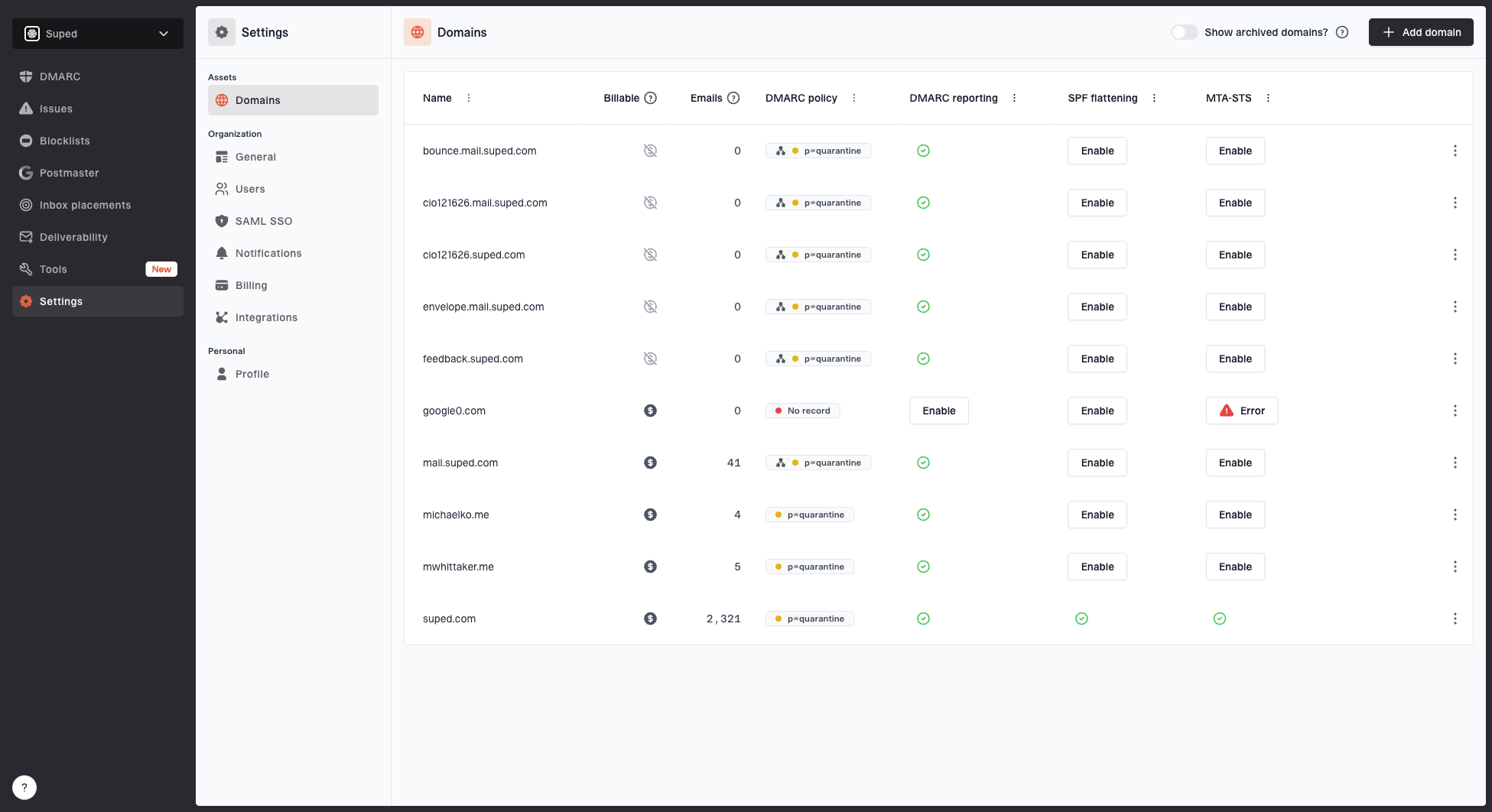
Domains page showing monitored domains, email volume, DMARC policy, DMARC reporting, SPF flattening, and MTA-STS
Review issues
The Issues page will flag any problems with your DMARC, SPF, or DKIM configuration. Address anything marked as critical first.
Issues page showing top issues, verified sources, unverified sources, and authentication pass rates
Wait for DMARC data
DMARC data will start appearing on the DMARC monitoring page within 24-48 hours after your first report arrives. ISPs send reports on their own schedule, so it can take a bit of time.
Suped DMARC dashboard showing email volume, authentication health, and source breakdown
Troubleshooting
If you don't see data after 48 hours:
- Check that the
ruaaddress in your DMARC record matches the one shown in your Suped dashboard. - Make sure your DMARC record is published at
_dmarc.yourdomain.comand is a valid TXT record. - Use the DMARC checker tool to validate your record.


