Why is one-click unsubscribe missing in GoHighLevel emails, and how to troubleshoot?

Published 2 Jun 2025
Updated 6 Aug 2026
10 min read
Summarize with
Updated on 6 Aug 2026: We updated this guide with HighLevel's current header behavior, mailbox display checks, DKIM coverage, and preference controls.
When one-click unsubscribe seems to be missing in GoHighLevel, first determine whether the inbox button is hidden or the delivered message lacks the required headers. Send a real campaign to a seed contact, inspect the full message source, and confirm that both List-Unsubscribe and List-Unsubscribe-Post are present. If they are present, mailbox eligibility and sender reputation become the next checks.
A visible footer link or the {{unsubscribe}} merge tag is separate from header-based one-click unsubscribe. Gmail requires the RFC 8058 pattern for bulk promotional mail. Yahoo requires easy unsubscribe for bulk promotional mail, highly recommends the POST method, and expects requests to be honored within two days.
- Send an actual campaign to one seed contact that you are comfortable unsubscribing.
- Open the raw message source and search for both List-Unsubscribe headers.
- Record whether the message came from a campaign, workflow, conversation, or manual send.
- If production mail has no one-click headers, send the full headers to GoHighLevel support.
What has to be present
One-click unsubscribe is not a special button that GoHighLevel places in the email design. It uses headers added during sending. Mailbox providers can use those headers to show their own unsubscribe control and send a server-side request.
RFC 8058 requires an HTTPS URI in List-Unsubscribe, plus the exact POST declaration shown below. A mailto URI is optional and does not satisfy Gmail's one-click requirement by itself. The POST endpoint must process the request without an HTTPS redirect.
Required one-click unsubscribe headerstext
List-Unsubscribe: <https://example.com/unsubscribe/abc>,
 <mailto:unsubscribe@example.com?subject=unsubscribe>
List-Unsubscribe-Post: List-Unsubscribe=One-Click
RFC 8058 also requires a valid DKIM signature that covers List-Unsubscribe and List-Unsubscribe-Post. Check that both names appear in the DKIM-Signature h= list. Headers that are present but unsigned do not complete the RFC 8058 setup.
Do not use the inbox button as the only test. Gmail can hide the visible control even when valid headers exist. Raw headers establish whether GoHighLevel added them, while DKIM coverage and a working POST endpoint establish whether the implementation is complete.
For a detailed header inspection, compare the raw message source against the steps to verify List-Unsubscribe. If the headers pass these checks but Gmail still shows no shortcut, review Gmail display behavior.
Body unsubscribe link
This is the visible link inside the email. In GoHighLevel, it can come from the default footer, the manual merge tag, or a custom trigger link.
- The recipient clicks a link in the email body.
- Bulk-sender guidance still requires a visible body link for promotional messages.
One-click header
This is hidden in the raw email headers. Gmail, Yahoo, and other mailbox providers can use it to power their unsubscribe UI.
- The mailbox provider sends an HTTPS POST request after consent.
- It is the mechanism Gmail checks for RFC 8058 one-click unsubscribe.
When the headers exist but the button is missing
Finding both headers changes the diagnosis. Gmail displays its top-of-message unsubscribe control only for messages that pass automated eligibility checks. HighLevel's current guidance also points to sender reputation as a reason Gmail or Outlook may not show the control.
- Confirm DKIM passes and signs both unsubscribe header fields.
- Use permission-based contacts, stable sending volume, and low complaint rates.
- Unsubscribe a seed contact and confirm its contact or subscription status changes.
- Google's Compliance Status dashboard can take up to seven days to reflect a fix.
HighLevel says a header-based unsubscribe updates the contact record automatically. If Preference Management is enabled, confirm the contact is excluded from the relevant subscription category, or from all location marketing after a global unsubscribe. A request that is not honored within 48 hours is a processing problem, regardless of whether the inbox button appeared.
Why it is missing in GoHighLevel
The first GoHighLevel trap is treating the inbox button as proof that the headers are absent. The second is testing a send path that does not match production. Preview, test, campaign, workflow, conversation, and manual sends can pass through different message-building paths, so inspect the exact type used for marketing.
GoHighLevel separates the platform-added List-Unsubscribe header from the visible body link. Its current guidance says the header cannot be disabled. The default footer link can be disabled only when every LC Email message includes the manual {{unsubscribe}} tag instead. The documentation on default unsubscribe links explains the account-level body-link setting.
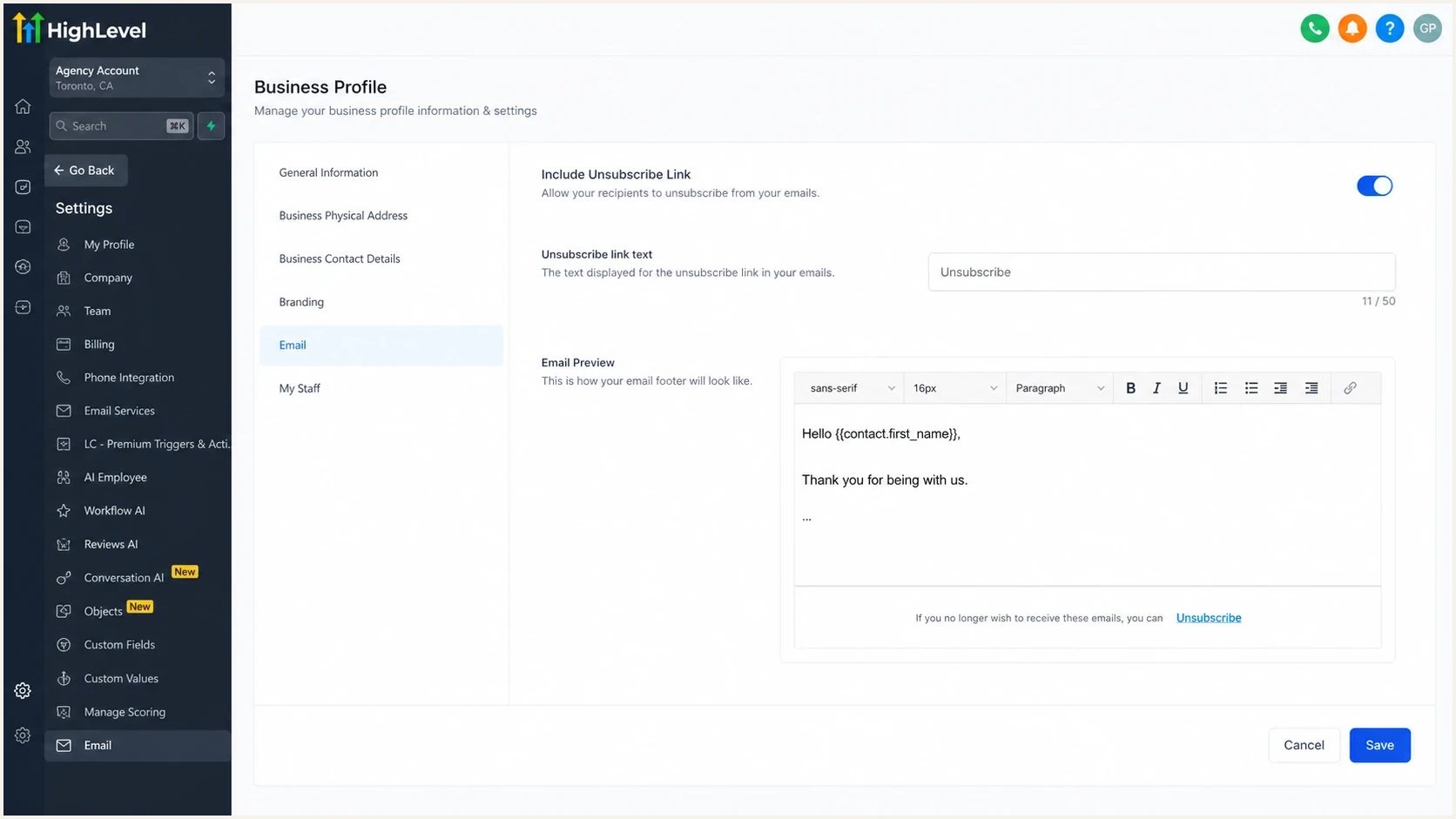
GoHighLevel unsubscribe settings screen for LC Email.
HighLevel's One Step, Two Step, and Dynamic unsubscribe-flow settings control what happens after a recipient clicks the body link. They do not verify RFC 8058 header one-click. Dynamic can require confirmation when the click occurs within five minutes of delivery or the contact is less than one hour old, which matters when testing the body-link flow.
|
|
|
|---|---|---|
Inbox button absent | Headers may exist | Inspect raw source |
Headers absent | Send-path issue | Escalate headers |
Default footer off | Body link may be absent | Enable footer or tag |
DKIM coverage incomplete | Headers are unsigned | Have sender sign them |
Test path only | Not production proof | Send live seed |
Common causes of missing one-click unsubscribe in GoHighLevel
The custom trigger-link route needs extra care. GoHighLevel describes custom unsubscribe links as a workflow-based way to mark contacts as Do Not Disturb after a click. That can handle visible opt-out behavior, but it does not prove one-click header compliance unless the delivered email also contains the RFC 8058 headers, valid DKIM coverage, and a working POST endpoint.
If Gmail's Compliance Status dashboard shows One-click unsubscribe or Honor-unsubscribe as Needs work after production sends, inspect every promotional stream that uses the domain. After a fix, allow up to seven days for the rolling data to change. If the status remains unchanged, send the full raw headers to GoHighLevel support.
How to troubleshoot it
Use a narrow troubleshooting flow so inbox UI behavior does not obscure the first question: did the delivered production message contain a valid RFC 8058 implementation?
- Add a real contact address that can be unsubscribed without affecting a customer record.
- Use the same sender domain, content type, and route as the production campaign.
- Use the recipient mailbox source view and save the complete message headers.
- Find both List-Unsubscribe fields, an HTTPS URI, the exact POST value, and DKIM coverage.
- Use only the seed contact, then confirm its email DND or applicable subscription status updates.
- Check every route that sends promotional mail, including relevant workflows.
A header test is faster with a purpose-built inbox report. Suped's email tester accepts a real message and displays its authentication, headers, and related delivery signals together. In this workflow, it separates message-source facts from the unsubscribe control a mailbox chooses to display.
Email tester
Send a real email to this address. Suped shows a results button when the test is ready.
?/43tests passed
When headers are missing, the ticket to GoHighLevel should include the raw headers, send type, sub-account, sender domain, and route used for delivery. Screenshots of the email body are not enough because support needs the server-added headers. These details let support reproduce the affected pipeline and compare it with the account settings.
Header fields to capture before escalationtext
List-Unsubscribe:
List-Unsubscribe-Post:
Authentication-Results:
DKIM-Signature:
From:
Return-Path:
Message-ID:

Email tester sample report showing total score, email preview, issue summary, and per-section results
How to validate the full sending setup
One-click unsubscribe is one part of sender compliance. When an unsubscribe header is missing or unsigned, also verify domain authentication and use reporting that can expose problems before mailbox providers flag the sender.
For a quick domain-level pass, run a domain health check and confirm the sending sources authenticate and pass DMARC alignment. Then add ongoing DMARC monitoring so failed sources, missing signatures, and policy changes do not go unnoticed.
Suped's product provides DMARC reporting and authentication monitoring for the sending domain. In this workflow, use its alerts and fix guidance to catch failed sources or alignment changes while GoHighLevel support investigates the missing header. Its other controls include hosted DMARC, hosted SPF, SPF flattening, hosted MTA-STS, and blocklist (blacklist) monitoring.
If the GoHighLevel sending domain also has reputation pressure, add blocklist monitoring to the workflow. A missing one-click header does not prove a blocklist or blacklist listing. Poor opt-out handling can raise spam complaints, which can damage the domain over time.
What counts as resolved
Use a delivered production email and a seed contact to classify the fix.
Ready
Pass
Both headers exist, DKIM covers them, and the seed contact is suppressed.
Needs work
Partial
The body link works, but the POST header is missing or unsigned.
Not ready
Fail
No body unsubscribe link and no one-click headers are present.
Transactional email does not follow the same one-click rules as promotional email. Classify appointment reminders, receipts, password resets, and form confirmations separately. If a workflow mixes service information with promotional follow-ups, treat the promotional messages as marketing and make the unsubscribe path explicit.
For the broader rule set, compare the implementation against the current Gmail and Yahoo requirements. Gmail now enforces its bulk-sender requirements on non-compliant traffic. Yahoo says non-compliant mail may be filtered or rejected, so a working opt-out path affects more than the visible inbox button.
Views from the trenches
Best practices
Send one live campaign to a seed address before judging one-click unsubscribe headers.
Keep the visible footer link and the header unsubscribe path working at the same time.
Inspect raw headers before trusting inbox UI, because Gmail can hide valid options.
Common pitfalls
Treat preview emails as render checks, not compliance tests for production headers.
Do not assume a trigger link satisfies one-click unsubscribe without POST headers.
Inspect workflow mail separately instead of assuming every send route uses one path.
Expert tips
Use a disposable seed contact so a true unsubscribe test does not affect a customer.
Save full message source when opening a platform ticket instead of screenshots alone.
Compare marketing campaigns and workflow sends, because they can use different paths.
Marketer from Email Geeks says a test email can contain the required headers while the live campaign path lacks them.
2025-05-05 - Email Geeks
Marketer from Email Geeks says GoHighLevel's CRM roots can make campaigns, workflows, and one-off sends behave differently.
2025-05-05 - Email Geeks
The practical fix
If the inbox unsubscribe button is missing, do not assume the production campaign lacks one-click headers. Inspect a delivered campaign first. When the raw source contains the valid, DKIM-covered header pair, focus on sender eligibility and confirm that GoHighLevel processes the opt-out.
If a production campaign lacks List-Unsubscribe-Post, or DKIM does not cover both headers, the issue sits in the sending path. Keep one visible body link, capture the full message source, and escalate with the exact send type. Test the suppression result within 48 hours, then monitor the domain so authentication problems do not hide behind the unsubscribe issue.




