
Why have Mailchimp email open rates dropped and gone to spam in Gmail recently?

Updated on 24 Oct 2026: We added a one-click unsubscribe check and corrected the Mailchimp tracking and authentication steps for Gmail delivery problems.
A Mailchimp open-rate drop in Gmail can come from two different problems: fewer trackable opens or worse inbox placement. Mailchimp bot filtering can remove automated activity from reports, Gmail can clip or block the tracking image, or Gmail can filter more of your mail into spam when authentication, engagement, reputation, or list-quality signals weaken. In a late-May 2023 incident, Mailchimp told affected users that Gmail filtering created more false positives for some Mailchimp senders and that a fix had been deployed. That past incident is useful context, but it does not prove a new Gmail-wide problem.
If Gmail opens fall sharply and live campaign tests now land in spam, treat it as a deliverability incident first. If older campaign reports changed too, or Gmail placement remains normal, check Mailchimp's bot-filtering and tracking settings before changing your sending strategy. Open tracking is imperfect because it depends on a hidden image and Mailchimp's treatment of automated activity.
- First distinction: If historical reports changed too, inspect Mailchimp bot filtering before changing campaigns.
- Placement check: Send a live Mailchimp campaign to a small Gmail test segment and compare folders with other mailbox providers. Use Suped's email tester to inspect authentication.
- If spam is confirmed: Authenticate the sending domain, pause weak Gmail segments, and resume with recent clickers first.
Separate spam placement from lower measured opens
When Mailchimp says a campaign was delivered, it normally means the receiving server accepted the message. It does not mean Gmail put the message in the inbox. A message can be accepted by Gmail and then placed in Promotions, Updates, spam, or another folder. Promotions and Updates are inbox tabs, so placement there is different from spam. That is why Mailchimp delivery can look steady while Gmail open rates fall hard.
Check whether the drop is limited to current Gmail recipients or also appears in older Mailchimp reports. A Gmail-only decline with new spam placement points to filtering. A broad change across old reports, without matching changes in clicks, conversions, subscriber replies, or placement tests, points to reporting or bot filtering. The useful question is which signal changed for your domain, audience, content, sending path, or report settings.
A sudden open-rate drop is not proof of one cause
A Mailchimp account can have normal delivery numbers while Gmail places mail in spam. It can also show lower opens after automated activity is filtered out. Confirm report settings and placement before changing templates, segments, sending volume, or platforms.
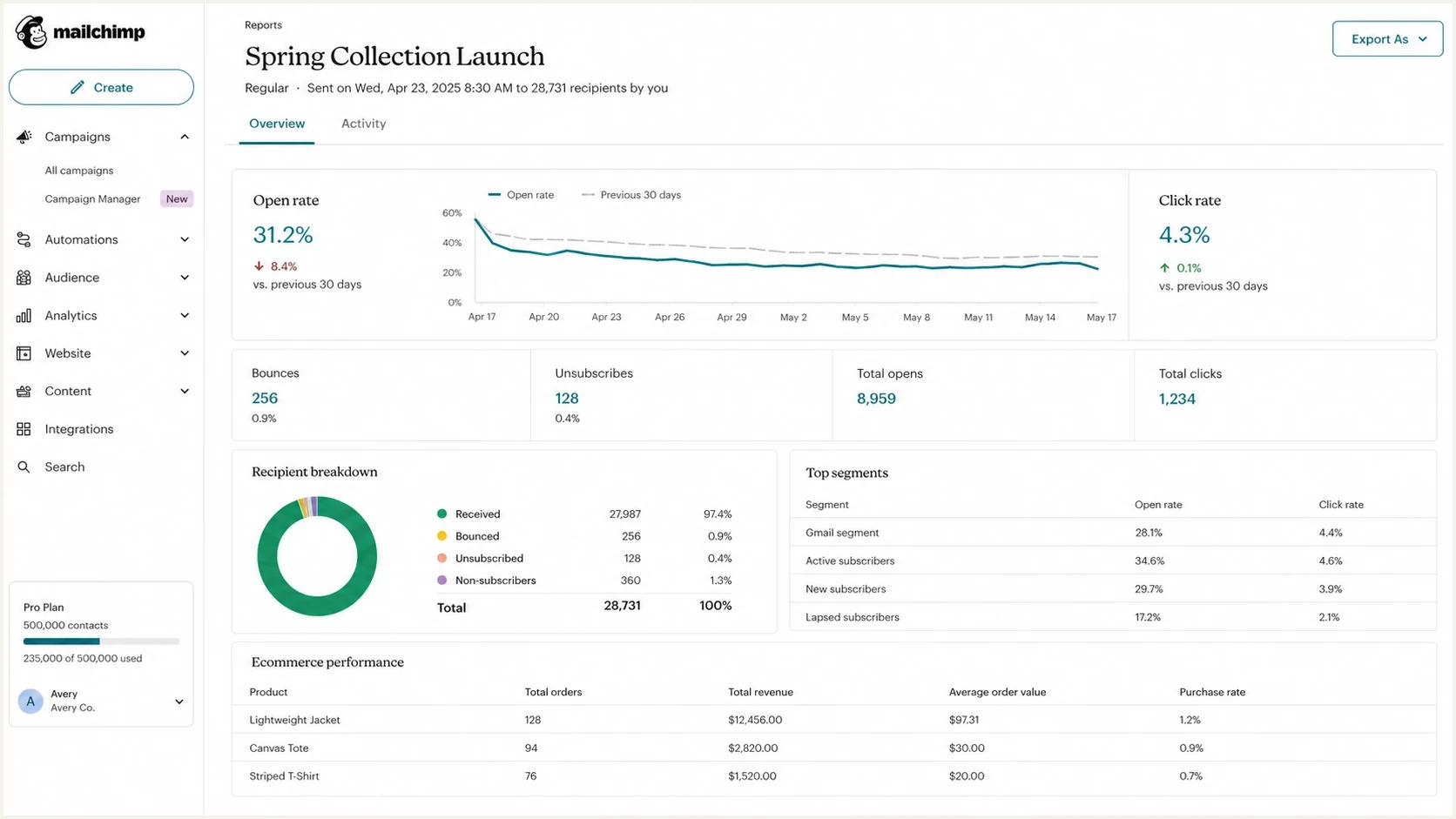
Mailchimp campaign report comparing falling Gmail open rates with stable click rates.
A Mailchimp report is useful, but it does not show the whole path. Separate the investigation into two tracks. First, confirm whether Gmail is the only mailbox with the problem. Second, prove whether your domain authentication and reputation signals give Gmail enough confidence to keep the mail out of spam.
Check Mailchimp bot filtering before changing sends
Mailchimp enables bot filtering by default to hide many non-human opens and clicks caused by automated image loads or link scans, including Apple Mail Privacy Protection (MPP). When that filtering is on, open and click metrics can fall significantly even though inbox placement and subscriber behavior did not worsen. The setting applies across account reporting, not to one campaign at a time.
Mailchimp makes bot-filtered historical data available for Apple Mail Privacy Protection opens starting July 10, 2024, and email clicks starting August 10, 2025. If old reports and new reports appear to change together, a reporting change is more plausible than a sudden Gmail reputation collapse. See Mailchimp's bot-filtering documentation.
Unchanged bot-filtering settings do not rule out image-loading or tracking problems. Confirm Track opens was enabled before sending, then check whether Gmail asks the recipient to display images. Gmail withholds automatic image loading for suspicious messages, which can leave a real open unrecorded. Open counts alone do not establish a new Gmail-wide filtering change.
- Open Analytics, then Analytics settings or Bot filtering on, and check the Bot activity toggles and any recent setting changes.
- Compare the same campaign with bot filtering on and off, then restore the original setting. The change affects reporting across the account.
- Compare conversions, purchases, replies, unsubscribes, and bounces over the same period.
- Treat the issue as spam placement only when Gmail tests, subscriber reports, complaint data, or mailbox comparisons support it.
Do not build re-engagement segments from opens alone
Bot filtering and privacy protections make open-only segments unstable. Use recent clicks, purchases, replies, and other deliberate actions when deciding who should receive a recovery send.
Why Mailchimp emails go to spam in Gmail
Start with these common causes before changing templates, suppressing contacts, moving platforms, or sending a large apology campaign. Changing too many variables at once makes the next send harder to read.
|
|
|
|---|---|---|
Bot filtering | Old and new reports change | Compare the filtering setting |
Gmail filtering | Gmail spam placement increases | Compare Gmail and non-Gmail sends |
Authentication failure | DKIM or DMARC fails | Update Mailchimp domain setup |
Stale or unconsented contacts | Complaints or bounces rise | Suppress invalid addresses and review consent |
Shared reputation | Some senders hit, others fine | Check IP and domain signals |
Template or tracking change | Open rate falls after redesign | Compare clicks, conversions, clipping, and preview text |
Blocklist issue | Spam tests fail broadly | Review blocklist and blacklist data |
Common causes behind a Gmail-specific Mailchimp open-rate drop
Domain verification is different from custom authentication. A verified Mailchimp From address does not prove that Gmail received a valid DKIM signature for your domain. Check a delivered campaign's authentication results before treating an older setup as correct or assuming its age caused the drop.
Blocklist or blacklist data can matter too, especially on shared IP paths, but do not over-read every listing. Shared marketing IPs often appear on minor lists without causing a Gmail collapse. The useful signal is whether a serious IP or domain listing lines up with the same date as the open-rate drop and whether multiple mailbox providers start placing the same message in spam.
A sudden change in sending domain, branded link domain, image host, campaign format, or header structure can also make Gmail treat the next send as a separate reputation test. Ramp large changes with engaged Gmail recipients before returning to full volume.
?
What's your domain score?
Deep-scan SPF, DKIM & DMARC records for email deliverability and security issues.
How to diagnose a Gmail open-rate drop
Start with a timestamp. Pick the first campaign where Gmail opens fell, then compare it with the last normal campaign. Do not compare a sale blast with a newsletter or a reactivation campaign with a buyer update. Use similar campaign types so the test measures placement and reputation rather than content intent.
- Confirm whether Mailchimp bot filtering or tracking settings changed, including whether older reports moved at the same time.
- Compare personal Gmail recipients (@gmail.com and @googlemail.com) with other providers using open rate, click rate, bounces, and available complaint data. Keep Google Workspace addresses separate.
- Send a live campaign to a small, consented test segment and inspect Gmail's Primary, Promotions, Updates, and spam folders. Do not use Send a Test Email to validate open or click tracking.
- Validate DNS with a domain health check for DMARC, SPF, DKIM, and obvious DNS mistakes.
- In Gmail, open Show original and inspect Authentication-Results. Check SPF, DKIM, and DMARC results, and confirm that a passing DKIM signing domain or SPF return-path domain matches the visible From domain for DMARC.
- Check recent campaign changes, including template, sender name, subject style, preview text, link domain, image host, and tracking pixel placement.
- Send the next campaign only to recently engaged, opted-in Gmail contacts. Avoid automatically resending to non-openers while tracking or placement remains uncertain.
Click-to-open rate depends on both metrics, so a stable ratio cannot confirm inbox placement. Compare absolute clicks and purchases with Gmail folder tests, using similar recipients and the same reporting settings. Because bot filtering can change both opens and clicks, stable conversions and replies are stronger evidence of unchanged human engagement.
Illustrative placement comparison
These percentages are hypothetical, not Mailchimp or Gmail benchmarks. Use comparable campaign tests to measure your own placement; Mailchimp delivery reports do not supply these folder percentages.
Inbox or tab
Spam
Unknown
Seed tests help when they show a clear pattern, but do not treat one personal Gmail account as proof. A new Gmail account has little relationship history. A work Gmail account can have different filtering. A real subscriber who clicked recently is another signal again. You need enough evidence to see whether the issue is broad Gmail filtering, weak recipient-level engagement, an account-specific problem, or a report-setting change. Mailchimp's email testing guidance confirms that Send a Test Email does not activate open or click tracking; use a live campaign when testing those measurements.
If the drop followed a template change
A new Mailchimp template can be linked to lower measured opens, but the body layout does not make a subscriber choose not to open after the message has already reached the inbox. The redesign affects opens indirectly when it changes subject style, preview text, sender name, send time, Gmail placement, message clipping, image loading, or open pixel behavior.
Compare delivered volume, absolute clicks, click-to-open rate, conversions, complaints, unsubscribes, and Gmail-only placement before treating the design as the failure. If clicks rise while opens fall, investigate open tracking before blaming the redesign. If opens and clicks both fall, check placement and report settings as well as the offer or audience fit.
- Check Gmail clipping. Keep the final HTML source, including tracking markup, below 102 KB with room to spare so the tracking pixel is not hidden behind clipped content. Hosted image-file sizes are separate from this HTML limit.
- If only test emails clip, change the subject line or delete earlier test messages. Gmail can thread repeated tests until the combined conversation exceeds the clipping limit.
- Check first visible text and preview text. Logos, spacer rows, hidden preheaders, and digest intros can weaken the inbox context before the reader sees the design.
- Test old and new templates side by side with the same Gmail segment, sender name, subject logic, send time, and tracking setup.
The cleanest answer comes from a same-day randomized test. Sending the old design next week adds a new news cycle, different inbox load, and different subscriber context. Hold the segment, sender name, send time, and subject approach steady so the template is the real variable.
Fix Mailchimp authentication first
Mailchimp authentication is the first technical fix because it gives Gmail a verified sending identity. Your campaign should have a passing DKIM signature whose signing domain matches the visible From domain for DMARC. SPF checks the return-path domain, which can differ from your From domain; an SPF pass alone does not establish the domain match. Adding an SPF include to the From domain does not change the return-path domain.
Gmail has been ramping enforcement against non-compliant traffic since November 2025. All senders need SPF or DKIM, valid forward and reverse DNS, TLS, RFC 5322 message formatting, and user-reported spam below 0.3%. Bulk senders also need both SPF and DKIM, a DMARC policy of at least p=none, a match between the visible From domain and either SPF or DKIM, and one-click unsubscribe for marketing or subscribed messages plus a visible unsubscribe link in the body. Gmail recommends keeping user-reported spam below 0.1% and never reaching 0.3%. See Google's sender guidelines.
Google classifies senders of close to 5,000 messages or more to personal Gmail accounts within 24 hours as bulk senders. It counts traffic across the same primary domain, including subdomains and other sending platforms. Once assigned, bulk-sender status is permanent, even after volume falls. See Google's bulk-sender FAQ.
Mailchimp DKIM record structure, placeholders onlytext
CNAME 1: [Name / Host from Mailchimp] -> [Value from Mailchimp]
CNAME 2: [Name / Host from Mailchimp] -> [Value from Mailchimp]
The placeholders above are not publishable DNS records. Use the exact hostnames and targets shown in Mailchimp's domain authentication setup. The manual flow supplies two DKIM CNAME records and one DMARC TXT record. If a DMARC record already exists, review that record instead of adding a second one or downgrading its policy. After validation, send a live campaign to your test segment and inspect Gmail's headers. A green platform checkmark does not prove the received message passed authentication.
Example DMARC monitoring policydns
_dmarc.example.com TXT "v=DMARC1; p=none; rua=mailto:dmarc@example.com"
If no DMARC policy exists, start with a monitoring policy and replace the example rua address with a working report destination. Keep an existing enforcement policy while you investigate, and preserve its report destinations. Then move toward stricter policy only after you know every legitimate sender is authenticating correctly. Suped's DMARC monitoring helps here because it shows which sources pass, which fail, and what needs to change before policy enforcement.
Do not skip domain matching
A DKIM pass for an unrelated domain does not satisfy DMARC domain matching. DMARC passes when at least one passing method, SPF or DKIM, also meets the domain-match rule. Relaxed matching permits the same organizational domain; strict matching requires the exact domain.
Check one-click unsubscribe in Mailchimp
A visible footer link does not replace Gmail's header-based one-click unsubscribe requirement for bulk marketing mail. Inspect the source of a live campaign received in Gmail and check these items against Google's unsubscribe guidance.
- Confirm the List-Unsubscribe header contains an HTTPS unsubscribe endpoint.
- Confirm the List-Unsubscribe-Post header contains List-Unsubscribe=One-Click. Verify that the HTTPS endpoint accepts the RFC 8058 POST request without a login or confirmation step.
- Keep Mailchimp's visible unsubscribe link in the message body. Its footer confirmation page is separate from the header-based process.
- Use a test subscriber to confirm opt-outs are honored within 48 hours and are not undone by an import or an audience sync.
Mailchimp's unsubscribe documentation explains that its two-click footer confirmation does not change the one-click email-header process. A missing Gmail unsubscribe button beside the sender name is not conclusive evidence of missing headers, because Gmail applies eligibility checks before displaying it.
A practical recovery plan
Once authentication is clean, recover gradually. Sending more volume to the same weak segment because revenue dipped risks more complaints. Increase volume only when placement and deliberate engagement remain stable; reputation recovery has no fixed deadline.
Do now
- Reduce Gmail volume to opted-in subscribers who clicked, purchased, replied, or visited recently. Suppress hard bounces and honor opt-outs.
- Change one variable at a time by testing subject, content, sender name, or segment separately.
- Keep Gmail user-reported spam below 0.1% and never let it reach 0.3%.
Avoid for now
- Full-list blasts to dormant Gmail contacts can drag the next send back into spam.
- Platform hopping without fixing identity and engagement moves the issue too.
- Cosmetic edits will not repair a domain or audience reputation problem.
If Mailchimp acknowledges a platform-side Gmail issue, let them work with Gmail, but keep improving your own setup. A platform-wide fix helps only the part of the problem caused by platform-level filtering. It does not clean a stale list, repair broken DMARC domain matching, improve consent, or rebuild Gmail engagement for a cold audience. If failures persist, give Mailchimp support the campaign IDs, first affected send time, affected recipient providers, full message headers, and SMTP rejection text so it can investigate the sending path.
If you recently changed template format, link structure, tracking domain, or From address, ramp that changed traffic through engaged Gmail subscribers first. Do not treat a design change and a reputation recovery send as the same experiment.
For more Gmail-specific recovery steps, the related guide on Gmail spam placement goes deeper into sender reputation, authentication, content signals, and recipient behavior.
Where Suped fits into the workflow
Suped's DMARC reporting and email authentication platform helps investigate the authentication side of a Mailchimp open-rate drop. Use Suped's issue detection and steps to fix to identify sending sources with authentication failures.

Issue steps to fix dialog showing the issue overview, tailored fix steps, and verification action
Suped's DMARC reports show authentication outcomes reported by participating receivers, including Mailchimp's DKIM domain matching. Compare those results with Gmail message headers before changing DNS or DMARC policy. Use Suped's blocklist monitoring to investigate relevant domain or IP listings alongside that evidence. DMARC reports do not show Gmail folder placement or explain every filtering decision.
The workflow to use
- Confirm Mailchimp DKIM domain matching and DMARC pass results for the visible From domain.
- Identify other legitimate sending services with authentication failures before tightening DMARC policy.
- Move from monitoring to enforcement only when legitimate sources are clean.
- Compare Suped's authentication alerts with Gmail placement tests and complaint trends while volume ramps back up.
For MSPs or agencies, the same workflow matters across many domains. Suped's multi-tenant dashboard lets teams see which clients have broken Mailchimp authentication, missing DMARC reports, SPF lookup issues, or blocklist (blacklist) warnings without logging into each DNS provider during a time-sensitive deliverability issue.
What if the issue was a Gmail false positive
Sometimes Gmail tightens filtering and a subset of Mailchimp mail gets caught. The right response is still measured. If open rates rebound after Mailchimp and Gmail resolve a false positive, keep the authentication and segmentation changes you made. They reduce the chance that the next filter update hurts you again.
If open rates do not recover, do not assume the old false-positive incident explains current results. Recheck current authentication, campaign tracking, and recipient-level placement before increasing volume. Start with recent clickers, suppress long-inactive Gmail recipients, and treat reactivation as a separate program with lower expectations.
Complaint thresholds during recovery
Gmail's user-reported spam rate measures recipient complaints, not the share automatically sent to spam. Read it with placement and human engagement signals.
Within target
Spam below 0.1%
Continue a controlled ramp while placement and deliberate engagement remain stable.
Caution
Spam 0.1% to below 0.3%
Investigate complaint sources and hold volume before the rate climbs further.
Stop ramp
Spam 0.3%+
Reduce volume and fix consent, segmentation, authentication, or sending problems.
A low user-reported spam rate does not prove healthy placement: Gmail counts complaints on messages delivered to engaged recipients' inboxes, so heavy automatic spam filtering can make that rate look low. Mailchimp complaint figures use different data and are not interchangeable with Gmail's rate. See Google's spam-rate definition.
The mistake is waiting for one external fix while continuing the same send pattern. Mailchimp and Gmail can correct platform-level false positives, but your domain still owns list quality, consent quality, complaint pressure, and the consistency of your authentication. Those are the controls you can improve immediately.
A broader guide on Gmail open-rate drops can help if the decline affects other sending tools, not only Mailchimp.
Views from the trenches
Best practices
Benchmark Gmail against other mailbox providers before changing templates or platforms.
Authenticate Mailchimp with domain-matched DKIM and keep DMARC reports active weekly.
Ramp Gmail volume back through recent clickers before mailing dormant subscribers.
Common pitfalls
Treating Mailchimp delivery numbers as inbox placement proof hides Gmail spam issues.
Sending more volume after a drop gives Gmail more weak engagement data to score.
Reading every shared-IP blacklist entry as the cause wastes time during diagnosis.
Expert tips
Use clicks and conversions to judge engaged Gmail segments, not opens alone after filtering.
Compare the first bad campaign with the last normal one before changing multiple variables.
Keep platform-side incidents separate from domain authentication and list hygiene fixes.
Expert view
Expert from Email Geeks says Gmail filtering can tighten without targeting every Mailchimp sender, so affected teams should prepare for the new baseline instead of waiting.
2023-06-02 - Email Geeks
Marketer view
Marketer from Email Geeks says two Mailchimp accounts dropped from low 40% open rates to around 12-15%, while click behavior from openers stayed similar.
2023-06-01 - Email Geeks




