Why have Gmail open rates dropped and how can I fix it?


Updated on 3 Aug 2026: We updated this guide with current Gmail Promotions sorting, clipping checks, sender requirements, and measurement guidance.
Gmail open rates usually drop for one of five reasons: Gmail has recategorized your mail into Promotions, Gmail is not loading images for some recipients, Gmail has clipped the HTML before the tracking pixel, your audience is receiving more competing commercial mail, or your sender authentication and reputation signals have weakened. Prove which signal changed before touching copy, subject lines, or sending volume.
The fastest fix is a controlled Gmail-only test. Compare Gmail against non-Gmail domains, inspect real inbox tab placement, send a simpler version of the same campaign, and then add commercial elements back one at a time. If clicks fell with opens, the issue is usually placement or audience attention. If opens fell but clicks stayed steady, treat the open metric itself as suspect.
- First check: Split reporting by Gmail, Yahoo, Microsoft, Apple, and corporate domains before changing the campaign.
- Second check: Look at Gmail tabs with real accounts, not only a generic inbox placement score.
- Third check: Check the received message for Gmail clipping and confirm whether the tracking pixel loaded.
- Fourth check: Run an authentication and reputation review before blaming the template.
Why Gmail open rates drop
A Gmail-only decline is different from a whole-list decline. When Gmail drops and other mailbox providers stay steady, check Gmail classification first. A message that used to land in Primary or Updates can start landing in Promotions without becoming spam. The email still arrives, but fewer people see it during the same session, so opens and clicks fall. Gmail also lets personal-account users sort Promotions by most relevant, which can place mail from frequently engaged senders above newer promotions.
The other common trap is image loading. Open tracking depends on a tiny tracking image. If Gmail displays the message but does not load images, your reporting platform records no open even when the recipient saw the email. Compare opens with clicks, replies, conversions, and unsubscribe behavior before deciding demand has fallen.
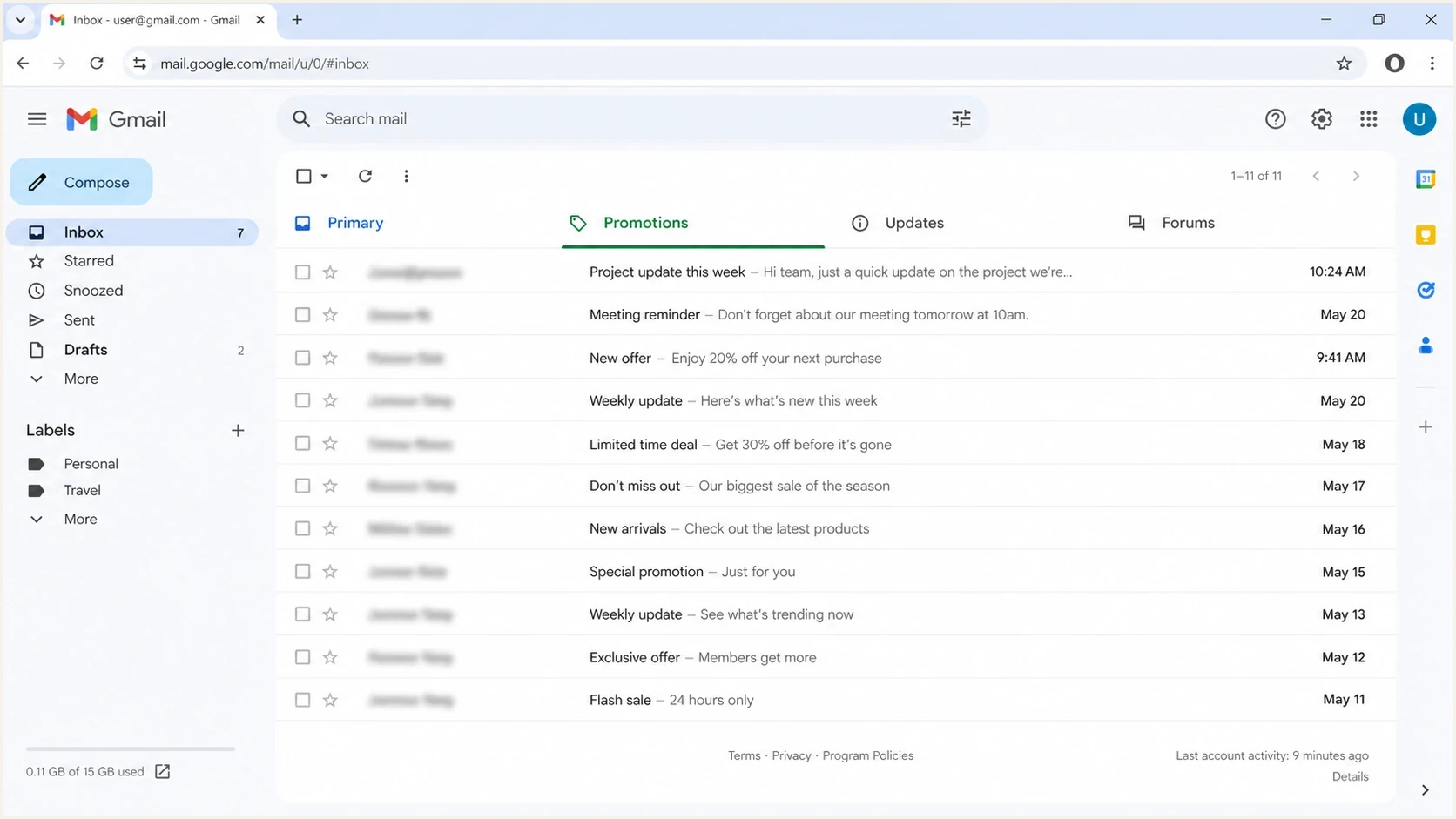
Gmail inbox tabs showing how Promotions placement can reduce measured opens.
|
|
|
|---|---|---|
Gmail only | Tab shift | Seed test |
Opens only | Images blocked | Click review |
Opens and clicks | Placement | Plain test |
Bounces rising | Reputation | Volume pause |
Compact triage map for Gmail-only open-rate drops.
How to confirm the cause
Use a short decision path. First, isolate Gmail recipients and compare them with the same campaign sent to other domains. Then compare Gmail performance against your own historical baseline, not against a generic industry benchmark. A November or December decline often has extra noise because inboxes receive more commercial mail and attention becomes harder to earn.
Gmail open-rate drop bands
Compare the relative drop with a recent Gmail baseline to decide how aggressive the investigation should be.
Normal noise
Under 5% relative
Watch the next send and compare clicks.
Check tabs
5-15% relative
Inspect Gmail placement and image loading.
Test content
15-30% relative
Run a plain-template A/B test.
Stop guessing
30%+ relative
Audit authentication, reputation, and volume.
Next, send the same message to several real Gmail accounts. Use accounts with tabs enabled, accounts with tabs disabled, and at least one account where images are not loaded automatically. Send a live message through the email tester so you can inspect headers, authentication results, and content signals in one pass.
Email tester
Send a real email to this address. Suped shows a results button when the test is ready.
?/43tests passed
- Segment: Create separate Gmail, non-Gmail, engaged Gmail, and inactive Gmail cohorts.
- Compare: Measure opens, clicks, replies, conversion rate, spam complaints, and unsubscribe rate.
- Inspect: Open the message inside Gmail and record the tab, image state, clipping, and warning banners.
- Repeat: Send the plain test and the normal creative on the same day to the same Gmail quality band.
Check for Gmail clipping
Gmail commonly clips an email when its HTML body reaches roughly 102 KB, then hides the remainder behind a "View entire message" link. Remote image file sizes are not the main test here. Repeated modules, inline CSS, tracking parameters, and copied formatting can make the received HTML much larger than the design appears.
Clipping can suppress measured opens when the tracking pixel sits below the cut and the recipient does not select "View entire message". It can also hide the unsubscribe link or main call to action. A Gmail-only open-rate drop after a template expansion is a strong reason to inspect the delivered message before changing the audience or sender domain.
- Send the production version: Use the final tracked campaign, because a builder preview can have different HTML.
- Check Gmail itself: Look at the bottom of the message for the clipping notice and the "View entire message" link.
- Measure received HTML: Judge the source that arrived in Gmail, not the total weight of remotely hosted images.
- Reduce source weight: Remove unused modules, duplicated styles, pasted formatting, and unnecessary tracking parameters, then retest.
How to fix the drop
If the drop is tied to Promotions, the fix is usually content restraint, not a sender-domain reset. Strip the email back to a useful message: fewer product blocks, fewer price signals, fewer image-only sections, fewer tracking-heavy links, and a clearer reason for the recipient to read now.
Template that often shifts to Promotions
- Offer stack: Multiple discounts, banners, and product grids.
- Image weight: Hero images carry the main message.
- Link pattern: Many similar calls to action point at commercial pages.
Template to test first
- Message first: Lead with useful text before sales copy.
- Simple layout: Use one main image or none.
- One action: Use one clear link path and fewer repeated buttons.
The right test is not "old template versus a completely new strategy." Keep the audience, send time, sender, and subject style close enough that content classification is the main variable. If the plain version recovers, add one element back at a time. This is also where template design matters more than small wording changes.
Gmail recovery test plantext
Audience: engaged Gmail recipients only
Split: 50% normal template, 50% plain template
Hold constant: sender, subject style, send time, offer
Measure: tab, opens, clicks, replies, complaints, revenue
Next step: add one removed element back per test
Do not chase Primary placement at any cost. Gmail tabs are user-facing organization, not a punishment system. The practical goal is to reach the right recipients with mail they keep engaging with, while removing template patterns that make useful messages look purely promotional.
- Keep: Recognizable sender identity and consistent sending cadence.
- Remove: Excess banners, repeated product modules, and image-only copy.
- Measure: Clicks and revenue before declaring the open-rate recovery complete.
Do the authentication checks
If Gmail open rates dropped and bounces, spam placement, or delivery delays rose at the same time, check authentication before touching creative. A content test will not fix a broken DKIM signature, a failing SPF path, a DMARC failure, or a domain reputation problem. Gmail now applies stronger enforcement to traffic that does not meet its sender requirements, including temporary or permanent rejection for some non-compliant messages.
Suped DMARC dashboard showing email volume, authentication health, and source breakdown
Suped's product connects DMARC, SPF, DKIM, blocklist (blacklist), and deliverability signals in one troubleshooting workflow. Use DMARC monitoring to identify unverified sources, alerts to catch sudden authentication failures, and hosted SPF or SPF flattening when authorized sender lists have become hard to manage in DNS.
Authentication checks before blaming Gmail
If the primary domain has ever sent about 5,000 or more messages to personal Gmail accounts in one day, treat it as a bulk sender. Check SPF and DKIM, DMARC with the visible From domain matching the SPF or DKIM domain, one-click unsubscribe for marketing mail, and unsubscribe processing. Keep the user-reported spam rate below 0.1% and prevent it from reaching 0.3%.
- SPF path: Confirm the envelope sender is authorized and its domain matches the visible From domain when SPF supplies the DMARC pass.
- DKIM state: Verify the active selector signs mail and the signing domain matches the visible From domain when DKIM supplies the DMARC pass.
- DMARC result: Check that legitimate sources pass DMARC with matching domains and unauthorized sources remain visible in aggregate reports.
- Reputation: Review sending IPs and domains for blacklist or blocklist hits.
If the decline started after a sending-domain or IP change, hold other campaign variables steady, begin with engaged Gmail recipients, and increase volume gradually. Correct authentication does not give a new domain or IP an established Gmail reputation.
For a fast outside-in view, run a domain health check and then review blocklist monitoring if spam placement, throttling, or rejection signals increased. Those checks will not force Gmail into Primary, but they remove the hidden technical causes that make every content test harder to read.
When opens are the wrong metric
Open rates are useful for spotting a change, but they are not a clean measure of attention. Gmail image caching, image blocking, Apple privacy behavior, forwarding, and clipped HTML all distort the signal. If Gmail opens fell but clicks, replies, and revenue stayed steady, treat the decline as a tracking change until the delivery evidence says otherwise.
A better recovery dashboard has Gmail opens, Gmail clicks, click rate, spam complaints, unsubscribe rate, revenue per recipient, and tab observations. Click-to-open rate still inherits every distortion in the open denominator. For deeper background on measurement limits, the open-rate accuracy breakdown explains why the number can move without a matching business drop.
- Trust more: Clicks, replies, conversions, complaint rate, and repeat engagement.
- Trust less: One-day open swings, especially during holiday volume or after template changes.
- Explain clearly: A lower Gmail open rate can be a tracking or tab issue, not proof that the list is tired.
Views from the trenches
Best practices
Segment Gmail from other mailbox providers before changing copy, templates, or volume.
Test a plain version against the normal template, then add commercial elements back.
Track clicks and revenue beside opens because image loading distorts open-rate data.
Keep authentication clean so tab changes are not mixed with SPF, DKIM, or DMARC faults.
Common pitfalls
Treating a Gmail-only drop as a list-wide issue hides tab placement changes and delays tests.
Assuming inbox placement is fine without checking tabs misses a Promotions shift.
Changing subject lines only rarely fixes a template pattern that Gmail classifies as commercial.
Using opens as the only recovery metric makes image behavior look like demand loss.
Expert tips
Build a Gmail seed panel with real accounts that have tabs enabled and images disabled.
Keep a saved baseline campaign so each test compares against proven Gmail performance.
Use small A/B tests before rolling template changes across a large Gmail segment.
Review authentication and reputation first when spam, bounce, or delay signals rise.
Marketer from Email Geeks says Gmail appeared to send more commercial messages into Promotions around mid-November, so a Gmail-only decline should be checked by tab before changing audience strategy.
2024-12-11 - Email Geeks
Marketer from Email Geeks says some Gmail inbox messages were not loading images by default, which can depress measured opens even when placement looks acceptable.
2024-12-11 - Email Geeks
What to do next
If Gmail open rates dropped, do not make one large change and hope it works. Prove whether the issue is tab placement, image loading, clipping, audience attention, or authentication. Then run a plain-template Gmail test against your normal creative and rebuild only the elements that keep engagement intact.
Use this sequence: segment Gmail, inspect tabs, check clipping, test a stripped-back template, verify authentication, review blacklist and blocklist status, and judge the result with clicks and revenue as well as opens. Suped supports the technical part of that workflow by turning DMARC authentication failures, unverified senders, and reputation issues into specific steps to fix, which keeps the content test clean.




