
Why are email security filters auto-clicking links in opt-in emails with Javascript and how can I prevent it?

Updated on 3 Oct 2026: We clarified how to test scanner-triggered opt-ins, protect confirmation flows, and review subscriptions already confirmed by scans.
Yes. Email security filters can open an opt-in link, render the landing page, run JavaScript, and trigger an auto-submit action before the subscriber sees the message. The practical fix is to remove JavaScript auto-submit, make the link open a confirmation page, and require a deliberate button submit or short code entry before changing subscription state.
Treat every tracked click in an opt-in email as a URL request, not as consent. A click event proves that something requested the URL. It does not prove that a person intended to subscribe. Link scanning can occur during mail delivery, after delivery, or when someone opens or clicks a protected message.
- Immediate fix: Remove the script that submits the form on page load.
- Safer fix: Confirm only after an explicit action that sends a separate POST request.
- Stronger proof: Require the subscriber to enter a short code from the email when a false confirmation carries greater risk.
Why scanners run the page
Security filters follow links because harmful email often hides the final destination behind redirect chains, rewritten URLs, script-loaded content, or a benign-looking first page. Reading only the raw email HTML misses pages that change after JavaScript runs. Some filters therefore trace URLs in a sandbox and use browser-like rendering to inspect the final page.
That behavior helps detect abuse, but it collides with opt-in flows that treat page load as confirmation. If the email link lands on a form and the page contains a script that clicks the button or submits the form, the scanner has completed the same state change a subscriber would complete.
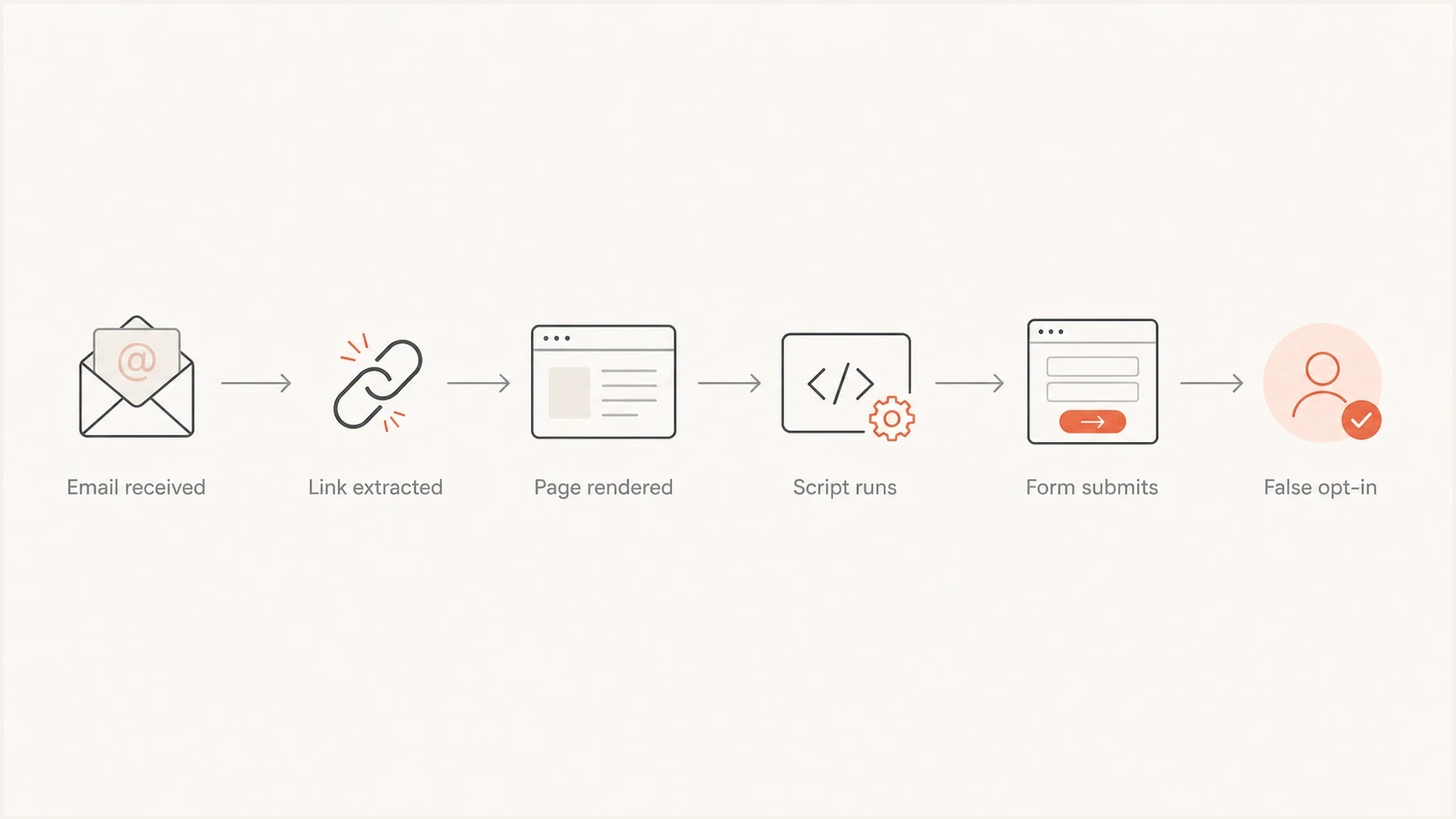
Email security scanner flow from link extraction and page rendering to a false opt-in.
The core rule
Do not let a GET request, page render, tracking redirect, image load, or page-load script change a subscription state. Only a separate, validated action should confirm consent.
- State change: Use POST for confirmation and other state-changing actions.
- Page load: Use it only to show information, not to finalize the opt-in.
- Token use: Mark a token confirmed only after the final action succeeds.
Build the confirmation flow around intent
The safer pattern is simple: the email link opens a page, the page explains the subscription, and the user presses a button. The button submits a POST to a confirmation endpoint. That keeps the second step of double opt-in separate from a scanner visit. The token is single-use, has a limited lifetime, and cannot be confirmed by fetching the URL alone. Store only a hash of the token when practical, and show a generic response for invalid or expired tokens.
Risky pattern
- Email link: The token is confirmed when the URL is opened.
- Landing page: JavaScript submits the form automatically.
- Evidence: Logs show a request, but not human intent.
Safer pattern
- Email link: The token only opens the confirmation page.
- Button submit: A separate POST confirms the subscription.
- Evidence: Logs separate page render events and button actions.
Unsafe auto-submit patternHTML
<form id="confirm" method="post" action="/confirm">
  <input type="hidden" name="token" value="abc123">
  <button type="submit">Confirm subscription</button>
</form>

<script>
  document.getElementById('confirm').submit();
</script>
That script removes the useful signal of intent. A scanner that renders the page can execute it. A real user and a scanner now look identical at the confirmation endpoint.
Safer confirmation patternHTML
<form method="post" action="/confirm">
  <input type="hidden" name="token" value="abc123">
  <input type="hidden" name="form_nonce" value="server-issued-value">
  <button type="submit">Confirm subscription</button>
</form>
For higher-risk workflows, replace the button-only model with a short code. Send the code in the email, ask the subscriber to enter it in the form, and submit only after the field is complete. A link scanner can open the URL, but it does not normally copy a code from the message body into a form.
Why POST alone is not enough
POST keeps a normal GET request from changing state, but the HTTP method does not prove human intent. Page-load JavaScript can submit a POST automatically, which is exactly how a rendered security scan becomes a false opt-in. Require a deliberate submit and server-side validation; a button reduces accidental confirmations but is not an absolute human check.
For a public opt-in form, validate the single-use email token and a server-issued form nonce. If the confirmation or preference page relies on login cookies, apply the application's normal CSRF protection as well. A form nonce or CSRF token can protect request integrity, but neither proves that a person submitted the form.
Validate the confirmation request
Keep the state transition on the server and make repeat requests harmless.
- Render only on GET: Do not consume the token, update consent, or start automation.
- Require explicit submit: Remove auto-submit, programmatic clicks, and page-load request handlers.
- Validate server-side: Check token state, expiry, intended subscription, and any required CSRF value.
- Make retries harmless: Return a stable result without duplicating consent records or downstream events.
Separate scanner traffic from subscriber actions
The goal is not to block every scanner. The goal is to keep scanner activity out of consent decisions and engagement analytics. Log the visit, render, tracked click, and confirmation as separate events, then compare timing, method, endpoint, network, token state, and the pattern of links requested.
Seed consumer and protected corporate inboxes with a controlled opt-in email, then compare application logs with inbox activity and message source. Send the same message to Suped's email tester address to inspect its authentication and headers. The tester does not reproduce a recipient mailbox's link scanning.

Email tester sample report showing total score, email preview, issue summary, and per-section results
|
|
|
|---|---|---|
Method | GET or POST | Treat GET as page view only. |
Endpoint | Visit or confirm | Separate render events and actions. |
Timing | Seconds after send | Use fast bursts as one signal, not proof. |
Link pattern | URLs and sequence | All-link bursts strongly suggest scanning. |
Network | IP and ASN | Cluster activity by network. |
Token | State | Reject reused or stale tokens. |
Signals that help separate automated security activity from real confirmation intent.
The same method improves reporting. If click rates jump after a domain moves behind a new email security gateway, classify non-human interaction (NHI) before the data reaches campaign analytics. Retain the raw events for investigation, and do not suppress a subscriber because one heuristic labels a click as automated. Use a bot-click review process like identify artificial clicks instead of treating every tracked click as subscriber engagement.
Email tester
Send a real email to this address. Suped shows a results button when the test is ready.
?/43tests passed
Why scanner detection alone fails
There are tempting shortcuts, but most fail because scanners change behavior, use distributed infrastructure, or mimic normal browsers. Use these signals for analysis, not as the only protection around consent.
- User agent: Useful for classification, weak for enforcement because scanners can use normal browser strings.
- IP filtering: Helpful for reporting, brittle for consent because scanner networks change.
- Delay timers: Weak protection because scanners can wait long enough to render delayed content.
- Mouse or touch events: Scanners can simulate them, and requiring them can exclude keyboard and assistive-technology users.
- Hidden links: Useful as one analytics signal, poor for proving consent or blocking a network.
- Robots rules: Irrelevant for mail security scanning. Mail filters are not search crawlers.
The same failure pattern occurs with unsubscribe links. The security scan discussion frames the core issue correctly: servers and security systems follow links to inspect risk. The application has to treat that as normal traffic.
Do not make the email link perform the action
This applies to opt-ins, preference changes, account confirmations, and one-click unsubscribe problems. If a protected mailbox opens a body link before the subscriber, any action tied to that GET has already happened. Keep standards-based header unsubscribe handling separate: under RFC 8058, a receiver sends a POST after the mailbox user chooses one-click unsubscribe, and that POST should complete the unsubscribe without an extra confirmation page.
Authentication and reputation are separate checks
Auto-clicking does not mean the sending domain has a DMARC, SPF, DKIM, or reputation problem. Security filters scan legitimate mail too, and stronger authentication does not prevent recipient-side link scanning. Check authentication as a separate troubleshooting track so a sending problem is not mistaken for an application bug.
Use a domain health checker to confirm SPF and DKIM are valid and the DMARC policy is published correctly. Then use ongoing DMARC monitoring to catch unauthorized senders and authentication failures in real traffic. These checks do not establish whether a confirmation request came from a person.
DMARC record detail view showing SPF, DKIM, DMARC, rDNS diagnostics, and DNS records
Suped's DMARC reporting and email authentication platform supports this separate investigation. It does not stop a recipient-side scanner from opening a link. It helps a team identify authentication failures, trace unknown sending sources, set operational alerts, and review blocklist (blacklist) exposure alongside the campaign investigation. The blocklist monitoring workflow keeps those sending-domain findings distinct from scanner-triggered application events.
?
What's your domain score?
Deep-scan SPF, DKIM & DMARC records for email deliverability and security issues.
Handle opt-ins already confirmed by scans
Fixing the form stops new false confirmations, but it does not repair consent records created by the old flow. Use request logs to identify the affected period and accounts. A GET or page-load POST alone is weak evidence of consent, so do not treat those records as verified simply because the token changed state.
- Review affected records: Correlate send time, token, request method, endpoint, and scanner-like click bursts.
- Pause dependent automation: Keep uncertain addresses out of welcome sequences and engagement-based segments while you review them.
- Request fresh confirmation: Use the repaired flow for accounts with no separate evidence of a deliberate submit.
- Preserve the audit trail: Keep the original events and record why each subscription was retained or reset.
A practical prevention checklist
Use this implementation checklist when an opt-in flow has false confirmations. It keeps the subscriber experience simple while removing the risky assumption that a visited URL equals consent.
- Remove auto-submit: Delete scripts that submit the confirmation form on page load.
- Split endpoints: Use one endpoint for the page view and another for the final POST.
- Protect tokens: Use single-use tokens and reject any token that is expired or does not match the intended subscription.
- Make confirmation idempotent: Do not duplicate consent records or trigger automation twice on a retry.
- Log enough detail: Record method, endpoint, token state, IP, ASN, user agent, timing, and link pattern.
- Adjust analytics: Classify scanner-like clicks before reporting engagement or starting click-based automation.
- Test after changes: Seed protected inboxes and confirm scanners can no longer complete the opt-in.
Confirmation confidence
Use event type, method, endpoint, and timing to assess evidence of subscriber intent.
Low confidence
GET
Only the email link was opened.
Medium confidence
Render
A form page was rendered, but no final action was recorded.
Higher confidence
POST
A separate button submit or code entry completed the confirmation; review other evidence if needed.
Views from the trenches
Best practices
Require a real POST after the page loads, because page views are no longer human proof.
Log method, user agent, ASN, timing, token state, and confirmation endpoint separately.
Keep confirmation pages simple, with clear copy and one button that submits only on intent.
Common pitfalls
Auto-submitting JavaScript turns a security preview into a subscription confirmation event.
Trusting user agents or IP lists alone breaks when scanners use normal browser stacks.
Making the link itself perform the action lets scanners create false-positive opt-ins.
Expert tips
Use a short code for high-risk flows when a false confirmation has business or consent impact.
Separate page visits and renders from tracked clicks so reporting shows what was triggered.
Treat inflated clicks as analytics noise, then protect any workflow that changes state.
Marketer view
Marketer from Email Geeks says link scanning has been normal for years, and JavaScript auto-submit is the part that turns a scan into an opt-in.
2023-09-05 - Email Geeks
Marketer view
Marketer from Email Geeks says a six-digit code copied into a form prevents scanners from creating a false confirmation.
2023-09-05 - Email Geeks




