How can I identify and handle bot clicks and opens, particularly from Microsoft/Outlook domains, in email marketing campaigns?

Updated on 2 Aug 2026: We updated this guide with current Microsoft Safe Links behavior and safer bot-click filtering.
The practical answer is to stop treating opens and clicks as single clean human signals. For Microsoft-hosted and Outlook recipient domains, identify bot activity by combining event timing, link fan-out, recipient-domain clustering, landing-page behavior, and downstream intent. A null user agent can raise suspicion for opens, but it is weak evidence for clicks because security systems often use normal-looking browser user agents.
A reliable workflow keeps raw events intact, then builds a filtered reporting layer. Raw clicks stay available for audit, but campaign decisions use a scored human-engagement model. Opens get the lowest trust. Clicks get medium trust only after they pass timing and behavior checks. Replies, form submissions, purchases, account activity, and confirmed preferences get the highest trust.
Before blaming Microsoft or Outlook, send a real seeded message and inspect authentication and message headers, then confirm rendering with Suped's email tester. Bot clicks are an analytics problem. Authentication testing will not identify a human click, but it separates sending and configuration problems from interaction-classification problems.
The short answer
For Microsoft and Outlook domains, a burst of clicks seconds after delivery is a strong scanner signal, especially when one recipient appears to click every tracked link. It is not proof by itself. Microsoft Safe Links can also check a URL when a person clicks, so two close requests can contain one human action and one security request. The user agent usually looks real because the security system needs to inspect the same destination that a person would reach.
- Timing: Clicks within the first 0-10 seconds after delivery deserve heavy suspicion, especially in bulk, but timing alone should not remove them.
- Fan-out: One recipient touching all links, including legal, social, preference, and unsubscribe links, usually means automated inspection.
- Sequence: A later session with normal page behavior raises human confidence, while two near-simultaneous requests can be a person plus a time-of-click security check.
- Opens: Open pixels are directional at best, because image proxies and privacy systems separate loading from reading.
Do not delete these events from the database. Store them, label them, and exclude them from decision dashboards. This keeps finance, sales, lifecycle, and compliance teams working from the same evidence instead of arguing over missing rows.
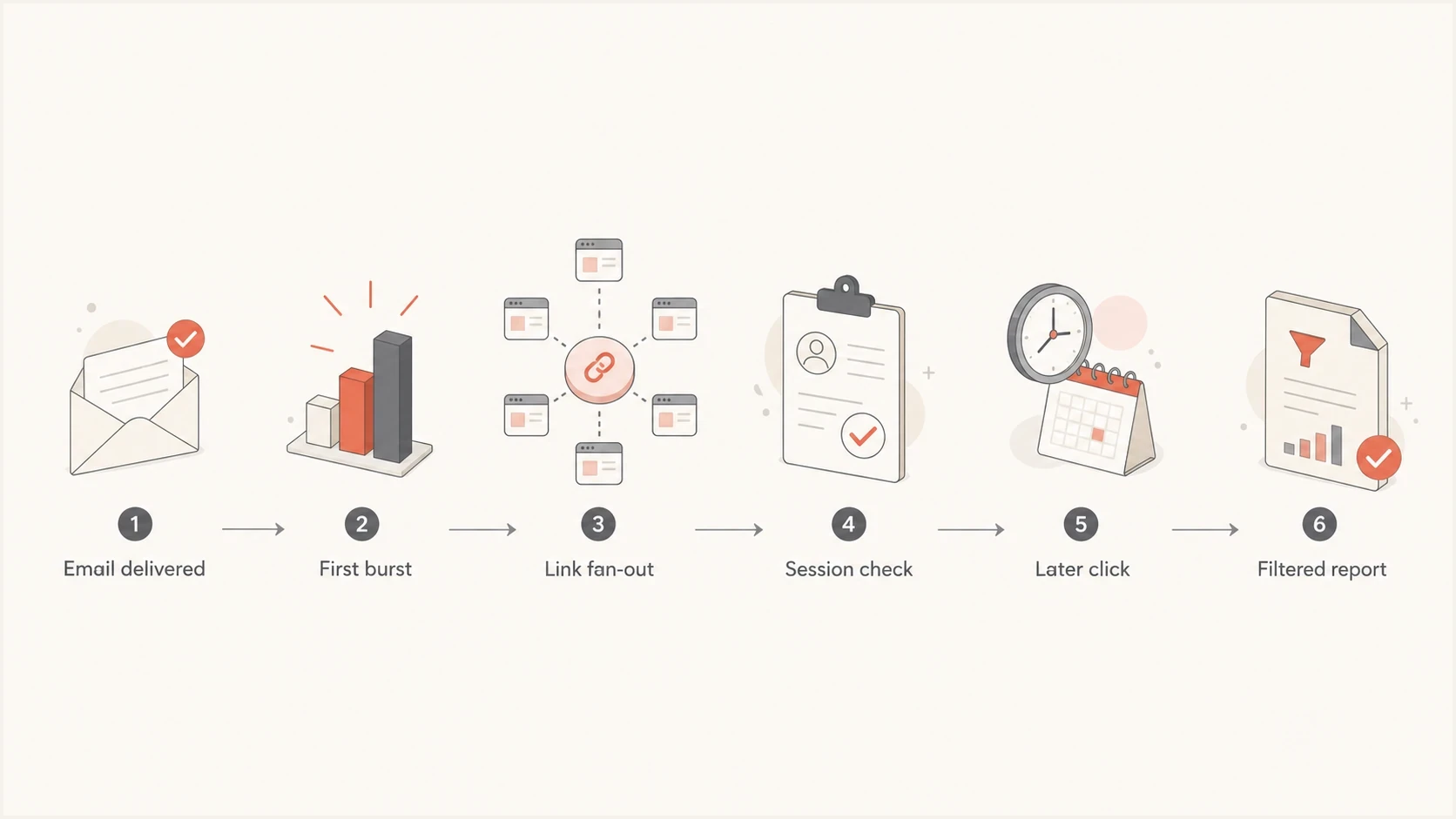
Microsoft Outlook email bot-click filtering flow for campaign reports.
Why Microsoft and Outlook domains create confusing data
Microsoft 365 recipients can sit behind Safe Links policies that scan URLs during mail flow and check them again at the time of click. Other security gateways also fetch destinations to inspect redirect chains, tracking-domain reputation, page content, and downloaded files. A pre-delivery fetch can look like engagement even though the recipient has not acted, while a time-of-click fetch can appear beside a real human request.
That is why a sudden pattern such as delivered count matching unique clickers, or delivered count matching unique unsubscribes, should be treated as scanner traffic first. It is rarely a real audience shift. It usually means every tracked URL was touched by automation during the delivery window.
Security scan
- Timing: The click happens at delivery time or in a tight burst soon after delivery.
- Coverage: Multiple links are clicked with no normal preference for the main call to action.
- Session: The landing page has no scroll, form input, navigation, or meaningful dwell time.
Human click
- Timing: The click occurs after a plausible reading delay or in a later session.
- Coverage: The recipient clicks one or two relevant links, not every tracked URL.
- Session: The landing page shows normal browser execution, navigation, conversion intent, or an authenticated action.
This is not limited to Microsoft. Microsoft and Outlook domains often make the issue obvious because the burst is large, but non-human interaction (NHI) has existed in B2B email for years. If the current spike is concentrated in Outlook, Hotmail, Live, or Microsoft 365 recipient domains, create a domain-family segment first, then compare it with Gmail, Yahoo, corporate gateways, and your own seed accounts.
Signals that separate scanner traffic from human traffic
The reliable approach is a weighted signal model. Do not use one field as the whole answer. A normal-looking user agent, a Microsoft-owned IP, a single fast click, or a recipient-domain spike does not prove automation by itself. The pattern across event timing, link behavior, landing-page execution, and confirmed actions gives the useful answer.
|
|
|
|---|---|---|
Fast click | 0-10 seconds after delivery | Raise suspicion |
All links | Many unrelated URLs touched | Suppress from CTR |
No session | No page behavior | Lower confidence |
Later session | Reading delay plus page events | Raise human confidence |
Use these signals as labels in your reporting layer, not as destructive deletes.
Example click classification logicSQL
case
  when confirmed_action = true
  then 'confirmed_human_intent'

  when seconds_after_delivery <= 10
   and links_clicked_by_recipient >= 3
   and landing_page_events = 0
  then 'likely_scanner'

  when paired_requests_within_seconds = true
   and later_session_events >= 2
  then 'mixed_keep_human_session'

  when seconds_after_delivery <= 30
   and landing_page_events = 0
  then 'suspect_scanner'

  else 'unknown'
end
The exact thresholds depend on delivery speed, audience, tracking setup, and landing pages. Start strict for executive reports, then keep a separate analyst view with raw, suspect, mixed, and filtered counts. That makes it easy to explain why total click events and reported click-through rate differ.
How to filter the data without hiding real engagement
The goal is not to prove that every suspect event is automated. The goal is to keep reporting honest enough that teams do not optimize subject lines, segments, lead scoring, and lifecycle triggers around security scans. For newsletter reporting, a more detailed workflow for filter bot clicks helps when stakeholders still ask for raw click metrics.
- Preserve: Store the raw open and click event exactly as received, including timestamp, IP, user agent, recipient domain, URL, campaign, and delivery timestamp.
- Label: Add labels such as likely scanner, suspect scanner, mixed, likely human, and unknown. Do not overwrite the original event type.
- Score: Give negative weight to delivery-time bursts, all-link clicks, and sessions with no page behavior. Use recipient domain only when its cohort departs sharply from baseline.
- Segment: Report Microsoft, Outlook, Hotmail, and Live domains separately until the spike returns to your baseline.
- Protect: Exclude suspect clicks from lead scoring, sales alerts, nurture branching, and conversion attribution.
- Validate: Compare classifications with replies, form fills, purchases, preference-center saves, and later sessions, then review false positives on a regular schedule.
First-click timing triage
A starting point for reviewing first-click timing after delivery. Timing never validates a click by itself.
Scanner-heavy
0-10s
Treat as suspect unless other human behavior exists.
Review zone
11-60s
Use link count and session depth to decide.
Needs context
60s+
Check fan-out, paired requests, page behavior, and confirmed actions.
Strongest
Action
Use a confirmed downstream action.
For Microsoft-specific spikes, also build a baseline by recipient domain family. If Outlook-family click rate jumps from 3% to 45% while replies, form fills, purchases, and conversions stay flat, that is a scanner classification issue. If every domain family rises and downstream actions rise too, the campaign probably earned real engagement.
Email tester
Send a real email to this address. Suped shows a results button when the test is ready.
?/43tests passed
A seed test also tells you whether tracking domains, redirect chains, authentication headers, or rendering are creating avoidable friction. It does not prove which recipients are human, but it gives you a cleaner baseline before you adjust reporting rules.
Avoid brittle bot filters
Some common fixes create new reporting errors. Use IP ownership, hidden detector links, recipient domain, and signup behavior as supporting evidence only. None of them identifies a human by itself, and each can hide real engagement when applied as an account-wide exclusion.
- Fixed IP ranges: Provider infrastructure changes, and a security service can proxy a real click. Review IP rules frequently and require another scanner signal.
- Hidden links: A scanner may skip a stealth link, and unusual markup can create rendering or accessibility problems. Do not treat the absence of a hidden-link click as proof of a person.
- Whole-domain suppression: Suppressing all Outlook or Microsoft 365 engagement removes genuine clicks along with fake clicks. Segment the domain family, but classify each event pattern.
- Signup CAPTCHA: CAPTCHA can reduce automated form submissions, but it does not stop a recipient security system from inspecting links sent to a valid subscriber.
Test every new rule against a labeled sample of later sessions and confirmed actions. If the rule removes real conversions, narrow it before using it in campaign reports or automation.
Fix unsubscribe and conversion handling first
If a simple tracked GET request immediately unsubscribes a contact, fix that before tuning analytics. Security scanners fetch unsubscribe URLs because they inspect links. A footer unsubscribe link should open a page that confirms the request. For RFC 8058 one-click unsubscribe, send both List-Unsubscribe and List-Unsubscribe-Post headers, process the authorized POST, and cover both headers with a valid DKIM signature.
A scanner should never be able to trigger destructive actions through a tracked GET. That includes unsubscribe, account cancellation, trial deletion, meeting cancellation, lead status changes, and preference resets.
Safer unsubscribe handlingHTTP
List-Unsubscribe-Post: List-Unsubscribe=One-Click

GET /unsubscribe?id=abc
200 Show confirmation page

POST /unsubscribe/confirm
200 Contact unsubscribed

POST /one-click-unsubscribe
200 Header unsubscribe honored
The same logic applies to conversion links. If a tracked click starts a trial, registers for an event, marks a lead as hot, or sends a sales alert, it needs a second signal. A page load alone is not enough. Wait for a form submit, authenticated action, button press, or meaningful session event.
Use reporting labels such as confirmed clickers, raw click events, and filtered clickers. Those labels make the limits clear without pretending the platform has perfect human detection.
What to do about opens
Opens are weaker than clicks because the event is usually an image request, not a deliberate action. Privacy proxies, mailbox preloading, image caching, security scanning, and disabled images all distort open data. A null user agent is useful as a flag, but it does not tell you whether a person later read the message through a cached image path.
Keep opens for broad trend analysis. They help spot rendering failures, broken links, major inbox placement changes, and rough audience fatigue. Do not use opens for individual lead scoring, automated sales alerts, resend suppression, or preference changes unless a second signal supports the decision.
Engagement signal reliability
A practical weighting model for campaign decisions.
Reply
95 scoreForm submit
90 scoreFiltered click
65 scoreRaw click
40 scoreOpen
20 scoreFor more detail on the Microsoft side, compare campaign data against known Office 365 auto-clicking patterns, then validate against delivery timestamps and seed accounts.
Where Suped fits
Suped's product does not turn every raw click into a perfect human-or-bot verdict. Its role here is to identify authentication, sender, DNS, and reputation problems separately so the remaining scanner problem is easier to measure. When DMARC, SPF, DKIM, tracking domains, and sending sources are visible in one place, teams can distinguish infrastructure findings from campaign interaction data.
Suped combines DMARC monitoring, SPF and DKIM visibility, hosted SPF, hosted DMARC, hosted MTA-STS, issue detection, real-time alerts, and blocklist monitoring in one workflow. If a blocklist or blacklist hit, broken SPF include, missing DKIM signature, or unauthenticated sender appears during the same period as a click spike, investigate it as a separate deliverability issue instead of treating it as proof of bot activity.
Issues page showing top issues, verified sources, unverified sources, and authentication pass rates
The domain health checker is a useful first pass when a Microsoft or Outlook spike starts. Check whether the domain has authentication gaps, sender mismatch, DNS mistakes, or reputation issues before tuning click filters.
Use two layers: Suped for authentication and reputation monitoring, then event-level rules in marketing analytics to classify raw opens and clicks.
Views from the trenches
Best practices
Keep raw click events, then build filtered views so analysts can audit every exclusion later.
Use delivery-time bursts, link fan-out, session depth, and confirmed actions to assess clicks.
Separate unsubscribe confirmation from tracked GET requests across every campaign flow.
Common pitfalls
Treating normal-looking user agents as human proof creates inflated Microsoft click rates.
Deleting suspect events removes the audit trail needed to explain metric changes later.
Using opens for person-level lead scoring creates noisy automation and weak sales alerts.
Expert tips
Compare Microsoft-family domains with other recipient groups before changing reports.
Count later repeated clicks with page behavior as stronger evidence of human intent.
Use filtered clicks for decisions and raw clicks only for troubleshooting and auditing.
Marketer from Email Geeks says opens are near impossible to classify accurately once caching and privacy behavior are involved.
2024-07-09 - Email Geeks
Marketer from Email Geeks says delivery-time click bursts are the quickest broad signal for non-human interaction.
2024-07-09 - Email Geeks
A practical operating model
Treat Microsoft and Outlook bot clicks as a reporting quality problem, not as a reason to abandon click data entirely. Opens move to the bottom of the trust stack. Raw clicks stay in storage. Filtered clicks stay in dashboards. Confirmed downstream actions drive automation and revenue reporting.
The immediate fix is a scanner label based on timing, all-link behavior, no landing-page activity, and recipient-domain clustering. The deeper fix is to stop letting a single URL fetch trigger high-value business actions. Once unsubscribe, conversion, and lead-scoring flows require stronger signals, bot clicks become noisy data instead of operational damage.
Suped supports the layer underneath campaign analytics: authentication, policy monitoring, sender visibility, hosted SPF, hosted DMARC, hosted MTA-STS, SPF flattening, issue alerts, and blocklist or blacklist visibility. Cleaner sending infrastructure does not remove every scan, but it gives you a stable base for measuring what the scans are doing.