Why is Office365 automatically opening and clicking emails?

Updated on 1 Aug 2026: We updated this guide to separate Safe Links checks from bot clicks and make scanner filtering more reliable.
Office 365, now part of Microsoft 365, can appear to open and click emails because Microsoft security systems inspect messages before delivery and when recipients interact with them. In campaign analytics, the activity can come from Microsoft Defender for Office 365, Exchange Online Protection, Safe Links, URL detonation, remote-image loading, Outlook preview behavior, or a tenant security policy. The opens and clicks are real HTTP requests, but they are not always real human engagement.
Treat a sudden spike in Microsoft 365 opens or clicks as an analytics question first, not immediate proof of a deliverability failure. The message reached enough of the recipient's mail system for something to evaluate its content. That does not prove inbox placement, but it also does not mean the email was rejected or sent to spam.
There is one practical distinction. If Outlook opens a message when a user selects it, that is usually reading-pane or client behavior. If an ESP, CRM, or web server shows a burst of opens and clicks across Microsoft-hosted recipients without plausible reading or browsing behavior, that is likely automated security scanning.
The direct answer
Microsoft scans email content to protect business tenants against unsafe links, impersonation, malware, credential collection pages, and suspicious redirects. That scanning can trigger the same tracking endpoints marketers use to measure opens and clicks.
- Link inspection: Safe Links and related checks can evaluate tracked URLs before delivery and again when a user clicks. Some checks request the destination, depending on policy and verdict.
- Image inspection: Tracking pixels and remote images can be fetched by a client, proxy, sandbox, or preview process.
- Redirect analysis: Wrapped ESP links can be followed through redirects until the final landing page is known.
- Tenant policy: Recipient organizations set different security levels, so one Microsoft 365 tenant can behave unlike another.
- Timing spikes: A burst seconds after delivery is a strong scanning clue, but delayed scanners mean timing alone is not proof.
Scanner activity is not a click quality signal
When a Microsoft-controlled process opens a pixel or follows a link, the event tells you a machine touched the message. It does not tell you that the recipient read the email, trusted the brand, visited the page, or intended to unsubscribe.
The pattern is common in B2B and enterprise email, especially at schools, government bodies, healthcare organizations, and other tenants with strict security policies. The domain type itself does not cause the activity or prove a bot click. Recipient-side systems can change policies, sampling, link handling, and message selection without warning senders, so similar campaigns can produce different open and click spikes.
Where the automated event can occur
Do not attribute every Microsoft 365 event to Safe Links. Microsoft documents URL checks during mail flow and again at click time, but a request in sender-side logs can also come from URL detonation, Outlook image loading, a reading pane, or another security layer used by the recipient organization.
- During mail flow: Microsoft filters the message and scans URLs before delivery. Suspicious or unknown destinations can receive deeper analysis.
- At click time: Safe Links checks a rewritten URL, or uses a client-side API for an unwrapped URL, when the recipient actually clicks. That request can accompany genuine engagement.
- When images load: An open pixel fires when a remote image is requested. A reading pane, proxy, preview, or security process can make that request without proving the message was read.
- Inside the tenant stack: A recipient organization can add its own gateway or policy layer. Do not classify traffic only because the address belongs to a Microsoft-hosted domain.
A Safe Links URL does not prove a bot click
A rewritten Safe Links URL proves that link protection applies. It does not prove who initiated the final request. Use timing, link spread, session behavior, and a later human action to classify the event.
How to tell Microsoft scanning from human engagement
The fastest way to identify automated Microsoft 365 activity is to combine timing, link breadth, request order, network context, session behavior, and downstream actions. IP ownership and user-agent strings are supporting clues because proxies are shared and identifiers change. No single signal proves a non-human interaction, sometimes called a bot click or ghost click, so score events instead of deleting everything with one suspicious attribute.
|
|
|
|---|---|---|
Timing | Seconds or minutes after delivery | Varied, often later |
Links | Many unrelated links | Usually selective |
Order | Near-simultaneous requests | Plausible page sequence |
Session | No page depth | Page depth or conversion |
Repeat pattern | Uniform across recipients | Recipient-specific |
Compact signals for separating scanner activity from human activity.
The strongest bot-click clue is a tight cluster across multiple unrelated links in the same message, often including privacy, terms, social, logo, and unsubscribe URLs. Normal recipients rarely request every tracked link within the same few seconds.
Likely Microsoft 365 scanning
- Fast event: The open or click arrives before a person could reasonably read the message.
- Broad crawl: Many links fire in a tight burst, including low-intent footer links.
- Thin session: There is no later page depth, form action, or other evidence of intent.
Likely human engagement
- Natural delay: The click follows a plausible read time or arrives later in the day.
- Selective click: The recipient clicks one relevant call to action or product link.
- Session depth: The visit continues to another page or produces a form submit, reply, or conversion.
Illustrative event scoring, tune to your datatext
score = 0
if seconds_after_delivery <= 10: score += 2
if unique_links_within_5_seconds >= 3: score += 4
if clicked_unsubscribe_and_cta: score += 2
if no_landing_page_depth: score += 1
if confirmed_human_action: score -= 5

if score >= 5:
  classify = scanner_likely
elif score >= 3:
  classify = review
else:
  classify = human_or_unknown
For Microsoft 365 tenants you administer, compare the sender-side timestamp with the URL protection report or the URL clicks view in Explorer. Those records can corroborate a user click. If Track user clicks is disabled in the applicable Safe Links policy, an absent record proves nothing. Upstream scanning requests might also sit outside the user-click report.
For a deeper operational filter, the guide on how to identify artificial opens is useful when you need rules for BI, CRM scoring, and campaign reporting.
What triggers Microsoft 365 to inspect more aggressively
A Microsoft-hosted recipient domain can inspect normal mail without the sender doing anything wrong. Still, certain message traits can make automated review more visible in logs. Common triggers include link-heavy creative, redirect chains, newly used domains, recent sender changes, mismatched authentication, unusual volume, and body links that perform state changes. These are risk signals, not a published formula for when Microsoft will request a URL.
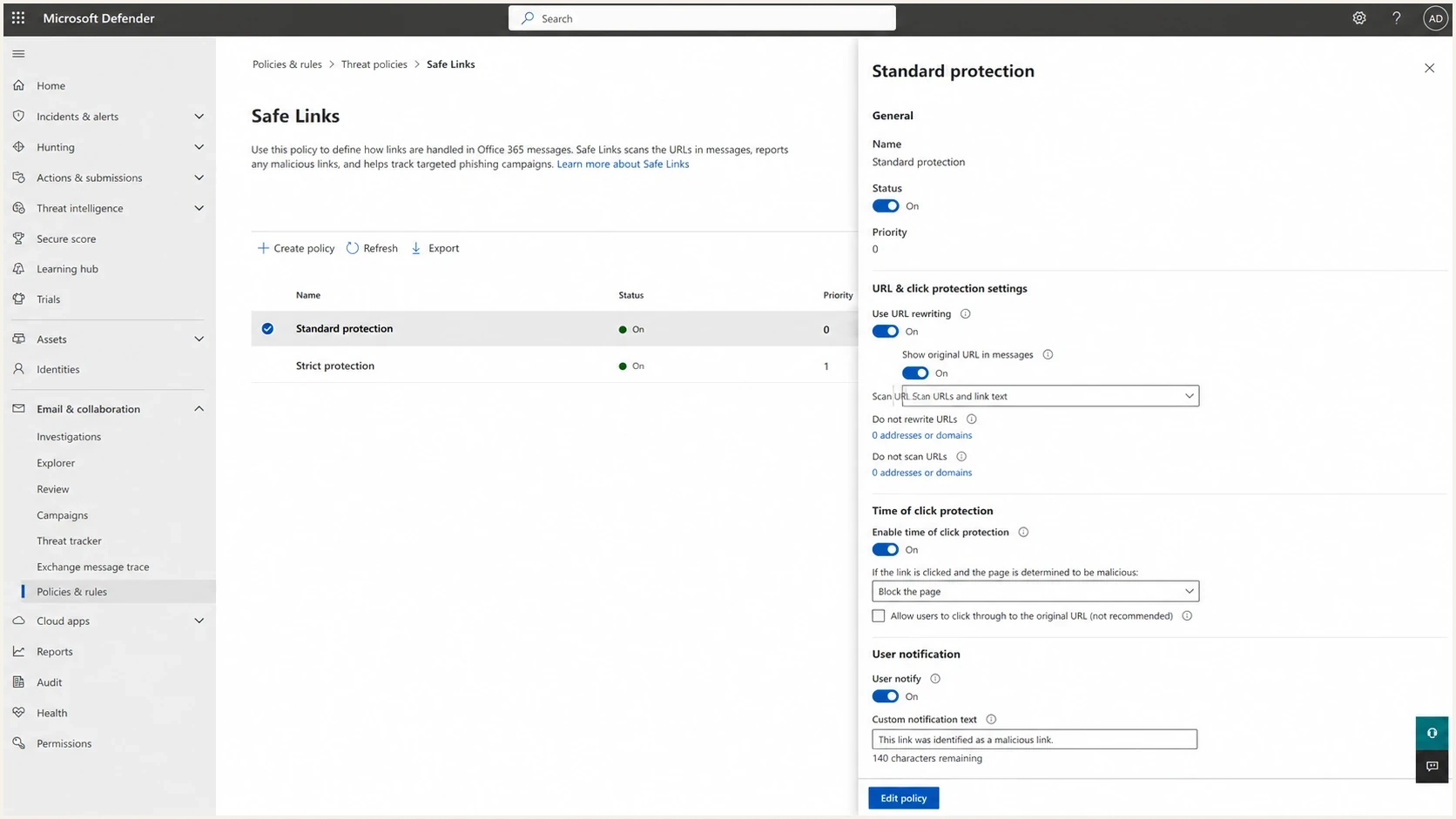
Microsoft Defender for Office 365 Safe Links settings for URL rewriting and click-time scanning.
A visible spike can also come from Microsoft changing its scanning behavior, tenant administrators applying stricter policies, or a recipient organization adding another inspection layer. That is why authenticated senders can see the behavior. It is not limited to damaged domains or unwanted campaigns.
Do not use GET links for destructive actions
If an email body unsubscribe link immediately unsubscribes on page load, a scanner can unsubscribe real recipients. Body links should land on a confirmation or preference page. Header-based one-click unsubscribe should use the proper POST flow, not a state-changing GET request.
Safer unsubscribe behaviortext
GET /unsubscribe?id=abc123
  show preference page
  do not change subscription state

POST /unsubscribe?id=abc123
  validate token
  unsubscribe recipient
  return confirmation
The same rule applies to webinar registrations, account changes, lead scoring, coupon redemption, and sales alerts. A click is not consent. Treat it as a weak signal until a browser session, form submit, reply, purchase, or other human action confirms intent. The one-click unsubscribe problem deserves special handling because automated link checks can create permanent list changes.
Does it mean the email was delivered?
An automated Microsoft 365 open or click means the recipient's mail system processed the message far enough for a component to inspect it. It does not prove inbox placement, and it does not prove the recipient saw the email. A request associated with a message also cannot replace the SMTP delivery record as evidence of acceptance.
Confidence levels for interpreting a Microsoft click
Use combined evidence as a confidence scale, not a universal probability.
Low confidence
Weak human evidence
Immediate click, many links, no session depth.
Mixed confidence
Needs corroboration
One link click with limited browser evidence.
High confidence
Strong human evidence
Delayed click with page depth or conversion.
To answer the delivery question, compare engagement data with SMTP delivery logs, bounce responses, complaint data, inbox seed tests, authentication results, and DMARC aggregate reports. Opens and clicks alone are too noisy for Microsoft 365-heavy audiences.
This is where Suped's product fits into the workflow. Suped's DMARC monitoring shows which sending sources pass SPF, DKIM, and DMARC, while alerts and issue detection identify authentication work that needs attention. Suped does not determine whether an individual click was human, so keep that classification in the campaign analytics or BI layer.
Suped DMARC dashboard showing email volume, authentication health, and source breakdown
If the domain has authentication gaps, fix those on their own evidence. If authentication is clean and the spike is isolated to Microsoft-hosted recipients with machine-like behavior, filter the engagement analytics instead of rewriting the whole sending program.
A practical investigation workflow
Use a short workflow when Microsoft 365 engagement spikes look wrong. The goal is to determine whether the event is a scanner request, a real recipient action, a deliverability issue, or a measurement issue inside the sending platform.
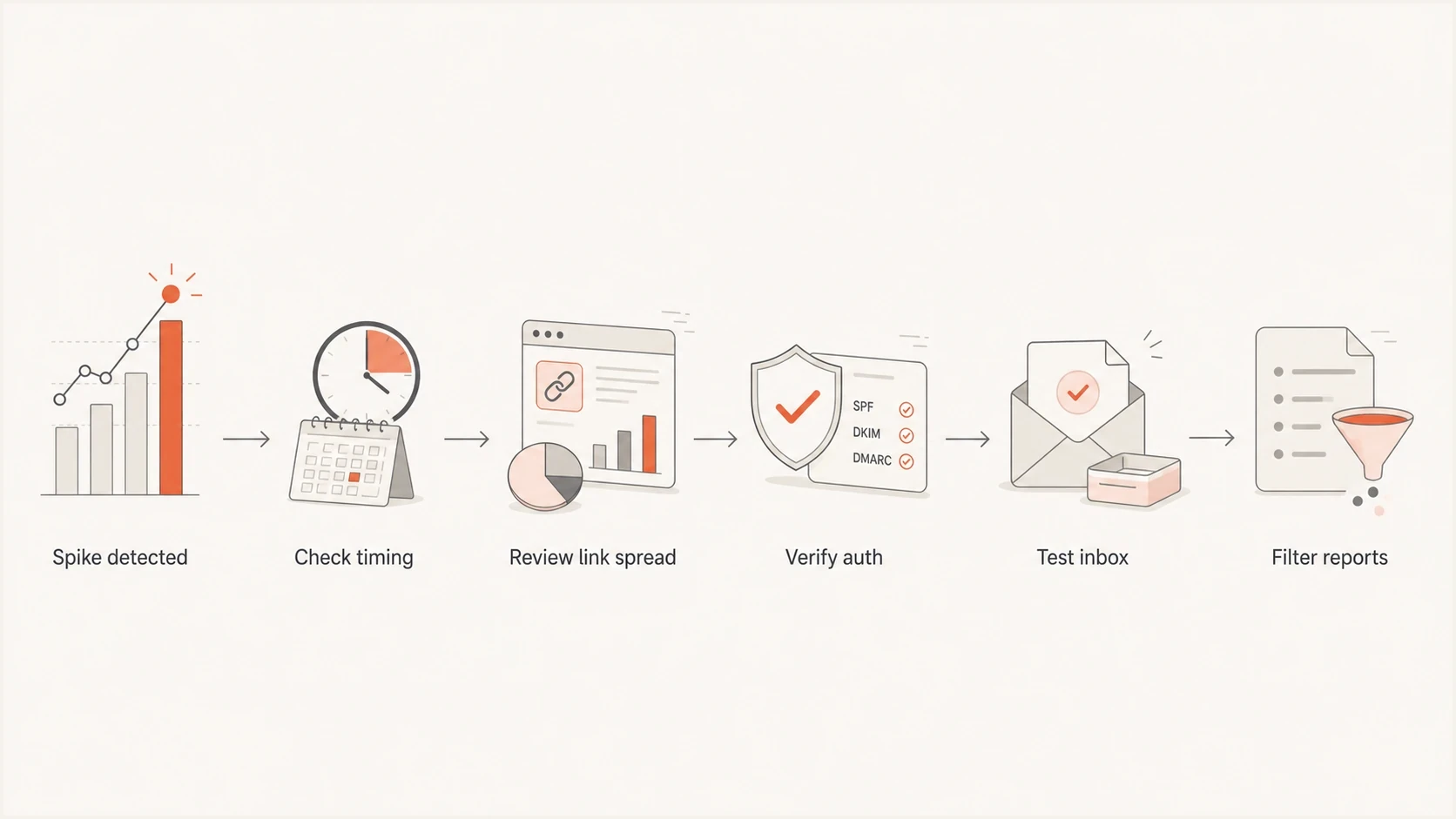
Office 365 bot-click investigation covering timing, link spread, authentication, inbox testing, and reporting.
- Segment first: Break the spike out by recipient domain, tenant, campaign, link, and time after delivery.
- Check timing: Flag opens and clicks that arrive within seconds of delivery or in uniform bursts, then look for delayed repeats.
- Inspect breadth: Mark sessions that requested several unrelated links without a later browser path.
- Validate auth: Confirm SPF, DKIM, DMARC, reverse DNS, and sending source identity as a separate health check.
- Cross-check Microsoft: If you control the tenant, compare the event with URL click records and the applicable Safe Links policy.
- Protect actions: Remove state changes from GET links and keep body unsubscribes confirmation-based.
- Report separately: Create raw, filtered, and confirmed engagement metrics for internal teams.
For a controlled test, send a real message through the email tester and inspect the message content, authentication, and delivery signals. For a broader DNS and authentication check, use the domain health checker before drawing conclusions from engagement metrics.
Email tester
Send a real email to this address. Suped shows a results button when the test is ready.
?/43tests passed
If reputation is part of the concern, Suped's product also includes blocklist monitoring for domain and IP listings. A blocklist (blacklist) alert does not cause bot clicks by itself, but it belongs in the same investigation when Microsoft 365 behavior changes suddenly.
How to fix the reporting problem
You cannot stop Microsoft from protecting its tenants. You can reduce the effect on analytics, automation, and infrastructure. The fix is to make automated traffic harmless and make reporting honest.
Poor handling
- Lead scoring: Every click adds sales intent, even if the event arrived in two seconds.
- Unsubscribe links: A GET request changes subscription state without confirmation.
- Reports: Raw clicks are presented as human clicks without a bot filter.
Better handling
- Lead scoring: Clicks need delay, session, or conversion evidence before they count.
- Unsubscribe links: Body links open a confirmation page and only POST changes state.
- Reports: Dashboards show raw events, filtered events, and confirmed engagement.
A hidden canary link can identify scanners that request every URL, but it should not be the only filter. Selective scanners can ignore it, and invisible content can create accessibility or rendering problems. Prefer normal low-intent links combined with timing, breadth, session, and conversion evidence.
For paid analytics, redirect services, and small hosting accounts, also plan for load. A large Microsoft scan can hit image servers, redirect endpoints, and analytics meters quickly. Cache static assets, keep redirects lightweight, and avoid sending scanner traffic through expensive server-side paths unless you need it.
The reporting model that works
- Raw events: Everything that hit the tracking endpoint, including Microsoft scanners.
- Filtered events: Events removed or down-weighted by timing, breadth, network, and session rules.
- Confirmed actions: Form submits, replies, purchases, booked meetings, or preference changes.
- Auth health: SPF, DKIM, DMARC, and reputation checks kept separate from engagement.
Suped's product keeps authentication and reputation work in one place instead of mixing those signals into campaign click reports. Its DMARC monitoring, SPF and DKIM checks, hosted DNS services, blocklist (blacklist) monitoring, alerts, and issue-level fix steps help rule authentication problems in or out. Bot-click filtering still belongs in the engagement reporting layer.
Views from the trenches
Best practices
Score scanner signals with timing, link count, session depth, and follow-up behavior.
Keep body unsubscribe links confirmation-based so scanners cannot change subscriptions.
Separate authentication health from engagement reports before making campaign changes.
Common pitfalls
Treating every Office 365 click as buyer intent can inflate lead scores and sales alerts.
Using GET links for unsubscribes lets automated scanners trigger permanent list changes.
Blaming deliverability before checking timing patterns can send teams in the wrong direction.
Expert tips
Compare Microsoft-hosted domains against other domains for the same campaign window.
Watch redirect and image infrastructure costs when security scanners hit campaigns at scale.
Use raw and filtered metrics so stakeholders can see total activity and likely humans.
Marketer from Email Geeks says Office 365 auto-clicking is common in enterprise B2B mail and has become more visible across normal business sends.
2024-05-21 - Email Geeks
Marketer from Email Geeks says the practical response is to clean the data, filter scanner events, and avoid treating raw clicks as final truth.
2024-05-21 - Email Geeks
The practical takeaway
Microsoft 365 can appear to open and click emails because its security and client systems inspect URLs, load remote images, and check destinations during mail flow or user interaction. The activity is likely machine-generated when it arrives immediately, requests many unrelated links, follows a uniform pattern, and produces no downstream action.
Make the measurement model resilient by filtering bot-like events, protecting unsubscribe and state-changing links, keeping raw and confirmed metrics separate, and verifying authentication before assuming a deliverability problem. Suped's product supports the authentication side through DMARC reporting, SPF and DKIM visibility, hosted DNS services, blocklist (blacklist) monitoring, alerts, and issue remediation. Campaign analytics or BI rules should classify the engagement event itself.




