How can I prevent Microsoft Defender from triggering unwanted one-click unsubscribes?

Published 3 Jun 2025
Updated 31 Jul 2026
11 min read
Summarize with
Updated on 31 Jul 2026: We clarified the separate body-link and RFC 8058 unsubscribe flows, including DKIM coverage, token handling, and Safe Links testing.
You prevent Microsoft Defender from triggering unwanted one-click unsubscribes by making every automated link visit harmless. The unsubscribe link in the email body should open a confirmation or preference page. The actual body-link unsubscribe should happen only after a human submits an HTML form that sends a POST request. For list-header one-click unsubscribe, use RFC 8058 with List-Unsubscribe and List-Unsubscribe-Post, so mailbox-provider UI actions can unsubscribe correctly while scanner GET requests do not change subscriber status.
The wrong fix is trying to identify every Microsoft Defender for Office 365 click by User-Agent, IP address, timing, or Safe Links rewrite pattern. Those signals change, and security scanners use infrastructure that is hard to separate from real users at the point of click. Treat scanner detection as reporting data, not as the control that protects the unsubscribe action.
- Make GET safe: a link visit can render a page, log a click, or show preferences, but it should not unsubscribe anyone.
- Use the right POST: a body-link unsubscribe needs a form submission, while header one-click needs the exact RFC 8058 POST.
- Keep headers separate: one-click belongs in the list headers, while the visible body link should lead to a web page.
- Measure scanners: keep automated clicks out of engagement, churn, and consent reporting whenever you can identify them.
The direct fix
The safest unsubscribe design separates discovery from action. Microsoft Defender, Safe Links, and other scanners can discover and open URLs. That is expected behavior. Your system should assume that any link in the email body and any URL in List-Unsubscribe can be fetched before the recipient touches the message.
A compliant setup still gives recipients an easy unsubscribe path. It just avoids using a raw body-link click as consent. The body link opens a page with a clear unsubscribe button. The header path advertises one-click support to mailbox providers through RFC 8058. The server suppresses the address after a body-form POST or after the mailbox provider sends the RFC 8058 POST in response to the user's unsubscribe request.
Safe list unsubscribe headerstext
List-Unsubscribe: <https://example.com/u/abc>,
 <mailto:unsubscribe@example.com?subject=unsubscribe>
List-Unsubscribe-Post: List-Unsubscribe=One-Click
The rule that stops accidental unsubscribes
A GET request must be safe. It can display the unsubscribe page, preselect a list, or show a confirmation state. It must not write to the suppression list. That one rule removes the business risk caused by Defender auto-clicks.
- Scanner visit: render the page and record a non-suppressing click event.
- Human action: submit the body form, verify its token, then suppress the address.
- Header one-click: accept the valid token and exact RFC 8058 POST signal for the automated header path.
Implement RFC 8058 correctly
The header endpoint needs more than a POST route. The List-Unsubscribe header must contain an HTTPS URI, and List-Unsubscribe-Post must contain the exact value List-Unsubscribe=One-Click. A valid DKIM signature must cover both headers. Without that DKIM coverage, a receiver should not offer the one-click control.
Put an opaque, hard-to-forge recipient-and-list token in the HTTPS URI. The endpoint must complete the request without cookies, HTTP authorization, a login, or browser-session state. It should accept the standard form-encoded POST body directly and return a success response without redirecting the POST to another URL.
Expected one-click POSThttp
POST /u/OPAQUE_TOKEN HTTP/1.1
Host: example.com
Content-Type: application/x-www-form-urlencoded

List-Unsubscribe=One-Click
- Validate the URI token: confirm that it identifies a real recipient, list, sending domain, and message stream.
- Validate the body: accept the one known key-value pair and reject unrelated state-changing POSTs.
- Make repeats idempotent: a repeated valid request should leave the subscriber suppressed without creating conflicting records.
- Keep GET harmless: if the same URI receives a GET, render a manual page and make no subscription change.
Why Defender causes unwanted unsubscribes
Microsoft Defender for Office 365 uses Safe Links URL scanning during mail flow and verifies links again at click time when rewriting is enabled. Microsoft says URLs are scanned before delivery whether they are rewritten or not, and URLs without a valid reputation can be detonated asynchronously. If your unsubscribe endpoint treats any URL request as a confirmed unsubscribe, this automated inspection looks like recipient action.
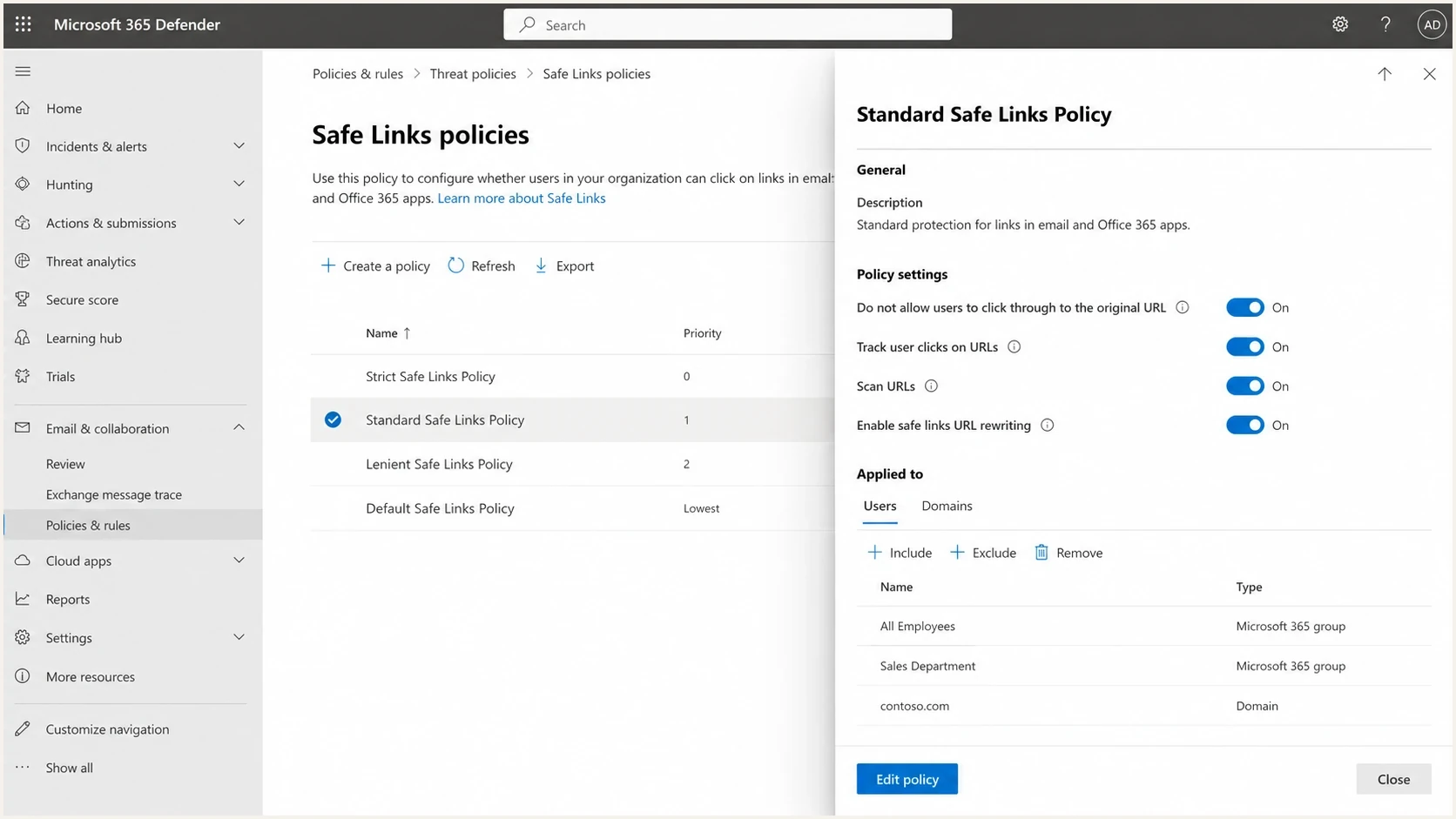
Safe Links scanning and URL rewriting policy settings in Microsoft Defender for Office 365.
This is why the problem often appears uneven. One Microsoft 365 tenant can apply more aggressive URL scanning than another, and policy scope can differ by user, group, or domain. The pattern is documented in public reports such as this Microsoft forum thread, and it matches the broader issue of Office 365 auto-clicking emails.
Unsafe unsubscribe design
- Body link: clicking the URL immediately suppresses the recipient.
- Header URL: a fetched URL changes state without a POST requirement.
- Bot filter: the system relies on IP or User-Agent guessing.
Safe unsubscribe design
- Body link: the URL opens a preference page with a form button.
- Header URL: one-click uses the RFC 8058 POST signal.
- Bot filter: scanner signals improve analytics without protecting state.
|
|
|
|---|---|---|
Body | Show page | Suppress |
Header | Accept POST | Trust GET |
Logs | Classify | Delete |
Use compact checks to separate scanner visits from real unsubscribe actions.
Build the unsubscribe flow
Build the visible body-link flow with two separate operations. The first operation is page rendering. The second is suppression. A scanner can complete the first operation all day without changing consent. A recipient must submit the body form before the second operation runs. The header flow remains separate: the mailbox provider sends its one-click POST after the user asks to unsubscribe.
Safe body unsubscribe route patterntext
GET /preferences/unsubscribe?t=TOKEN
  Validate token shape
  Render preferences page
  Do not suppress the recipient

POST /preferences/unsubscribe
  Validate token and form nonce
  Suppress recipient
  Record source as confirmed body unsubscribe
For the body link, the token should identify the recipient and list, but a GET containing that token is not permission to suppress. Use it to load the page and prefill the right subscription choices, then require a form submit for the final action. For the RFC 8058 endpoint, the valid opaque token and exact one-click POST body are enough. Do not require a form nonce, cookie, or browser session on that header path.
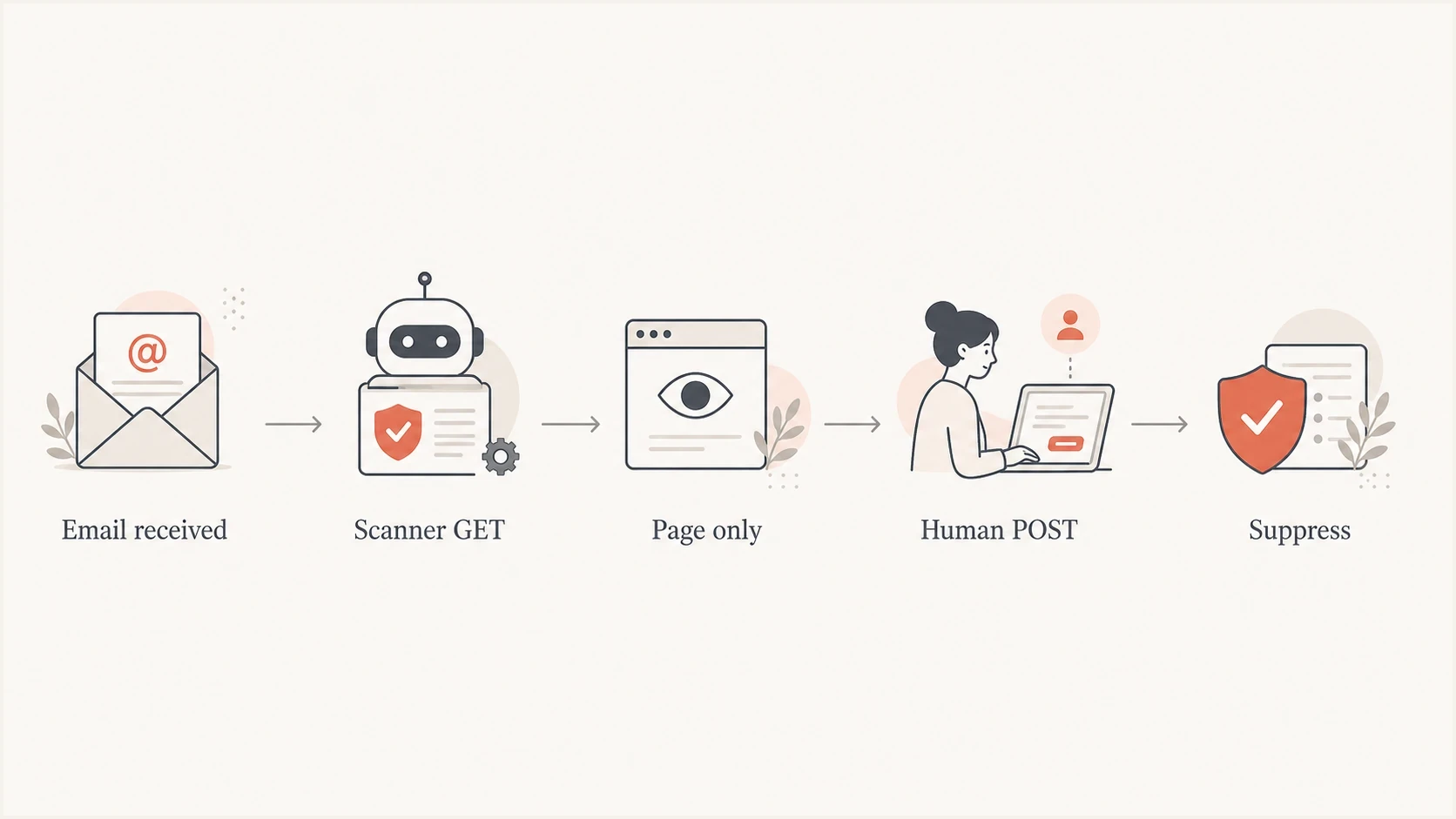
Scanner-safe unsubscribe flow where GET displays a page and human POST suppresses the recipient.
- Audit endpoints: find every URL that can suppress, opt down, or modify subscription state.
- Split methods: keep display logic on GET and write logic on POST.
- Add a form: make the body-link button clear, fast, and accessible, without forcing a login.
- Verify server-side: validate the body form's token and nonce, or the header endpoint's token and exact RFC POST body.
What to do with body unsubscribe links
The body unsubscribe link is still useful. Recipients expect it, and hiding it pushes people toward spam complaints. The important point is that the body link should not be true one-click. It should take the recipient to a page that confirms what will happen before the address is suppressed.
This is also the right place to give people reasonable choices. A recipient can unsubscribe from one newsletter, pause email, or unsubscribe from all marketing. The page should be simple, and the unsubscribe button should work without account creation, password reset, or hidden friction. For a deeper checklist, see these unsubscribe link best practices.
Do not hide the unsubscribe path
The fix is not to remove unsubscribe links, bury them, or make the page harder to use. The fix is to make link prefetching harmless and make the confirmed action explicit.
If your ESP already handles List-Unsubscribe correctly, use its subscription center or hosted preference page for the visible link. Problems usually appear when a custom body link bypasses the ESP's safer unsubscribe flow and points directly to a suppression endpoint.
Testing and monitoring
After changing the flow, test with real inboxes. Send to Microsoft 365, Outlook.com, and other mailbox providers you care about. Logs can show URL scanning before delivery or a Defender visit before the recipient clicks. The required result is simple: automated GET requests never suppress, and only a valid body-form POST or user-approved RFC 8058 POST changes subscriber status.
Repeat the same GET several times, submit the body form once, and send the one-click POST more than once. Check that repeated scanner requests are harmless, duplicate valid POSTs are idempotent, and the RFC endpoint does not redirect or depend on cookies. Keep delivery, scan, click, and suppression events separate in your logs.
A practical test is to send the message through the Suped email tester and inspect authentication, headers, links, and rendering issues before a larger send. This does not replace inbox testing with Microsoft tenants, but it catches configuration mistakes early.
Email tester
Send a real email to this address. Suped shows a results button when the test is ready.
?/43tests passed
Keep this separate from sender authentication checks. If Microsoft scanning increases after a domain change, campaign change, or new sending source, verify the domain with the Suped domain health checker. Authentication problems do not excuse unsafe unsubscribe handling, but SPF, DKIM, DMARC, rDNS, and TLS issues can affect how messages are evaluated.
Suped's product can support the ongoing checks around this application fix. Suped connects DMARC reports, SPF and DKIM visibility, DNS record monitoring, alerts, and blocklist (blacklist) monitoring so teams can trace authentication failures and unexpected sending sources while keeping unsubscribe events separate.
When Defender needs remediation
There are still cases where Defender behavior needs attention from the receiving tenant. If only Microsoft 365 recipients at a specific company are affected, ask that tenant's admin to review Safe Links policies, URL detections, and support options. The sender cannot reliably control those tenant-side scans.
The sender-side fix remains the same, even when a tenant escalates with Microsoft. Your endpoint should survive aggressive link scanning. After that, tenant remediation can reduce noisy logs, false engagement, or repeated page fetches, but it should not be required to protect subscriber status.
- Ask for evidence: collect timestamps, recipient domains, rewritten URLs, and unsubscribe endpoint logs.
- Escalate narrowly: have the Microsoft 365 admin report the specific false action or overactive policy.
- Keep sending clean: avoid sudden new domains, weak authentication, and confusing link chains during testing.
- Do not denylist: blocking guessed Microsoft IPs or User-Agents creates gaps and breaks real users.
Views from the trenches
Best practices
Use GET only to render a confirmation page, then unsubscribe through a verified POST form.
Put one-click unsubscribe in headers with RFC 8058, not as a body state-change link.
Keep scanner detection as analytics context, not the gate that protects subscriber status.
Common pitfalls
Treating any body link click as consent lets Safe Links and other scanners remove readers.
Relying on Microsoft IP lists fails when scanners use changing routes, proxies, or tenants.
Hiding unsubscribe options can increase spam complaints and damage inbox placement over time.
Expert tips
Store raw click logs separately so automated clicks do not pollute engagement reporting.
Test new sending domains with Office 365 inboxes before large campaigns depend on them.
Use signed recipient-and-list tokens, and keep header POST free of cookies or login state.
Expert from Email Geeks says link scanners should not unsubscribe people when the endpoint is designed correctly; a body link should open a page, not suppress immediately.
2024-03-07 - Email Geeks
Expert from Email Geeks says the user should click a button on an HTML form, causing an HTTP POST, before the unsubscribe is applied.
2024-03-07 - Email Geeks
The practical answer
You cannot make Microsoft Defender promise never to open unsubscribe links. You can make those opens harmless. That is the durable fix.
Use RFC 8058 for header one-click unsubscribe, and make sure DKIM covers both list headers. Send body unsubscribe clicks to a confirmation or preference page. Suppress only after a valid POST for the correct path. Keep scanner detection for reporting, not for consent. Then test the full email, headers, DNS, and endpoint behavior before the next campaign.
Suped fits the surrounding workflow when you need one place to monitor authentication, spot sender issues, test email setup, and catch domain reputation problems while your application team fixes the unsubscribe endpoint itself.




