How do email clients generate unsubscribe links, and what best practices should be followed?

Updated on 28 Jul 2026: We updated this guide with current RFC 8058 signing and processing requirements.
Mailbox providers and email clients usually generate the visible unsubscribe action from the message headers, especially List-Unsubscribe and List-Unsubscribe-Post. They are not simply moving future mail to Trash. When the recipient uses the client-level unsubscribe control, the provider submits a real opt-out request through the declared HTTPS or mailto method.
Some clients can detect a footer unsubscribe link for their own interface, but that link does not replace the structured headers or satisfy RFC 8058 one-click requirements. The reliable setup is an HTTPS one-click endpoint, an optional mailto fallback, and a visible unsubscribe link in the email body.
To inspect a real message, send it through Suped's email tester and check the raw headers, DKIM coverage, authentication results, and body link behavior together.
- Main source: The client-level button normally comes from List-Unsubscribe headers.
- Body fallback: Keep a visible unsubscribe link for people, even when the native control is absent.
- Compliance boundary: A body link alone does not meet RFC 8058 one-click requirements.
- Best practice: Declare the header path, sign it with DKIM, and keep the body link easy to find.
What the email client uses
A mailbox provider has two broad ways to create an unsubscribe action. The clean path is to read the structured headers that the sender included with the message. A less reliable path is to parse the HTML or text body and look for an opt-out link.
The structured header path is the recommended implementation because it is explicit. The sender declares where unsubscribe requests should go, and the client does not need to guess which footer link is correct. It also gives mailbox providers a consistent way to show a native unsubscribe button beside the sender name, above the message, or near other message actions.
The direct answer
In-client unsubscribe controls submit real unsubscribe requests. Standard List-Unsubscribe can declare HTTPS and mailto methods, but RFC 8058 one-click specifically uses an HTTPS POST. A footer link remains useful for people, but it does not replace the required headers.
Basic unsubscribe headerstext
List-Unsubscribe: <https://example.com/unsubscribe/abc123>,
 <mailto:unsubscribe@example.com>
List-Unsubscribe-Post: List-Unsubscribe=One-Click
The HTTPS URL should contain an opaque, hard-to-forge token that identifies the recipient and list without exposing personal data. The mailto address should route to an automated processor that can apply the correct list-level suppression. When multiple URIs appear, clients can treat their left-to-right order as the sender's preference.
How one-click unsubscribe works
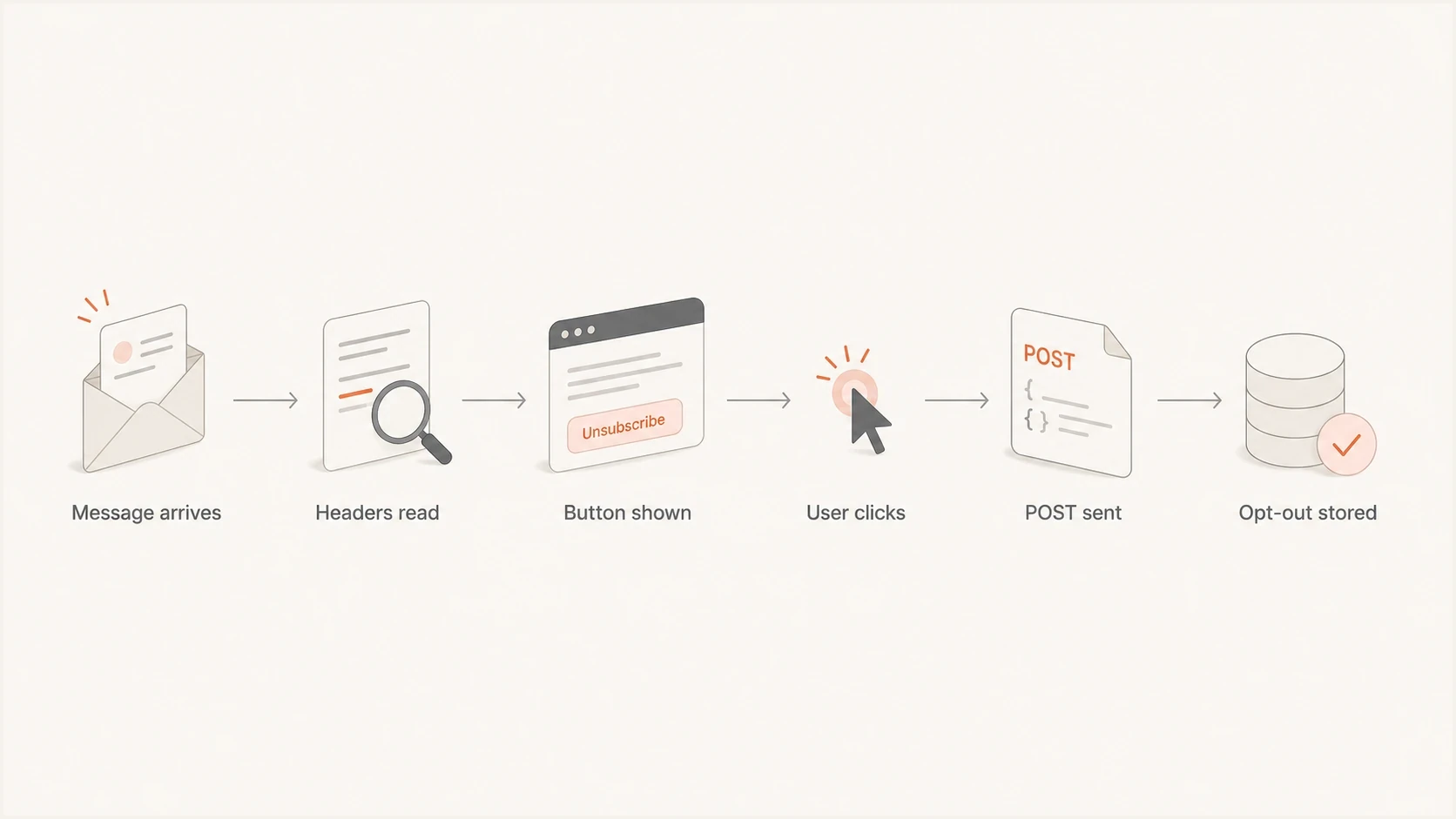
RFC 8058 one-click unsubscribe flow from message headers to stored opt-out.
One-click unsubscribe uses the HTTPS URI in the List-Unsubscribe header and the companion List-Unsubscribe-Post header. After the recipient chooses the native unsubscribe action, a supporting mailbox provider sends a POST request to the HTTPS URI with the body List-Unsubscribe=One-Click. The recipient should not have to load a page or confirm the request again.
That distinction matters because security scanners and link preview systems often fetch links in messages. A plain GET unsubscribe endpoint can remove people before they ask. A one-click POST flow lets the sender ignore simple link fetches and process the intended unsubscribe signal. For more detail on the standard, use this guide to one-click unsubscribe.
Header unsubscribe
- Declared path: The sender gives the client a clear unsubscribe endpoint.
- Client action: The client can show a native unsubscribe button when the message meets its eligibility checks.
- Best use: Marketing, newsletters, product updates, and other non-transactional mail.
Body unsubscribe
- User path: The recipient opens the message and follows the visible link.
- Client action: A client can surface the link in its own UI, but support is inconsistent.
- Best use: A visible option for people, not the only signal for clients.
Treat GET versus POST as a security boundary. GET can display a landing page or preference center. POST should process the one-click unsubscribe without cookies, login, JavaScript, or another confirmation step.
Sign the headers with DKIM
RFC 8058 requires a valid DKIM signature that covers both List-Unsubscribe and List-Unsubscribe-Post. Include both field names in the DKIM-Signature h= tag. If the signature fails or omits either header, the receiver should not offer one-click unsubscribe for that message.
DKIM header coverage exampletext
DKIM-Signature: v=1; a=rsa-sha256; d=brand.example; s=mail;
 h=from:to:subject:date:list-unsubscribe:list-unsubscribe-post;
 bh=...; b=...
The endpoint must identify the recipient and list from the URI alone. It must not depend on cookies, HTTP authorization, or prior browser state, and it must not redirect the POST. Validate the opaque token, record the suppression, and return a direct success response.
What common clients do
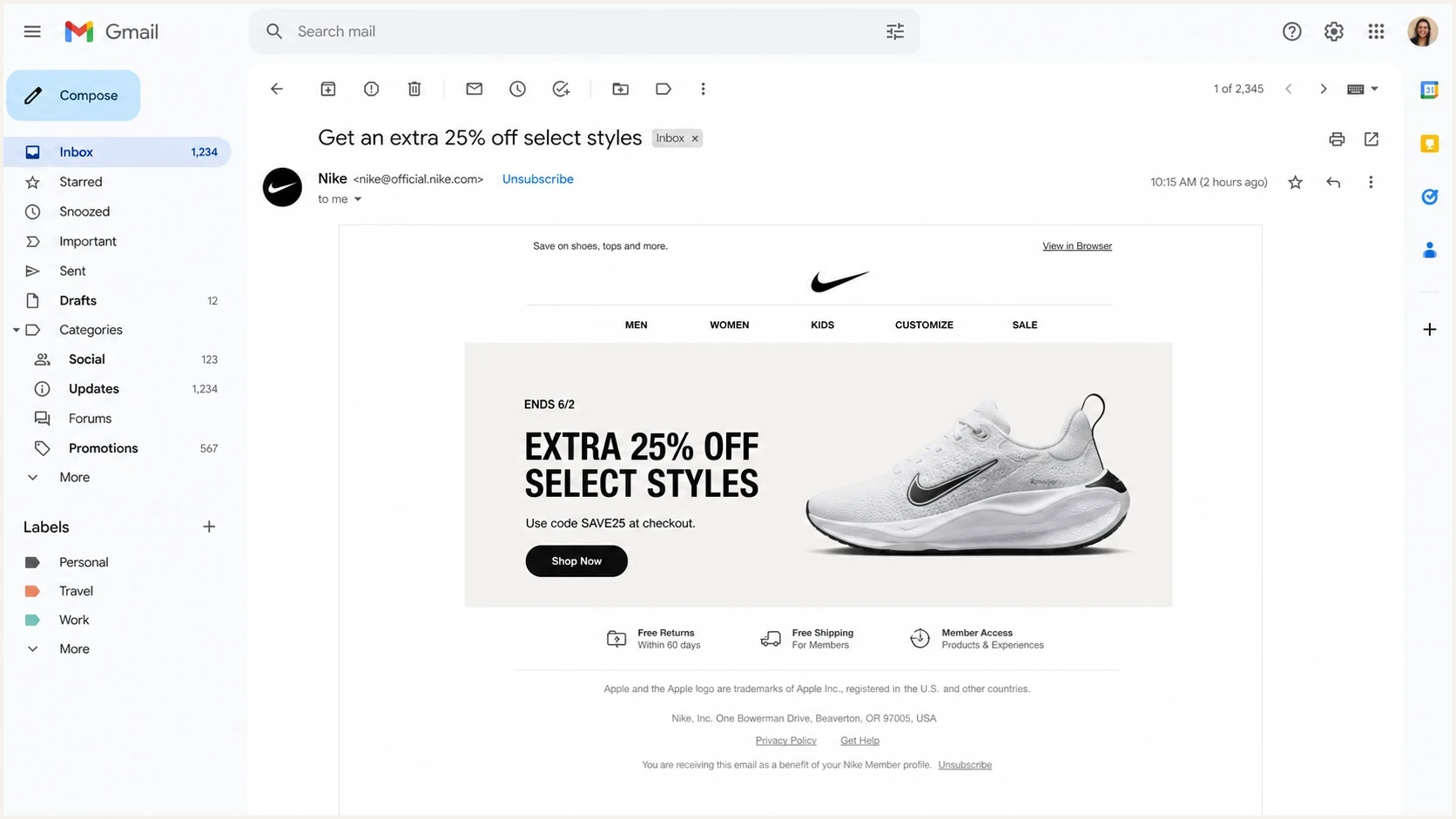
Gmail message view with a native unsubscribe link beside the sender and a footer link.
The exact UI differs across clients, but the underlying pattern is similar. Clients prefer declared headers and can use authentication, reputation, engagement, or message classification to decide whether to show the native action. A visible body link remains a user-facing fallback and does not replace the header.
|
|
|
|---|---|---|
 Gmail Gmail | RFC 8058 headers | Eligibility and DKIM |
 Yahoo Mail Yahoo Mail | List-Unsubscribe | Reputation and engagement |
 Outlook Outlook | List-Unsubscribe | Header support and context |
 Apple Mail Apple Mail | List-Unsubscribe | Header format |
Client unsubscribe behavior varies by account type, interface, and sender reputation.
A missing unsubscribe button does not always mean the header is absent. Sender reputation, authentication, DKIM coverage, message classification, client support, and account settings can affect whether the button appears. Test the raw message first, then check the client UI.
Implementation checklist
Use this checklist when reviewing an unsubscribe setup. It keeps the technical path and user experience connected, because a standards-compliant header still fails when the endpoint is slow, broken, or disconnected from the mailing database.
- Add headers: Include an HTTPS URI first in List-Unsubscribe, with mailto as an optional fallback.
- Use POST: Add List-Unsubscribe-Post with the exact List-Unsubscribe=One-Click value.
- Sign both headers: Cover List-Unsubscribe and List-Unsubscribe-Post with a valid DKIM signature.
- Keep tokens opaque: Use signed or random tokens instead of exposed email addresses.
- Avoid friction: Do not require login, a password, or a second confirmation for one-click.
- Honor scope: Remove the recipient from the list identified by the message and offer a separate global opt-out.
- Sync suppression: Apply the request to the consent or suppression store used to build every future audience.
- Process quickly: Honor the request immediately where possible and within 48 hours for Gmail and Yahoo expectations.
- Monitor outcomes: Record the request time, list, token, processing result, and retry status.
Production-style header exampletext
List-Unsubscribe: <https://u.brand.example/o/8f3c2b>,
 <mailto:unsubscribe@brand.example>
List-Unsubscribe-Post: List-Unsubscribe=One-Click
After processing a body-link request, show a simple confirmation. A preference center can offer list or frequency controls, but it must not obstruct a full unsubscribe. Any feedback question should be optional and appear after the opt-out is complete.
Before rollout, check your domain health because unsubscribe UI depends on trust signals beyond the header itself.
?
What's your domain score?
Deep-scan SPF, DKIM & DMARC records for email deliverability and security issues.
Do not unsubscribe on GET
A GET request can come from a scanner, preview system, or browser prefetch. Use GET for display only. Process the actual one-click opt-out only when POST contains the expected payload.
Authentication and reputation still matter
A technically correct unsubscribe header does not guarantee that every client shows a button. Mailbox providers also look at authentication, complaint history, sending patterns, user engagement, and whether the message looks like bulk mail.
Suped's product supports this workflow by bringing DMARC monitoring, SPF and DKIM results, sending-source visibility, alerts, and blocklist (blacklist) monitoring into one view. Use those signals to separate an authentication or reputation problem from an unsubscribe-header implementation problem.
Suped DMARC dashboard showing email volume, authentication health, and source breakdown
Review unsubscribe behavior with the surrounding trust signals. Check whether SPF and DKIM pass, whether DMARC passes through alignment, whether traffic from the From domain is consistent, and whether complaint rates changed after a campaign.
Operational targets for unsubscribe handling
Processing targets for a healthy unsubscribe flow.
Preferred
Immediate
The request reaches the suppression store before another send.
Mailbox target
Within 48h
Gmail and Yahoo expect the request to be honored in this window.
High risk
Over 48h
Further marketing mail can create complaints and compliance risk.
Common failure modes
Most unsubscribe problems come down to missing headers, fragile endpoints, unclear list scope, or authentication gaps. Check these before assuming a client is broken.
|
|
|
|---|---|---|
No native button | Header or eligibility issue | Check headers and trust |
One-click ignored | DKIM omits headers | Update DKIM h= tag |
Bot opt-outs | GET removes | Require POST payload |
Mailto fails | No parser | Automate inbox |
Still mailed | Suppression sync delay | Fix audience pipeline |
Compact troubleshooting map for unsubscribe issues.
The most expensive failure is silent non-processing. A client submits the request and the endpoint returns success, but the record never reaches the system that builds future audience segments. Use a durable unsubscribe event path with retries, monitoring, and a human-readable audit trail.
A good unsubscribe flow lowers spam complaints
When people can leave a list easily, fewer of them use the spam button as the fastest exit. That protects sender reputation more effectively than hiding the link or making the process slow.
Legal and operational basics
For marketing email, an unsubscribe link is a deliverability control and a legal consent-management requirement in many markets. Treat the law as the floor and make the opt-out easy to find, easy to use, and quick to process.
Mailbox-provider targets can be stricter than statutory deadlines. Gmail and Yahoo expect relevant one-click unsubscribe requests to be honored within 48 hours, while legal deadlines vary by jurisdiction.
Transactional email is different because the message exists to complete or document a user action, such as a password reset, receipt, account alert, or security notice. Separate mandatory transactional notices from optional product education. If the message contains marketing content, give that content a marketing opt-out path.
- Marketing mail: Include one-click headers and a visible body link.
- Transactional mail: Do not let marketing opt-outs block required account or security notices.
- Mixed messages: Separate optional content so the recipient can opt out cleanly.
- Recordkeeping: Keep proof of the request and the system change that followed.
Never make a person prove they deserve to leave a marketing list. Let the client submit the request, apply the correct list scope in the suppression store, and stop the next send before its audience is assembled.
Views from the trenches
Best practices
Declare unsubscribe headers clearly so mailbox providers do not need to parse footer links.
Use one-click POST for client actions and keep GET requests limited to display pages.
Keep a visible footer link because humans still look for it when the client UI is absent.
Common pitfalls
Treating a body link as enough leaves clients guessing which link performs the opt-out.
Processing GET requests can let security scanners remove people before they choose to opt out.
Broken mailto handling creates silent failures when clients choose the email-based route.
Expert tips
Test with raw headers and real inboxes because UI display depends on trust and context.
Route unsubscribe events through the same consent store that builds future audiences.
Watch authentication health because low trust can suppress otherwise valid client actions.
Marketer from Email Geeks says clients often use List-Unsubscribe headers, while some can also surface opt-out links found in message content.
2023-07-05 - Email Geeks
Marketer from Email Geeks says the client-level unsubscribe action is a real unsubscribe request, not an automatic Trash rule for future mail.
2023-07-05 - Email Geeks
Practical recommendation
Build the header path first. Add List-Unsubscribe with an HTTPS URI and optional mailto fallback, add List-Unsubscribe-Post for one-click support, and cover both headers with DKIM. Keep the body footer link visible, then test the raw message and multiple inboxes.
Suped's product connects this unsubscribe review to the authentication and reputation workflow. The unsubscribe headers tell the client where to send the request. Suped shows whether DMARC alignment, SPF and DKIM results, sending-source behavior, domain health, and blocklist (blacklist) status support the trust needed for the client UI to appear.
Do not make mailbox providers hunt for the opt-out. Declare it in the header, make the POST work without friction, and keep a human-visible link in the message.




