How to identify and filter out email bot clicks from newsletter reports?

Updated on 27 Aug 2026: We clarified bot-click confidence rules and added safeguards for automations and unsubscribe actions.
The direct answer: identify email bot clicks by timing, click density, link coverage, and event metadata, then remove those events from newsletter reporting while keeping the raw data intact. Mark clicks within 1,000ms of delivery as bot-likely when burst or link-coverage evidence supports the timing signal, then preserve later human activity as a separate event. If delivery time is unavailable, use SMTP handoff as a less precise baseline.
Most false clicks come from security systems that inspect links before a person reads the message. They often click several links in seconds, click every footer link, or hit a hidden control link that a person never sees. Do not try to stop those scans. Let them happen, log them, classify them, and report a separate human-estimated click metric.
The key distinction is that a bot click, also called a non-human interaction (NHI), is an event, not proof that the subscriber is fake. A protected corporate, education, healthcare, or government mailbox can produce scanner clicks before the same real person later reads, visits, replies, or buys.
Separate raw and filtered click metrics
A useful newsletter report has at least two click numbers: raw clicks and filtered clicks. Raw clicks are every redirect hit. Filtered clicks are what remains after bot-like events are removed. If ads, renewals, or editorial decisions depend on click-through rate, keep those numbers separate and make the filtering rule visible.
Use filtered clicks for A/B tests and click-triggered automations. Otherwise, a variant sent to more protected corporate mailboxes can win a test for the wrong reason, and a scanner click can move a subscriber into a high-intent workflow before there is real intent.
- Timing: Mark clicks within the first second as bot-likely when another signal supports the classification, then review the 1-5 second window for bursts.
- Density: Mark clustered click events as automatic when several unique links are requested almost together.
- Coverage: Treat an all-links sweep, especially footer and social links, as a strong bot signal.
- Control link: Add a diagnostic control link that only scanners should request, then use it as supporting evidence.
- Metadata: Store IP, ASN, user-agent, recipient domain, link id, and timestamp, but avoid relying on one of them alone.
Do not block the scanner
Blocking link scanners at the redirect layer can hurt deliverability and create worse data. Security systems expect to inspect URLs. Return a normal response, record the event, and filter it out of reporting after collection.
Build the click event model
Filtering works only when the event model has enough context. A redirect log with only timestamp and URL leaves too much guesswork. Use a click table that lets the reporting layer classify events without losing the original record.
|
|
|
|---|---|---|
Click time | Shows the scan burst | Timing rule |
Delivery time | Defines the baseline | First second |
Recipient hash | Groups clicks safely | Burst count |
Link id | Counts unique links | All-link sweep |
Link type | Flags control links | Confidence |
Session id | Connects web analytics | Human evidence |
Request method and status | Shows fetch behavior | Supporting signal |
IP and UA | Adds network context | Review only |
Fields that make bot click filtering reliable.
Example click classification logicSQL
case
  when conversion_event = true or repeat_visit_after_minutes >= 1
    then 'human_likely'
  when ms_after_delivery <= 1000 and unique_links_5s >= 2
    then 'bot_likely'
  when control_link_clicked = true and unique_links_5s >= 2
    then 'bot_likely'
  when unique_links_5s >= 3 then 'bot_likely'
  when page_session_seconds >= 8 then 'human_likely'
  else 'review'
end
User-agent data still helps, but it is weak on its own because a lot of link inspection happens through normal-looking clients or cloud infrastructure. Use it as a supporting signal. A deeper bot user agents review is useful when your ESP exposes detailed click headers.
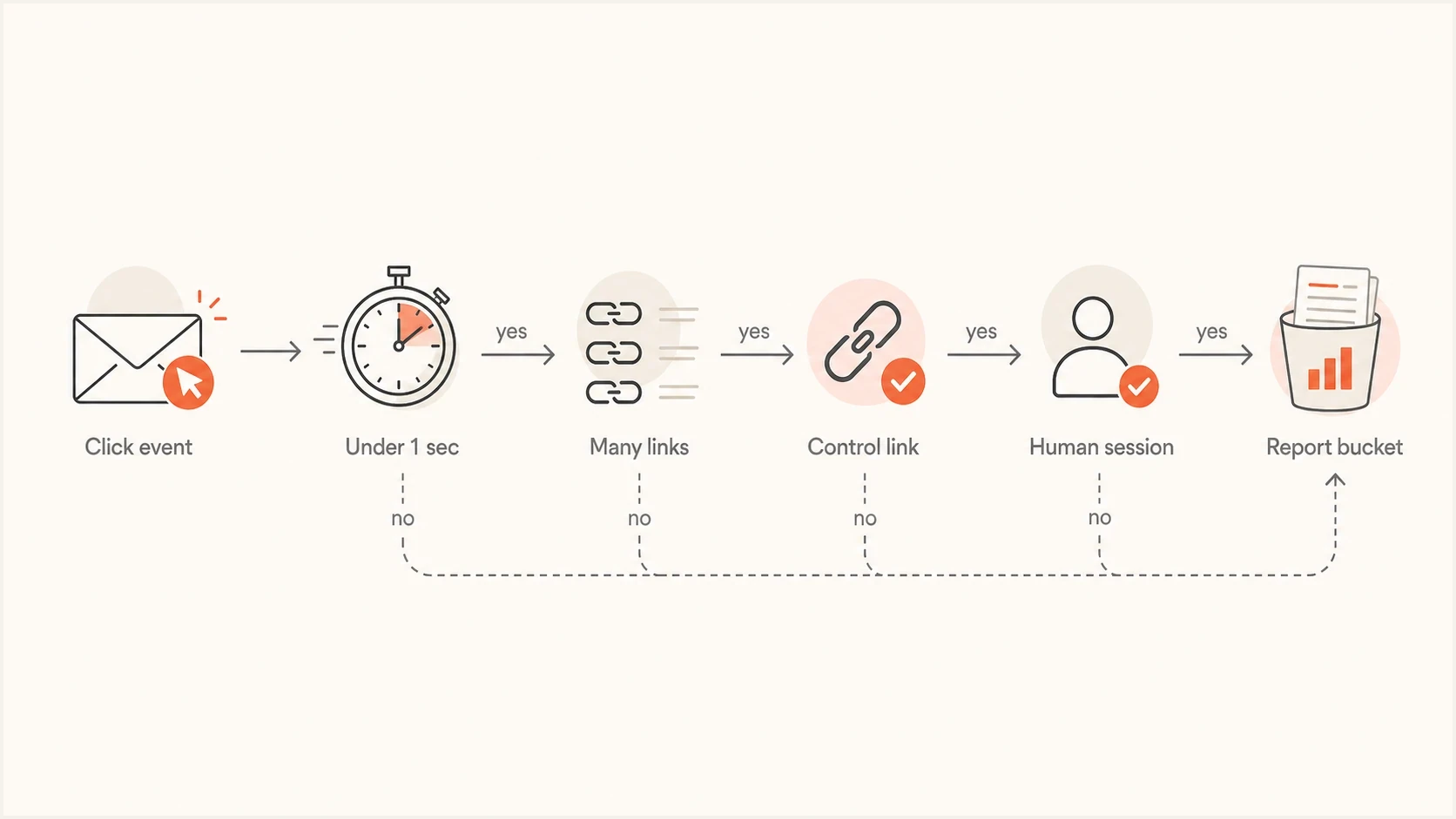
Newsletter bot click filtering flowchart using timing, link bursts, control links, and human sessions.
Filtering rules that work in practice
A single rule catches part of the problem. A small scoring model catches more without over-filtering. Treat the first-second window as a strong timing signal, then combine it with behavior and add softer signals for scans that happen after the first pass.
High confidence bot signals
- First second: The click arrives immediately and is followed by a burst or broad link coverage.
- Every link: The same recipient clicks headline, ads, footer, social, and policy links together.
- Control link: A hidden or inert link receives a request alongside other rapid clicks.
Signals that need caution
- IP address: Shared gateways, proxies, and mobile networks make IP-only filtering brittle.
- User-agent: Scanners can use common browser strings, so treat user-agent as context.
- Domain: A recipient domain can have mixed human and automatic activity.
Click confidence bands
Use timing and behavior together instead of one brittle filter.
Exclude
High bot confidence
Under 1 second with a burst, or a control-link request plus other rapid clicks.
Review
Mixed confidence
1-5 seconds after delivery with several links clicked.
Keep
Human likely
Delayed click with session depth or a later repeat visit.
Compare filtered clicks with website sessions and conversions. A high click-through rate with flat session volume, orders, form fills, or replies usually means email campaign reports are counting scanner activity.
The key is to classify at the event level, then roll the result up to campaign, article, ad, and subscriber reports. That gives marketing a clean CTR while analytics still has the raw trail for audit.
Use hidden links carefully
A hidden control link is useful when it is implemented cleanly. The link should not affect unsubscribe, preference, ad, or editorial routing. It exists only to test whether a scanner is requesting URLs a human cannot see. There is a fuller treatment of invisible links when you need a dedicated detection pattern.
Use a control link, not a trap
The control link should return a normal lightweight page and never punish the subscriber. If it is clicked, raise the confidence score for that recipient's other early clicks. Do not use it to unsubscribe, suppress, or block anyone.
Avoid CSS-hidden or deceptive links that can be exposed by screen readers, unusual email clients, or accessibility tools. A bad control link creates false positives, and false positives are worse than a small amount of remaining bot traffic.
Protect automations and unsubscribe actions
A scanner click can disappear from a report and still start a workflow if reporting and automation use different event paths. Apply the same classification before lead scoring, segmentation, sales alerts, or follow-up messages. For high-impact actions, require human-likely evidence such as a confirmed page action, a later session, a reply, or a conversion event.
- Gate automations: Trigger workflows from human-likely or qualified clicks, not every raw redirect event.
- Protect body links: Let a GET request display a confirmation page, then require an explicit action before changing a subscription or account.
- Preserve one-click unsubscribe: Keep the standards-based List-Unsubscribe and List-Unsubscribe-Post flow separate, and honor its valid POST requests.
- Audit side effects: Record why an event was excluded and verify that it did not change scores, segments, alerts, or subscriber state.
Do not filter valid unsubscribe requests
Bot-click classification belongs in analytics and automation logic. It should not block a valid standards-based unsubscribe request. Keep the required unsubscribe path reliable, and use confirmation only for message-body links or other state-changing actions that are exposed to ordinary scanner fetches.
Protect ad reporting and billing
Ad-funded newsletters need a stricter metric than ordinary campaign reporting. Use gross clicks for operational debugging, filtered clicks for trend reporting, and qualified clicks for billing. Qualified clicks should exclude automatic scans and require a minimum signal of intent.
|
|
|
|---|---|---|
Gross | All redirect hits | Debugging |
Filtered | Bot-like removed | Trends |
Qualified | Intent signal | Billing |
Unique | One per reader | Reach |
Use separate click metrics for clean advertiser reporting.
Example reporting policyJSON
{
  "gross_clicks": "all_redirect_events",
  "filtered_clicks": "exclude_bot_likely",
  "qualified_clicks": "filtered_with_session_signal",
  "billing_window": "first_7_days",
  "dedupe": "one_click_per_recipient_per_ad"
}
For advertiser-facing reports, label the methodology plainly. A clean report says how automatic clicks are excluded, when deduplication happens, and whether landing-page engagement is required. That prevents the CTR from changing silently when the filter improves.
Confirm sender health before tuning reports
A sudden bot-click spike does not prove that sender authentication changed. Still, check sender health before rewriting analytics because mailbox providers and security gateways look at domain reputation, authentication, message shape, and link patterns together.
Suped's product covers DMARC monitoring, authentication visibility, and blocklist monitoring. Use that sender-health view to distinguish click-reporting noise from a wider authentication or blocklist (blacklist) change.
Suped DMARC dashboard showing email volume, authentication health, and source breakdown
When a spike appears, send a seeded copy of the newsletter and inspect its authentication and message path with an email tester. The test does not classify bot clicks, but it helps rule out broken authentication and message-level problems before you change the click model.
Email tester
Send a real email to this address. Suped shows a results button when the test is ready.
?/43tests passed
If authentication, blocklists, and complaint data look stable, treat the issue as analytics noise and improve the reporting filter. If sender health changed at the same time, fix that first, then compare click behavior again.
A reliable reporting workflow
The workflow should keep marketing reports simple while preserving enough detail for engineering and analytics. Avoid editing source events. Add a classification column and let each report choose which class to include.
- Keep raw events: Store every redirect hit with campaign, recipient, link, time, IP, and user-agent.
- Join delivery time: Calculate milliseconds after delivery for each click, or use SMTP handoff as a less precise fallback.
- Classify events: Apply timing, burst, all-links, and control-link rules together.
- Join web analytics: Connect clicks with session IDs, conversions, replies, or orders where available.
- Publish both: Show raw and filtered click-through rate so trend changes are visible.
- Audit weekly: Review a sample of filtered clicks by recipient domain and campaign.
The clean reporting pattern
The headline CTR should use filtered unique clicks. The appendix or internal dashboard should keep gross clicks, bot-likely clicks, and review clicks. That gives stakeholders a stable metric without hiding the scanner activity.
Why bot clicks can spike suddenly
A sudden start does not always have one visible cause. Security systems update policies, enterprise recipients change gateways, subscriber mix changes, and a campaign with more links gives scanners more to request. Break the spike down before changing strategy.
- Recipient mix: More corporate recipients can raise scan clicks even when human behavior is stable.
- Gateway update: A receiver-side security change can make every link get tested at send time.
- Campaign shape: More links, redirects, or footer URLs create more scanner events.
- Sender health: Authentication or blocklist (blacklist) movement can increase scrutiny.
If opens, complaints, inbox placement, and unsubscribe behavior are otherwise stable, the most practical fix is reporting-side filtering. A broader bot click spike review helps when the change affects many campaigns at once.
Views from the trenches
Best practices
Keep scanner clicks in raw logs, then exclude them from the headline CTR downstream.
Use delivery timing, unique link count, and control-link hits as a combined score.
Publish raw, filtered, and qualified clicks so commercial reports stay auditable.
Common pitfalls
Do not filter only by IP address, because shared gateways create many false matches.
Do not block URL scanners, because inspection failures can harm deliverability checks.
Do not use hidden links for unsubscribe, suppression, or any subscriber-side action.
Expert tips
Use sub-second timing with burst evidence, then tune later windows using sampled events.
Break unusual spikes down by recipient domain before changing campaign strategy.
Store the classification reason beside each click so future audits are straightforward.
Marketer from Email Geeks says early clicks after send are usually automatic security checks, and reporting should remove them instead of interrupting the request.
2025-04-14 - Email Geeks
Marketer from Email Geeks says clicks across every link in the email, especially footer links, are a strong sign of scanning rather than reader intent.
2025-04-14 - Email Geeks
The reporting setup to use
Filter newsletter bot clicks after collection. Do not try to prevent the scan. Use first-second timing with burst and all-link detection, keep a careful control-link signal, and separate raw clicks from filtered clicks in every report.
For most teams, a practical setup is ESP or webhook event capture for click classification, with Suped's product covering DMARC, SPF, DKIM, and blocklist (blacklist) monitoring. This separation helps teams debug analytics noise without treating every spike as a sender-health problem.




