
How can I identify bot user agents in my email click data?

Published 22 Apr 2025
Updated 16 Oct 2026
13 min read
Summarize with
Updated on 16 Oct 2026: We corrected the bot-scoring example and added a controlled test to protect real clicks from overfiltering.
Identify bot user agents in email click data by treating the user agent as the first clue, then confirming it with timing, IP, recipient domain, link pattern, and repeat behavior. A user agent that does not start with Mozilla needs context; that prefix alone does not distinguish automation from app activity.
Flag obvious automation libraries first, score security scanners and preview services next, then inspect browser-like strings alongside request behavior. The HTTP User-Agent header is a self-reported identifier for the requesting client. It does not prove who intended the click, and a browser-like string can be copied or supplied by an intermediary.
- Strong bot: strings such as python-requests, aiohttp, Wget, curl, Java HTTP clients, Jetty, Apache-HttpClient, and lua-resty-http usually mean scripted fetching.
- Likely automated: strings such as Slackbot-LinkExpanding, facebookexternalua, facebookexternalhit, Snap URL Preview Service, and RSS scrapers usually mean link preview or syndication activity.
- Needs context: strings such as Microsoft Office, Microsoft Exchange, dataaccessd, Dalvik, CFNetwork, and okhttp need timing, network, and session checks before exclusion.
Classify email clicks by request type
Start with a simple classification pass. Use four buckets: explicit automation, known preview services, security scanning, and normal mail client or browser activity. Exclude explicit automation and known preview requests from click-rate reporting. Mark confirmed scanning requests as nonhuman interaction (NHI), and preserve a later human click as a separate event. Leave missing or unrecognized user agents unclassified until other evidence supports a decision.
Do not use one rule alone
The rule "does not start with Mozilla" is too blunt for exclusion. Some real mobile and app clients use non-browser user agents, while some security systems use browser-like strings. Match specific client patterns and check their behavior.
- Prefix check: investigate unfamiliar strings, but do not increase a bot score solely because Mozilla is absent.
- Fast click: clicks within seconds of delivery often come from scanners or prefetch systems, but timing alone is not proof.
- Link sweep: the same recipient hitting several distinct links within a second or two is stronger evidence than a high link count over several days.
This matters because bot clicks change business decisions. They inflate click-through rate and click-to-open rate, trigger false lead scoring, distort A/B tests, and make unsubscribe or preference-center data harder to interpret. A clean filter has to protect reporting without deleting real buyer intent.
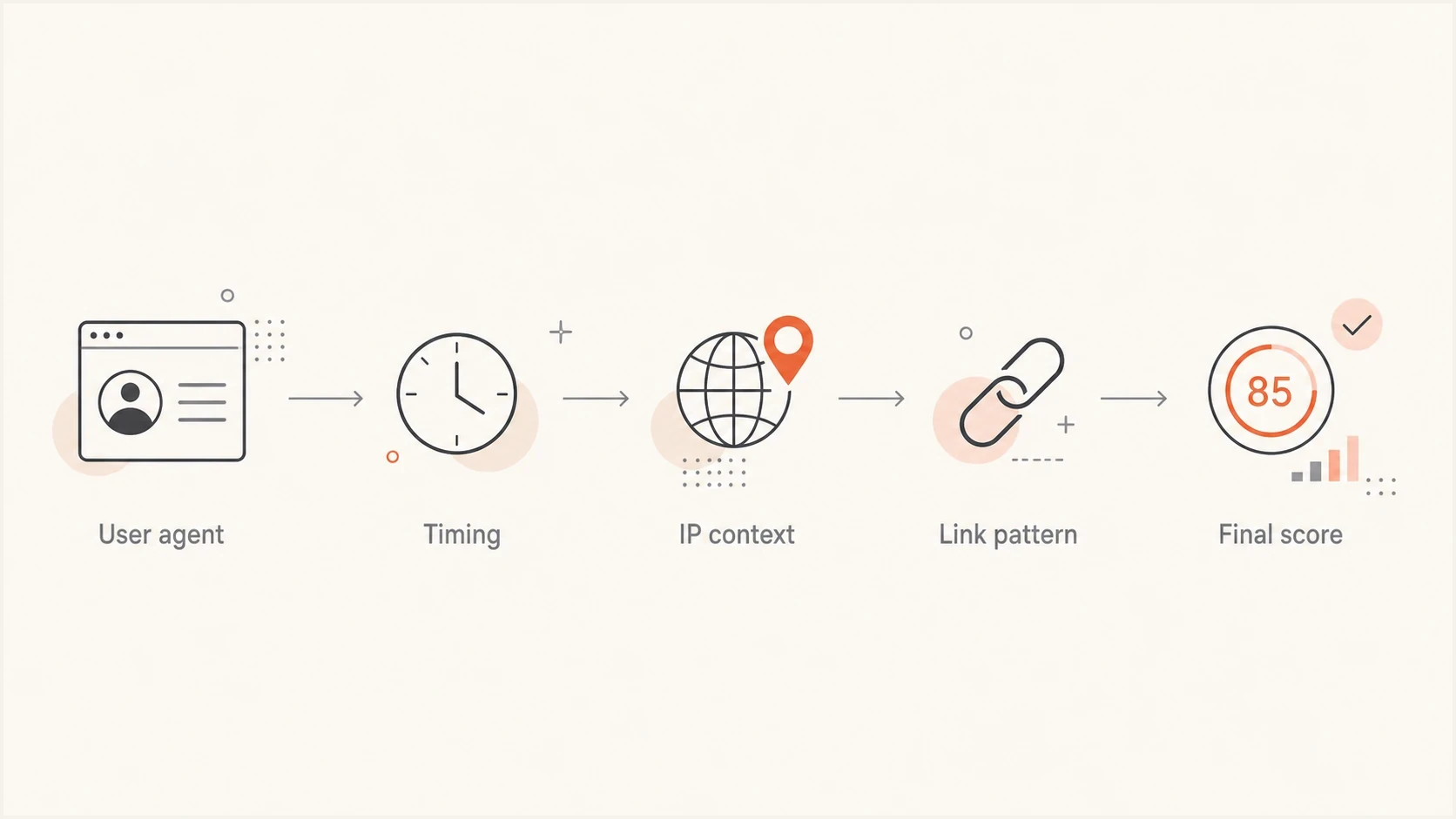
Email bot click detection flowchart using user agent, timing, IP, link pattern, and score.
Signals that identify bot user agents
The highest-confidence signal is a user agent that names an automation library. A real person does not normally click a newsletter link with Wget or python-requests. Those strings usually mean a script, a scanner, an integration worker, or an internal system fetched the link.
High-confidence bot user-agent patternstext
python-requests/
aiohttp/
Wget/
curl/
Java/
Apache-HttpClient/
Jetty/
lua-resty-http/
AHC/
Preview services are different. They often fetch a link because a message, feed, or social app wants to show a preview card. These clicks are still not human engagement with the email, but the separate label explains why a contact appears to have clicked before reading.
|
|
|
|---|---|---|
python-requests or aiohttp | Script | Exclude |
Wget or curl | Fetcher | Exclude |
Slackbot-LinkExpanding | Preview | Suppress |
Microsoft Office | Client or protection | Score |
Mozilla | Browser-like | Verify |
Missing or unrecognized | Unknown | Review with context |
Compact user-agent triage table.
Store the full raw User-Agent at the tracked redirect, then classify it into a short normalized label for reporting. Match specific tokens case-insensitively rather than broad words such as "python" or "Office". A missing header is unknown, not proof of a bot; check whether the export omitted it before classifying the request.
Build a scoring model
A deterministic pattern list is the right start, but a scoring model works better over time. The model does not need machine learning. A few weighted rules are easier to audit and explain to sales and analytics teams. The SQL below is an illustrative ruleset, not a validated detection standard. Precompute distinct_links_2s for each recipient and message within a two-second request window, and recipients_same_ip_10s as distinct recipients sharing the requesting IP within ten seconds.
Example click scoring logicsql
WITH normalized AS (
  SELECT *, LOWER(COALESCE(ua, '')) AS ua_normalized
  FROM click_events
)
SELECT *,
  CASE
    WHEN ua_normalized LIKE '%python-requests/%'
      OR ua_normalized LIKE '%aiohttp/%'
      OR ua_normalized LIKE '%wget/%'
      OR ua_normalized LIKE '%curl/%'
      OR ua_normalized LIKE '%java/%'
      OR ua_normalized LIKE '%apache-httpclient/%'
      OR ua_normalized LIKE '%jetty/%'
      OR ua_normalized LIKE '%lua-resty-http/%'
      OR ua_normalized LIKE '%ahc/%' THEN 100
    WHEN ua_normalized LIKE '%slackbot-linkexpanding%'
      OR ua_normalized LIKE '%facebookexternalua%'
      OR ua_normalized LIKE '%facebookexternalhit%' THEN 90
    ELSE
      CASE WHEN seconds_after_delivery BETWEEN 0 AND 10
        THEN 40 ELSE 0 END
      + CASE WHEN distinct_links_2s >= 5
        THEN 30 ELSE 0 END
      + CASE WHEN recipients_same_ip_10s >= 10
        THEN 30 ELSE 0 END
  END AS bot_score
FROM normalized;
Use 90-100 as a candidate nonhuman band and 50-89 as a review band after calibrating the rules. Scores below 50 mean insufficient bot evidence, not confirmed human activity. The separate behavior rules add together: a fast click, a rapid link sweep, and a multi-recipient IP burst score 100. Shared IPs and fast clicks still need review for false positives.
Bot score bands
Illustrative review bands that require validation against your own click events.
Unclassified
0-49
Insufficient bot evidence; human intent is unconfirmed.
Review
50-89
Inspect timing, IP, domain, and link pattern.
Likely nonhuman
90-100
Exclude from engagement after rule validation.
The exact weights depend on the traffic. B2B lists with enterprise recipients see more security checks. Consumer lists see more app previews and mobile proxy behavior. Keep the scoring rules visible, versioned, and calibrated against confirmed conversions.
Use click context before filtering
The context around the user agent strengthens the classification. Check the delivery timestamp, recipient domain, source IP, autonomous system number (ASN), reverse DNS, geographic location, referrer, HTTP method, clicked URL, and whether the same request cluster touched several recipients. A security scanner often clicks immediately, touches several links, and repeats similar behavior across a company domain. Shared corporate egress, VPNs, and privacy proxies also carry human traffic, so IP or location alone is not a verdict. HEAD requests and missing referrers are supporting clues, not proof of automation.
Human click pattern
- Timing: the click usually happens after a plausible reading delay.
- Depth: the visitor clicks one or two relevant links, not every link.
- Session: a landing-page visit, scroll, form start, authenticated session, or second page supports intent.
Bot click pattern
- Timing: requests cluster around delivery; delayed scanning also occurs minutes or hours later.
- Depth: the visitor touches several links in rapid succession, including low-value links; some scanners fetch only selected links.
- Session: there is no later action supporting intent; a missing analytics session alone is inconclusive.
Do not require a recorded open before accepting a click as human. Image proxying, blocked tracking pixels, and privacy controls make open data incomplete. Look for later page or conversion activity. Consent choices and blocked analytics also explain missing website sessions, while headless browsers can execute JavaScript, so a pageview or scroll alone does not establish human intent. Use consistent UTC timestamps with millisecond precision where available. A request recorded before the delivery event needs review for pre-delivery scanning, clock differences, or delayed event reporting.
Compare request and network clusters by recipient domain. A burst from cloud-hosted IP space, a shared ASN, or Microsoft Office-related strings warrants investigation, but it does not identify a particular security gateway. Some protection systems rewrite links and verify destinations at the time of a real user's click, so a protection-related request can coexist with human intent. Suped's DMARC monitoring provides authentication evidence for a separate check of the sending domain; DMARC reports do not contain click user agents.
To inspect a real message, send it through Suped's email tester before launch. That provides a baseline for message headers and authentication results; it does not reproduce every recipient domain's link scanning.
Email tester
Send a real email to this address. Suped shows a results button when the test is ready.
?/43tests passed
A clean authentication test does not rule out link scanning. Compare scanner behavior using test inboxes you control at the affected recipient domains, and review the click logs separately from the authentication report.
What common user agents usually mean
Some strings deserve special handling because they are common in email click logs. Document them in plain English so analysts know why a click was excluded or kept.
- python-requests: a Python HTTP client fetched the URL. Treat that request as automation even when it belongs to a known internal integration; it is not a reader click.
- aiohttp: another Python HTTP client. It is normally scripted and safe to exclude from engagement.
- Cloud-hosted IP or reverse DNS: this is network context, not a user-agent family. Verify the ASN, recipient domain, and request pattern before classifying it.
- Microsoft Office: an Office or Outlook-related fetch. Score it with timing, link sweep behavior, and later session activity.
- dataaccessd: an Apple system process. Do not classify it as human or automated without timing and downstream behavior.
- Dalvik: an Android runtime string. It can be app activity, so use timing and session evidence.
- Slackbot: a link preview fetch. Suppress it from email engagement and keep it in audit logs.
- facebookexternalua or facebookexternalhit: a social preview or app fetch. It is not a newsletter reader click.
Keep raw and normalized values
Store the original user agent, normalized family, bot score, rule version, final decision, and suppression reason. This creates an audit trail when a revenue team asks why a click disappeared from a dashboard.
Keep separate suppression reasons. "Scripted client" and "security scanner" both get removed from click-rate reporting, but they mean different things operationally. The first can indicate scraping or a custom integration. The second can indicate normal recipient protection.
Example click classification mix
Illustrative values only, not measured campaign data or a benchmark for expected bot traffic.
Likely human
68%Security
17%Preview
9%Script
6%Protect automations and state-changing links
Nonhuman interaction can do more than inflate a dashboard. A scanner click can enter a contact into an automated journey, change a lead score, record a survey response, or activate a preference link. Classify the event before allowing a click alone to cause a high-impact action.
- Quarantine the first click: record it immediately, but wait for a later human signal such as a form submission, purchase, reply, or authenticated session before sales handoff or a high-value journey.
- Make ordinary GET requests safe: a fetched message link should not confirm consent, cast a vote, change a preference, or submit a form without an intentional next step.
- Handle one-click unsubscribe correctly: honor valid RFC 8058 HTTPS POST requests without login, CAPTCHA, or extra confirmation. Do not process an automated GET fetch as that one-click request.
- Measure downstream intent: compare filtered click-through rate (CTR) with conversions and replies. Treat click-to-open rate (CTOR) cautiously because privacy-related opens distort its denominator.
Use hidden marker links carefully
A hidden honeypot-style link can support a bot score during a controlled test, but the marker must perform no action and must stay out of engagement reports. Some scanners click selected links, wait, or use browser-like behavior, so a marker click is supporting evidence and no marker click is not proof of a human. Review accessibility and message content before production use. Hidden content also risks accessibility problems or additional security scrutiny, so prefer passive log analysis before introducing marker links.
Where Suped fits
Bot user-agent filtering belongs in analytics or your email service provider (ESP) event data. Suped's product supplies authentication and domain-health evidence for a parallel sender-health check. Authentication status alone cannot establish why a link was fetched.

Email tester sample report showing total score, email preview, issue summary, and per-section results
Suped's DMARC platform includes DMARC, SPF, DKIM, MTA-STS, authentication alerts, and blocklist (blacklist) monitoring. Use DMARC reports to check sending sources and authentication failures alongside campaign changes. These reports do not identify individual click requests or prove that authentication failures caused extra scanning.
- Issue detection: Suped flags authentication issues and provides concrete remediation steps.
- Alerts: teams can react when authentication failures or sender changes appear.
- Domain checks: review SPF, DKIM, DMARC, and blocklist (blacklist) results during a sender-health investigation.
- MSP workflow: agencies and managed service providers can investigate many domains in one dashboard.
For a quick domain-level check, run the sender through the domain health checker. If bot clicks spike alongside authentication failures or a new blocklist (blacklist) listing, investigate both findings. Coinciding changes do not establish that one caused the other.
Operational rules that hold up
Email clients, security gateways, and app previews change behavior. Use rules that are transparent enough to revise. Filter analytics after collecting requests and let link inspection complete; blocking scanners or adding challenges to tracking redirects can interfere with recipient security checks.
- Normalize first: map raw user agents into stable families before reporting.
- Score second: add timing, IP, ASN, link sweep, recipient-domain, and session context.
- Suppress events carefully: exclude confirmed nonhuman requests from engagement, preserve later human clicks, and keep raw events in audit tables. Do not suppress a subscriber or recipient domain because it produced scanner traffic.
- Version rules: record the rule set used for each reporting period.
- Review spikes: inspect sudden changes by campaign, domain, sender, source IP, and normalized user-agent family.
If the same unknown user agent appears across several unrelated domains, investigate shared infrastructure. If it appears only in one account or recipient organization, check whether that company has a new mail security layer. If it appears only after one campaign, inspect the links, redirects, and message content.
For more detail on filtering clicks in reports, the guide on bot click filtering covers reporting rules that sit downstream of user-agent classification.
Validate filters with a controlled click test
Test candidate rules on inboxes you control before excluding production events. Export raw click events with timestamps, user agents, source IPs, request methods, message IDs, recipient identifiers, and link IDs. Confirm whether your ESP already filters bots or supplies a bot flag, so the same requests are not subtracted twice.
- Send a tracked test message and leave it untouched. Record requests that arrive before you open or click it, then check again later for delayed scans.
- Click a known link yourself, note the time and device, and complete a harmless page action. Confirm that this later event survives even when an earlier request was automated.
- Join redirect and landing-page events using opaque click IDs. Use UTM parameters for campaign attribution, but do not treat them as proof of a human or put email addresses in them.
- Compare raw and filtered unique clickers using delivered messages as the same CTR denominator. Review excluded manual clicks and remaining scanner requests before applying the rules broadly.
Keep the rule version and exclusion reason with each event. Suped's bot click filtering guidance explains event-level filtering and preserving later human engagement.
Views from the trenches
Best practices
Classify raw user agents into stable families before building campaign engagement filters.
Pair user-agent rules with timing plus IP and link sweep checks before suppression.
Keep raw bot events in audit tables so teams can explain changes in reported engagement.
Common pitfalls
Treating every non-Mozilla string as a bot removes some app and mobile client activity.
Deleting bot clicks entirely makes later deliverability and security investigations harder.
Using one global rule set without recipient-domain context causes uneven reporting quality.
Expert tips
Start strict with known libraries, then add review bands for scanners and app previews.
Review sudden user-agent spikes by domain and MX pattern before changing campaign reports.
Separate preview fetches from scripted fetches because they imply different follow-up work.
Marketer view
Marketer from Email Geeks says python-requests usually means someone or some system is running a script against the tracked link.
2024-04-21 - Email Geeks
Marketer view
Marketer from Email Geeks says IP data is important because the same suspicious user agent can be harmless infrastructure or an unknown script.
2024-05-17 - Email Geeks
Keep click classifications auditable
Classify each request before using it for engagement or automations, and retain its raw data and exclusion reason. Recheck rules against manual clicks after a recipient-domain spike or a client change. A low bot score leaves human intent unconfirmed; a later verified action supplies stronger evidence.




