
How can honeypots be used in B2B emails to identify and filter out bot clicks effectively without impacting deliverability?

Published 21 Jul 2025
Updated 28 Oct 2026
14 min read
Summarize with
Updated on 28 Oct 2026: We clarified honeypot testing, event-level bot filtering, and filtered click-through rate calculations.
Yes. A honeypot can identify B2B bot clicks by adding a link that a normal human has no reason to click, tracking that link per recipient and message, then filtering matching events out of engagement reporting. Treat the honeypot click as a classification signal, not as proof that the person is bad or should stop receiving email.
A practical pattern uses one signed, opaque URL per recipient-message pair, places it in the HTML before the primary CTA after rendering and accessibility checks, and routes it through the campaign's existing HTTPS tracking domain. Log timing, user agent, IP, and link sequence. Filter suspected automated events from reporting first, and use a temporary suspected-bot segment to review patterns across sends without excluding later human clicks.
Short answer for implementers
- Use a short opaque token and test that it survives the campaign's actual link rewriting. Path segments and query parameters both need verification.
- Place the link near the top of the HTML, after the opening body area and before the first visible CTA.
- Keep every campaign link on HTTPS and avoid new or unrelated tracking hosts during the test.
- Correlate clicks by recipient-message token first, using IP and user agent only as supporting evidence.
- Exclude suspected automated events first, keep recipients eligible for campaigns, and reassess each send.
How the honeypot works
A honeypot link works because B2B security scanners fetch links before delivery, during later rescans, or when a recipient clicks a link. Some fetch every link, some fetch the first few links, and some select URLs based on policy. These automated security checks are not evidence of malicious click fraud or poor-quality subscribers.
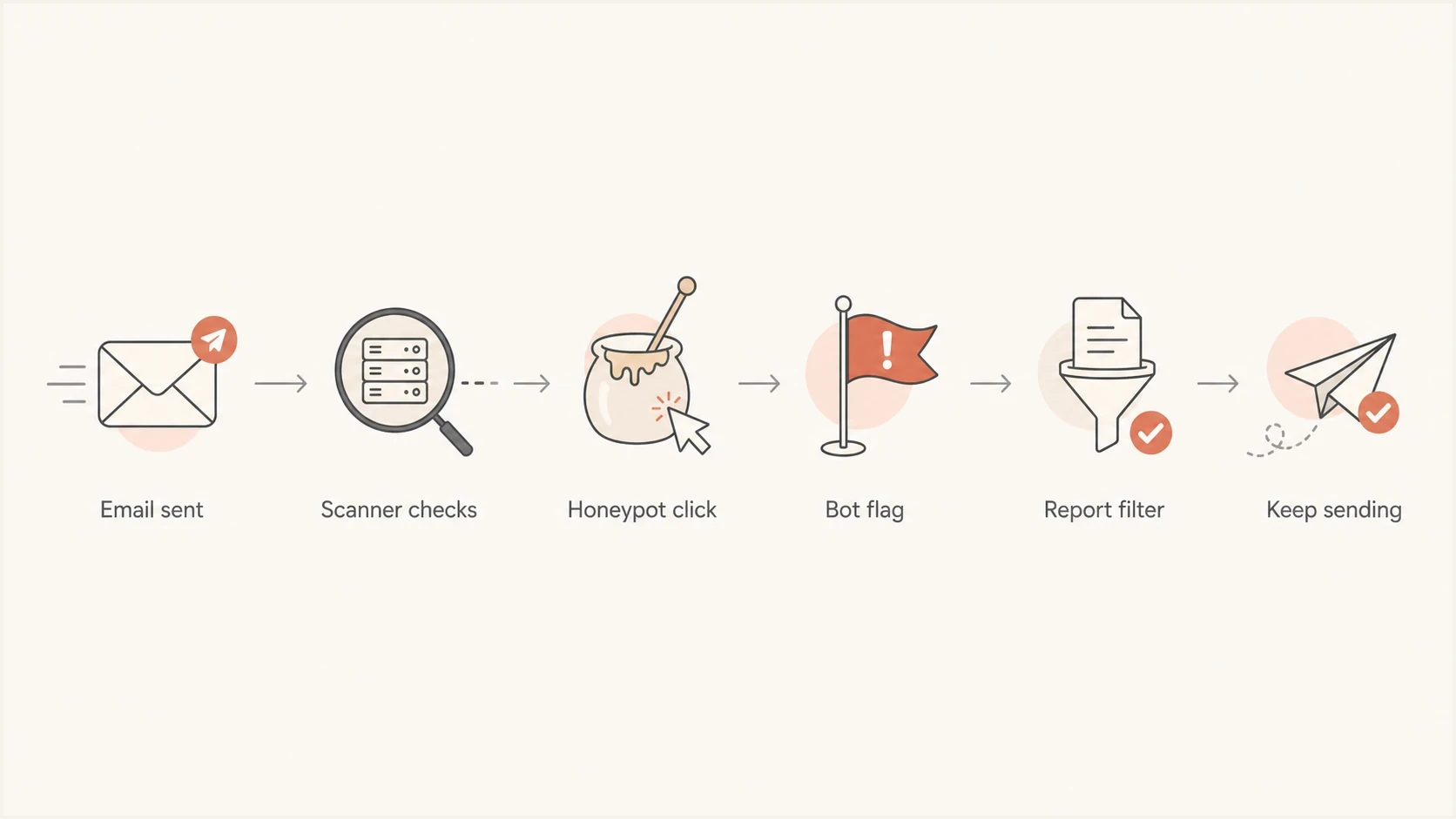
Flowchart showing email sent, scanner check, honeypot click, bot flag, report filter, and continued sending.
Use the honeypot as a label on the event stream. It should not change the creative, the offer, or the recipient experience. It should make reporting cleaner by separating likely non-human interaction from real buying intent.
- Create a different token per recipient, campaign, and message so one hit maps to one send.
- Use the normal campaign tracking host to wrap the honeypot link, with working TLS and destination handling.
- Return a small static page without forms, scripts, or redirects to a conversion page, and record the diagnostic request separately.
- Do not put a raw email address, company name, or account ID in the visible URL.
- Keep the trap out of the plain-text part unless you want humans to see a strange extra link.
The marker can be a neutral text anchor, a tiny punctuation link, or another low-visibility anchor. Test it across supported email clients, assistive technology, and spam-filter QA because some clients or scanners remove hidden elements. Do not link a tracking pixel when a normal anchor gives the same click signal, since image loads and link clicks measure different actions. Check the delivered HTML and confirm the sending platform retains the anchor and exposes its events in reports or an export. A managed tracking hostname does not automatically support custom routes; use a destination you control behind the normal link wrapper when needed.
Keep honeypot URLs intact through link rewriting
Keep the honeypot URL short and use opaque identifiers. Path-style tokens are an option, but neither paths nor query parameters guarantee reliable attribution through every link wrapper. Test the final delivered link through the security gateways used by your test recipients and confirm that the endpoint receives the original token.
Path-style honeypot URLtext
https://click.example.com/h/OPAQUE_SEND_TOKEN/SERVER_SIGNATURE

Uppercase values are placeholders, not production tokens.

Avoid:
https://click.example.com/track?email=person@example.com&campaign=cmp123
|
|
|
|---|---|---|
Send token | OPAQUE_SEND_TOKEN | Maps to one recipient and message server-side |
Campaign | Server-side lookup | Groups the send without exposing an account ID |
Message | Server-side lookup | Separates sends and variants |
Signature | SERVER_SIGNATURE | An HMAC validated server-side rejects tampering |
Opaque URL values with recipient and campaign details stored server-side.
Do not expose personal data
Never place the raw recipient email address in the honeypot URL. Use a cryptographically random token with at least 128 bits of randomness, mapped to the send server-side, and validate its signature server-side. A predictable internal ID or an unsalted email hash exposes more information than an opaque random token, and a signature does not encrypt its contents. Forwarded emails, link preview systems, and shared inboxes expose URLs to logs outside your control.
Place the honeypot before the first visible CTA
If the goal is to catch scanners that click early links, put the honeypot near the top of the HTML, after the opening body area and before the first visible CTA. That usually means the preheader or the first layout spacer, not a random footer link. The footer still catches scanners that click every URL, but it misses first-link behavior.
Avoid putting the link inside HTML comments because email platforms and security tools strip comments. Use a real anchor with neutral hidden text or a tiny punctuation character, then track it as a separate event. Verify that the method does not expose confusing text to screen readers or break the layout in clients that remove CSS. Do not wrap a 1x1 image in an anchor unless a specific test proves it behaves better in your sending stack, because image loads and link clicks are different signals.
Hidden text link examplehtml
<a href="https://click.example.com/h/OPAQUE_SEND_TOKEN/SERVER_SIGNATURE"
   style="display:none;visibility:hidden;mso-hide:all;
          font-size:0;line-height:0;color:transparent;
          opacity:0;height:0;width:0;overflow:hidden;"
   aria-hidden="true"
   tabindex="-1">
  Campaign reference
</a>
Better pattern
- Use one hidden text anchor or tiny punctuation marker that is not a CTA.
- Keep it on the same click-tracking host as other email links.
- Store the event as a bot marker, not as a normal campaign click.
- Check rendering and accessibility before using the pattern at scale.
Risky pattern
- Do not rely on HTML comments, since send tools and scanners often remove them.
- Do not introduce an unrelated tracking host with an unknown URL reputation.
- Do not use a linked pixel when a normal anchor gives the same click signal.
- Do not treat CSS invisibility as proof that every scanner will follow the link.
Filter clicks without deleting real engagement
The reporting rule matters more than the link itself. A honeypot hit should remove or label the related click events, not automatically remove the subscriber from all marketing. In B2B, a security gateway can click on behalf of a real buyer who later reads the message.
Bot clicks, also called non-human interaction or NHI, inflate click-through rate (CTR) and trigger journeys before recipients read an email. A temporary suspected-bot segment should mark sends for review while only classified automated events are excluded. A click without a recorded open is weak evidence because people can read with tracking images blocked. Privacy-related image fetching also makes a recorded open unreliable proof of human engagement.
Example bot score action bands
These illustrative scoring bands require validation against reviewed events before filtering visible-link clicks. The scores do not express probabilities.
Regular
0-39
No detected automated signals; human activity is not confirmed.
Review
40-69
One weak signal, such as a fast click or unusual sequence.
Filter
70-100
Diagnostic link hit, or a scan burst supported by another signal.
Illustrative event classification logictext
if event.link == honeypot_link:
  label = "suspected_bot"
else if same_send_scan_burst and corroborating_signal:
  label = "suspected_bot"
else if fast_click or user_agent_flag:
  label = "review"
else:
  label = "unclassified"

# Apply labels to events, not every future click by the recipient.
# Tune scan-burst timing using reviewed events from your own sends.
For broader reporting cleanup, the related article on how to filter bot clicks covers timing rules, click volume rules, and campaign reporting adjustments.
Correlate the rest of the scan carefully
Once the honeypot fires, review other clicks tied to the same recipient-message token inside a short observation window. This catches a scanner that walks the visible CTAs before or after it reaches the trap. Set the window from observed scan bursts and require corroborating signals before excluding neighboring visible-link clicks. A blanket 15-minute exclusion risks removing genuine activity, especially when scanning happens at the time of a human click.
- Mark the honeypot event as suspected automation, then review adjacent clicks on the same send for matching scan behavior.
- Require another signal before correlating events that share only an IP address or user agent.
- Retain later human engagement independently; a genuine reply or authenticated action does not turn an earlier scan into a human click.
- Store the reason, rule version, and correlation window with each filtered event for audit.
Shared IPs create false positives
A security gateway and a real employee can use the same corporate egress IP, and scanners can send browser-like user agents. Do not discard every click from a shared IP or matching user agent after one honeypot event. The recipient-message token and event sequence provide safer correlation. Forwarded messages and shared inboxes also reuse the original token, so it identifies a send rather than proving who clicked.
Calculate filtered CTR without removing recipients
Filter click events without changing the delivered-message denominator. Exclude the honeypot itself from engagement totals, then count each recipient once per message if at least one visible-link click remains after bot filtering. Keep a recipient with both scanner activity and a later retained click in that count.
Unique filtered click-through ratetext
Filtered unique CTR =
  (recipients with at least one retained visible-link click
   / delivered messages in the same campaign cohort) * 100
For an illustrative campaign with 1,000 delivered messages, suppose 120 recipients clicked a visible link and 40 had only suspected automated clicks. The filtered unique CTR is 80 / 1,000, or 8%, compared with a raw 12%. Removing those 40 recipients from the delivered denominator would distort the comparison. Keep complaints and unsubscribes measured against their original eligible population.
Check existing bot-filter settings before comparing reports with event exports, since a platform can remove events before export. Use the same reporting window and filtering rules for control and honeypot groups, record rule changes, and compare retained clicks with downstream outcomes. A lower click rate after filtering is not evidence of worse inbox placement.
Keep bots out of automation decisions
Do not let the honeypot endpoint perform an action. It should not unsubscribe, confirm consent, update preferences, unlock gated content, trigger sales-ready scoring, or enroll a contact in a nurture journey. Record the diagnostic event, then let later human evidence decide what happens next. Hold click-triggered scoring or alerts for a short, tested evaluation period so a later honeypot hit can identify an earlier CTA fetch before the action runs.
- Implement RFC 8058 one-click unsubscribe with an HTTPS List-Unsubscribe URI, List-Unsubscribe-Post: List-Unsubscribe=One-Click, a valid POST handler, and DKIM coverage of both headers. Process valid unsubscribe requests even when other campaign clicks look automated; an ordinary body-link GET is not the required one-click action.
- For double opt-in or high-value confirmations, use an explicit confirmation step, a short code, or an authenticated account action. A page visit or form submission alone is not conclusive because scanners also execute scripts and submit forms; avoid prefilled forms on the honeypot destination.
- Keep A/B test reads, lead scores, and sales alerts tied to filtered engagement, replies, form fills, or product activity rather than raw first-click data.
Keep raw events available
Store raw and filtered values separately so analysts can audit why a click was excluded. This protects reporting while keeping compliance and consent evidence intact.
Protect deliverability while testing
A honeypot has no universal deliverability guarantee. Hidden content and tracking URLs are assessed with the rest of the message; suspicious hosts, broken destinations, invalid HTTPS certificates, deceptive anchor text, or sender authentication problems add risk. Start with one diagnostic link and verify the result with a controlled test.
Use a randomized control and honeypot test within the same B2B segment, keeping the creative, send time, and normal tracking identical. Compare delivery, bounces, complaints, unsubscribes, replies, form submissions, conversions, and raw-versus-filtered click patterns before adopting the rule. An accepted message is not proof of inbox placement, and a tiny sample without complaints does not establish that the change is safe.
Practical test plan
- Randomly split an eligible B2B audience into control and honeypot groups; send the control with normal tracking only.
- Add one honeypot link in the HTML and keep everything else identical.
- Review delivery, complaints, blocklist or blacklist signals, raw clicks, and downstream human actions.
- Keep the rule only if it reduces false engagement without a delivery drop or material loss of genuine clicks.
Before sending the test, send a sample through your normal provider to Suped's email tester to inspect the received message's authentication, unsubscribe headers, SMTP TLS, and blocklist (blacklist) checks. Check rendering, accessibility, and honeypot endpoint behavior separately in the email clients and gateways used by your test audience.
Email tester
Send a real email to this address. Suped shows a results button when the test is ready.
?/43tests passed
Use the technical report as a baseline alongside real inbox and engagement data. Fix authentication issues in the report and verify link behavior separately before judging the honeypot.

Email tester sample report showing total score, email preview, issue summary, and per-section results
Suped's DMARC and email authentication platform tracks sending sources during the test. Use Suped DMARC monitoring to review SPF and DKIM results in receiver reports, and use blocklist monitoring to watch domain and IP listings on blocklists (blacklists). Classify honeypot clicks in your campaign analytics using endpoint logs or exported click events.
Log enough evidence to make fair decisions
A useful honeypot system needs more than a clicked URL. Log the context around each click so the scoring rule can separate a security gateway from a human who clicked later in the day. Keep the dataset specific, access-controlled, and easy to audit. Record request timestamps at subsecond precision where available, keep HEAD probes separate from GET events, and deduplicate retries before counting engagement. Treat IPs and send tokens as sensitive telemetry and set a retention period appropriate to the diagnostic work.
|
|
|---|---|
Time | Detect instant clicks |
Recipient-message token | Correlate one send |
Link order | Find click-all scans |
User agent | Flag known patterns |
IP and ASN | Find shared gateways |
HTTP method | Separate HEAD and GET |
Message ID | Tie back to send |
Filter reason | Explain exclusion |
Part | Separate HTML and text |
Fields that make bot-click filtering easier to audit.
Avoid a permanent "bot" label unless the pattern repeats across sends. A honeypot hit plus a rapid click sequence on the same recipient-message token gives a strong case for event filtering. An IP address or browser-like user agent alone is weak evidence because security gateways and real employees can share both.
What honeypot links miss
Honeypots catch a useful class of bot clicks, but they do not catch every scanner. A scanner that only follows visible CTAs, ignores hidden elements, or checks selected URLs will skip the trap. A scanner that fetches only the plain-text part will also miss an HTML-only honeypot.
Combine the honeypot with timing, click count, link sequence, user agent, IP and ASN patterns, and downstream human actions. Scanners can delay clicks, randomize their sequence, or use browser-like user agents. A honeypot hit is strong diagnostic evidence, but accidental human access and forwarded messages still require review. A delayed scan still reaches the honeypot if it follows that link; timing alone does not create a detection gap.
Honeypot catches
- Systems that follow every URL in the HTML.
- Systems that start at the top and click early links.
- Gateways that inspect links before inbox delivery.
Honeypot misses
- Systems that try to ignore hidden or tiny elements.
- Systems that inspect the plain-text part only.
- Systems that inspect only selected visible links at click time.
Views from the trenches
Best practices
Use one unique honeypot URL per message so later scoring stays precise and reversible.
Keep the honeypot out of reports, then review nearby events before filtering real clicks.
Run a small A/B test before changing click-driven automation for a B2B email program.
Common pitfalls
Using raw email addresses in URLs creates privacy risk and messy forwarded-email data.
Treating one fast click as permanent proof removes real buyers from useful reporting.
Hiding links with aggressive CSS can create QA issues across older email clients and apps.
Expert tips
Use path parameters when query strings get stripped by security scanners or link proxies.
Score timing, link count, user agent, and honeypot hits before labeling individual events.
Keep sending to recipients behind scanners, but remove classified bot events from reports.
Marketer view
Marketer from Email Geeks says large B2B senders can use hidden text markers near the top of the HTML, then route matches into a temporary suspected scanner segment without changing who receives campaigns.
2023-08-04 - Email Geeks
Marketer view
Marketer from Email Geeks says a path-style URL can survive some rewriting better than long query strings, so teams should test both structures before relying on one pattern.
2023-08-05 - Email Geeks
Practical recommendation
Start with one HTML-only honeypot link, path-style URL tracking, and a temporary report-filtering rule. Place it before the first visible CTA, keep it visually neutral, and do not put personal data in the URL. Then correlate the honeypot hit with clicks on the same recipient-message token before using timing, user agent, or IP evidence for broader decisions.
- Begin with a randomized test and compare delivery, complaints, raw clicks, and downstream human actions.
- After enough events have been reviewed, filter suspected bot events from dashboards while keeping recipients in the audience.
- Monitor authentication and reputation separately so cleaner click reports do not hide a sending problem.




