
Why are email complaint rates and bounce issues suddenly increasing with Microsoft (Outlook, Hotmail)?

Updated on 15 Oct 2026: We updated this guide for Outlook.com's bulk sender authentication rules and corrected complaint-rate and bounce troubleshooting advice.
Email complaint rates and bounce issues can suddenly increase with Microsoft because Outlook and Hotmail use their own reputation, filtering, and feedback systems. A sender can look stable everywhere else while Microsoft starts blocking more mail, deferring it, routing it to junk, or reporting more unique complaints.
When a complaint rate jumps only at Microsoft, such as 0.02 percent rising to 0.09 percent with the same list and volume, do not assume the list suddenly became bad. Split the issue into two tracks: complaint reporting and SMTP delivery. Those tracks often move together, but they do not have the same fix.
Common causes of Microsoft complaint and bounce spikes
Common causes include Microsoft-specific reputation changes and authentication or policy failures. Microsoft has started treating the mail stream, IP, domain, links, or recipient engagement as riskier than before, or a Microsoft 365 recipient policy or downstream gateway has rejected the message. The trigger can be a real sender-side problem, a Microsoft filtering change, a feedback loop reporting change, or a cluster of inactive Outlook and Hotmail subscribers complaining after another campaign.
- Provider shift: Microsoft can tighten filtering or complaint reporting without the same movement at other inbox providers.
- Reputation pressure: More complaints can harm reputation. Falling accepted volume can also inflate a reported rate when complaints arrive for earlier sends.
- List fatigue: Inactive Outlook and Hotmail subscribers can complain in clusters even when campaign content has not changed.
- Authentication drift: SPF, DKIM, or DMARC can fail after a sending source, DNS record, selector, or return-path change.
- Block bounces: A sudden 5xx or 4xx pattern needs classification by full response text: invalid recipients, authentication failures, policy blocks, and temporary deferrals have different fixes.
Do not average the problem away
A normal global bounce rate can hide a serious Microsoft issue. Track Outlook, Hotmail, Live, and MSN separately before you change content, suppress contacts, or move traffic.
Why Microsoft can spike when other inboxes look normal
Microsoft evaluates mail through its own signals: user complaints, IP and domain reputation, list accuracy, message content, authentication, and traffic patterns. A sender can pass the same checks at another mailbox provider and still have trouble at Outlook or Hotmail. These factors are described in Microsoft's filtering guidance.
Consumer Outlook.com, Hotmail, Live, and MSN addresses share Microsoft's consumer filtering environment. Custom domains hosted on Microsoft 365 can also apply tenant mail-flow rules, connectors, and downstream gateway policy, so a Microsoft-generated NDR does not always mean Microsoft made the final rejection.
If your symptom is mostly rejected mail, compare your data with a Microsoft bounce spike pattern. If your accepted mail is stable but complaint reporting jumps, compare the complaint dates with campaign drops, segment reuse, and feedback loop counts.
Complaint spike
- Main signal: Feedback loop reports rise while accepted volume stays close to normal.
- First check: Deduplicate complaint reports by message identifiers and compare rates using the same denominator and reporting window.
- Likely fix: Suppress identifiable complainants immediately, pause inactive Microsoft recipients, and reduce campaign frequency.
Bounce spike
- Main signal: Microsoft returns more 4xx deferrals or 5xx block responses.
- First check: Group replies by enhanced status code and exact SMTP text.
- Likely fix: Reduce risky traffic, fix DNS faults, and rebuild accepted volume.
A complaint spike can also create a bounce spike when negative feedback damages reputation. A higher reported rate alone does not prove more people complained: 20 reports against 100,000 accepted messages is 0.02 percent, while the same 20 against 25,000 is 0.08 percent. Compare complaint counts and accepted volume separately, and match reports to the original campaign where possible. Microsoft's complaint-rate documentation records complaints on the reporting day, so delayed reports can distort daily comparisons.
How to triage Microsoft complaints and delivery failures
Start with evidence, not assumptions. Group the first hour of analysis by recipient type, domain, sending source, status code, and campaign. The goal is to decide whether the problem is acceptance, complaint reporting, recipient policy, or a combination.
|
|
|
|---|---|---|
Provider-specific | Split domains | |
Custom domain | Check Microsoft 365 hosting and tenant or gateway policy | Read full NDR |
Complaint jump | Feedback volume, timing, or denominator changed | Deduplicate reports and compare counts with accepted volume |
5.7.1 | Policy block | Read full response and identify rejecting system |
5.7.515 | Outlook.com bulk sender authentication failure | Check SPF and DKIM passes plus DMARC domain matching |
4.7.x | Temporary deferral; full text identifies the cause | Use backoff and inspect rate or policy signals |
Auth fail | DNS, signing, domain matching, or relay problem | Inspect message headers and source configuration |
Fast triage labels for Microsoft complaint and bounce changes.
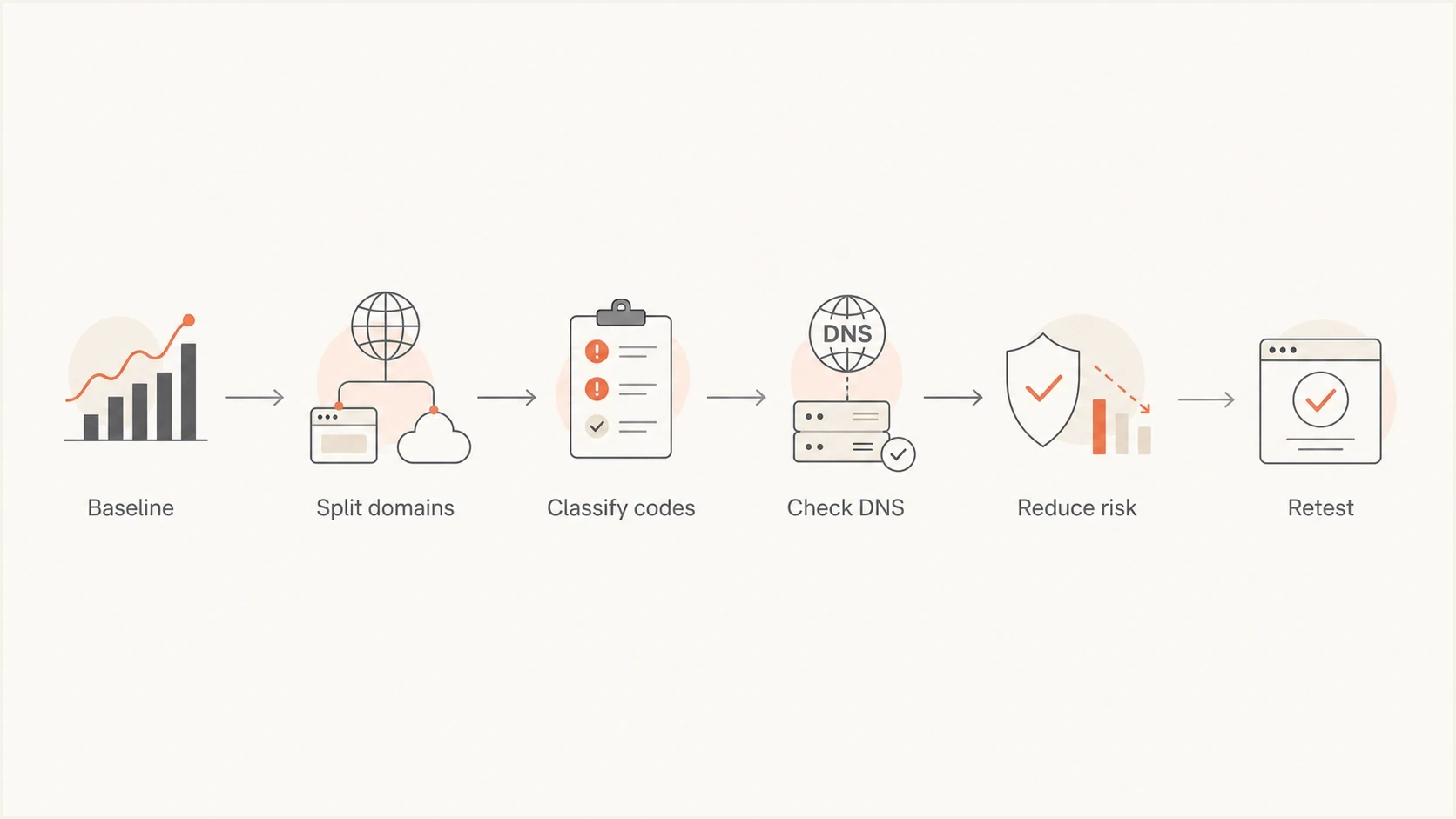
Microsoft email delivery troubleshooting flowchart: establish a baseline, separate domains, classify SMTP errors, check DNS, reduce risk, and retest.
Bounce codes and what they usually mean
Do not treat every bounce as a dead mailbox. Microsoft delivery logs include invalid recipients, temporary throttling, authentication failures, content rejection, IP and domain reputation, and recipient policy. A 4xx response is a temporary deferral; a final bounce follows if delivery retries expire. The same campaign can contain a normal list-cleaning signal and a serious block signal.
Illustrative shortened SMTP responsestext
550 5.7.1 Sending IP blocked by policy.
421 RP-001 Sending IP rate limit reached.
550 SC-004 Sending IP blocked after complaints.
550 5.7.515 Sending domain authentication requirements not met.
550 5.1.1 Recipient address rejected.
550 5.0.350 Remote server returned 550 5.7.1: gateway policy rejection.
Classify before suppressing
A 5.1.1 address failure belongs in list hygiene. A 5.7.x or 4.7.x pattern needs authentication, policy, or reputation triage. Use backoff for temporary 4xx responses and stop automatic retries of a message after a permanent 5xx response. A policy rejection alone does not mean the recipient address is invalid. Read the full SMTP text before acting, because the final response can name a recipient gateway or tenant restriction rather than a Microsoft reputation block.
A "mailbox full" or "quota exceeded" response needs separate handling. Outlook.com rejects incoming mail when a recipient exceeds mailbox or Microsoft cloud storage limits. The recipient must free storage, and the sender must resend afterward. Microsoft's storage guidance explains this recipient-side cause.
Microsoft issues also show up as stale or delayed bounce data inside some sending platforms. If the timing looks wrong, compare the SMTP event timestamp with the campaign send time and the final delivery status. A separate guide on Outlook spam rates covers the complaint side in more detail.
Find the system that rejected the message
The server that generates an NDR is not always the server that rejected the message. Microsoft 365 can accept a message, pass it through a recipient organization's mail flow, and then report a rejection returned by a tenant rule or downstream gateway. Read the full diagnostic chain before treating the bounce as a Microsoft block.
- Find the generating server: This identifies the system that created the report, but it does not prove that system made the rejection decision.
- Follow the remote response: Read the 'Diagnostic information for administrators' section, including 'Remote server returned' layers, and verify the rejecting-server hostname against the SMTP logs. Nested codes alone do not identify the operator.
- Match the named IP: Confirm that the source IP in the error is an IP your system actually used, not the visible From domain or an unrelated relay.
- Choose the right owner: A Microsoft consumer rejection, a Microsoft 365 tenant rule, and a downstream gateway rejection require different fixes and escalation paths.
Use the instructions in the NDR
If the terminal response identifies a banned IP or sender, follow the exact review or delisting instructions in that response. If a recipient gateway returned the final error, the recipient's mail administrator must investigate that policy. Sending a Microsoft review request for a non-Microsoft rejection will not fix it. For unresolved Outlook.com blocks, collect the full SMTP response, sending IP, recipient domain, timestamps with timezone, and recent changes before contacting Microsoft sender support. For shared IPs, ask your sending platform to investigate other traffic on the same IP.
Authentication checks before blaming filtering
Microsoft reputation issues get worse when authentication is inconsistent. DMARC passes when SPF or DKIM passes and its authenticated domain matches the visible From domain under the selected DMARC mode. Relaxed matching permits the same organizational domain; strict matching requires an exact domain match. Check the SPF envelope sender (Return-Path), the DKIM d= domain and selector, and SPF's limit of 10 DNS-querying mechanisms and modifiers after a sender is added. Also confirm that the outbound IP has the expected PTR or reverse-DNS hostname and that the IP named in the bounce belongs to the active sending path.
Run a domain health check before changing content. If SPF, DKIM, or DMARC is failing, fix that first. A content rewrite will not repair a broken Return-Path, removed DKIM selector, or invalid DMARC record. The rua address requests aggregate reports; its absence does not cause DMARC to fail.
Illustrative records to verify, not copy unchangedtext
_dmarc.example.com TXT "v=DMARC1; p=none; rua=mailto:dmarc@example.com"
example.com TXT "v=spf1 include:send.example.net -all"
selector1._domainkey.example.com TXT "v=DKIM1; k=rsa; p=MIIB..."
Replace the SPF include with your authorized sender and the abbreviated DKIM public key with the complete key. DKIM selectors are also published as CNAME records by some senders; follow the sending source's instructions.
DMARC aggregate reports help identify authentication failures in reported traffic. Suped's DMARC monitoring shows which sources pass SPF, DKIM, and DMARC and provides practical fix steps. These reports do not establish inbox placement or complaint rates; compare them with SMTP logs and complaint feeds.
?
What's your domain score?
Deep-scan SPF, DKIM & DMARC records for email deliverability and security issues.
Outlook.com's bulk sender authentication requirements
Since May 5, 2025, domains sending more than 5,000 messages daily to Outlook.com consumer accounts have been subject to stricter authentication requirements. Noncompliant mail is subject to 550 5.7.515 rejection. This applies to consumer Outlook.com, Hotmail, and related addresses. Microsoft's sender requirements specify the rules.
- Both SPF and DKIM must pass. Check a message sent by the failing source, including its envelope sender and DKIM signature.
- Publish a valid DMARC policy of at least p=none. Either the SPF or DKIM authenticated domain must match the visible From domain under the chosen DMARC mode.
A DMARC pass through SPF does not excuse failed DKIM under these rules. Fix the sending configuration and verify the receiving server's authentication results before restoring volume. A published DNS record alone does not prove that a message passed.
A practical triage sequence
Once you have the first signals, work through the issue in a fixed order. The point is to stop reputation damage without deleting evidence or over-correcting based on one campaign.
- Freeze the baseline: Save sent, accepted, deferred, finally bounced, complained, and unsubscribed counts for the last 30 days.
- Split by domain: Separate outlook.com, hotmail.com, live.com, and msn.com from custom domains hosted on Microsoft 365 and the rest of the list.
- Deduplicate complaints: Remove duplicate reports for the same complained-about message, suppress identifiable complainants, and compare counts and rates for matching campaigns and time windows.
- Classify bounces: Group replies by status code and exact Microsoft SMTP text.
- Identify the final rejector: Follow nested NDR responses to the server that returned the terminal SMTP error.
- Map the source: Compare IP, sending domain, DKIM selector, tracking domain, and campaign type.
- Reduce risk: Pause inactive Microsoft marketing segments and prioritize recipients with recent verified clicks, purchases, logins, or replies. Treat opens cautiously because privacy prefetching distorts them.
- Re-test daily: Compare accepted volume and complaint rate before adding volume back.
When DNS checks look clean but Microsoft behavior is still poor, send a test email and inspect headers, authentication results, message structure, and visible content. A real message test catches issues that DNS-only checks miss.
Email tester
Send a real email to this address. Suped shows a results button when the test is ready.
?/43tests passed
Microsoft 365 sending limits and recipient-side checks
Your sending platform can show bounces and complaints, but it often cannot show the receiving-side decision path. If you administer the recipient's Microsoft 365 tenant, message trace can help confirm whether Exchange Online accepted, deferred, filtered, or rejected test messages. Access to your own tenant does not provide visibility into another organization's message trace.
If you send through a Microsoft 365 mailbox, also check outbound restrictions. Exchange Online has per-user and tenant sending limits, and a 5.1.8 "bad outbound sender" response points to a restricted sending account. Ask your administrator to investigate account security and the Restricted entities page before resuming. These outbound controls are separate from Outlook.com's incoming bulk sender rules. Exchange Online sending-limit guidance explains the distinction.
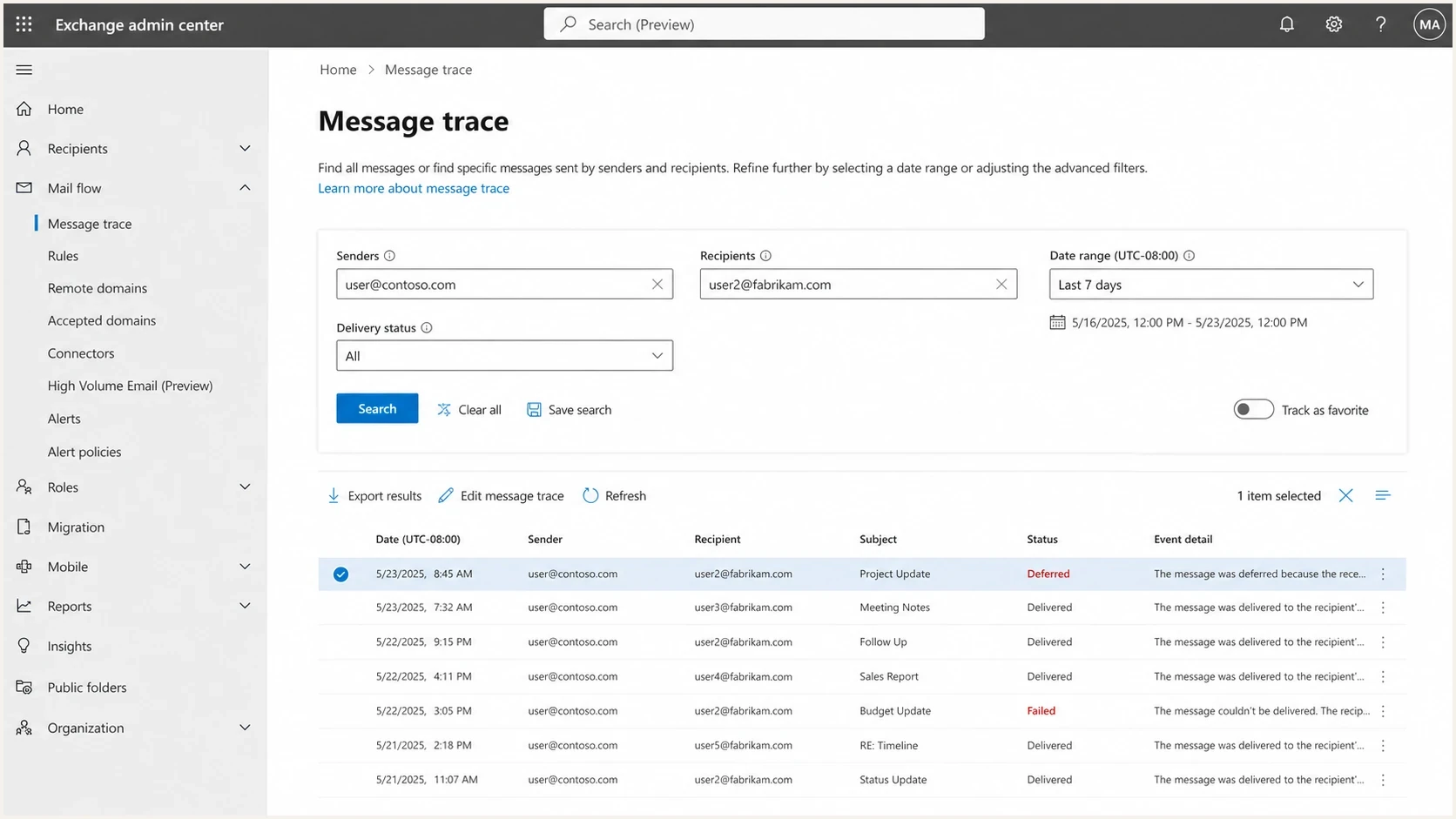
Microsoft 365 Exchange admin center message trace with sender, recipient, and delivery status filters.
For consumer Outlook and Hotmail addresses, you will not get that same internal trace. In that case, lean on your SMTP logs, feedback loop data, authentication reports, test-mailbox observations and segment-level engagement. If only one recipient is affected, ask them to check storage, junk folders, and inbox rules. If failures affect many unrelated senders simultaneously, check Microsoft service health before attributing the incident to your reputation.
Where Suped fits
Suped is our DMARC and email authentication platform. For a Microsoft-only issue, use Suped to check for changes in sending sources and authentication results before altering campaigns.
Issues page showing top issues, verified sources, unverified sources, and authentication pass rates
- Issue detection: Suped identifies authentication failures and gives steps to fix them instead of leaving raw XML for manual review.
- Hosted controls: Hosted SPF and Hosted DMARC help manage authentication DNS while you investigate sending-source changes.
- Reputation context: Suped's blocklist monitoring checks domain and IP status across major blocklist and blacklist sources.
The practical workflow
How to decide whether to slow sending
Microsoft's reporting documentation cites below 0.3 percent as a reference benchmark, not a guaranteed delivery threshold. The stricter bands below are illustrative internal investigation triggers. Set your own triggers using comparable traffic, your baseline, complaint counts, and acceptance trends. See Microsoft's complaint-rate documentation.
Illustrative internal complaint triage bands
Example internal investigation triggers, not Microsoft enforcement limits or guarantees of inbox delivery.
Baseline check
Under 0.05%
Investigate a meaningful rise even below this value; compare counts and accepted volume.
Investigate
0.05-0.10%
Higher than baseline and concentrated at Microsoft.
Act now
Over 0.10%
Sustained rise or paired with block bounces.
A sustained rise above baseline with enough complaints to establish a pattern is a reason to reduce Microsoft marketing volume. On small sends, inspect the raw counts before acting on a multiple such as 1.5x or 2x. If block bounces rise at the same time, act immediately and pause inactive recipients first.
Recovery plan for Microsoft domains
Recovery is easier to assess when changes are measured and documented. The wrong move is to change everything at once: content, DNS, IPs, sender name, volume, and segmentation. That makes the next result impossible to explain.
- Pause inactive recipients: Pause Microsoft marketing recipients with no recent verified clicks, purchases, logins, or replies; keep required transactional messages available.
- Protect good mail: Send critical transactional mail on a clean, authenticated stream with stable volume.
- Fix DNS first: Repair SPF, DKIM, DMARC, and rDNS faults before content tests. Investigate TLS only when the delivery response indicates a transport problem; MTA-STS on your receiving domain does not fix outbound Microsoft filtering.
- Clean URLs: Remove broken or suspicious redirects and verify tracking-domain ownership and destination reputation. A tracking subdomain does not need to match the From domain for DMARC.
- Ramp carefully: Add Microsoft volume back in small steps only after accepted mail improves and complaint counts and rates stabilize near baseline.
Avoid the IP switch reflex
Moving the same Microsoft traffic to a different IP without fixing complaints, engagement, authentication, or URLs usually moves the problem. It can also damage the new IP faster because the receiving system sees the same negative recipient behavior.
Views from the trenches
These August 2021 community reports describe historical campaigns. Diagnose current Microsoft problems with current SMTP logs and complaint data.
Best practices
Separate Microsoft domains before changing content, recipient lists, DNS, or sending frequency.
Compare deduplicated complaint reports with matching accepted volume and reporting windows.
Keep an untouched baseline so each recovery change has a clear before and after comparison.
Common pitfalls
Treating every 550 as a bad address hides Microsoft policy and reputation rejection patterns.
Sending unchanged volume to inactive Hotmail subscribers prolongs recovery after complaint spikes.
Relying on aggregate bounce rates hides domain-level delivery failures at Outlook and Hotmail.
Expert tips
Use a separate Microsoft marketing segment so throttling does not delay healthy recipient domains.
Match delayed complaint reports to their original campaigns before interpreting daily rate changes.
Restore volume gradually after accepted mail, complaint counts, and rates stabilize near baseline.
Marketer view
Marketer from Email Geeks says Microsoft feedback loop volume rose sharply while other mailbox provider complaint volume stayed flat.
2021-08-17 - Email Geeks
Marketer view
Marketer from Email Geeks says Outlook and Hotmail delivery dropped from above 99 percent to below 90 percent on unchanged lists.
2021-08-17 - Email Geeks
What to fix first
A Microsoft-specific spike requires checks of reputation, authentication, recipient policy, and reporting timing. The fastest path is to separate Microsoft domains, classify bounce text, identify the final rejector, deduplicate complaints, verify authentication, and reduce inactive Microsoft marketing traffic while preserving required transactional mail.
Use Suped's authentication reports and issue alerts alongside your SMTP logs to prioritize failing sources. Fix the measurable faults first, then rebuild Microsoft volume in small steps.




