Why are Outlook/Microsoft spam rates spiking recently?

Updated on 8 Aug 2026: We added Microsoft's enforced high-volume sender rules and clarified how to separate authentication rejection from reputation-driven junk placement.
Outlook and Microsoft spam rates spike when Microsoft starts judging a sender more harshly, when a seed-list panel changes, or when recent sending behavior gives Microsoft enough negative signals to move messages into junk. The fastest answer is this: treat the spike as real until your live user data proves it is only a measurement change.
Separate the problem into two tracks. First, confirm whether Outlook.com, Hotmail, Live, MSN, and Microsoft 365 recipients actually see more junk placement, bounces, deferrals, or lower engagement. Second, check whether your measurement source changed, especially if the spike appears only in seed data.
A sudden Microsoft spike rarely has one clean cause. The common causes are filter recalibration, sender reputation changes, complaint clustering, stale recipient segments, a template or URL that got re-scored, domain or IP reputation issues, authentication drift, or a changed seed list that now behaves more like a new subscriber.
The direct answer
The most common causes of a recent Outlook/Microsoft spam-rate spike are:
- Filter shift: Microsoft's filters continually rescore mail using current sender, message, and recipient signals. A message that previously scored low can jump into a higher spam confidence level without a visible template change.
- Reputation drop: A few bad sends to Microsoft domains can move enough mail into junk, especially after a volume increase or a dormant-segment campaign.
- Complaint cluster: Microsoft weighs user actions heavily. A batch that generates spam complaints, deletes without opens, or low reads can reduce trust in later sends.
- Seed-list change: If the spike appears only in seed data, the panel or its account history likely changed. Newer seeds often behave closer to new subscribers and get treated more strictly.
- Authentication drift: SPF, DKIM, or DMARC can pass in one mailstream and fail in another because of forwarding, DNS changes, or a vendor switch. High-volume Outlook.com senders also face enforced authentication requirements.
- Infrastructure issue: A shared IP, new dedicated IP, changed return-path domain, broken reverse DNS, or blocklist (blacklist) event can reduce trust fast.
Do not re-warm before you isolate the source
Re-warming Microsoft addresses can help after a reputation hit, but it also hides evidence. Find the first affected date, review every send in the seven days before it, and compare seed results against live Microsoft recipient behavior.
If Microsoft SCL moves from 1 to 5 or higher, take it seriously. Passing SPF, DKIM, and DMARC does not guarantee inbox placement. Authentication tells Microsoft that the sender is permitted to send. It does not prove that recipients want the mail.
What changed first
The first job is to find the earliest reliable change point. Do not start with the day someone noticed the dashboard. Start with the first date that Microsoft placement, SCL, complaints, bounces, deferrals, or engagement moved outside the normal range.
Microsoft spike triage bands
Use these practical bands against your own 30-day Microsoft baseline.
Watch
0-10%
Check campaign mix and measurement source.
Investigate
10-25%
Segment Microsoft domains and review recent sends.
Act
25%+
Pause risky segments and fix the suspected cause.
Work backward seven days before that first date. Microsoft can react to a bad send after the fact, so the campaign that caused the issue is often not the same campaign where the issue first appeared.
|
|
|
|---|---|---|
SCL jump | Microsoft re-scored risk | Content and URLs |
Seed dip | Inbox panel changed | Live users |
Deferrals | Rate or trust issue | SMTP text |
Complaints | Recipient rejection | Segment age |
Auth fails | Domain trust gap | DNS records |
Use short labels to keep the investigation readable.
For a clean read, split Microsoft consumer mail from Microsoft 365 business mail. Outlook.com, Hotmail, Live, and MSN are not the same operational problem as a corporate Microsoft 365 tenant with its own filtering policy.
Seed data can mislead you
Seed-list changes are a common reason teams see a sudden Microsoft drop without a matching change in opens, clicks, revenue, or support tickets. Older seed addresses can become trusted or ignored by parts of filtering. Newer seeds are often treated closer to a new subscriber with no history.
When it is a real placement issue
- Live users: Microsoft recipients open less, complain more, or stop converting.
- Mail logs: Bounces or deferrals rise for Microsoft domains.
- Message tests: Fresh Microsoft test accounts show junk placement.
When it is measurement noise
- Seed only: The spike appears in seed reports but not in real user outcomes.
- Panel update: New seed accounts were added around the same period.
- No logs: There are no Microsoft bounces, deferrals, or complaint changes.
This does not mean seed data is useless. A seed drop is a signal, not proof. Treat it as a prompt to test real mail, compare engagement, and inspect authentication before changing volume.
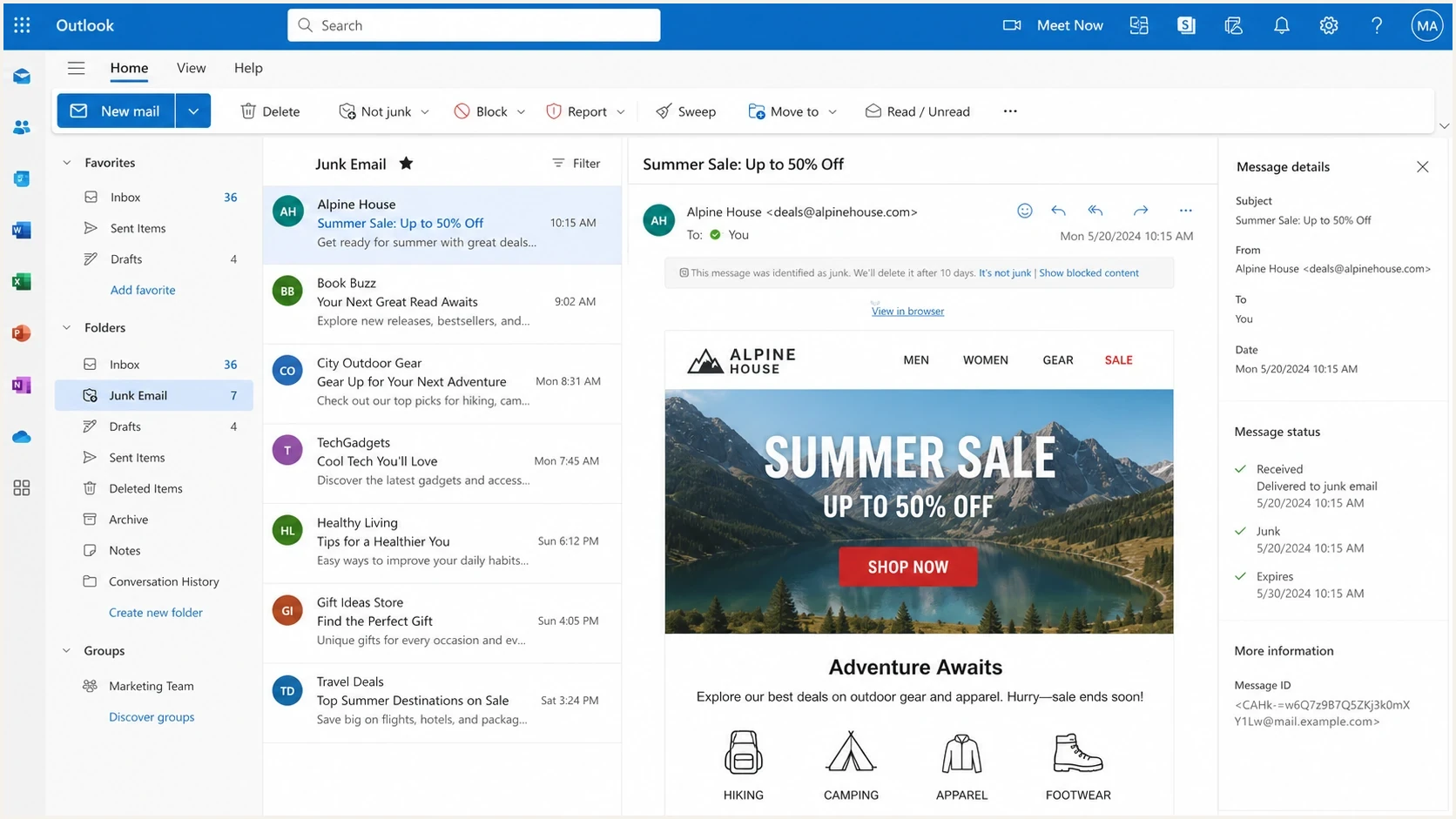
Outlook on the web showing junk mail placement for a marketing email
If the same campaign lands in junk for a new Outlook test account and existing engaged Microsoft users keep opening normally, the issue is likely concentrated around new-subscriber trust, not total sender failure.
How to diagnose the spike
Start with evidence that Microsoft itself creates or influences: SMTP bounces, deferrals, SCL values, junk placement, complaint rate, engagement, and authentication results. Then compare the same send across non-Microsoft mailbox providers.
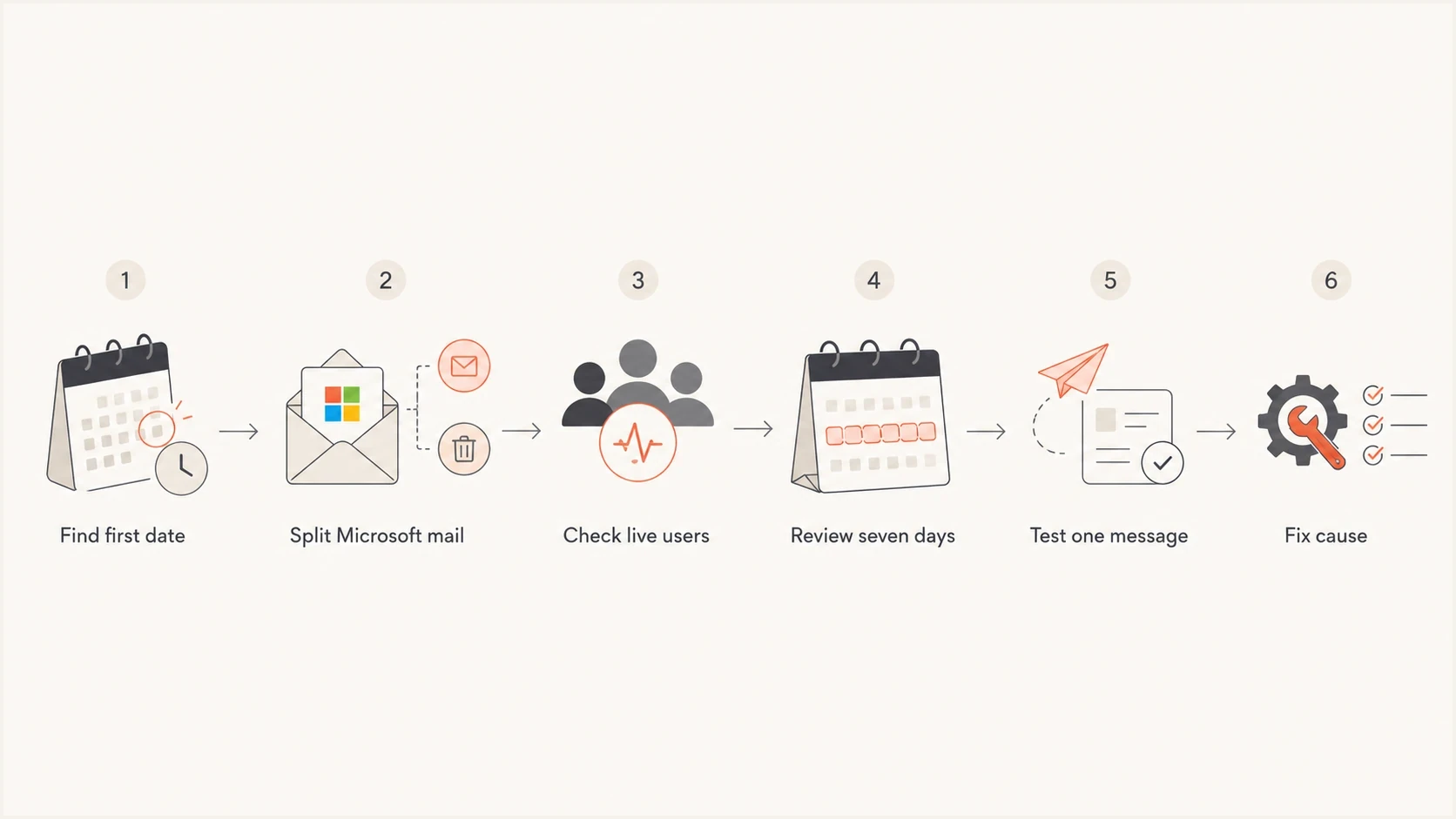
Flowchart for diagnosing a Microsoft spam rate spike
- Find baseline: Compare Microsoft placement, opens, clicks, complaints, bounces, and deferrals against the previous 30 days.
- Segment domains: Separate outlook.com, hotmail.com, live.com, msn.com, and Microsoft 365 business domains.
- Review sends: Look at campaigns sent up to seven days before the first bad Microsoft signal.
- Inspect content: Compare subject lines, URLs, redirects, images, unsubscribe placement, and promotional density.
- Check authentication: Confirm SPF, DKIM, and DMARC pass for the exact mailstream that hit Microsoft recipients.
- Test delivery: Send the same real message through an email tester and compare the headers with your production mail.
Email tester
Send a real email to this address. Suped shows a results button when the test is ready.
?/43tests passed
A real message test matters because Microsoft delivery problems often come from the final assembled email, not the template preview. The actual tracking domain, return-path, DKIM selector, image host, and footer all need to match what subscribers receive.
Verify authentication and alignment
SPF, DKIM, and DMARC do not buy inbox placement, but broken authentication makes every other signal harder to recover from. Check authentication early because it is objective, fast to verify, and easy to miss during vendor changes.
Baseline DMARC recordDNS
Host: _dmarc.example.com
Type: TXT
Value: v=DMARC1; p=none; rua=mailto:reports@example.com; fo=1
Basic SPF recordDNS
Host: example.com
Type: TXT
Value: v=spf1 include:_spf.sender.example -all
Run a full domain health checker pass when the spike starts. Then inspect DMARC reports for the exact sources that send to Microsoft. A marketing platform, CRM, billing system, support desk, or new automation can create a Microsoft-only reputation issue if its mailstream behaves differently.
Suped's DMARC monitoring shows which sending sources pass, which fail, and when the result changed. Use Suped's issues and alerts to match a new or failing source to the first affected Microsoft date, then verify the exact SPF or DKIM alignment failure before changing volume.
Issues page showing top issues, verified sources, unverified sources, and authentication pass rates
If Microsoft spam rates spike at the same time as a new source appears in DMARC data, investigate that source first. If authentication is clean, keep going. The next suspect is usually reputation, content, or list quality.
Microsoft's high-volume sender rules
Microsoft began enforcing high-volume sender requirements for Outlook.com in May 2025. The policy covers domains sending more than 5,000 messages per day, with traffic from the primary domain and its subdomains counted together. It applies to Microsoft's consumer service, including outlook.com, hotmail.com, and live.com recipients. A corporate Microsoft 365 tenant can apply separate filtering policies.
- SPF: The sending domain must pass SPF, and its record must authorize the infrastructure that sends the message.
- DKIM: The message must pass DKIM with a valid signature for the active mailstream.
- DMARC: The From domain needs a DMARC record with at least p=none, and either SPF or DKIM must produce DMARC alignment.
- Mailing practice: Use a valid From or Reply-To address, accurate headers, recipient consent, bounce control, and a functional unsubscribe link.
Separate rejection from junk placement
A 550 5.7.515 rejection means the high-volume sending domain does not meet Microsoft's required authentication level. Fix the failing authentication control before diagnosing content or engagement. Passing these requirements prevents that policy rejection, but it does not guarantee inbox placement.
Reputation and content causes
Microsoft is sensitive to recent recipient behavior. A sender with strong long-term metrics can still trigger junk placement after one aggressive campaign to stale Microsoft contacts. The same thing happens when a list import, reactivation, giveaway audience, or partner lead source enters the program.
High-risk sends before a spike
- Dormant users: Large sends to contacts with no recent Microsoft engagement.
- New source: A new signup path or imported list with weak consent.
- URL change: New tracking, redirect, landing page, or file host.
- Volume jump: A Microsoft send volume increase without matching engagement.
Content changes matter, but spam-related wording is only one input. Microsoft also evaluates sender identity, domain and URL reputation, image hosting, historical engagement, recipient context, and the full message pattern.
If the issue looks like SCL or junk placement, read high SCL scores as the next step. If the question is broader inbox placement, use the Outlook inbox placement workflow.
Blocklists and infrastructure
A Microsoft spike is not always caused by a public blocklist or blacklist, but infrastructure reputation still belongs in the checklist. Check IPs, sending domains, return-path domains, DKIM domains, tracking domains, and landing domains.
A listing on one public blocklist (blacklist) does not automatically explain Microsoft junk placement, but it can point to abuse, compromised traffic, or a shared infrastructure problem. Use blocklist monitoring as a reputation tripwire, not as the only diagnosis.
Infrastructure checks
- Reverse DNS: Confirm it resolves cleanly for sending IPs.
- HELO name: Check that it matches expected mail infrastructure.
- DKIM domains: Verify selectors for every active stream.
Reputation checks
- Domain age: Avoid new branded domains at full volume.
- URL trust: Audit new redirects, shorteners, and landing hosts.
- Shared IP: Compare Microsoft delivery across all streams.
Suped can place a blocklist or blacklist alert beside the domain and authentication checks already tracked in Suped. Use that timeline to see whether the listing began before the Microsoft spike or appeared after the same risky send.
When to pause, re-warm, or keep sending
The wrong reaction can make the spike worse. A full stop can damage expected engagement patterns. Pushing the same volume into junk can harden the bad reputation. The answer depends on whether the issue is real, isolated, or caused by measurement.
|
|
|
|---|---|---|
Seed-only drop | Keep testing | Need live proof |
SCL jump | Reduce risk | Protect reputation |
Deferrals | Slow volume | Rate pressure |
Auth failure | Fix DNS | Trust gap |
Bad segment | Suppress it | Stop complaints |
Choose the least disruptive action that matches the evidence.
For a Microsoft re-warm, start with people who opened or clicked recently, then add less engaged Microsoft recipients only after placement and engagement recover. Do not include old non-openers, purchased contacts, scraped addresses, or contest leads in the recovery phase.
A practical recovery sequence
- Stabilize: Pause the risky segment, not the whole program by default.
- Verify: Confirm authentication, blocklist (blacklist) status, and message headers.
- Repair: Remove the campaign, URL, source, or segment that triggered the spike.
- Rebuild: Send to recently engaged Microsoft recipients first and expand slowly.
If users report the same symptom, the Outlook junk placement breakdown is a useful follow-up. Public complaints about consumer Outlook spam volume, such as this Microsoft Answers thread, are useful context, but they do not diagnose your sender-specific placement issue.
Views from the trenches
Best practices
Find the first bad Microsoft date, then audit every send from the prior seven days.
Compare seed-list results against live Microsoft users before changing send volume.
Separate Hotmail, Outlook, Live, MSN, and business Microsoft domains in reports.
Common pitfalls
Do not assume authentication pass means inbox placement should remain unchanged.
Do not re-warm Microsoft traffic before isolating content, list, and seed causes.
Do not treat one seed-list change as proof that all Microsoft users see junk mail.
Expert tips
Track SCL movement alongside complaints because SCL jumps often expose re-scoring.
Ask vendors about seed-panel changes when a spike appears without live user impact.
Keep Microsoft recovery sends limited to recently engaged recipients at first only.
Marketer from Email Geeks says a seed-list drop from perfect placement to roughly 80% can still be above the wider benchmark when Hotmail placement dips across many senders.
2024-03-19 - Email Geeks
Marketer from Email Geeks says Microsoft SCL can jump from 1 to 5 or higher even when the visible email template has not changed.
2024-03-20 - Email Geeks
How to respond to a Microsoft spike
A recent Outlook/Microsoft spam spike is usually a filter, reputation, seed-list, or authentication story. The fix starts with evidence, not panic. Find the first affected date, split Microsoft traffic by domain type, compare seed data with real users, inspect the seven-day lookback window, and test the actual message that subscribers received.
If the problem is real, reduce risk before you rebuild volume. Suppress weak Microsoft segments, fix DNS or infrastructure issues, remove suspicious URLs, and re-warm only with recently engaged Microsoft recipients. If the problem is seed-only, keep monitoring but avoid major program changes until live data agrees.
Suped can support the investigation by comparing DMARC source changes, SPF or DKIM failures, alerts, and blocklist or blacklist events on one timeline. For teams managing more than one domain, use Suped's multi-tenant view to apply the same Microsoft triage steps without maintaining a separate incident spreadsheet.




