
Why am I receiving event confirmation emails for events I didn't sign up for?

Updated on 26 Sep 2026: We updated this guide with clearer email-bomb triage and direct steps for paid orders and unwanted calendar entries.
You are receiving event confirmation emails for events you did not sign up for because your address was entered into a registration flow, imported by an organizer, added during a ticket transfer, or used in a message made to look like a confirmation. Common causes include purchased or scraped B2B contact lists, bot submissions, another person's typo, targeted nuisance activity, and phishing. If a real event platform sent the email and authentication passes, that proves the platform's mail system handled the message. It does not prove that you requested the registration, that the organizer is trustworthy, or that your mailbox or domain was compromised.
Treat this as a signal to investigate, not a reason to panic. A few confirmations spread across several days usually point to unwanted list use, a mistake, or low-volume B2B spam. A rapid flood across unrelated platforms, password reset emails, calendar invites, account creation emails, payment receipts, or confirmations sent to role addresses such as info@ and sales@ needs closer review. That pattern can indicate list bombing, harassment, contact harvesting, or an attempt to hide a genuine purchase or account-security alert.
- List upload: An organizer imports a spreadsheet of contacts and the event platform sends confirmations or reminders to everyone on it.
- Scraped address: Your public work address appears on a website, conference page, PDF, directory, or old lead list.
- Purchased list: The event organizer bought B2B contacts and used them without consent.
- Ticket transfer: An attendee transferred a registration to your address, either intentionally or after entering it incorrectly.
- Bot submission: A script submits real email addresses into forms, often to test forms or create noise.
- Targeted abuse: Someone intentionally registers your address to create annoyance, alerts, or reputational confusion.
- Fake confirmation: A phisher imitates an event service or abuses organizer-controlled content to request a password, phone number, payment, or one-time code.
Why this happens
Event platforms make registration fast because organizers need a low-friction way to collect attendees. That design also creates a weak point: many flows accept an email address before the recipient proves they control it. Once the address is submitted, the platform sends the confirmation. The platform sees a normal registration event, while the recipient sees an email they never requested.
This is especially common with free events. There is no payment card, no billing address, and often no strong identity check. A registration confirmation is also transactional mail, so it can arrive even when you never consented to promotional messages. Unsubscribing from marketing does not always cancel the registration or remove data held by the organizer. If a marketer uploads a cold list, or a bot submits addresses to a public form, confirmations can be sent at low volume and still pass through mailbox filters. A public Eventbrite case shows the same basic pattern: a real address is registered for real events by someone else.
|
|
|
|
|---|---|---|---|
One free event | Typo or transfer | Low | Verify, report, or cancel |
Many free events | Cold list | Medium | Report organizer |
Role address | Scraping | Medium | Add filtering |
Rapid cross-platform burst | List bombing | High | Search for hidden alerts |
Paid ticket or receipt | Mistake or payment abuse | High | Verify payment separately |
Fake confirmation | Phishing | High | Verify host directly |
Common causes and the first response.
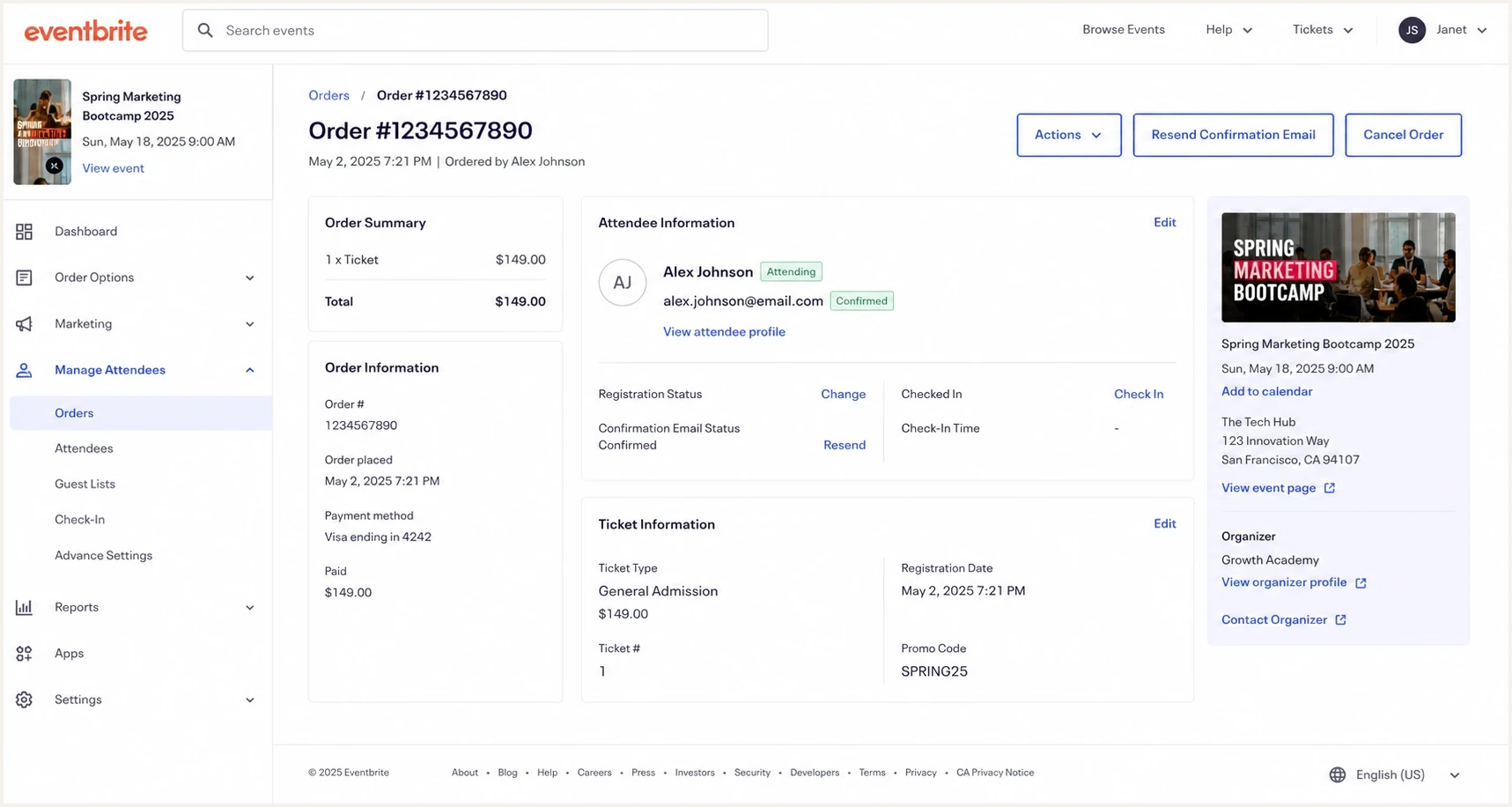
Eventbrite attendee registration screen showing a confirmed registration.
When it becomes a security issue
The dividing line is the pattern and apparent intent. A few unrelated confirmations spread across several days are annoying, but they are usually not enough to prove a security incident. Give the pattern more attention when messages arrive rapidly from unrelated services, when several employees receive them at the same time, or when they are mixed with login prompts, password resets, subscription notices, and payment receipts. A large email bomb can be a smokescreen. Search the inbox, spam, trash, and archive folders for a real purchase, password change, forwarding-rule notice, or account alert, then check important account activity directly.
Confirmation pattern risk
Use speed, source diversity, recipient spread, and accompanying alerts for triage.
Low
Isolated
One isolated confirmation with no related account activity.
Review
Repeated
Repeated messages, role addresses, or one organizer using several events.
Escalate
Rapid burst
A rapid burst across services or staff, especially with payment or security alerts.
Do not click every confirmation link
If the message looks unexpected, review the sender, return path, and link destinations before clicking. Use the event platform's website directly if you need to cancel or report the registration. A tracked link can confirm that the address is active, and a fake invitation can lead to a credential collection page.
Mailbox compromise has a different pattern. If the event confirmations are the only odd activity and your account has no new forwarding rules, no unknown logins, no unexpected MFA prompts, and no sent mail you do not recognize, compromise is less likely. Check account activity, active sessions, recovery details, and MFA status to look for direct evidence of unauthorized access.
If the confirmation includes a paid order
A paid ticket, receipt, or payment reference changes the response. The sender might have entered the wrong email address, but an unexpected paid order can also point to card testing, a compromised event account, or a transaction hidden inside an email flood. Do not use the phone number, reply address, or payment link in the message to investigate.
- Check the order independently: Open the event platform through a saved address or by typing its known address, then look for the order in your account.
- Match payment details: Compare the amount, currency, timestamp, and any displayed last four card digits with your own accounts.
- Review financial activity: Check pending and completed card or bank transactions through the official app or website.
- Escalate a match: If your payment method or account was used, lock the card if available, contact the issuer, dispute the charge, and secure the affected account.
- Report an unrelated order: If the payment is not yours, ask the platform to detach your address and preserve the message and order number for its fraud team.
Do not send identity or card documents to the organizer
Use the platform's official support or privacy route. Share only the minimum order details needed to locate the registration, and redact unrelated personal or payment information.
Rule out fake invitations
An unexpected event email can be a phishing message rather than a registration mistake. Some scams imitate recognizable event services. Others use a real event platform but place deceptive text, links, QR codes, or phone numbers in organizer-controlled fields. The second type can pass email authentication because the platform genuinely sent it. A legitimate host does not need your mailbox password or an authentication code to show event details.
Verify the event by contacting the named host through an address or number you already know. You can also type the platform address into your browser and look for the event or registration there. Do not trust a familiar display name by itself, and do not share a code sent to your phone or email.
If the invitation created an unwanted calendar entry, report or remove the entry in the calendar as well as deleting the email. Where your calendar supports it, restrict automatic additions to known senders or invitations you have answered. For a work account, ask the administrator to review organization-wide invitation settings and remove the event from every affected mailbox.
If you entered credentials
Change the affected password through the real account site, revoke active sessions, check recovery details, forwarding rules, and recent OAuth access, then confirm MFA settings. Contact your IT or security team immediately if the mailbox belongs to an organization.
How to inspect one of the messages
The fastest technical check is the full header. Review whether the visible sender domain, return path, and authentication results point to a real platform. A DMARC pass means that SPF or DKIM passed with a domain that matches the visible From domain under DMARC. It shows that the visible domain authorized the mail path, but it does not prove that you requested the registration or that the organizer and organizer-controlled content are safe.
Header fields to reviewtext
From: Event Platform <no-reply@eventplatform.example>
Reply-To: organizer@example.com
Return-Path: bounces@eventplatform.example
Authentication-Results: mx.example;
  spf=pass smtp.mailfrom=eventplatform.example;
  dkim=pass header.d=eventplatform.example;
  dmarc=pass header.from=eventplatform.example
- Visible sender: Check whether the From domain is the event platform or the organizer.
- Return path: Check whether bounces go to the platform's mail system, not an unrelated domain.
- Authentication: Look for dmarc=pass and confirm that either spf=pass or dkim=pass uses a domain that matches the visible sender domain under DMARC.
- Reply address: A human organizer address can explain who imported or submitted the contact, but it is not proof of identity.
- Link destination: Read the actual destination before opening it because visible button text can hide an unrelated domain.
If your own organization sends event confirmations too, run an outgoing sample through the email tester to confirm your legitimate mail passes authentication and does not look like the noisy mail you are trying to avoid.
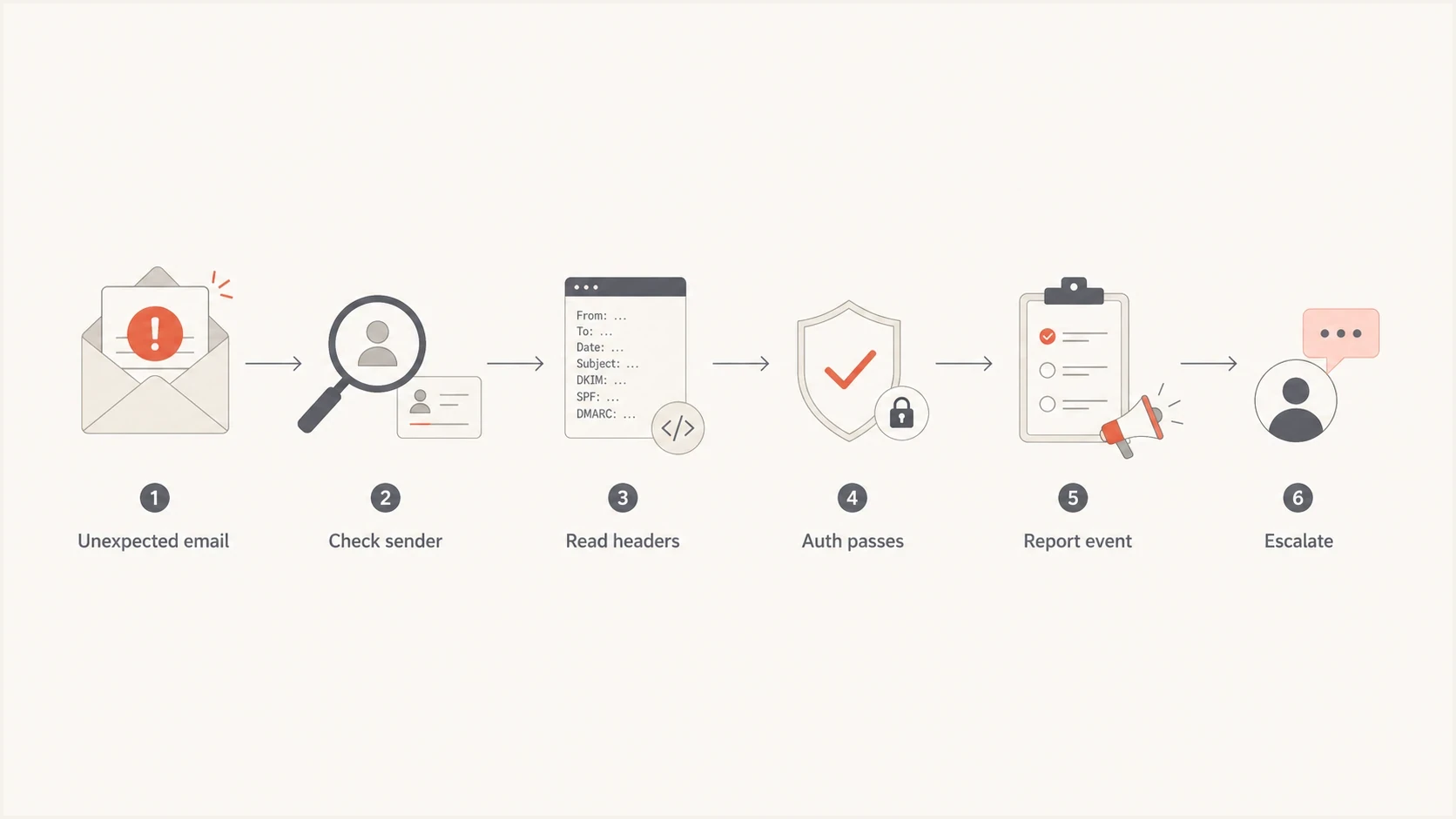
Flowchart for checking an unexpected event confirmation email.
Check your own domain and reputation
Unexpected confirmations usually involve your address as the recipient, not your domain as the sender. Still, a short domain check is useful when the messages mention your company, use role addresses, appear to come from your domain, or arrive alongside bounce messages. Check whether the domain has SPF, DKIM, and DMARC set up correctly, whether unknown sources are sending as the domain, and whether the domain or sending IPs appear on a blocklist or blacklist.
Suped's DMARC monitoring shows which sources send mail using your domain and whether they pass the DMARC domain-match requirement. A one-off domain health check catches missing records and syntax mistakes. If your team sends mail at scale, blocklist monitoring helps identify blacklist and blocklist issues affecting legitimate mail.
?
What's your domain score?
Deep-scan SPF, DKIM & DMARC records for email deliverability and security issues.
The important question is simple: are these confirmations arriving at your address, or is someone using your domain to send mail? Those are different problems. Recipient abuse is handled with filtering, platform reports, and privacy requests. Sender abuse requires authentication monitoring followed by policy enforcement.
Suped DMARC dashboard showing email volume, authentication health, and source breakdown
What to do next
Use a practical response path. The goal is to stop the noise, preserve evidence if it escalates, and avoid turning a nuisance into more engagement signals.
- Save one sample: Keep the original message or an .eml export with full headers, sender, event name, event URL, and timestamp.
- Report the registration: Navigate to the real platform separately, use its abuse or privacy form, and ask it to remove or detach your address.
- Contact the organizer: Use independently verified contact details, ask how the address was collected, and request removal from all imported lists.
- Search for hidden alerts: Review the inbox, spam, trash, and archive folders for login, password, purchase, payment, forwarding, and recovery notices from the same time window.
- Check important accounts directly: Open financial, retail, identity, and email accounts through their official apps or saved addresses and review recent activity.
- Create a narrow mail rule: Filter the repeated event pattern into a review folder instead of deleting evidence or blocking all mail from a legitimate platform.
- Escalate internally: Bring in IT or security if several employees, executives, or role addresses are targeted, or if the flood overlaps with account alerts.
Likely nuisance
- Small volume: A few confirmations spread across several days.
- Real platform: Headers authenticate for a known event provider.
- No account signs: No unknown logins, forwarding rules, MFA prompts, or sent mail.
Escalate internally
- Broad targeting: Several staff, executives, or shared inboxes receive the same pattern.
- Mixed alerts: Confirmations appear with password resets, purchases, or payment notices.
- Sender abuse: Reports show unauthorized mail using your company domain.
How to reduce repeat abuse
You cannot stop every person from typing your address into a form, but you can reduce the blast radius. Public role addresses are easy targets, so give them tighter filtering rules and route questionable confirmations to a monitored folder. For personal work addresses, report the sender, avoid clicking attendance links, and ask the organizer to remove the address from every uploaded audience.
If you see this pattern across newsletters and event forms, the same mechanism is often involved: real addresses are submitted by bots or imported lists. The same investigation model applies to spambot form signups and strange newsletter signups: identify the source, check authentication, preserve samples, then apply filtering or reporting.
If your company runs event registrations
Use rate limits and bot controls on public forms, log the source of every registration, and send only one confirmation request until the address owner responds. Keep transactional registration notices separate from marketing consent, and give recipients a direct way to report a mistaken registration. These controls reduce automated abuse and complaints against your own domain.
DMARC does not stop someone from submitting your address to an event form. For domains you control, it helps separate authorized mail from spoofing and shows which systems send using the domain. Monitor first, fix legitimate sources, then enforce a quarantine or reject policy when authentication coverage is ready.
Where Suped fits
Suped is our DMARC reporting and email authentication platform. It becomes relevant when the question changes from "why did I receive this?" to "is my domain sending or being spoofed in related mail?" Suped collects DMARC aggregate reports, groups sending sources, flags authentication failures, and records policy progress in one workflow.
- Source identification: Group DMARC report data to separate approved senders from unknown sources using the domain.
- Issue resolution: Trace SPF, DKIM, and DMARC domain-match failures before they affect legitimate confirmations.
- Policy rollout: Move a clean domain toward quarantine or reject with evidence about every active source.
- Operational alerts: Notify the team when authentication results or sending patterns change unexpectedly.

Issue steps to fix dialog showing the issue overview, tailored fix steps, and verification action
A genuine platform confirmation sent to you as the recipient does not require a DMARC project. Handle the platform and organizer first. Use Suped when the unwanted messages appear to come from your own domain, when you receive related bounces, or when you need evidence about which systems are authorized to send for the domain.
Views from the trenches
Best practices
Keep one full header sample before filtering, so security can verify sender and route data.
Ask the event organizer how the address was sourced, then request removal from all uploads.
Monitor role inboxes separately because public aliases attract repeated low-volume abuse.
Common pitfalls
Treating every confirmation as compromise wastes time when headers show a real platform.
Clicking cancel links in every email can confirm the address is live to poor senders.
Deleting samples too early removes the evidence needed for platform or organizer reports.
Expert tips
Compare recipient patterns across staff to separate one bad list from targeted activity.
Use DMARC data to confirm your domain is not sending the unwanted confirmations.
Create a review folder for event mail so nuisance traffic does not hide real alerts.
Marketer view
Marketer from Email Geeks says event creators often upload lists without clear recipient consent, which triggers unsolicited confirmations and reminders.
2022-01-21 - Email Geeks
Marketer view
Marketer from Email Geeks says public work addresses are often bought, scraped, or copied into event audiences, especially for B2B promotions.
2022-01-21 - Email Geeks
The practical answer
The direct answer is that your email address was submitted to one or more event registration systems, imported by an organizer, added during a ticket transfer, or used in a fake confirmation. A sender can be a real event platform, and the event can be real, even though you never signed up. Most genuine confirmations come from imported lists, scraped addresses, purchased contacts, bots, or a person using your address.
Start with the headers, check whether the platform authenticated the message, verify the host independently, and look for patterns across people and platforms. Treat a paid ticket or a rapid cross-platform flood as more urgent. If the activity spreads across staff, services, or security-related emails, escalate to IT, search for buried alerts, check key accounts directly, and review mailbox access, domain authentication, and reputation data.




