What are the purposes of bots signing up for emails and accounts on websites?

Published 7 Aug 2025
Updated 19 Aug 2026
14 min read
Summarize with
Updated on 19 Aug 2026: We added account-enumeration and resource-cost risks, then tightened layered bot controls and incident handling.
Bots sign up for emails and accounts because the signup itself has value. Sometimes the goal is to bury a real security alert inside thousands of subscription messages. Sometimes it is comment spam automation that treats every form field as a target. Sometimes it is account farming, promotion abuse, list poisoning, harassment, account enumeration, or reconnaissance against weak plugins and badly handled form inputs.
The same logic applies to newsletter, account, sales, quote, and lead forms. If a form accepts an email address, triggers an email, creates a record, or passes data into a CRM, it gives bots and fake-data operators something to exploit.
The address can be one the attacker controls, a victim address, a purchased address, or a disposable mailbox. If the attacker controls the inbox, they can confirm accounts and collect delivery signals. If they use a victim's address, the goal is usually disruption, concealment, or abuse of your signup infrastructure.
- Most common: Generic spam bots submit forms at scale because forms are easy to find and cheap to test.
- Most dangerous: List bombing can hide password reset, login, purchase, transfer, or loyalty-point theft alerts.
- Most overlooked: A signup form can tell an attacker which sites run weak plugins, unsafe templates, or poor validation.
- Most practical response: Treat fake signups as an abuse signal as well as a list hygiene problem.
Why bots submit signup forms
There is no single master plan. Bot signups happen for several concrete reasons, and more than one can be true in the same incident. Random-looking newsletter abuse can be a fraud-covering mail bomb, a deliverability test, a list-poisoning attempt, or a probe for unsafe form handling.
Some fake submissions are not classic bot signups. They are fake leads, outsourced form fills, typo domains, disposable mailboxes, or real users who want access to a quote, result, trial, or download without future follow-up.
|
|
|
|
|---|---|---|---|
Mail bomb | Victim | Many brands | Fraud hidden |
Spam testing | Attacker | Fast confirms | Abuse |
Form probing | Any | Odd names | Security |
List poisoning | Bad data | Low engagement | Reputation |
Account farming | Controlled | Reusable accounts | Platform abuse |
Common bot signup motives and the signals they leave
If one person complains that your signup form joined them to a list they never requested, do not assume your brand was the main target. Your form was probably one sender in a larger list-bombing attack.
Why attackers use real addresses
Attackers use real addresses because real addresses produce real outcomes. Fake addresses bounce, but real inboxes accept mail, trigger confirmation workflows, and give the attacker a predictable result.
The address does not have to belong to the attacker. In list bombing, it often belongs to the person being targeted. The attacker submits that victim address to hundreds or thousands of forms, filling the inbox with welcome emails, opt-in requests, coupons, and newsletter confirmations. A real transaction alert or account-change notice is easier to miss inside that flood.
Address the attacker controls
- Confirmation: They can click verification links and create usable accounts.
- Testing: They can see what emails your site sends and how fast they arrive.
- Automation: They can reuse accounts for scraping, spam, trials, or promo abuse.
Address the attacker does not control
- Noise: They can flood a victim's mailbox with unrelated signup messages.
- Harassment: They can make the victim spend time unsubscribing and reporting abuse.
- Damage: They can make your sender reputation absorb complaints caused by their attack.
That distinction matters. Confirmed opt-in reduces downstream list pollution, but the first confirmation email can still contribute to a victim's mailbox flood.
Account pre-hijacking risk
Some signup abuse prepares an account before the real user arrives. In an account pre-hijacking pattern, an attacker creates or primes an account with a victim's email address, then tries to keep access after the victim verifies, resets, or connects that account later.
- Unverified account state: The site lets an account exist before the mailbox owner proves control.
- SSO merge behavior: Password login and single sign-on are not merged or reset cleanly.
- Recovery settings: Old recovery paths, secondary addresses, or pending changes remain active.
- Session cleanup: Existing sessions survive after email verification, password reset, or account claim.
The fix is to treat unverified accounts as limited records, clear old sessions when the mailbox owner proves control, reset risky recovery settings, and require fresh verification before sensitive account actions.
The main purposes behind bot signups
Separate the motives into practical buckets. That is more useful than trying to decide whether the attacker is clever or just destructive, because the same controls are not equally effective against every bucket.
- Hiding fraud: The attacker floods the victim with signup emails so a bank, card, loyalty, or account-security alert gets buried.
- Harassment: The attacker uses forms as a cheap way to make a victim's inbox unusable for hours or days.
- Comment spam: The bot sees a form, fills every field, and hopes the site publishes a link, profile, or comment.
- Account farming: The attacker creates accounts for content spam, fake reviews, free trials, inventory holds, referral rewards, discount codes, or scraping.
- Reconnaissance: The bot checks whether your form leaks plugin details, reflects unsafe input, or sends predictable emails.
- Account enumeration: The bot compares registration responses to learn which email addresses already have accounts.
- Deliverability testing: The attacker watches whether your email reaches an inbox, spam folder, or security gateway.
- List poisoning: The bot injects low-quality addresses that later bounce, complain, or distort campaign metrics.
- Lead-quality abuse: Fake lead submissions can trigger sales follow-up, waste budget, and push bad addresses into downstream mail programs.
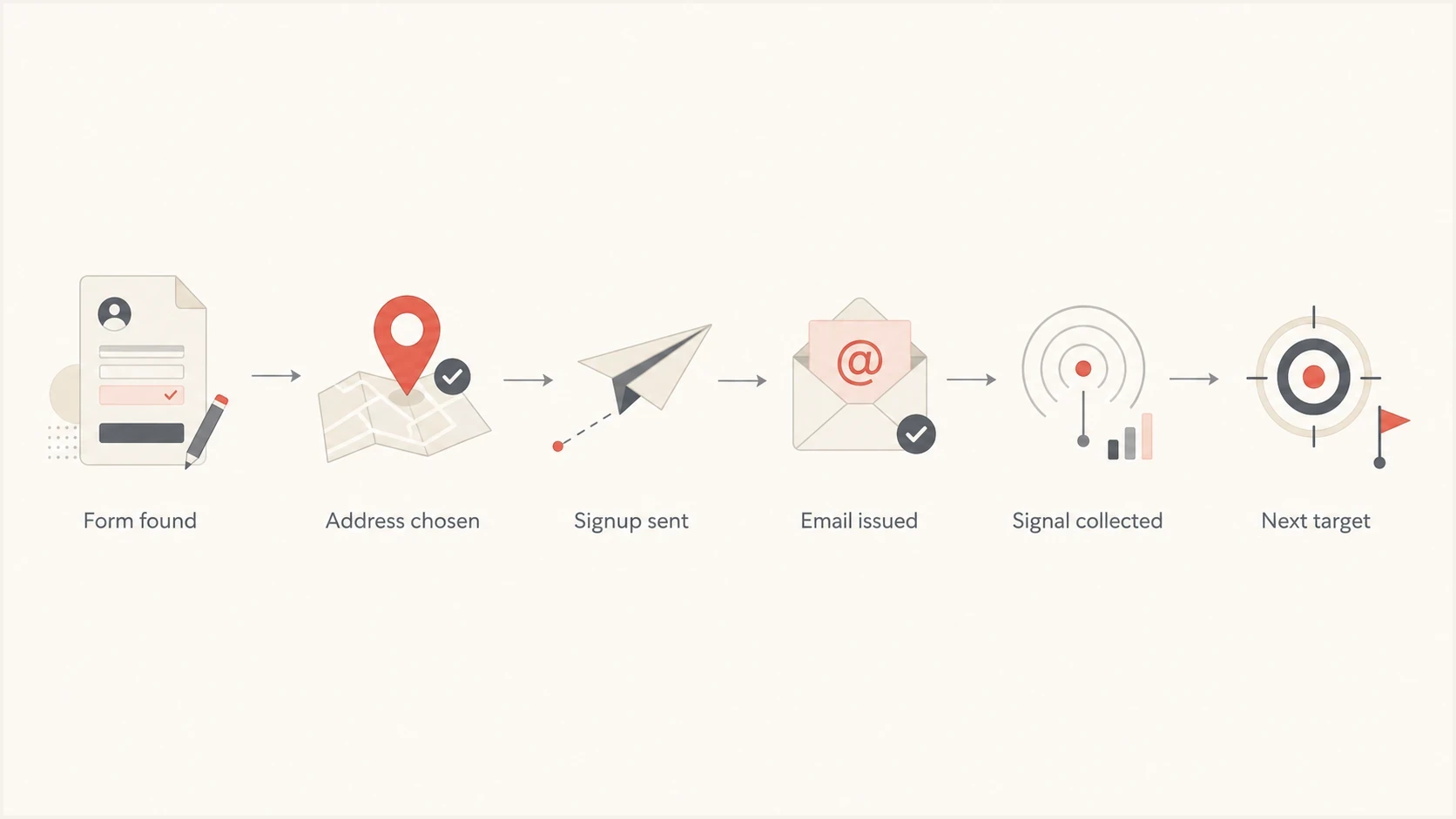
Flowchart showing how a bot finds a form, submits an address, and collects signals.
Cost inflation and resource exhaustion
Some campaigns intentionally consume the resources behind a signup form. Each submission can write database rows, trigger email or SMS, call verification services and webhooks, start onboarding automations, or notify sales staff. At scale, normal application behavior becomes an operating-cost and capacity problem.
- Outbound costs: Email, SMS, verification, and webhook calls consume paid capacity.
- Queue pressure: Automated jobs can delay legitimate confirmations and account events.
- Promotion loss: Fake accounts claim trial access, signup credits, referral rewards, or discount codes.
- Metric distortion: Fake records skew conversion rates, experiments, forecasting, and fraud models.
Set per-action budgets and limits, not only a global request limit. Cap submissions by recipient, IP, network, device, and session. Hold expensive downstream actions until risk checks pass, then alert on unexpected changes in spend or queue depth.
List bombing hides the real event
List bombing is the most serious explanation when a real person reports hundreds or thousands of unexpected signup emails. The attacker is using your confirmation or welcome email as one message in a flood.
The hidden message is often a security alert: a password reset, account login, payout change, purchase receipt, transfer confirmation, or loyalty-point redemption. The victim sees a wall of ordinary email and misses the one message that matters. A public Google support thread shows how this feels when the victim receives signup mail from many unrelated sites.
What a list-bombing inbox can contain
The important message can be a small part of a much larger burst of ordinary-looking signup mail.
Signup mail
Confirmation mail
Security alert
Other mail
A useful clue is breadth. If your site sees one suspicious signup and one complaint, the target is likely the recipient, not your brand. If you see thousands of signups across many addresses, your form itself is likely being abused.
A victim receiving a signup flood should search for bank, payment, password, login, purchase, gift card, and loyalty terms before deleting the noise. Website owners should make unwanted signups easy to report.
Forms also act as probes
Not every bot cares about the inbox. Some bots use signup pages to learn about the website. A form tells an attacker whether the site accepts automation, which framework it uses, whether it sends email, whether it reflects input, and whether old plugins are present. Registration responses can also disclose whether an email address already has an account.
One strong signal is payload content. A harmless-looking name field can carry a script tag, SQL-like text, a long string, or a URL. If the page or email template reflects that value without proper escaping, the attacker learns that the application has weak output handling.
Response differences are another signal. A bot can compare messages, status codes, redirects, and response time to enumerate registered addresses. Return the same public response with similar timing whether an address exists, then send account-specific instructions only through the mailbox.
Suspicious signup payload examplestext
first_name=<script>alert(1)</script>
first_name=' OR '1'='1
website=https://spam.example/path
comment=Nice post cheap pills
email=victim@example.com
This is why security teams should care about fake signups too. Weird field names, plugin-specific POST values, or exploit-shaped first names mean the bot is searching for weak application behavior.
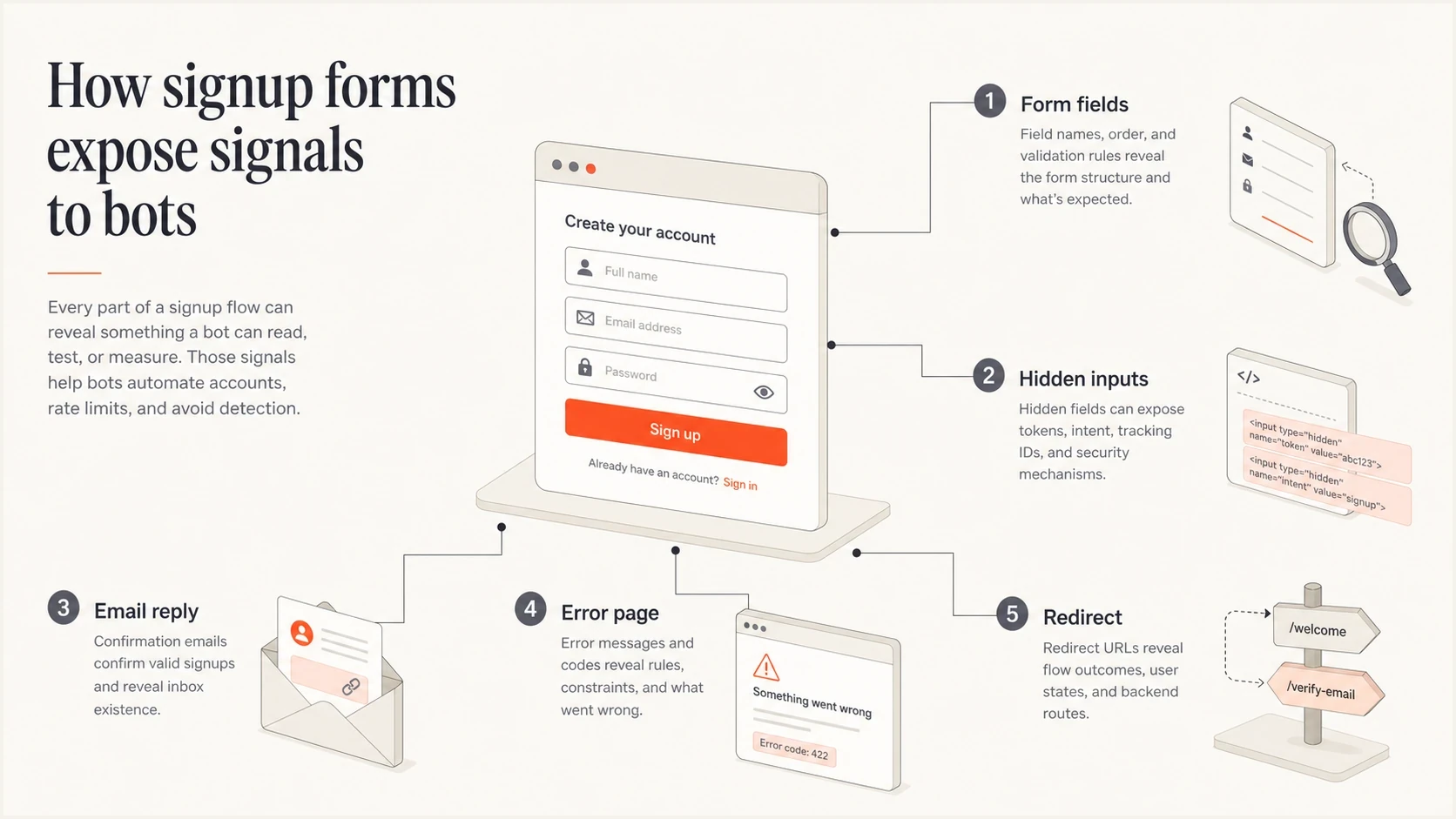
Infographic showing signup form signals that bots can use for probing.
What this means for email programs
For email teams, bot signups create two problems. They pollute audience data, and they can turn your domain into a tool inside someone else's abuse campaign.
When bots add addresses that never wanted mail, bounce, complaint, unsubscribe, and engagement signals suffer. A list-bombing victim can also report your confirmation email as spam, even if you never added them to a marketing list.
Email tester
Send a real email to this address. Suped shows a results button when the test is ready.
?/43tests passed
After tightening signup controls, send a real test email and inspect the authentication and content signals with the email tester. A clean test does not prove bots are gone, but it confirms your outbound mail still has the basics right while you work on abuse prevention.
Authentication and reputation should be checked in parallel. Bot abuse is not caused by DMARC, SPF, or DKIM, but weak authentication makes incident cleanup harder. Suped's DMARC monitoring shows which sources send for a domain, which pass authentication, and where unauthorized traffic appears. Its blocklist monitoring shows whether a domain or IP has reputation damage.
Issues page showing top issues, verified sources, unverified sources, and authentication pass rates
How to tell what type of bot problem you have
The fastest way to classify the incident is to compare signup volume, address variety, timing, confirmation behavior, and payload content. Start with evidence.
- Count bursts: Look for sudden spikes by minute, IP, ASN, country, form path, and user agent.
- Group recipients: Separate many signups to one victim address from many signups across many addresses.
- Inspect fields: Search names, comments, URLs, and hidden fields for scripts, SQL-like strings, or plugin-specific values.
- Compare responses: Check whether messages, status codes, redirects, or timing reveal if an account exists.
- Check consent: Compare unconfirmed, confirmed, bounced, complained, unsubscribed, disposable, and typo-domain addresses.
- Trace downstream cost: Measure email, SMS, webhook, verification, queue, and sales-automation activity caused by each signup.
- Review sending: Confirm that only approved systems are sending signup, confirmation, and welcome messages.
- Watch reputation: Monitor blocklist and blacklist status when complaints or volume spike suddenly.
?
What's your domain score?
Deep-scan SPF, DKIM & DMARC records for email deliverability and security issues.
A broad domain health check is useful after a bot-signup incident because it checks the public email foundation around the domain. If your website form was abused, you still need to know whether DMARC, SPF, DKIM, and DNS signals are healthy before the next campaign goes out.
If submissions share the same structure but come from scattered IPs, assume distributed automation. If they use normal-looking addresses and no odd payloads, assume list-bombing or list poisoning until logs prove otherwise.
Controls that reduce the damage
The right controls slow bots without punishing legitimate subscribers. Good defenses combine friction, validation, rate limits, consent handling, and monitoring.
|
|
|
|---|---|---|
Rate limits | Bursts | Shared IPs |
Honeypot field | Simple bots | Autofill errors |
CAPTCHA | Automated submits | Accessibility |
Confirmed opt-in | List pollution | Still sends |
Field validation | Bad payloads | Maintenance |
Address checks | Typos and disposables | False positives |
Suppression | Repeat abuse | False matches |
Monitoring | Blind spots | Needs response |
Practical controls for bot signups
For newsletter forms, confirmed opt-in keeps unverified addresses out of marketing sends. It does not fully stop mail bombing, because the confirmation email itself can be part of the flood.
Use CAPTCHA or another step-up challenge when risk rises instead of interrupting every visitor. Provide an accessible alternative, and do not treat a passed challenge as proof that the address owner requested mail.
Signup abuse scoring signalstext
score += recent_submissions_by_ip > 5 ? 25 : 0
score += recent_submissions_by_email > 2 ? 40 : 0
score += hidden_field_filled ? 50 : 0
score += payload_contains_script ? 80 : 0
score += disposable_domain ? 20 : 0
score >= 60: hold email and review
For account creation, use progressive friction. Let low-risk users proceed normally. Step up verification when the submission looks automated, repeats too often, uses suspicious payloads, or comes from poor-history infrastructure.
For accounts with sensitive capabilities, require 2FA or step-up verification before profile changes, purchases, referral actions, or payout changes. Keep CMS, plugins, templates, and form libraries current so old signup endpoints do not become the easiest path in.
A good signup defense does not depend on one gate. It limits repeated submissions, validates field content, delays suspicious email sends, stores consent state clearly, and keeps traceable logs.
Where Suped fits
Suped does not replace form security controls. You still need rate limiting, bot detection, input validation, confirmed opt-in, and sane account rules. Suped fits on the email-authentication and monitoring side, where teams need to see whether domain mail is legitimate and reputation is stable.
In practice, Suped's DMARC monitoring helps confirm which systems send mail for a domain, whether those messages pass SPF and DKIM checks under DMARC, and where unauthorized or broken sources appear.
Form-layer controls
- Purpose: Stop or slow the abusive signup before email is sent.
- Examples: Rate limits, honeypots, validation, risk scoring, confirmed opt-in.
- Owner: Usually web, product, security, or growth engineering.
Suped monitoring
- Purpose: Show whether domain mail is authenticated and reputation is stable.
- Examples: DMARC monitoring, SPF visibility, DKIM visibility, blocklist monitoring.
- Owner: Usually email, deliverability, security, or MSP teams.
If complaint rates rise after a signup attack, check DMARC monitoring and blocklist monitoring together. Authentication tells you whether your own sources are legitimate and passing. Blocklist and blacklist signals tell you whether the wider ecosystem has started treating your mail or infrastructure as risky.
What to do when it happens
If you run the website, stop the current abuse, preserve evidence, protect recipients, and prevent your mail from becoming part of another flood. Handle it in this order.
- Pause risky sends: Temporarily hold confirmation or welcome emails for submissions that match the abusive pattern.
- Preserve logs: Keep timestamps, IPs, user agents, headers, payload fields, form paths, and email event IDs.
- Suppress victims: Add reporting recipients to a suppression or temporary hold list so they are not mailed again.
- Block patterns: Apply rate limits, IP reputation checks, field validation, and bot challenges where the abuse enters.
- Clean data: Remove unconfirmed or suspicious signups before campaigns, automations, or lead scoring use them.
- Review auth: Check DMARC, SPF, and DKIM so legitimate mail remains identifiable during cleanup.
If you are the mailbox owner receiving the flood, search for important account activity first. Review recent transactions and account changes by opening official sites directly instead of clicking links in unexpected email. Then report unwanted signups, create mail rules to group confirmation emails, and change passwords on sensitive accounts.
For a deeper prevention workflow, the practical next step is preventing list bombing, because that is where form controls, consent handling, and incident response come together.
Views from the trenches
Best practices
Rate-limit signup forms before sending email, especially during sudden recipient bursts.
Keep raw form payloads and mail event IDs so abuse teams can connect later reports.
Use confirmed opt-in, but pair it with pre-send checks to reduce mailbox flooding.
Common pitfalls
Treating every complaint as normal list churn misses targeted list-bombing patterns.
Relying only on opt-in still lets confirmation emails contribute to victim floods.
Ignoring odd first-name payloads can miss security probing through signup forms.
Expert tips
Separate one-address floods from many-address bot runs before choosing controls.
Check for hidden fraud alerts in the recipient inbox before deleting signup noise.
Monitor DMARC and blocklist status after attacks that trigger complaint spikes fast.
Expert from Email Geeks says many bot signups are ordinary comment spam bots that find a form field and submit data without caring about the specific brand.
2021-10-06 - Email Geeks
Expert from Email Geeks says paid mail-bombing services often submit one signup per list so the victim receives a broad flood of confirmation messages.
2021-10-06 - Email Geeks
Why bot signups matter
Bots sign up for emails and accounts because forms can send mail, create accounts, leak signals, consume resources, and create noise. Some campaigns are low-grade spam automation. Some are deliberate mailbox floods used to hide fraud. Others farm accounts, claim promotions, enumerate users, or probe weak input handling and outdated website components.
The response is to classify the pattern, reduce automated submissions, avoid mailing suspicious signups, preserve evidence, clean the list, and monitor authentication and reputation. Suped helps with the domain-level visibility that email and security teams need while the web layer handles the signup controls.




