Why am I getting a lot of strange signups to my newsletter?

Updated on 20 Aug 2026: We added server-side signup controls and clarified how scanners, confirmation clicks, and one-click unsubscribe affect suspicious signup investigations.
The short answer: a sudden batch of strange newsletter signups is usually automated activity, not sudden organic demand. Bots and spambots use real addresses because real mailboxes receive the confirmation, welcome message, coupon, download link, or account notice. A fake address usually bounces or produces no useful result. Even when each address confirms through double opt-in, the signup can still come from a bot, a controlled mailbox pool, a monitoring script, a human-assisted process, or a subscription bombing attempt. The confirmation event can also come from a security system that opened the URL while scanning the email, including a tracking link or hidden link in the HTML. Strong clues include repeated mailbox providers, generated-looking names, the same source network, unusual capitalization, and no normal behavior after confirmation, but no single clue proves abuse.
Treat those subscribers as suspicious until they prove otherwise. A confirmed click only proves the mailbox or a scanner reached the link. If the link was hidden in the message source or wrapped by click tracking, automated systems can still parse it and log a click. The safest response is to quarantine the cluster, inspect the signup and confirmation events, and protect your sender reputation before the addresses start dragging down engagement or creating complaint risk.
- Likely cause: Automated or semi-automated signups using real inboxes, scraped addresses, generated addresses, seed accounts, or subscription bombing targets.
- Main risk: Poor engagement, spam complaints, list pollution, unwanted confirmation emails, and misleading campaign data.
- Best first move: Pause those contacts from regular sends while you compare patterns across signup, confirmation, and post-confirmation behavior.
What the pattern means
A legitimate signup spike often has variety across mailbox providers, names, browsing paths, and follow-on activity. Paid campaigns and partner promotions can still create legitimate clusters, so compare the spike with the normal pattern for that acquisition source. A suspicious spike is more likely to combine repeated mailbox providers, names that do not match the address, repeated numeric suffixes, odd capitalization, implausibly fast submissions, and no next step in the expected funnel.
The confusing part is the confirmation click. Double opt-in stops a large amount of junk, but it does not stop every kind of automated signup. Mailbox owners, automated scripts, link scanners, and paid traffic systems can all complete the confirmation step. Link scanners operate on HTML source, so they can open visible links, tracking links, and hidden links without any visual intent. A confirmation link click is useful evidence, but it is one event in a broader behavioral record.
Do not count confirmed as trusted
Confirmed subscribers still need quality checks when they arrive in a tight cluster. Quality review should check source concentration, mailbox provider concentration, username patterns, confirmation timing, user-agent patterns, honeypot hits, throttling events, and whether those contacts ever open, click, reply, buy, or take the next expected action.
- Keep them out: Do not send normal newsletters to the cluster while the pattern is still under review.
- Measure separately: Tag the cohort so it cannot distort open, click, conversion, or unsubscribe data.
- Retain evidence: Keep enough short-lived audit data to explain what happened if complaints appear later.
Human signup pattern
- Name variety: Addresses differ in structure, casing, age clues, and mailbox providers.
- Source variety: Sessions arrive through search, referrals, direct visits, and normal campaign paths.
- Behavior depth: Some users browse more, pick preferences, subscribe to related lists, or reply.
Automated signup pattern
- Name formula: Addresses reuse the same template, such as names plus five or six digits.
- Source cluster: Sessions concentrate around one IP range, proxy network, ASN, or country.
- Behavior stop: The address confirms, then skips every normal reader or customer action.
Why bots sign up for newsletters
The motive is not always about your newsletter. Many signup bots use ordinary newsletters as background activity for some other goal. That is why small publishers, hobby newsletters, and plain editorial lists see this too, even without discounts, coupons, gated content, or account value. Some scripts do not distinguish a newsletter form from a contact form; they crawl for fields named email, name, website, or message and submit whatever payload they have.
|
|
|
|---|---|---|
Account aging | Real inboxes join ordinary lists | Quarantine and watch behavior |
Seed monitoring | Many accounts confirm quickly | Tag as seed-like |
List scraping | No funnel behavior follows | Limit content access |
Listbombing or subscription bombing | Victims receive unwanted confirmations | Rate limit forms |
Resource exhaustion | Confirmation volume or send costs spike | Cap sends and pause the source |
Metric damage | Scanner and hidden-link clicks inflate reports | Classify clicks before scoring |
Common causes of unusual newsletter signups
One possible explanation is account aging. If an operator controls a batch of mailbox accounts, receiving ordinary messages can make those inboxes appear active. The mailbox history creates background traffic around the accounts, which can make later abusive activity less obvious during a quick review.
Another explanation is newsletter monitoring. Someone can subscribe seed accounts to track what publishers send, when they send, and how unsubscribe links behave. A small pool of accounts gives redundancy if one address gets removed. This can explain confirmed signups that never read like normal readers.
A third explanation is signup abuse against the address owner. In a listbombing or subscription bombing pattern, the target receives many confirmation emails from unrelated sites. Double opt-in limits the damage because it sends only the confirmation email unless the address confirms, but that message can still bury a password reset, bank alert, order notice, or account security event.
Subscription bombing can make you a secondary victim
The mailbox owner is the target, but your sending domain still carries the complaint and reputation risk if your confirmation or welcome flow keeps sending unwanted mail. Stop risky clusters before they move into regular campaigns.
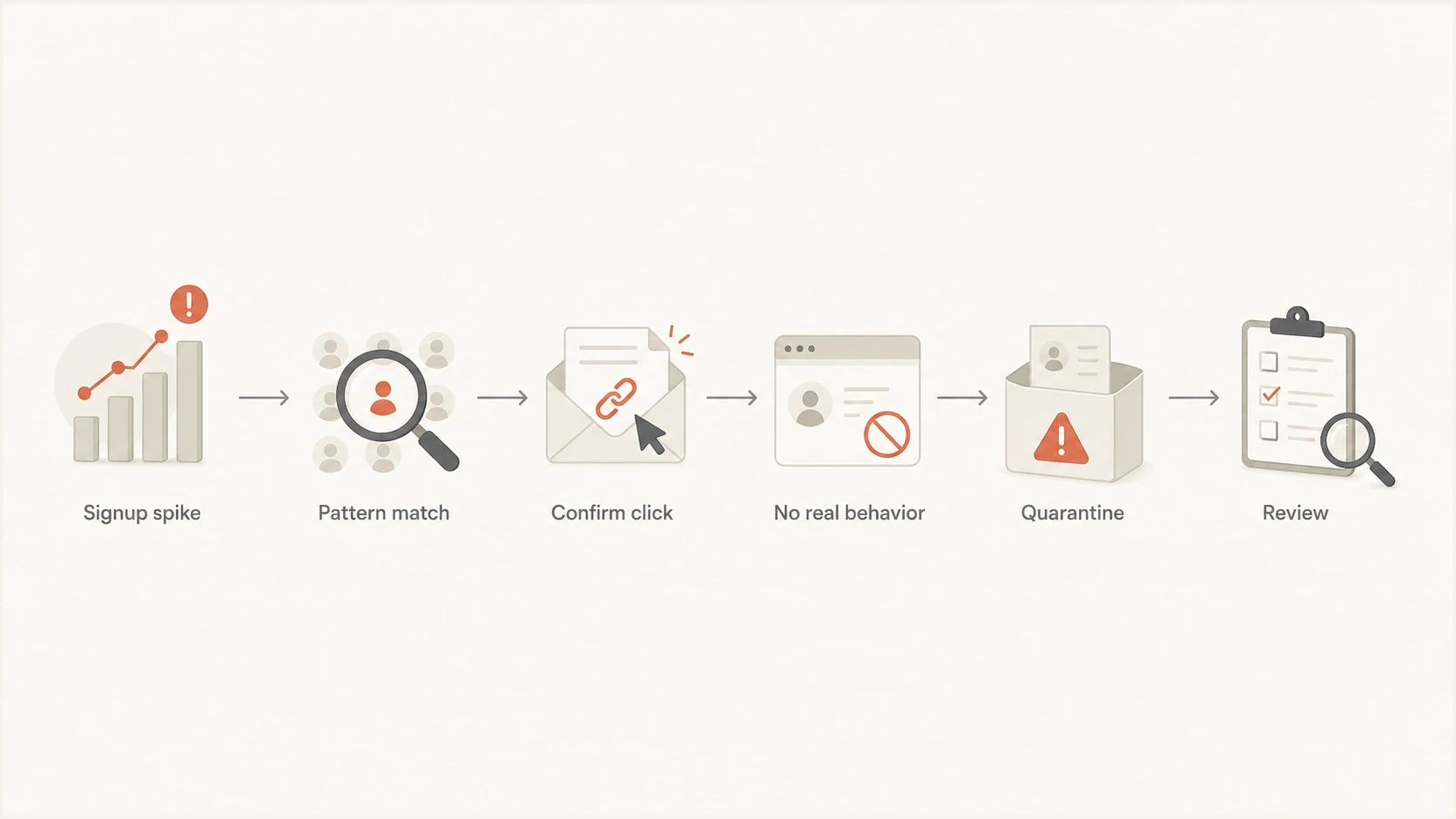
Flowchart showing how to triage a suspicious newsletter signup spike.
How to investigate the signups
Start by separating evidence into three moments: the form submission, the confirmation click, and the first real send after confirmation. If the signup and confirmation come from the same network with the same user agent, that points toward controlled automation. If the confirmation comes from a mailbox provider or security scanner, the click alone has less value as proof of human intent.
Keep the evidence lightweight. You do not need to store every detail forever. You need enough short-retention data to prove whether a cluster is abuse, debug a complaint, and tune form protection. If privacy rules apply to your audience, document the purpose, retention period, and access controls before adding new fields.
Minimal signup audit fieldstext
event_type: signup_submitted | email_confirmed | first_send
email_hash: sha256(lowercase_address)
email_domain: hotmail.com
signup_time_utc: 2026-05-24T09:15:00Z
confirm_time_utc: 2026-05-24T09:16:12Z
ip_prefix: 203.0.113.0/24
asn: example_asn
country: DE
user_agent_hash: short_hash
method: GET
link_id: confirm_primary
redirect_chain_hash: short_hash
form_id: newsletter_footer
referrer_group: direct
- Cluster addresses: Group by mailbox domain, casing, punctuation, numeric suffix length, signup minute, date added, and signup source.
- Compare events: Check whether signup and confirmation share IP prefix, ASN, country, user agent, HTTP method, and link ID.
- Check behavior: Look for preference changes, replies, related-list joins, purchases, or real page depth.
- Review mail flow: Send a controlled test and inspect headers, authentication, links, and scanner activity with the email tester.
A useful test
If the suspicious contacts all confirm in under a few seconds, use the same user agent, and never perform a second meaningful action, treat the confirmation link as part of the automation. If they confirm over many hours, show varied devices, and later behave like normal readers, keep monitoring before you suppress them.
Email tester
Send a real email to this address. Suped shows a results button when the test is ready.
?/43tests passed
Why confirmation clicks and hidden links mislead
The confirmation URL sits inside an email, so security systems can treat it like every other URL. They parse the HTML, extract each href value, follow redirects, and sometimes request hidden or image-wrapped links that a person never sees. A hidden link click proves that a URL was requested. It does not prove that a reader intended to subscribe.
This matters because many signup systems put confirmation, tracking, preference, and unsubscribe events into nearby reporting views. A scanner click can make a suspicious contact look active unless the event carries enough context to classify it.
- Use single-use confirmation tokens that expire, and do not reuse the same token across reminders.
- For high-risk flows, send the first GET request to a confirmation page and require an explicit final action.
- Give hidden probes, diagnostic links, and test links separate IDs so they never count as engagement.
- Keep raw click events, then add a scanner-likely classification instead of deleting the original event.
Do not use hidden critical links
Do not hide unsubscribe, preference, account, coupon, or conversion links as bot traps. Security systems can open GET links, and your reporting can misclassify the result. A standards-based one-click unsubscribe request uses POST, so a simple scanner GET should not remove the subscriber.
How to clean the suspicious cohort
Cleanup should preserve enough evidence to explain the abuse later. Start with a segment, not a bulk delete. The segment can use signup date, signup source, form ID, mailbox domain, name mismatch, confirmation speed, IP prefix, ASN, user-agent hash, link ID, and lack of post-confirmation behavior.
- Create the segment: Group the strange signups by the shared traits that appeared during the spike.
- Export the evidence: Compare signup and confirmation IP, ASN, country, user agent, link ID, HTTP method, and timestamp before deleting records.
- Quarantine first: Keep the cohort out of newsletters, journeys, coupons, downloads, lead routing, and performance reports.
- Delete or suppress: Remove records that fail confirmation, and suppress confirmed contacts that bounce, complain, or keep matching abuse signals.
During an active attack, pause the affected signup source before debating attribution. Keep the logs, hold the suspect records, and restart one form, widget, or integration at a time after rate limits and alert thresholds are in place.
How to stop bot signups
The best fix is layered. One control catches obvious scripts, another catches repeated abuse, and another protects the list if the signup still gets through. Avoid making every real reader solve a challenge. Challenge only sessions that match suspicious patterns.
A good form defense starts before the email is sent, and every decisive check should also run on the server because bots can submit directly to the endpoint. For a deeper prevention workflow, the related guide on bot signups covers form controls and spam complaint prevention in more detail.
Form controls
- Hidden field: Reject submissions that fill a field hidden from normal users.
- Time check: Reject forms submitted too quickly after the page loads.
- Address check: Normalize the address and reject invalid syntax, but do not treat a valid address as proof of consent.
- Rate limit: Throttle the server-side endpoint by IP prefix, email hash, form path, API key, and source ID.
- Adaptive challenge: Show a CAPTCHA or human check only after the session matches suspicious rules.
List controls
- Quarantine tag: Hold risky contacts until they show normal reader behavior.
- Cohort reporting: Exclude suspicious cohorts from engagement and conversion reports.
- Fast suppression: Remove clusters that bounce, complain, or stay inactive after confirmation.
- Source pause: Pause one form, widget, partner feed, or integration without stopping every signup path.
A repeated user-agent string can support a fast containment rule when a cluster shares the same value. User-agent values are easy to spoof or rotate, so pair that rule with timing, source, network, and post-confirmation behavior rather than using it alone.
Proxy and VPN blocking helps at the edge, but it never catches everything. Residential proxies, rotating networks, and cloud traffic change quickly. Use network reputation as one signal, not as a final verdict. The same applies to generated address detection. It is useful to flag generated email addresses, but real people also use names plus numbers.
Suspicious signup rate
Compare the share of signups matching a suspicious rule with the normal baseline for the same source and time window.
Normal watch
At baseline
Track the cohort while ordinary processing continues.
Manual review
Above baseline
Tag the cohort and compare behavior before regular sends.
Quarantine
Sharp break
Hold the cluster and tighten form controls.
Protect the signup endpoint
A CAPTCHA, hidden field, or timer in the browser does not protect an API endpoint by itself. Enforce acceptance rules where the signup request reaches the server, then give each form, integration, and API key its own ceiling so one abused source can be paused without blocking every signup path.
- Limit submissions and confirmation resends per source, network, session, and normalized email hash.
- Keep one pending confirmation during a cooldown instead of sending a new message for every repeat request.
- Reject missing or invalid source identifiers before the request can trigger an email.
- Set a global send ceiling and automatically pause a noisy source when volume breaks its normal baseline.
Do not expose list membership
Keep the user-facing copy neutral whether the address is new, already subscribed, pending confirmation, or suppressed. Distinct messages let an attacker test which addresses are on the list.
Protect triggered emails
A bot can use the first-name, company, referral, invite, or message field to push unsafe text into a confirmation or welcome email. Treat every submitted field as untrusted until it has been validated, length-limited, escaped, and stripped of URLs where the field should only contain a name.
Confirmation emails should stay minimal. Confirm the request, identify the brand, and avoid printing raw submitted names, HTML, URLs, referral text, or profile fields. If a field fails validation, use a generic greeting instead of reflecting the submitted value.
Risky triggered email
- Raw names: The subject or greeting prints the submitted name exactly as entered.
- Clickable payloads: URLs from signup fields become visible links inside the email.
- Shared automation: Every form and API path can trigger the same send without source limits.
Safer triggered email
- Safe fallback: Use plain fallback copy when a name or free-form field fails validation.
- No reflected URLs: Strip links from fields that should never contain links.
- Source ceilings: Give each form, widget, API key, and integration its own limits and pause control.
Protect deliverability while cleaning the list
The deliverability damage comes later if you keep mailing low-quality confirmed addresses. They ignore mail, click unsubscribe immediately, trigger automated security clicks, or complain because they never intended to subscribe. Mailbox providers watch recipient behavior, so a bot-heavy cohort can make a healthy list look weaker than it is.
Authentication does not stop signup bots, but it lets receivers identify legitimate mail from your domain. Keep SPF, DKIM, and DMARC healthy throughout the cleanup, especially when confirmation and newsletter traffic use different sending services. A broad domain health check can confirm whether the authentication foundation is intact.
Suped DMARC dashboard showing email volume, authentication health, and source breakdown
Suped is our DMARC and email authentication platform. During this workflow, use DMARC monitoring to identify which services send with your domain, check SPF and DKIM alignment by source, and separate authentication failures from list-quality problems.
Watch blocklist and blacklist status during a cleanup. Strange signup traffic does not directly put your domain on a blocklist (blacklist), but poor list hygiene and complaints can raise reputation risk. Suped's blocklist monitoring keeps those checks beside DMARC, SPF, DKIM, and deliverability indicators.
Practical cleanup rule
Do not delete the entire cluster immediately unless it is clearly abusive. Tag it, exclude it from engagement reporting, hold it out of normal campaigns, and let a small amount of evidence accumulate. Suppress quickly if the cohort bounces, complains, never engages, or keeps matching the same automated pattern.
When the signups are harmless
Some odd signups are not hostile. A deliverability monitor can subscribe to check whether your messages arrive, whether unsubscribe works, or whether content changes over time. A reader can use a privacy mailbox. A corporate scanner can click a confirmation link before the user sees it. A paid social burst can bring many low-intent subscribers in one hour.
Avoid one-rule decisions. If every suspicious signup is suppressed, you lose real readers. If every confirmed signup is trusted, you pollute the list. The better path is scoring: suspicious traits raise a risk score, normal post-confirmation behavior lowers it, and the highest-risk contacts stay out of regular campaigns.
- Lower risk: The user browses multiple pages, confirms after a realistic delay, and later clicks relevant content.
- Medium risk: The signup matches one cluster signal, but shows mixed devices, timing, or reader behavior.
- High risk: The contact matches the formula, confirms fast, shares network traits, and then goes silent.
If unusual clicks or unsubscribes appear after the signup spike, treat that as part of the same investigation. Security scanners can inflate click reporting and can trigger unsubscribe links that change state on GET. A correctly implemented one-click unsubscribe request requires POST, so record the method and link ID before classifying the event as human.
Views from the trenches
Best practices
Keep short event logs for signup and confirmation so abuse can be checked later.
Tag suspicious cohorts before campaigns so they do not distort engagement reporting.
Use layered form controls, because IP and proxy blocking alone misses many sessions.
Common pitfalls
Treating every confirmed signup as real hides automated clicks and controlled inboxes.
Keeping no audit data makes later complaint handling and abuse triage much harder.
Blocking only one country or IP range leaves the form exposed to rotating proxy traffic.
Expert tips
Compare signup and confirmation traits before deciding whether a cohort is real.
Use a repeated user agent for fast containment, then pair it with stronger signals.
Hold suspicious addresses outside normal sends until they show real reader behavior.
Marketer from Email Geeks says a delivery monitor or seed process can look like a burst of confirmed users, so the signup and confirmation sources should be compared.
2023-05-10 - Email Geeks
Marketer from Email Geeks says limited audit data has operational value when people claim they never subscribed or when subscription bombing starts.
2023-05-10 - Email Geeks
What to do next
The pattern often points to an automated system using your newsletter for account aging, monitoring, listbombing, data collection, or engagement manipulation. The confirmation click makes the case more interesting, but it does not make the contacts safe.
A practical response is simple: tag the cluster, hold it out of normal sends, compare signup and confirmation evidence, add targeted form and server-side controls, protect triggered emails from raw submitted fields, classify link-scanner activity, and keep email authentication healthy while the list is cleaned. If the cohort later behaves like real readers, keep it. If it stays silent or starts causing complaints, suppress it.
Suped helps with the email authentication and reputation side of this response. It will not stop a bot from filling in a form, but it helps teams monitor DMARC, SPF, DKIM, blocklist and blacklist status, and deliverability signals while they protect the list.




