
What platforms are used to monitor email deliverability, reputation score, and sender score?

Updated on 23 Oct 2026: We clarified reputation monitoring, reporting limits, and the DMARC setup steps that help diagnose delivery problems.
The platforms used to monitor email deliverability, reputation score, and sender score usually split into a few jobs: Suped's product for DMARC, SPF, DKIM, blocklist monitoring, hosted authentication, and alerts; mailbox-provider reporting for provider-specific delivery data; IP reputation checks for score snapshots; and inbox placement tests for inbox-versus-spam comparisons.
No single reputation score tells the whole story. Treat sender score as one diagnostic signal rather than the goal itself. A useful monitoring setup watches authentication health, provider-specific spam rates, blocklist (blacklist) status, seed placement, bounces, spam complaints, list quality, consent, and campaign engagement together.
- Use Suped's product to investigate authentication failures, identify sending sources, and monitor blocklist status across your domains.
- Use mailbox-provider data to understand how each receiving network handles your traffic.
- Read reputation scores as a baseline, then validate them against provider data and actual sending results.
- Use seed tests for inbox-versus-spam checks, but confirm trends with real engagement and complaint data.
- Track hard bounces, inactive contacts, consent source, and unsubscribe behavior beside reputation scores.
Platforms and monitoring categories
A practical setup starts with authentication monitoring, then adds provider-specific reporting. Suped's product brings DMARC reporting, hosted authentication, SPF flattening, blocklist monitoring, issue detection, and alerts into one workflow. These checks help trace problems to a sending source or DNS change.
Gmail and Outlook.com have their own filtering systems, and any monitoring platform measures only the data it can observe. Combine authentication reports with mailbox-provider data and the analytics inside your email service provider (ESP).
|
|
|
|---|---|---|
DMARC, SPF, DKIM, blocklists, hosted records, alerts | Authentication reports and listings do not measure inbox placement | |
Mailbox-provider reporting | Provider-specific compliance, spam reports, and delivery errors | Coverage, reporting delays, and access requirements vary |
IP reputation checks | A reputation snapshot for the sending IP | A shared-IP score includes other senders' traffic |
Inbox placement tests | Where a message lands in a controlled set of test inboxes | Seed results do not reproduce every subscriber's experience |
ESP analytics | Acceptance, bounces, deferrals, complaints, and campaign activity | Server acceptance does not confirm inbox delivery |
Choose monitoring categories according to the question each one answers.
A useful rule
Use a platform when it answers a specific operational question. A score plus evidence about the cause gives the team something to investigate.
- Can the team verify SPF and DKIM authentication and a DMARC pass for every legitimate sending source?
- Are mailbox-provider reports showing a worsening reputation or delivery pattern?
- Do test messages and real campaigns show inbox, spam, or missing placement?
- Can the team identify which DNS record, source, list, or campaign needs a fix?
Why sender score is only one signal
An IP reputation score is helpful when you need a fast check before deeper investigation. Some scores use a 0-to-100 scale, but scoring methods differ. Mailbox providers do not all use one universal public score to decide inbox placement.
Mail sent through a well-rated IP can still struggle at Gmail because complaint rate, engagement, authentication, volume changes, list quality, and content patterns differ by provider. On shared infrastructure, an IP score also includes traffic outside your direct control. Pair reputation checks with provider data, DMARC reports, bounce data, blocklist checks, and direct message testing.
Gmail user-reported spam-rate thresholds
Aim below 0.1% and avoid reaching 0.3%. These thresholds apply to Gmail's user-reported spam metric, not every ESP complaint rate.
Below recommended ceiling
Below 0.1%
Continue monitoring. A low rate alone does not prove inbox placement.
Investigate
0.1% to below 0.3%
Review consent, list source, and the campaigns generating complaints.
Take action
0.3% or higher
Identify complaint sources and pause affected campaigns while correcting the cause.
Gmail calculates its rate using eligible DKIM-authenticated mail delivered to engaged users' inboxes and then reported as spam. Mail automatically routed to spam can leave a low reported rate even when placement is poor. Google's spam-rate documentation explains this reporting limit.
To diagnose a low sender score, start with recent volume changes, bounce rate, complaint rate, list source, IP sharing, and blocklist history. A score change is a reason to investigate; it does not identify the exact repair.
Separate domain reputation from IP reputation
Domain reputation and IP reputation answer different questions. Domain reputation follows identities such as the visible From domain or DKIM signing domain and can differ by mailbox provider. IP reputation follows the sending infrastructure. On a shared IP, a public IP score includes the behavior of other senders, so it cannot diagnose your domain by itself.
|
|
|
|---|---|---|
Domain reputation | Provider trust in a sending domain | Segment results by mailbox provider and sending domain |
IP reputation | Provider trust in the sending IP | Investigate it with your ESP on shared IPs, or directly when you control a dedicated IP |
Public reputation score | A third-party assessment based on the data that service observes | Use the trend as a prompt for investigation |
Inbox placement | Where accepted messages are placed | Validate with seed tests and real recipient behavior |
How to interpret common reputation and placement signals.
Keep these signals separate in reports. A 98% delivery rate usually means receiving servers accepted 98% of attempted messages, subject to the ESP's definition. It does not show how many reached the inbox rather than spam, so pair delivery data with placement, complaint, and provider-specific evidence.
What each monitoring source tells you
Mailbox-provider and ESP data
Provider reports are the first stop when a problem affects one receiving network. ESP logs add the message-level evidence needed to investigate.
- Gmail reporting covers personal Gmail accounts. Compliance status includes subdomain traffic under the primary domain, so check the domain scope before comparing it with campaign reports.
- Outlook.com IP reporting requires authorization for the sending IPs. On shared infrastructure, ask your ESP to investigate the pool and its complaint feedback.
- Your ESP shows bounces, deferrals, SMTP errors, unsubscribes, complaints, clicks, and audience engagement. Confirm which feedback loops it processes before assuming complaint coverage is complete.
Authentication and placement checks
These checks are useful for repeatable tests and alerts, but they need to be read beside real sending data.
- Seed tests show placement across sample inboxes. Test with the same sending infrastructure and message you plan to use for the campaign.
- Reputation checks provide a baseline that helps prioritize investigation, particularly when a sending IP changes.
- SPF and DKIM checks verify authentication. DMARC also requires a passing authentication domain to match the visible From domain under the domain's matching policy.
- Bounce diagnostics and list quality checks add context, but they should feed the same deliverability review.
For Gmail, prioritize compliance status and delivery diagnostics over relying on legacy reputation labels. Google has announced the retirement of its old domain and IP reputation dashboards, but its interface migration notice still postpones the legacy interface shutdown without a replacement date. A dashboard being unavailable is not evidence of a reputation drop.
To validate a real message, run a live email test rather than relying on DNS records alone. Inspect the actual headers and authentication results alongside any message or link warnings. A test message does not establish placement for your entire audience.
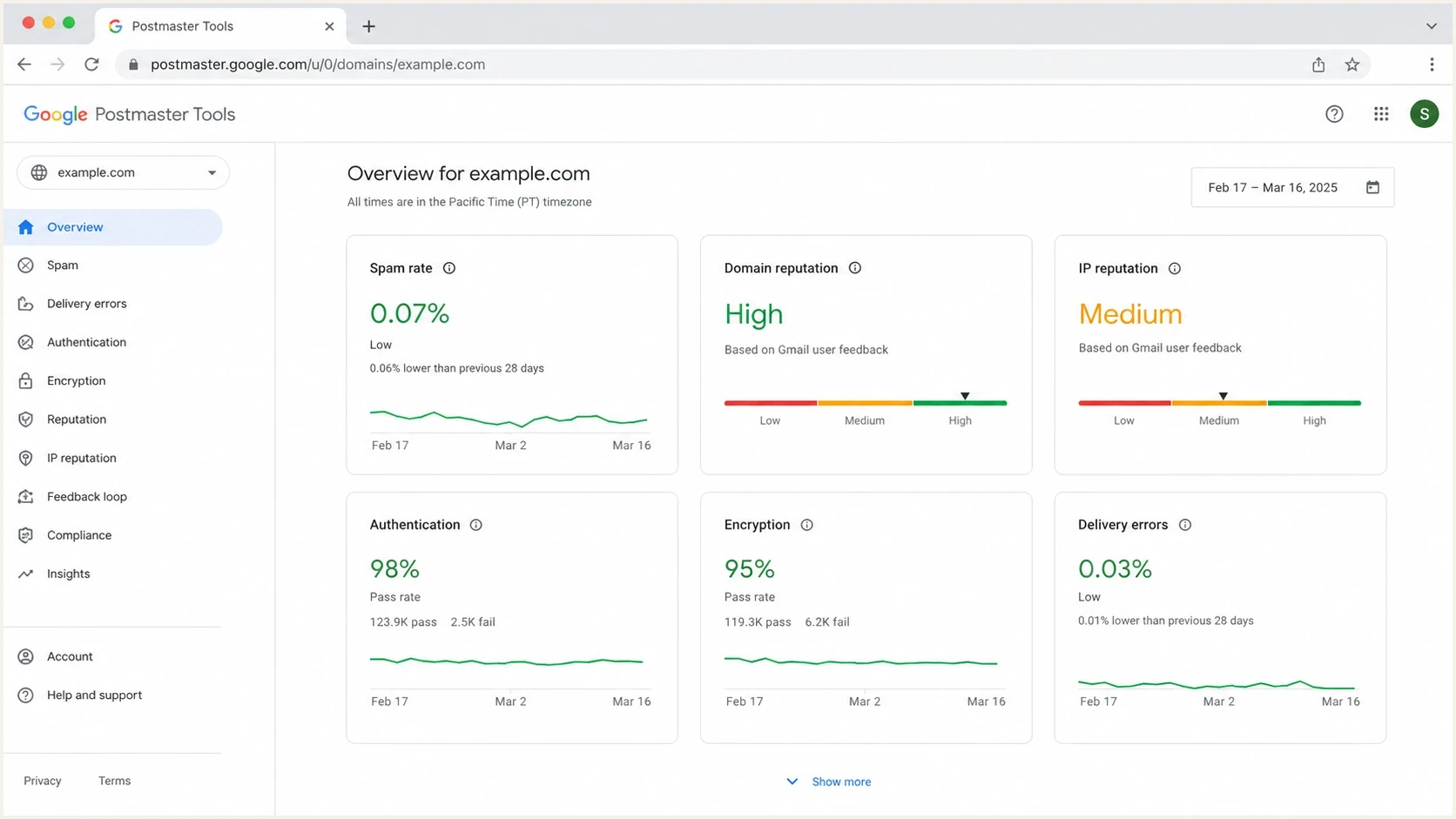
Google Postmaster Tools dashboard for Gmail spam rate, domain reputation, authentication, and delivery errors.
Email tester
Send a real email to this address. Suped shows a results button when the test is ready.
?/43tests passed
A test result is strongest when it is part of a loop: send the message, inspect the result, check provider reports, compare authentication reports, and then change one thing at a time. Changing DNS, content, list source, and volume all at once makes the next result hard to interpret.
A practical monitoring stack
A practical stack starts with authentication monitoring, then adds provider data and placement checks where they answer a specific question. Suped connects authentication failures, source detection, DNS records, alerts, hosted records, and blocklist monitoring in one place.
- Track DMARC, SPF, DKIM, sender sources, DNS errors, hosted records, and blocklist status in Suped.
- Watch provider-specific compliance, spam-rate, authentication, and delivery-error reports for your largest recipient groups.
- Enable complaint feedback loops (FBLs) where available, directly or through your ESP, and suppress recipients who complain when recipient-level reports are provided.
- Run seed tests for campaigns where inbox placement or content differences need investigation. Check rendering separately.
- Read hard bounces, soft bounces, spam complaints, unsubscribes, sends, clicks, replies, and segment behavior in ESP reports.

Issue steps to fix dialog showing the issue overview, tailored fix steps, and verification action
The team should be able to answer, "what changed, where did it fail, who owns the fix, and did the fix improve subsequent sending?" Suped's DMARC monitoring workflow groups authentication results by sending source to support that investigation.
Set measurable monitoring goals
- Define measurable signals such as legitimate-source DMARC pass rate, complaint rate, hard bounce rate, and unresolved blocklist listings.
- Check authentication reports, provider data, and ESP reporting on a fixed weekly cadence, with alerts for incidents between reviews.
- Trace each drop to a source, campaign, list segment, DNS change, IP issue, or domain issue.
- Fix the record, suppress bad data, reduce sending volume, improve segmentation, or pause affected campaigns.
- Review comparable sending after the repair and account for reporting delays. Reputation recovery has no fixed seven-to-fourteen-day deadline.
How to choose by use case
The right platform mix depends on what you send, how much you send, and whether you control the DNS, IPs, and sending tools. A small SaaS team and an agency managing client domains need different views.
For transactional notifications such as password resets and account alerts, connect application logs to ESP delivery events. Monitor the exact sender domain used by those messages so an aggregate marketing report does not hide failures in critical email flows.
|
|
|
|---|---|---|
Small SaaS | Suped, ESP analytics, provider reporting where data is available | DMARC pass, bounces, complaints, provider compliance |
Transactional SaaS | Suped, ESP analytics, provider reporting, application logs | Critical mail acceptance, delivery delays, bounces, authentication |
High-volume B2C | Suped, provider reporting, seed testing | Complaints, placement, blocks, source health |
Agency or MSP | Suped multi-tenancy, reports, alerts | Client status, source changes, DNS fixes |
Dedicated IP sender | Suped, authorized IP-level provider reports, ESP logs | IP reputation, volume changes, SMTP blocks, listings |
Content-heavy campaigns | Suped email tester, seed placement checks, ESP analytics | Authentication, rendering, links, placement, engagement |
Monitoring coverage by sender type.
If the main risk is DNS or authentication drift, start with domain health checks and DMARC reporting. If the main risk is reputation decline, add provider data and complaint-rate monitoring. If the main risk is campaign quality, add message testing and seed placement. For transactional reliability, monitor application jobs, provider acceptance, delivery delays, and bounces.
Avoid making one score the goal
A single reputation score hides provider-specific issues, shared-IP noise, authentication failures, and campaign behavior.
- Reduce hard bounces, keep complaints low, maintain legitimate-source DMARC pass rates, and investigate blocklist hits promptly.
- Compare provider data, Suped issues, ESP metrics, seed results, and real campaign performance.
- Assign fixes to the owners of DNS, sending infrastructure, recipient data, and campaigns.
- Review weekly during normal sending and daily during launches, migrations, or reputation recovery.
Where Suped fits
Suped's product supports the authentication and blocklist-monitoring part of this workflow. It identifies sending sources, detects authentication issues, and gives steps to fix them. Hosted DMARC, hosted SPF, SPF flattening, and hosted MTA-STS help teams manage the related DNS and policy work.
Many deliverability problems start as operational misses: a new sender is not configured correctly, an SPF record exceeds the lookup limit, a DKIM selector is missing, or a policy change affects a legitimate source. Suped's blocklist monitoring adds listing information to the same investigation. A listing matters when the affected receiving network uses it; a clean blacklist check does not guarantee inbox delivery.
Operational gaps
- Scores, DMARC reports, blocklist checks, and ESP metrics sit in separate dashboards.
- Nobody is clear whether the issue belongs to DNS, marketing operations, security, or the sender.
- Teams notice reputation problems after inbox placement or campaign metrics have already dropped.
Suped workflow
- Identify sending services and inspect their SPF, DKIM, and DMARC results.
- Use issue-specific steps to investigate DNS records and sender configuration.
- Use multi-tenant views when managing multiple client domains.
DMARC aggregate reports describe authentication results for mail observed by reporting receivers. They do not show inbox-versus-spam placement, every recipient's activity, or all mail sent. Keep ESP events and provider data beside them, and expect reports to arrive after the messages they describe.
Interpret rates and missing data before acting
Before comparing platforms, check the date range, domain scope, and denominator behind each metric. Different definitions can produce different rates for the same campaign.
- Treat missing data as unknown. Low-volume days and privacy limits can leave gaps in provider reports; a blank chart is not a zero-complaint result.
- Keep Gmail's inbox-based user-reported spam rate separate from an ESP complaint rate calculated against sent or accepted messages.
- Do not use open rate as proof of inbox placement. Email privacy protections obscure whether recipients opened messages; compare clicks, replies, and conversions as supporting evidence.
- Compare like-for-like campaigns by mailbox provider, sending domain, and message type. Keep transactional and marketing traffic separate when their sending patterns differ.
Apple's Mail Privacy Protection documentation explains why senders cannot reliably observe opens. Even genuine engagement is supporting evidence rather than a complete measure of audience-wide inbox placement.
What to monitor each week
The weekly monitoring rhythm matters more than the tool count. The review should show whether authentication is stable, reputation is improving or declining, lists are producing complaints, and any blocklist or blacklist listing needs direct action. Track transactional flows and marketing campaigns separately when they use different domains, templates, or sending patterns.
|
|
|
|---|---|---|
Authentication | Weekly review plus alerts for detected changes | A legitimate source starts failing or an unknown source appears |
Provider delivery and reputation | Weekly; daily during incidents | More deferrals, rejections, or compliance failures |
Complaints and bounces | After each campaign; daily for active streams | A change from the stream's baseline or a provider limit being reached |
Blocklist status | Ongoing monitoring plus weekly review | A new listing relevant to affected recipients |
Seed placement | Before major campaigns or during diagnosis | A repeatable provider-specific placement change |
Suggested review cadence, adjusted to sending volume and incident severity.
Example starter DMARC monitoring recorddns
Host: _dmarc.example.com
Type: TXT
Value: v=DMARC1; p=none; rua=mailto:reports@example.com
Replace example.com and the report address with your own values. This record requests aggregate reports and uses the default relaxed domain matching. DMARC passes when SPF or DKIM passes with the required match to the visible From domain; both mechanisms do not have to pass. The DMARC specification defines these matching rules.
A p=none policy requests monitoring without DMARC-based quarantine or rejection. It does not prevent receivers from filtering mail for other reasons. If a DMARC record already exists, update that record instead of publishing a second one. Use the reporting address supplied by your DMARC platform and complete external reporting authorization when required.
In production, aggregate reports should feed a platform that parses XML and groups sending sources. Validate legitimate mail before progressing to quarantine or reject. Measure legitimate-source pass rates separately from unauthorized traffic so spoofing attempts do not make a healthy configuration look broken.
Also monitor PTR or reverse DNS, TLS, one-click unsubscribe for subscribed mail, SMTP errors, list quality, unsubscribe behavior, and sudden sending-volume changes. Gmail requires one-click unsubscribe for qualifying bulk marketing and subscribed mail, with requests honored within 48 hours. A visible body link alone does not meet the one-click requirement. Check Google's sender requirements when auditing subscription flows.
Provider reports are not real-time monitors. Gmail reporting usually updates within 24 hours, can take longer, and can omit low-volume data. Use sending logs and alerts for immediate incident response, then use provider data to confirm the trend.
For inbox placement, use seed testing when the campaign or provider mix justifies it. For ongoing operational monitoring, prioritize authentication, provider delivery trends, complaints, bounces, and blocklist alerts.




