
What are the best inbox placement testing tools?

Published 5 Jul 2025
Updated 24 Oct 2026
11 min read
Summarize with

Updated on 24 Oct 2026: We clarified how to compare inbox placement results and corrected the DMARC testing guidance.
The best inbox placement testing tools show where a real message lands across the mailbox providers your audience uses. Shortlist focused seed-list testing for pre-send checks, enterprise placement analysis for larger programs, or business-mailbox testing for B2B audiences. Suped fits beside placement testing as Suped's DMARC reporting and email authentication platform for investigating authentication failures and sender setup changes.
Do not buy an inbox placement tool as a magic answer to spam folder problems. Seed-list testing gives a useful signal, not the full truth. Mailbox providers also evaluate the recipient's past behavior with your mail, list quality, complaint history, sender reputation, authentication, and message content. The right tool shows where a test message landed, then gives enough detail to decide what to investigate next.
- For broad provider coverage, compare consumer seed accounts across the providers your subscribers actually use.
- For enterprise analysis, check audience weighting, historical reports, team access, and support before committing to a larger suite.
- For B2B testing, check Google Workspace and Microsoft 365 business-mailbox coverage, including the limits of testing different company filtering policies.
- Pair placement tests with real engagement data, complaint signals, DMARC reports, blocklist (blacklist) monitoring, and sender reputation checks.
Which type of inbox placement tool fits?
The right shortlist depends on whether you send consumer newsletters, high-volume ecommerce campaigns, or B2B mail. The common mistake is treating every placement percentage as a literal forecast of live performance. Use these reports as early warning signals and compare changes against a stable baseline.
|
|
|
|
|---|---|---|---|
Focused seed-list tester | Pre-send campaign checks | Provider-level placement and message headers | Test credits and seed coverage limit comparisons |
Enterprise placement suite | High-volume programs | Audience weighting and historical analysis | Contract scope and reporting complexity |
Business-mailbox tester | B2B programs | Google Workspace and Microsoft 365 tenant coverage | Company-specific filtering is not fully reproducible |
Authentication monitoring | Ongoing sender checks | DMARC reports and SPF or DKIM failures | Does not measure inbox folder placement |
Inbox placement testing options by workflow and measurement limits.
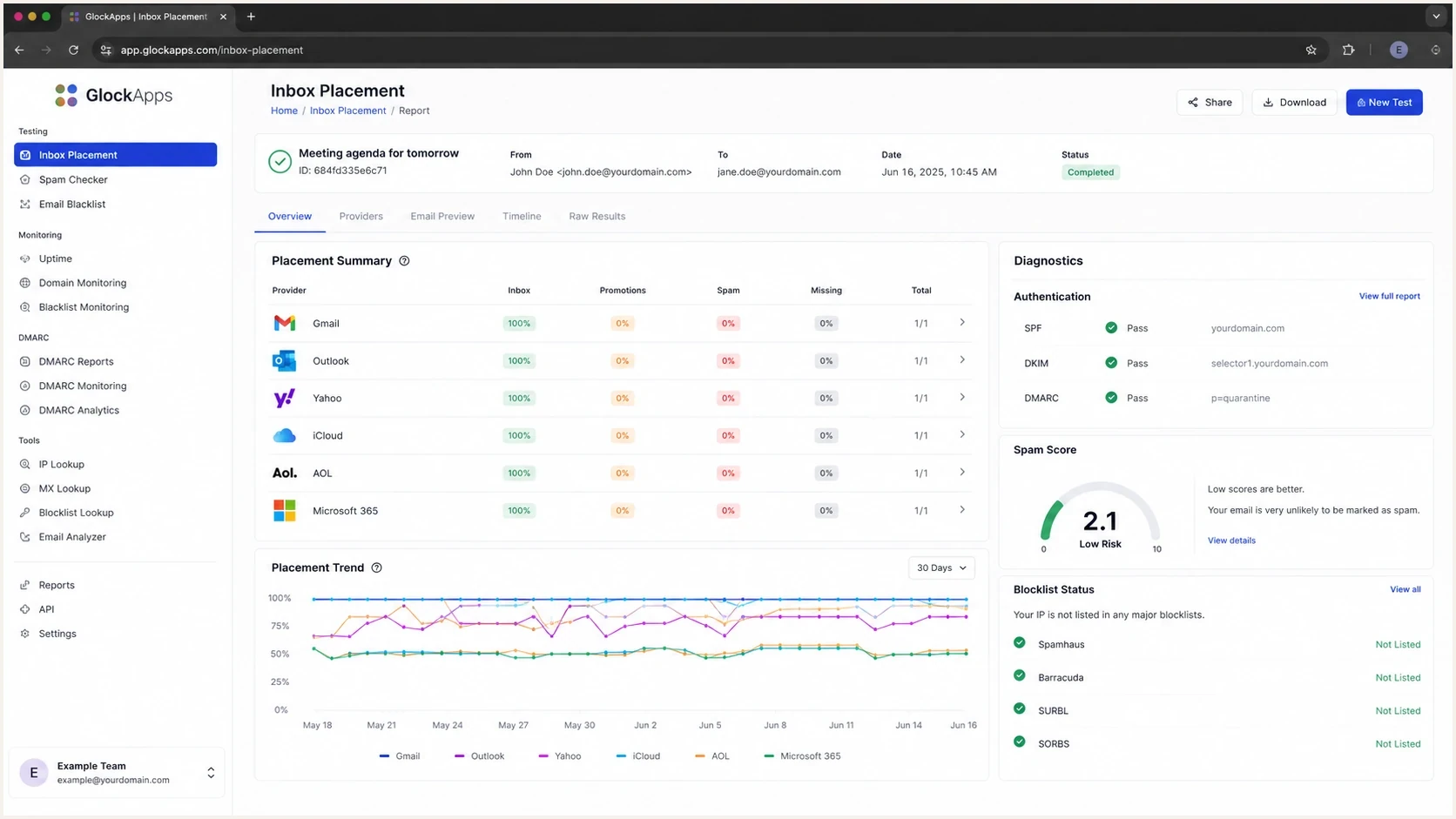
GlockApps inbox placement test results by mailbox provider with SPF, DKIM, and DMARC diagnostics.
Make the decision on your own send profile. A B2C retailer with Gmail, Yahoo, and Outlook-heavy lists needs a different test mix than a B2B sender targeting Microsoft 365 tenants at finance or government organizations.
Also check whether the tool supports manual one-time tests, recurring tests, external-address tests, placement alerts, and exports. Those capabilities matter when you need a quick pre-send check, a repeatable trend, or a test that runs outside your usual sending setup.
How these tools differ
Inbox placement testing usually involves sending your campaign through your own sending platform to a controlled seed list. The tool reports whether each copy reached the inbox, a tab such as Promotions, the spam folder, or no observed folder. Its value depends on whether its consumer and business seed mix resembles your audience, how quickly it checks results, and what diagnostic evidence it provides. A spam score alone does not measure inbox placement.
Seed-list placement testing
- You can test a campaign before a large send and catch provider-specific placement changes.
- Useful reports separate Gmail, Outlook, Yahoo, Apple, business tenants, and regional mailbox providers.
- Seed accounts do not have the same history as your actual subscribers or prospects.
Ongoing deliverability monitoring
- You track changes in authentication, complaints, reputation, and blocklist or blacklist status over time.
- Monitoring supplies evidence for investigating authentication failures or changes in sender setup.
- You compare trends before changing a campaign after one poor seed result.
Email validation, rendering previews, content spam scores, warmup, and placement testing are separate jobs. A wider suite can combine them, but assess each capability separately so a long capability list does not hide weak seed coverage or poor diagnostic detail.
How to choose an inbox placement testing tool
Choose the seed network and workflow before comparing dashboard polish. A large seed list can still give a weak signal when its mailbox distribution does not resemble your recipients or when the test bypasses your production sending path.
- Match the audience: Check the provider, region, and consumer-versus-business mailbox mix. B2B programs need useful Google Workspace and Microsoft 365 coverage, not only consumer accounts.
- Preserve the sending path: Test the exact message through the same ESP, domain, tracking links, headers, and IP pool used for production mail. Check whether proxy-address or automated tests change that path.
- Demand useful categories: Look for provider-level Inbox, Primary, Promotions, Spam, and Missing results where the mailbox provider exposes those categories.
- Check the operating controls: Recurring tests, alerts, exports, API access, and multi-tenant permissions matter when results must feed an ongoing process. Confirm that raw headers and individual seed results are available.
- Price the repeatable test: Compare the cost of a consistent baseline and retest. Check included test credits, credit expiry, supported mailboxes, and any extra charges for automation or API access, then review data retention and report-link access.
Use a free trial to send the same campaign through each candidate's seed list and inspect the reports before paying. A free email spam check that only evaluates content or DNS is a different measurement. For transactional email, trigger an actual order confirmation or password reset to controlled test addresses, since a newsletter test does not exercise those sending paths.
Where seed tests mislead
Seed inboxes cannot fully model how a real subscriber has behaved with your domain over months or years. Recipient-specific filtering and mailbox rules affect placement, and a business tenant can apply policies that differ from another tenant using the same provider.
Do not overpay for a proxy metric
A seed-list result is useful when it changes suddenly, disagrees across providers, or exposes authentication and content problems. It is weak when it is used as the only proof that a live campaign will reach real inboxes. Treat seed results as a flag, then compare them with real sends, complaint rates, bounces, replies, conversion data, DMARC reports, and blocklist (blacklist) checks.
How to read inbox placement changes
Operational bands based on your own baseline rather than a universal pass rate.
Stable
Usual range
Repeated tests under the same conditions stay close to the normal provider mix.
Watch
Repeated decline
A repeat test confirms lower placement without a known setup change.
Investigate
Sharp drop
Placement falls sharply or missing mail increases under identical conditions.
Provider split
One provider down
One provider falling often points to provider-specific reputation or filtering.
An ESP's delivered rate normally means the receiving server accepted the message; it does not establish which folder received it. Open rates also have privacy and automated-activity distortions, so use replies and conversions alongside complaints and bounce data.
Set the testing cadence according to sending risk and the action you will take. Weekly tests, launch checks, domain migration checks, and tests after major template changes are enough for many programs. High-volume or revenue-sensitive senders can justify recurring tests and alerts around important campaigns.
How to compare placement reports fairly
Two tools can report different overall inbox placement rates for the same message because their seed lists and calculation methods differ. Compare provider-level results first, then apply your audience's provider distribution if you need a combined score.
- Check the denominator: Ask whether the rate includes every intended seed address or only observed messages, and whether pending results are excluded.
- Check tab handling: Some reports separate Primary and Promotions. Count Promotions as inbox delivery when comparing total inbox placement, while keeping tab results visible.
- Investigate Missing: Wait for the stated observation window, then check suppression lists, send logs, SMTP replies, delivery delays, and any required test identifier. Missing does not establish that a provider blocked the message.
- Inspect sample size: Keep the raw seed counts beside percentages. One changed result among five seeds moves that provider's score by 20 percentage points, without establishing the same change for subscribers.
|
|
|
|
|---|---|---|---|
Gmail | 80% | 90% | 72 percentage points |
Microsoft 365 | 20% | 50% | 10 percentage points |
Hypothetical two-provider example, using the same inbox definition for both providers.
In this example, the audience-weighted score is 82%: (0.80 x 90%) + (0.20 x 50%). Giving each provider equal weight produces 70%. Neither number is a measured inbox rate for your subscriber list. Keep the underlying provider results and reuse the same weighting for later comparisons.
Google's Gmail category documentation identifies Promotions as an inbox category. Keep spam-folder placement separate when comparing reports.
Where Suped fits
Suped is our DMARC reporting and email authentication platform for investigating sender identity and configuration alongside placement results. Outlook spam placement needs investigation, but Gmail Promotions is an inbox tab rather than a failed delivery. When placement shifts unexpectedly, check what changed in the domain, sender setup, DNS, list quality, or reputation before chasing a different score.
Suped's DMARC monitoring turns aggregate reports into source-level authentication results and alerts. Pair that evidence with Suped's blocklist monitoring to investigate listings affecting sending IPs or domains. For MSPs and agencies, the multi-tenant dashboard keeps client domains in one workflow.

Issue steps to fix dialog showing the issue overview, tailored fix steps, and verification action
Use an inbox placement test to see where a message lands, then use Suped to investigate DMARC failures, DKIM signing domains, SPF lookup issues, unexpected sending sources, or a blocklist (blacklist) event. DMARC aggregate reports, defined in RFC 9990, do not show the inbox or spam folder for each message, and an authentication pass does not guarantee inbox placement.
Email tester
Send a real email to this address. Suped shows a results button when the test is ready.
?/43tests passed
For a quick hands-on check, send a live message through Suped's email tester using your normal sending platform. Use its technical findings to fix authentication or DNS issues before interpreting placement changes. It is a technical message check, rather than a multi-provider seed-list placement report.
A practical testing workflow
Test the message, check the headers, compare provider results, review domain health, fix the specific cause, then retest. If the issue repeats on real sends, look at engagement and list quality before rewriting the entire template.
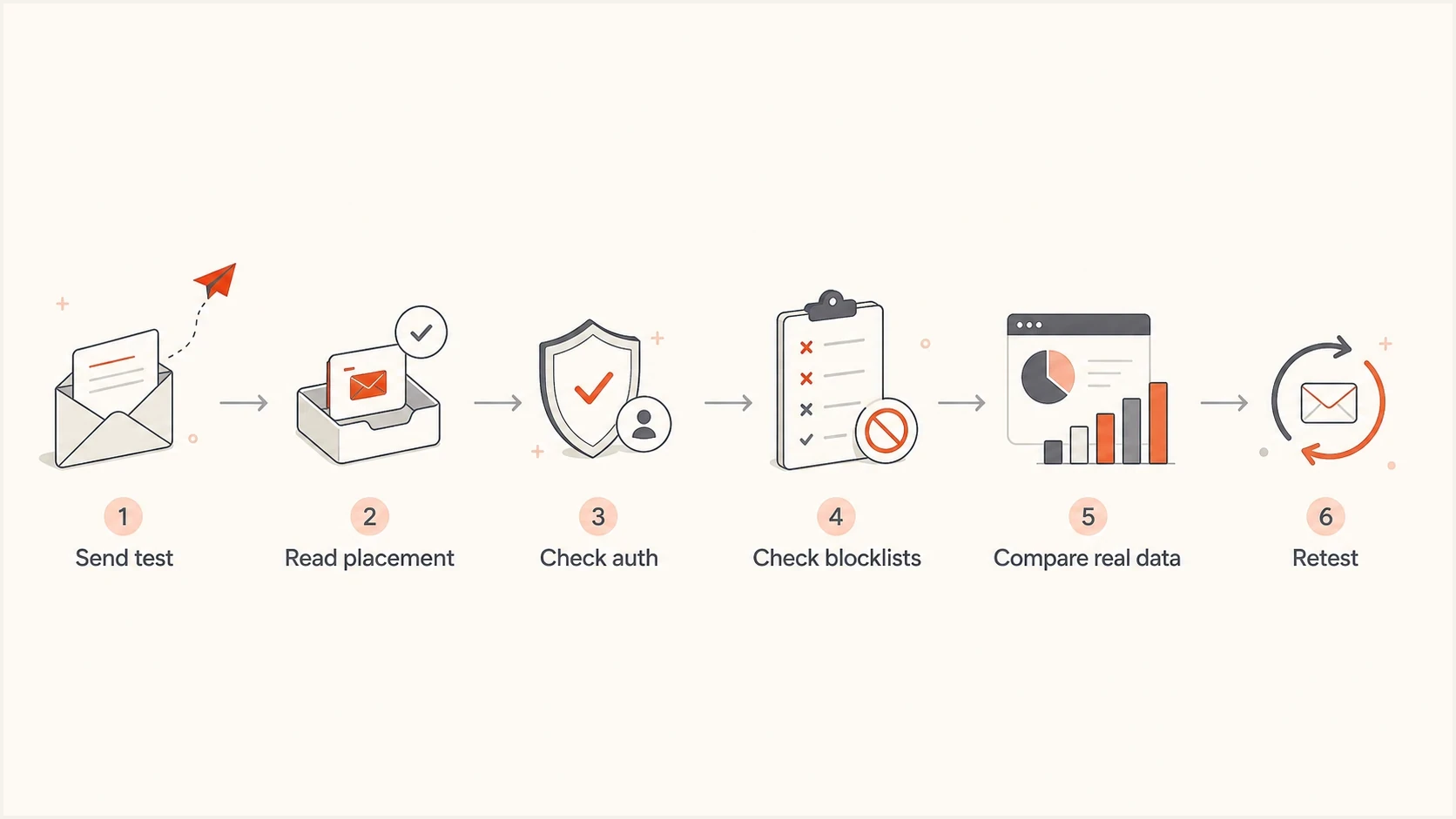
Inbox placement testing workflow covering provider results, authentication, blocklists, real-send data, and retesting.
- Start clean: Send the exact campaign version through the same ESP, sending domain, tracking setup, and template you plan to use. Include any required test identifier and confirm that the platform actually sends to every seed address.
- Read by provider: Treat Gmail, Microsoft, Yahoo, Apple, and regional inboxes separately because each provider weighs signals differently.
- Check authentication: Review the receiving server's Authentication-Results header. A DMARC pass requires SPF or DKIM to pass with a domain matching the visible From domain under the published DMARC mode. Inspect the SPF MAIL FROM domain and the DKIM d= domain rather than accepting unrelated SPF and DKIM pass results.
- Inspect reputation: Run a domain health check and review IP, domain, DNS, blocklist, and blacklist signals before changing copy. A listing needs context; it does not prove which filter caused spam placement.
- Compare outcomes: If seed tests pass but real performance drops, move to engagement, complaint, bounce, and list-source analysis.
- Document changes: Change one major variable at a time so the next test explains something instead of adding noise.
The authentication rule is defined in RFC 9989. Configure both SPF and DKIM for bulk sending even though either can supply the domain match for DMARC. Google's email sender guidelines require SPF, DKIM, and DMARC for bulk senders, plus one-click unsubscribe for applicable marketing and subscription messages. A placement test does not replace those requirements.
Example monitoring TXT value at _dmarc.example.comdns
v=DMARC1; p=none; rua=mailto:dmarc-reports@example.com;
Replace the example report address with your actual reporting destination. The rua tag requests aggregate reports; fo controls failure-reporting options and is unnecessary in this aggregate-only example. A p=none policy requests no DMARC enforcement action and does not prevent spam filtering. Keep an existing quarantine or reject policy when adding reporting to a protected domain.
Example received-message authentication resultstext
Authentication-Results: mx.example;
 spf=pass smtp.mailfrom=news.example.com;
 dkim=pass header.d=example.com;
 dmarc=pass header.from=example.com
If you need a deeper troubleshooting path, use a structured checklist to diagnose deliverability issues instead of jumping between tools. Placement testing is one input. The fix usually sits in authentication, reputation, consent, list quality, sending cadence, or message relevance.




