
Why is my email sender score low and what can I do about it?

Published 16 May 2025
Updated 4 Oct 2026
14 min read
Summarize with
Updated on 4 Oct 2026: We clarified how to check a low sender score against receiver feedback, delivery logs, and authentication results.
A low email sender score usually means a reputation data source has detected worse activity around your sending IP. If you mean the specific Sender Score metric, it measures IP reputation. Domain reputation is related but separate. Common negative signals include rejected mail, filtered mail, spam complaints, spam traps, unknown users, sudden volume changes, and mailbox-provider-specific blocking. A low score does not prove that every mailbox provider is sending your mail to spam.
The right move is to treat the score as a clue, then check the underlying evidence. Start with bounce logs by receiving domain, recent volume changes, complaint rate, click and conversion trends, authentication domain match, DMARC reports, and blocklist or blacklist status. Open trends can add context, but privacy protections and image caching make them noisy. If the stronger signals look stable, do not change a healthy sending program just because one score moved.
- Direct answer: Your score is low because a reputation data source sees negative activity on your sending IP, or because its scoring model is reacting sharply to limited data.
- First action: Pull bounce and rejection logs by domain for the same dates as the score drop.
- Second action: Verify authentication and sending health with a real test email using the email tester.
- Third action: Check whether the issue is isolated to one receiver, one campaign, one segment, or one sending IP.
What a low sender score actually means
Sender score tools estimate reputation using data they can see. They are not the same thing as inbox placement. A score can fall when a small set of receivers rejects mail, when a scoring partner reports filtering, or when a sudden volume increase changes how the model rates your IP. That can be useful, but it has to be interpreted alongside your own logs.
The most common mistake is treating the number as the final diagnosis. If the score falls from 97 to 67, the useful question is not "How do I raise the score?" The useful question is "Which metric changed, for which receiver, and did that change affect real delivery?"
|
|
|
|---|---|---|
Rejected | Receivers are refusing mail | Bounce logs |
Filtered | Mail is accepted but routed poorly | Placement and engagement |
Complaints | Recipients object to mail | Complaint rate |
Unknown users | List quality has degraded | Hard bounces |
Traps | Acquisition or hygiene issue | List sources |
Use the score as a triage signal, not as the only decision point.
Do not change everything at once
A sudden score drop can be real, but broad emergency changes can make diagnosis harder. Pause risky sends if rejection or complaint signals are active, then isolate the affected receiver, campaign, segment, and IP before changing authentication, cadence, or targeting.
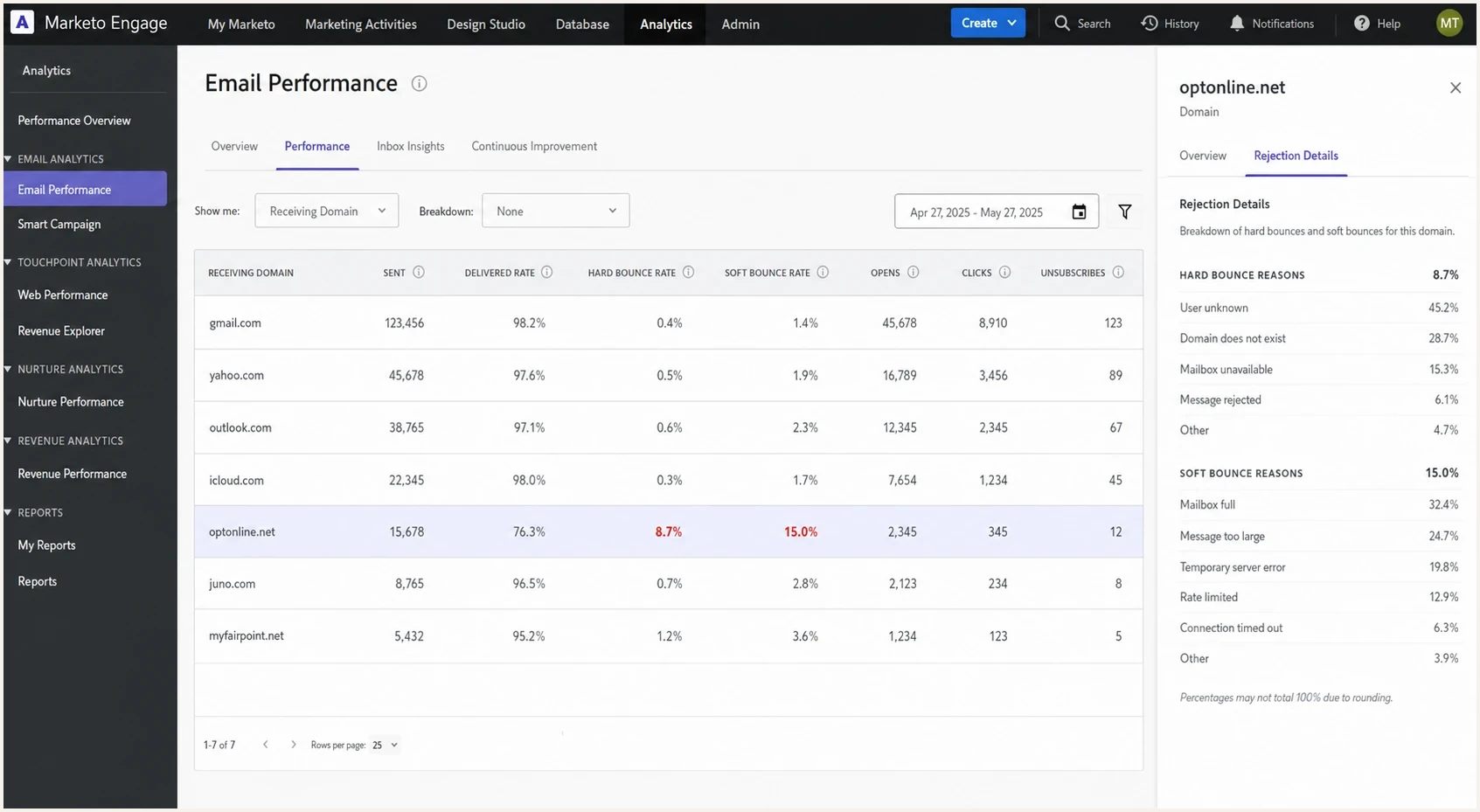
Marketo Engage analytics view showing one receiving domain with high bounces.
Sender score, IP reputation, and domain reputation
A sender score, IP reputation, and domain reputation are not interchangeable. The specific Sender Score metric rates an IP address on a 0 to 100 scale using the activity visible to its data network, usually over a rolling 30-day period. Mailbox providers build their own reputation views and can evaluate the connecting IP, the authenticated domains, and the visible From domain separately. That is why one public score can disagree with your actual results at a particular receiver.
Your IP setup changes what you control. On a shared IP, other customers influence the IP's history, while your domain reputation remains tied to your sending behavior. On a dedicated IP, you control the traffic but also carry the full burden of warming and maintaining it. Moving to a dedicated IP does not repair poor consent, weak list hygiene, spam complaints, or damaged domain reputation.
|
|
|
|---|---|---|
Sender score | One external view of an IP | Compare with receiver logs |
IP reputation | History of the connecting IP | Check pool, volume, and rejections |
Domain reputation | History associated with sending domains | Fix consent and sending behavior |
Shared IP | Combined traffic from multiple senders | Ask the ESP about pool health |
Dedicated IP | Traffic controlled by one sender | Warm with steady wanted mail |
Identify the reputation layer before choosing a recovery action.
Changing IPs is not a reset button
A new dedicated IP starts without a useful sending history. Increase volume in controlled steps, keep the audience highly engaged, and avoid sharp changes in cadence. If poor list practices continue, the new IP and the existing domain can both develop weak reputation.
The fastest way to diagnose the drop
Use a simple order of operations to prevent panic work. First, match the score drop to the dates and sends that could have influenced it. Then compare real delivery indicators before and after the drop. A delivered rate of 99.3% means the receiving servers accepted most messages; it does not confirm inbox placement. Stable clicks and conversions tell a different story than rising hard bounces, falling engagement, or complaint spikes. Use opens as a directional signal rather than decisive evidence.
Next, break results down by receiving domain. A single receiver can drag a reputation score down, especially if that receiver contributes data to the score. For example, one domain rejecting 70% of messages can explain a low score even while every other major domain has normal bounces.
Example bounce pattern by receiver
A low overall sender score often comes from one receiver, not from every destination.
optonline.net
70.2%icloud.com
2.05%juno.com
1.56%myfairpoint.net
1.5%all other domains
0.9%- Pull the dates: Record the exact days the score changed, the campaigns sent, and the volume sent from each IP.
- Split by receiver: Export bounces by receiving domain instead of total bounces across the whole program.
- Read rejection text: Ask your ESP for the raw SMTP responses so you can distinguish reputation blocks, invalid recipients, throttling, and policy errors.
- Compare engagement: Look for sudden drops in clicks and conversions at the same receivers, using opens only as supporting context.
- Check infrastructure: Verify SPF, DKIM, DMARC, reverse DNS, TLS, and whether the sending domain matches the authenticated identifiers.
Email tester
Send a real email to this address. Suped shows a results button when the test is ready.
?/43tests passed
A real-message test is useful because it shows the headers the receiver actually sees. That matters in platforms where the visible From domain, bounce domain, tracking domain, DKIM domain, and envelope sender are not all the same. An SPF answer on the organizational domain can be irrelevant if SPF is evaluated against a different return-path domain.
This is also where Suped fits into the workflow. Suped's DMARC monitoring shows which sources are sending for your domain, whether SPF and DKIM pass, and whether those results match the visible From domain. That keeps authentication questions separate from reputation questions, which makes the root cause easier to pin down.
How to verify reputation by receiver
Compare the IP score with feedback from each affected mailbox provider. Where a receiver provides sender reports, review its domain and IP reputation, user-reported spam rate, and delivery errors. These reports reflect that receiver's traffic and can omit low-volume streams, so match them to your own SMTP logs and campaign dates.
- Record the connecting IP, visible From domain, DKIM signing domain, and return-path domain for the affected stream.
- Compare each receiver's complaint and reputation trends with rejection text and send volume for the same dates.
- Treat a delivered event as server acceptance. Use receiver feedback and engagement trends to investigate inbox placement.
- Suppress addresses reported through complaint feedback. DMARC aggregate reports show authentication results, not user complaints.
The score usually uses a rolling 30-day window, while receiver reports often show daily results. A single campaign can therefore appear in the receiver data before its full effect is visible in the score. Compare trends over matching periods rather than expecting the numbers to move together each day.
Causes that commonly lower sender score
A low score can come from one big issue or several small ones. The key is to avoid generic fixes until you know which signal moved. A sender with clean authentication and high delivered rate can still see a low score if one smaller receiver rejects most of a campaign. A sender with no obvious blocklist listing can still have filtering or throttling at specific mailbox providers.
Score-driven panic
- Broad changes: Changing DNS, cadence, content, and targeting at the same time removes useful evidence.
- Wrong domain: Checking SPF on the parent domain can miss the actual return-path domain.
- No segmentation: A total bounce rate can hide one receiver rejecting most mail.
Evidence-driven diagnosis
- Raw logs: SMTP responses show whether the receiver says reputation, policy, invalid user, or temporary deferral.
- Aligned checks: Test the exact message path, including return-path, DKIM selector, and tracking domain.
- Receiver view: Separate Gmail, Yahoo, Outlook, cable domains, corporate domains, and small hosted domains.
|
|
|
|---|---|---|
Receiver block | High bounces at one domain | Review SMTP text |
Volume spike | Send volume jumped fast | Throttle and segment |
Bad addresses | Unknown users rise | Suppress and audit sources |
Complaints | Spam reports rise | Tighten consent |
Auth issue | SPF or DKIM fails | Fix DNS and sender setup |
Blocklist | Listed IP or domain | Remediate source |
Match the likely cause to the evidence before changing the send program.
Blocklist and blacklist results need context. A listing on a major reputation source can hurt delivery. A listing on a minor blocklist can have no practical impact. The deciding factor is whether the receivers you care about use that list and whether your logs show rejections connected to it. Suped's blocklist monitoring tracks domain and IP status so a new blacklist or blocklist event can be compared with rejection logs.
How to treat a sender score drop
The number matters less than whether real delivery signals moved with it.
Low concern
Monitor
Score drops but bounces, clicks, conversions, complaints, and authentication are stable.
Medium concern
Isolate
One receiver or one campaign shows a clear change.
High concern
Pause risk
Multiple major receivers show rising rejections, filtering, or complaints.
How to fix the real issue
The fix depends on the evidence. If the sender score fell because of one receiver, fix that receiver path. If it fell because of authentication, fix DNS and domain matching. If it fell because of poor recipient quality, fix list hygiene and acquisition. A generic "improve reputation" plan wastes time unless it maps to a specific signal.
For receiver-specific blocking, ask your ESP for raw bounce logs and the volume sent to that receiver. Look for phrases such as blocked, rejected, policy, reputation, spam content, invalid recipient, or too many connections. Then reduce or pause that receiver segment while you clean the data, remove inactive recipients, and send only highly engaged mail when you resume.
Example support request for bounce logstext
Please export raw SMTP bounce logs for the affected sending IP.
Date range: YYYY-MM-DD to YYYY-MM-DD
Include: receiving domain, recipient status, SMTP code, response text,
campaign ID, sending IP, envelope sender, and DKIM domain.
- If rejections are concentrated: Suppress inactive recipients at that receiver, slow the send rate, and send a smaller engaged segment first.
- If unknown users are high: Suppress hard bounces immediately, audit acquisition sources, stop using purchased lists, and apply a sunset policy to addresses that never engage.
- If complaints are high: Require clear consent, make unsubscribe easy, honor opt-outs promptly, and reduce frequency for low-engagement groups. For bulk marketing mail, support one-click unsubscribe. For Gmail traffic, keep the reported spam rate below 0.1% and avoid 0.3% or higher; the receiver rate can differ from the ESP complaint rate.
- If authentication fails: Fix SPF and DKIM for the exact sending stream, then confirm that at least one passes with DMARC alignment in aggregate reports.
- If a listing appears: Find the sending behavior that caused the blocklist or blacklist hit before requesting removal.
For authentication, do not assume the parent domain tells the whole story. In many marketing platforms, SPF is checked against the return-path domain, while DMARC checks whether the passing SPF domain or DKIM signing domain aligns with the visible From domain. DMARC passes when either aligned SPF or aligned DKIM passes; both do not need to align.
?
What's your domain score?
Deep-scan SPF, DKIM & DMARC records for email deliverability and security issues.
A broad domain health check is useful after a score drop because it catches broken DNS records, missing DMARC, weak SPF, and DKIM issues without forcing you to inspect every record by hand.

Issue steps to fix dialog showing the issue overview, tailored fix steps, and verification action
Suped makes this investigation repeatable by bringing DMARC data, SPF and DKIM results, blocklist monitoring, alerts, and multi-domain reporting into one workflow. Use it to identify the affected source and authentication result, then compare that evidence with ESP bounce logs before changing the sending program.
When to ignore the score and when to act
Sometimes the right answer is to make no sending change. If the score rebounds, receiving servers keep accepting mail, clicks and conversions are normal, complaints are flat, and no major receiver is rejecting mail, the low score was likely a noisy signal. Keep monitoring, but do not overhaul the program.
Act quickly when the score drop has matching operational evidence. That means raw bounces show receiver blocks, inbox placement has dropped at important destinations, complaint rates are up, or DMARC reports show unexpected sources using your visible From domain. If a domain reputation issue is visible across multiple signals, work through fixing domain reputation with a controlled recovery plan.
A practical rule
If a sender score moves but delivery does not, investigate without making broad changes. If delivery moves, set the score aside and fix the delivery evidence directly.
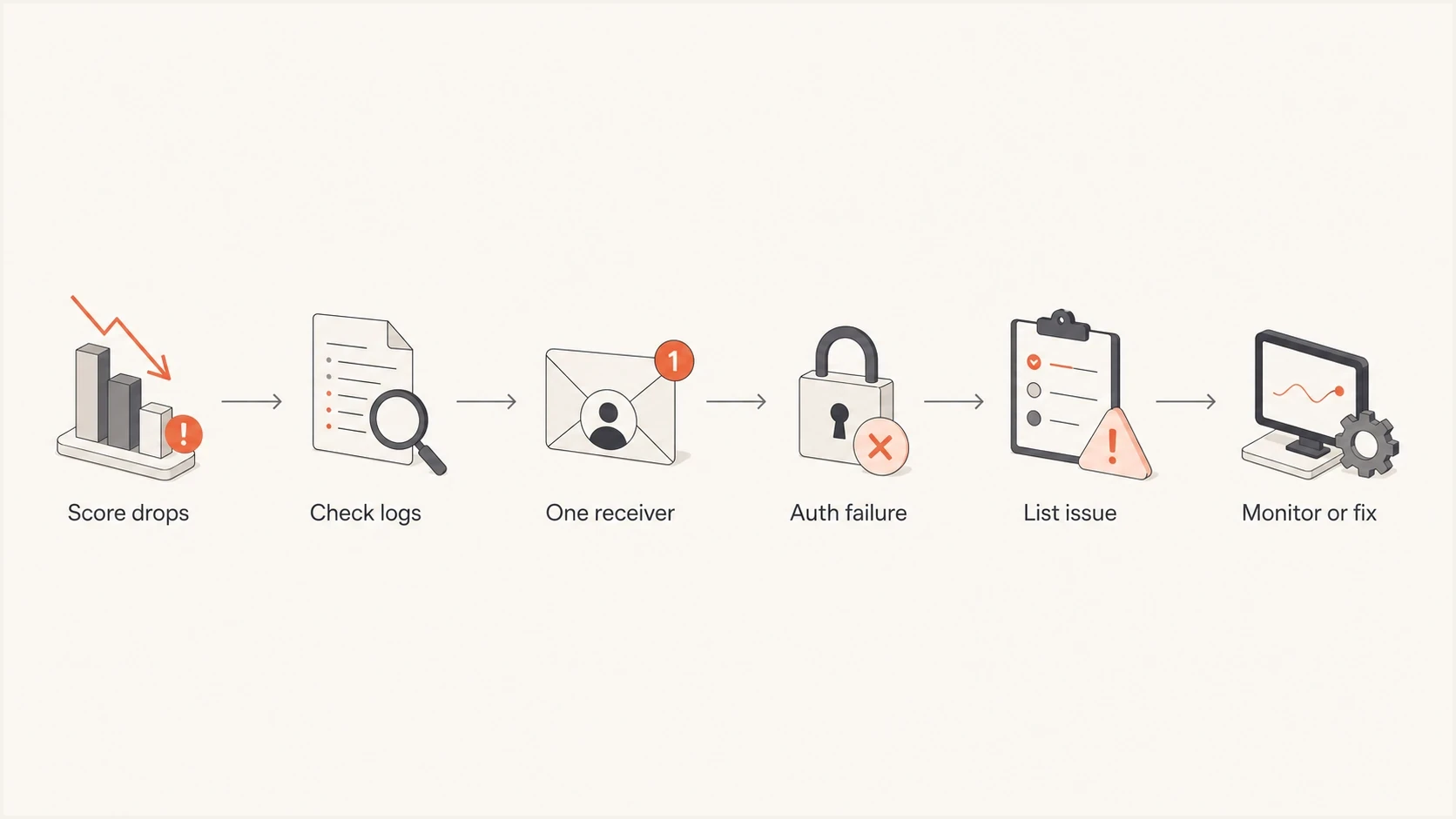
Flowchart for deciding whether to monitor or fix a low sender score.
What to ask your ESP or reputation vendor
If the low sender score comes through an ESP integration, ask for the underlying data, not only the score. Frontline support can confuse parent-domain SPF with return-path SPF, or label a domain as problematic without showing the receiver evidence. You need the data that generated the warning.
- Score metric: Which tracked category lowered the score: rejected, filtered, complaint, trap, unknown user, or another signal?
- Affected scope: Which IP, domain, campaign, date, and receiver produced the negative signal?
- Raw evidence: Can they provide SMTP response text and rejection counts by receiver, plus any filtering data they actually receive?
- Volume context: Did sent volume from the IP change sharply compared with the previous baseline?
- Known anomalies: Is there any reporting issue, mapping issue, or limited data sample affecting the metric?
- IP ownership: Is the affected IP shared or dedicated, and did the ESP move the stream to a different pool?
Views from the trenches
Best practices
Break bounce reports down by receiver before changing cadence, content, or DNS records.
Use real-message tests to confirm the return-path, DKIM domain, and DMARC match.
Ask for raw SMTP logs when a vendor says an IP or domain has become problematic.
Treat a quick score rebound as a reason to monitor, not a reason to rebuild everything.
Common pitfalls
Checking SPF only on the parent domain can miss the domain receivers actually evaluate.
A total delivered rate can hide one mailbox provider rejecting a large local segment.
Minor blocklist or blacklist listings can distract from the receiver doing the blocking.
Changing several variables after one score drop can remove the evidence needed to fix it.
Expert tips
Compare score movement with send volume, because sudden jumps can distort reputation models.
Separate cable and hosted domains in reports when their rejection patterns differ from freemail.
Use engagement trends as a delivery proxy, but confirm major changes with receiver-level logs.
Open a vendor ticket when the score conflicts with the underlying tracked metrics.
Expert view
Expert from Email Geeks says a sender score should be treated as a clue, while actual delivery stats, bounce logs, opens, and clicks decide whether there is a real issue.
2024-01-08 - Email Geeks
Expert view
Expert from Email Geeks says a real test message is faster than guessing because it shows whether SPF, DKIM, and domain matching matter for the exact sending path.
2024-01-08 - Email Geeks
A practical recovery plan
A low sender score is worth investigating, but it is not a command to rebuild your email program. The practical path is to confirm the affected metric, isolate the receiver or sending stream, inspect raw rejection text, and verify authentication on the exact message path.
If the evidence points to one receiver, fix that receiver path. If the evidence points to list quality, tighten acquisition, consent, suppression, and the sunset policy. If the evidence points to authentication, use DMARC reports and DNS validation to fix domain matching. If the score drops but real delivery remains healthy, monitor it and keep sending normally.
Suped keeps the authentication and reputation evidence visible between incidents. Use its DMARC reporting, SPF and DKIM visibility, blocklist monitoring, alerts, and multi-domain views to spot changes, identify affected sources, and prepare the evidence needed for a focused fix.




