
What can cause domain reputation to decrease and how can it be fixed?

Published 14 May 2025
Updated 9 Oct 2026
14 min read
Summarize with
Updated on 9 Oct 2026: We clarified domain reputation recovery signals, bounce handling, and unsubscribe requirements.
Domain reputation decreases when mailbox providers see a sending domain become riskier. The usual causes are spam complaints, low engagement, poor consent, bounces, spam traps, sudden volume spikes, weak targeting, authentication failures, compromised forms, and relevant blocklist (blacklist) listings. Rewarming helps only after the cause of the drop has been removed. Start by finding the reason for the drop, stop the behavior causing it, then rebuild trust with a smaller audience of engaged subscribers.
A low domain reputation does not guarantee that every email goes to spam. It does make inbox placement unreliable, especially for new subscribers and people who have no recent engagement history with the domain. Mailbox providers combine sending history with recipient behavior, but their exact scoring methods are private.
A useful diagnosis separates sending behavior from technical setup. A sender can have correct SPF, DKIM, and DMARC records and still lose reputation because the audience did not want the mail. Authentication failures and relevant blacklist (blocklist) listings can also disrupt delivery even when recipients want the messages.
- Main warning: If people are added without clear consent, reputation recovery will stall because complaints and ignores keep repeating.
- Practical check: Send a real message through an email tester and inspect authentication, content, and deliverability clues before changing DNS or cadence.
Stop the signals that damage domain reputation
The repair path is a controlled recovery plan: pause risky acquisition sources, suppress unengaged recipients, check authentication, check blocklists, restart with recent clickers and buyers who opted in to marketing, then expand gradually. Add or verify one-click unsubscribe for marketing mail so opting out is easier than complaining. A rewarm helps only after the source of the drop has been removed.
A clean warmup does not protect a domain from bad list quality. If the mail is going to people who did not ask for it, or to people who forgot they signed up, the domain can move from high to low or bad even when the DNS records look correct.
- Complaint signal: People mark the message as spam instead of unsubscribing.
- Engagement signal: Recipients ignore, delete, or never interact with the mail.
- Risk signal: Volume jumps suddenly, forms get abused, or a sender starts mailing stale data.
Sending actions during reputation recovery
These are practical sending states, not standardized provider reputation ratings or numeric thresholds.
Stable
Keep normal cadence
Complaints are low, bounces are controlled, and authentication passes.
Soft decline
Tighten segments
Engagement is slipping or one mailbox provider shows lower reputation.
Low reputation
Rewarm carefully
Inbox placement is unreliable, especially for new subscribers.
Bad reputation
Pause risky mail
Complaints, bounces, abuse, or listing issues need immediate correction.
Separate domain, subdomain, and IP reputation
Mailbox providers calculate reputation independently. A domain can look healthy at one provider and weak at another, and there is no universal 0-to-100 domain reputation score. Diagnose the affected recipient domains instead of relying on one blended score.
Domain reputation and IP reputation are separate parts of sender reputation, and filters evaluate them together with authentication and recipient behavior. A shared IP can pick up risk from other senders, while a dedicated IP places its sending history under your control. Neither option repairs weak consent or unwanted mail. Separate marketing and transactional mail with distinct subdomains and DKIM signing domains, but do not assume subdomains are fully independent of the parent domain.
|
|
|
|---|---|---|
Domain | Provider-specific reputation | Repair sender behavior |
Subdomain | Mail stream and purpose | Separate mail streams |
IP address | Shared or dedicated history | Control volume and neighbors |
Campaign | Audience, complaints, bounces | Stop the harmful source |
Reputation layers to inspect during diagnosis.
Moving mail to a fresh IP, subdomain, or domain does not erase weak consent, complaints, or list-quality problems. It moves the same behavior to an identity with little history, where a new decline can happen faster.
Start with root cause diagnosis
Work backward from the date reputation changed. Look at the domain, subdomain, IP, sending platform, audience source, campaign type, and volume shape for the two to four weeks before the drop. Check recent sending changes first, but retest authentication even when your own DNS records are unchanged: a provider can change its signing setup or the records referenced by an SPF include.
Start with a domain health check so you can rule out obvious SPF, DKIM, DMARC, and DNS errors. Then compare that with provider-specific data such as complaint rate, bounce rate, clicks, replies, delivery errors, and reputation by domain or subdomain.
|
|
|
|---|---|---|
Spam complaints | Weak consent | Suppress risky sources |
Low clicks or replies | Poor targeting | Send to engaged users |
Invalid-recipient bounces | Stale or mistyped addresses | Suppress invalid recipients |
Failed DKIM | Broken signing | Repair sender setup |
Volume spike | Risky traffic | Stabilize cadence |
Listing hit | Abuse pattern | Fix source first |
Signals that point to the most likely root cause.
Read SMTP error codes before removing recipients. A 4xx response is a temporary deferral; reduce sending if rate-limited and let the sending server retry. A 5xx response is permanent for that delivery attempt, but a policy rejection does not prove the address is invalid. Suppress confirmed nonexistent addresses and fix authentication or policy errors at the sender. RFC 5321 defines these response classes.
Suped's DMARC reporting platform supports this workflow by showing sending sources, authentication failures, and repair steps. Compare those source-level findings with complaint and delivery logs from your sending system to identify which mail stream changed. DMARC reports do not measure clicks, complaints, or inbox placement.
?
What's your domain score?
Deep-scan SPF, DKIM & DMARC records for email deliverability and security issues.
The causes that reduce domain reputation
Most reputation drops come from a mix of audience quality and traffic pattern. Technical errors matter, but if a domain was already sending successfully and then declined after new campaigns, new data sources, or new cadence, check the recipient experience first.
Audience causes
- Assumed consent: People are added because they accepted cookies, filled a form, or visited a page, not because they asked for email.
- Low intent leads: The list grows, but recipients do not recognize the brand or value.
- Stale subscribers: Subscribers forget signing up, stop engaging, or have addresses that become invalid or are recycled as spam traps.
- Poor targeting: The offer, timing, or content does not match what the recipient expected.
Infrastructure causes
- Auth failures: SPF, DKIM, or DMARC fails for a real sender or stops matching the visible domain.
- Unexpected spikes: Sudden jumps in traffic look like account abuse or a rushed campaign.
- Account or form abuse: Stolen sending credentials or bots abusing signup forms create unwanted mail. Secure accounts, revoke exposed credentials, and protect forms.
- Listing events: A domain or sending IP appears on a blocklist (blacklist) after repeated abuse signals.
Accepting website cookies is not the same thing as requesting marketing email. Adding those visitors without an email signup sends messages they did not ask for and risks spam complaints.
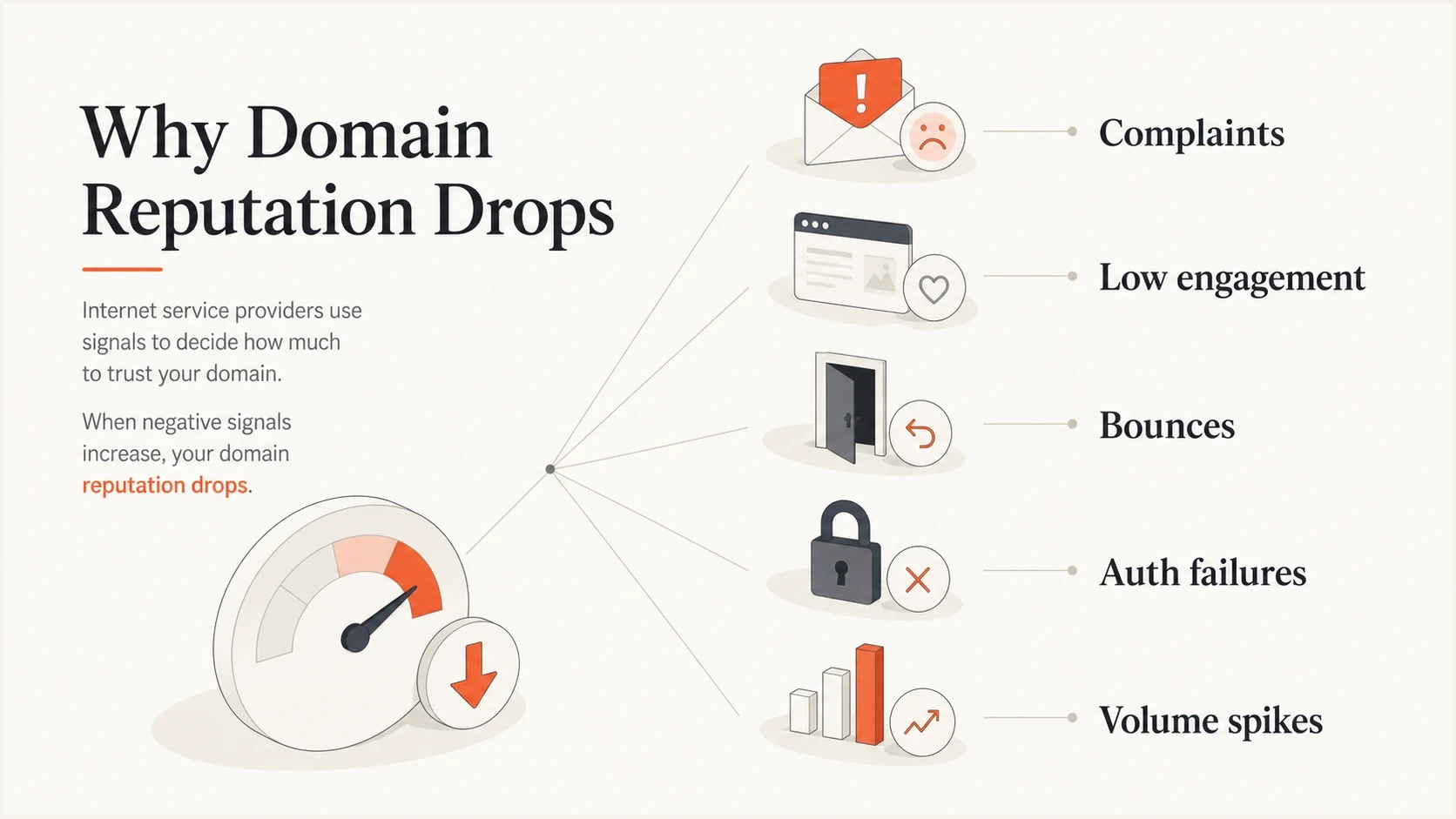
Causes of email domain reputation decline: complaints, low engagement, bounces, authentication failures, and volume spikes.
Fix the technical layer before rewarming
Before changing content or cadence, make sure every legitimate sender passes authentication. If a client uses multiple platforms for invoices, booking confirmations, newsletters, review requests, and sales messages, one missing sender can drag down the visible domain. Check SPF authorization, DKIM selectors, DMARC domain matching, bounce domain setup, TLS, valid forward and reverse DNS for sending IPs, and whether any sender is using the root domain without permission. DMARC passes when SPF or DKIM passes and its authenticated domain matches the visible From domain under the applicable matching rules; both methods do not need to pass for DMARC itself. RFC 9989 defines this test. Bulk-sender requirements can still require both SPF and DKIM.
Suped's DMARC monitoring supports this check because aggregate reports show which sources send as your domain, whether they pass SPF and DKIM, and which sources need attention. Suped's alerts and guided issue steps turn report data into a practical repair queue. The published aggregate-report specification describes authentication and policy results; those results do not establish inbox placement.
Starter DMARC record for monitoringDNS
Host/name: _dmarc.example.com
Type: TXT
Value: v=DMARC1; p=none; rua=mailto:dmarc@example.com
The example reporting address must receive and process DMARC aggregate reports. Replace example.com with your domain and use the reporting address assigned during Suped setup if Suped will process the reports. Publishing p=none collects feedback without requesting quarantine or rejection.
Do not jump straight to strict enforcement while reputation is falling. First confirm all legitimate mail sources authenticate correctly. RFC 9989 removed pct percentage sampling and introduced the t testing flag; it is not a percentage rollout control. Stage enforcement by fixing named sources and separating mail streams, then change policy after reports show consistent passing results. RFC 9989 also advises against p=reject for general-purpose email because forwarding and mailing lists can disrupt authentication.
Example DMARC quarantine policy after sender validationDNS
Host/name: _dmarc.example.com
Type: TXT
Value: v=DMARC1; p=quarantine; rua=mailto:dmarc@example.com
SPF has a limit of 10 DNS-querying mechanisms and modifiers per evaluation, including nested includes. Exceeding it produces permerror. Remove unused senders before adding more includes. Suped's Hosted SPF and SPF flattening support controlled sender updates, but flattened IP entries need maintenance when providers change their infrastructure. RFC 7208 defines the lookup limit.
Repair the sending behavior
Once the technical setup is sound, repair list hygiene and cadence. If reputation has dropped to low or bad, do not keep sending to the full file while hoping engagement improves. For marketing recovery, use opted-in subscribers with recent verified clicks or replies, or relevant purchase and product activity. A booking or purchase does not by itself grant marketing permission. Let positive engagement rebuild before expanding.
- Pause risky acquisition: Stop cookie-based automatic list growth, scraped records, bought data, and old imports.
- Segment by engagement: Start with opted-in subscribers showing recent clicks, replies, or relevant customer activity. Filter automated clicks and do not select recovery recipients by tracked opens alone.
- Improve list hygiene: Suppress confirmed invalid addresses immediately, plus unsubscribers and identifiable complainants. Apply a sunset policy to inactive marketing subscribers based on your normal sending frequency.
- Stabilize volume: Avoid sudden jumps. Increase slowly only when complaints and bounces stay low.
- Fix the signup path: State the email promise clearly, protect forms from bots, and use double opt-in (confirmed opt-in) where signup risk is high. Address validation does not prove consent or detect every spam trap.
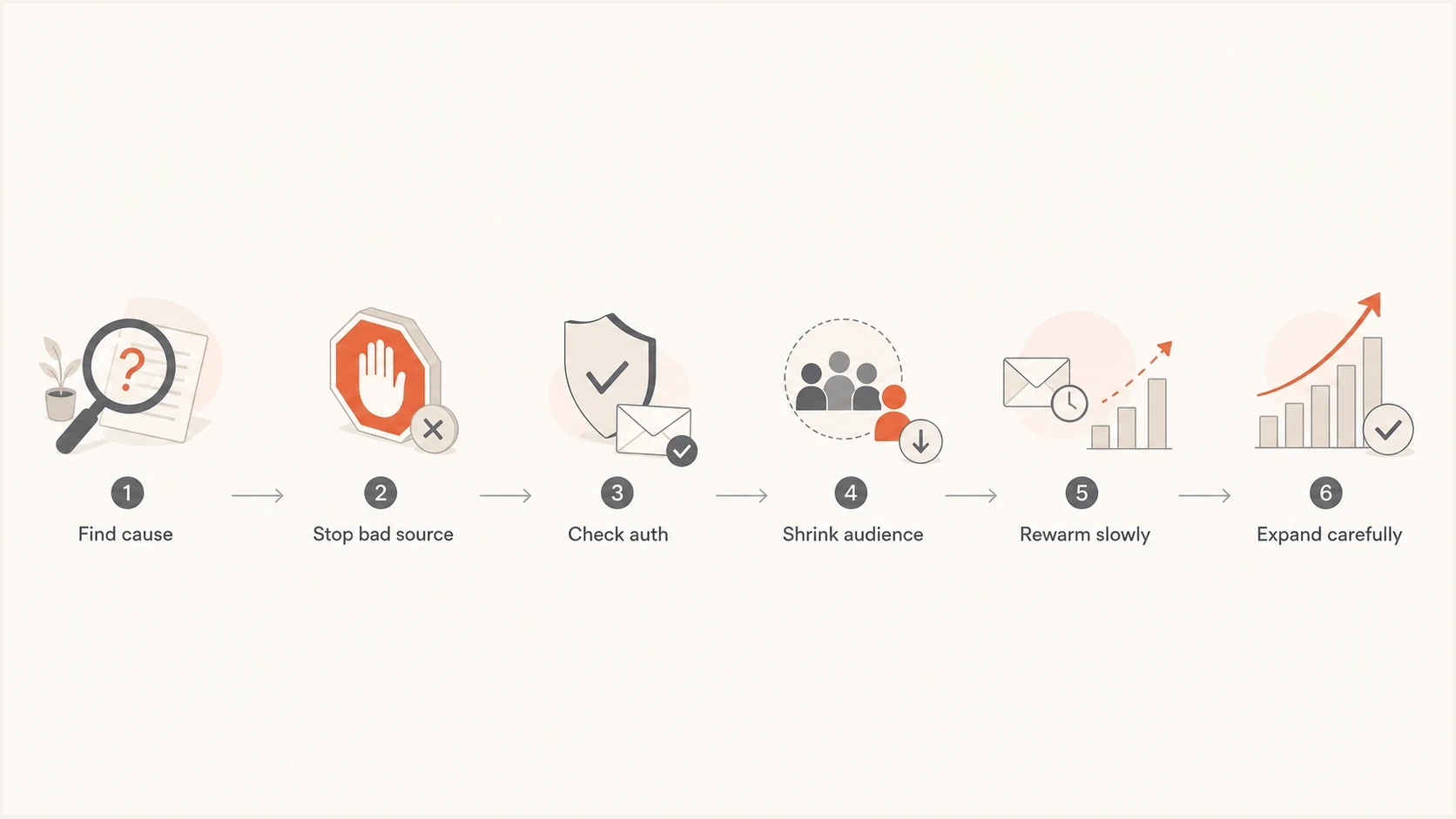
Domain reputation recovery steps: find the cause, stop the source, check authentication, reduce the audience, rewarm, and expand carefully.
For a service business such as HVAC or electrical, the clean list-building path is simple: ask at booking, quote request, checkout, or service follow-up. The call to action should benefit the customer, such as seasonal maintenance tips, recall notices, warranty reminders, or local rebate alerts. Do not frame the signup around the company needing a list.
Make unsubscribing easy with a visible link and RFC 8058 one-click headers for applicable bulk marketing mail. Gmail requires an HTTPS URL in List-Unsubscribe plus List-Unsubscribe-Post: List-Unsubscribe=One-Click; a body link alone is insufficient. Process requests within two days and test the complete unsubscribe path. Gmail's sender FAQ explains the header requirement, and Yahoo's sender requirements specify the two-day deadline.
Cadence can make the drop worse
Cadence affects reputation because it changes the traffic shape and the recipient's memory of consent. Too much mail burns out engaged subscribers and pushes complaints or unsubscribes. Too little mail lets engagement history go stale, and people forget why they are receiving the message.
|
|
|
|---|---|---|
Over-mailing | Complaints | Lower frequency |
Under-mailing | Weak recent engagement | Restart gently |
Spiky sends | Abuse risk | Smooth volume |
Cold blasts | Low engagement | Segment first |
Cadence mistakes and reputation impact.
Reputation recovery needs steady behavior. If the domain sends 500 messages one day, 15,000 the next, then nothing for two weeks, filters treat that pattern as riskier than a predictable program. Keep the rhythm consistent while the domain repairs.
Email tester
Send a real email to this address. Suped shows a results button when the test is ready.
?/43tests passed
Testing one message will not prove future inbox placement for every recipient, but it catches authentication breaks, content issues, header problems, and DNS mistakes before you send recovery campaigns at scale.
Use monitoring to keep recovery on track
Recovery fails when the sender cannot see which source is still creating bad signals. For client sending domains, separate every client, subdomain, and mail stream. Marketing, transactional, review requests, and sales outreach should not be grouped together when you are investigating reputation.
Track complaint rates by provider, not only as a blended average. For Gmail, keep the reported spam rate below 0.1% and prevent it from reaching 0.3% or higher, as specified in Gmail's sender guidelines. Yahoo's sender requirements require spam rates below 0.3%. The 0.3% figures are ceilings, not recovery targets; aim for complaints as close to zero as practical.
Issues page showing top issues, verified sources, unverified sources, and authentication pass rates
Suped's platform keeps authentication sources and repair steps together with blocklist monitoring. For MSPs and agencies, the multi-tenant dashboard keeps each client's sources and issues separate during diagnosis. Pair these findings with provider-specific delivery errors and complaint data. For a blacklist listing, confirm which domain or IP is listed and whether the affected receiver uses that list, fix the abuse source, then follow the operator's removal process. Delisting alone does not restore mailbox-provider reputation.
The strongest recovery programs track technical health and recipient behavior together. DNS fixes can restore authentication, but consent, relevance, and steady volume restore trust with mailbox providers.
- Daily checks: DMARC source pass rates, invalid-recipient bounces, deferrals, complaints, and blocklist or blacklist status.
- Weekly checks: Reputation by provider, clicks and replies by segment, unsubscribe rate, and volume trend.
- Release checks: New sender authentication, new form protection, and new list source consent.
How to measure recovery before increasing volume
There is no guaranteed recovery deadline or daily message count that repairs domain reputation. Compare several expected sends to the same engaged segment before widening the audience. Track each mailbox provider separately; authentication can recover before inbox placement does.
- Increase gradually only when complaints stay very low, invalid-recipient bounces are controlled, and SMTP deferrals or rejections decrease. If those signals worsen, return to the last stable volume.
- Use replies, verified clicks, and relevant customer activity to assess engagement. Privacy-related image prefetching makes tracked open rates unreliable. Apple's privacy documentation explains why remote content can load without a recipient reading the message.
- Treat missing provider data as a reporting gap, not a healthy score. Gmail data typically updates within 24 hours but can take longer, and low-volume days can lack data. A low reported complaint rate can also occur when messages already go to spam. See Gmail's reporting documentation.
Gmail requires spam rates below 0.3% for seven consecutive days before bulk senders regain mitigation eligibility. That is an eligibility rule, not a promise of repaired reputation or inbox placement. Gmail's sender FAQ distinguishes this condition from wider sender compliance.
Views from the trenches
Best practices
Start diagnosis with complaints, consent source, sending spikes, bounces, and authentication.
Rewarm by sending first to recent clickers and buyers, then expand when signals improve.
Ask for explicit signup at booking, checkout, or quote forms, with a clear value promise.
Common pitfalls
Treating warmup as a cure while poor audience quality keeps producing complaints.
Adding people after cookie acceptance creates low intent records and weak engagement fast.
Sending after long silence makes subscribers forget consent and mark mail as unwanted.
Expert tips
Track each subdomain separately because one client stream can hide a reputation drop.
Hold volume steady during recovery because sudden spikes make filters increase risk.
Use complaint and bounce trends before content tests, because those signals move fast.
Expert view
Expert from Email Geeks says a clean warmup does not protect a sender when poor data, weak targeting, or poor content keeps producing negative signals.
2024-09-10 - Email Geeks
Marketer view
Marketer from Email Geeks says if a domain reached high reputation and then fell, the mail stream usually changed in a way mailbox providers did not like.
2024-09-10 - Email Geeks
What to fix first
The priority order is straightforward: stop non-consensual or low-intent acquisition, suppress cold and stale records, verify SPF, DKIM, and DMARC for every real sender, stabilize sending volume, then rewarm with the best audience first. Suped supports that process by showing authentication sources, issue details, alerts, and domain health signals so recovery decisions use source-level evidence.




