
What is the best way to invite people to sign up for a newsletter without directly adding them to the list?

Published 23 Apr 2025
Updated 5 Oct 2026
13 min read
Summarize with
Updated on 11 Oct 2026: We added practical newsletter signup advice and clarified referral consent and double opt-in safeguards.
The best way to invite people to sign up for a newsletter without directly adding them is to give the referrer a public signup link or a web version of the newsletter, then let the recipient subscribe through your own form. Do not accept a spreadsheet of addresses, paste those people into the list, or treat someone else's forwarded "yes" as clean consent.
The key is control of the consent record. The subscriber should take the action that creates the subscription. Your system should capture the signup source, timestamp, consent wording, and confirmation state. That protects the recipient, the person making the referral, and the sender reputation behind the newsletter.
Keep a personal note personal: one person independently decides to email someone they actually know with a link to subscribe. It becomes risky when the organization encourages employees, board members, volunteers, partners, or clients to send bulk invitations from normal work mailboxes. That can turn a newsletter growth idea into an unmanaged acquisition campaign and, in some jurisdictions, make the organization responsible for the invitation.
Use an invite link, not a forwarded list
The clean answer is simple: share the newsletter, share the signup page, and make the recipient opt in directly. Keep "someone thinks this person will like it" separate from "this person gave the sender permission to email them every month." Those are different things.
- Share the form: Give the referrer a signup page link, not access to list management.
- Use the web version: Publish an archive with a visible subscribe button that people can discover or share on their own initiative.
- Keep consent direct: The recipient should submit the form, not the referrer or list owner.
- Use confirmed opt-in: Send a confirmation email before the address becomes an active subscriber.
- Avoid address-based incentives: Do not reward people for submitting names or private address books, and review organized referral rewards under applicable marketing rules.
If someone independently wants to invite a small number of real contacts, the practical path is a short personal email that says why the newsletter is useful and includes a signup link, provided the outreach is permitted where the recipients live. The organization should not receive those addresses first. The first contact with your marketing system should come from the person who wants the newsletter.
Make the newsletter signup page worth sharing
A newsletter signup landing page should say who it is for and what subscribers gain. Replace a generic "Join our list" with a specific promise, such as "Get one practical nonprofit board tip each month." Add a sample issue so people can judge the content before subscribing.
Keep the signup form short and usable on a phone. An email field is usually enough; make extra fields optional unless they are needed. Use a clear call to action such as "Subscribe to the monthly newsletter" and place the privacy information nearby.
MarketingSherpa's signup copy examples emphasize explaining what readers receive and why it is useful.
- Link the signup page in your website navigation, relevant articles and social media profile so interested people can find it.
- Share a sample issue or useful excerpt in a public social media post with a subscribe link, rather than sending unsolicited direct messages.
- Put a QR code on event materials or printed handouts so people can open the form and subscribe on their own device.
- If you offer a downloadable resource or lead magnet, explain newsletter enrollment separately. Requesting the resource alone is not newsletter consent.
Why the invite path protects consent and deliverability
Consent is not a transferable asset. If a board member, colleague, or former classmate knows someone, that relationship belongs to them. It does not automatically give the newsletter owner permission to start recurring email. A business card, social connection, event registration, donation, purchase, or membership does not by itself create a reliable consent record for a recurring newsletter.
Deliverability risk also changes once normal work mailboxes get used for acquisition. Personal mailboxes are built for correspondence, not campaign volume. A few thoughtful notes to real contacts are different from a department sending hundreds of lightly personalized invitations. Scale is where complaints, filtering, rate limits, and blocklist (blacklist) listings become more likely.
Risky path
- Imported addresses: The list owner receives addresses before permission is clear.
- Forwarded approval: A copied reply lacks a clean form submission record.
- Mailbox sending: A correspondence account starts acting like a campaign tool.
Cleaner path
- Signup link: The recipient chooses the subscription directly.
- Confirmed opt-in: Recipient confirmation helps verify access to the mailbox.
- Clear source: The subscription source is recorded inside your system.
For a small number of real relationships, the highest-risk part is not the personal note itself. The problem is the precedent. If the organization says "send us people you know and we will add them," the next person can read that as permission to upload a much larger list. Set the rule at the process level so it still works when enthusiasm increases.
Check referral rules before you encourage sharing
Consent and marketing rules depend on the jurisdictions that apply to the sender and recipient, and how the invitation starts. Under UK PECR, encouraging someone to email or forward your marketing makes the organization responsible as an instigator. The UK has defined soft opt-in exceptions, including one for charitable purposes, but those exceptions do not cover refer-a-friend schemes. An independent personal recommendation is treated differently. See the ICO electronic mail guidance.
- Keep the organization out of the send: Do not collect a friend's address or send an invitation on a referrer's behalf.
- Favor discoverable links: Keep the signup page and web issue public so readers can choose whether and how to share them.
- Review organized campaigns: Have counsel check referral rewards, prewritten invitations, automated share flows, and recipient locations before launch.
- Separate service messages: A purchase, donation, membership, or event registration does not automatically authorize newsletter marketing.
US federal CAN-SPAM generally takes an opt-out approach to commercial email, but a one-to-one commercial invitation still has to meet its requirements, including sender identification and an unsubscribe mechanism. Referral incentives also affect who is responsible. See the FTC CAN-SPAM guidance. A consent-first signup workflow is a practical default across regions.
A one-off email asking for newsletter consent is itself marketing when it promotes the newsletter. It does not bypass prior-consent rules. For example, ACMA guidance says you cannot send an electronic marketing message just to ask for consent.
Set up a confirmed newsletter signup workflow
A good invite workflow has one job: make it easy for interested people to subscribe without letting anyone else enroll them. It can be lightweight, but it needs clear guardrails.
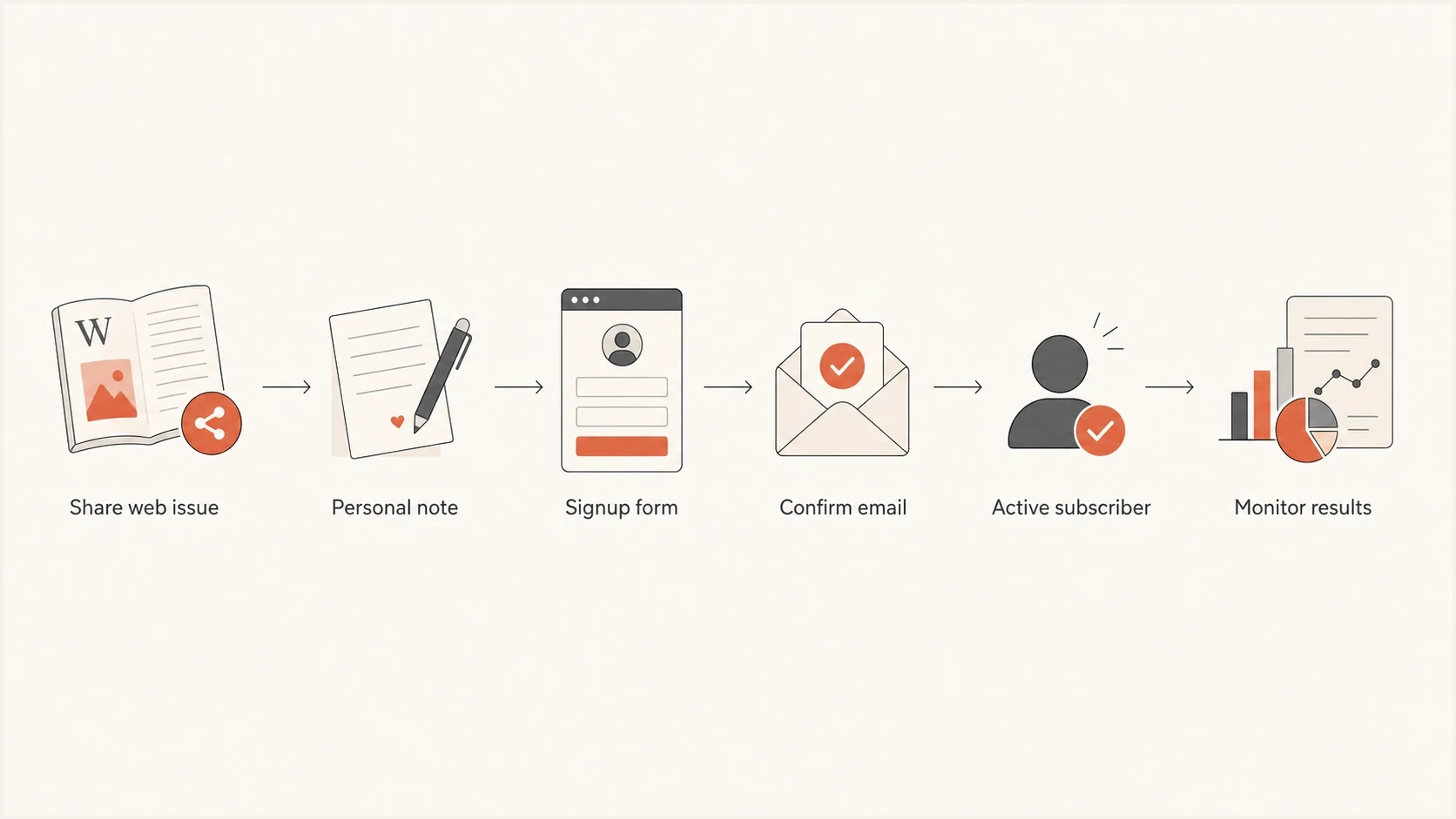
Newsletter signup workflow with a shared web issue, personal invitation, signup form and email confirmation.
- Create a share page: Publish the current issue on the web with a short subscribe call-to-action.
- Give referrers one link: Use the same signup page so tracking and consent stay consistent.
- Explain the subscription: State the newsletter topic, sender identity, expected frequency, privacy treatment, and unsubscribe option beside the email field. Keep newsletter consent separate from checkout or event registration and do not precheck opt-in boxes.
- Confirm the address: Send a confirmation email after the form submission and activate the subscription only after the recipient confirms. Keep pending addresses out of newsletter campaigns.
- Tag the source: Use a campaign code such as board-referral or member-share for reporting. Keep email addresses out of referral URLs.
- Watch complaints: Pause the referral push if complaints, bounces, or unsubscribes rise.
Measure confirmed opt-in conversion as confirmed subscribers divided by signup-page visitors, and track the share of form submissions that reach confirmation separately. Compare complaints and bounces by referral source so higher signup counts do not hide poor list quality.
Do not accept address lists
If someone offers a list of names, decline it and send the invite link instead. The safer operating rule is that your team never handles referred addresses until those people submit the signup form themselves.
- No uploads: Do not import contacts supplied by another person.
- No forwarded consent: Ask the recipient to complete the official form.
- No address storage: Do not keep referred addresses outside your consent system.
Write the invitation as a personal note
The invitation itself should read like a real note, not a mass campaign. If the person knows the recipient and independently chooses to write, they can explain why the newsletter is relevant and give them a choice. Avoid pressure, urgency, language that implies the recipient has already been subscribed, and organization-led bulk outreach.
Simple invite emailtext
Subject: Newsletter you might find useful

Hi Jordan,

After our conversation about board meetings, I thought this
monthly newsletter on nonprofit board work and community
programs would be relevant to you.

If you want it, you can sign up here:
https://example.com/newsletter

No action needed if it is not useful.

Best,
Avery
That wording identifies the relationship, gives context, offers a direct signup path, and makes no assumptions. It also avoids using the organization's marketing system until the recipient chooses to subscribe. Use it as a model for an independently written personal note, not as a mass template distributed by the organization.
Use double opt-in for referred signups. It records a confirmation step and reduces accidental or third-party enrollment. It does not guarantee informed consent or prevent unwanted confirmation emails when a signup form is abused.
Where DMARC and deliverability monitoring fit
The invite process creates a direct consent record when the signup wording and recipient action are clear. It does not replace deliverability hygiene. Once someone signs up, your newsletter still needs authenticated mail, stable sending patterns, and clean handling of bounces and complaints.
Before you promote a referral push, send a real message through your normal newsletter system and check its authentication with Suped's email tester. Separately check rendering and test the unsubscribe link. Where bulk sender rules require it, verify one-click unsubscribe headers as well as the visible link. Check the applicable email sender requirements before expanding the list.

Email tester sample report showing total score, email preview, issue summary, and per-section results
Run a domain health checker before expanding newsletter acquisition. A clean signup flow will not help enough if SPF, DKIM, or DMARC are broken.
Email tester
Send a real email to this address. Suped shows a results button when the test is ready.
?/43tests passed
Suped's product provides DMARC monitoring for the authentication part of this workflow. Use its reports and alerts to identify failing sending sources, prioritize repairs and verify fixes after DNS changes. Its blocklist monitoring tracks domain and IP blocklist or blacklist status while referral traffic grows. Keep consent records and complaint metrics in your newsletter system; DMARC aggregate reports do not contain subscriber-level signup or complaint data.
What to monitor after the invite campaign
- Authentication: Track SPF, DKIM, and DMARC pass rates for newsletter traffic.
- Complaints: Watch complaint rates after each referred subscriber cohort.
- Reputation: Check domain and IP blocklist or blacklist signals before scaling.
- Sources: Compare confirmed signup conversion by referral source and investigate complaint spikes in each group.
How to handle forwarded signup requests
A forwarded "yes, add me" is tempting because it feels human. Ask the referrer to pass along the official signup link. If the person has contacted you directly to request a subscription, reply with the link. A forwarded reply is not automatically invalid consent, but the form and confirmation step give your team a consistent record without sending a new invitation to an unverified contact.
|
|
|
|---|---|---|
Spreadsheet | Reject | An address list alone does not establish consent |
Forwarded yes | Return signup link to referrer | Record the recipient's own signup action |
Personal share | Share public link where permitted | Sharing does not enroll the recipient |
Form signup | Confirm | Keep pending until the recipient confirms |
How to handle referred newsletter interest
The same discipline also helps with list quality. If your form is exposed publicly, protect it against bot signups by rate-limiting submissions and confirmation resends. Suggest corrections for email typos before confirmation, and let the person approve the corrected address. Double opt-in does not stop an abused form from sending unwanted confirmation emails.
Keep a short internal script for staff: "Please send them this signup link. We cannot add people on their behalf, but they can subscribe in under a minute." That answer is clear, repeatable, and hard to misread.
When small private sharing is acceptable
Readers can choose to share the newsletter with people who will find it useful. The difference is that they share content, not private addresses. If the organization prompts, scripts, automates, or rewards invitation messages, check the marketing rules that apply before launch. In every case, the newsletter owner should control the signup flow and the recipient should control whether they subscribe.
Newsletter footer share prompttext
Know someone who would find this useful?
Share the web version of this issue:
https://example.com/newsletter/latest

New readers can subscribe here:
https://example.com/newsletter/signup
That footer sends people to content first. It does not ask subscribers to hand over private contacts, and every interested reader still takes the subscription action. Before using an explicit share prompt, confirm it is permitted where recipients are located. If it is not, keep the web issue and signup link public without directing readers to forward them.
The referral boundary
The practical boundary is "share this link if local rules allow it," not "send us their addresses and we will add them." That boundary keeps list growth tied to subscriber action instead of internal enthusiasm.
Views from the trenches
Best practices
Give referrers a public signup link so every new subscriber creates their own consent record.
Use the web version of the newsletter as the share asset, with a clear subscribe button.
Check local rules before prompting, scripting, automating, or rewarding referral messages.
Common pitfalls
Accepting private address lists creates consent gaps before the first newsletter is sent.
Treating a forwarded yes as permission leaves weak proof when a complaint arrives later.
Letting staff send bulk invites from work mailboxes can trigger filtering or complaints.
Expert tips
Write a short internal rule that says staff share links, never collect addresses.
Tag referral signups so engagement and complaint rates can be reviewed by source.
Stop the referral campaign quickly if complaints rise, even when signups look strong.
Marketer view
Marketer from Email Geeks says a signup form link is the cleanest asset to pass around because it keeps the action with the recipient.
2024-03-12 - Email Geeks
Expert view
Expert from Email Geeks says list owners should avoid actively encouraging staff to send unsolicited newsletter invites from work addresses.
2024-03-12 - Email Geeks
Newsletter referral checklist
- Best default: Publish a subscribe link and use confirmed opt-in.
- Acceptable personal path: An independently written, one-to-one note to a real contact when local rules permit it.
- Avoid entirely: Receiving a list of addresses and adding them yourself.
- Monitor after launch: Watch authentication, complaints, bounces, and blocklist or blacklist signals.




