What are the pros and cons of using double opt-in for email lists?

Updated on 2 Aug 2026: We added safer confirmation handling and clearer measurement advice.
Double opt-in makes an email list cleaner, safer, and easier to defend, but it also reduces the number of people who become reachable subscribers. The direct answer is that double opt-in is worth using when fake signups, consent disputes, spam traps, listbombing, or poor list hygiene create more risk than the lost conversions. It is a poor default when a low-risk signup path already has strong validation, clear consent language, and tight early engagement filtering.
Treat double opt-in as a risk control, not as a moral badge. A well-designed confirmation event provides strong evidence that the message reached the mailbox and a person completed the requested action. A simple link activation is weaker evidence because automated email security scanners can follow links. Double opt-in also does not fix weak sending practices, bad segmentation, or an authentication setup that fails in the background. Test the confirmation message with an email tester so the one email that controls the whole signup process actually reaches the inbox.
- Main pro: Better list quality, stronger proof of permission, fewer bad addresses, and fewer malicious submissions.
- Main con: Lower list growth because every signup now depends on a confirmation email action.
- Best use: High-risk forms, political lists, giveaways, referral programs, new sender domains, and public signup pages.
- Bad use: A generic fix for poor content, weak targeting, broken authentication, or missing unsubscribe hygiene.
The short answer
The strongest case for double opt-in is not that every confirmed subscriber becomes a better customer. The stronger case is that unconfirmed subscribers include addresses that never belonged on the list. Some are typos. Some are people entered by someone else. Some are fake submissions. Some are real people who did not care enough to finish the signup. Double opt-in removes those before they start affecting reputation metrics.
|
|
|
|---|---|---|
List quality | Removes typos and fake signups | Shrinks reachable list size |
Consent proof | Adds a clear confirmation event | Requires record keeping |
Reputation | Reduces bad first sends | Does not replace monitoring |
Conversion | Confirms strong intent | Loses distracted signups |
Operations | Simplifies complaint analysis | Adds one workflow step |
Compact view of the tradeoffs.
A practical default
Use double opt-in when the downside of bad addresses is high. Test it when the business impact of lost signups is high. Avoid treating it as the only acceptable permission model.
- Use it: For public forms, high-abuse campaigns, sensitive topics, and lists with weak historical hygiene.
- Test it: For paid acquisition, ecommerce discounts, webinars, and lead magnets where conversion loss is material.
- Replace it: Only when validation, abuse controls, suppression logic, and early engagement rules are already working.
Why double opt-in improves list quality
The best way to explain double opt-in is data integrity. A form submission proves that someone typed an address into a form. It does not prove that the person owns that inbox, entered the address correctly, or wanted ongoing marketing. A well-designed confirmation flow narrows that gap.
The invisible benefit is waste removal. A list can look bigger under single opt-in while carrying misspellings, disposable addresses, spam trap risk, and people who never asked to hear from the sender. Double opt-in removes much of that before the first campaign touches the mailbox provider reputation model.
Single opt-in
- Speed: The subscriber joins immediately after submitting the form.
- Risk: Bad addresses and malicious submissions enter the list unless other controls catch them.
- Use case: Low-risk forms with strong validation and fast suppression of non-engagers.
Double opt-in
- Proof: A deliberate confirmation after mailbox delivery provides strong ownership evidence.
- Filter: Typos, fake addresses, and low-intent submissions stop before marketing begins.
- Use case: High-risk acquisition, legal proof needs, political senders, and abuse-prone signup forms.
Confirmation event fields to storeJSON
{
  "email": "subscriber@example.com",
  "signup_time": "2026-05-26T10:00:00Z",
  "signup_ip": "203.0.113.10",
  "source_form_id": "newsletter-footer",
  "consent_text_version": "2026-05-newsletter-v1",
  "confirmation_time": "2026-05-26T10:03:40Z",
  "confirmation_ip": "203.0.113.10",
  "confirmation_user_agent": "Mozilla/5.0"
}
Where double opt-in hurts
The obvious cost is that the final signup rate becomes the form completion rate multiplied by the confirmation rate. If 1,000 people submit a form and 800 confirm, the cost is acceptable for many lists. If only 100 confirm, double opt-in has turned the signup process into a heavy conversion tax.
Confirmation rates depend on intent and message design. Account activation, paid access, and promised downloads usually confirm better than a plain newsletter signup. Measure the rate by source and compare each form with its own history. A blended sitewide rate can hide a broken form or a poor acquisition source.
Confirmation rate signals
Set separate baselines for each signup source and offer.
Healthy
At or above baseline
The source remains at or above its established confirmation rate.
Investigate
Below baseline
Review inbox placement, copy, timing, source quality, and form expectations.
Broken
Sudden collapse
A sharp fall points to a workflow failure or a sudden traffic-quality change.
The confirmation email is the product
A default confirmation email is often the weakest part of double opt-in. The subject line, sender name, landing page promise, and call to action need to match what the person just requested. If the email looks like a system receipt, many valid subscribers ignore it.
- Subject: Use clear action wording such as "Confirm your newsletter signup" or "Activate your download".
- Body: Repeat the value promised on the form and keep one primary button.
- Timing: Send immediately and suppress duplicate confirmation requests inside a short window.
When double opt-in is worth using
Double opt-in is most valuable when the list is exposed to abuse or when proof matters. It fits public forms, political or advocacy lists, sweepstakes, referral incentives, controversial topics, and any signup path that has already attracted fake submissions.
It also deserves serious attention for small senders. A small list can run into spam trap or complaint problems faster because there is less volume to dilute bad signals. If blocklist (blacklist) operators or mailbox providers see repeated trap hits, the sender pays for those bad addresses long after the signup event. For high-risk forms, pair double opt-in with listbombing prevention rather than relying on the confirmation email alone.
- Political lists: They attract hostile signups and need cleaner proof of consent.
- Giveaways: They attract low-intent addresses and prize-driven submissions.
- New domains: They have little reputation history and less room for early mistakes.
- Legal proof: They benefit from a stored confirmation timestamp, source, and consent version.
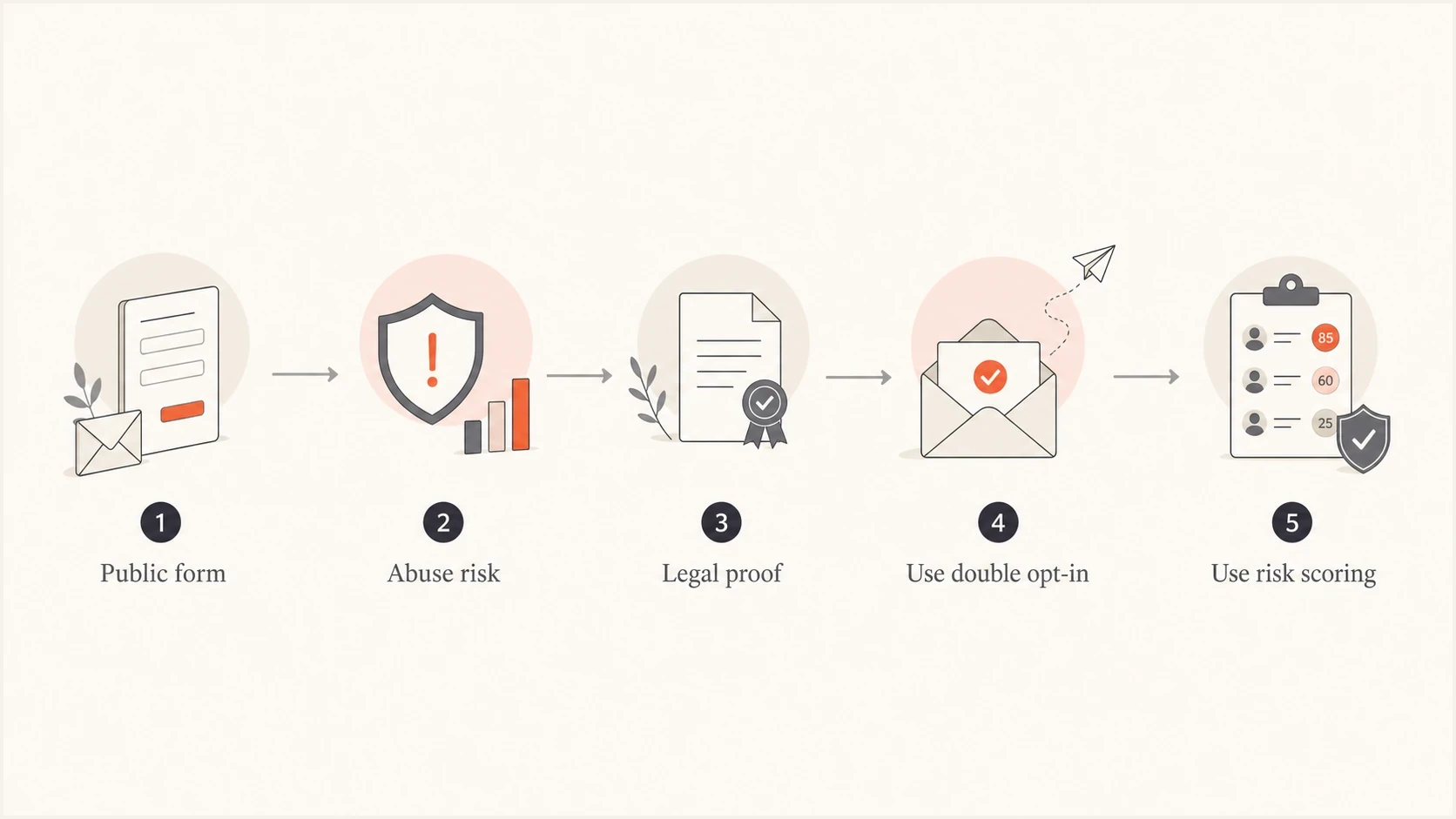
Decision path for choosing double opt-in or risk scoring.
For legal planning, do not reduce the question to "GDPR equals double opt-in". Double opt-in provides evidence of a confirmation event, but valid consent still depends on a clear request, a deliberate choice, and records showing what the person agreed to. It cannot repair vague disclosures, bundled consent, or preselected choices. Regional rules and campaign types still differ, so read the country requirements and get legal advice for the final policy.
When single opt-in can be reasonable
Single opt-in can be reasonable when the signup source is controlled, abuse is low, the offer is clear, and the sender removes low-quality addresses quickly. That last part matters. Single opt-in without a cleanup system is a decision to let every form submission reach the list.
A risk-based approach often works better than a blanket rule. The form can accept trusted traffic immediately, challenge suspicious traffic, and require confirmed opt-in for risky sources. That gives the list owner most of the protection without forcing every subscriber through the same step.
Strict confirmed opt-in
- Rule: Nobody receives marketing until they complete the confirmation.
- Strength: Clean evidence and strong bad-address filtering.
- Cost: Valid subscribers are lost when the confirmation step is missed.
Risk-based confirmation
- Rule: Only risky or untrusted submissions require a confirmation action.
- Strength: Lower friction for trusted traffic and more control over abuse.
- Cost: Needs scoring, segmentation, and fast suppression rules.
|
|
|
|---|---|---|
CAPTCHA | Automated form abuse | Manual bad entries |
Validation | Typos and invalid mailboxes | Consent disputes |
Rate limits | Submission bursts | Slow manual abuse |
Early filters | Non-clickers and low intent | First-send risk |
Controls that reduce single opt-in risk.
How to make double opt-in work better
The confirmation email should not look like an afterthought. It is the handoff between interest and subscription. The copy should connect directly to the form, restate what the person asked for, and make the next action obvious. The post-submit page should also tell the person to check the inbox and identify the sender name.
Simple confirmation email structureTEXT
Subject: Confirm your weekly deliverability notes

You requested weekly deliverability notes from Example Co.

Confirm your subscription:
https://example.com/confirm?token=abc123

If you did not request this, ignore this email.
The best confirmation emails behave like activation emails. They explain what happens after confirmation and match the promise that got the person to submit the form. After confirmation, show a clear success page and send the promised welcome message or access email.
- Match intent: If the form promised a guide, the email should say the guide unlocks after confirmation.
- Keep one CTA: The button should confirm the signup, not compete with social links or product navigation.
- Track source: Measure confirmation rate by form, campaign, incentive, and acquisition channel.
- Expire tokens: Use time-bound links and issue a fresh confirmation only when the subscriber requests it.
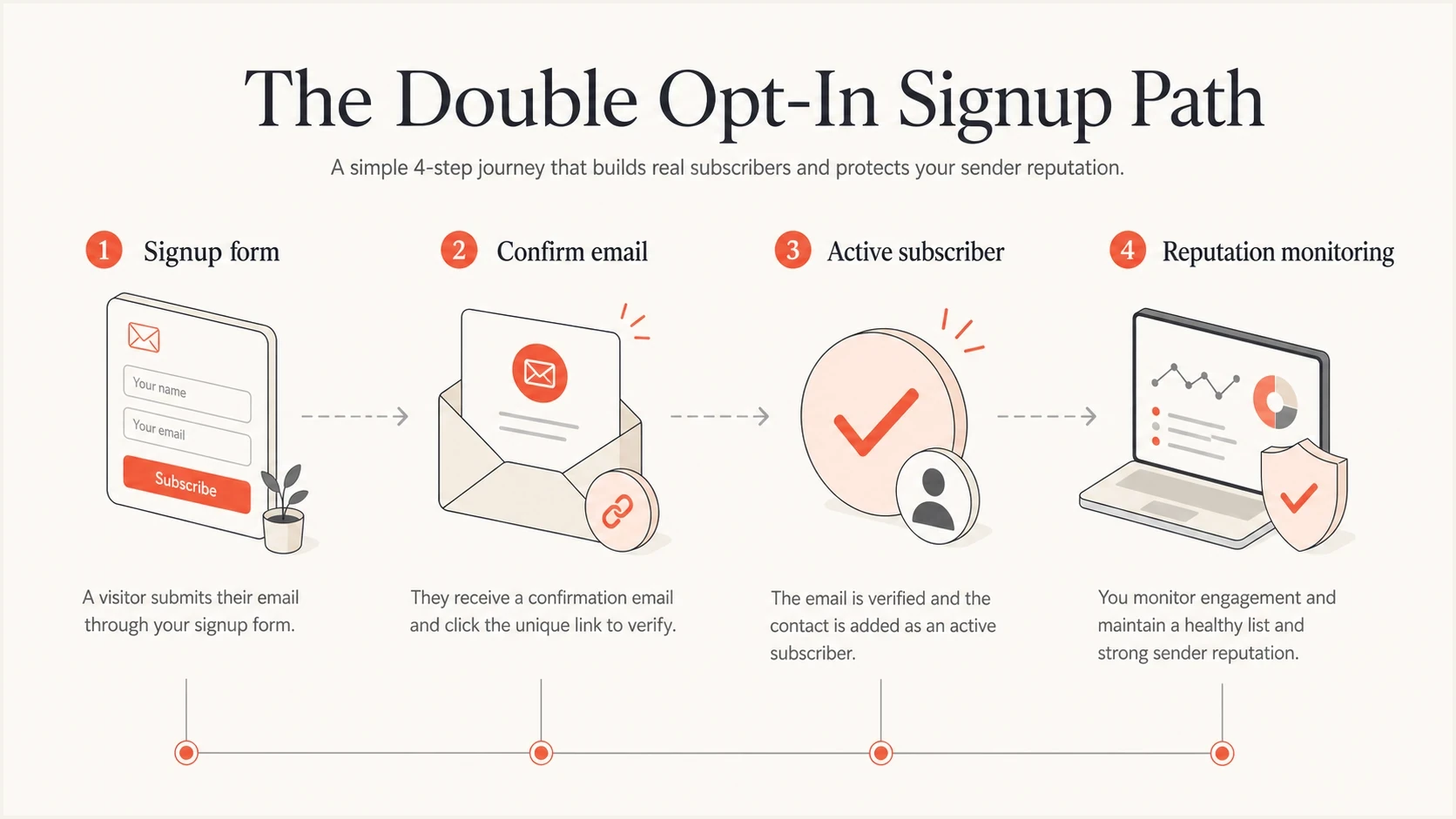
Double opt-in signup path with confirmation and monitoring.
How to handle pending subscribers and automated clicks
A submitted address should enter a pending state, not the marketing audience. Keep that state separate until confirmation succeeds or the token expires. This prevents an unconfirmed record from slipping into campaigns through a broad segment, import, or automation rule.
Build the confirmation event carefully
Some email security systems inspect links before delivery or at click time. A confirmation URL that changes subscription state on the first request can record an automated visit as consent.
- Separate pending records: Exclude them from every marketing segment until confirmation is complete.
- Require deliberate activation: If automated visits appear, let the link open a page and require an explicit confirmation button.
- Use single-use tokens: Expire each token, reject replays, and avoid putting personal data in the URL.
- Limit reminders: Send only the confirmation reminders allowed by the legal basis and the expectation set on the form.
Investigate bursts of confirmations that happen seconds after delivery, share one user agent, or never complete the landing-page action. These patterns are investigation signals, not automatic proof of abuse. Delete or anonymize stale pending records under a documented retention policy.
What to monitor after rollout
After rollout, compare confirmed and unconfirmed cohorts instead of arguing about theory. Track confirmation rate, first-send bounce rate, complaints, clicks, conversions, unsubscribes, spam trap indicators, and blocklist (blacklist) movement. Treat opens as directional because image caching and privacy protections distort them. Confirmed subscribers also self-select for higher intent, so stronger engagement does not prove that the confirmation step caused the entire difference.
This is where Suped's product fits the workflow. Suped brings DMARC aggregate reports, SPF and DKIM authentication results, blocklist (blacklist) monitoring, and deliverability signals into one place. Use those reports to check whether a signup-policy experiment coincides with healthier sending signals while keeping subscriber consent and conversion metrics in the email platform.
Suped DMARC dashboard showing email volume, authentication health, and source breakdown
Double opt-in will not save a domain with broken authentication. Use DMARC monitoring to see whether legitimate sources pass authentication, and use blocklist monitoring to spot reputation problems before they turn into broad inbox placement issues. A quick domain health checker pass is also useful before changing signup policy because it catches obvious DNS and authentication gaps.
A practical test plan
- Segment: Tag each signup as confirmed, pending, trusted, or risk-scored.
- Measure: Compare clicks, conversions, complaints, bounces, and unsubscribes by segment.
- Suppress: Keep pending addresses out of marketing and remove stale records under the retention policy.
- Decide: Keep double opt-in where it improves quality or reduces reputation risk.
Views from the trenches
Best practices
Measure segments: compare confirmed, unconfirmed, and risk-scored subscribers first.
Protect forms: use CAPTCHA, throttling, validation, and source tracking together.
Write clearly: explain the value, name the next step, and keep one confirmation action.
Common pitfalls
Counting raw list size: unconfirmed addresses inflate totals and hide real demand.
Ignoring form abuse: double opt-in alone still lets scripts submit garbage hourly.
Using defaults: bland confirmation emails reduce clicks even when signup intent is real.
Expert tips
Segment first: test double opt-in on risky sources before changing every signup form.
Watch reputation: compare complaint, bounce, and blocklist signals after changes.
Keep proof: store consent text, timestamp, source, IP, and confirmation event together.
Marketer from Email Geeks says double opt-in is a crude but useful fallback when malicious signups, political targeting, or consent disputes are real risks.
2024-07-17 - Email Geeks
Marketer from Email Geeks says data integrity is often the stronger framing than permission because the process provides evidence that the address belongs to the person who asked.
2024-07-17 - Email Geeks
Practical recommendation
The pros of double opt-in are stronger list quality, cleaner consent evidence, lower fake-signup risk, and better protection against spam traps. The cons are lower signup completion, extra friction, more operational tracking, and false confidence if the sender ignores authentication and reputation.
The recommendation is conditional. Use double opt-in when risk is high or proof matters. Use single opt-in only when the form is controlled, abuse prevention is in place, and low-quality new subscribers are suppressed quickly. For many teams, the best setup is risk-based: trusted sources enter normally, suspicious sources confirm first, and every cohort is measured.
Suped helps with the part double opt-in does not solve. Suped's DMARC reports and alerts show whether legitimate sources authenticate correctly, while blocklist (blacklist) monitoring surfaces reputation changes during the test. Keep those domain signals beside confirmation, complaint, and conversion data when deciding which signup policy to retain.




