What are the security risks and solutions associated with misspelled email addresses and password resets?

Updated on 27 Jul 2026: We updated this guide with safer token handling, session controls, address-change checks, and recovery notifications.
Misspelled email addresses create security risk when the typo points to a real domain that accepts mail. A reset link, login code, invoice, health notice, or account alert then lands in an inbox controlled by someone other than the intended user. The most dangerous case is password reset mail because many applications still treat control of the email inbox as control of the account.
The direct answer is simple: prevent obvious typos before account creation, verify ownership before activating sensitive workflows, rate-limit and log password reset requests, keep passwords and account data out of reset emails, and protect each reset token with a short-lived, single-use HTTPS link. Monitor the sending domain so attackers cannot imitate your reset messages. Misspelled addresses are both an identity problem and an email authentication problem because the damage often happens at the boundary between product signup, recovery, and mailbox trust.
The direct security risk
The core risk is account takeover through misdirected recovery. If a customer types user@gmial.com instead of user@gmail.com, and the misspelled domain accepts mail, the reset message can be delivered. A person operating that domain can see the reset link, one-time code, account name, IP hint, or login prompt. They do not need to break SPF, DKIM, DMARC, TLS, or the mailbox provider. The application sent the secret to the wrong place.
- Account takeover: A reset link gives the unintended recipient a path into the account unless the application adds a stronger proof step.
- Data exposure: Reset emails often reveal usernames, customer status, product names, account IDs, and support links.
- Abuse feedback loss: The real user never sees the message, so they cannot report that the address is wrong until something else breaks.
- Sender reputation damage: Typos can deliver to spam traps, dormant domains, or catch-all inboxes that treat the message as unwanted.
The MX record is not proof of ownership
A domain with a valid MX record can accept mail without being the right destination. Address existence does not prove that the person requesting the reset controls the intended mailbox.
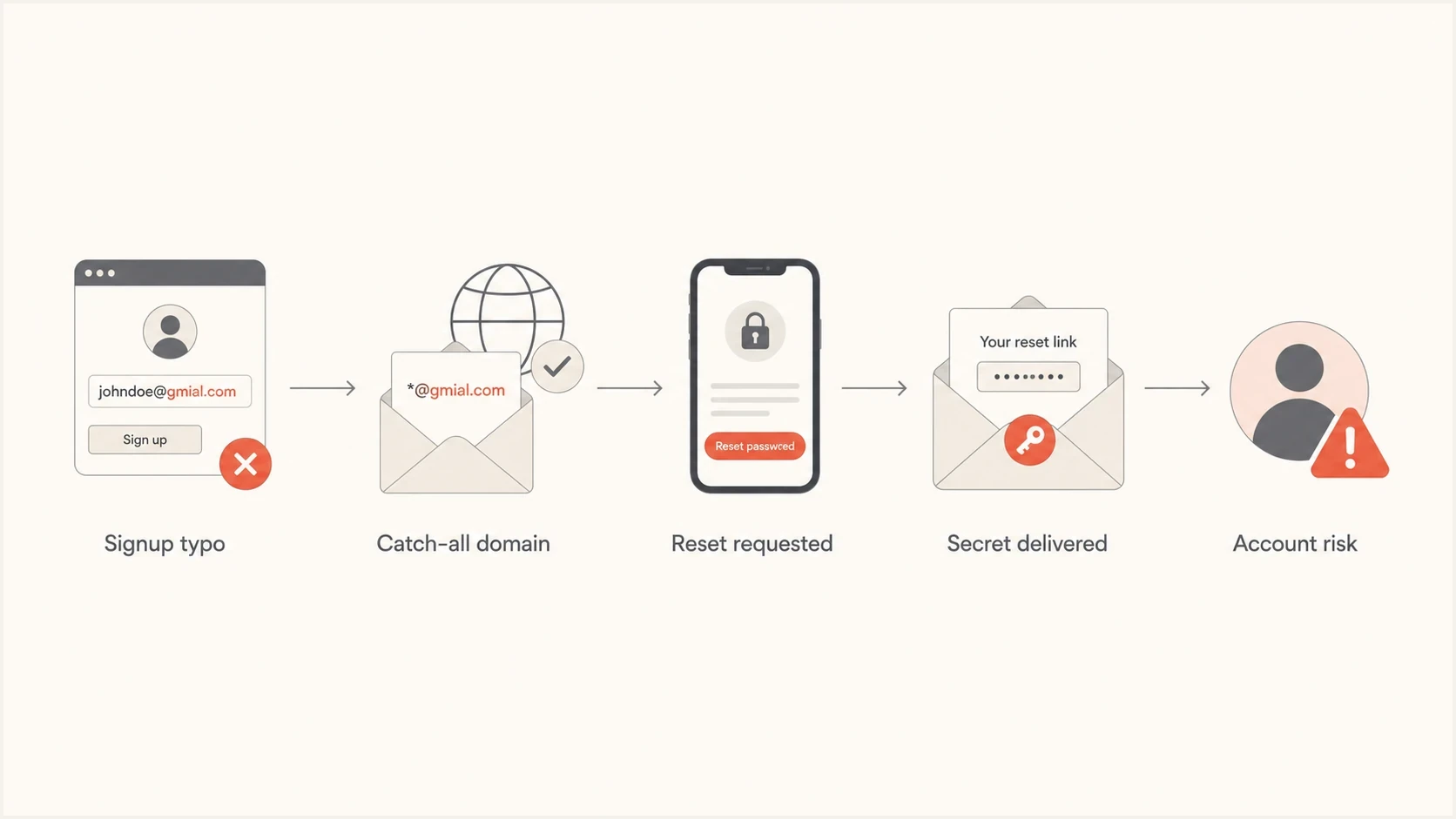
Password reset flow showing a misspelled email reaching a catch-all domain
How misspelled addresses become exploitable
There are several ways typo addresses become exploitable. Some are accidental, such as a real user mistyping a major mailbox provider. Some are deliberate, such as an attacker registering lookalike or typosquatting domains that collect mail. The risky part is that these domains can look operationally normal to a sender: they have DNS, they have MX records, and they accept SMTP delivery.
|
|
|
|
|---|---|---|---|
Transposed letters | gmial | Misdirected resets | Inline correction |
Wrong TLD | com vs co | Lookalike capture | Confirm domain |
Catch-all domain | Any local part | Silent collection | Verification first |
Trap domain | Old typo | Reputation loss | Suppress sends |
Common typo address patterns and the risk each one creates.
The password reset flow makes this worse because it often bypasses normal inbox engagement logic. Marketing mail might stop after bounces or no engagement, but transactional systems keep sending because the event is user-triggered. A typo address that accepts mail can receive repeated resets for months unless the product treats the address as unverified or risky.
A reset system should not send a working link to any address stored on an account without checking account state. If the email address has never been verified, or if the address was recently changed, the reset flow needs extra proof. Use a previous-session confirmation, an existing authenticator, a recovery code, or a limited recovery session that does not expose account data until another check succeeds.
Password reset design that reduces harm
A safer reset flow assumes that the email address can be wrong, stale, compromised, or monitored by someone else. Email still works as a recovery channel because it is widely available, but high-risk accounts should not use email as the sole proof of identity. An existing authenticator, saved recovery code, prearranged recovery contact, or reviewed support process can provide stronger proof when the account holds sensitive data. Require multi-factor authentication (MFA) for sensitive recovery when another bound authenticator remains available. Users should also protect the recovery mailbox with MFA because inbox compromise defeats an otherwise correct email reset flow.
Risky reset flow
- Unverified address: The app sends a reset link before proving that the user controls the mailbox.
- Rich email body: The email includes account details that help the wrong recipient identify value.
- Long-lived links: A reset URL remains usable after forwarding, scanning, or delayed mailbox access.
Safer reset flow
- Verified address: Sensitive recovery only works after email ownership has been verified.
- Minimal content: The email says only what is needed and avoids exposing account data.
- Short expiry: The random token expires quickly, works once, and is bound to the account and recovery purpose.
Use a plain reset message with one action. Do not email an existing password or a temporary replacement password. Leave out billing status, plan name, customer address, last login, organization name, and internal IDs. Those details can expose account value when they land in a typo inbox or a spam trap feed.
- Verify before trust: Do not allow full account recovery to an email address that has never been verified.
- Bind the token: Make reset tokens single-use, short-lived, and tied to one account and recovery purpose.
- Throttle requests: Rate-limit by account and request source, but do not lock the account because that creates a denial-of-service path.
- Keep responses neutral: Do not confirm whether an address has an account, and keep response timing consistent for registered and unregistered addresses.
Safe reset email content patterntext
Subject: Password reset requested

A password reset was requested for your account.

If this was you, use the secure reset link in this email.
The link expires in 15 minutes and works once.

If this was not you, do not use the link.
The request alone did not change your password.
Review your account security if requests continue.
There is a broader security debate about using email for resets at all. A useful external discussion asks why email is used for password recovery despite known weaknesses. In practice, most teams keep email resets, so the work is to reduce what a wrong recipient can do with a delivered message.
Protect the reset token and account state
Delivery is only the first half of reset security. The application also has to protect the token before use, prevent it leaking from the reset page, and close older access paths after the password changes. A typo mailbox becomes more dangerous when a token can be replayed, read from logs, or used without disturbing an attacker's existing session.
- Generate and store safely: Use at least 128 bits of cryptographic randomness and store only a hash of the token on the server.
- Build a trusted URL: Use HTTPS and a fixed or allowlisted origin. Do not build reset links from an untrusted Host header.
- Limit reset-page leakage: Keep analytics and third-party scripts off the page, set a no-referrer policy, and never log the token or full reset URL.
- Finish the recovery: Invalidate outstanding reset tokens, notify the user, and end other active sessions or offer an immediate option to end them.
Treat an email-address change like an identity change. Require re-authentication, confirm the new address before using it for recovery, notify the old address, and require confirmation through both addresses for high-risk accounts. If the old address is unavailable, route the case through a documented recovery process instead of letting a support agent replace the address using weak knowledge questions.
Signup and address validation controls
The best fix is to stop bad addresses before they become account identifiers. Validation should be layered. Syntax checks catch broken input. Domain checks catch missing receiving DNS. Typo suggestions catch common consumer mailbox mistakes. Verification confirms ownership. Suppression rules stop repeated sending when signals show the address is wrong or risky.
Address risk bands
A practical way to decide what the application should do before sending sensitive mail.
Low risk
Send
Valid syntax, known domain, verified mailbox
Medium risk
Confirm
Valid syntax but typo-like domain or no prior engagement
High risk
Hold
Unverified, catch-all, trap-like, or repeated reset attempts
Do not block every unfamiliar domain. That creates false positives for businesses, schools, nonprofits, and custom domains. Interrupt obvious mistakes and require confirmation for uncertain cases. For example, if someone enters a domain one edit away from a major mailbox provider, show a suggestion. If they reject it, let them continue, but do not enable password reset or sensitive notifications until they verify the address.
Signup validation policy exampletext
1. Parse with a well-tested library and reject only malformed input.
2. Preserve the original address; lowercase the domain for comparisons.
3. Normalize Unicode and compare internationalized domains in punycode.
4. Suggest corrections for likely provider typos or homoglyphs.
5. Check MX or equivalent receiving DNS.
6. Verify ownership before account activation.
7. Hold sensitive mail until verified.
Do not rewrite the local part with provider-specific rules unless the application fully controls that behavior. Removing dots, folding case, or changing aliases can merge distinct accounts on providers that interpret addresses differently. Store the original input for display and use a documented canonical form only for comparisons your identity model requires.
For public signup forms, address validation should sit next to bot controls and abuse detection. A sudden wave of resets to many typo domains can be list bombing, credential stuffing cover, or account enumeration pressure. The prevention work overlaps with guidance on bot sign-ups, especially when attackers use your forms to send unwanted mail at scale.
Email authentication and monitoring controls
Email authentication does not stop your application from sending to a misspelled address. It solves a different but related problem: protecting the reset channel from impersonation and giving you visibility when legitimate reset mail fails authentication. If attackers can spoof your reset sender, users cannot reliably distinguish a real recovery email from a fake one.
Check the sending domain separately from recipient-address validation. Suped's domain health checker checks DMARC, SPF, and DKIM on the domain used for security mail. It cannot prove that a recipient owns the address they entered.
?
What's your domain score?
Deep-scan SPF, DKIM & DMARC records for email deliverability and security issues.
For password reset mail, the sending domain should have SPF, DKIM, and DMARC configured correctly. Move DMARC toward enforcement after every legitimate sender authenticates correctly. Suped's DMARC monitoring shows which systems send as your domain, which messages pass, and which sources need fixing before enforcement.

Issue steps to fix dialog showing the issue overview, tailored fix steps, and verification action
Suped is our product for this monitoring workflow. It turns aggregate authentication data into source-level issues and alerts, so teams can find a broken reset stream after a sending provider or DNS change. Keep application reset logs separate from DMARC data, then correlate the time, sender, affected domain, and authentication result without storing reset tokens in either system.
DMARC protects the sender identity, not the typed address
A perfect DMARC setup will not know that a user meant a different mailbox. It does help receivers reject fake reset mail that pretends to be from your domain, and it gives you reporting signals when legitimate mail breaks.
Blocklist and blacklist monitoring also matters because password reset floods can look abusive to receivers, especially if typo addresses hit traps. If a reset stream starts landing on a blocklist (blacklist), find the root cause quickly: a compromised form, weak validation, an import error, or malicious request traffic.
Email tester
Send a real email to this address. Suped shows a results button when the test is ready.
?/43tests passed
After changing reset templates or sender configuration, send a real message through an email tester and inspect authentication, content, links, and delivery signals before rolling it out.
What to do when resets already hit typo domains
If password resets have already gone to misspelled domains, treat it as a security incident triage problem. Deliverability cleanup alone is insufficient. The response depends on what was sent, whether links were used, whether account data appeared in the email, and whether the destination domain is an obvious typo, a catch-all, or a known trap.
- Find the scope: Query reset sends by destination domain, request source, account identifier, template, and delivery result.
- Invalidate tokens: Expire unused reset links sent to risky destinations and force a new verified flow.
- Lock risky accounts: Require stronger proof for accounts where a reset link was clicked by a suspicious recipient.
- Suppress bad addresses: Stop all non-essential mail to typo addresses until the real user corrects the account.
- Update the form: Add typo suggestions, verification gates, reset throttles, and request monitoring before resuming normal sends.
Do not contact the typo-domain operator with sensitive examples or full message copies. If they run a legitimate abuse desk, share only what is needed: sending domain, approximate time window, destination domain, and a request to discard any messages. If they are collecting data, a detailed report gives them more value. Keep full message bodies out of shared artifacts unless legal or security review requires them.
Never treat opens or clicks as proof of the right user
A typo domain, mailbox scanner, security gateway, or unintended recipient can open and click reset mail. Use verified identity signals, not engagement metrics, before restoring account access.
If the event involves a wave of resets, review whether attackers are using the reset form to harass users or hide another attack. The operational pattern can overlap with account compromise, so logs from the reset service, authentication service, and mail provider should be reviewed together.
A practical control checklist
The strongest approach combines application controls with email infrastructure monitoring. Together they reduce the chance that a typo address receives a useful secret and reduce the chance that a fake reset email can impersonate your domain.
|
|
|
|---|---|---|
Typo suggestions | Signup form | Accidental bad addresses |
Email verification | Account state | Recovery to wrong inbox |
Reset throttling | Auth service | Reset floods |
Hashed reset tokens | Recovery service | Token reuse after data exposure |
Session invalidation | Session service | Continued access after reset |
DMARC enforcement | DNS | Sender spoofing |
Blocklist monitoring | Deliverability | Reputation damage |
Controls that reduce misspelled address and password reset risk.
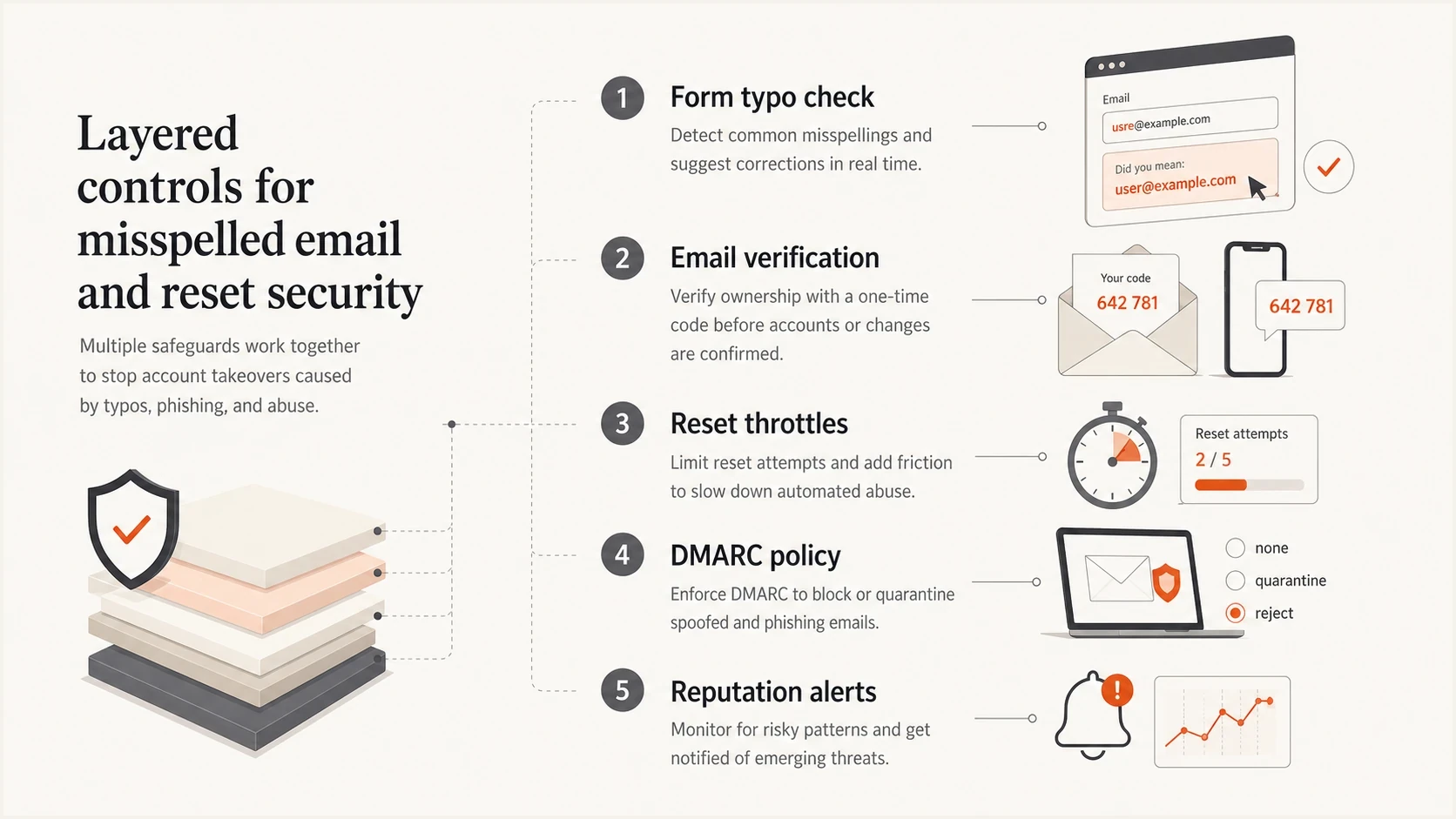
Five layered controls for misspelled email and password reset security
Views from the trenches
Best practices
Verify email ownership before enabling account recovery or sensitive notification flows.
Suppress typo-like destinations when resets bounce, click oddly, or never verify ownership.
Keep reset emails sparse, with short-lived tokens and no customer-specific account detail.
Common pitfalls
Treating a valid MX record as proof that the destination mailbox belongs to the user.
Using opens and clicks from reset emails as proof that the intended recipient engaged.
Sharing full reset message bodies with outside parties during typo-domain investigations.
Expert tips
Watch reset traffic by destination domain so typo clusters and trap domains stand out fast.
Separate verification mail from recovery mail so unverified accounts cannot be recovered.
Review DMARC reports after sender changes to catch reset stream authentication failures.
Marketer from Email Geeks says many typo domains accept mail, which means a normal delivery result can still hide a wrong-recipient problem.
2023-02-01 - Email Geeks
Marketer from Email Geeks says password reset messages in trap feeds create obvious value for attackers, so full message bodies should not be retained without a strict reason.
2023-02-02 - Email Geeks