What are the best practices for handling a list bombing attack and account compromise?

Updated on 12 Aug 2026: We added guidance for follow-up fake support contact and tightened the response steps for personal inboxes and business domains.
Treat a list bombing attack as an account compromise signal first, and an inbox cleanup problem second. A sudden flood of subscription confirmations, welcome emails, or account notices can be cover noise hiding a card charge, password reset, new device login, mailbox rule, forwarding change, or payment wallet enrollment.
The immediate order of operations is simple: preserve access to the mailbox, search for high-risk account activity, contact financial providers through known channels, avoid unnecessary password resets during the first rush, then harden email, financial, and identity controls once the live incident is contained. If the attack is hitting a business mailbox or a domain you manage, add authentication and reputation checks across DMARC, SPF, DKIM, and blocklist (blacklist) status so you can separate inbound abuse from outbound domain abuse.
Do not assume the list bombing itself is the whole incident. The mailbox flood is often the smoke screen. Search for the hidden account event before spending time unsubscribing from hundreds of newsletters.
What to do in the first 30 minutes
Start by slowing the incident down. The attacker wants the inbox to feel unusable and urgent. Do not click links inside the new flood or call phone numbers from new alerts. Open the bank, card provider, payroll, cloud account, or social platform from a saved app, a bookmarked login, the official website you type yourself, or the number on the back of the card.
- Keep the mailbox open, confirm recovery email and phone settings, and check whether forwarding, filters, delegated access, or app passwords were added.
- Search for phrases such as password reset, new login, card added, account changed, verification code, withdrawal, transfer, order, and refund.
- Check banking, credit cards, payment apps, payroll, shopping accounts with stored cards, and mobile wallet activity before cleaning newsletters.
- Contact providers through their app, official site, or card-back number. Do not trust links or phone numbers in new messages during the attack.
- Take screenshots of suspicious transactions, security alerts, unexpected support contacts, and message timestamps. These help banks, workplace security teams, and support staff act faster.
- For a work mailbox, report the flood through a known internal security or help-desk channel. Do not accept an incoming offer to fix the problem.
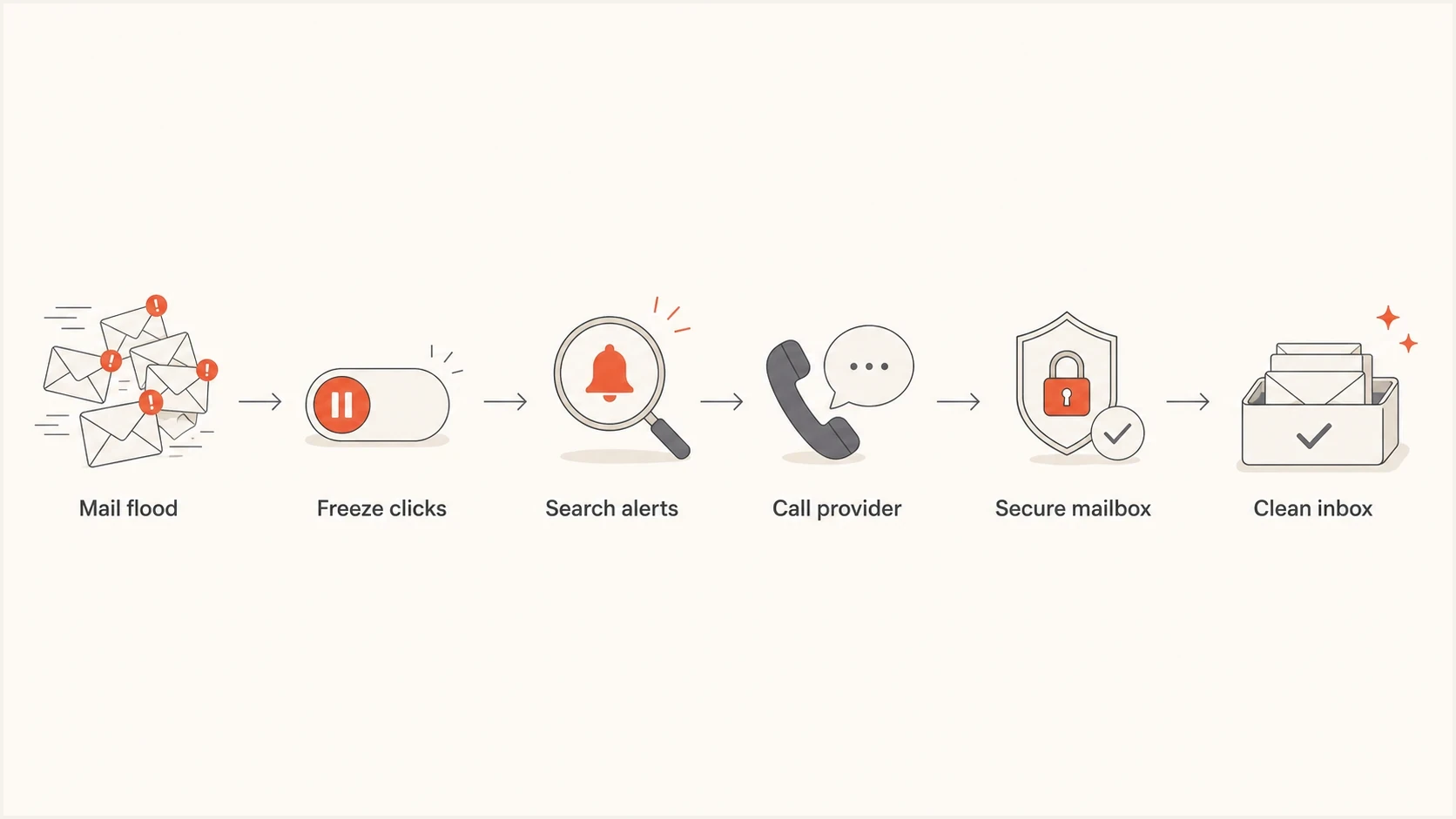
A six-step flow for responding to a list bombing attack.
Why list bombing points to account compromise
List bombing works because many sign-up forms send confirmation or welcome messages before proving that a real person wanted the subscription. This variant is also called subscription bombing, subscription flooding, or email spam bombing. A bot submits the victim's address across unprotected web forms, and the recipient gets buried. The activity can be random harassment, but treat it as targeted until careful checks show otherwise because attackers use the timing to hide a real account event.
The technical pattern is straightforward. An exposed email address, reused credentials, stolen session token, partial card data, or social engineering attempt gives the attacker a target. The attacker then floods the inbox so a legitimate alert from a bank or identity provider gets lost among hundreds of confirmations. Because legitimate third parties send most of the flood, SPF, DKIM, and DMARC can pass and ordinary spam filters can admit the messages. The CACM article on subscription bombing describes this abuse pattern at scale, including automated form submissions and follow-up support impersonation.
List bombing only
- The messages are mostly confirmations, newsletters, account signups, and welcome notices.
- No financial alerts, password changes, forwarding rules, or new sessions appear after targeted searches.
- The priority is filtering, temporary inbox rules, and notifying major senders or form owners where practical.
List bombing plus compromise
- The flood arrives close to a card charge, wallet enrollment, password reset, or account recovery notice.
- A sensitive provider reports a new login, changed details, new device, or payment attempt.
- The priority is containment with the provider, session revocation, identity checks, and mailbox hardening.
Watch for fake support after the flood
Treat an unsolicited support call, chat, text, or collaboration-platform message during or shortly after the flood as part of the incident. Current subscription bombing campaigns use the noise as a pretext for attackers to impersonate IT staff and ask the target to open a remote support session, install software, share a screen, or read out a verification code.
- End the contact and reach the real support desk through a known internal number, portal, or saved contact.
- Do not install remote access software, approve screen control, run pasted commands, or share verification codes.
- Deny unexpected MFA prompts. Repeated prompts can mean that stolen credentials are being tested in a live login attempt.
- Report caller details, external chat invitations, usernames, screenshots, and timestamps so the security team can find related contacts.
- If remote access was approved, disconnect the device from the network and call the real security team immediately. Keep the device powered on unless the incident team directs otherwise.
Real support staff should be reached through an established channel. The fact that a caller knows about the mailbox flood does not prove the caller works for your organization.
Triage the inbox without losing the real alert
The inbox needs two lanes: one for likely list-bomb noise and one for high-risk security or money signals. Avoid mass deletion during the first pass because the important alert can look ordinary. Use searches and temporary labels or folders so the mail remains available for evidence.
Inbox searches to run firsttext
"password reset" OR "reset your password"
"new login" OR "new device" OR "successful sign-in"
"card added" OR "Apple Pay" OR "wallet"
"verification code" OR "security code"
"account changed" OR "email changed" OR "phone changed"
"charge" OR "transaction" OR "transfer" OR "withdrawal"
Once those searches are clear, create narrow filters for repeated list-bomb phrases. Use temporary filters that label or archive instead of permanent deletion if the mailbox contains financial, legal, or business records. Common phrases include confirm your subscription, welcome to, activate your account, thanks for signing up, and please confirm. Avoid broad sender-domain blocks because many messages come from legitimate services, and do not follow unsubscribe links during the live incident.
If Gmail tabs or a similar inbox classification system are available, turn on categories such as Updates and Promotions during the incident. This can make account alerts easier to scan while bulk subscription mail lands elsewhere.
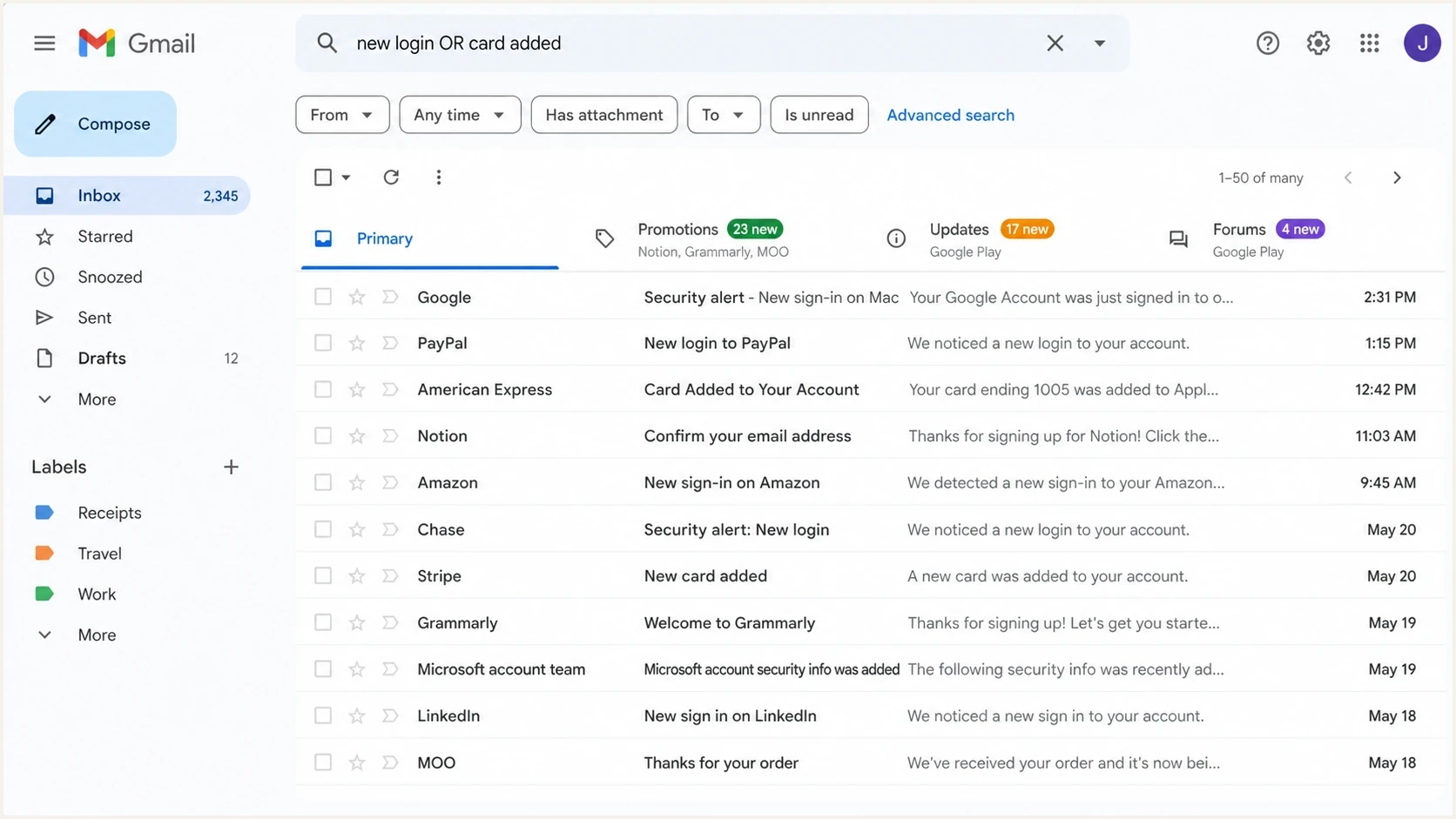
Gmail search view used to find security alerts during a mailbox flood.
Contain financial and account risk first
If there is a suspicious charge, card enrollment, or payment alert, contact the provider from a trusted path and ask for a fraud review. Freeze the affected card if the provider supports it, and inspect pending and declined activity as well as completed transactions. Ask whether any mobile wallet, authorized user, shipping address, phone number, email address, or recovery method was added or changed.
|
|
|
|---|---|---|
Card charge | Payment fraud | Call card issuer |
Wallet added | Card token abuse | Remove device |
New login | Session theft | Revoke sessions |
Email change | Account takeover | Recover account |
Forwarding rule | Mailbox compromise | Delete rule |
Fast triage map for list bombing plus account compromise
Avoid making broad changes while adrenaline is high. Resetting twenty passwords at once makes every confirmation email another item to verify, and a fake reset page becomes easier to miss. Change the email password and sensitive account passwords from a clean device and a trusted network, but do it deliberately.
Never authenticate through a link sent during the attack. Open the provider directly, then check security settings, active sessions, recovery methods, payment methods, and recent activity from inside the account.
Harden the mailbox after the live incident
After the financial risk is contained, lock down the mailbox because it controls resets for many other accounts. Change the mailbox password to a long unique value, enable phishing-resistant multi-factor authentication such as a passkey or security key where possible, sign out all sessions, remove unknown app passwords, and review recovery email and phone settings.
- Sign out unknown devices and sessions, especially mobile sessions and browser sessions that do not match your locations.
- Check forwarding, filters, delegated access, POP, IMAP, and mailbox rules for anything that hides security messages.
- Use unique passwords across email, banks, commerce accounts, cloud storage, social accounts, and domain registrars.
- Run endpoint security scans if the mailbox or account compromise suggests malware, stolen cookies, or unauthorized browser extensions.
- Use a dedicated mailbox that is not public for high-value accounts. Tagged aliases that deliver to the same inbox help identify the exposed address, but they do not keep alerts visible when that inbox is flooded.
If the mailbox is tied to a business domain, also inspect whether the domain is being spoofed or whether legitimate sending infrastructure has changed. Suped's domain health checker checks DMARC, SPF, and DKIM together, which helps establish whether a domain-authentication problem exists alongside the mailbox incident.
?
What's your domain score?
Deep-scan SPF, DKIM & DMARC records for email deliverability and security issues.
Business domain checks during the incident
For a company mailbox, widen the investigation. A list bombing attack against an employee can be a personal fraud attempt, but it can also be a business email compromise step or the opening for fake support contact. Report it through a known internal channel, check whether the user's account sent mail, review new inbox rules and OAuth grants, and inspect endpoint and identity alerts.
Suped's DMARC monitoring gives teams one place to review sending sources, authentication pass rates, DMARC policy, SPF and DKIM issues, and deliverability signals. If someone spoofs the domain during or after the mailbox incident, DMARC monitoring helps identify unrecognized sources that use the domain.
Issues page showing top issues, verified sources, unverified sources, and authentication pass rates
Use DMARC aggregate data to find new sending sources or a rise in authentication failures, then correlate those findings with sign-in, mailbox audit, OAuth, endpoint, and outbound message logs. Suped's issue detection and alerts help teams run that workflow across several domains or clients. DMARC data alone does not prove that an employee mailbox was compromised, especially when an attacker sends through approved infrastructure.
Email tester
Send a real email to this address. Suped shows a results button when the test is ready.
?/43tests passed
When the question is whether a real message path authenticates correctly, use an email tester with a live message. DNS checks tell you what should happen. A sent-message test shows what happened in the headers.
When to involve providers and support teams
There are two kinds of providers to involve. First are account providers tied to loss: banks, card issuers, mobile carriers, payroll systems, cloud identity providers, and commerce accounts. Second are senders whose forms were abused. The second group cannot always stop the attack quickly, but a form owner can suppress the address from subscriptions created during the attack window and review the requests when given timestamps and examples.
- Ask the bank or card issuer for a freeze or replacement, a fraud case, wallet token removal, and a review of recent profile changes.
- Ask mailbox support to inspect forwarding, recovery changes, app passwords, and suspicious login activity if self-service logs are unclear.
- Ask form owners to remove the address from subscriptions created during the attack window and preserve request logs for abuse review.
- Ask the workplace security team to review sign-ins, mailbox rules, identity alerts, OAuth grants, endpoint events, and outbound sending from the user.
A useful support note has exact timing, recipient address, examples of subject lines, visible sender domains, suspicious contact details, and whether financial or account compromise was found. That gives abuse teams enough data to act without repeated clarification.
Long-term prevention for people and forms
You cannot fully prevent someone from typing your address into unprotected forms. You can reduce the impact. Use a dedicated, non-public mailbox for high-value accounts, unique passwords everywhere, phishing-resistant multi-factor authentication where available, and alerts for card-not-present activity. For business accounts, add central identity logs, mailbox rule monitoring, endpoint alerts, and a documented escalation route.
If you operate forms that send autoresponders, rate-limit by recipient address as well as request source, send no more than one confirmation within a cooling period, use bot checks, and preserve request logs for abuse review. Confirmed opt-in prevents an unwanted enrollment, but the first confirmation can still become bomb traffic. CSRF tokens protect form integrity, but they do not replace per-recipient limits because browser-driven automation can obtain valid tokens. More practical prevention patterns are covered in prevent listbombing.
Incident priority bands
Use the highest matching band when deciding how urgently to respond.
Low
Filter and monitor
Subscription flood only, no sensitive account signals after targeted searches.
Medium
Secure accounts
New login alerts, password reset notices, or mailbox settings changes.
High
Call provider
Card charges, wallet enrollments, transfers, or identity changes.
Domain risk
Check DMARC
Business account involved or suspicious outbound authentication failures.
For businesses, add blocklist (blacklist) monitoring to the post-incident checklist. A compromised account that sends spam can damage domain and IP reputation quickly. Suped's blocklist monitoring helps teams see whether abuse has affected deliverability and which listings need remediation.
Views from the trenches
Best practices
Search for money, login, wallet, and reset alerts before cleaning subscription noise.
Use known provider channels only, especially when fraud alerts arrive during the flood.
Keep temporary filters narrow so security notices remain searchable after the incident.
Review mailbox rules, recovery settings, sessions, and app access before closing the case.
Common pitfalls
Do not mass delete mail early, because the real account alert can be buried inside.
Do not call numbers from fresh alerts during an active mailbox flood or fraud event.
Do not reset every password at once, because it creates more alerts to verify safely.
Do not assume list bombing means personal error, because breached data often seeds it.
Expert tips
Use a dedicated mailbox for high-value accounts so future floods do not hide alerts there.
Ask senders to purge recent malicious subscriptions when volume stays disruptive.
Watch payment wallet enrollments as closely as card charges during fraud review.
For business mailboxes, check DMARC, outbound logs, mailbox rules, and reputation.
Marketer from Email Geeks says a list bombing flood should be treated as cover for account takeover until searches prove otherwise.
2023-09-27 - Email Geeks
Marketer from Email Geeks says contacting financial providers through known channels matters more than reacting to links inside fresh alerts.
2023-09-27 - Email Geeks
The practical bottom line
The right response goes beyond unsubscribing and waiting. Treat the attack as an active incident: find the hidden security event, secure money-related accounts, reject unsolicited support contact, verify mailbox integrity, then clean the inbox. If no compromise appears after careful searches and provider checks, keep monitoring for at least several days because delayed account alerts can still arrive.
For a personal Gmail account, the core controls are search, filters, strong authentication, and direct provider contact. For a business domain, add DMARC monitoring, authentication diagnostics, blocklist (blacklist) monitoring, identity review, endpoint checks, and outbound log review. Suped combines DMARC, SPF, DKIM, authentication alerts, and deliverability checks in one business workflow. Use those findings alongside identity and outbound mail logs, not as evidence that the mailbox itself was compromised.




