
Is mailbox full still a valid email bounce message?

Published 8 Jul 2025
Updated 25 Sep 2026
12 min read
Summarize with

Updated on 25 Sep 2026: We updated this guide to clarify current mailbox quota codes, misleading quota messages, and safe retry decisions.
Yes. "Mailbox full" is still a valid email bounce message, and X.2.2 remains the standardized enhanced status-code family for it. The error is less common than it was when mailbox quotas were smaller, but over quota and quota exceeded replies still appear across consumer, hosted business, and corporate mail systems.
The cause has changed. A full mailbox does not necessarily mean that email alone filled the available space. Gmail and iCloud can stop receiving mail when files, photos, videos, or backups consume shared account storage. The error can also point to an abandoned mailbox that filled gradually.
For senders, the practical response is to let the mail system retry a temporary 4xx quota failure, classify any final result carefully, and stop new sends after repeated failures. The leading class digit matters: 4.2.2 is temporary for the current delivery attempt, while 5.2.2 is permanent for that message even though the recipient can clear space later. Avoid manually resending while the original message remains queued, since both copies can arrive if storage becomes available. To compare the bounce with the sending setup, send a test email and inspect the SMTP result, headers, authentication, and delivery path together.
Why mailbox full still happens
The biggest misconception is that mailbox full errors disappeared because consumer mailbox sizes increased. Larger quotas reduced their frequency, but shared storage changed how they occur. A user can stop receiving email because backups, shared files, photos, or videos consumed the same storage pool used by the mailbox.
Business mailboxes are another source. Companies still apply quota rules to individual users, public folders, archives, and shared mailboxes. Some receiving systems return a temporary status, while others return a permanent status after deciding that the current message cannot be accepted.
- Shared storage: Email can stop when files, photos, videos, backups, or retained items use the same account quota.
- Abandoned accounts: Old addresses can keep accepting mail until storage fills, then start returning quota replies.
- Corporate limits: Company mail systems still enforce mailbox, archive, public-folder, and shared-mailbox quotas.
- Routing behavior: Forwarding, aliases, and hosted gateways can return a quota error from the final destination.
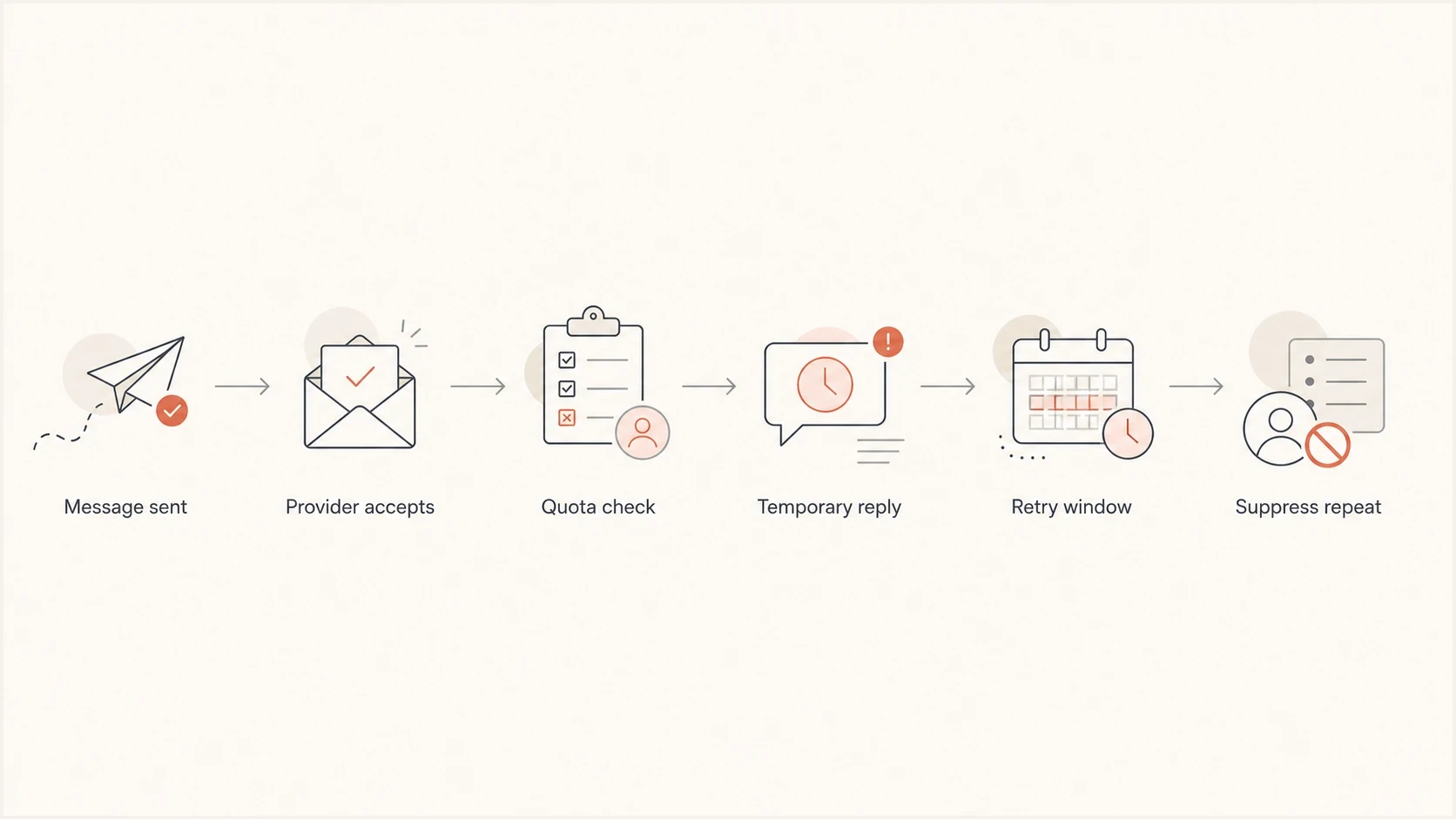
Mailbox full bounce flowchart showing quota checks, retries, and repeat suppression.
When the mailbox does not look full
A recipient can see free space in the visible inbox and still trigger a valid quota response. The limit may apply to account-wide storage, a hidden or retained data area, a public folder, a shared mailbox, or the mailbox reached after forwarding. In Exchange environments, the diagnostic text can identify a specific storage or named-property quota even when the short NDR label only says "mailbox full."
Senders cannot confirm the recipient's remaining capacity from the short bounce text. Preserve the full Diagnostic-Code, Final-Recipient, Remote-MTA, and timestamp fields, then give them to the recipient or their mail administrator. If other recipients at the same domain accept mail, investigate the affected mailbox or routed destination before treating the event as a domain-wide problem.
- Check the whole account: Review shared storage, Trash, Spam, photos, files, backups, and retained data rather than inbox size alone.
- Check the actual destination: Confirm whether an alias, forwarding rule, shared mailbox, or public folder received the delivery attempt.
- Read the detailed diagnostic: Use the provider-specific exception or quota name instead of relying on the short mailbox full label.
- Allow storage to refresh: After space is cleared or a quota changes, wait for the provider's storage figure to update before a controlled new test.
A false-looking bounce can still identify a real quota
Intermittent delivery does not prove that the earlier NDR was wrong. The user may have cleared space, an administrator may have changed a limit, or the provider may have recalculated storage between attempts. Diagnose the original response with its full timestamp and server detail.
Is mailbox full a soft or hard bounce?
Mailbox full can produce either a temporary or permanent result. The wording alone does not decide it. Check the SMTP reply class and enhanced status code together. A 4xx response tells the sending system to retry that message later. A 5xx response says to stop retrying that message, even when the text describes a condition the recipient can fix.
X.2.2 describes a per-mailbox quota or capacity problem. X.3.1 means the receiving mail system's storage is full, so one recipient may be unable to fix it. Keep these conditions separate when grouping bounce data.
|
|
|
|---|---|---|
Temporary mailbox reply | 452 4.2.2 | Let the queue retry |
Permanent mailbox reply | 552 5.2.2 | Stop that message |
Mail system storage | 452 4.3.1 | Retry and track domain scope |
Generic permanent reply | 550 5.2.2 | Use the enhanced code |
Delayed DSN | Action: delayed | Do not duplicate |
Common quota signals and how to classify them.
Common quota responsestext
452 4.2.2 Mailbox full
452-4.2.2 The email account that you tried to reach is over quota
452 4.3.1 Mail system full
552 5.2.2 user is over quota
554 5.2.2 mailbox full
550 5.2.2 Mailbox full
Do not trust wording alone
Two providers can use similar human-readable text and different SMTP classes. One can say over quota with a temporary 4xx reply, while another returns mailbox full with a 5xx reply. Keep the raw SMTP code, enhanced status code, DSN Action and Diagnostic-Code fields, provider, timestamp, and sending attempt count before deciding whether to retry or suppress.
When the sender sees the bounce
A mailbox full failure can appear during the SMTP conversation or later as a delivery status notification (DSN), also called a non-delivery report (NDR) or mailer daemon message. An immediate 5xx reply ends that delivery attempt. A 4xx reply normally leaves the message in the sending mail server's queue for later retry.
- Immediate rejection: The recipient server returns a final 5xx response while the sending server is connected.
- Queued retry: A 4xx response keeps the original message pending according to the sender's queue policy.
- Delayed notice: A DSN with Action: delayed reports that delivery has not succeeded but retries continue.
- Final notice: A DSN with Action: failed means that specific message was not delivered and no more retries are expected.
The distinction prevents duplicate sends. A delayed notice is not permission to launch another copy. A final failure also does not prove that the address will remain unreachable forever, since the recipient can clear storage later. Treat message status and future address eligibility as separate decisions.
How to classify mailbox full bounces
A conservative policy gives temporary quota bounces a short retry window but does not keep an address active forever because the text sounds temporary. An actively used mailbox often clears storage quickly. A mailbox that remains over quota across separate sends is no longer reachable enough for the active sending pool.
Temporary pattern
- Recent activity: The address clicked, logged in, purchased, or replied recently.
- 4xx status: The receiver returned a temporary SMTP class such as 4.2.2.
- Short duration: The failure appears in one send and clears after the queued retry.
Permanent pattern
- Repeated status: The same quota result repeats across separate sending events.
- 5xx status: The receiver returned a permanent SMTP class such as 5.2.2.
- No engagement: The subscriber has no recent activity and the mailbox is not clearing.
This is why a single bounce rule fails. When cleaning a list, group an initial 4xx quota result with other soft bounces, then move repeated quota failures to suppression after the retry policy and later sending observations show no recovery.
Recovery varies. Some mailbox full addresses accept mail soon after the user deletes data or adds storage. Others never recover because the mailbox is abandoned. Track mailbox recovery by provider, list source, and engagement age instead of relying on a fixed guess.
What to do before suppressing an address
Do not suppress every mailbox full bounce immediately. That creates avoidable list loss when the mailbox belongs to an active subscriber with a temporary storage issue. Do not keep retrying indefinitely either, because repeated quota failures inflate bounce rates and waste delivery attempts.
A useful policy has a bounded retry period, an engagement check, and a clear endpoint. Separate a temporary receiver response for one message from evidence that the address remains unreachable across later sends.
- Honor the queue: Let the sending system retry a 4xx response and avoid creating a duplicate attempt.
- Check engagement: Give more patience to recent clickers, buyers, account users, and replies.
- Group by provider: Look for provider-specific spikes before changing global bounce rules.
- Stop repeats: Suppress after quota failures continue across separate sends, especially without recent engagement.
- Keep evidence: Store the original SMTP and DSN fields so future classification can be improved.
Email tester
Send a real email to this address. Suped shows a results button when the test is ready.
?/43tests passed
When a bounce pattern is unclear, a controlled test provides a cleaner baseline. It cannot prove that a recipient mailbox has free storage, but it can confirm whether the sending setup, message headers, authentication, and routing look normal.
Pre-send address validation also cannot guarantee free storage at delivery time. A valid mailbox can reach its quota after the check, and many receiving systems do not expose recipient capacity to probes. Use signup validation to catch malformed addresses and bad domains, then base mailbox full suppression on actual delivery events.
A clean handling policy
- First result: Hold a temporary quota result while the existing retry policy runs.
- Repeated result: Suppress the address if quota failures continue across later sends.
- Fresh action: Allow reactivation only after a new opt-in or verified account signal.
Where authentication and reputation fit
DMARC does not create a mailbox full bounce, and neither do its SPF or DKIM checks. Quota failures occur because the receiving mailbox or account storage cannot accept the message. Check authentication separately when bounce rates change, since quota responses can appear beside policy rejections, authentication failures, or reputation-related deferrals.
A domain health check helps rule out DNS and authentication problems that happen alongside quota bounces. Suped's product brings DMARC monitoring, SPF and DKIM checks, MTA-STS status, alerts, and blocklist monitoring (blacklist monitoring) into the same investigation workflow. This helps teams separate a recipient quota spike from a domain-wide sending problem.

Issue steps to fix dialog showing the issue overview, tailored fix steps, and verification action
Use the raw SMTP response, campaign context, provider grouping, DNS health, and authentication status together. Suped's issue detection and steps to fix support that investigation when a team manages several domains or client accounts.
Set retry and suppression thresholds
The exact threshold depends on sending frequency, recipient value, and provider mix. There is no universal number of mailbox full results that fits every sender. Count final campaign-level bounce results, not each retry performed inside the mail queue. A daily sender can detect a continuing failure sooner than a monthly sender because it receives new delivery results more often.
Mailbox full repeat handling
A practical starting model based on separate sending events, not internal queue retries.
Watch
1 send
First quota result with recent engagement.
Retry
2-3 sends
Temporary result returns on later sends.
Suppress
Repeated
Quota failures continue without engagement or recovery.
Review
Provider spike
One provider spikes across otherwise active recipients.
Treat message purpose differently as well. Transactional or account-critical mail, such as password resets and receipts, needs a more careful retry policy than a newsletter. Marketing mail can suppress repeat quota failures sooner because another send adds delivery risk without helping an unreachable recipient.
Provider-specific mailbox full signals
Provider context matters because mailbox full behavior is not uniform. Some systems use explicit over quota text, while others return a generic unavailable message. Some send a 4xx response first and a 5xx result later. Do not assume Gmail, iCloud, Microsoft-hosted mail, Comcast, and corporate systems apply the same quota or response policy.
|
|
|
|---|---|---|
Shared account storage | Keep full code | |
Shared iCloud storage | Track later recovery | |
Microsoft-hosted mail | Mailbox, folder, or property quota | Read diagnostic detail |
Temporary or permanent | Preserve raw reply | |
Corporate | Local mailbox limit | Check domain pattern |
Provider patterns to review before changing suppression rules.
If one provider suddenly produces more quota bounces, check whether the increase comes from list age, campaign volume, retry settings, or changed response wording. A provider spike does not prove a sender reputation problem, but it deserves investigation when other delivery symptoms appear at the same time.
Views from the trenches
Best practices
Retry quota bounces for a short window, then stop sending if the same status repeats.
Separate mailbox full reports by provider so one domain spike does not distort list health.
Use recent clicks, replies, purchases, and account activity to judge whether retry is worthwhile.
Common pitfalls
Treating every quota message as temporary keeps abandoned addresses active for too long.
Combining 4xx and 5xx quota replies hides whether the receiving server has given up.
Blaming DMARC for quota bounces wastes time because storage failures happen after routing.
Expert tips
Keep the original SMTP text because providers use wording that improves later classification.
Compare quota spikes with campaign size, provider mix, and retry behavior before changing policy.
Suppress repeat quota failures quietly, then allow reactivation through fresh user engagement.
Marketer view
Marketer from Email Geeks says Gmail and iCloud quota bounces still appear, often because shared storage is consumed by photos, videos, files, or backups.
2024-08-14 - Email Geeks
Marketer view
Marketer from Email Geeks says large recurring sends can reveal plenty of mailbox full bounces even when smaller campaigns do not show the pattern.
2024-09-02 - Email Geeks
The practical answer
Mailbox full is still a valid bounce message. Treat it as a real sign that the recipient cannot accept that message, but do not treat every address as permanently unreachable after the first temporary response. The SMTP reply class, enhanced status code, DSN action, provider, retry history, and recent engagement determine the next step.
Let the sending queue handle temporary quota responses, suppress addresses after failures continue across later sends, and keep the original delivery evidence. When bounce data sits beside authentication, DNS, blocklist (blacklist), and campaign context, the cause is easier to isolate. Suped's product supports that workflow with DMARC reporting, authentication checks, alerts, and multi-domain issue tracking.
Frequently asked questions
It can produce either result. A 4xx quota response tells the sending server to retry the current message. A 5xx quota response tells it to stop. Use repeated results and subscriber activity separately when deciding whether the address should remain eligible for future sends.
The enhanced status code 5.2.2 means the recipient mailbox exceeded a storage or administrative quota and the receiving system returned a permanent result for that message. Do not retry that same message automatically, but remember that the recipient can clear the condition later.
Gmail storage can be shared with files, photos, videos, backups, and other account data. The account can stop receiving mail even when email alone did not consume all available storage.
The limit can belong to shared account storage, retained data, a public folder, a shared mailbox, a hidden system quota, or a forwarded destination. Review the full diagnostic rather than the short NDR label, and allow storage figures to refresh after space is cleared.
Do not remove an address after its first temporary quota response. Let the queued retry policy finish, check reliable engagement signals, and suppress the address when quota failures continue across later sends or the receiver returns a permanent status.
Repeated sends to unreachable mailboxes increase bounce rates, waste delivery attempts, and can indicate a stale list. An isolated quota bounce is normal, but addresses with continuing failures should leave the active sending pool.