What causes full mailbox bounces and what is the recovery rate?


Updated on 29 Jul 2026: We clarified quota status codes, retry timing, and how to measure mailbox-full recovery without mistaking engagement for delivery.
A full mailbox bounce happens when the recipient mail system says it cannot accept the message because the mailbox has hit its storage quota. This is usually a recoverable recipient-side condition, not proof that the address is invalid. Treat the address as recoverable first, but distinguish a temporary SMTP deferral from a final delivery status notification.
The recovery rate is better than many senders expect, but there is no universal rate. The figures used here, close to 20% showing engagement within a week and more than 50% active again within a few months, are directional planning observations. Engagement is a stricter signal than successful delivery because many recipients receive mail without clicking or replying.
If a customer sees an over-quota bounce and later gets a reply after another send, the original bounce can still be valid. The recipient can clear storage, increase the quota, or wait for the provider to refresh the quota state. A different sender route matters only when it reveals that the original response was misclassified or came from a forwarding destination.
What causes full mailbox bounces
The direct cause is simple: the receiving system believes the mailbox has no usable storage left. The reason behind that state varies by provider, hosting setup, and user behavior. Start by separating storage problems from address validity problems because a mailbox-full bounce and an invalid-user bounce need different handling.
- Storage quota: The recipient has used the allocated mailbox storage, so the next inbound message is rejected.
- Shared storage: Some providers share account storage across mail, photos, and files, so mail quota can change after cleanup outside the inbox.
- Message size: A large message can exceed the space still available, but an X.2.3 response points to a message-length limit rather than an X.2.2 mailbox-full condition.
- Forwarding chain: The visible address can forward to another mailbox, and the destination mailbox is the one over quota.
- Delayed cleanup: The user deletes data, but the provider needs time to update storage, indexes, or folder quotas.
- Provider wording: Some gateways pair a recoverable quota condition with a permanent-class response, so the full diagnostic matters.
Typical over-quota bouncetext
Status: 5.2.2
Diagnostic-Code: smtp; 552 5.2.2 mailbox full
Remote-MTA: dns; mx.recipient-host.example
Action: failed
The enhanced status code carries the most specific signal. X.2.2 means mailbox full, where the first digit can be 4 for a transient reply or 5 in a final failure report. Providers can pair it with basic SMTP codes such as 550, 552, or 554. Read the enhanced code and diagnostic text before suppressing the address.
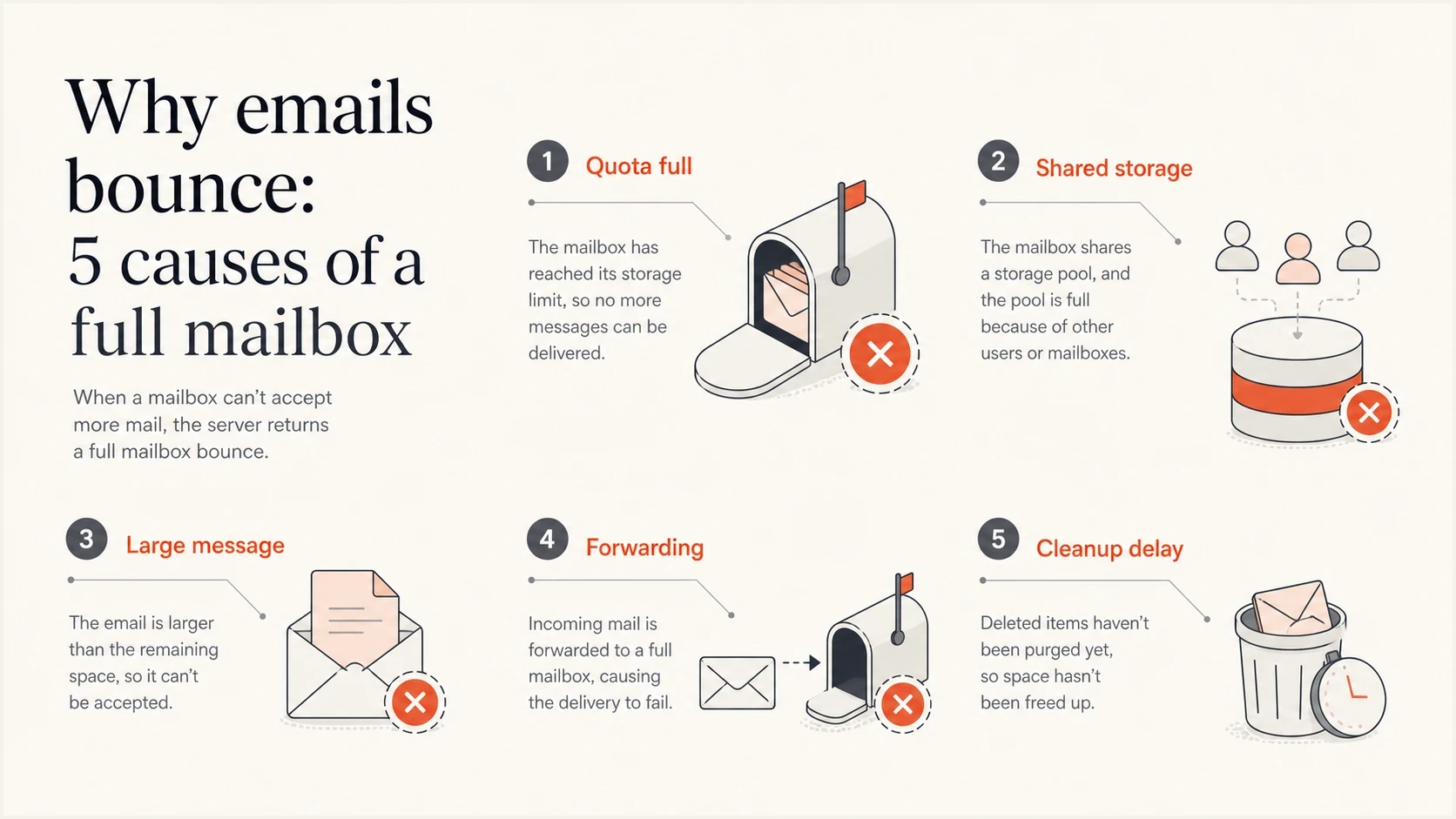
Infographic showing five common causes of full mailbox email bounces.
Why delivery can work later
A later successful send does not invalidate the original bounce. It usually means the recipient deleted data, increased storage, emptied trash, or waited for a quota refresh. For Gmail users, account storage is shared with Drive and Photos, so freeing space outside Gmail can restore mail delivery. Google advises that storage updates after deleting many files can take 48 to 72 hours.
Message size and sender path need careful interpretation. A smaller message can succeed when the provider rejected the earlier message for its size or the space remaining. A different route or reputation cannot create recipient storage, so success through another path is a reason to inspect the original diagnostic, forwarding chain, and timing rather than assume quota checks vary by sender.
Mailbox full
- State: The mailbox exists, but the recipient system rejects new mail for quota reasons.
- Recovery: The address can accept mail again after cleanup, quota expansion, or provider refresh.
- Action: Let queued retries finish, then use a reduced cadence if the final result is still a bounce.
Invalid address
- State: The recipient account does not exist or is not valid at that domain.
- Recovery: Recovery is rare unless the mailbox is recreated or the original result was wrong.
- Action: Suppress quickly after a clear no-such-user response.
Do not let the basic code decide alone
A 550 or 554 reply can still include quota wording. Give more weight to X.2.2 and phrases such as overquota, mailbox full, or quota exceeded. Keep X.2.3 message-length failures in a separate category.
The recovery rate to use
For planning, use a recovery window instead of a one-send verdict. Directional observations suggest that around one in five mailbox-full contacts can show fresh engagement within the first week, while more than half can be active again within a few months. These are not industry-wide guarantees. Lists with recent buyers, active account users, or current subscribers usually recover differently from old promotional lists, so sender data should replace the benchmark as soon as the sample is large enough.
Mailbox full recovery planning bands
Use these as directional observation windows, then replace them with rates from your own bounce cohorts.
First week
~20% engaged
Look for early accepted deliveries and engagement among recently active contacts.
First month
Measure
Measure accepted delivery separately because recovery can occur without a click or reply.
Few months
50%+ active
More than half active is a directional observation, not a provider guarantee.
Engagement recovery and delivery recovery answer different questions. If 20% click, reply, or otherwise engage within a week, the delivered share is higher than 20% because many delivered recipients take no measurable action. Report both rates instead of labeling the non-engaged share as failed.
For more background on similar temporary failures, the soft bounce fixes page is useful. The mailbox full validity page also explains why this bounce reason still exists in modern mailbox systems.
How to measure mailbox-full recovery
Build a cohort of unique addresses whose first final result in the study period was an X.2.2 quota bounce. Count each address once, exclude later duplicate bounce events from the denominator, and use the same observation window for every address. Otherwise frequent senders appear to fail more often simply because they create more events.
Mailbox-full recovery formulastext
Delivery recovery rate = addresses later accepted / unique X.2.2 addresses
Engagement recovery rate = addresses later engaged / unique X.2.2 addresses
|
|
|
|---|---|---|
Delivery recovery | A later message is accepted | Retry and suppression rules |
Engagement recovery | A later click, reply, or account action | Audience value and cadence |
Use separate recovery measures for delivery and recipient activity.
Calculate both measures at fixed windows such as 7, 30, and 90 days, then segment by mailbox provider, mail type, list age, and prior activity. Keep addresses without a later send out of the delivery-recovery numerator rather than assuming they failed again. This produces a recovery rate that can support a defensible retry policy.
How to classify the bounce
Classification needs the enhanced status code, diagnostic text, event stage, and address history. A temporary SMTP reply can remain in the sending server's queue and recover without a final bounce. A final delivery status notification means that delivery attempt ended, but an X.2.2 address can still become deliverable after the recipient clears space.
|
|
|
|---|---|---|
4.2.2 | Temporary mailbox full reply | Let the queue retry |
5.2.2 | Final quota failure for this attempt | Cool down and monitor |
5.2.3 | Message length exceeds limit | Reduce message size |
5.1.1 | No valid user | Suppress |
Disabled | Mailbox not accepting mail | Review separately |
5.7.x | Policy or security rejection | Investigate sender side |
Compact classification guide for common mailbox-related bounce signals.
A disabled mailbox is different from a full mailbox. Disabled can mean the user lost access, left an organization, or the account was suspended. That needs a stricter rule than simple over-quota handling. For a deeper retry framework, use the resend strategy notes and adapt the timing to your list.
A clean retry policy
- Temporary reply: Let the sending system finish its queued retries instead of submitting duplicate copies.
- First final quota bounce: Mark the address as recoverable over-quota and keep it out of immediate resend loops.
- Repeat quota bounces: Move the address to a reduced cadence and review it after 30 days.
- No recovery: Suppress routine campaigns by the end of the chosen window, such as 90 days, unless current account activity justifies controlled attempts.
When to investigate sender-side issues
A genuine X.2.2 mailbox-full response starts on the recipient side. Sender authentication or reputation changes will not free recipient storage. Investigate sender-side causes when quota responses rise alongside deferrals, policy rejections, spam placement, or failures across many unrelated recipients.
If one provider suddenly produces a high over-quota rate, check whether the change is isolated to a segment, recent import, forwarding domain, or provider-specific diagnostic pattern. A domain health check is useful only when the same spike includes DMARC, SPF, DKIM, rDNS, or policy problems.
Suped is our DMARC and email authentication platform. Suped combines DMARC monitoring, hosted SPF, DKIM visibility, hosted MTA-STS, SPF flattening, and blocklist monitoring in one workflow. Use those signals when mailbox-full events occur beside authentication failures or blocklist (blacklist) risk, not as a fix for a recipient's full storage.
Suped DMARC dashboard showing email volume, authentication health, and source breakdown
The useful workflow is continuous source monitoring. Check which sources send mail, which pass authentication, and whether reputation signals changed at the same time as the broader bounce spike. Suped's issue detection and remediation steps support that day-to-day work.
A practical recovery workflow
A full mailbox workflow should protect reputation without deleting good contacts too early. Avoid immediate manual resend loops and permanent suppression after one quota response. First determine whether the event is a queued deferral or a final bounce.
- Capture: Store the raw SMTP reply, enhanced status code, provider, campaign, message size, and event time.
- Classify: Separate queued deferrals and final quota bounces from invalid-user, disabled, policy, and DNS failures.
- Cool down: Let automated retries finish, then wait before another campaign attempt if the final result still shows quota failure.
- Retry carefully: Use controlled backoff for requested or account-critical mail and restore normal cadence only after acceptance.
- Measure: Track delivery recovery and engagement recovery by provider, source, segment age, and prior activity.
When the diagnostic might be message-specific, send a test email and inspect authentication, content weight, headers, and the exact response before changing suppression rules.
Email tester
Send a real email to this address. Suped shows a results button when the test is ready.
?/43tests passed
The recovery window should vary by mail type. Transactional and account mail can continue with controlled backoff when the user still needs the message. Bulk promotional mail needs a stricter cadence because repeated quota bounces add noise and reduce send quality.
Simple mailbox-full retry ruletext
If the reply is temporary 4.2.2:
  let the sending queue retry with backoff
If the final result is 5.2.2 or says mailbox full:
  mark the address as recoverable quota failure
  pause marketing sends for 7 days
  allow requested account mail with controlled backoff
  review at 30 days
  suppress routine campaigns after 90 days without accepted delivery
Views from the trenches
Best practices
Classify mailbox full as a temporary failure first, then cool down before the next send.
Track recovery by provider because major and regional inboxes recover at different rates over time.
Keep the address on a reduced cadence until it accepts mail or shows recent engagement.
Separate mailbox full from invalid user so suppression rules do not remove recoverable contacts.
Common pitfalls
Treating every 550 as permanent removes addresses that would accept mail after cleanup later.
Retrying too fast after repeated quota failures keeps bounce rates higher than needed for campaigns.
Mixing mailbox full with disabled mailbox hides different user states and sender risks.
Judging recovery only by clicks understates delivery because many recipients never click.
Expert tips
Use status codes and provider text together; either one alone misclassifies some bounces.
Measure recovery on delivered mail plus engagement, not engagement alone, when logs allow it.
Resume with lower-risk mail first, such as requested notices or recent account messages.
Review sender authentication when full mailbox bounces rise with other deferrals or blocks.
Marketer from Email Geeks says mailbox full is common and recovery can be high enough to justify a controlled retry period.
2023-10-26 - Email Geeks
Marketer from Email Geeks says shared storage can explain why a mailbox is over quota and then receives mail after cleanup.
2023-10-26 - Email Geeks
The practical answer
A full mailbox bounce comes from a recipient quota or storage condition, including shared account storage, forwarding destinations, and delayed quota updates. A later successful message usually means the recipient freed space or the provider refreshed the quota. If only a smaller message or different route works, re-check whether the earlier response was a size failure, forwarding failure, or misclassified policy rejection.
The recovery rate is high enough to avoid hard suppression after one over-quota response, but the exact rate depends on the cohort. Use roughly 20% first-week engagement and more than 50% activity within a few months only as directional planning observations. Measure accepted delivery and engagement separately, then let provider-level data set the rule.
The operational rule is simple: classify the full diagnostic, let queued retries finish, reduce cadence after repeated final quota failures, and suppress routine mail only after the chosen recovery window ends without accepted delivery. Suped can connect a broader bounce investigation to authentication health, source visibility, and blocklist (blacklist) signals when the event set includes more than recipient quota failures.




