Should I resend emails to users with soft bounces due to full mailboxes, and what bounce rate is acceptable?

Published 17 May 2025
Updated 31 Jul 2026
12 min read
Summarize with
Updated on 31 Jul 2026: We clarified how 4.2.2 and 5.2.2 mailbox responses change retry decisions and added a precise bounce-rate calculation.
Yes, resend after a retryable full-mailbox response, but do it through a controlled retry and suppression policy rather than a special reminder blast. A full mailbox can produce a temporary 4xx response or a permanent 5xx response, so the SMTP class and diagnostic text control what happens next. Retry normal mail for a limited window after a temporary failure, pause repeated over-quota addresses, and suppress the current delivery after a clear permanent response.
A 0.1% bounce rate for one mailbox provider, such as Gmail, is low. For most marketing programs, a total bounce rate under 1% is healthy, 1-2% needs review, and anything over 2% should trigger list quality work. Hard bounces should be lower than that because they point to bad addresses. Full-mailbox bounces matter most when they trend upward, cluster by provider, or appear alongside lower engagement and higher complaints.
The practical answer: do not permanently suppress a full-mailbox soft bounce after a single event. Also do not keep hammering the address forever. Put it into a timed pause, then make the next send depend on recency, engagement, bounce history, and the SMTP response class.
The short answer
The safest policy is a middle path. Keep the contact eligible if the SMTP response is temporary and the contact is engaged, especially when the bounces are concentrated in a short period. Pause or suppress when the response is permanent, or when the same address keeps returning full-mailbox errors across campaigns over several weeks.
- Do resend: Resend through normal campaign logic during a limited retry window after a temporary response, especially for recent clickers, purchasers, or active account users.
- Do pause: Pause after repeated temporary full-mailbox bounces across separate campaigns, not after repeated retries inside the same delivery attempt.
- Do not blast: Avoid a reminder campaign whose only purpose is to test whether a full mailbox has room again. That creates extra negative signals for little upside.
- Do measure: Track full-mailbox bounces by provider, response class, source, signup age, and last engagement. A raw bounce count misses the timing and cause that matter.
Bounce rate thresholds
A practical benchmark for marketing email when authentication and complaint rates are otherwise stable.
Healthy
Under 1%
Normal noise, especially on large lists
Review
1-2%
Segment by provider and bounce reason
Investigate
Over 2%
List quality or acquisition issue likely
Those thresholds are operating benchmarks, not mailbox-provider limits. A password reset program, a legal notice, and a discount newsletter carry different delivery risks. For more context on bounce rate thresholds, the important part is trend and mix: hard bounces, soft bounces, complaints, clicks, replies, and provider concentration.
How full-mailbox responses work
The enhanced status family X.2.2 means the mailbox is full. The leading class changes the instruction: 4.2.2 is a temporary failure that the sending system can retry, while 5.2.2 is a permanent failure for that delivery. Providers can add their own diagnostic text, so store the complete response rather than only the label "soft bounce."
|
|
|
|---|---|---|
Temporary full mailbox | 4.2.2 | Retry, then pause |
Permanent over quota | 5.2.2 | Stop retrying |
Invalid address | Permanent | Suppress |
Blocked | Policy or reputation | Investigate |
Spam complaint | Negative signal | Suppress |
How to treat common bounce classes.
The nuance is time. Three temporary full-mailbox bounces in one day can be one storage problem. Three full-mailbox bounces spread across three months are stronger evidence that the address is no longer a good recipient. A rule that says three bounces equals suppression is unreliable unless it also includes a time window and response class.
Do not mix temporary and permanent responses in the same suppression rule. A 4xx response asks the sender to retry later. A 5xx response says not to retry that message without correcting the cause or receiving new evidence that the mailbox is usable.
Read the SMTP response before resending
A dashboard category such as "soft bounce" is only a summary. Save the SMTP reply class, enhanced status code, diagnostic text, and recipient provider for each failed delivery. Those fields show whether to retry the message, slow the affected stream, repair authentication, or suppress the address.
- Retry 4.2.2: Let the mail transfer system retry with backoff. Count the final campaign-level failure once, not every delivery attempt.
- Stop on 5.2.2: Do not automatically resend the same message. Suppress or pause the address according to the provider text and prior history.
- Separate 4.7.x: Rate limits and policy deferrals are not full-mailbox failures. Reduce volume for the affected provider and inspect the complete reply.
- Review unknown responses: Do not let a generic bounce label override the actual SMTP class. Correct the classification before changing list policy.
One failed campaign can contain several SMTP delivery attempts. Deduplicate those attempts when calculating bounce rate or applying a three-bounce pause rule.
When to retry and when to pause
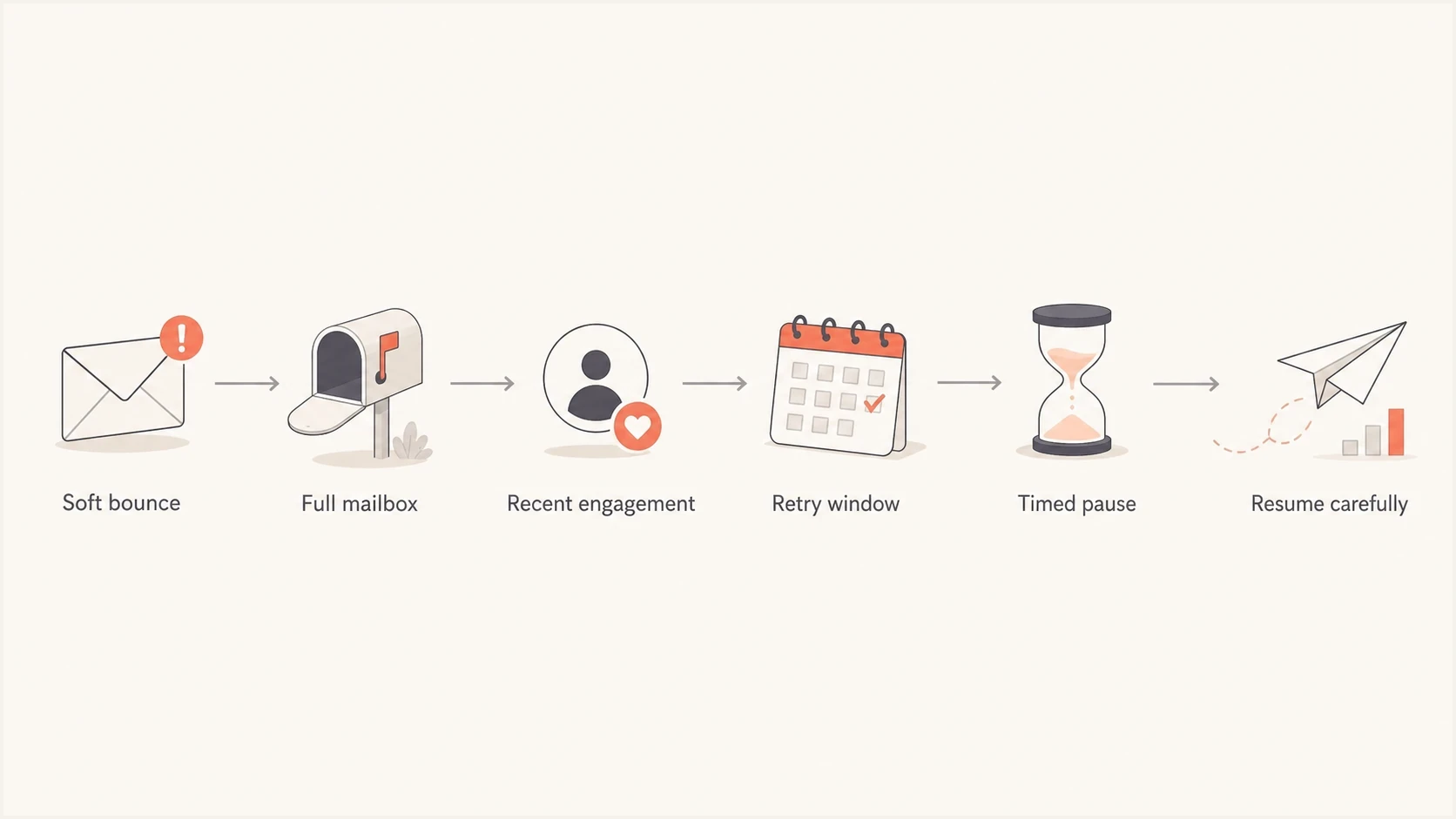
Flowchart showing when to retry or pause full mailbox soft bounces.
A resend policy should separate automatic mail transfer retries from marketing sends. Your sending platform already retries temporary failures for a defined period. The decision you control is whether the subscriber stays eligible for the next campaign after the platform gives up on that delivery.
Keep eligible
- Recent action: The user clicked, replied, purchased, or used the account recently, so the address still has value.
- Short cluster: Multiple bounces happened within one campaign or a short delivery period.
- Low rate: Provider bounce rate remains low and other health metrics are stable.
Pause or suppress
- Long spread: The same address bounces across separate sends over several weeks.
- No activity: The contact has no clicks, replies, account use, or purchase activity.
- Bad trend: The provider also shows rising complaints, repeated blocks, or lower delivery.
A good default is to keep the address eligible after one or two isolated 4.2.2 failures, then pause after three campaign-level full-mailbox bounces within 30-60 days. Extend the pause instead of suppressing forever when the user has clicked, replied, or bought recently. If the user has no meaningful engagement for six to twelve months, the full-mailbox bounce supports the sunset decision.
A deeper soft bounce suppression rule should store the SMTP class, bounce reason, provider, campaign date, and last positive action. Without those fields, the rule can punish recent buyers while retaining stale addresses.
A practical suppression policy
For recurring marketing mail, use a staged policy that keeps useful addresses available but removes chronic temporary failures from the main audience. The policy below is simple enough to automate and strict enough to keep manual review manageable.
Example full mailbox suppression logictext
if smtp_status == "4.2.2":
  count campaign-level bounces in the last 60 days
  check last click, reply, purchase, login, or other verified action

  if count == 1:
    keep eligible
  if count == 2 and last engagement <= 90 days:
    keep eligible with lower priority
  if count >= 3 and last engagement <= 90 days:
    pause for 30 days
  if count >= 3 and last engagement > 90 days:
    pause for 90 days
  if count >= 5 and no engagement for 12 months:
    suppress from marketing

if smtp_status == "5.2.2":
  stop retrying the current message
  pause or suppress based on provider text and address history
- First temporary bounce: Keep the contact in the normal audience. Do not create a special reminder email.
- Second temporary bounce: Check engagement recency. Engaged contacts stay eligible, while stale contacts move toward a pause.
- Third temporary bounce: Pause for 30-90 days depending on engagement, signup source, and sending frequency.
- After the pause: Let the next natural campaign or account event test the address. Do not send a mailbox-check email.
- Long-term stale: Suppress if the address has no engagement for a year and keeps bouncing.
Sending frequency changes the tolerance. If you send four times a week, three full-mailbox bounces can happen quickly and still describe one temporary storage problem. If you send monthly, three full-mailbox bounces means the issue has persisted for a quarter. The same count means different risk.
The best rule includes response class, count, time, and provider diagnostic. A rule that uses count alone is too blunt for high-frequency senders and too lenient for low-frequency senders.
What bounce rate is acceptable
A 0.1% full-mailbox bounce rate is low on its own, especially if it is isolated to one provider and clicks, replies, conversions, complaints, and delivery outcomes are stable. It is a signal to watch, not an emergency.
Bounce and acceptance rate formulastext
bounce rate = bounced messages / attempted messages x 100
acceptance rate = accepted messages / attempted messages x 100

For the same message set:
acceptance rate = 100% - bounce rate
Use the same attempted-message denominator for both metrics and count one final result per recipient message. An accepted message can still land in spam, so acceptance rate is not the same as inbox placement.
|
|
|
|
|---|---|---|---|
Total bounce | <1% | 1-2% | >2% |
Hard bounce | <0.5% | 0.5-1% | >1% |
Full mailbox | <0.5% | 0.5-1% | >1% |
One provider | <0.5% | 0.5-1% | >1% |
A compact operating guide for bounce rate review.
The mix matters more than the headline number. A 1.5% bounce rate made mostly of temporary full-mailbox bounces on an older but engaged list is different from a 1.5% hard-bounce rate on a new acquisition source. The second case points to list quality problems.
For full mailbox recovery, the recovery rate depends heavily on provider storage rules and user activity. Some users clear space quickly because the mailbox is active. Others let the mailbox sit full for months. Your own historical data is the best guide.
What to check before changing the policy
Before tightening suppression, check whether the trend is truly about mailbox storage. A provider-specific increase can also come from authentication failures, content filtering, rate limits, message size, or reputation problems. Full-mailbox wording is usually clear, but bounce classification is not always accurate.
- Provider split: Compare Gmail, Yahoo, Microsoft, Apple, and business domains separately.
- Cause split: Separate mailbox full, temporary deferral, rate limit, policy block, and hard bounce codes.
- Engagement split: Compare recent clickers, repliers, purchasers, and account users with people who have not acted for a year.
- Source split: Review signup source, list age, lead source, and import batch.
If one provider starts returning rate-limit or generic deferral responses, reduce volume for that stream until SMTP errors fall, then increase it gradually. A timed full-mailbox suppression rule will not fix provider throttling.
Send a real message to an email tester after template or infrastructure changes. That does not prove inbox placement for every recipient, but it catches obvious authentication, content, and header problems before a full campaign goes out.
Email tester
Send a real email to this address. Suped shows a results button when the test is ready.
?/43tests passed
If bounces rise while authentication also degrades, fix the authentication problem first. A domain health check helps verify DMARC, SPF, and DKIM quickly. Ongoing DMARC monitoring then shows which sources are passing authentication and which sources need cleanup.
Also check reputation. A sudden policy block is not the same as an over-quota mailbox. Suped's blocklist monitoring tracks IP and domain listings across major blocklist and blacklist sources, so teams can separate storage issues from reputation problems.
Where Suped fits
Suped is our DMARC and email authentication platform. Bounce handling remains in the sending platform, while Suped helps teams check whether a bounce spike coincides with DMARC, SPF, or DKIM failures. Its product also provides hosted authentication records, alerts, and blocklist monitoring for the same investigation workflow.
Issues page showing top issues, verified sources, unverified sources, and authentication pass rates
The workflow is straightforward: identify the bounce spike in the sending platform, then use Suped to confirm whether the domain still authenticates cleanly, whether a new sender fails DKIM, whether SPF lookup limits are involved, and whether a blocklist or blacklist event appeared at the same time.
Sending-platform data
- Scope: Shows failed deliveries, SMTP responses, and bounce categories.
- Action: Controls retries, timed pauses, and recipient suppression.
- Limit: Does not always explain authentication drift or sender identity gaps.
Suped authentication data
- Scope: Shows DMARC, SPF, DKIM, hosted records, and alerts.
- Action: Identifies authentication gaps that need correction.
- Use: Confirms whether the bounce event coincides with a domain-level issue.
The cause determines the fix. Tighten a poor acquisition source when the spike consists of invalid addresses. Repair authentication when a legitimate sender is unverified. Apply timed suppression when the responses are genuinely temporary full-mailbox failures.
Views from the trenches
Best practices
Use count plus time window, so repeated bounces in one day do not equal churn signals.
Segment mailbox full bounces by provider, signup source, list age, and recent engagement.
Pause chronic soft bounces, then let normal campaigns test mailbox recovery later.
Common pitfalls
Suppressing every third soft bounce ignores timing and loses users who still engage.
Sending a special reminder to full mailboxes adds risk without clear delivery value.
Judging bounce rate alone misses complaint, engagement, provider, and trend context.
Expert tips
Treat 0.1% provider bounce rate as watchlist data, not a crisis metric by itself.
High send frequency needs shorter review windows and stronger fatigue checks per domain.
Use a sunset rule for stale contacts, then layer full-mailbox behavior on top of it.
Marketer from Email Geeks says full-mailbox recipients can return, and repeated mailing has not always caused visible negative impact in their programs.
2024-01-26 - Email Geeks
Marketer from Email Geeks says the time between bounces matters more than the raw count because three bounces in one day and three bounces over months mean different things.
2024-01-26 - Email Geeks
Recommended policy
Resend after 4.2.2 full-mailbox responses through normal sending, but stop treating the address as fully eligible after repeated failures across time. A 30-90 day pause after three campaign-level temporary full-mailbox bounces is a reasonable default, with more patience for recent clickers, repliers, or buyers and less patience for stale contacts. Do not automatically resend after a 5.2.2 response.
A 0.1% bounce rate is acceptable in most programs. The bigger question is whether it is rising, concentrated at one provider, or paired with complaints or verified engagement decline. If those other signals are clean, keep the policy measured. Fix list quality, authentication, frequency, and reputation only when the data points to those causes.




