What is the best practice for determining how many soft bounces before suppressing a user?

Updated on 3 Aug 2026: We tightened the soft bounce suppression guidance around elapsed time, final delivery outcomes, recovery data, and sender-level failures.
The practical best practice is to suppress after 3 to 7 consecutive soft bounces, but only when those failures span enough calendar time to prove the mailbox is persistently unreachable. For most marketing programs, start with 5 consecutive soft bounces over at least 14 days. If you send daily or more often, 7 consecutive soft bounces is reasonable. If you send weekly or monthly, use a lower count such as 3, but require those bounces to occur across 15 to 30 days.
The number alone is the wrong control. Five soft bounces in one afternoon can be a provider incident or throttling event. Five soft bounces across 5 weeks points to a mailbox that is not accepting your mail consistently.
- Suppress after 5 consecutive soft bounces across at least 14 days.
- Use 7 consecutive soft bounces, because daily senders can accumulate failures quickly.
- Use 3 consecutive soft bounces, but measure them across multiple campaigns.
- Suppress earlier when overall bounce rate, hard bounce rate, complaint rate, or blocklist and blacklist risk is already elevated.
Why there is no single perfect number
A soft bounce is usually treated as a temporary delivery failure, but email platforms do not use one universal definition. One platform can label a full mailbox as a soft bounce, another can include a temporary domain failure, a third can include a remote server timeout, and a fourth can show a 4xx deferral only after retries have already expired. Some platforms also classify certain 5xx mailbox rejections as soft bounces when they believe the failure is not permanent.
A bare setting such as "suppress after 5 soft bounces" is unreliable unless you know exactly what the platform means by soft bounce. If the bucket includes deferrals, mailbox-full responses, temporary suspension messages, DNS lookup trouble, remote server timeouts, and generic policy blocks, a single threshold can suppress people for reasons that have nothing to do with their mailbox validity.
Do not suppress on count alone
A soft bounce count has to be paired with elapsed time, SMTP response patterns, engagement, and current sending health. Otherwise, one temporary provider incident can push good subscribers into suppression.
The safest way to set the threshold is to look at your own recovery curve. Export users who soft bounced, then measure how many later received successfully and how many never recovered. Most programs see useful recovery happen in the first few attempts. If someone has failed across several campaigns and enough calendar time has passed, continued sending usually adds reputation risk without much upside.
Suped's product can help around the edges of the decision. Suped is not your customer engagement platform, so it does not decide which individual subscriber to suppress. It helps separate list hygiene problems from domain-level authentication and reputation problems through DMARC monitoring, SPF and DKIM checks, blocklist monitoring (blacklist monitoring), and real-time alerts. If soft bounces jump because authentication broke or a sending domain is listed on a blacklist (blocklist), suppressing subscribers is treating the symptom.
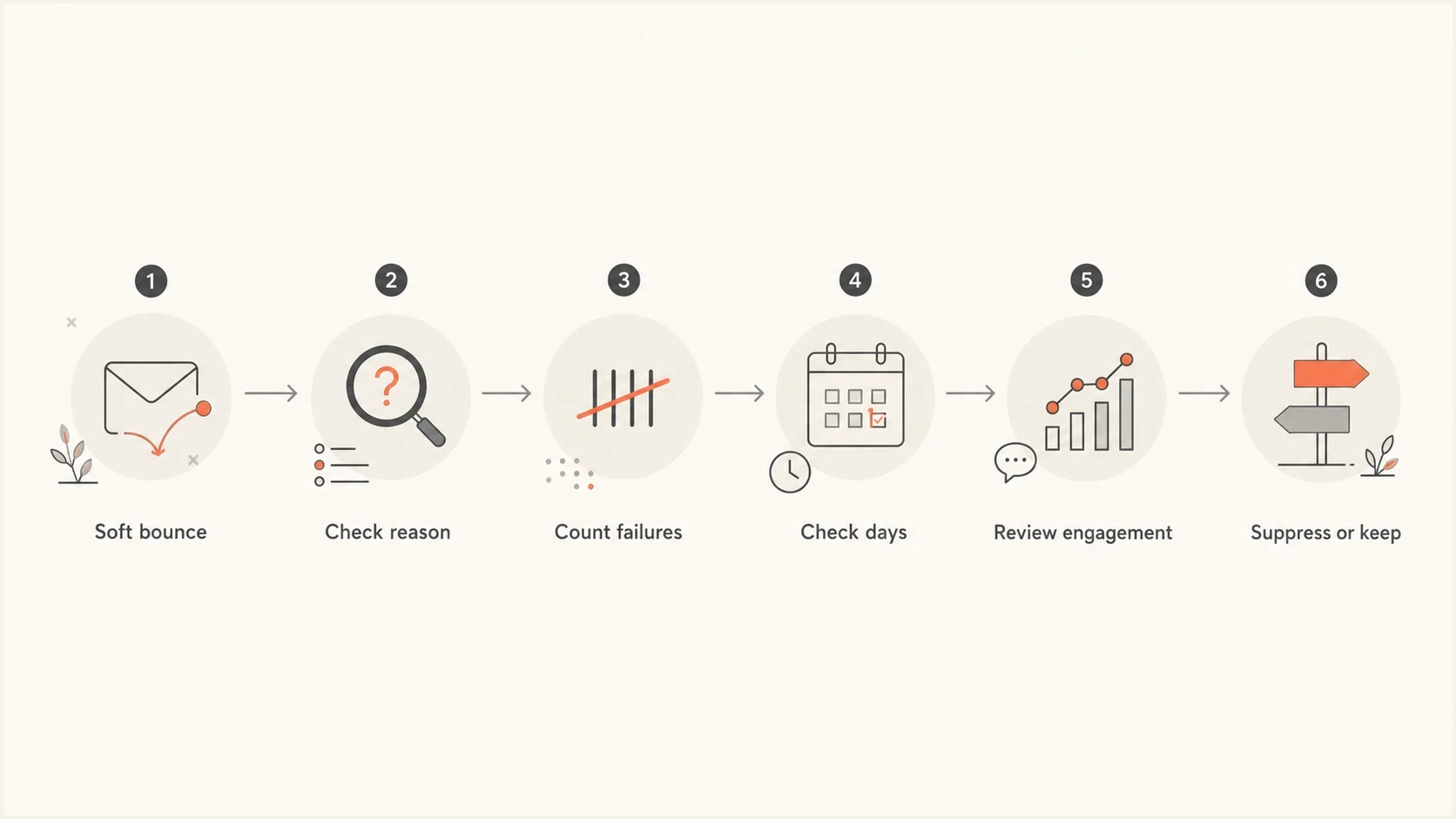
Flowchart for checking bounce reason, count, days, engagement, then deciding whether to suppress.
A suppression rule that works in practice
A practical setup without dedicated marketing operations staff should balance deliverability risk with the chance that a temporarily unreachable recipient comes back. The rule has four parts: consecutive failures, elapsed days, bounce reason, and engagement status.
|
|
|
|---|---|---|
Multiple daily | 7 over 7-14 days | Fast senders can hit 3 failures before a mailbox owner has time to fix quota. |
Daily | 5-7 over 14 days | Enough attempts to catch temporary issues without mailing indefinitely. |
Weekly | 3 over 21 days | Three failed campaigns is a clear signal for low-frequency mail. |
Monthly | 3 over 60-90 days | A higher count would keep bad addresses active for too long. |
Triggered only | 3 with review | Transactional context matters, so review before global suppression. |
Suggested soft bounce suppression thresholds
The most important wording is "consecutive." If a user soft bounces twice, then receives successfully, the counter should reset. That successful delivery proves the mailbox or route recovered. Suppressing later based on lifetime soft bounces can punish old temporary failures that no longer matter.
Simple suppression logictext
if hard_bounce:
  suppress_globally

if final_delivery_result == soft_bounce:
  increment_consecutive_counter_once

if consecutive_soft_bounces >= threshold
  and days_since_first_soft_bounce >= minimum_days
  and successful_delivery_since_first_soft_bounce == false:
  suppress_from_marketing

if successful_delivery:
  reset_consecutive_counter

if user_requests_transactional_message:
  route_through_transactional_policy
Suppress from promotional and lifecycle marketing first, not necessarily every transactional email. Password resets, security alerts, receipts, and account messages can require a separate policy because the user is actively asking for or expecting the message. For reactivation, require an address update or verified user request, reset the counter, record the reactivation source, and retain the original suppression reason and date.
If your platform only offers a blunt soft bounce filter, set it conservatively and monitor the effect for a few sends. Compare suppressed users against opens, clicks, purchases, logins, or other recent activity. A recently active customer with 3 soft bounces deserves more caution than a dormant subscriber who has not engaged in 18 months.
Count failed messages, not retry attempts
A receiving server can issue multiple temporary 4xx responses while one message remains queued. Those automatic retry events belong to one delivery attempt and should not advance a recipient's consecutive soft bounce counter several times. Count the final failed message or campaign outcome after the sending platform exhausts its retries.
- Treat all automatic retries for that message as one soft bounce outcome.
- Increment only when a later, separate message also ends in a soft bounce.
- Reset the consecutive counter because the mailbox or route recovered.
- Confirm whether the event means a deferral, an automatic retry, a temporary failure report, or a final failure before automating suppression.
This distinction prevents a short receiving-server incident from looking like repeated campaign-level failure. It also makes recovery-rate analysis comparable across sending platforms with different retry schedules.
Separate true mailbox problems from sender problems
Before suppressing users based on soft bounces, check whether the failures are clustered by recipient domain, sending IP, sending domain, campaign, or authentication result. If one campaign suddenly soft bounces at a major mailbox provider more than usual, the problem is not necessarily the individual subscribers.
Mailbox-level signal
- The same recipient soft bounces across different sends and dates.
- Mailbox full, disabled mailbox, account suspension, or user-specific acceptance trouble can cause this pattern.
- Suppress after the threshold and keep a reactivation path.
Sender-level signal
- Many recipients at one domain fail at the same time.
- Common causes include throttling, weak reputation, authentication failures, DNS trouble, or a blocklist or blacklist issue.
- Pause aggressive suppression and fix the sending problem first.
This distinction matters because a soft bounce can be a deliverability symptom. A temporary suspension response, a DNS failure, a missing DKIM signature, or a sudden blacklist (blocklist) event can create soft bounce noise that has nothing to do with the user's address quality.
Email tester
Send a real email to this address. Suped shows a results button when the test is ready.
?/43tests passed
When soft bounces spike, send a real message through the same stream and inspect the result with the email tester. That catches obvious authentication, content, routing, and configuration issues before a suppression rule removes thousands of users.
For domain-level checks, Suped's domain health checker is useful when bounce behavior looks broader than one campaign or one recipient. It lets you verify DMARC plus SPF and DKIM posture before you decide the list itself is the main problem.
What to do with different soft bounce reasons
The best suppression policy treats soft bounce reasons differently when your platform exposes them. If the platform only provides a general soft bounce bucket, you can still use domain clustering, send timing, campaign context, and raw SMTP text when available.
|
|
|
|---|---|---|
Mailbox full | Often recoverable | Allow several attempts across 14 to 30 days, depending on send cadence. |
Temporary deferral | Can be throttling | Check domain-level clustering before suppressing. |
Domain unreachable | DNS or remote server issue | Wait, then suppress if it persists. |
Policy block | Sender or message policy issue | Investigate authentication, reputation, content, and sending patterns before suppressing. |
Disabled mailbox | Likely permanent | Suppress sooner or treat as hard. |
How to interpret common soft bounce reasons
A temporary deferral is especially tricky. In many platforms, the sender does not see every 4xx retry event. The platform retries behind the scenes, then reports a final failure only after the message leaves the queue. By the time you see the soft bounce, that individual message has permanently failed, even though the SMTP response class looked temporary.
A raw response can change the decision
Example SMTP responsetext
451 4.3.0 [internal] Sending IP temporarily suspended
This kind of response points to a sender-side or platform-side condition. Suppressing individual subscribers because of it would hide the real issue.
When the status code and diagnostic text point in different directions, use the full response and delivery history instead of mapping every 4xx response to keep and every 5xx response to suppress.
A measured rollout plan
Roll out suppression changes in stages instead of turning on a new rule globally without evidence. The goal is to prove the rule reduces repeated failed delivery without removing recently active people who were likely to recover.
Suggested rollout thresholds
Use tighter suppression only after reviewing recovery and current sender health.
Low risk
1-2 soft bounces
Suppression is delayed and recovery is still likely.
Review
3-4 soft bounces
Check reason, domain clustering, and engagement.
Suppress
5-7 soft bounces
Use when failures are consecutive and span enough time.
Start by tagging affected users instead of suppressing them. Run the tag for 2 to 4 weeks. Continue sending only to a controlled sample, then check how many tagged users later receive successfully, how many engage, and how many continue to fail. If very few users recover after the third or fifth failure, the suppression rule is justified.
- Measure current soft bounce rate, hard bounce rate, complaints, and delivered volume.
- Mark users after the proposed threshold, but keep only a controlled sample eligible during the test window.
- Look at recovery rate, recent engagement, revenue, and failure clustering.
- Suppress users who match the rule after the test supports it.
- Recheck the rule after seasonality, send volume, audience mix, or platform behavior changes.
Issues page showing top issues, verified sources, unverified sources, and authentication pass rates
Suped's issue view is useful when suppression changes coincide with authentication or sender-source issues. It gives a clear view of verified and unverified sources, authentication pass rates, and the specific fixes needed, so the list hygiene work does not mask a broken sender setup.
When to be more aggressive
A 5-over-14-days starting rule is practical, but some cases justify a tighter threshold. Soft bounces are not always dangerous. Tighten the threshold when surrounding signals show that sender reputation or audience quality is already under pressure.
- Use 3 to 5 failures and review domain-level patterns after each campaign.
- Suppress earlier because there is less upside in repeated attempts.
- Reduce sending to weak segments and fix consent or targeting issues.
- Check domain and IP reputation before deciding the bounce problem is subscriber-level.
If reputation is already fragile, suppressing a small number of questionable addresses is safer than sending into repeated failure. A threshold of 3 consecutive soft bounces across 15 days is defensible for dormant users, low-engagement segments, high-risk domains, or programs recovering from inbox placement problems.
Use Suped's blocklist monitoring when soft bounce increases might be tied to reputation. Blocklist and blacklist checks are not a substitute for bounce management, but they stop you from blaming users when receiving systems are reacting to the sender.
Best default policy
Use 5 consecutive soft bounces over at least 14 days for regular marketing mail. Reset the counter after any successful delivery. Tighten to 3 for dormant or risky segments. Loosen to 7 for high-frequency senders with strong reputation.
Views from the trenches
Best practices
Pair soft bounce counts with elapsed days so one short outage cannot suppress valid users.
Reset the soft bounce counter after successful delivery to avoid punishing old failures.
Review domain clustering before suppression, since sender issues can look like list decay.
Common pitfalls
Treating all platform soft bounce labels as equal creates bad suppression decisions.
Using lifetime soft bounce totals keeps stale failures attached to healthy recipients.
Ignoring send cadence makes daily and monthly programs follow the same bad threshold.
Expert tips
Start with five consecutive soft bounces over fourteen days, then tune with recovery data.
Use three failures for dormant users where recovery value is low and reputation risk is high.
Check raw SMTP text when available because some soft bounces point to sender-side issues.
Expert from Email Geeks says a configurable soft bounce threshold needs nuance, because some platforms convert repeated soft bounces into harder suppression states only after multiple consecutive failures.
2024-10-28 - Email Geeks
Marketer from Email Geeks says seven consecutive failures can be too slow for some programs, and the better approach is to inspect how many recipients recover after the first few attempts.
2024-10-28 - Email Geeks
Recommended soft bounce suppression rule
The best practice is to start with 5 consecutive soft bounces over at least 14 days, reset the count after successful delivery, and adjust the threshold by send frequency and engagement. Use 3 for dormant or high-risk segments. Use 7 for high-frequency programs with strong sender health. Do not use lifetime soft bounce totals or automatic SMTP retry events as the suppression trigger.
Before turning the rule on, check whether recent soft bounces are concentrated by recipient domain, sending source, campaign, or raw SMTP reason. If the pattern points to authentication, DNS, policy blocks, or a blacklist (blocklist) event, fix the sending issue first. Suped's product supports this workflow by bringing DMARC reports, SPF and DKIM visibility, blocklist monitoring (blacklist monitoring), hosted SPF, hosted DMARC, hosted MTA-STS, and real-time alerts into one place.
A clean suppression rule protects reputation without quietly deleting good subscribers. The count matters, but the time window, bounce reason, current sender health, and distinction between retries and final failures matter more.




