Why am I getting soft bounces and how do I fix them?


Updated on 28 Jul 2026: We updated the soft-bounce guidance with current SMTP retry behavior, hard-bounce differences, and baseline-based triage.
Soft bounces happen because the receiving mail server did not accept the message right now, but it did not declare the address permanently invalid. Common causes include full mailboxes, provider throttling after volume spikes or complaint increases, graylisting, temporary DNS failures, authentication failures, provider outages, and sender reputation problems. Message size and content policy limits can produce temporary or permanent failures, so use the complete SMTP reply to classify them.
The fix is not to guess. Start by reading the raw SMTP replies, then group them by mailbox provider, SMTP code, sending IP, campaign, template, and time window. A count like 5,000 soft bounces means very different things if the send volume was 5 million, 200,000, or 20,000. The percentage shows urgency. The bounce text shows cause.
- First check: Export raw SMTP replies rather than relying only on the ESP's friendly category name.
- Next split: Separate recipient-side problems like full mailboxes from sender-side problems like throttling.
- Then act: Fix the specific cluster, slow the risky traffic, and only suppress addresses after a repeated pattern.
The direct answer
You are getting soft bounces because a receiving system is temporarily refusing your email. That temporary refusal can be caused by the recipient mailbox, the receiving provider, your sending infrastructure, your authentication, or your recent sending behavior. The exact reason is inside the bounce response.
Treat soft bounces as a routing investigation. One cluster might be harmless, such as a few full mailboxes. Another cluster might be urgent, such as one provider deferring most traffic because the sending IP has low reputation. Another might be operational, such as one sending host being graylisted while the rest of the mail stream works.
|
|
|
|---|---|---|
Mailbox full | Recipient issue | Retry later |
Many at one provider | Provider deferral | Throttle sends |
One host | Graylisting | Fix retry |
SPF fail | Auth drift | Trace source |
Listed IP | Reputation | Pause source |
Large file | Size limit | Reduce email |
Fast mapping between soft bounce signals and practical fixes.
Soft bounce vs. hard bounce
A soft bounce is a temporary delivery failure, usually signaled by a 4xx SMTP reply. The sending system keeps responsibility for the message and normally queues another attempt. A dashboard can show the event as deferred before it becomes a final bounce, and a delay notice can arrive while retries continue.
|
|
|
|---|---|---|
SMTP class | 4xx | 5xx |
Meaning | Temporary failure | Permanent failure |
Queue action | Retry on schedule | Do not retry unchanged |
List action | Hold after repetition | Suppress promptly |
The operational difference between temporary and permanent delivery failures.
Use the raw code and full response instead of assuming the dashboard label is exact. Sending platforms apply their own retry windows and can map provider-specific policy replies differently.
How to find the real cause
The sender dashboard category is only a starting point. ESPs often compress many different replies into one soft bounce label. That hides the useful detail. A full mailbox, a provider throttle, and a temporary authentication failure all need different fixes, but all three can appear as soft bounces in a campaign report.
The raw SMTP reply or delivery status notification usually has a basic SMTP status code and an enhanced status code. The basic code tells you whether the receiver treated the failure as temporary or permanent. The enhanced code adds context, such as mailbox storage, policy, authentication, or network trouble. A final delivery status notification might not appear until the sender's retry queue expires.
Example soft bounce repliestext
421 4.7.0 Try again later
451 4.7.1 Greylisted, please retry
452 4.2.2 Mailbox full
454 4.7.5 Temporary authentication failure
451 4.4.2 Timeout while connecting to remote host
Work from evidence
A soft bounce investigation should start with the exact messages returned by the receiving system. Without those replies, every explanation is speculation.
- Export replies: Pull SMTP text, enhanced status code, recipient domain, sending IP, and timestamp.
- Group tightly: Build clusters by provider, campaign, source host, message type, and retry outcome.
- Fix narrowly: Change the traffic pattern that matches the evidence instead of changing everything.
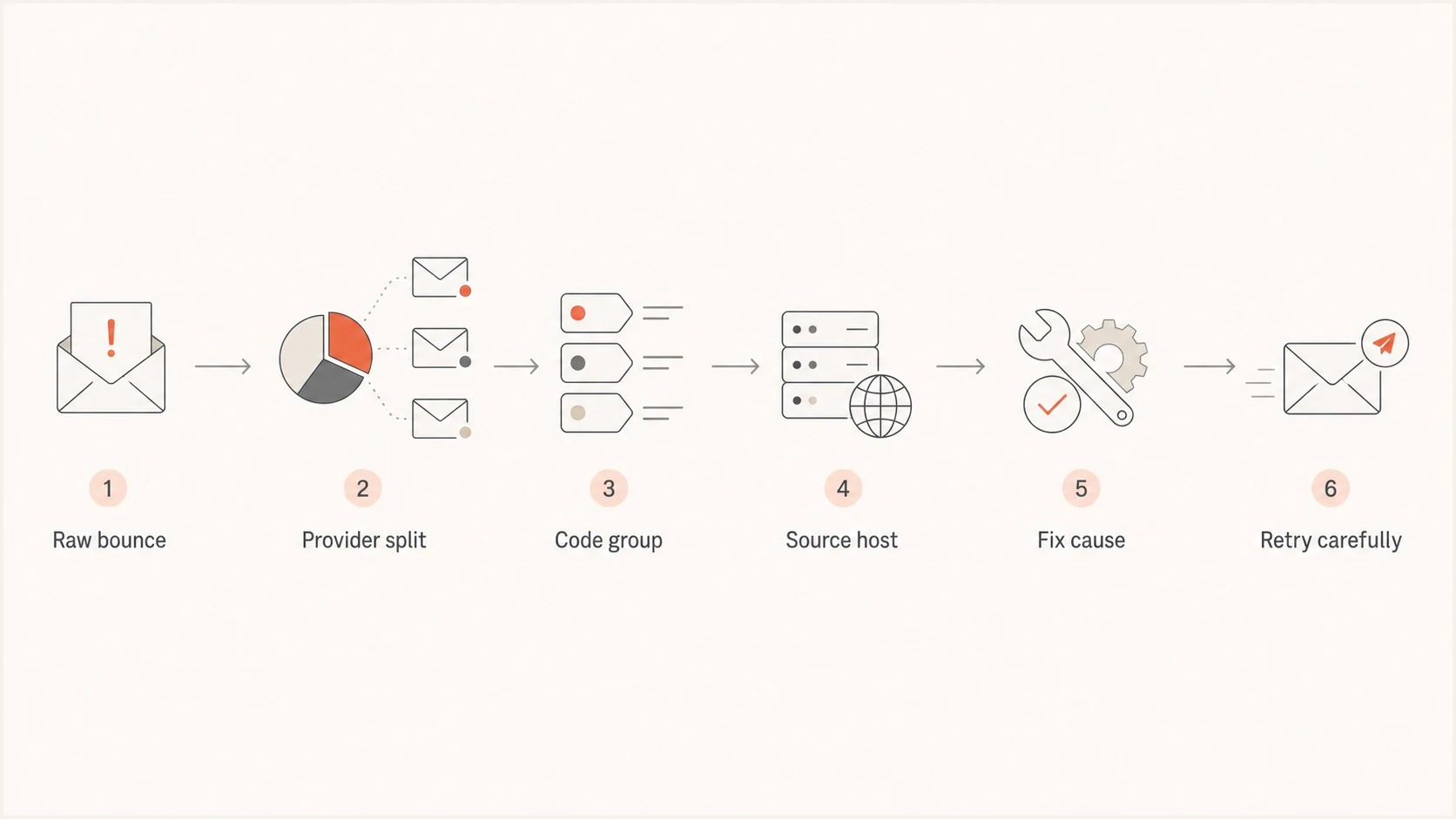
SMTP soft bounce troubleshooting flowchart from raw reply to careful retry.
Soft bounce codes to check first
The first digit matters, but the complete response matters more. A 4xx reply means the receiver expects the sender to retry. A 5xx reply normally means permanent failure, but some sending platforms still place certain policy replies into a soft bounce bucket when they retry internally. Keep the code, enhanced status, and response text together.
|
|
|
|---|---|---|
421 | Service busy | Slow retry |
450 | Temporary refusal | Read full reply |
451 | Local error | Read text |
452 | Storage full | Hold briefly |
454 | Auth issue | Check auth path |
Common reply families seen in soft bounce investigations.
When the code and text point in different directions, use the reply class, enhanced code, and full provider text together. If a reply says rate limited, slow that provider segment. If it says mailbox full, do not treat it like a global sender problem. If it names authentication, check SPF, DKIM, DMARC, and the return-path domain used by that stream. Do not assume every size failure is temporary because an X.2.3 message-length status is intended as a permanent failure.
Bounce fields to exporttext
recipient_domain
smtp_code
enhanced_status
raw_smtp_reply
sending_ip
sending_host
mail_from_domain
header_from_domain
campaign_id
template_id
first_attempt_time
last_attempt_time
retry_count
How to separate mailbox problems from sender problems
Recipient-side soft bounces tend to be scattered across many providers and campaigns. Sender-side soft bounces tend to cluster around one mailbox provider, one IP, one message stream, one campaign, or one time window. That split keeps the fix focused.
This also protects good subscribers. If the problem is a temporary provider throttle, suppressing every affected address punishes valid recipients. If the problem is repeated full mailboxes over several campaigns, a temporary hold makes sense.
Recipient-side pattern
- Mailbox full: The address exists, but the inbox has no room at the time of delivery.
- Auto-reply systems: Some systems produce temporary replies that look noisy in bulk reporting.
- Old addresses: Aging lists produce more full, disabled, or intermittently reachable mailboxes.
Sender-side pattern
- Provider throttling: One provider defers traffic when volume, complaints, or reputation look risky.
- Graylisted host: One sending host is told to retry later and fails if retry behavior is poor.
- Auth mismatch: A source sends with broken SPF, DKIM, DMARC, or return-path setup.
Authentication and reputation checks
After grouping the bounces, check whether the domain or sending source changed. A domain health check is useful when the bounce text points at DNS, authentication, or mixed sender setup. Some providers issue temporary deferrals for authentication or sender-requirement failures, while others reject the message permanently.
Suped's product brings DMARC monitoring, SPF, DKIM, hosted SPF, hosted DMARC, hosted MTA-STS, and real-time alerts into one workflow. Use Suped to connect a bounce cluster to authentication changes and follow source-specific fix steps instead of changing every DNS record.

Issue steps to fix dialog showing the issue overview, tailored fix steps, and verification action
Reputation checks matter too. If the replies mention policy, abuse, spam, denied connections, or listed infrastructure, check the sending IP and domain against blocklist (blacklist) data. Suped's blocklist monitoring helps catch listings and reputation changes before they become repeated delivery failures.
Do not fix DNS blindly
Only change authentication records after you connect the bounce cluster to the failing source. A global SPF or DMARC edit can affect working streams.
- Map sources: Identify the exact vendor, host, and envelope domain tied to the failing replies.
- Check pass rates: Compare SPF, DKIM, and DMARC pass rates before and during the bounce spike.
- Confirm scope: Fix the failing stream first, then watch the next retry window for recovery.
Use a live test before resending
Before resending to a soft-bounced segment, send a fresh test through the same route when possible. Use the same envelope domain, header-from domain, DKIM selector, sending IP pool, and message template. A clean test does not prove every provider accepts the next campaign, but it catches obvious authentication and formatting problems.
A practical email tester result should show whether SPF, DKIM, DMARC, message headers, and content checks look sane before you put volume behind the stream again.
Email tester
Send a real email to this address. Suped shows a results button when the test is ready.
?/43tests passed
If the test shows authentication failures, fix those first. If authentication passes and the bounce cluster is provider-specific, treat it as a provider throttling or reputation problem. If the issue only appears with one template, reduce risky content, remove oversized attachments, and retest.
- Same route: Test using the same sending source that produced the soft bounce cluster.
- Same identity: Keep the same header-from domain, return-path domain, and DKIM selector.
- Same content: Test the actual template if content filtering or size limits appear in replies.
- Controlled volume: Start with one message, then use a small batch only after the route accepts it.
When graylisting is the answer
Graylisting is a temporary refusal that asks the sending server to try again later. The receiving system uses the retry to distinguish standards-compliant mail transfer behavior from sources that give up or repeat too aggressively. When one sending host or IP produces many soft bounces and the rest of the program looks normal, graylisting belongs near the top of the list.
The key sign is concentration. If the failures all came from one host, one IP pool, or one automation process, the recipient list is probably not the root cause. The fix is to correct retry handling, adjust the sending pattern, and check whether the receiving provider sees the host as new or risky.
Graylisting style replytext
451 4.7.1 Greylisted, please try again later
421 4.7.0 Temporarily deferred due to rate limits
451 4.7.1 Please retry after 900 seconds
Do not overreact to one graylisted host
A single graylisted source can create a scary soft bounce count without meaning the whole domain has failed. Isolate the host before changing list rules.
- Check retry: Confirm the sender retries after the requested delay instead of giving up.
- Warm slowly: Reduce volume from that host until the receiving provider accepts traffic again.
- Keep evidence: Track accepted, deferred, and expired retries separately for the same source.
Fixes by cause
Once the soft bounces are grouped, the fix is usually straightforward. The wrong move is applying one global response to every soft bounce. Full mailboxes need patient retry and later suppression. Provider throttling needs lower rate and better segmentation. Authentication failures need source-specific DNS fixes. Graylisting needs reliable retry behavior.
Soft bounce rate triage
Compare the current rate with its recent baseline, then inspect the largest provider and source clusters.
Normal watch
At baseline
Scattered temporary failures within the recent pattern
Investigate
Above baseline
Visible concentration or a material rate increase
Act now
Sharp spike
Large cluster, repeated deferrals, or authentication errors
- Full mailbox: Retry over a short window, then pause the address after repeated campaigns show the same issue.
- Provider throttle: Cut volume to that provider, send to recent engagers first, and extend spacing between batches.
- Auth failure: Fix the failing source, confirm SPF and DKIM pass, then watch DMARC results for that stream.
- Graylisting: Honor retry delays, keep the same sender identity on retry, and avoid sudden volume jumps.
- Listed source: Pause the affected IP or domain stream, remove risky recipients, and verify blocklist (blacklist) status.
For repeated temporary failures, use suppression logic that considers count, time, provider, engagement, and bounce reason. One temporary failure should not remove a good subscriber. A repeated pattern across multiple sends should stop mail until the address or provider recovers.
A practical recovery plan
The fastest recovery plan is narrow and measured. Do not resend the entire failed audience immediately. Do not suppress the entire failed audience immediately. Identify the biggest cluster, fix that cluster, then retry a small sample.
A staged retry gives receiving providers time to accept normal traffic again without adding another spike. It also shows whether the change worked. If a small retry still defers, the root cause remains.
- Measure rate: Divide soft bounces by delivered plus bounced attempts for the same send.
- Find cluster: Rank by provider, code, source host, sending IP, campaign, and template.
- Fix source: Change the exact sending pattern, authentication setup, or retry behavior at fault.
- Retry sample: Start with engaged recipients and a small batch before restoring normal volume.
- Update rules: Adjust suppression only after repeated failures prove the address is no longer reachable.
If the bounce spike came from a new list source, treat acquisition quality as part of the investigation. Old, scraped, unconfirmed, or poorly engaged addresses cause soft bounces before they become hard bounces. A valid address can still be low quality for the mail stream if the owner never opens, complains, or ignores every campaign. Prevent repeat clusters with confirmed opt-in, address checks at signup, an easy unsubscribe, and complaint monitoring.
If the spike came after a content change, compare the failing template against recent accepted templates. Attachments, URL density, URL reputation, image-heavy layouts, and sudden topic changes can increase filtering. Keep that review separate from DNS unless the bounce text names authentication.
Views from the trenches
Best practices
Group soft bounces by provider and SMTP reply before changing resend or hold rules.
Pull the raw bounce text because ESP categories often hide the condition that matters.
Compare bounce percentage against total send volume, not against the absolute count alone.
Check list age, engagement, and acquisition source before blaming the receiving ISP.
Common pitfalls
Treating every 4xx reply as harmless lets repeated temporary failures hurt reputation.
Resending all soft bounces at once can intensify throttling from the same provider.
Ignoring one noisy sending host can hide a graylisting issue that is easy to isolate.
Suppressing after one soft bounce removes valid recipients with temporary mailbox issues.
Expert tips
Keep a provider-level bounce dashboard so Gmail, Yahoo, Microsoft, and Apple stand out.
Store the sending IP, campaign, template, and bot or host name with every bounce event.
Use DMARC reports next to bounce data to separate authentication drift from mailboxes.
Set retry windows by bounce class because full mailboxes and throttling differ clearly.
Marketer from Email Geeks says the first step is to group soft bounces by classification and the receiving provider that generated them.
2023-05-15 - Email Geeks
Marketer from Email Geeks says the actual SMTP bounce text is the only reliable source when a temporary failure spike needs an answer.
2023-05-15 - Email Geeks
The shortest path to a fix
Soft bounces are not a diagnosis. They are a signal that the receiving side refused delivery temporarily. The fix starts when you read the raw reply and find the pattern behind it.
If the failures are scattered, handle them with normal retry and suppression rules. If they cluster around one provider, source, host, or code, slow the affected traffic and fix that source. If authentication or reputation changed, treat it as an infrastructure issue before you resend.
Suped's product fits this workflow when the cause touches DMARC, SPF, DKIM, hosted SPF, blocklist (blacklist) monitoring, or cross-domain visibility. Bounce data shows what failed at delivery time. Suped helps show whether the sending identity behind that failure is healthy enough to keep sending.




