
How to resolve Yahoo soft bounces and TSS04 errors when email warming up too fast?


Updated on 29 Sep 2026: We updated this guide with Yahoo-specific throttling, retry telemetry, and current unsubscribe and DKIM requirements.
The direct fix for Yahoo soft bounces with TSS04 is to stop increasing volume, drop back to the last Yahoo and AOL volume that delivered cleanly, hold there for several days, and restart warm-up only with the most engaged, clearly opted-in recipients. There is no universal safe number. A sender with 500 highly engaged Yahoo recipients can recover faster than a sender with 100 weakly engaged recipients if complaint signals, content, or authentication are causing the deferrals.
Treat TSS04 as a Yahoo rate and reputation warning, not as a normal address-level bounce. Yahoo's SMTP error codes describe 421 and 451 errors as temporary problems tied to unusual traffic patterns, spam-like content, complaints, server load, or other suspicious behavior. The response should be operational: reduce pressure, fix the cause, retry carefully, and keep proof of what changed.
TSS04 soft bounce example
smtp;421 4.7.0 [TSS04]
Messages from 74.112.67.1 temporarily deferred
because of unexpected volume or user complaints.
Diagnostic: 4.16.55.1
Do this before the next send
- Pause increases: Stop adding Yahoo volume until deferrals drop after retries.
- Segment carefully: Send only to recent clickers, buyers, active account users, or confirmed subscribers first.
- Keep evidence: Save complete SMTP responses, Yahoo domain volumes, retry results, complaint data, and content changes.
What TSS04 means
TSS04 usually appears as a 421 4.7.0 temporary deferral. Yahoo can issue it at different points in the SMTP exchange while evaluating the connection, sending pattern, or message. Check four causes first: Yahoo volume rose faster than reputation allowed, complaint signals increased, the message or links created a negative content signal, or the IP or domain has weaker reputation than it had during the last successful campaign.
- Volume: The same total campaign size can still be too much if Yahoo reputation has cooled down or engagement has changed.
- Complaints: A small number of unhappy recipients can outweigh a clean-looking send count.
- Content: Yahoo can defer after DATA, so the cause can be a URL, template, subject, attachment, or redirect chain.
- History: A one-month comparison can miss reputation decay or an earlier sending change. Review enough Yahoo history to identify the last stable pattern.
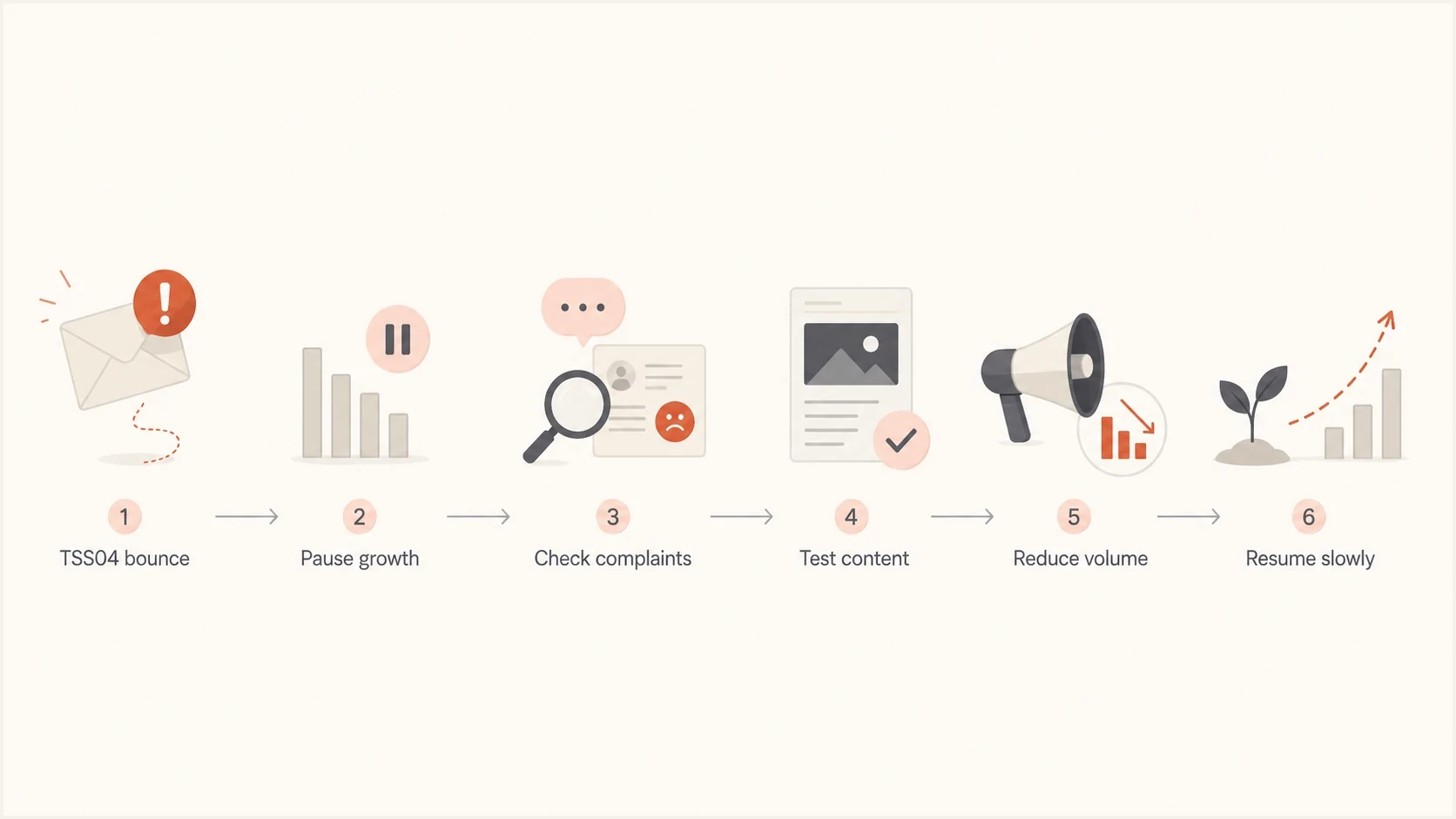
Yahoo TSS04 recovery flowchart for checking complaints and content before restoring volume.
Preserve the complete SMTP response for each event: the basic 421 code, the enhanced 4.7.0 code, the TSS04 tag, the response text, and any diagnostic code. Grouped labels such as "soft bounce" remove details that help separate traffic spikes, content signals, and reputation problems.
A related walkthrough on Yahoo deferrals is useful when the deferrals sit between queue handling and Yahoo's retry timing.
First response when Yahoo starts soft bouncing
The first move is not to hunt for a magic daily cap. Find the last Yahoo send that completed with normal deferrals, normal complaint handling, and normal engagement. That becomes the recovery ceiling. If the last clean Yahoo send was 250 recipients, sending 500 because it sounds conservative is still a guess.
|
|
|
|---|---|---|
421 4.7.0 [TSS04] | Rate, complaint, content, or trust warning | Throttle and diagnose |
After DATA | Possible content signal | Test links and template |
Repeated soft bounces | Suppression risk | Separate bounce rules |
Persistent pattern | Needs documented review | Submit a support case |
TSS04 triage signals and actions
- Roll back: Return to the last Yahoo and AOL volume that delivered without unusual temporary errors.
- Hold steady: Stay at that level for two to four sends, or longer if retries still defer.
- Tighten the list: Exclude old opens, non-clickers, imported addresses, role accounts, and anyone without clear consent.
- Change content: Remove risky links, shorten redirect chains, and send a simpler message to the safest segment.
- Resume slowly: Increase only after delivered mail, low complaints, and stable retry completion.
For the specific SMTP pattern 421 4.7.0 TSS04, the key distinction is temporary deferral versus permanent rejection. Normal mail-server retry is valid, but manually repeating the same high-volume send without fixing the cause gives Yahoo the same traffic pattern to defer again.
Set a safer Yahoo warm-up pace
If a 1,700-recipient campaign caused Yahoo to soft bounce most of the mail, stop treating all 1,700 recipients as warm-up inventory. Split domains hosted by Yahoo into their own pool, start at the last clean accepted volume, and prioritize recent positive activity. If there is no clean baseline, begin with the smallest engaged cohort that produces useful delivery data without creating another volume spike.
Yahoo recovery decision bands
Use accepted volume and retry behavior to decide the next send. These are operating signals, not mailbox provider limits.
Continue
Rare and clearing
TSS04 is rare and deferred mail clears through normal retries.
Hold
Persistent
Deferrals repeat after retries or complaints move upward.
Roll back
Widespread or rising
TSS04 is widespread, rising, or causing the retry queue to expire.
After a clean hold period, add one controlled increment that is small relative to the accepted Yahoo volume, then hold again. On a small list, add tens of recipients rather than hundreds. If a send is deferred heavily, reduce the next send instead of keeping volume flat.
Yahoo warm-up decision ledger
Send 1: smallest engaged Yahoo cohort, record accepted and deferred mail
Send 2: hold volume if normal retries clear
Send 3: add one small cohort only after clean acceptance
Send 4: hold again and compare complaints and engagement
Next send: hold or roll back if TSS04 persists
A safe number is earned
A smaller Yahoo send with clean retry completion gives a stronger recovery signal than a larger send with widespread temporary deferrals. Let accepted volume, complaint data, engagement, and retry completion determine the next increase.
Configure Yahoo-specific throttling and retry logging
Campaign size and delivery rate are separate controls. A previously safe daily volume can still trigger TSS04 when too many connections or messages arrive in a short window. Apply Yahoo-family throttling at the sending platform or mail transfer agent, then spread the cohort across a longer period instead of repeatedly reinjecting the same deferred mail.
- Isolate the route: Group domains hosted by Yahoo for throttling and reporting while keeping transactional and marketing streams separate.
- Lower concurrency: Reduce simultaneous Yahoo connections and the message rate on each connection, then change one control at a time.
- Keep the queue: Let the existing queue use progressive backoff. Do not create duplicate attempts by launching the campaign again.
- Track conversion: Measure how many deferred messages later deliver before queue expiry, split by sending IP, domain, campaign, and hour.
Minimum Yahoo retry log
queue_id, sending_ip, recipient_domain, campaign_id
first_attempt_at, last_attempt_at, attempt_count
smtp_code, enhanced_status, response_text, diagnostic_code
final_outcome, delivered_at
Use retry conversion as the decision metric. A falling first-attempt deferral rate is useful only when deferred messages also reach a final delivery. If conversion worsens or the queue expires, roll volume back again and review complaints, content, authentication, and list quality before another increase.
Check authentication, reputation, and content
A TSS04 event is not always an SPF, DKIM, or DMARC failure. Clean authentication removes one source of risk, but it does not earn higher Yahoo volume by itself. Check SPF and DKIM pass results, DMARC identifier matching, rDNS, HELO or EHLO identity, TLS, complaint feedback handling, and whether the sending IP or tracked link domains show a blocklist (blacklist) problem.
Suped is our DMARC and email authentication platform. Suped's DMARC monitoring supports this workflow by showing which source sent the mail, whether SPF, DKIM, and DMARC passed, and which identifier matched the visible From domain. Teams can apply the fix, then compare Yahoo-facing traffic after the change.

Issue steps to fix dialog showing the issue overview, tailored fix steps, and verification action
For a fast first pass, run a domain health check and then send a real test message through an email tester. The DNS check shows whether the domain is structurally ready. The message test shows whether the actual mail stream has authentication, header, content, or rendering problems.
Email tester
Send a real email to this address. Suped shows a results button when the test is ready.
?/43tests passed
If the issue started suddenly, compare the exact message that triggered TSS04 against the last clean Yahoo send. Review every visible URL, tracking domain, image host, redirect target, unsubscribe header, subject line, and template module. Content can trigger a deferral even when volume did not change.
Authentication checks
- SPF: Confirm the envelope sender passes and stays within lookup limits.
- DKIM: Confirm the signing domain fits the visible From domain strategy.
- DMARC: Confirm at least one authenticated identifier matches the visible From domain.
- DNS: Confirm rDNS, HELO, MX, and TXT records are consistent.
Content checks
- Links: Review redirect chains, tracking hosts, affiliate links, and external brand domains.
- Template: Compare HTML size, images, hidden text, and MIME structure.
- Headers: Check List-Unsubscribe, List-Unsubscribe-Post, and From consistency.
- Audience: Remove stale subscribers before changing the template again.
Check blocklist monitoring when TSS04 appears with broader delivery problems. A blocklist or blacklist listing is not the only reason Yahoo defers mail, but it can explain why a previously safe volume now looks risky.
Meet Yahoo's current sender requirements
Passing authentication does not guarantee that TSS04 will stop, but failure to meet Yahoo's sender requirements adds avoidable trust problems. Check the requirements against the exact domain and IP used for the deferred stream, not against a different corporate or transactional stream. Yahoo does not publish a fixed volume threshold for bulk classification. It evaluates senders at the authenticated domain or From domain level and can use content, IP, and other available signals when checking compliance.
- All senders: Authenticate with SPF or DKIM at minimum, keep spam complaints below 0.3%, use valid forward and reverse DNS, and comply with RFC 5321 and RFC 5322.
- Bulk senders: Pass SPF and DKIM, publish DMARC with at least p=none, make DMARC pass through identifier matching, and use a working rua reporting address when adding the strongly recommended rua tag.
- DKIM keys: Use at least 1024 bits. Yahoo recommends 2048-bit keys when the DNS provider supports them.
- Marketing mail: Provide a functioning List-Unsubscribe header. Yahoo strongly recommends RFC 8058 one-click unsubscribe and accepts the mailto method. Show a visible body link and honor requests within two days.
- Complaint measurement: Yahoo calculates its spam rate using mail delivered to the inbox. A complaints-per-attempted-send calculation will not match Yahoo's denominator.
- Complaint Feedback Loop: Enroll each DKIM signing domain, process ARF complaint reports, and suppress each complainant promptly.
Authentication can pass while reputation fails
SPF, DKIM, and DMARC prove identity and policy compliance. TSS04 can still continue when volume, complaints, list quality, content, or sending history gives Yahoo a negative signal.
Apply these controls to consumer domains hosted by Yahoo, including AOL. Yahoo Japan is separate, so diagnose its responses and policies independently instead of grouping it into the same recovery pool.
Handle retries and suppressions without losing good subscribers
Do not suppress every Yahoo address after a few TSS04 soft bounces. A temporary rate deferral is not the same as an invalid mailbox. If a system suppresses after three total soft bounces in 30 days, and each Yahoo send creates another temporary deferral, it can remove a valid Yahoo audience before the sender-level cause is fixed.
Do not treat TSS04 like a hard bounce
Suppress hard bounces and confirmed complaints. For TSS04, classify the event as a temporary deferral, preserve the subscriber, and use a separate retry and holdback rule. Only remove recipients after a permanent failure, complaint, unsubscribe, or clear engagement-policy decision.
- Reset logic: If a recipient later accepts mail, reset temporary bounce counters tied to rate deferrals.
- Separate causes: Track TSS04 separately from mailbox full, DNS timeout, connection timeout, and permanent user-unknown failures.
- Throttle retries: Let deferred messages use progressive backoff instead of pressing Yahoo with the same queue or reinjecting duplicate mail.
- Protect consent: Keep opted-in, engaged subscribers available for the recovery pool after the cause is fixed.
A TSS04 message can later produce a final non-delivery report when the sending queue reaches its retry limit. That queue outcome does not prove that the recipient mailbox is invalid. Suppress a Yahoo user who complains, but do not punish every deferred recipient for low sender trust.
When to ask Yahoo for review
After rolling back volume, checking authentication, reviewing content, and confirming complaint handling, open a Yahoo sender support request if the same TSS04 pattern persists for more than 48 hours of controlled sending or appears across unrelated sending streams with no common change. Include data instead of a general delivery complaint.
- Include logs: Provide complete SMTP responses, affected IPs, affected domains, timestamps, queue outcomes, and diagnostic codes.
- Show controls: Explain the reduced volume, per-domain throttling, list segmentation, authentication checks, and content changes already completed.
- Share patterns: Compare domains hosted by Yahoo with other mailbox providers and show whether AOL behaves the same way.
- Follow up: If the first response is generic, reply with the evidence and ask for a deeper review.
Do not resume normal volume only because a ticket is open. Keep the Yahoo segment throttled until SMTP results show recovery. Repeated failed recovery attempts can extend the problem and make the evidence harder to interpret.
Views from the trenches
Best practices
Roll back to the last clean Yahoo volume, hold there, then increase only after retries clear.
Separate Yahoo-family domains during recovery so one provider's signals do not hide in totals.
Keep TSS04 soft bounces out of hard suppression rules unless a permanent failure appears.
Common pitfalls
Picking a daily cap without checking the last clean Yahoo send creates another guess.
Removing every TSS04 recipient after a few soft bounces can erase valid subscribers.
Ignoring links and redirects misses a common reason Yahoo defers after message data.
Expert tips
Review six months of Yahoo engagement before assuming the latest campaign caused the issue.
Open a sender support request when the issue persists after clean remediation steps.
Process complaint feedback quickly, because Yahoo complaints can outweigh small list size.
Expert view
Expert from Email Geeks says TSS04 usually means the sender is warming up too fast, so the right move is to return to a previously successful volume and rebuild slowly.
2023-03-01 - Email Geeks
Expert view
Expert from Email Geeks says Yahoo can defer after message data, so a URL or content element can be the trigger even when the recipient count looks unchanged.
2023-03-01 - Email Geeks
Confirm recovery before restoring volume
To resolve Yahoo soft bounces and TSS04, reduce volume first, then fix the trust signals that made Yahoo slow the stream. Start with the last clean Yahoo send, build a recovery pool of recipients with clear permission and recent engagement, test the actual message, confirm authentication, process complaints, and keep temporary deferrals out of hard suppression logic.
Suped is our product for DMARC reporting and email authentication. It gives teams one place to identify the sending source, inspect SPF, DKIM, and DMARC results, track authentication changes, review blocklist or blacklist signals, and alert the owners who need to act. During TSS04 recovery, that creates a record of which source sent, which identifier matched, which checks failed, and whether a fix changed the Yahoo result.
Recovery is complete when Yahoo-hosted mail accepts after retries, the deferral-to-delivery conversion rate stays healthy, complaint feedback is processed, engaged recipients receive mail again, and controlled volume increases do not recreate the same 421 4.7.0 pattern.




