How can I resolve Yahoo SMTP error 421 4.7.0 TSS04?

Published 7 Aug 2025
Updated 12 Aug 2026
11 min read
Summarize with
Updated on 12 Aug 2026: We added Yahoo complaint feedback loop steps and tightened the TSS04 recovery sequence.
To resolve Yahoo SMTP error 421 4.7.0 [TSS04], I treat it as a temporary deferral caused by sender behavior, then act in this order: slow or pause Yahoo-bound mail, let normal retries work, identify the exact IP and sending stream, check complaint and volume spikes, validate SPF, DKIM, DMARC, and rDNS, review content and list quality, and contact Yahoo only if the same deferral continues for an extended period after the cause has been corrected.
The wording tells you the likely cause. "Messages from 194.76.27.226 temporarily deferred due to unexpected volume or user complaints" means Yahoo is not saying the mailbox is invalid. Yahoo is saying it does not trust that sending pattern right now. The fix is not to keep retrying faster. The fix is to reduce pressure, remove bad traffic, and prove the source is authenticated and stable.
Short answer
Do not flush the queue repeatedly or raise sending speed into Yahoo. A 421 4.7.0 TSS04 response is a soft block. Your server should retry later, but your job is to fix the reason Yahoo deferred the traffic.
- Throttle first: Cut Yahoo-bound concurrency and hourly volume before sending more mail.
- Inspect the source: Find the IP, domain, campaign, application, and mailbox that caused the spike.
- Fix trust signals: Repair authentication, complaint sources, list quality, and shared IP issues.
What TSS04 means
Yahoo's Yahoo error codes page explains that 421 and 451 responses are temporary 4xx errors. It names the common causes: unusual traffic patterns, messages with spam-like characteristics, user complaints, busy Yahoo servers, and other suspicious sender behavior. The TS section also points to substantial complaints, poor IP reputation, objectionable content, and unusual traffic patterns.
|
|
|
|---|---|---|
421 | Temporary SMTP response | Retry later |
4.7.0 | Policy or reputation deferral | Fix sender behavior |
TSS04 | Yahoo sender signal | Reduce risk signals |
IP | Source Yahoo saw | Audit that source |
How to read the TSS04 response
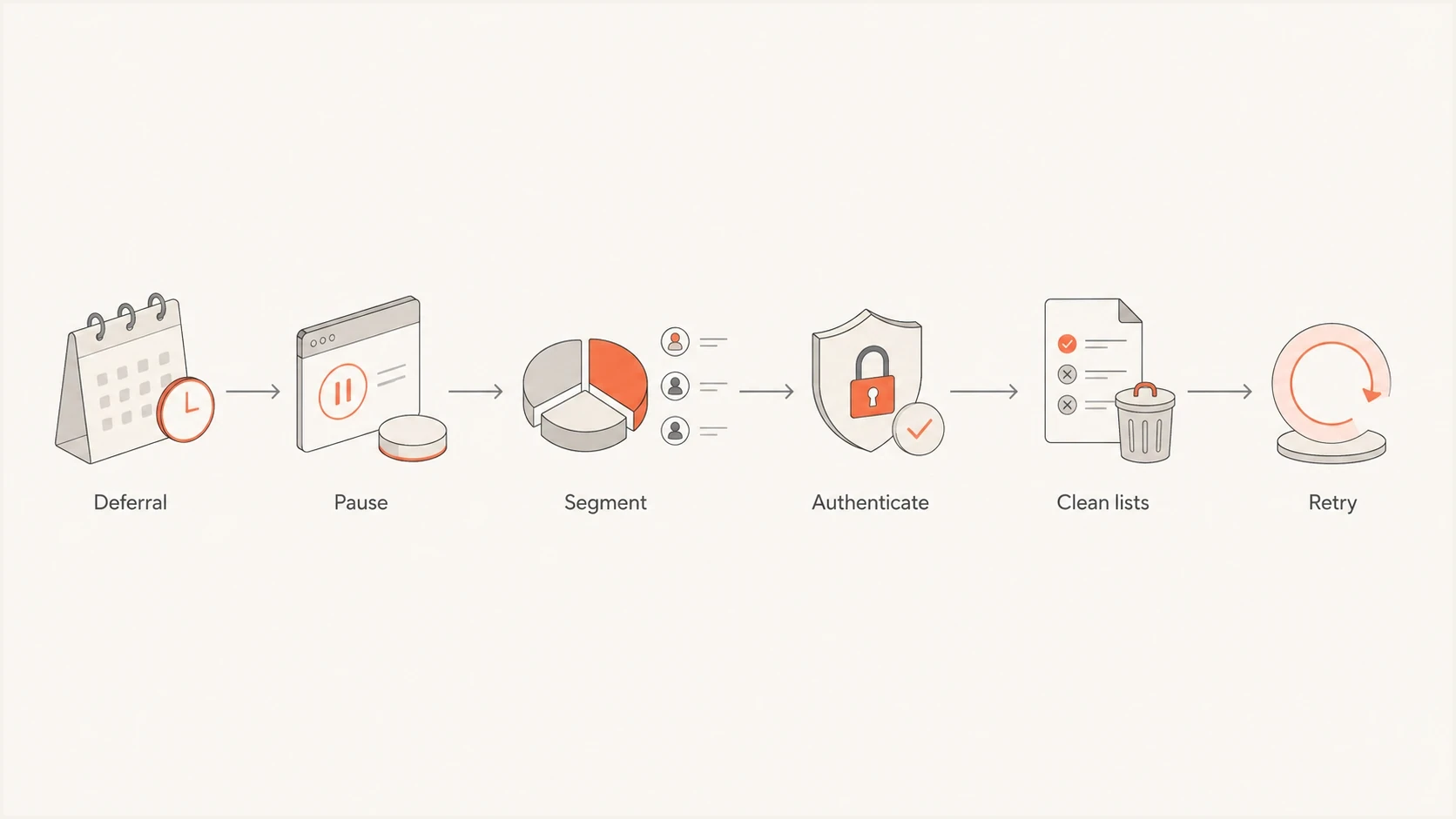
Flowchart showing a Yahoo TSS04 recovery path: defer, pause, segment, authenticate, clean lists, retry.
First actions in the first hour
The first hour decides whether this stays a temporary deferral or turns into a longer reputation problem. I stop new Yahoo-heavy sends, keep the queue intact, and reduce retry pressure. If the affected host is a WHM or cPanel server, the message "retry time not reached for any host" usually means Exim is waiting for its next scheduled retry. That line is normal after a temporary deferral.
- Pause campaigns: Stop bulk or promotional mail to Yahoo, AOL, Rogers, Sky, and related Yahoo-hosted domains.
- Keep retries sane: Let normal backoff run. Repeated manual retries create more suspicious traffic.
- Preserve evidence: Save the full SMTP response, sending IP, envelope sender, queue ID, and timestamp.
- Separate streams: Keep transactional mail away from marketing mail while you diagnose the source.
Then send one controlled test message and inspect the headers, authentication, and placement signals. A real email tester check helps confirm whether the problem is visible outside Yahoo too. It will not remove a Yahoo deferral by itself, but it gives you a clean baseline before you resume volume.
Email tester
Send a real email to this address. Suped shows a results button when the test is ready.
?/43tests passed
Recovery pacing after TSS04
Use pacing as a control, not as a promise that Yahoo will clear the deferral at a fixed time.
High risk
Now
Keep sending paused if complaints, bad recipients, or auth failures are still present.
Cautious retry
24h
Resume low Yahoo volume only after the root cause has been fixed.
Measured ramp
72h+
Increase slowly if deferrals drop and normal queue delivery returns.
Find the exact sender
Do not troubleshoot the whole domain at once if only one IP, application, tenant, or mailbox caused the spike. I start with the IP in the Yahoo response, then map it to the exact sending source. On shared hosting, that often means one compromised mailbox, one newsletter script, or one client account can hurt the entire IP pool.
WHM and Exim triage commandsBASH
exim -bp | exiqsumm
grep "TSS04" /var/log/exim_mainlog | tail -50
exim -Mvh MESSAGE_ID
exim -Mvb MESSAGE_ID
A domain health check is useful at this stage because it collects the DNS and authentication signals that Yahoo will weigh alongside engagement and complaints. In Suped, the practical workflow is to compare source volume, authentication pass rates, unverified sources, and recent issue changes before touching DNS or queue settings.

Issue steps to fix dialog showing the issue overview, tailored fix steps, and verification action
Suped combines DMARC, SPF, and DKIM monitoring with hosted SPF, SPF flattening, hosted MTA-STS, blocklist (blacklist) monitoring, and real-time alerts. For a TSS04 investigation, use Suped to compare source-volume changes and authentication failures, identify the source behind the SMTP symptom, and follow the fix steps attached to the issue that changed.
Fix unexpected volume
Yahoo names unexpected volume because sudden changes are risky, even when the message is legitimate. A server that usually sends 200 Yahoo messages per day and suddenly sends 8,000 looks different to a mailbox provider. New IPs, newly moved domains, reactivated old lists, and merged audiences create the same pattern.
Unsafe response
- Force delivery: Flushing deferred queues repeatedly adds more traffic after Yahoo has asked you to wait.
- Mix streams: Sending receipts, newsletters, password resets, and cold mail on one IP hides the cause.
- Ignore history: A clean domain record does not offset a sudden Yahoo-specific volume spike.
Safer response
- Throttle by domain: Use lower Yahoo concurrency and hourly caps until deferrals fall.
- Separate mail: Move critical transactional mail away from risky or promotional streams.
- Ramp slowly: Increase only after successful Yahoo deliveries stay stable.
For a broader explanation of the family of temporary Yahoo responses, the Yahoo 421 errors guide covers how 421 responses differ from permanent bounces. For a TSS04-specific path, use the Yahoo TS04 checklist after you have the sending source isolated.
Fix user complaints
If Yahoo mentions user complaints, I assume the audience or permission model needs work. Complaints happen when people did not expect the email, cannot recognize the sender, cannot unsubscribe easily, or receive too much mail. A single bad segment can create enough negative signal to slow a good sending domain.
- Suppress bad recipients: Suppress complaints and unsubscribes, remove hard bounces, and pause long-inactive segments.
- Check consent: Keep only recipients who clearly requested that sender and message type.
- Make exit easy: Use a working unsubscribe path and honor it quickly across every platform.
- Audit content: Look for misleading subjects, link shorteners, broken templates, and unexpected offers.
Do not skip remediation
A support request with the same volume pattern and list quality problem still in place will not solve the deferral. Yahoo needs evidence that the source stopped creating the signal that triggered TSS04.
Use Yahoo's complaint feedback loop
Yahoo's Complaint Feedback Loop (CFL) closes a major visibility gap in a TSS04 investigation. The CFL is a domain-based service for DKIM-signed mail. When a Yahoo user marks a message signed by an enrolled DKIM domain as spam, Yahoo sends an Abuse Reporting Format (ARF) report so the sender can suppress that recipient.
- Enroll every DKIM domain: Add and verify each signing domain used for Yahoo-bound bulk mail.
- Process ARF reports: Route reports to a monitored process that maps each complaint to the recipient and stream.
- Suppress promptly: Stop future campaign mail to the complaining recipient across every connected sender.
- Read the rate correctly: Yahoo tells bulk senders to stay below 0.3%, and its rate uses mail delivered to the inbox as the denominator.
Check the Yahoo complaint feedback loop enrollment for each DKIM signing domain. If a sending provider handles enrollment and suppression, confirm that coverage instead of assuming it.
Unsubscribe is a separate control
For marketing and subscribed mail, Yahoo requires bulk senders to provide a functioning list-unsubscribe header and a visible unsubscribe link in the message body. Honor requests within two days. A working one-click path reduces the chance that users choose the spam button instead.
Authentication and DNS checks
TSS04 is usually reputation and traffic driven, but broken authentication makes recovery harder. I check SPF, DKIM, DMARC, rDNS, HELO, and the envelope sender domain before resuming. DMARC monitoring helps catch new unauthorized sources, and blocklist monitoring helps spot a blocklist or blacklist event that explains a sudden Yahoo trust drop.
Minimum DNS baselineDNS
_dmarc.example.com. TXT "v=DMARC1; p=none;"
  "rua=mailto:dmarc@example.com"
example.com. TXT "v=spf1 include:send.example.net -all"
selector1._domainkey.example.com. TXT "v=DKIM1; k=rsa;"
  "p=PUBLICKEY"
|
|
|
|---|---|---|
SPF | Passes for the sending IP | Hidden unauthorized source |
DKIM | Valid signature on real mail | Broken selector or body changes |
DMARC | Reports are flowing | No visibility into failures |
rDNS | Matches expected host | Generic or missing identity |
Checks that matter before resuming Yahoo volume
A practical Suped workflow
In Suped, use the issues view to find authentication failures, unverified sources, and sudden source volume changes. Then use hosted SPF or SPF flattening if DNS lookup limits or frequent sender changes keep breaking SPF. Hosted DMARC is useful when you need staged policy changes without manual DNS edits for every adjustment.
Shared IP pools and WHM
WHM servers often sit behind shared IPs. That changes the investigation because the domain in the bounce is not always the domain that damaged the IP. If many accounts share 194.76.27.226, one account's script or old list can create TSS04 for everyone using that IP.
- Rank senders: Sort accounts by Yahoo volume, complaint-prone content, bounces, and queue growth.
- Check abuse: Look for compromised mailboxes, contact form abuse, and unexpected PHP mail bursts.
- Cap risky accounts: Apply per-domain limits instead of punishing clean transactional senders.
- Use dedicated IPs: Move high-volume mail away from general hosting pools after cleanup.
If your logs mention a domain such as sky.com with "retry time not reached", treat that as queue state. It means the local MTA is not ready to try the next delivery attempt. Changing the recipient domain does not fix the Yahoo deferral unless the same infrastructure and sending pattern caused both symptoms.
When to contact Yahoo
Contact Yahoo only after you have cleaned up the traffic source, slowed volume, verified authentication, and collected evidence. If the same deferral continues for more than 48 hours, review your outgoing mail and remediation again. If it continues for an extended period after those checks, submit a sender support request with specifics. A vague appeal that says mail is legitimate is weaker than a short technical summary with timestamps and corrected causes.
- Include the IP: Provide the exact sending IP and the full TSS04 response.
- Include time: Use timezone-specific timestamps and queue IDs from your logs.
- Include fixes: State the throttling, suppression, DNS, and security changes already completed.
- Include scope: Separate Yahoo-specific failures from general SMTP, DNS, or server errors.
What a clean update looks like
A clean support note says the IP, the first and last deferral times, the affected domains, the volume reduction applied, the complaint source removed, and the authentication checks that now pass. Keep it factual.
Views from the trenches
Best practices
Read the exact SMTP response before changing DNS, queue rules, or sender identity settings.
Slow Yahoo traffic first, then diagnose complaints, volume changes, and authentication gaps.
Preserve logs with IPs, timestamps, queue IDs, envelope senders, and complete deferral text.
Common pitfalls
Treating a temporary 421 response like a hard bounce leads to wrong suppression choices.
Flushing the queue too often can extend the signal that caused Yahoo to defer traffic.
Assuming one domain is at fault misses shared IP abuse on WHM and hosting servers.
Expert tips
Check the TS error section, not only the first temporary 4xx explanation on Yahoo pages.
Separate transactional and marketing streams before resuming traffic after a TSS04 event.
Ask for support only after fixes are complete and the evidence is specific and current.
Marketer from Email Geeks says the answer usually starts inside the SMTP response because Yahoo names the likely cause.
2023-09-03 - Email Geeks
Marketer from Email Geeks says the temporary TS section on Yahoo's error page has the next steps senders need.
2023-09-04 - Email Geeks
The practical fix
A Yahoo 421 4.7.0 TSS04 error is not solved by one DNS edit or one support form. It is solved by reducing the risky signal Yahoo saw. Slow the traffic, find the exact source, remove complaint-heavy or unexpected mail, repair authentication, watch the queue, and resume Yahoo volume only after successful deliveries return.
Suped supports that investigation by keeping DMARC reports, source changes, SPF and DKIM failures, hosted SPF controls, blocklist (blacklist) monitoring, and real-time alerts in one workflow. These signals do not replace responsible sending practices, but they help identify the source of a temporary Yahoo deferral before it becomes a repeated operational issue.




